Last December, a neighbor discovered her email was sending strange messages to all her friends. She was one of over 5.8 million people affected by the 700Credit data breach in late 2025. It's a frightening moment that makes you worry about losing your private photos, contacts, and personal identity. You might ask yourself if you did something wrong or if you're simply noticing the common signs your email has been hacked.
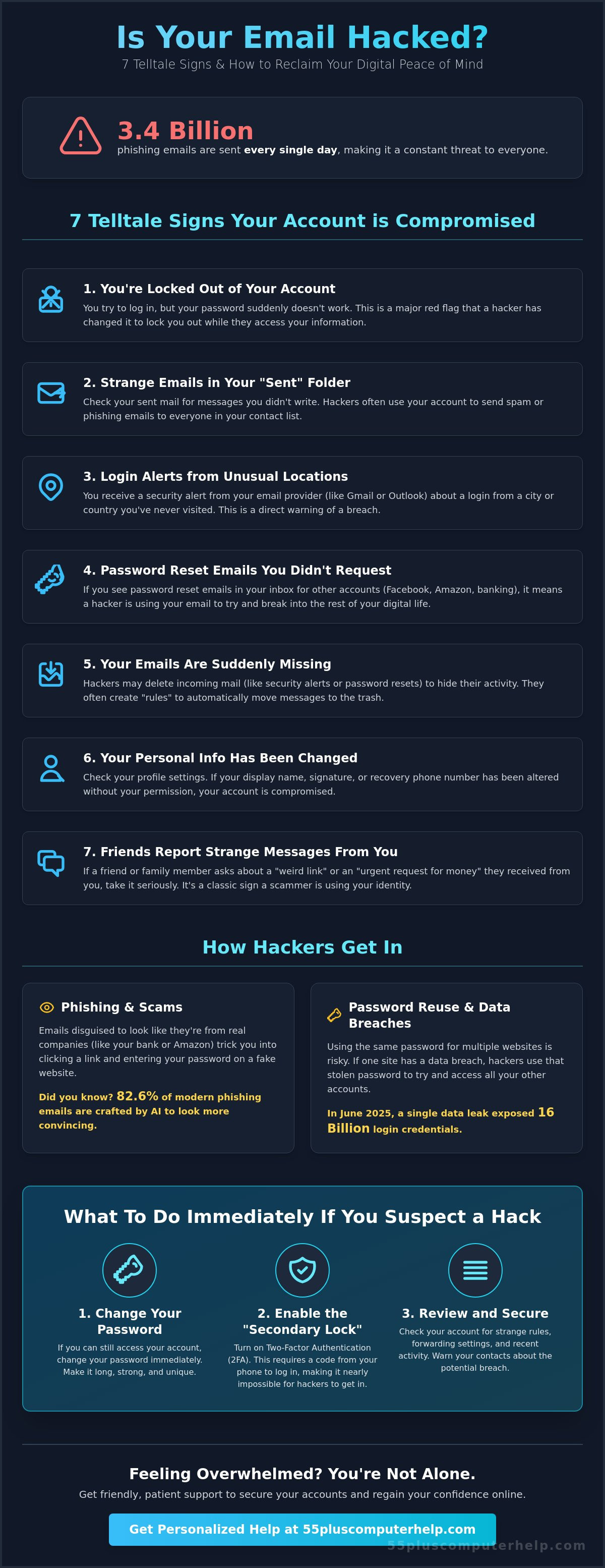
We understand that technical jargon can feel overwhelming when you just want to feel safe. It's okay to feel anxious. Over 3.4 billion phishing emails are sent every single day in 2026. Our goal is to replace that frustration with a sense of security and control. This guide provides a simple, stress-free plan to help you spot the red flags and regain your account access. We'll walk through seven clear warning signs and the exact steps you can take to protect your digital life and feel confident online again.
Key Takeaways
- Identify the common signs your email has been hacked to stop an intruder before they access your private data.
- Follow a simple, stress-free plan to regain account access even if your password no longer works.
- Learn about the "secondary lock" that makes it nearly impossible for hackers to enter your digital home.
- Understand how a patient mentor can help you feel safe and confident while navigating the online world.
Understanding Email Security: Why Accounts Get Compromised
Email hacking is simply when someone gains unauthorized access to... an account that doesn't belong to them. It's helpful to think of your email as a private digital mailbox. It holds your personal letters, bank statements, and family memories. When a stranger gets inside, they can see everything you've sent or received. A compromised account is one where a stranger has gained your login details and can act as if they're you.
It's very common to feel like you've made a mistake when technology goes wrong. Please know that hacking happens to everyone regardless of how much they know about computers. In June 2025, a massive data leak exposed 16 billion login credentials. This means even very careful people can find themselves looking for signs your email has been hacked. You aren't alone, and this isn't your fault.
Hackers aren't just looking for your personal messages. They want "digital keys" to the rest of your life. Your email is often the hub for your bank accounts, social media profiles, and contact lists. If they get into your email, they can reset passwords for your other accounts with ease. This is why staying alert is such a helpful way to protect your digital home and your peace of mind.
How Hackers Get In: Phishing and Scams
Most hackers use "phishing" to get inside your account. This is like a piece of fake bait. They send an email that looks like it's from a real company like Amazon or a local bank. They want you to click a link and type in your password. In 2026, about 82.6% of these phishing emails are created by artificial intelligence. This makes them look very professional and hard to spot. Another risk is using the same password for every website. If one store has a data breach, like the 700Credit breach in late 2025, hackers can use that one password to try and open all your other accounts.
The Emotional Impact of a Hack
Discovering a hack can feel like a digital violation. It's often embarrassing or frightening to think a stranger is reading your mail or contacting your friends. You might feel overwhelmed by the technical steps needed to fix it. We want you to know that these feelings are completely normal. Millions of people face this every year. The good news is that we can fix this together. By following a calm and methodical process, you can regain control. We'll help you look for the signs your email has been hacked and show you exactly how to lock the door behind you so you can feel safe again.
7 Telltale Signs Your Email Has Been Hacked
Recognizing the signs your email has been hacked is the first step toward reclaiming your digital peace of mind. One of the most obvious red flags is being suddenly locked out of your account. You might try to log in as usual, but your password no longer works. This often happens because a hacker has changed your credentials to keep you out while they explore your messages. If this happens, please don't panic. There are methodical steps we can take together to help you regain control.
Another major warning sign is found in your "Sent" folder. You should check this folder regularly to see if there are messages you did not write. If you see emails sent to your contacts or strangers that you don't recognize, it's a clear indication that someone else is using your account. Activity in the "Sent" folder is a smoking gun for account compromise because it shows the hacker is actively using your identity to communicate. You might also receive "Login Alert" emails from providers like Gmail, Yahoo, or Outlook. These alerts often mention logins from cities or countries you have never visited. These are automated security features designed to help you recognize and report these attacks quickly.
Subtle Red Flags in Your Inbox
Some clues are much quieter than a locked door. You might notice "Password Reset" emails for other websites like Facebook or Amazon that you did not request. This suggests a hacker is trying to use your email to break into your other accounts. You should also look for missing emails. Hackers sometimes set up hidden "rules" to automatically delete incoming messages so you won't see their activity. Finally, check your email signature or display name. If your name has been changed or a strange link has been added to the bottom of your messages, your account needs immediate attention. If these technical details feel confusing, our email troubleshooting assistance can help you sort through the mess.
Social Clues from Your Circle
Sometimes your friends and family will notice the problem before you do. You might get a confused phone call from a grandchild asking why you sent them a "weird link" or an "urgent request for money." A classic sign is the "Emergency in a Foreign Country" scam. This is where a hacker sends a message to your contacts claiming you are stranded abroad and need funds immediately. You might also see "bounced back" messages in your inbox. These are notifications that an email failed to deliver to a person you don't even know. This happens when a hacker uses your account to send thousands of spam messages at once. Staying alert to these social clues helps you act fast to protect your reputation and your friends.
Immediate Steps: What to Do If You Suspect a Hack
If you notice the signs your email has been hacked, the most important thing is to stay calm. You can fix this situation by following a few simple steps. First, try to log in to your account. If you still have access, change your password immediately. Choose something completely different from your old one. If you're locked out, don't worry. Use the "Forgot Password" link on the login page. This tool helps you reclaim your account by sending a special code to your backup phone number or a secondary email address you set up previously.
Once you're back in, you need to check your "Forwarding" settings. Hackers often set up a hidden rule that sends a copy of every email you receive to their own address. This allows them to keep reading your mail even after you change your password. You should also look for a setting called "Recent Activity" or "Security." From there, choose the option to "Sign out of all other sessions." This action instantly kicks the hacker off your account on their phone or computer. According to the State of Michigan Consumer Protection office, these quick actions are the best way to stop an active intrusion.
Securing Your Other Digital Doors
Your email is often connected to many other parts of your life. If you use the same password for your bank, Amazon, or Facebook, you must change those passwords right away. It's a good idea to call your bank and credit card companies to let them know your email was compromised. They can put a temporary watch on your accounts for extra safety. Finally, send a quick text or make a phone call to your close friends and family. Tell them your email was hacked so they don't click on any strange links or send money if they get a message that looks like it's from you.
A Simple Guide to Better Passwords
Creating a strong password doesn't have to be difficult. You should avoid using common things like birthdays, pet names, or "Password123." Instead, try the "Passphrase" method. Pick a short, memorable sentence like "The blue birds sing in May!" This is much harder for a hacker to guess but very easy for you to remember. If you feel overwhelmed by remembering many different logins, we can help you set up a "Password Manager." This is a helpful digital tool that remembers all your passwords for you, so you only have to know one master code to stay secure.
Reclaiming Your Peace of Mind: How to Secure Your Account for Good
Securing your account for the long term is the best way to move past the worry of the common signs your email has been hacked. One of the most powerful tools you can use is Multi-Factor Authentication, or MFA. Think of this as a secondary lock for your digital home. Even if a hacker manages to get your password, they still cannot get in without a special code. This code is usually sent directly to your smartphone. Since the hacker does not have your physical phone in their pocket, it makes it nearly impossible for them to access your private mailbox.
Regular software updates are another vital part of your safety. You should install these updates on your computer and smartphone as soon as they appear on your screen. These updates are digital patches that fix small holes hackers use to crawl into your system. By keeping your software current, you're essentially sealing the windows and doors of your digital life. This simple habit prevents attackers from using old vulnerabilities to bypass your security settings.
Setting Up Your Safety Net
You should also add a recovery phone number to your account settings. This ensures you never get locked out again because you have a reliable way to prove who you are. When you pick security questions, try to avoid answers that are easy to find on the internet. For example, your mother's maiden name or your high school might be public record. Pick a secret that only you would know. Most major providers like Gmail and Outlook now offer a monthly security checkup tool. Running this check once every 30 days is a great habit to build your digital confidence.
Avoiding Future Scams
Avoiding future scams is mostly about following a simple Golden Rule. If an email asks you for money or a password, stop and call a trusted friend or family member first. Scammers are getting more clever. QR code phishing attacks increased by 400% between 2023 and 2025, so be extra careful before scanning codes in an email. You can also hover your mouse pointer over any link in an email without clicking it. This shows you the real website address where the link wants to take you. Remember that your bank will never ask for your PIN or password in an email. If you ever feel unsure about these settings, we offer personalized security training to help you feel completely safe and in control again.
Friendly Support: How Personalized Help Can Restore Your Digital Confidence
Discovering the signs your email has been hacked often leaves people feeling isolated and unsure of where to turn. While many large companies rely on automated chat bots or clinical help menus, we believe in a more human approach. 55 Plus Computer Help LLC offers a Patient Mentor who understands the unique needs of the senior community. We provide a supportive environment where you can ask questions without feeling rushed or judged. This neighborly style of assistance turns a technical crisis into a calm, manageable conversation.
Our goal is to turn a stressful security breach into a moment of empowerment. Whether you choose an in-home visit or a remote one-on-one session, our guidance is available across the United States to help you feel safe again. We focus on your specific concerns, whether that's cleaning up your inbox or securing your personal contacts. This personalized attention ensures that you don't just fix the immediate problem but also gain the confidence to use your devices without fear.
Beyond Repair: Building Digital Skills
At 55 Plus Computer Help LLC, we go beyond simple troubleshooting to help you build lasting digital skills. We act as a translator for the digital world, explaining complex security concepts in plain English. You can have a Trusted Expert on call to help you navigate new updates or strange messages as they appear. Our lessons are tailored to your interests, allowing you to learn at a pace that feels comfortable and productive.
Getting Started with a Patient Tutor
You don't have to spend your afternoon struggling with confusing help menus or waiting on a corporate phone line. A simple session can resolve technical roadblocks that have been causing you stress for weeks. We are ready to assist with everything from email setup and virus removal to general training on your favorite tablet or smartphone. Let us help you reclaim your digital confidence with a friendly, patient tech session.
Move Forward with Digital Confidence
Learning to spot the signs your email has been hacked is the first step toward a worry-free online experience. You now know how to identify suspicious activity in your sent folder and how to apply "secondary locks" like Multi-Factor Authentication to keep intruders out. These simple habits protect your private photos and family connections from unwanted access. Since 2014, 55 Plus Computer Help LLC has provided specialized guidance for the senior community across the country. Our friendly, patient mentors speak plain English and tailor every session to your specific schedule.
You don't have to face technical hurdles alone. Whether you prefer in-home assistance or a remote one-on-one session, we are here to help you regain your independence. Get Patient, Expert Help to Secure Your Email Today. Technology should be a source of joy and connection. With the right support, you can explore the internet safely and feel completely secure in your digital life.
Common Questions About Email Security
Is it possible for my email to be hacked without me knowing?
Yes, it is possible for an intruder to remain hidden for a long time. Some hackers prefer to quietly watch your activity rather than locking you out immediately. They might wait for you to receive a specific bank statement or a message from a family member. This is why checking for the signs your email has been hacked at least once a month is a very helpful habit for your digital safety.
Can someone hack my email just by me opening a message?
No, simply opening an email to read it is almost never enough for someone to hack you. The risk comes when you interact with the content inside that message. This includes clicking on links, downloading attachments, or scanning QR codes. If you only read the text and then delete the message, your account remains secure. Staying cautious about what you click is your best defense.
How much does it cost to have a professional fix a hacked email?
Professional assistance should be transparent and affordable. At 55 Plus Computer Help LLC, we offer personalized support at $55 per half hour. This ensures you have a patient mentor to guide you through the recovery process without any hidden fees. We focus on resolving your specific issue while teaching you how to prevent it from happening again, giving you both a solution and new skills.
What happens if I cannot get back into my hacked email account?
If the standard recovery tools fail, you may need to go through a manual identity verification process with your email provider. This can take a few days but is designed to protect your privacy. If the account is permanently lost, we can help you set up a new one safely. We will assist you in moving your contacts and updating your login information for other important websites so you don't lose touch with your circle.
Should I delete my email account if it has been hacked?
You usually do not need to delete your account. In most cases, changing your password and removing the hacker's access is enough to make it safe again. Deleting an account can actually be difficult because it is often the "key" to your other digital doors, like your social media or utility bills. If you close the account, you might lose the ability to manage those other services. We can help you clean and secure your current address instead.
How do I know if a "Security Alert" email is real or a scam?
A real alert will usually notify you of a problem but will not pressure you to click a link immediately. Scammers often use "urgent" language to make you feel panicked. To be safe, never click a button inside a security email. Instead, open a new window in your web browser and go directly to your email provider's website. If there is a real problem, you will see a notification waiting for you in your account settings.
Can a hacker see my bank account through my email?
A hacker cannot see your actual bank balance just by reading your emails. However, they can use your email to find out where you bank and then try to reset your banking password. If they gain access to your inbox, they can receive the reset codes meant for you. This is why noticing the signs your email has been hacked early is a vital step in protecting your financial independence and peace of mind.
What is the easiest way for a senior to remember a strong password?
The easiest method is often a combination of a memorable passphrase and a physical backup. You can write your passwords in a small notebook and keep it in a secure, hidden drawer in your home. This "low-tech" solution is very effective because a hacker in another country cannot reach a physical book. 55 Plus Computer Help LLC can also show you how to use simplified digital tools that remember everything for you, so you only have to know one master code.


