
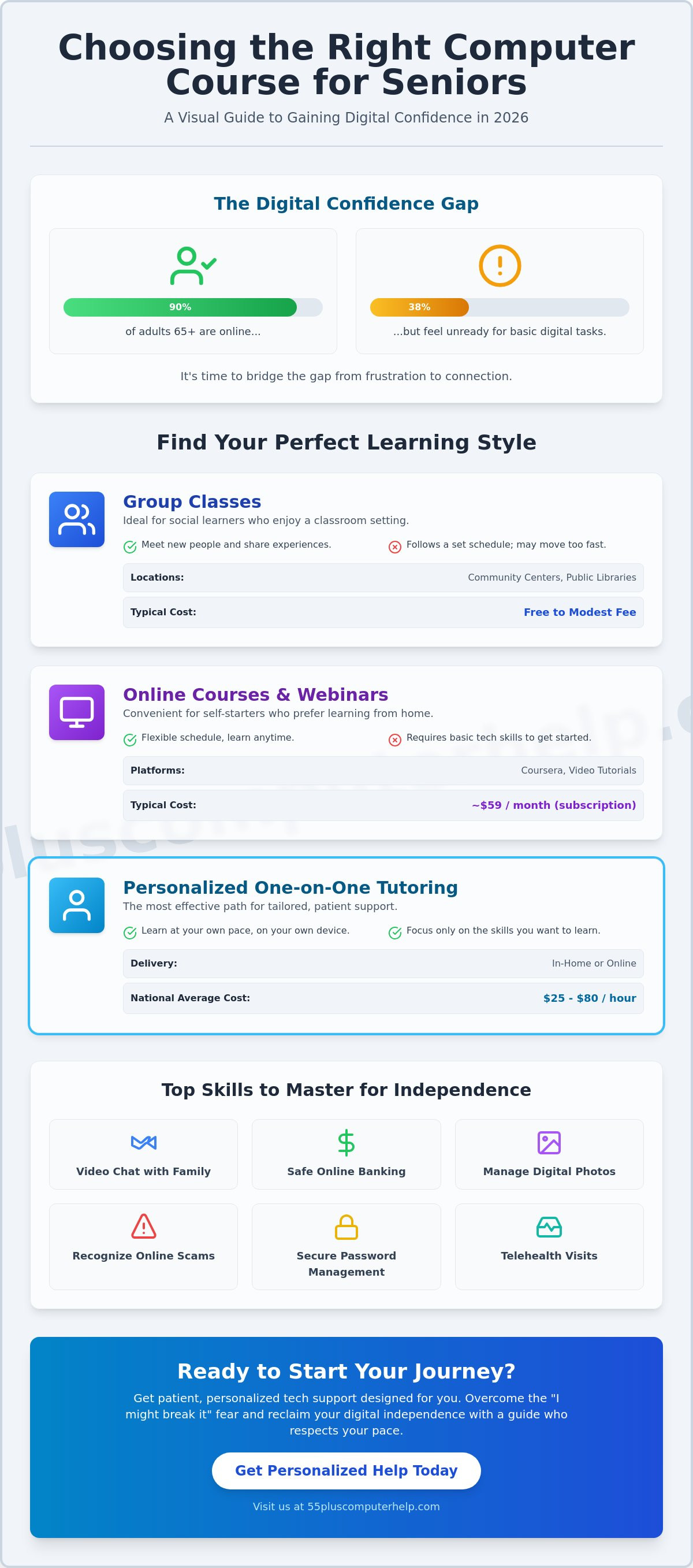
Did you know that 90% of adults aged 65 and older are now online, yet 38% still feel unready for basic tasks like video telehealth visits? It's a common gap that often leads to unnecessary frustration. If you feel overwhelmed by technical jargon or worry about breaking your device, you aren't alone. Many people want to join the digital world but find fast-paced tutorials more confusing than helpful. Finding the right computer courses for seniors is the first step toward reclaiming your independence and feeling secure with your technology.
We believe that technology should be a tool for connection, not a source of stress. You deserve a learning path that respects your pace and answers your questions with genuine patience. This guide will help you choose a course that fits your specific needs and budget in 2026. We will explore everything from community workshops to private tutoring options that typically range from $25 to $80 per hour nationally. You'll discover how to gain the skills to video chat with your family, manage your digital photos, and handle online banking safely and independently.
Key Takeaways
- Bridge the gap between frustration and connection by mastering tools that keep you close to friends and family.
- Explore different learning formats, from local group classes to convenient online webinars, to see which style suits you best.
- Evaluate the benefits of professional guidance in computer courses for seniors to ensure you receive patient, one-on-one support.
- Gain peace of mind by learning how to recognize online scams and manage secure passwords for safe banking.
- Understand how personalized lessons can adapt to your unique skill level and help you manage digital photos independently.
Why Computer Courses for Seniors are Essential Today
Technology isn't just about gadgets. It's about staying close to the people you love. As of 2025, 90% of adults aged 65 and older use the internet, but many still feel like they're walking through a maze. Taking computer courses for seniors helps you turn that maze into a clear path. You can learn to video call your grandkids without the screen freezing. You can manage your weekly grocery delivery without feeling flustered. These skills bridge the gap between feeling left behind and staying right in the center of the conversation.
Independence is a major goal for many of our clients. Mastering online banking means you don't have to wait for a ride to the bank. You can check your balance or pay a bill at any time from your favorite chair. Security is another vital piece of the puzzle. Learning to spot a phishing email or a fake tech support popup protects your hard-earned savings. When you understand how these systems work, technology stops being a source of stress. It starts being a helpful assistant that makes your daily life easier.
The Emotional Benefits of Digital Literacy
Feeling left out of family group chats is a lonely experience. Digital literacy changes that dynamic. Research on the impact of technology on aging shows that staying connected online can significantly reduce feelings of isolation. When you can confidently navigate social media, you see photos and updates in real time. This builds a sense of pride and accomplishment. You won't have to wait for a visitor to show you how to open an attachment. You'll have the peace of mind that comes from being in control of your own digital world.
Overcoming the "I Might Break It" Fear
Many seniors tell us they're afraid one wrong click will delete their files or ruin their computer. It's a very real concern, but it's also a myth we enjoy busting. Modern software is built with safety nets. Most programs have an "Undo" button or a way to go back to the previous screen. Think of your tablet or laptop like a sketchpad rather than a stone tablet. You can always erase a mistake and try again.
In a supportive environment, mistakes are simply part of the learning process. A patient mentor doesn't judge you for clicking the wrong icon. Instead, we show you how to get back to the home screen safely. We encourage you to explore your device with a sense of play. When you realize that you can't actually break the internet, your confidence will grow. This shift in mindset is why the best computer courses for seniors focus on patience rather than just technical speed.
Types of Computer Courses: Finding Your Learning Style
Every person learns in a different way. Some people enjoy the energy of a classroom. Others prefer a quiet conversation in their own living room. In 2026, the variety of computer courses for seniors ensures there is a perfect match for your personality. Community centers and senior living facilities often provide a social atmosphere. For example, many offer beginner-friendly courses on popular operating systems like Windows 11, often for a modest fee. Public libraries are also excellent resources. They frequently host free workshops for beginners who want to learn the basics of using a mouse or opening an email.
If you prefer to stay at home, online webinars and video tutorials are very convenient. Platforms like Coursera offer thousands of lessons for about $59 per month. These are great if you already feel comfortable navigating a website. However, many people find that one-on-one personalized tutoring is the most effective path. Private tutors across the country average about $28-$40 per hour as of April 2026, depending on location and expertise. This focused attention helps you reach your specific goals without the pressure of keeping up with a group. If you want a teacher who truly understands your pace, consider looking for personalized technology guidance that comes to you.
Group Classes vs. Private Lessons
Group classes are a wonderful way to meet others and share the learning experience. You might find comfort in knowing others have the same questions. The downside is that these classes follow a set schedule. The instructor may move to the next topic before you feel ready. Private lessons solve this problem. You can spend an entire hour just practicing how to save photos from your email. A tailored curriculum focuses only on your specific device and your unique needs. This ensures you never waste time on things you already know.
Online vs. In-Home Learning
Online courses are flexible and often quite affordable. You can learn at midnight or in your pajamas if you wish. The challenge is that you must already know how to join the video call or log into the website. In-home assistance removes this hurdle entirely. A patient mentor arrives at your door and helps you set everything up. You don't have to worry about your internet connection failing or your volume being too low. For quick fixes, remote support can bridge the gap. An expert can securely view your screen from a distance to help you solve a problem in real time.
Free Courses vs. Paid Tutoring: Which Should You Choose?
Deciding between a free class and a paid tutor depends on your personal goals and your patience. Free resources are very tempting. They allow you to explore new topics without any financial risk. However, there is often a hidden cost in time and frustration. If you spend several afternoons trying to find the right tutorial, you might feel more overwhelmed than when you started. Choosing the right path in computer courses for seniors means balancing your budget with your need for clear, direct answers.
Volunteer programs are a wonderful community resource. Organizations like the National Council on Aging and AT&T are currently funding digital literacy workshops through June 30, 2026. These sessions are perfect for getting a general overview of technology. The challenge is that volunteers may change from week to week. You might have to explain your problem to a new person every time you visit. A professional mentor provides a consistent and reliable relationship. They get to know your specific device and your unique learning style over time.
The Value of Professional Expertise
Professional tutors usually have specialized training in how to teach older adults effectively. They understand that you don't want technical jargon; you want practical solutions. If you are facing a complex issue like a suspected virus or a full hard drive, an expert is the safest choice. Investing in personalized computer lessons for seniors often saves you hours of worry. You can solve a problem in one focused session rather than waiting for a monthly library workshop. National averages for private tech tutoring in 2026 range from $25 to $80 per hour. This small investment can give you the confidence to manage your own files without fear.
When Free Resources Are the Perfect Fit
Free resources are excellent for small, specific questions. If you want to see how to use a new button on a social media app, YouTube is a great place to start. You can watch the demonstration and hit pause whenever you need a moment to catch up. Local libraries are also ideal for the absolute basics. Many community centers receive funding, ranging from $4,500 to $9,000, to host these sessions. These are perfect for learning how to use a keyboard or a mouse for the first time.
You might also enjoy free webinars for general interest topics. These are helpful for staying updated on new trends like Artificial Intelligence. AI usage among older adults grew to 30% in 2025, and many people are curious about how it works. A free webinar is a low-pressure way to listen and learn. If you find the topic interesting, you can then decide if you want to hire a professional for more detailed, one-on-one guidance.
Top Skills Every Senior Computer Course Should Cover
Learning technology is like learning a new language. You don't need to know every word to have a meaningful conversation. The most effective computer courses for seniors focus on the skills that actually improve your daily life. These usually fall into four main categories: safety, communication, organization, and basic device maintenance. When you master these, the digital world feels much smaller and more manageable.
Understanding your device is the foundation of digital confidence. For example, knowing how to manage your Windows 11 settings ensures your computer stays healthy. Microsoft released a major security update in April 2026, known as KB5083769. A good course will show you how to check for these updates so your system remains protected. You should also learn how to monitor your battery health and manage Wi-Fi connections. These small tasks prevent the frustration of a slow or disconnected computer. They help you stay independent without needing to call for help every time a popup appears.
Mastering the Essentials of Online Safety
Safety is the most important skill to master before you dive deep into the web. You need to recognize red flags like urgent emails asking for money or text messages with suspicious links. We teach you to look for misspelled words or strange email addresses that don't match the sender's name. It's also vital to keep your antivirus software active and your system updated. Two-Factor Authentication is simply a digital second lock that requires a code from your phone before anyone can access your account. This single step makes your personal information much harder to steal and gives you peace of mind while banking online.
Connecting with Family Through Technology
Many people join computer courses for seniors because they want to see more of their family. Sharing digital photos of your garden or a recent trip is a wonderful way to stay involved. You can learn to send these as email attachments or through private messaging apps. Setting up a video call on Zoom or FaceTime allows for virtual family gatherings that feel almost like being in the same room. You don't have to worry about missing out on birthdays or holiday celebrations anymore.
Using social media like Facebook is popular, with 45% of seniors active on these platforms as of 2025. However, you must learn how to adjust your privacy settings. You can choose exactly who sees your posts and photos. This keeps your personal life private while still letting you enjoy updates from your grandkids. If you want to master these skills in a stress-free environment, our personalized technology support can help you get started today.
Empowering Your Journey with 55 Plus Computer Help LLC
Choosing between different computer courses for seniors can feel like a big decision. At 55 Plus Computer Help LLC, we make that choice easy by focusing on your comfort first. Our team understands that you don't just want a quick fix; you want to understand the logic behind the solution. We intentionally avoid the clinical, fast-paced style of typical technical support. Instead, we offer a warm and welcoming environment where your questions are always welcome. This specialized focus ensures that every lesson reduces intimidation and helps you build a lasting sense of accomplishment.
Our mentors specialize in working with the 55-plus community because we recognize the unique challenges you face. We know that everyone starts at a different level of experience. Some of our clients want to master their new tablets to read the news, while others need help setting up a reliable backup system for their family photos. We adapt our teaching to your specific goals and your preferred pace. You won't follow a rigid classroom schedule or feel pressured to keep up with others. Instead, you get a personalized experience that moves exactly how you need it to. This approach transforms the learning process into a rewarding path toward true digital independence and security.
A Friendly Approach to Technical Support
We believe in the power of plain English to solve technical problems. You won't have to navigate through confusing industry jargon or complex acronyms when you work with us. Our goal is to put you back in the driver's seat of your own technology. Whether you are struggling with a temperamental printer, a new smartphone, or a complex laptop update, we provide clear and patient guidance. We break down each task into small, manageable steps that are easy to remember. This ensures you feel capable and completely in control of your devices at the end of every visit. Our computer courses for seniors are designed to take the mystery out of your gadgets.
Get Started with Your Own Patient Mentor
Reclaiming your digital independence starts with one simple, supportive step. You don't have to feel left behind by the rapid pace of modern technology or the latest software updates. Our primary mission at 55 Plus Computer Help LLC is to build your confidence through empowering education. We want you to feel excited about using your computer to connect with the world rather than feeling anxious about making a mistake. When you work with us, you are gaining a trusted local expert who is genuinely dedicated to your success and peace of mind.
Schedule your personalized technology guidance session today. We look forward to helping you master your digital world with ease and safety. By choosing a mentor who values your comfort as much as the technical solution, you are choosing a path to long-term digital success. Let's work together to turn your technology from a source of frustration into a helpful and reliable tool for your everyday life.
Take the Next Step Toward Your Digital Independence
Technology is a bridge to your loved ones and your community. You've learned how to choose between group classes and private lessons. You also know the value of prioritizing safety and communication skills. Finding the right computer courses for seniors is about more than just software. It's about finding a mentor who understands your pace and respects your experience. You deserve to feel secure and capable every time you turn on your device.
Since 2014, we've specialized in helping the 55+ community gain confidence with their technology. We provide patient, one-on-one mentoring for your computer, tablet, or smartphone. You don't have to struggle with confusing manuals or fast tutorials anymore. We're here to offer expert assistance that makes sense to you. Our mission is to make sure you feel empowered and independent in this digital world.
Empower yourself with friendly, patient computer help today. You already have the wisdom and the curiosity to master these tools. We're excited to help you turn your digital goals into a daily reality. Your journey to digital confidence starts with a single, simple conversation.
Frequently Asked Questions
Are there free computer courses for seniors available online?
Yes, you can find many free learning options through websites like Senior Planet or AARP. These platforms offer live webinars and recorded tutorials on various tech topics. Local libraries also use government grants to provide free digital literacy training. For instance, the 2026 California LSTA grant supports many public library programs. These free resources are a great way to start your journey without any upfront costs.
What is the best way for a senior to learn how to use a computer?
Personalized, one-on-one mentoring is usually the fastest way to learn. This method allows you to ask questions in a safe, private environment. You don't have to worry about keeping up with a group or feeling embarrassed. Many people find that computer courses for seniors that focus on their specific goals are more helpful than general classes. This approach builds your confidence by letting you practice on your own device at your own pace.
Do I need a special type of computer to take an online course?
You don't need a special computer to take most classes. A standard laptop, desktop, or tablet with a reliable internet connection is enough. If you are taking a course for a specific system, like Windows 11, you just need a device running that software. Most modern browsers like Google Chrome or Microsoft Edge will allow you to access online learning platforms easily. We can help you check your device settings before you begin.
How long does it typically take for a senior to become tech-savvy?
Most seniors feel significantly more confident after three to five personalized sessions. Learning technology is a journey rather than a race. You might master email in one afternoon but take longer to learn photo organization. A 2025 AARP study showed that older adults are narrowing the tech gap quickly. Consistency is the key. Practicing for 15 minutes every day helps you remember what you learned in your lessons.
Can I learn how to use a smartphone or tablet in these courses?
Yes, many computer courses for seniors now include training for smartphones and tablets. Since smartphone ownership among the 50-plus demographic reached 90% in 2025, these skills are very popular. You can learn how to download apps, send text messages, and use your camera. We specialize in helping you navigate both iPhones and Android devices. This ensures you can stay connected with your family no matter which device you prefer to use.
Is it safe for seniors to do online banking after taking a class?
Online banking is very safe when you know how to protect your information. A good course teaches you how to create strong passwords and recognize suspicious links. You will learn to use official bank apps and secure websites. Only 30% of older adults used AI tools in 2025, but many more are learning digital safety to manage their finances. Understanding these security layers gives you the independence to handle your money from home.
What should I look for in a patient computer tutor?
You should look for a tutor who avoids technical jargon and listens to your concerns. A patient mentor understands that you might need to hear an explanation more than once. They should be a trusted expert who makes you feel comfortable and respected. Check for someone who has experience working specifically with the 55-plus community. This specialized focus ensures they have the interpersonal skills needed to teach technology in a way that feels supportive and encouraging.
Do I need to buy any software before starting a computer course?
You typically don't need to buy any new software to begin your lessons. Most courses use the programs already installed on your computer, such as your web browser or email. If a specific class requires a tool like Zoom for video calls, your tutor can help you download the free version. We always recommend checking your current system first. This prevents you from spending money on tools you might not actually need for your daily tasks.


