
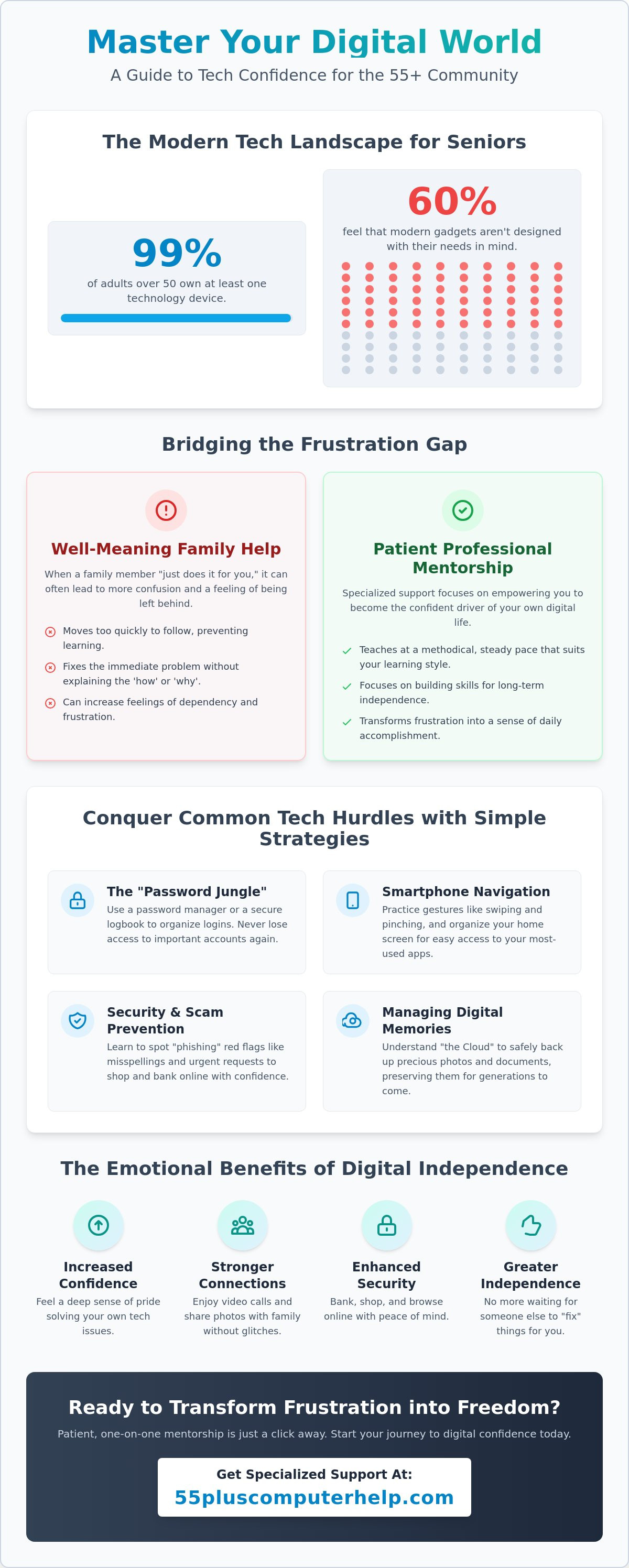
You ask your grandson for help with a photo, and he fixes it in three seconds without explaining how. It feels like you're a passenger in your own digital life rather than the driver. Even though 99% of adults over 50 now own at least one technology device, finding reliable computer help for seniors is still a major challenge. About 60% of older adults feel that modern gadgets aren't actually designed with their needs in mind. It's frustrating to feel left behind by apps and updates when you just want to connect with your family.
We understand that you don't want someone to do it for you; you want to learn how to do it yourself. Patient, specialized support can transform that digital frustration into true independence. You deserve to feel secure while banking online and enjoy video calls with your grandkids without any technical glitches. This guide explores how a mentorship approach can help you master your technology in 2026. We'll show you how to protect your identity and manage your digital memories with total confidence.
Key Takeaways
- Learn why technical support designed for seniors focuses on how you learn, not just fixing a broken screen.
- Discover how professional computer help for seniors can help you conquer the "password jungle" and navigate your smartphone with ease.
- Understand why well-meaning family members often make technical frustration worse and how a patient mentor can bridge that gap.
- Find out the specific questions you should ask to ensure your tech assistant is a teacher rather than just a repairman.
- Master the skills needed to manage your digital photos and bank online with total security and confidence.
Understanding Why Specialized Computer Help for Seniors Matters
Modern technology moves fast. Most apps and devices are built for younger users who grew up with a screen in their hands. This often leaves a gap for the 55 plus community. Research from early 2026 shows that 60% of older adults feel technology is not designed with their age group in mind. This is where specialized computer help for seniors becomes essential. It is not just about fixing a broken link. It is about providing assistance tailored to your specific cognitive and emotional needs.
True support requires a methodical, steady pace. When a family member "just does it for you," they move too quickly for your brain to map the steps. Specialized guidance focuses on the "why" and the "how" behind every click. This patient approach is vital for your mental well-being. By 2026, digital literacy is no longer a luxury. It is a tool to fight social isolation. Staying tech-savvy helps you stay connected to your community and healthcare providers through telehealth services.
The Myth of Being "Too Old" for Tech
Many people believe they reached an age where they can't learn new tricks. Science proves this is wrong. Neuroplasticity exists at every stage of life. Your brain is fully capable of learning new software or navigating a new tablet. Often, the biggest hurdle isn't ability; it is the fear of "breaking the computer." We help you shift from a fixed mindset to a growth mindset. We create a safe environment where you can explore settings without worry. You can't break the internet by clicking the wrong button when you have the right guidance.
The Emotional Benefits of Digital Independence
There is a deep sense of pride that comes from solving your own technical issues. When you can manage your own digital photos or join a video call without help, your confidence grows. You no longer have to wait for a busy relative to stop by and "fix" things. This independence reduces the feeling of being a burden on younger family members. It allows you to participate in the digital world on your own terms. Whether you are shopping safely or sharing a photo of your garden, doing it yourself feels great. Reliable computer help for seniors turns frustration into a sense of daily accomplishment.
Common Technology Challenges and How to Solve Them
Managing dozens of passwords feels like a full-time job. In 2026, almost every service requires a complex login and two-factor authentication. This "Password Jungle" is a top reason people seek computer help for seniors. We suggest using a dedicated password manager or a secure physical logbook kept in a safe place. This ensures you never lose access to your bank or medical portal. Simple strategies like these turn a source of stress into a manageable routine.
Smartphone navigation is another common hurdle. With 90% of adults over 50 owning a smartphone as of January 2026, mastering gestures like swiping and pinching is essential. These movements don't always feel natural at first. We practice these steps until they become second nature. We also help you organize your home screen so your most-used apps are always easy to find. If your printer stops working or your Wi-Fi drops, we show you how to reset the connection without stress. You shouldn't have to wait for a technician every time a cable wiggles loose.
The "Cloud" sounds mysterious, but it's just a way to store your files on a secure remote computer. This keeps your photos safe even if your tablet breaks. If you find yourself confused by syncing or storage warnings, getting professional computer help for seniors can clear up the mystery quickly. We explain these concepts in plain English so you feel in control of your data.
Security and Scam Prevention
Identifying phishing emails is a critical skill. Scammers often use urgent language to trick you into clicking a link. Red flags include misspellings, strange sender addresses, or requests for your social security number. You can find excellent resources for staying safe through AARP Personal Technology guides. Regular virus and malware checks keep your device healthy. Safe browsing habits allow you to shop and bank online without any anxiety.
Organizing Your Digital Legacy
Your digital legacy includes thousands of photos and documents. We help you back up these memories so they're never lost to a hardware failure. Cleaning up old files also improves your computer's speed. A tidy computer is a fast computer. We can help you organize your photo albums so you can share memories with your grandkids with just a few taps. This ensures your history is preserved for the next generation. Our goal is to make your digital life as organized as your physical home.
Professional Tech Support vs. Asking Family: Bridging the Frustration Gap
You ask your grandson to help with a missing file. He takes your mouse, clicks three times, and says "all fixed." He leaves the room, and you still don't know where the file went. This is the "Grandkid Effect." Being good at using technology is not the same as being a good teacher. Family members often move too fast because they find the steps obvious. They "just do it for you" to save time. This leaves you with a working computer but no new skills. It creates a cycle where you feel more dependent every time something goes wrong.
Professional computer help for seniors changes this dynamic. We provide a judgment-free zone where you can ask any question. A structured lesson plan beats a five-minute "quick fix" every time. We don't just solve the immediate issue. We teach you the logic behind the software. This methodical approach builds your digital muscles. You aren't an inconvenience; you are the priority. Having a dedicated hour for learning makes all the difference in your progress. You deserve a teacher who stays until you feel truly comfortable with the task.
Why a Professional Mentor is Different
A professional mentor speaks your language. We use a simple subject-verb-object communication style. We avoid technical jargon that sounds like a foreign language. You build a relationship with a trusted local expert who understands your specific home setup. They know which printer you use and how your Wi-Fi behaves. This consistency builds trust. Because this is a specialized computer help for seniors service, the mentor is fully committed to your success. We don't rush off to another task until you say, "I've got it."
From Frustration to "I Got This!"
One-on-one training turns a confusing device into a window to the world. Consider the story of a client named Mary. She was afraid to touch her new tablet for months. We sat down and translated terms like "cloud" and "sync" into everyday concepts. We created customized "cheat sheets" with large print and clear steps. Mary now uses her tablet to join her bridge club online and share photos with her family. That "Aha!" moment happens when you realize technology is just a tool you can master. With the right guidance, frustration turns into genuine confidence.
How to Safely Choose a Reliable Technology Assistant
Finding the right person to help with your devices is a big decision. You shouldn't settle for the first name you see in a search result. Many services claim to offer support, but they don't always have the patience required for teaching. When you look for computer help for seniors, check if the business specifically mentions the "55 plus" community. This is a badge of specialized expertise. It means they understand that you learn differently than a teenager does. They won't rush through the steps or get frustrated when you ask for a second explanation.
Verify their approach before you book a session. Some companies only offer "repairs" where they take your device away and fix it in a back room. This leaves you in the dark. You want a service that offers "training" or "mentorship." This ensures you sit in the driver's seat. Transparency is also vital. In 2026, some national services like Geek Squad charge upwards of $200 for a single in-home visit. Look for local experts who offer clear, half-hour rates so you can control your budget. If you want to build your skills today, you can schedule a patient technology session with a mentor who respects your time.
Assess their communication style during your first phone call. If they use industry jargon or talk down to you, they aren't the right fit. A good assistant uses plain, everyday English. They should treat your questions with respect rather than acting like your query is "silly." You deserve a partner who views technology as a way to empower you, not as a way to make you feel out of the loop.
The In-Home Support Advantage
Learning in your own environment is the best way to gain confidence. An in-home assistant can see exactly how your Wi-Fi reaches your back porch or why your specific printer keeps losing its connection. You get to sit in your own chair and use your own mouse. This face-to-face interaction builds a level of trust that a voice on a phone simply can't match. It allows the mentor to provide personalized guidance based on your physical setup and daily habits.
When to Use Remote Assistance
Remote support is a great tool for quick "how-do-I" questions. Through secure screen-sharing, a mentor can see your desktop and guide your cursor in real time. This is often more cost-effective for minor software troubleshooting. In 2026, services like Tech Maid offer 24/7 live chat for as little as $4.99 per month for basic queries. Remote help is fast and convenient. You stay in total control of the session and can end the screen-share at any moment with one click.
Empowering Your Digital Life with 55 Plus Computer Help LLC
The mission of 55 Plus Computer Help LLC is to give you the tools to succeed in a digital world. We believe technology should be a source of joy rather than a burden. Our team focuses on building your skills through personalized, one-on-one training. We don't just fix a problem and leave. We explain the "how" and "why" behind every step so you can repeat the process later. This approach turns everyday tasks into a sense of accomplishment. Whether you want to shop safely or organize years of digital memories, we are here to support your goals.
Our services are built around the "Patient Mentor" philosophy. This means we treat every question with respect and move at a pace that feels comfortable for you. We provide expert computer help for seniors that covers everything from basic tablet setup to complex virus removal. We understand that your needs are unique. We don't use a one-size-fits-all lesson plan. Instead, we listen to what you want to achieve and build our training around your specific interests. This ensures that every minute of your session is valuable and relevant to your life.
Choosing 55 Plus Computer Help LLC means choosing a partner who values your independence. We act as translators for the digital world. We take confusing industry terms and turn them into plain English that makes sense. This clarity helps reduce the anxiety often associated with software updates or new devices. You deserve to feel in control of your digital life. Our goal is to ensure you never feel left behind by the rapid changes in modern technology.
What to Expect in Your First Session
Your first meeting starts with a calm and friendly conversation about your technology. We look at your current devices and discuss what you find most frustrating. There is never any high-pressure sales tactic or technical jargon. We simply create a clear path forward that matches your learning style. This session is the first step toward feeling total confidence in your digital skills. We make sure you feel supported and heard from the very beginning of our partnership.
Your Partner in the Digital World
We take pride in being the trusted choice for the 55 plus community across the US. Our specialized expertise means we anticipate the challenges you might face and provide solutions before they cause stress. Many of our clients report a significant boost in their digital confidence after just a few visits. One client, Susan, shared that she now manages her own grocery orders and video calls with ease. If you are ready to feel confident, book your personalized tech session today. Let's work together to make your technology work for you.
Take Control of Your Digital World Today
Mastering your devices is about more than just clicking the right buttons. It is about staying connected to the people you love and feeling secure in a digital world. You now understand how specialized support bridges the gap between frustration and independence. Choosing a mentor who uses plain English and moves at your pace ensures you never feel left behind again. Technology should be a tool that serves you rather than a source of stress.
Since 2014, we have provided dedicated support to the 55 plus community. Our team has over a decade of experience in providing specialized computer help for seniors. We use a Patient Mentor approach to help with everything from virus removal to video calling your grandkids. You deserve a teacher who respects your time and your specific goals. You don't have to navigate these challenges alone.
We are here to help you turn your computer into a tool for joy and connection. Get Friendly, Patient Tech Support Now and start your journey toward digital confidence. You are more than capable of mastering your technology. We are honored to be your partner in this journey.
Frequently Asked Questions
How much does professional computer help for seniors typically cost?
Professional rates for technology assistance in the US vary based on the provider and the level of support. General on-demand IT services often range from $75 to $200 per hour, while national retailers like Best Buy typically charge over $200 for a single in-home visit. Some non-profit organizations like SeniorNet offer one-on-one help for about $20 per hour. We believe in transparency and provide clear pricing so you can manage your budget while getting the computer help for seniors you deserve.
Is it safe to let a tech support person access my computer remotely?
It's safe as long as you are working with a verified professional from a reputable company. Remote support uses an encrypted connection that allows a mentor to see your screen and guide you through a fix. You stay in total control of the mouse and can end the session at any moment with one click. This method is often the fastest way to solve minor software glitches or "how-to" questions without waiting for a visitor.
Can you help me set up a new computer I just bought?
Yes, we can assist with every step of setting up a new device. We help you unbox the machine, connect it to your home Wi-Fi, and install any necessary software. We also ensure your old files and photos are transferred safely so you don't lose any memories. Since 99% of adults over 50 own at least one technology device as of 2026, a proper setup is the best way to start your digital journey with confidence.
Do you provide training for smartphones and iPads, or just computers?
We provide patient training for all mobile devices, including iPhones, Androids, and tablets. Smartphone ownership among adults over 50 reached 90% in 2026, making these devices vital for staying connected. We teach you how to use apps, adjust your settings for better visibility, and master the gestures that make navigation easy. Our goal is to make your tablet or phone feel as familiar as a favorite book.
What happens if I forget what I learned during the lesson?
Forgetting a step is a natural part of the learning process. 55 Plus Computer Help LLC provides customized, large-print "cheat sheets" after each session to help you practice on your own. These notes are written in plain English and follow the exact steps we practiced together. If you ever feel stuck between sessions, we're always available for a quick follow-up to get you back on track.
Can you help me remove a virus or a scary pop-up from my screen?
We can quickly remove malware and those intimidating pop-ups that claim your computer is at risk. Many of these are "scareware" designed to trick you into calling a fake number. We clean your system and set up reliable protections to keep your personal data safe. Expert computer help for seniors also includes teaching you how to recognize these red flags so you can browse the web without fear.
Do I need to bring my computer to a shop, or can you come to me?
We come directly to your home so you can learn in the environment where you actually use your technology. You don't have to worry about unplugging cables or lugging a heavy tower to a retail store. We offer onsite visits throughout the US, allowing us to see your specific printer and Wi-Fi setup. This personalized approach ensures your technology works perfectly in the exact spot you need it.
Can you teach me how to see photos of my grandkids on my device?
We love helping you connect with your family through photos and video calls. We can show you how to use platforms like Facebook, which 72% of adults over 50 used as of early 2026. We'll teach you how to save photos from messages and organize them into digital albums. Staying in touch with the next generation is one of the most rewarding parts of mastering your technology.


