
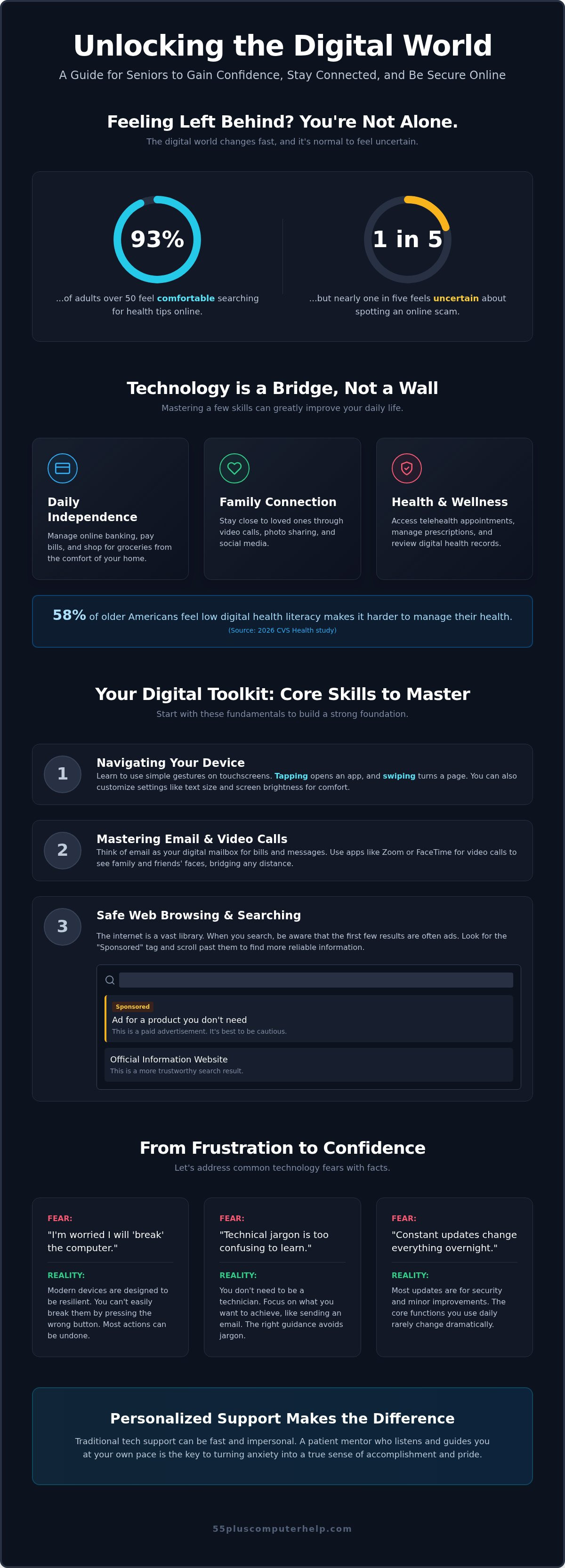
Did you know that while 93% of adults over 50 feel comfortable searching for health tips, nearly one in five still feels uncertain about spotting an online scam? Improving digital literacy for seniors is about more than just learning buttons. It's about feeling safe and connected. It's normal to feel like the latest update for Windows 11 or macOS Tahoe changed everything overnight. You might worry about "breaking" your computer or feel frustrated by technical words that don't make sense. We understand that feeling of isolation when you just want to see a video of your grandkids.
This guide is here to help you regain your independence. We'll show you how to master your specific devices, keep your personal information secure, and troubleshoot basic issues on your own. We'll walk through everything from setting up your email to identifying a scam immediately. Our goal is to provide patient, easy to follow guidance that turns frustration into a sense of accomplishment. By the end, you'll have the confidence to explore the digital world without any fear.
Key Takeaways
- Understand that technology is a bridge to your loved ones and your health, not a wall meant to keep you out.
- Learn how to navigate touchscreens and internet browsers to find the information you need with ease.
- Discover why you won't "break" your computer and how to turn tech frustration into a sense of accomplishment.
- Improving digital literacy for seniors is easier when you focus on your specific goals, like seeing photos of your grandkids or using email safely.
- See how a patient mentor can help you learn at your own speed through personalized lessons that focus on your unique needs.
Digital Literacy: Why It Matters for Seniors
Digital literacy is the simple ability to use technology to find the information you need. It's about staying connected to your community and the people you love. You can learn more about What is Digital Literacy? to see how these skills help you navigate the modern world. At its heart, being tech-savvy is a way to keep your world large and full of possibilities. It means you can look up a recipe, check the weather, or send a quick note to a friend without feeling stuck.
Technology in 2026 can feel like a moving target. With the release of macOS 26 Tahoe and constant Windows 11 updates, things change fast. It's completely normal to feel overwhelmed by these complex systems. This "digital divide" isn't about your ability to learn. It's about how quickly the tools are changing around you. You aren't alone if you feel like the computer is speaking a different language.
Learning these skills has a deep emotional impact. When you can use social media or video chat, you reduce the risk of feeling isolated. Seeing a smile on a screen can bridge the distance between you and your family. Digital literacy for seniors is a fundamental tool that promotes daily independence and provides a shield for your personal safety online.
The Benefits of Staying Tech-Savvy After 55
Improving your skills helps you stay in control of your daily life. You don't have to rely on others for every small task. Here are a few ways technology makes life easier:
- Online banking and shopping: Manage your finances and buy groceries without needing a ride to the store.
- Family connection: Use video calls and photo sharing to stay close to your grandkids.
- Better wellness: Access telehealth and digital records to manage your health from home.
- Veteran support: Seniors who served can more easily navigate advocacy resources like Military Veteran Solutions, LLC to secure the benefits they are entitled to.
According to a 2026 CVS Health study, 58% of older Americans feel that low digital health literacy makes it harder to manage their health. By learning these tools, you can take charge of your medical needs with confidence. Beyond digital solutions, you may also want to explore Non-medical home care and companion services to ensure you have the personalized physical support needed to stay safe and independent at home.
Why Traditional Technical Support Often Fails Seniors
Traditional tech support is often too fast and confusing. Technicians use complex jargon that feels like a foreign language. If someone "just fixes" the problem for you, you haven't gained any new skills. You're left waiting for the next time something goes wrong. A patient, slow-paced environment is much better for learning. You deserve a mentor who listens to your questions and waits for you to feel ready. This supportive approach helps you turn tech anxiety into a real sense of pride. Digital literacy for seniors works best when the teacher focuses on your comfort, not just the computer.
The Core Skills You Need to Master the Digital World
Building digital literacy for seniors starts with the physical device in your hands. You don't need to understand the complex wiring inside your computer or tablet. You only need to know which buttons to press to get started. Whether it's the power button on a laptop or the home screen on a smartphone, these are your entry points to a wider world. Mastering these basics is the foundation of your digital independence.
Navigating Your Smartphone and Tablet
Modern devices use touchscreens instead of traditional keyboards. You'll learn to use simple gestures like swiping to turn a page or tapping to open an icon. Icons are just small pictures that stand for different tools. For example, a camera icon opens your camera. Managing your apps is an important part of digital literacy for seniors. You can customize your settings to make icons larger or the screen brighter. This makes your device much more comfortable to use for long periods. If you feel stuck with these gestures, smartphone and tablet training can help you feel more at home with your device.
Mastering Email and Video Calls
Email acts as your personal digital mailbox. It's a secure way to receive letters, monthly bills, and updates from your local community. Setting up a secure account protects your privacy while keeping you in the loop. Beyond text, video calls through Zoom or FaceTime let you see your grandchildren's faces from anywhere. These tools bring your loved ones into your living room with just a few taps. For a deeper look at managing your inbox, check out our guide on Email Setup and Troubleshooting for Seniors.
Safe Web Browsing and Searching
The internet is like a massive library where you can find any information. You use a browser to navigate this space. When you search for a topic, the first few results are often advertisements. These are usually marked with a small "Sponsored" tag. It's generally better to scroll past these to find the real information you need. You can also use "bookmarks" to save your favorite websites. This saves you from typing long web addresses every time you want to check the news or a favorite recipe. Learning these search habits keeps your online experience fast and safe.
Your digital skills also help you manage your memories. Your phone stores your photos, and learning to organize them into folders makes sharing them with friends easy. It's a beautiful way to stay involved in your family's life every single day.
Overcoming Common Technology Fears and Obstacles
Many people worry they will press the wrong button and delete everything. It's a very common fear. The truth is that you probably won't break your computer or the internet. Most software has an "undo" button or a simple way to go back. Tech anxiety is a real feeling, but it shouldn't stop you from exploring. It's never too late to learn how to use these tools. Your experience and wisdom are assets, not obstacles.
Asking for help is a sign of strength. It shows you're ready to grow and stay independent. You don't have to be a burden to your family or friends. Some people enjoy group classes at a community center. Others find those classes move too fast. One-on-one tutoring offers a much calmer pace. You get to ask your specific questions without feeling rushed or judged. This personalized approach helps you build confidence one small step at a time.
Identifying and Avoiding Online Scams
A 2026 AARP survey found that only 74% of people over 65 feel confident identifying scams. Improving digital literacy for seniors must include safety training. Scammers often use "red flags" like urgent threats or strange requests for money. They might pretend to be from your bank or a government agency. You should never give your password or social security number to a stranger online. If you're worried about your device's safety, our Virus and Malware Removal Guide provides clear steps to secure your computer again.
Self-Paced Learning vs. Personalized Training
You can find thousands of free video tutorials online. These are helpful for quick tips, but they often move very fast. They use technical words that might be confusing. Personalized training works better because there's a real person with you. They can see exactly where you're stuck and explain things in plain language. A tailored curriculum focuses only on what you want to learn. If you only want to see photos of your grandkids, you don't need to learn complex business software. This focused approach makes digital literacy for seniors feel much more achievable. You deserve a learning experience that respects your time and your goals.
How to Start Building Your Digital Skills Safely
Starting your journey with digital literacy for seniors doesn't have to be scary. You can take it one small step at a time. The first step is to identify your "Big Why." This is the specific reason you want to use technology. Maybe you want to join a book club online or see videos of your great-grandchildren. When you have a clear goal, the learning feels much more rewarding. It gives you a reason to keep going even when a task feels a little bit tricky.
Step two is choosing the right device for your comfort level. Many people find tablets easier to use because you can touch the screen directly. Step three is securing your device. You should ensure you have basic virus and malware protection installed. This acts as a safety net for your personal information. Step four is to practice one specific skill until it feels natural. Repetition is the key to memory. Finally, step five is to find a trusted resource you can call when you feel stuck. Having a patient mentor makes all the difference in your success.
Choosing Your First Digital Project
It's best to start with a project that brings you joy. Seeing your grandkids on a screen is a powerful way to stay motivated. You can set small, achievable goals each week. For example, your first goal might be to simply turn the device on and open the camera. The next week, you could learn to send that photo to a friend. Keep a small notebook to record your progress. Looking back at what you've learned helps build your confidence. It proves that you're making real progress every day.
Creating a Safe Online Routine
Good safety habits protect you from most online risks. You should practice basic password hygiene. This means using different passwords for different websites. You can keep these in a physical notebook in a safe place at home. Software updates are also very important. These updates often include security patches that keep your device safe from new viruses. If you ever see an email or a message that looks "fishy," trust your gut. It's always better to ask for help than to take a risk. If you need help getting started securely, our computer setup and training services can ensure your device is ready for safe use.
Personalized Support: Why a Patient Mentor Makes the Difference
Learning a new skill is always easier when you have a friend by your side. For many, digital literacy for seniors isn't just about reading a manual or watching a generic video. It's about having a person who understands your pace and your specific questions. At 55 Plus Computer Help LLC, we believe that patience should be the first priority in every lesson. We don't just "fix" the problem and leave you wondering what happened. We teach you how to handle the technology yourself. This shift from a simple repair to an educational experience is what builds true confidence. You move from feeling frustrated to saying "I can do this myself."
In-Home Tech Support for Seniors
There's a special comfort in learning on your own equipment in your own home. Onsite assistance allows a mentor to see the whole picture of your digital life. Sometimes a problem isn't just a setting on your screen. It could be an issue with your printer setup or a weak signal during Wi-Fi troubleshooting. Being in your home helps us build a real relationship. We get to know your specific devices and your history. You don't have to explain your situation to a new person every time you need help. This neighborly approach makes the learning process feel safe and supportive.
Remote Assistance for Quick Wins
Sometimes you don't need a full house call for a small question. Remote support uses screen-sharing technology to let a mentor see exactly what you're seeing on your screen. It's a fast and convenient way to handle software updates or email questions. You can get help right when you need it without waiting for a scheduled visit. This method is perfect for those "how-do-I" moments that might otherwise stop your progress. It keeps your momentum going and ensures you never feel stuck for long.
Every lesson is tailored to your specific interests and goals. You won't have to sit through a class on things you'll never use. If you want to learn how to back up your family photos, that's exactly what we'll focus on. We work at your speed. If we need to go over a step five times, that's perfectly fine with us. Our goal is to empower you through education. By the end of our time together, you'll have the skills and the self-assurance to use your devices with ease. Improving digital literacy for seniors is about giving you the keys to stay connected and independent. If you are ready to start your journey, our personalized technology training provides the patient support you deserve.
Embrace Your Digital Independence
Mastering your devices is a journey that starts with a single tap. You've learned that starting with a clear goal, like seeing your family on a video call, makes the process rewarding. Safety is simply a matter of building good habits and knowing which red flags to watch for. Improving digital literacy for seniors isn't about memorizing complex manuals. It's about gaining the freedom to explore the world from your own living room with total peace of mind.
You don't have to navigate these updates and icons alone. Since 2014, we've specialized in providing patient, jargon-free instruction tailored specifically for your needs. We offer both in-home and remote support options to ensure you feel comfortable every step of the way. Our focus is on teaching you the skills you want to learn at a pace that feels right for you.
Get Patient, Personalized Tech Help Today
You have the wisdom and the life experience to master these tools. We're here to provide the support and encouragement you deserve. Your digital world is waiting for you.
Frequently Asked Questions
Is it too late for me to learn how to use a computer?
It's never too late to learn how to use a computer. Your brain is capable of learning new skills at any age. Many of our students start their digital journey in their 70s or 80s. The key is to focus on the tasks that matter most to you, like sending emails or looking up hobbies. With patient instruction and a little practice, you'll find that technology becomes a helpful tool rather than a source of stress.
What is the easiest device for a senior to learn first?
A tablet is often the easiest device for a beginner to learn first. These devices use touchscreens, which feel more natural than using a mouse and keyboard. You simply tap the icon you want to open. Tablets are also lightweight and easy to hold while sitting in your favorite chair. This simplicity helps build digital literacy for seniors because it removes the frustration of complex hardware and focuses on clear, visual icons.
How can I tell if an email is a scam?
You can spot a scam email by looking for a few specific warning signs. Scammers often use a sense of extreme urgency to make you act without thinking. They might ask for your password or tell you to buy gift cards. Check the sender's email address carefully to see if it looks official. If a message feels "fishy" or too good to be true, it's best to delete it immediately and ask a mentor for help.
Do I need special software to be safe online?
You don't necessarily need expensive software, but having basic virus and malware protection is a smart safety step. Most modern computers come with built-in security features that work well. The most important part of staying safe is your own online behavior. Learning how to identify suspicious links and keeping your software updated provides the best defense. A patient mentor can help you check your current settings to ensure your personal information stays private and secure.
What should I do if I think I "broke" something on my computer?
If you think you broke something, the best thing to do is take a deep breath and stay calm. Most technical issues are temporary and can be fixed without losing your data. Try restarting your device, as this simple step often clears up minor glitches. You can't actually "break" the internet by clicking the wrong link. If you're still stuck, reach out to a trusted expert who can walk you through the solution with patience.
Why should I pay for tech help when my grandkids can do it for free?
Professional mentors are trained to teach, whereas family members often just "fix" the problem for you. Your grandkids might move too fast or use technical words that are hard to follow. A paid expert focuses on your empowerment. We use a slow pace and plain language to ensure you actually understand the steps. This specialized approach to digital literacy for seniors ensures you gain the independence to use your computer without needing to wait for help.
Can I learn digital skills over the phone or remotely?
Yes, you can absolutely learn new digital skills through remote assistance. We use secure screen-sharing tools that allow us to see exactly what is happening on your device. This method is perfect for quick questions or learning how to use a specific piece of software. It provides immediate help without the need for a house call. You get the same patient, one-on-one guidance while staying in the comfort of your own home.
How long does it typically take to feel confident with a new tablet?
Confidence usually begins to grow after just a few weeks of regular use. Everyone learns at a different speed, and there is no right or wrong timeline. If you practice one small task every day, like checking the weather or sending a text, the gestures will soon feel like second nature. The goal isn't to become a tech expert overnight. It's about feeling comfortable enough to explore your favorite interests and stay connected with loved ones.


