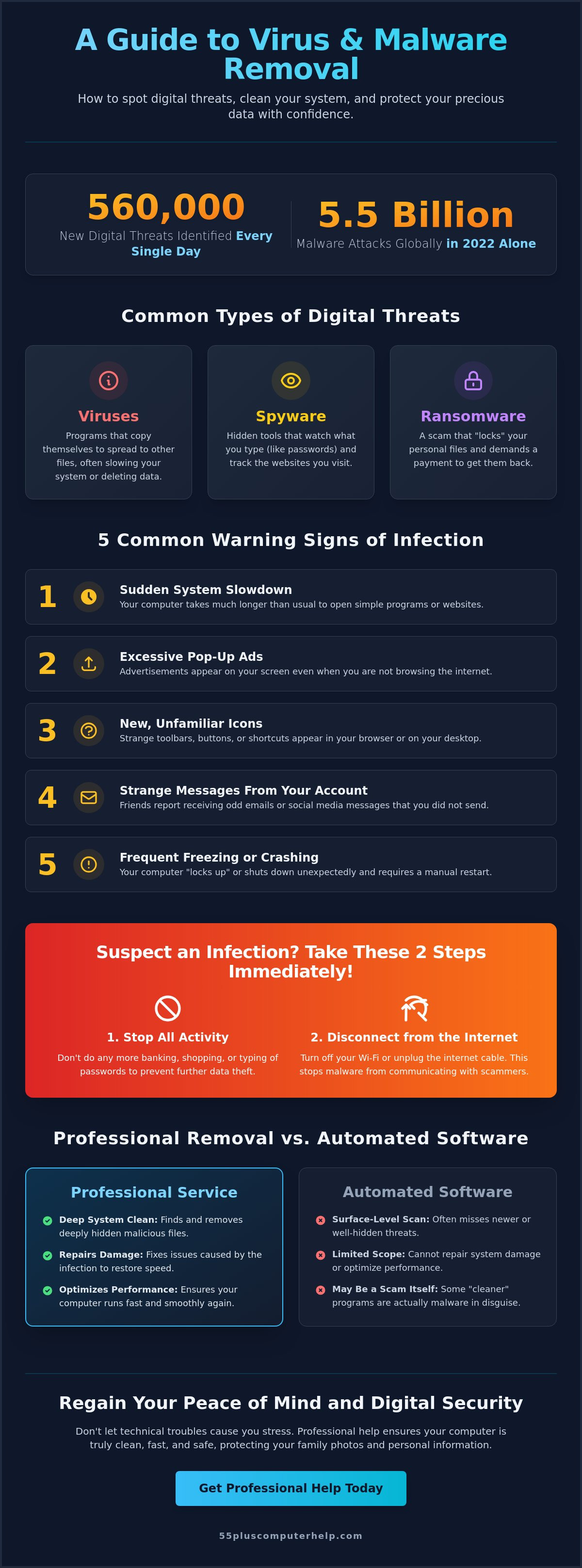
Did you know that 560,000 new digital threats are identified every single day? It's completely normal to feel anxious when a strange pop-up appears or your computer starts acting sluggish. You might worry about losing your cherished family photos or having your personal data stolen. We know that technical jargon often makes these problems feel even more overwhelming than they actually are.
Professional virus and malware removal doesn't have to be a confusing or scary process. This guide will show you how to spot the warning signs of an infection and what simple steps you can take to get your device running fast again. You deserve to use your technology with total confidence and peace of mind. We will walk through how to identify real threats, the best ways to clean your system, and how to stay safe so you can avoid these same problems next time.
Key Takeaways
- Identify common warning signs of a digital threat, such as sudden computer sluggishness or frequent, unwanted pop-up ads.
- Learn the immediate steps to take if you suspect an infection, including the importance of stopping all activity and disconnecting from the internet.
- Understand why professional virus and malware removal provides a deeper, more reliable clean than simple automated software tools.
- Discover how a specialized system optimization can restore your computer's speed and protect your precious family photos and personal data.
- Gain the confidence to browse the web safely by learning how to recognize and avoid common digital traps and scams in the future.
What is Virus and Malware Removal and Why Does It Matter?
Malware is simply a short way of saying "malicious software." These are programs designed to sneak onto your computer to disrupt your work or steal your personal information. If you've found a virus on your machine, please don't feel embarrassed. It happens to almost everyone who uses the internet. In 2022 alone, there were 5.5 billion malware attacks globally. This is a common hurdle, not a personal mistake or a sign that you aren't good with technology.
The process of virus and malware removal involves more than just deleting a single icon from your screen. It's a thorough cleaning of hidden files that may be tucked away in corners of your system you never see. To understand the basics, you can read more about What is Malware? and how it functions. Effective removal also means repairing any damage the software left behind. This ensures your computer runs smoothly again and keeps your private details safe from prying eyes.
Understanding Different Types of Threats
Not all digital threats are the same. Some are just annoying, while others are more serious. Here are three common types you might encounter:
- Viruses: These are programs that copy themselves and spread to other files. They often cause damage by slowing down your system or deleting your data.
- Spyware: These hidden tools act like a digital peeping tom. They watch what you type, including passwords, or track which websites you visit.
- Ransomware: This is a particularly mean scam. It "locks" your computer or your files and demands you pay a fee to get them back.
Why Seniors Are Often Targeted by Digital Scams
Scammers often focus on the 55-plus community because they hope to use technical jargon to cause confusion. They use "social engineering," which is a way of tricking you by using fear or urgency. You might see a flashing red box telling you your computer is "infected" and providing a phone number to call. These are almost always fake. Their goal is usually to get your credit card number or your identity information.
Staying safe is about having a "safety-first" mindset. If something feels urgent or scary, it's okay to step away from the screen. You don't need to panic. Protecting your digital life ensures your precious family photos and financial records stay exactly where they belong. We are here to help you regain that sense of security and keep your computer running like new.
5 Common Warning Signs Your Computer Needs Help
It can be frustrating when your computer stops behaving the way you expect. You might wonder if you did something wrong or if the machine is simply getting old. Most of the time, your computer is trying to tell you that it's struggling with a hidden visitor. Recognizing these warning signs early can save your family photos and your sanity. If you notice these changes, it's time to consider professional virus and malware removal to get things back on track.
One of the most obvious signs is a sudden, significant slowdown. If opening a simple program like your email or a news website takes much longer than it did just a few days ago, your computer might be working overtime to run hidden background tasks. Another major red flag is the appearance of excessive pop-up advertisements. If ads start covering your screen even when you aren't actively browsing the internet, you likely have an infection that needs attention.
Keep an eye out for these other common indicators that your digital security is at risk:
- Unfamiliar toolbars or icons: New buttons in your browser or strange shortcuts on your desktop often appear when sneaky software installs itself without your permission.
- Strange messages from your account: If friends or family members tell you they received an odd email or Facebook message from you that you didn't send, a virus may have accessed your contact list.
- Frequent freezing or crashing: If your computer "locks up" and requires a manual restart more than once a day, it's a sign of a deep-seated issue that software alone might not fix.
Performance Issues vs. Technical Glitches
It's sometimes hard to tell if your computer is just having a bad day or if it has a virus. A slow internet connection usually only affects how fast websites load. However, if your whole computer feels sluggish even when you aren't on the web, the problem is likely internal. You might also notice a "mystery" fan noise. If your computer fan is spinning loudly even when you aren't doing much, a hidden infection might be using up your system's resources. Malware symptoms are essentially any computer behavior that feels out of your control.
The Red Flags of Internet Scams
Scammers love to use fear to get what they want. You might see a "System Alert" pop-up with a phone number, claiming your computer is blocked or "hacked." Please remember that legitimate companies like Microsoft or Apple will never call you out of the blue or put a phone number in a pop-up alert. If you see a suspicious link in an email, even from a person you know, don't click it. If you're feeling unsure about what you're seeing on your screen, our friendly experts can help you identify and fix the issue safely.
Professional Virus Removal vs. Automated Software
Many people hope that clicking a "scan" button will solve every computer problem. While automated tools are helpful for catching common threats, they often miss the more complex infections that hide deep within your system. In fact, with 560,000 new malware threats identified every single day as of 2026, software programs can struggle to keep up. A professional virus and malware removal service provides a manual "deep clean" that automated software often skips. This process involves checking your browser settings, startup programs, and system files to ensure every trace of the problem is gone.
The Limits of "Free" Antivirus Downloads
It's tempting to download the first "free" security tool you see online. However, many of these programs are actually advertisements in disguise. They might scan your computer and tell you there are hundreds of errors just to scare you into buying a "pro" version. Even more concerning, some fake removal tools are actually viruses themselves. Relying only on a free download can give you a false sense of security. You might think your computer is clean while a hidden program is still tracking your keystrokes or accessing your family photos. While basic antivirus software usually costs between $30 and $100 per year, it's only one layer of defense.
The Peace of Mind Provided by Expert Guidance
There's a big difference between a software pop-up and a human expert. A professional can look at your specific situation and verify if your personal data and identity are actually safe. They won't just fix the machine; they'll explain what happened using plain English. This is a core part of our Computer Help for Seniors. We focus on being a patient mentor rather than just a repair technician. We want you to feel comfortable asking questions without any fear of judgment.
During the removal process, an expert can set up customized security settings tailored to your specific browsing habits. If you mostly use your computer for email and video calls with grandkids, your security needs are different than someone running a business. This personalized guidance ensures you feel in control of your technology again. Industry data shows that professional cleanup for advanced threats typically ranges from $100 to $200, which is a valuable investment for your long-term security. You'll finish the session with a clean computer and the knowledge you need to stay safe next time.
What to Do If You Suspect an Infection
If you suspect your computer has been compromised, the most important thing to do is stop. Don't type any passwords. Don't enter your credit card information. It's natural to feel a bit panicked, but taking a moment to pause is the best way to protect your data. If you see active pop-ups or a message saying someone is remotely controlling your computer, disconnect from the internet immediately. You can do this by turning off your Wi-Fi or unplugging the internet cable from the back of your machine. This simple action cuts the link between your computer and the person trying to access it.
One common trap that many people fall into is the "scam support" phone number. Many viruses will show a scary red screen with a phone number, claiming to be Microsoft or Apple. These companies will never put a phone number in a pop-up window. Do not call these numbers. They are operated by scammers who want to gain access to your bank account. Industry reports from 2023 show that the average cost of a data breach has risen to $4.45 million, which highlights why ignoring these fake alerts is so important. Instead, grab a pen and paper. Write down exactly what happened. Note what you clicked right before the problem started and what the messages on the screen say. This information is very helpful for professional virus and malware removal.
Immediate Safety Steps for Your Data
If your screen is frozen or you can't close the pop-ups, you may need to turn off your computer manually. Hold down the power button for about 5 to 10 seconds until the screen goes black. This is a safe way to stop a malicious program from doing more damage. Once the computer is off, do not log into your bank accounts from that device. If you need to check your balance, use a different tablet or your smartphone. You can also check if your email is safe by looking at your "sent" folder from a different device to see if any strange messages were sent out without your knowledge.
Preparing for a Support Session
When you reach out for assistance, try to have your device model and your list of symptoms ready. This helps the technician understand the situation quickly. If you are using a laptop, the model number is usually on a sticker on the bottom of the case. You should also ensure you have a safe way to receive a remote support connection from a person you trust. Professional help is the safest way to ensure a threat is 100% gone. This is especially true since the U.S. government banned certain software like Kaspersky in 2024, making it harder for seniors to know which tools are truly safe. If you aren't sure where to start, our team provides expert virus and malware removal designed specifically for the needs of seniors. We will walk you through every step with patience and care.
How 55 Plus Computer Help Restores Your Security
We know that dealing with a compromised computer feels like a violation of your privacy. At 55 Plus Computer Help, we don't treat you like just another technical problem to be solved. Our approach is fundamentally reassuring, patient, and empathetic. We want to transform your frustration into a sense of accomplishment and security. Whether we visit you at your home in Denver for $55 per half hour or assist you through a secure remote connection, our goal is to make your technology easy to use again. We act as a patient mentor, walking beside you until you feel completely comfortable.
Our process for virus and malware removal is methodical and calm. We begin with a deep diagnosis to see exactly what is happening under the hood. Once we identify the intruders, we remove them completely. We don't stop there. We also optimize your system to ensure it runs as fast as possible. This three step approach ensures your computer isn't just clean, but it's also more reliable than it was before the infection started. You'll notice the difference in speed the next time you open your favorite websites or apps.
Our Patient, Step-by-Step Removal Process
We look for the root cause of the infection rather than just treating the symptoms. Sneaky programs often leave behind small files that try to reinstall the virus later. We find these hidden files and delete them for good. During this time, we also make sure your security software and system updates are current. Most importantly, we verify that your cherished family photos and personal documents remain exactly where they belong. We understand these memories are irreplaceable, so we handle your data with extreme care throughout the entire session.
Preventative Training for Long-Term Safety
We believe that a fixed computer is only half the solution. The other half is giving you the confidence to browse the web without fear. We provide personalized lessons on how to spot the red flags of future scams. You'll learn which buttons are safe to click and which ones are clever traps designed to trick you. We also help you set up reliable, automated backups. This ensures your photos and files are saved to a separate location every day. If a problem ever happens again, your memories will be safe and easy to recover.
For more help with staying safe online, you can explore our guide on Email Setup and Troubleshooting for Seniors. We are here to be your trusted local experts, providing the guidance you need to enjoy your digital life with total peace of mind. You deserve to use your computer with confidence, and we are here to help you achieve that goal.
Take Control of Your Digital Safety Today
You now have the knowledge to recognize warning signs like sudden slowdowns or those frustrating pop-up advertisements. Remember that your first line of defense is a calm response. If you suspect an infection, stop entering passwords and disconnect from the internet to keep your personal data safe. Professional virus and malware removal is the most reliable way to ensure a threat is completely gone and your system is running at its best.
We've provided friendly, personalized support for seniors since 2014. Our team specializes in making technology approachable and easy to understand. We offer both onsite visits and secure remote assistance to fit your comfort level. We want you to enjoy your computer without the anxiety of hidden threats or confusing jargon. You deserve a device that works for you, not against you. Let's get your computer back to being a helpful tool for staying connected with the people you love.
Get Patient, Expert Help Removing Viruses and Malware Today
You don't have to navigate these digital challenges by yourself. We are here to provide the patient guidance you need to explore the web with total confidence. We look forward to helping you secure your digital life and protect your precious memories.
Frequently Asked Questions
Is it possible for a virus to steal my bank information?
Yes, certain types of malware are designed specifically to steal financial details. These tools, often called keyloggers, record what you type, including bank logins and credit card numbers. According to IBM's 2023 report, the average cost of a data breach has risen to $4.45 million. This is why it's so important to stop typing immediately if you suspect your computer is compromised. We can help you check your system to ensure your private information stays private.
Can I get a virus just by opening an email?
Simply reading a plain text email is generally safe. However, clicking a link or downloading an attachment can trigger an infection. Scammers often use phishing to make these emails look like they come from your bank or a shipping company. With 560,000 new threats identified daily in 2026, it's best to be cautious. If you didn't expect the email, don't click anything inside it.
Do Apple computers and iPads need virus removal too?
Yes, Apple devices are not immune to digital threats. While Macs were once considered safer, hackers now target them more frequently as their popularity grows. Malware attacks on mobile and connected devices increased by 87% in 2022. Whether you use an iPad or a MacBook, you still need to practice safe browsing habits. We provide specialized support for Apple users to keep their devices clean and secure.
How much does professional virus and malware removal cost?
The cost of professional virus and malware removal varies based on the complexity of the infection. Basic cleanup often ranges from $50 to $75, while advanced repairs like registry fixes usually cost between $100 and $200. For example, Geek Squad charges $149.99 for in-store or remote removal. We pride ourselves on transparent pricing and patient service that focuses on your specific needs without hidden fees.
What is the difference between a virus and a scam pop-up?
A virus is malicious software that lives on your hard drive, while a scam pop-up is usually just a deceptive advertisement on a website. Pop-ups use fear to trick you into calling a fake support number. A virus actually changes how your computer functions. Both are serious, but a pop-up can often be closed by exiting your browser, whereas a virus requires a deeper cleaning process to remove.
Will I lose my photos if my computer has a virus?
Most viruses don't delete your photos, but ransomware can lock them so you can't open them. This is why we emphasize the importance of regular data backups. If your files are stored in a second location, a virus won't be a disaster. During our sessions, we help you set up automated backups to protect your memories. We always work carefully to keep your existing photos safe during the cleaning process.
How can I tell if a "security alert" on my screen is real or fake?
Real security alerts from your computer or your antivirus software will never include a phone number for you to call. Legitimate companies like Microsoft or Apple will not use flashing lights or loud sirens to get your attention. If an alert tells you that your license has expired or your IP address is compromised and asks for money, it's a fake. When in doubt, close your browser and ask for a professional opinion.


