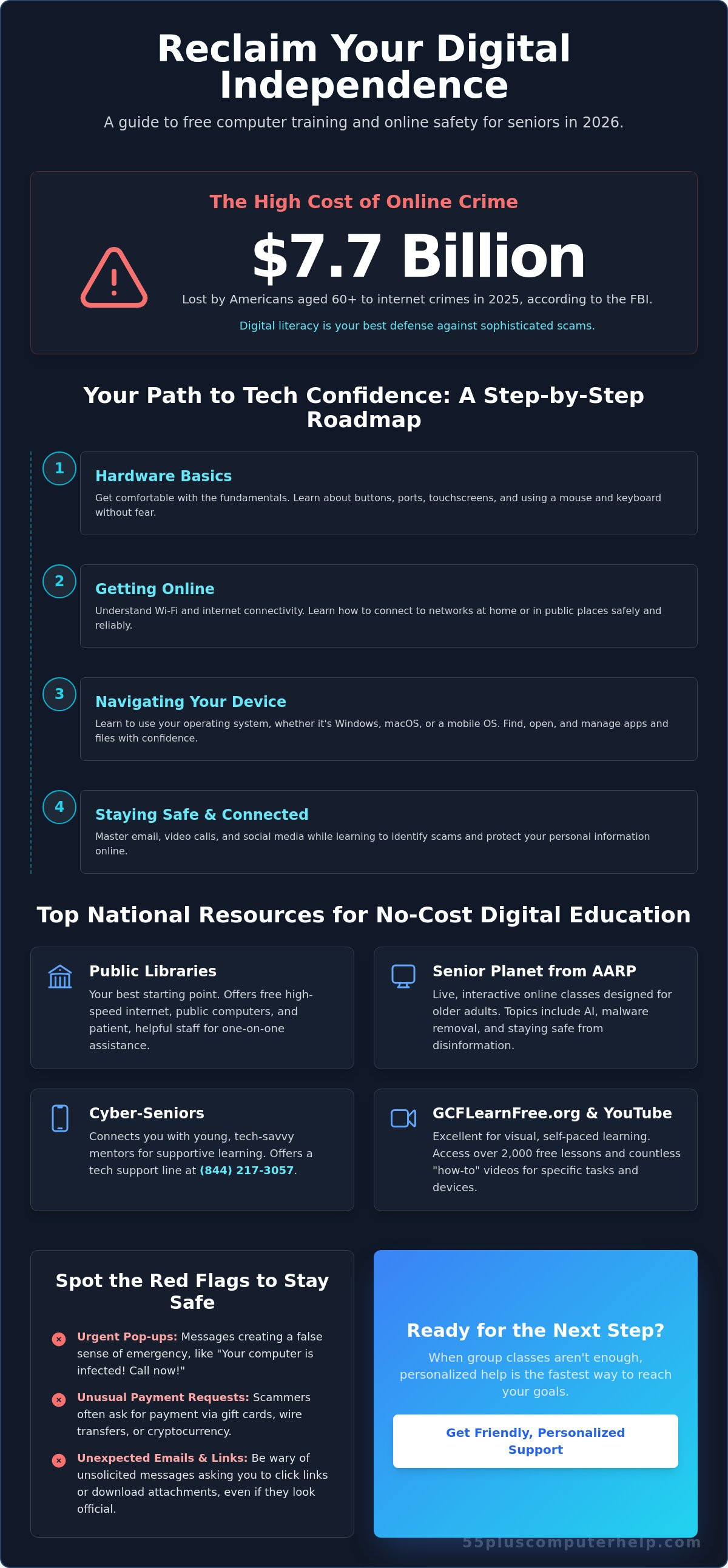
Did you know that in 2025, Americans aged 60 and older lost a staggering $7.7 billion to internet crimes according to the FBI? This number is frightening, and it's often why many people feel a deep sense of anxiety when they sit down at a keyboard. You might worry about clicking the wrong button or accidentally breaking your device. It's frustrating when family members "just do it for you" instead of explaining the steps. If you feel left behind by technology, you aren't alone. Accessing high-quality free computer training for seniors is the first step toward reclaiming your digital independence.
We promise to help you build your tech confidence by connecting you with the most reliable resources available in 2026. You can learn to see photos of your grandkids independently and use video calls without any stress. This guide provides a clear roadmap to programs like Senior Planet, which offers webinars on malware removal this April 29, 2026. We will also show you how to stay safe online to avoid the sophisticated scams that cost adults over 50 more than $4.3 billion last year. It's time to turn your frustration into a sense of accomplishment and security.
Key Takeaways
- Understand how digital literacy helps you find and share information safely without feeling overwhelmed by technical jargon.
- Discover how to access free computer training for seniors through local public libraries and interactive virtual classes from Senior Planet.
- Follow a simple roadmap that begins with hardware basics like buttons and touchscreens before moving to Wi-Fi and internet connectivity.
- Learn to identify common red flags such as urgent pop-ups or requests for gift cards to protect yourself from sophisticated online scams.
- Recognize when it is time to move from group learning to personalized support for your specific device or technical goals.
What is Free Computer Training for Seniors and Why Does it Matter?
Free computer training for seniors is a specialized form of education designed specifically for older adults. These programs offer no-cost lessons on how to use devices like smartphones, tablets, and laptops. Unlike generic tech support, these courses move at a slower pace. They focus on the specific tasks you want to accomplish in your daily life. You can find these resources at local libraries, senior centers, and through national organizations like AARP. This type of training removes the stress of a high price tag while providing a supportive environment for learning.
At its core, this training builds Digital literacy. This concept describes your ability to find, evaluate, and communicate information using technology. In 2026, being digitally literate is a necessity rather than a luxury. It means you can spot a fake news story or a scam email before it causes trouble. It's about feeling at home in a world that often feels like it's moving too fast. We believe it's never too late to start this journey. Learning new skills keeps your mind active and your spirit independent.
The Benefits of Digital Independence
Gaining tech skills helps reduce the feeling of social isolation. According to AARP 2025 data, 90% of adults aged 50 and older now use social media to stay in touch. Technology allows you to see your grandkids grow up through video calls and shared photo albums. Beyond social ties, digital independence helps you manage your daily life. You can order prescriptions or check lab results from your living room. This convenience is vital for maintaining your health and wellness as you age. Every new thing you learn provides a healthy challenge for your brain. It's a great way to stay sharp and connected.
Overcoming the "Fear of Technology"
Many seniors worry they will "break the computer" if they click the wrong link. We want to reassure you that these devices are much tougher than they look. Most errors are easy to fix with a simple restart. Modern technology is intentionally complex, and feeling frustrated is a normal part of the process. You aren't "behind" because you find a tablet confusing. It takes patience and a step-by-step approach to build confidence. Accessing free computer training for seniors is a great way to practice in a safe place. You have the wisdom of a lifetime; you can certainly learn to navigate a digital screen. We are here to help you turn that frustration into a sense of accomplishment.
Top National Resources for No-Cost Digital Education
Local public libraries are the best place to start your search for help. Most libraries provide high-speed internet and computers you can use for free. In 2026, the federal BEAD program is investing $42.45 billion to improve digital access, which helps libraries expand their tech programs. You can walk in and ask a librarian for assistance with basic tasks like setting up an email account. These staff members are trained to be patient and helpful with your questions.
For those who prefer learning from home, Senior Planet from AARP offers fantastic live, interactive classes. They cover modern topics like using AI and staying safe from disinformation. While their April 29 session focuses on malware, they also have a webinar on AI and Disinformation scheduled for May 27, 2026. This is a reliable way to get free computer training for seniors from the comfort of your own living room. These classes are designed specifically for your age group, so the instructors don't use confusing jargon.
Cyber-Seniors provides a unique experience by pairing you with young, tech-savvy mentors. This intergenerational model is very supportive and helps bridge the gap between age groups. You can reach their tech support line at (844) 217-3057 to get answers to your specific questions. If you prefer visual, self-paced learning, GCFLearnFree.org has over 2,000 lessons. They use clear pictures and videos to explain software like Windows 11 or Google Docs. It is a great place to practice at your own speed.
YouTube is another powerful tool for visual learners. You can find thousands of "how-to" guides for almost any device. If you're struggling with a specific button or setting, a quick search often provides a video solution. While these resources are great, group settings can sometimes feel a bit fast. If you find yourself wanting a more friendly and personalized mentor, one-on-one assistance might be the right next step to reach your goals.
Virtual Classes and Webinars
Joining a Zoom class is easier than you might think. Most programs send you a simple link via email. You just click it to join the conversation and see your teacher. Learning from home means you don't have to worry about driving or parking. Many organizations also record these sessions. You can watch them again later if you missed a step or want to review the information.
In-Person Learning Opportunities
Community centers often host "Tech Tuesdays" where you can meet other people in your neighborhood. These events are great for social connection and shared learning. Using a library computer is a smart way to practice before you buy your own device. You can take your time and learn in a low-pressure environment. Meeting other seniors who are also learning helps you realize that everyone starts somewhere and it's okay to ask for help.
A Step-by-Step Roadmap: What Skills Should You Learn First?
Many online guides just list websites and leave you to figure out the rest. We believe a clear path is better. Learning technology is like building a house. You need a strong foundation before you can put up the walls. This roadmap helps you focus on one skill at a time. This keeps you from feeling overwhelmed while seeking free computer training for seniors. You will move from the basics of your device to connecting with loved ones safely.
Your journey begins with the physical device. You must understand how to charge it and where the buttons are located. Once you feel comfortable holding the device, you can move to connectivity. According to a 2024 report by the Humana Foundation and AARP, 42% of seniors still do not have broadband internet at home. Learning how to join a Wi-Fi network is a vital skill for staying connected. After that, you can master communication tools like email and video chat. Finally, you will learn to explore the internet safely. This includes using search engines and managing secure passwords to protect your information.
Level 1: The Foundations of Your Device
Start by practicing basic touch movements. A "tap" is a quick touch, while a "long-press" means holding your finger down to see more options. A "swipe" helps you move from one page to another. Look at the small pictures on your screen called icons. The gear icon usually means "Settings," the envelope is for "Email," and the camera is for taking photos. If your device ever feels "stuck" or frozen, don't panic. You can almost always fix this by holding the power button to restart it. Restarting is a simple trick that solves many common technical problems.
Level 2: Connecting with the World
Once you know your device, it's time to reach out to others. Setting up a secure email account through Gmail or Outlook is a great first step. This account acts like your digital mailbox. It allows you to receive beautiful photos from your family. You can also use it to sign up for free computer training for seniors online. When you start using social media like Facebook, keep your safety in mind. Never share your home address or phone number publicly. Focus on private groups where you can interact with people you already know and trust.
Staying Safe and Avoiding Scams While Learning
Safety is the most important part of your digital journey. You might feel a bit nervous about clicking the wrong link or opening the wrong email. That is a very healthy instinct to have. According to the FTC, the public reported 3 million fraud complaints in 2025. People aged 50 and older accounted for a massive $4.3 billion of those losses. Learning what NOT to click is a skill you will practice often in free computer training for seniors. If a message seems urgent or frightening, it's usually a trick. Take a deep breath and remember the "Ask First" rule. If something looks strange, talk to a trusted friend before you act.
Keeping your device updated is another simple way to stay safe. Companies release software updates to fix security "holes" that hackers like to use. Most tablets and computers will show a small notification when an update is ready. It's a good idea to say "yes" to these requests. These updates act like a digital lock on your front door. They keep your personal information and photos tucked away where they belong. Staying current with these updates is a foundational habit for anyone pursuing free computer training for seniors.
Identifying Tech Support Scams
Scammers often pretend to be from well-known companies like Microsoft or Apple. They might send a pop-up window that says your computer is "infected" or "at risk." These windows sometimes "freeze" your screen to make you panic. Real companies will never call you out of the blue to ask for your password. They will also never ask you to pay for repairs using gift cards. If your screen freezes, you can usually close the browser window or restart your computer to make the warning go away. Never give remote access to your device to someone you don't know personally. If you ever feel stuck or worried about a strange message, our team provides reliable and friendly support to help you clear away these threats safely.
Creating and Managing Safe Passwords
Using the same password for every account is a major security risk. If a thief gets one password, they can get into everything you own. We recommend the "Passphrase" method to make your accounts much stronger. Pick a long sentence that's easy for you to remember but hard for a computer to guess. For example, "IloveToEatBlueberriesInMay!" is a fantastic password. You can keep a physical "password book" in a safe place inside your home. This is often more reliable for seniors than trying to memorize dozens of different codes. Keeping your passwords private and unique is the best way to protect your digital independence.
When to Move Beyond Free Training to Personalized Help
The resources we've shared are wonderful starting points for your digital journey. Accessing free computer training for seniors provides a solid foundation and helps you feel more comfortable with your devices. However, many people eventually hit a "wall" where a general class no longer meets their needs. You might have a very specific goal, such as organizing thirty years of digital photos or connecting a finicky new printer. When you have a unique setup or a specific problem that a pre-recorded video cannot solve, you've reached the threshold for personalized help. This is the moment when a patient mentor can make all the difference.
One-on-one assistance isn't just about fixing a broken computer. It's about empowering you to use your technology exactly the way you want. While group settings are great for learning general concepts, they often lack the flexibility to address your personal concerns. Moving to a more personalized model allows you to ask the "small" questions that might feel too minor for a large class. It ensures that you aren't just following a script, but truly understanding how your specific device works in your own home environment.
The Limits of Group Classes
Group classes and national webinars must cater to everyone at once. This means the instructor often uses the newest version of software or the most expensive devices. If your laptop is a few years old, your screen might look completely different than the teacher's screen. This can lead to a deep sense of frustration. In a large class, it's also very easy to fall behind. If you miss one step, the rest of the lesson might not make sense. You shouldn't have to feel rushed or embarrassed because you need an extra minute to find a button. Generic tutorials simply cannot account for the specific hardware and software combinations that make your setup unique.
The Advantage of Personalized Technology Training
Personalized training focuses exclusively on the tasks that matter to you. We don't spend time on apps you'll never use. Instead, we can spend the entire session mastering the things that bring you joy or make your life easier. This might mean learning how to safely manage your banking or finally understanding how to sync your phone with your computer. A patient mentor builds a relationship with you and understands your specific learning style. They can explain things in plain English without using confusing industry jargon. This approach builds true confidence because it's tailored to your speed and your device. Ready for a more personal touch? Explore our patient, one-on-one training sessions. We provide transparent, localized support for a flat rate of $55 per half hour, ensuring you get exactly the help you need without any hidden fees or high-pressure tactics.
Take Your Next Step Toward Tech Confidence
You now have a clear roadmap to master your digital devices. Whether you visit a local library or join a virtual class through Senior Planet, free computer training for seniors is a powerful way to stay connected with your family. Remember to stay alert for the common red flags we discussed earlier. Protecting your personal data is just as important as learning how to send an email or join a video call. It's about feeling comfortable and in control every time you turn on your screen.
Since 2014, 55 Plus Computer Help LLC has focused exclusively on the unique needs of the senior community. We understand that everyone learns at a different pace. Our friendly experts specialize in virus removal and device setup. We always speak in plain English instead of technical jargon so you never feel overwhelmed. If you're ready to move from frustration to accomplishment, Get Personalized, Patient Tech Support Today. You deserve to feel secure and independent while navigating the digital world. We're here to help you succeed.
Common Questions About Digital Literacy
Is there really such a thing as free computer training for seniors?
Yes, there are many legitimate programs that offer free computer training for seniors. Organizations like Senior Planet from AARP and Cyber-Seniors provide daily classes at no cost to the user. Local senior centers and libraries also receive federal funding, such as the $42.45 billion BEAD program, to provide these services in your neighborhood. You can find high-quality guidance and build your confidence without spending a penny on tuition.
Do I need my own computer to take these classes?
You don't need to own a computer to start your digital journey. Most public libraries offer free access to desktop computers and high-speed internet for all visitors. This is a perfect way to practice your skills before you decide to purchase your own device. Librarians are also available to help you log on and find the specific websites you need to begin your training in a safe environment.
What is the best website for a senior to learn computer basics?
GCFLearnFree.org is widely considered one of the best websites for beginners today. It features over 2,000 lessons with clear pictures and videos that are very easy to follow at your own speed. Another excellent choice is Senior Planet, which offers live webinars on topics ranging from AI to malware removal. Both sites focus on making technology simple, accessible, and friendly for older adults who want to learn.
Can I learn how to use a smartphone or tablet in these classes?
Yes, most free computer training for seniors includes lessons for smartphones and tablets. Since 90% of adults over 50 now own a smartphone according to AARP 2025 data, these classes are very popular. You can learn how to navigate touchscreens, download helpful apps, and send text messages to your family. Instructors understand that mobile devices are the primary way many people stay connected with their loved ones today.
How do I know if a free online course is safe and not a scam?
You can tell a course is safe by looking for trusted names like AARP, local libraries, or university extensions. Avoid any "free" course that asks for your social security number or credit card information before you start. Legitimate training will never pressure you to buy expensive software or give remote access to your device. Always check the website address to ensure it ends in .org, .edu, or .gov to stay safe.
What should I do if I find the free classes too fast or confusing?
If a class feels too fast, it's perfectly okay to step back and look for one-on-one assistance. Group settings often have to move at a set pace to finish the lesson for everyone. You might benefit more from a patient mentor who can focus entirely on your specific questions and device. Personalized help ensures you don't feel left behind or frustrated by technical jargon that isn't clearly explained in a large group.
Are there free computer classes available in person?
Yes, in-person classes are available at most local libraries and community centers across the country. Many senior centers host regular "Tech Tuesdays" or special registration events. For example, the Peoria Area SeniorNet scheduled an open house for Saturday, March 14, 2026. These local gatherings are perfect for getting hands-on help and meeting other people in your community who are also learning new digital skills in a supportive setting.
How much time does it usually take to become "tech-savvy"?
Becoming "tech-savvy" usually takes a few weeks of consistent practice. You don't need to learn every single feature at once to feel confident. Focus on the three or four tasks you do every day, such as checking your email or using video chat. Once you master those basics, you'll feel much more comfortable exploring new things. Learning at your own pace is the best way to build lasting skills and security.


