
Imagine your mother sitting in her favorite chair, wanting to call you but struggling to remember where she put her phone. You want to help, but you worry that bringing a smart device into her home might feel like spying or add technical frustration to her day. Learning how to set up alexa for elderly parent doesn't have to be an overwhelming chore for you or a source of anxiety for them.
It's completely normal to feel hesitant about Wi-Fi hiccups or the latest privacy updates. You want the benefits of medication reminders and easy family connections without the headache of constant troubleshooting. We understand these concerns. This guide will show you how to transform an Amazon Echo into a supportive companion that respects your parent's privacy and independence.
We will walk through the exact steps to handle accounts, simplify voice commands, and use the new Alexa+ features for more natural conversations. You will learn how to create a working system that provides peace of mind for you and a helpful, friendly tool for your loved one.
Key Takeaways
- Voice-controlled assistants help seniors stay connected and call for help without needing to use small screens or buttons.
- We explain how to choose between the Echo Show for its visual screen or the budget-friendly Echo Dot for smaller rooms.
- Our guide simplifies how to set up alexa for elderly parent by using your own phone as the primary administrator.
- You will learn to configure recurring medication reminders and emergency contacts to provide a safer environment for your loved one.
- We provide tips for creating large-print cheat sheets and practicing commands together to build your parent's confidence.
Why Alexa is a Helpful Companion for Seniors
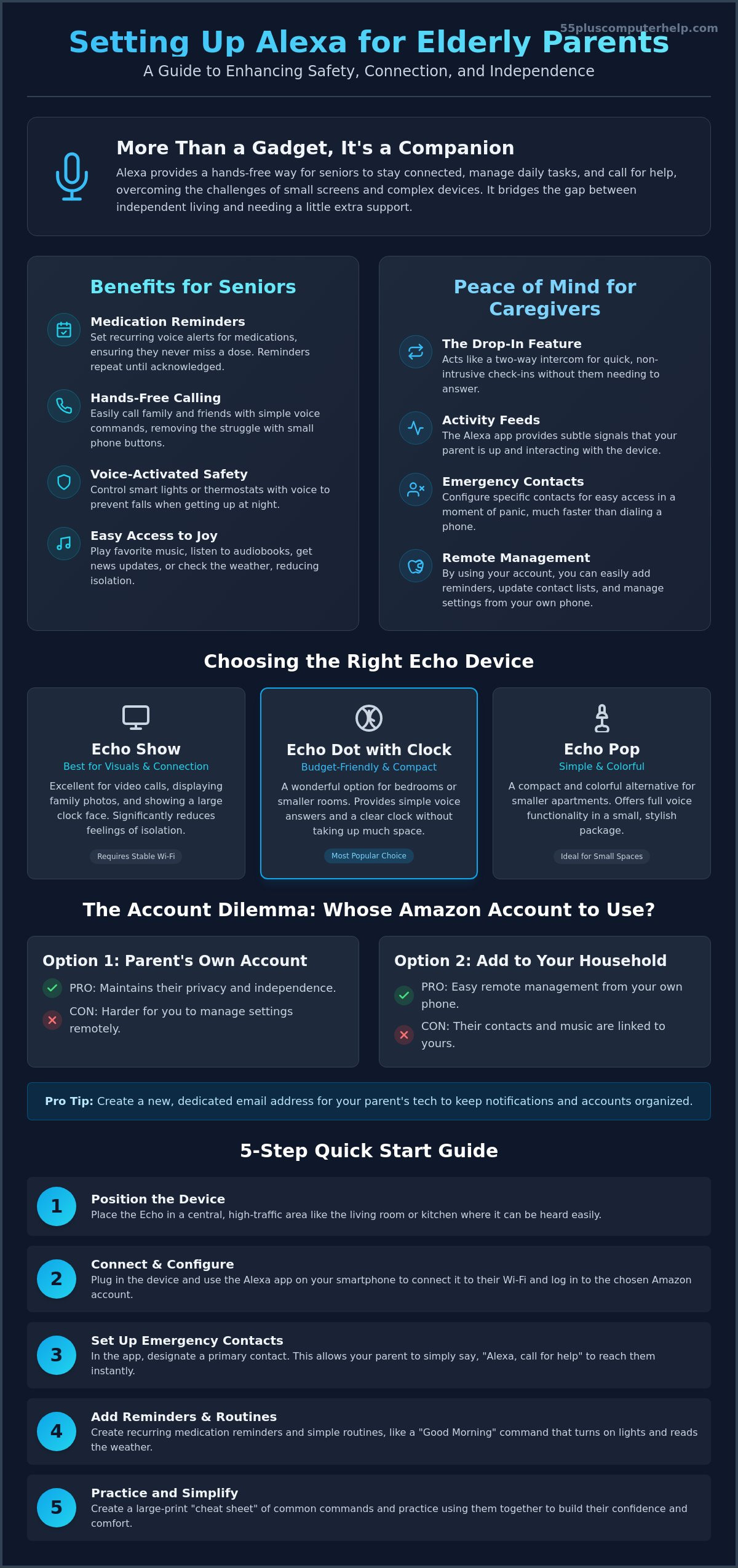
Alexa is more than just a gadget for playing music. It acts as a friendly companion that helps seniors maintain their independence. Many older adults find that traditional smartphones are difficult to use because of small buttons or dim screens. Amazon's virtual assistant, Alexa, removes these barriers by relying entirely on voice. This means your parent doesn't need nimble fingers or perfect eyesight to check the time or call a friend. They just need to speak.
When you research how to set up alexa for elderly parent, you are really looking for a way to make their life safer and more connected. The device provides a hands-free way to call for help. If a parent falls and cannot reach their phone, they can simply use their voice to contact you. This technology turns a scary situation into one where help is just a few words away. It bridges the gap between wanting to live alone and needing a little extra support nearby.
Of course, a smart home should be comfortable for every member of the family, including pets. If your parent’s dog is startled by the sound of a voice coming from a speaker, you can explore Reactive Dog Training to help them adapt to the new technology without stress.
Key Benefits for Daily Living
Small tasks can become big stressors as we age. Alexa helps by managing daily routines through simple, scheduled voice prompts. These features make the home feel more supportive and less confusing for someone who may be struggling with memory or mobility.
- Medication reminders: You can set alerts for specific times throughout the day. The device will repeat the reminder until your parent acknowledges it, which helps ensure they stay on track with their health.
- Voice-activated safety: Connecting Alexa to smart lights or thermostats can prevent falls. Your parent can turn on a hallway light before getting out of bed at night just by speaking.
- Easy access to joy: It is easy to play the news, check the weather, or listen to favorite music from their era. This keeps your parent engaged with the world and reduces the quiet that often comes with living alone.
Peace of Mind for Caregivers
The benefits aren't just for the senior. Learning how to set up alexa for elderly parent gives you tools to check in without being intrusive or causing them to rush to the phone. It changes the dynamic from constant worrying to helpful, distant support.
While digital tools provide excellent remote monitoring, many families find that combining technology with the dedicated in-home support of services like Providential Fijian Home Care offers the ultimate peace of mind for both the senior and their caregivers.
- The Drop-In feature: This works like a two-way intercom. You can check on your parent quickly. They don't need to answer the call, which is very helpful if they have mobility issues.
- Activity feeds: The Alexa app shows you if your parent is interacting with the device. Seeing that they asked for a song or the time provides a subtle signal that they are up and moving.
- Emergency shortcuts: You can configure specific contacts that are much easier to reach than dialing a traditional phone in a moment of panic.
Choosing the Best Echo Device and Account Setup
Selecting the right hardware is the first physical step in the process. You want a device that feels helpful rather than intrusive. Many families find that the benefits of Alexa for seniors are most apparent when the device has a screen. A screen provides a visual clock, weather updates, and a way to see family photos. However, you must also consider the strength of their internet connection. High-bandwidth video devices like the Echo Show require a stable Wi-Fi signal to work correctly. If the signal is weak, the video may lag or the device might disconnect.
Which Device Should You Buy?
The Echo Show 8 or 10 are the top choices for primary living areas. These models are excellent for video calls and displaying family photo slideshows. Seeing a loved one's face can significantly reduce feelings of isolation. For bedrooms or bathrooms, the Echo Dot with Clock is a wonderful, budget-friendly option. It fits easily on a bedside table and provides simple voice answers without taking up much space. If your parent lives in a smaller apartment, the Echo Pop is a colorful and compact alternative that still offers full voice functionality.
The Account Dilemma: Parent's vs. Child's
One of the biggest hurdles in learning how to set up alexa for elderly parent is deciding who should own the account. There are two main paths you can take. If you use your parent's own Amazon account, they maintain their privacy. Their music preferences and contacts remain separate from yours. This is often the best choice for parents who still enjoy some level of digital independence. It keeps their world distinct and personal.
Alternatively, you can add them to your Amazon Household. This allows you to manage their settings remotely from your own phone. It's much easier to fix a reminder or update a contact list if you have direct access. To keep things organized, we recommend creating a dedicated email address specifically for your parent's technology. This prevents their notifications from cluttering your personal inbox. If the technical side of this process feels overwhelming, our team at 55 Plus Computer Help LLC can guide you through the setup and account creation.
No matter which account style you choose, ensure you have the login credentials written down. You will need them if the device ever needs a reset or a software update. Taking the time to decide on the account structure now will save you hours of frustration later. It ensures the device remains a tool for empowerment rather than a source of technical confusion. How to set up alexa for elderly parent starts with a solid foundation of the right hardware and a clear account plan.
Step-by-Step Instructions to Set Up the Device
Setting up the hardware is a methodical process. You should begin by downloading the Amazon Alexa app on your own smartphone first. By doing this, you act as the primary administrator. This allows you to manage settings, add contacts, and fix small issues from your own home later. Once the app is ready, plug the Echo device into a wall outlet in a central location. Look for the light ring to turn orange. This color indicates the device is in setup mode and ready to talk to your phone.
Open the app and follow the prompts to connect the device to your parent's home Wi-Fi network. You will need their network name and password handy. Learning how to set up alexa for elderly parent requires a bit of patience during this stage. If the connection fails, simply unplug the device and try again. After the Wi-Fi is connected, ask your parent to sit with you for voice training. Alexa will ask them to repeat a few simple phrases. This helps the assistant recognize your parent's specific speech patterns and tone of voice.
Essential Accessibility Settings
Many standard guides ignore the small settings that make a big difference for seniors. You can find these in the 'Accessibility' menu within the device settings. First, enable 'Adaptive Listening'. This gives your parent more time to finish their sentence before Alexa responds. It prevents the device from cutting them off mid-thought. If you are using an Echo Show, turn on 'Captioning'. This displays text on the screen for everything Alexa says, which is very helpful for those with hearing difficulties. Finally, increase the volume of the 'Wake Word' confirmation sound. A clear 'beep' lets your parent know the device is actually listening to them.
Privacy and 'Drop-In' Configuration
Privacy is a common concern for many seniors. As of March 2025, Amazon processes voice recordings in the cloud to support the new Alexa+ features. You should explain this to your parent clearly. Show them how to use the physical shutter to cover the camera on an Echo Show when they want total privacy. This helps them feel in control of the technology rather than watched by it.
The 'Drop-In' feature is incredibly useful, but it needs boundaries. Set up a 'Circle of Support' so only specific, trusted family members can connect. Explain that this is like a two-way intercom for wellness checks. To keep your parent safe from scams or accidental orders, go into the 'Account Settings' and disable 'Purchasing by Voice'. This simple step ensures that no unwanted packages show up at their door. How to set up alexa for elderly parent correctly means balancing helpful features with strong safety guardrails.
Customizing Alexa for Safety and Connection
Once the basic technical steps are complete, you can begin the rewarding part of the process. This stage is where you turn a generic piece of technology into a personalized support system. Your goal is to make the device feel like a natural part of your parent's home. By customizing the features now, you ensure the device provides value every single day without requiring any extra effort from your loved one.
Safety is often the top priority when learning how to set up alexa for elderly parent. You can configure 'Emergency Contacts' within the Communicate tab of the Alexa app. This is a free alternative to paid monitoring subscriptions. If your parent ever needs assistance, they can simply say, "Alexa, call for help." The device will immediately dial the person you have designated. This simple voice command can be a lifesaver if they are unable to reach a physical phone.
You can also use the Echo Show to brighten their living space. Upload family photos through the app to turn the screen into a digital picture frame. Seeing rotating images of grandkids and shared memories makes the device feel friendly and familiar. Additionally, link their favorite music service, such as Spotify or Pandora. Being able to ask for "big band music" or "jazz from the fifties" can significantly improve their mood and reduce feelings of loneliness.
Setting Up Medication and Daily Reminders
Daily routines are easier to manage with gentle voice prompts. To set a recurring reminder for 9:00 AM every day, you simply select 'Reminders' in the app and choose the 'Repeat' option. Use clear and simple language for these alerts. Instead of using complex drug names, try phrases like "Time to take your blue pill" or "It's time to put the trash out." Always test the volume of these reminders from other rooms. You want to make sure your parent can hear the alert even if they are in the kitchen or hallway.
Connecting with Grandkids and Family
The device serves as a wonderful bridge to the rest of the family. Start by importing specific contacts into the Alexa app so the device knows exactly who "Sarah" or "Michael" is. You should then teach your parent the exact phrase: "Alexa, call [Name]." Practice this together a few times until they feel comfortable. Setting up a weekly 'video date' is another great way to build their confidence. If you find that these customizations are becoming complicated, our experts at 55 Plus Computer Help LLC can handle the entire smart home device setup for you.
By taking these steps, you create a circle of connection that keeps your parent involved with the people they love. They no longer have to struggle with small touchscreens or remember phone numbers. A simple voice command is all they need to hear a familiar voice or see a friendly face. This transformation from a gadget to a companion is the true goal of how to set up alexa for elderly parent.
Helping Your Parent Master Their New Smart Assistant
Completing the technical steps is a great achievement. However, the most important part of learning how to set up alexa for elderly parent is the training phase. A new device can feel intimidating. Your parent might worry about saying the wrong thing or "breaking" the system. You can help them overcome this fear by turning the learning process into a shared, low-pressure activity. The goal is to build their confidence so they feel empowered to use the device when you aren't there.
Start by creating a physical "Cheat Sheet." Use a piece of cardstock and write down 3 to 5 essential commands in very large, clear print. Place this sheet right next to the Echo device. You might include phrases like "Alexa, what is the weather?" or "Alexa, play 1950s music." Having a visual guide reduces the stress of memorizing specific phrases. Practice the "Wake Word" together multiple times. Encourage your parent to speak clearly and wait for the blue light or the confirmation "beep" you enabled earlier. This simple practice ensures the device actually hears their requests.
To lower anxiety, suggest that your parent asks Alexa "silly" questions. They can ask for a joke, a fun fact, or even a song. These lighthearted interactions show that the device is a friendly tool rather than a complex computer. Schedule a follow-up visit or a phone call exactly one week later. This gives your parent time to use the device on their own. You can then troubleshoot any small frustrations that came up during their first few days of independence.
The "Patient Mentor" Approach to Training
Your attitude during training makes a significant difference. If the device isn't responding correctly, avoid taking it away to "fix" it yourself. Instead, explain what you are doing as you adjust the settings. Reinforce the idea that they cannot break the device just by talking to it. This reassurance is vital for seniors who grew up with technology that was more fragile. Focus on teaching just one new skill per week. If they master music one week, wait until the next week to practice video calling. This slow pace prevents them from feeling overwhelmed.
When to Call for Professional Help
Sometimes, technical hurdles can get in the way of a good experience. If Wi-Fi issues persist or the Alexa app refuses to sync with the device, a professional setup can save you and your parent hours of stress. Expert guidance ensures that the foundation is solid from day one. Personalized lessons can also help a senior feel much more independent. A neutral third party can often provide the patient, step-by-step instruction needed to turn a gadget into a life-changing tool. Let us help you set up and teach your parent how to use Alexa!
By following these patient training steps, you ensure that the effort you put into how to set up alexa for elderly parent leads to long-term success. You aren't just giving them a speaker. You are giving them a way to stay safe, informed, and connected to the family they love.
Building Confidence and Connection at Home
Helping your loved one embrace new technology is a wonderful way to support their independence. You've learned how to choose the right Echo device, configure essential safety settings, and teach them with a patient, mentor-like approach. By focusing on simple voice commands and clear reminders, you turn a smart speaker into a reliable companion. Learning how to set up alexa for elderly parent is truly a gift of connection.
It ensures they stay close to family while remaining safe in their own home. If the technical details or the training process feel like too much to handle alone, we're here to support you. Our experts have been trusted by families since 2014 to provide specialized technology training for seniors. We offer national remote support to ensure every device is configured perfectly for your parent's unique needs. You don't have to tackle the Wi-Fi hurdles or account settings by yourself.
Empower your parent with a professional smart home setup today. With a little help, your parent can enjoy a more connected life with ease and confidence.
Frequently Asked Questions
Can I set up Alexa for my parent if I don't live in the same city?
Yes, you can manage the setup from a distance. You can configure the device at your home first and then ship it to them. Once it arrives, they just need to plug it in and connect it to their local Wi-Fi. This is a common part of how to set up alexa for elderly parent when families live in different states.
Does my parent need an Amazon Prime account to use Alexa?
No, an Amazon Prime membership is not required. Your parent only needs a basic, free Amazon account to access reminders, timers, and voice calling. While Prime offers extra perks like ad-free music, the essential safety and connection features work perfectly without any monthly fees.
Is Alexa always listening to my parent's private conversations?
Alexa only records and processes audio after it hears the specific "Wake Word." It is not recording private background conversations. For extra peace of mind, every Echo device has a physical button to disconnect the microphones. You can also review and delete voice history at any time through the app.
What happens to the Alexa reminders if the power or Wi-Fi goes out?
Alexa requires a steady power source and an active Wi-Fi connection to function. If the power or internet goes out, the device cannot trigger scheduled reminders. It is a good idea to keep a backup paper calendar for critical appointments in case of a temporary service interruption.
Can Alexa detect if my elderly parent falls?
Alexa cannot detect a fall on its own. However, it can connect to compatible third-party fall detection sensors. If you use the Alexa Together subscription, the device can also integrate with professional monitoring services to alert help if a fall occurs.
How do I stop Alexa from making accidental purchases?
You can easily turn off voice purchasing in the Alexa app settings. This prevents any accidental orders or unwanted charges. Disabling this feature is a vital step in how to set up alexa for elderly parent because it protects them from scams or confusing shopping prompts.
Can I manage my parent's Alexa settings from my own smartphone?
Yes, you can manage nearly every setting from your own phone. If you use your parent's login details on your Alexa app, you can add reminders or update contacts from anywhere. This allows you to support them without needing to be physically present in their living room.
What is the difference between Alexa Together and the standard free features?
Alexa Together is a paid subscription service that offers 24/7 professional emergency response. The standard free features include things like voice calling, reminders, and "Drop-In" wellness checks. Alexa Together is designed for seniors who need a higher level of daily monitoring and urgent care access.


