
Imagine sitting down to look at photos from your 50th anniversary, but when you click the folder, nothing happens. For many of us, our computers and tablets hold a lifetime of memories that we can't simply replace. It's completely natural to feel a sense of dread at the thought of a technical glitch wiping away those precious moments. You might feel stuck between confusing storage gadgets and those pesky monthly subscription fees that seem to add up so quickly. We understand that technology can feel like a moving target, especially when it comes to something as vital as data backup and recovery for seniors.
The good news is that protecting your digital life is much simpler than it sounds. You deserve the peace of mind that comes with knowing your family legacy is safe. In this guide, you'll learn how to easily secure your precious photos and important documents so you never have to worry about losing them again. We'll explain the actual costs of popular services like iCloud and Google Drive in plain English. You'll also learn how to create a "set it and forget it" system. By the end, you'll have the confidence to know that your files are backed up and ready to be recovered whenever you need them.
Key Takeaways
- Learn why a digital backup acts like a spare tire for your computer, protecting your memories from hardware failures and scams.
- Discover the benefits of using both physical hard drives and automated cloud services to keep your documents safe.
- Master the simple 3-2-1 strategy for data backup and recovery for seniors to ensure your photos are never lost.
- Understand how the recovery process works so you can feel confident and calm if your device ever has a problem.
- Find out how a patient mentor can help you set up a personalized system that runs quietly in the background.
What is Data Backup and Why Does it Matter for Seniors?
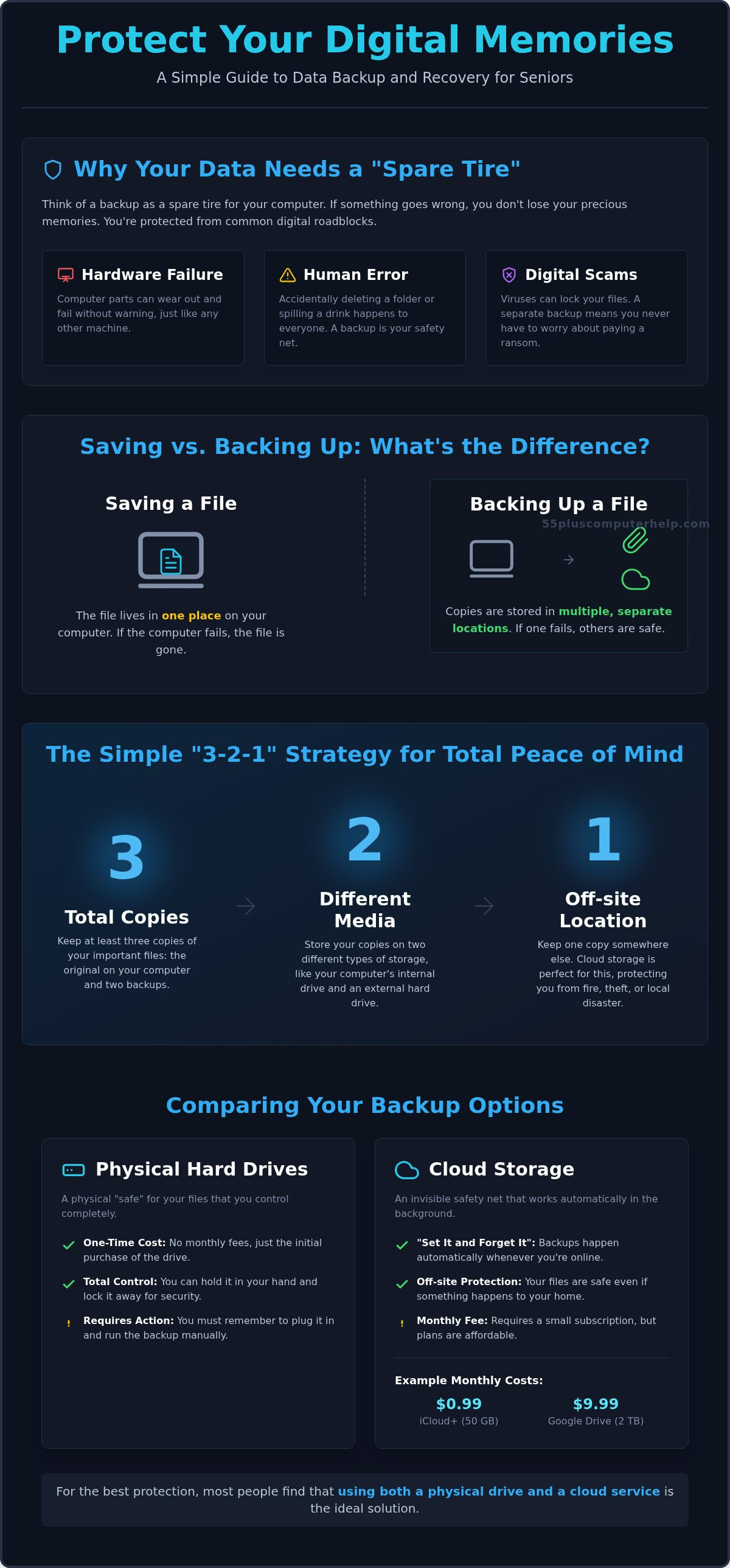
Think of your computer as a car you drive through your digital life. Your files, such as those cherished vacation photos or your carefully researched family tree, are the passengers. What is a data backup? Simply put, it's like having a spare tire in the trunk. If your computer crashes or stops working, you don't lose everything. You just pull out your "spare" and keep going. This process of data backup and recovery for seniors is about making sure your most important memories are never truly gone.
Computers are amazing, but they aren't perfect. There are three main reasons why files disappear. First, hardware can simply fail without warning. Parts inside a computer eventually wear out. Second, human error happens to everyone. You might accidentally delete a folder or spill a cup of coffee on your keyboard. Finally, digital scams are a real concern. Some viruses can lock your files and demand money to get them back. Having a backup plan protects you from all three of these worries.
Your digital files hold immense emotional value. They represent years of birthdays, holidays, and genealogy work that took hours to complete. With 75% of adults aged 65 and older using the internet as of 2026, the amount of digital memories we create is growing every day. Losing these items can feel devastating. It's never too late to start protecting them. Even if you've never backed up a single file, you can begin today and feel immediate relief.
The Difference Between Saving and Backing Up
Many people think that clicking "save" is the same as making a backup. It isn't. When you save a file, it lives in one place on your computer. If that computer breaks, the file is gone. Think of a backup like making a photocopy of an important document. You keep the original in one drawer and the copy in a different room. Redundancy means having the exact same digital photo stored in two or more separate locations.
Common Myths About Data Safety
It's easy to believe that a brand-new computer is safe from breaking. However, even new machines can have defects or software glitches. Another common myth is that a USB stick is a permanent solution. These tiny drives are easy to lose and can stop working if they sit in a drawer for too long. You might also worry that the "Cloud" is an unsafe place for your photos. In reality, large companies like Apple and Microsoft spend millions of dollars on security to keep your files safer than they would be on a single home computer. Using data backup and recovery for seniors helps you move past these myths with clear, simple facts.
Comparing Your Backup Options: Physical vs. Cloud Storage
Choosing how to save your files can feel like picking a home security system. You have two main choices: physical drives and cloud storage. Each has its own strengths. A physical drive gives you total control without monthly fees. Cloud storage works quietly in the background so you don't have to remember anything. Most people find that using both provides the best data backup and recovery for seniors.
External Hard Drives: The Physical "Safe"
An external hard drive is a small, rectangular box that fits in the palm of your hand. It plugs into your computer using a simple cord. Many seniors prefer this option because it feels familiar. You can hold your memories in your hand and lock the drive in a desk drawer. It's a one-time purchase, which helps if you want to avoid recurring costs. This physical control offers a sense of security that many people find comforting.
There's a simple tip to make this even easier. Use a piece of masking tape to label your drive with the date you started using it. This helps you keep track of how old the device is. Just like a car battery, these drives can eventually wear out, so knowing the age is helpful.
Cloud Storage: The Invisible Safety Net
The "cloud" sounds mysterious, but it's just a secure computer located in a high-tech building. Services like iCloud+, Google Drive, or OneDrive act as an invisible safety net. They automatically copy your files as soon as you save them. This means you don't have to remember to plug anything in. As of March 2026, iCloud+ offers 50 GB of storage for just $0.99 a month. If you have a very large collection of photos, Google Drive offers 2 TB for $9.99 a month. These small monthly costs buy a lot of convenience.
Privacy is a common concern for many users. You can keep your files safe by using a strong, unique password. Just like you wouldn't leave your front door unlocked, a good password keeps your digital home secure. Protecting your digital life is just one part of staying safe, as mentioned in this Disaster Preparedness Guide for Older Adults.
The most reliable plan usually combines both methods. You keep one copy on a drive at home and another in the cloud. This way, you're protected if your computer breaks or if you lose your physical drive. If setting these systems up feels overwhelming, you don't have to do it alone. You can find a patient mentor to help you set up your backup so you can relax and enjoy your photos.
The Simple "3-2-1" Strategy for Total Peace of Mind
Experts often recommend a data backup and recovery plan based on the 3-2-1 rule. It sounds like a secret code, but it's very simple to follow. You keep three copies of your files. You use two different types of storage media. You keep one copy in a separate location. This strategy is the gold standard for data backup and recovery for seniors because it removes the risk of a single point of failure.
For your life at home, this rule translates into a clear roadmap. Your photos stay on your computer or tablet. You save a second copy to a physical external hard drive. Finally, you keep a third copy in a cloud service. This setup ensures that no single accident can take away your memories. It sounds like a lot of steps, but most of it happens automatically once you get started.
The "1" in the 3-2-1 rule is the most important part for true peace of mind. Keeping a copy in the cloud means your files are "offsite." If a pipe bursts or a fire happens at home, your computer and your hard drive might get damaged. However, your cloud copy stays safe in a secure building miles away. It acts as a digital insurance policy for your family history and genealogy research. You can sleep better knowing your legacy is protected from local accidents.
Why Two Different Types of Media?
Relying on just one method is like putting all your eggs in one basket. A hard drive is like a paper ledger you keep in your desk. It's easy to reach and you own it completely, but it can be misplaced or stop working. The cloud is like a bank vault. It's managed by professionals and is incredibly hard to break into. Using both means you have the speed of a local drive and the high security of a vault. Just remember that a "sync" service is not always a true backup. If you delete a photo on your phone by mistake, a sync service might delete it from the cloud too.
Making it Automatic
You don't have to be a computer expert to maintain this system. Modern software allows for a "set it and forget it" approach. These automated tools run quietly in the background while you sleep or drink your morning coffee. They look for new files and copy them to your backup locations without you clicking a single button. A patient tech mentor can help you set this up one time. Once the system is ready, it handles the chores for you so you can focus on enjoying your digital life.
How to Recover Your Files if Something Goes Wrong
When your computer screen stays black or a file refuses to open, it's natural to feel a rush of panic. You might worry that your family photos or important documents are gone forever. This is where your preparation pays off. Think of recovery as the act of taking that "spare tire" out of the trunk and putting it on the car. Because you followed a plan for data backup and recovery for seniors, a technical failure is just a minor inconvenience rather than a tragedy.
The first and most important step is to stay calm. Panic can lead to mistakes, like clicking on the wrong button. Once you take a breath, check your backup source. If you use an external drive, plug it in. If you use the cloud, log in from a different device to see if your files are there. Most backup programs have a simple "Restore" button. This button copies your saved files back onto your computer. It might take some time depending on how many photos you have, but the process is usually straightforward.
Signs You Might Need Data Recovery
Sometimes, computers don't just stop working all at once. They might give you warning signs first. You might notice your computer is running very slowly or that certain folders take a long time to open. You might see "file not found" errors when you know the document should be there. A "Blue Screen" is another common sign. This is just your computer's way of saying it's confused and needs a restart. In some cases, a virus might be hiding your files. This is why virus and malware removal is often the first step in getting your data back safely.
When to Call a Professional
It's helpful to know when a problem is a simple software glitch and when it's a physical hardware break. If your computer is making a strange clicking or grinding noise, stop using it immediately. This usually means the internal parts are physically damaged. Attempting a "DIY" repair in this situation can make things worse. However, many file issues are software-based. These can often be fixed through remote support. A technician can securely connect to your screen and find your missing files while you watch. This is a safe and patient way to handle data backup and recovery for seniors without leaving your home.
You don't have to navigate these stressful moments alone. If your computer is acting up, we can provide expert Data Backup and Recovery services to ensure your precious memories stay protected. We move at your speed and explain every step so you feel in control of your technology again.
How 55 Plus Computer Help LLC Makes Backup Simple
Many people feel overwhelmed by the technical steps involved in protecting their digital lives. You might worry that you'll press the wrong button or that the system is too complicated to manage. At 55 Plus Computer Help LLC, we believe that technology should serve you, not cause you stress. We provide personalized training that focuses on data backup and recovery for seniors, moving at a pace that feels comfortable for you. You don't have to be a tech genius to have a safe and secure computer. Our goal is to transform that initial anxiety into a sense of accomplishment.
Our patient mentors act as translators. We take complex concepts like cloud syncing and turn them into simple, everyday tasks. We can also assist with email setup and troubleshooting for seniors to ensure your important messages and family attachments are included in your backup plan. This comprehensive approach means that every part of your digital legacy is protected. When you understand how your files are being saved, you gain a level of independence that makes using your computer much more enjoyable.
In-Home and Remote Assistance
We offer flexible support that fits your lifestyle. If you prefer a hands-on approach, we can visit your home to help you choose and plug in an external hard drive. We'll set up your physical safe right at your desk and show you exactly how to use it. For those who prefer a quicker check-up, our remote support allows us to look at your backup status through your screen. This training is designed to empower you. We want you to feel confident enough to know your system is working correctly. It's about giving you the tools to manage your own digital home with ease.
Your First Step to Digital Peace of Mind
The best time to start your data backup and recovery for seniors plan is today. You can begin by taking a simple inventory of your most important files. Think about where your wedding photos, tax documents, and genealogy records are currently stored. Once you know what you want to protect, you can schedule a session with us to build a personalized plan. Your memories are irreplaceable. Taking this one small step today ensures they remain safe for your children and grandchildren to enjoy. We're here to help you gain that peace of mind, one click at a time. It's a supportive journey we take together.
Your Path to a Worry-Free Digital Life
You now have a clear roadmap to protect your family history. By following the simple 3-2-1 rule and using a mix of physical drives and cloud storage, you turn a potential tech disaster into a minor task. Your photos and documents are far too valuable to leave to chance. Setting up a reliable system for data backup and recovery for seniors is the best way to ensure your memories stay safe for your children and grandchildren.
You don't have to navigate these technical steps on your own. Since 2014, we've provided patient, jargon-free instruction to help users feel confident with their devices. We offer trusted in-home and remote support that moves at your speed. Let us help you secure your memories today; schedule your patient tech session here! You deserve to use your computer with total peace of mind. We look forward to helping you feel empowered and secure.
Frequently Asked Questions
What is the best way for a senior to back up photos?
The most reliable approach is using the 3-2-1 method. You keep your photos on your computer, a local external drive, and a cloud service. This ensures that even if one device fails, your memories stay safe. Using automated software makes this process easy because you don't have to remember to do it yourself. It provides a balanced solution for data backup and recovery for seniors by offering both physical and digital protection.
Is it safe to store my personal documents in the cloud?
Yes, storing documents in the cloud is very safe when you use trusted providers like Apple or Microsoft. These companies use advanced encryption to scramble your data so only you can read it. You can enhance your security by using a strong password and two-factor authentication. Most seniors find that the cloud is actually more secure than a home computer because it's protected from physical damage like fires or floods.
How often should I back up my computer files?
You should ideally back up your files every day. Most modern systems allow you to schedule automatic backups that run while you aren't using your computer. If you create new documents or download new photos frequently, daily updates are best. If you only use your computer occasionally, a weekly backup might be enough. Setting it to happen automatically is the best way to ensure you never forget to protect your latest memories.
What is the difference between a USB flash drive and an external hard drive?
A USB flash drive is best for moving a few files between computers, while an external hard drive is designed for long-term storage. Flash drives are small and easy to lose; they also have a shorter lifespan. External hard drives have much more space and are more reliable for holding your entire collection of photos and documents. For a complete data backup and recovery for seniors plan, a large external hard drive is the better choice.
Can I recover files if I accidentally deleted them and have no backup?
It's sometimes possible to recover deleted files, but it's not guaranteed. When you delete a file, the computer marks that space as empty, but the data might still be there until it's overwritten. You should stop using the device immediately to prevent new data from covering the old files. A professional technician can use specialized software to try and pull those files back, though having a backup is always a much safer and more successful option.
Does backing up my computer protect me from viruses?
Backing up your computer doesn't stop a virus from entering, but it does help you recover from one. If a virus locks your files or damages your system, you can use your backup to restore everything to an earlier, healthy state. It's important to keep your backup drive unplugged when you aren't using it. This prevents a virus on your computer from spreading to your saved copies and ruining your digital safety net.
How much does it cost to set up a professional backup system?
The cost depends on the amount of data you have and the types of storage you choose. External hard drives are a one-time purchase, while cloud services usually charge a small monthly or yearly fee. Prices for hardware and storage vary based on brand and capacity. You can often start with free versions of cloud storage to see what works for you. We can help you evaluate these options to find a system that fits your budget.
What happens to my backed-up data if my computer is stolen?
Your backed-up data remains safe and accessible even if your computer is stolen. If you used a cloud service, you can simply log in from a new machine to see all your files. If you used an external hard drive and kept it in a safe place, you can plug it into a new computer to restore your data. This is why keeping one copy "offsite" or in the cloud is such a vital part of total protection.


