
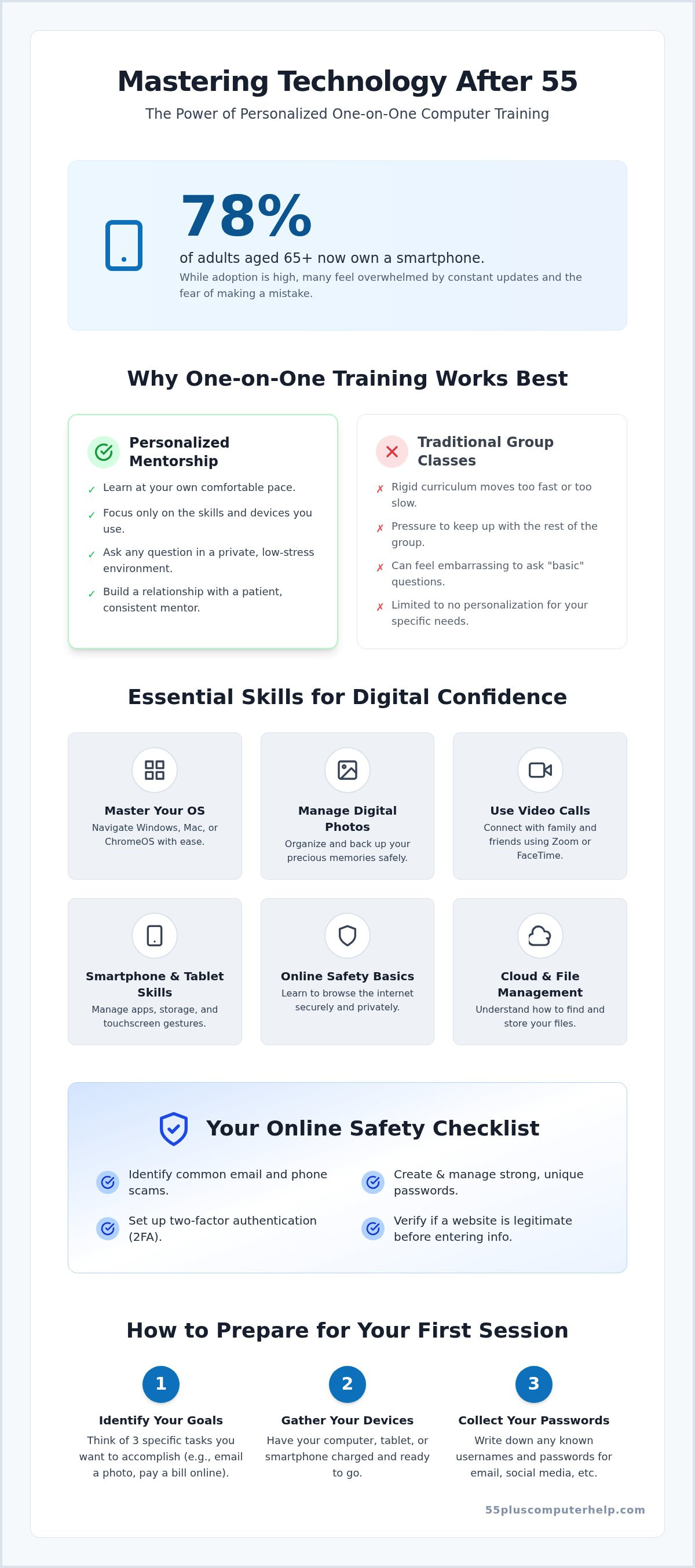
Did you know that 78% of adults aged 65 and older now own a smartphone? While more seniors are getting online every day, many still feel like they are trying to read a map in a language they haven't learned yet. It's easy to feel overwhelmed by constant updates or the fear of clicking the wrong button and breaking something. This is why one on one computer training for seniors has become such a vital resource for staying connected. Instead of struggling through a fast-paced group class where you might feel embarrassed to ask questions, you can learn at your own speed with a patient mentor by your side.
We understand that you simply want to use your devices to see photos of your grandkids or send emails without feeling frustrated. You deserve to feel safe and self-assured every time you log on. This guide will show you how personalized technology training helps you master your computer or tablet with confidence and independence. We will explore how dedicated coaching helps you spot online scams, manage your social media accounts, and finally feel in control of your digital life.
Key Takeaways
- Personalized technology mentorship allows you to learn at your own pace without the pressure of a fast-moving classroom.
- One on one computer training for seniors focuses on practical skills like mastering your operating system and identifying online scams to keep you safe.
- Working with a professional mentor provides a consistent relationship where your specific history and goals are always the priority.
- You can get the most out of your lessons by identifying three specific goals and gathering your devices and passwords before your session starts.
- Specialized support from 55 Plus Computer Help LLC helps you turn technical frustration into a sense of independence and digital confidence.
What is One-on-One Computer Training for Seniors?
One on one computer training for seniors is a specialized way to learn technology that puts you in the driver's seat. It is a personalized, pace-controlled form of instruction designed specifically for older adults who want to master their devices without the stress of a traditional classroom. This isn't just "tech support" where someone fixes a problem and leaves. It is a shift toward technology mentorship. A mentor works with you to build your skills, ensuring you understand the "why" behind each step. You learn in a comfortable, low-stress environment where your comfort is just as important as the technical lesson itself.
In a private session, the atmosphere is completely different from a busy repair shop or a loud library. There is no pressure to hurry. You can take as much time as you need to get comfortable with a mouse or a touchscreen. Many people feel embarrassed to ask basic questions, but in a one-on-one setting, no question is ever "silly." Whether you need to know how to turn the volume up or how to attach a photo to an email, your mentor is there to help with patience and empathy.
Why Personalized Learning Beats Group Classes
Community centers often provide group classes, but these typically follow a rigid curriculum. If you already know how to use a mouse but the class spends an hour on it, you'll feel bored. If the instructor moves too fast, you'll feel lost. Personalized one on one computer training for seniors solves this by focusing only on the tools you actually use every day. You have the freedom to stop and ask for a demonstration again at any moment. This ensures you never feel like you're holding up other students or falling behind the rest of the group.
The Role of Digital Literacy in Senior Independence
Building your computer literacy is a vital step toward maintaining your freedom as you age. Digital literacy is the key to maintaining social connections in 2026. When you can navigate a health portal to see your test results or use online banking to pay a bill, you regain a sense of control. You won't have to wait for a busy family member to find time to help you with small tasks. Mastering your smartphone or tablet means you can see photos of your grandkids the moment they are posted. It helps you stay connected to your community and manage your daily life with self-assurance.
Essential Skills Taught in Private Technology Lessons
Every person has different needs when they sit down at a computer. One on one computer training for seniors focuses on the specific tasks that matter to you. We start by mastering the basics of your operating system. Whether you use a Windows PC, a Mac, or a ChromeOS laptop, you will learn how to find your files and change your settings. We make sure you feel in control of your device instead of feeling like the device is controlling you.
Managing your digital memories is another key skill. We show you how to organize your photos so you can find that picture of your grandson's birthday in seconds. We also help you set up a backup system. This ensures your precious memories are safe even if your device stops working. Staying connected is just as important. We practice using video call software like Zoom or FaceTime. You will learn how to join a family meeting or start a call with a friend with total confidence.
Smartphone and Tablet Mastery
With 78% of adults over 65 now owning a smartphone, mastering these devices is more important than ever. Your phone is a powerful tool, but it can be confusing. We provide clear guidance on navigating touchscreens and using gestures like swiping or pinching to zoom. You will learn how to use the app store to find useful tools. We also help you organize your apps so the ones you use most are easy to reach. Many seniors enjoy using their tablets for e-books or games. We'll show you how to manage your storage so your device doesn't slow down when you have too many photos or apps.
Online Safety and Security Fundamentals
Safety is the most important part of any lesson. Learning to spot virus and malware removal signs is a critical skill for every user. We teach you how to identify common email and phone scams that target older adults. You can also find helpful resources through Senior Planet to stay updated on the latest tech trends. We will cover the basics of password management and show you how two-factor authentication keeps your accounts private. You will learn how to verify if a website is legitimate before you ever click a link or enter your information. If you want to feel safer online, our patient technology mentors can guide you through these steps at your own pace.
Professional Tutoring vs. Volunteer-Led Support
Choosing how to learn tech is a big decision. Many community centers offer free help from volunteers or students. While these programs are generous, they often lack the consistency of a professional service. One on one computer training for seniors works best when you have a dedicated mentor who knows you. A professional remembers which steps you found hard last week and where you left off. They don't just fix a problem; they use a "patience-first" method to make sure you can do it yourself next time. This relationship builds trust and reduces the anxiety that often comes with learning something new.
Professional trainers treat every lesson as an educational experience. They aren't just there to click buttons for you. They understand that you want to be independent. Because they are professionals, they have the interpersonal skills needed to teach effectively. They use plain language instead of technical jargon. This makes the path from identifying a problem to finding a solution clear and uncomplicated. You get what you pay for when it involves your technical security and the depth of the lesson.
The Benefit of Professional Expertise
Professionals offer a level of technical depth that volunteers might not have. They can troubleshoot complex software issues while they teach. This saves you time and frustration. It's also important to consider safety. Professional services vet their team with background checks. You can feel secure inviting a trusted expert into your home or onto your screen. Professionals also tailor the pace to you. They aren't rushing to finish a volunteer shift or a school project. Their only goal is your success and comfort.
When to Choose Free Resources vs. Paid Training
Free resources have their place in your learning journey. Sites like DigitalLearn.org provide great modules for very basic computer tasks. These are perfect if you just need a quick "how-to" on a simple topic. However, personalized training is necessary for more complex needs. If you have deep-seated fears of breaking your device or recurring errors that won't go away, a pro is the best choice. For example, email setup and troubleshooting for seniors often involves complex security settings. A professional ensures your accounts are private and secure from the start.
How to Prepare for Your First One-on-One Session
Preparing for your first session helps you feel calm and ready to learn. It ensures that your time with a mentor is productive and focused on the tasks that matter to you most. One on one computer training for seniors is most effective when you have a clear plan for what you want to achieve. Taking a few small steps before your trainer arrives can turn a good lesson into a great one. It reduces the initial anxiety and lets you focus on the fun part of discovering new skills.
Start by choosing a comfortable, well-lit workspace. You need enough room for yourself, your devices, and your trainer to sit side by side. Make sure there is a nearby power outlet for your chargers. It also helps to write down specific error messages or "pain points" you have encountered recently. If a certain window always pops up or a button doesn't seem to work, having those details ready allows your mentor to dive right into the solution. This prevents the frustration of trying to remember a problem while the lesson is happening.
Setting Realistic Learning Goals
Think about your "Top 3" goals for the lesson. What do you want to be able to do independently by the time the session ends? We encourage starting with just one device or one specific app to avoid feeling overwhelmed. It's better to master one thing completely than to try to learn everything at once. Remember that learning is a marathon, not a sprint, and it's perfectly normal to need multiple sessions to feel fully confident. You should always prioritize "safety first" goals, such as learning to identify scams, before moving on to "fun" goals like browsing social media.
Gathering Necessary Information
Having your information organized saves a lot of time and reduces stress. Gather all your devices and their chargers before the lesson starts. It's also vital to have a "Password Notebook" or a password manager ready. If you need help with a new setup, ensure your Wi-Fi password is easy to find. Keeping a notepad and a pen nearby is another great habit. While your mentor will guide you, taking your own notes helps you remember the steps later on. If you're ready to start learning in a supportive environment, you can book a personalized lesson with a patient expert who understands your needs.
Personalized Support with 55 Plus Computer Help LLC
Since 2014, 55 Plus Computer Help LLC has served as a reassuring and empathetic technology mentor for older adults. We understand that the rapid changes in tech can feel overwhelming. It's common to worry about clicking the wrong button or feeling embarrassed about asking basic questions. Our team is here to remove those fears. We provide specialized one on one computer training for seniors that focuses on your unique needs. Our goal is to transform your frustration into a sense of accomplishment and security. You deserve to use your devices with total self-assurance.
We offer flexibility to fit your lifestyle. You can choose onsite in-home support or convenient remote assistance. Our remote sessions often use screen-sharing technology. This allows you to stay in the comfort of your own home while we guide you through each step. Whether we are sitting next to you or helping you from a distance, the experience is personal and relationship-based. We aren't a faceless corporation. We are a community-oriented service that values your comfort as much as the technical solution.
Our Patient Mentoring Approach
Our approach is fundamentally different from standard technical support. We act as patient mentors rather than just repair technicians. Our trainers use everyday language instead of technical jargon. For example, we won't confuse you with complex terms for "the cloud" or "operating systems" without explaining them in plain English first. We follow a calm and methodical pace that ensures you never feel left behind. This teaching style builds trust and reduces the intimidation factor of new technology. We want you to feel empowered every time you turn on your computer or pick up your tablet.
Getting Started with Your Training
Starting your journey toward digital independence is a simple process. You can book a session for smartphone, tablet, or computer training today. We handle more than just lessons. Our team also assists with initial device setup, printer issues, and internet troubleshooting. We can help with email setup and software updates to keep your devices running smoothly. If you've been feeling frustrated by tech, it's time for a change. We invite you to take the first step toward mastering your devices with confidence and independence. Our patient experts at 55 Plus Computer Help LLC are ready to help you succeed.
Take Control of Your Digital World Today
Learning to navigate your devices shouldn't feel like a chore. By choosing personalized instruction, you take the pressure off yourself and focus on what truly matters. Whether it's seeing your grandkids more often or managing your own online banking, the right support makes these tasks simple. One on one computer training for seniors is about more than just clicking buttons; it's about reclaiming your independence in a digital world.
Our team has focused on this specialized care since 2014, providing the patience and expertise you deserve. We're here to ensure you feel secure and confident every time you log on. Master your technology today with patient, one-on-one training from 55 Plus Computer Help LLC. You have the ability to learn these skills, and we're ready to help you take that next step toward digital freedom.
Frequently Asked Questions
Is one-on-one computer training worth the cost for beginners?
Yes, personalized training is a valuable investment because it saves you hours of frustration. Learning the correct way from the start prevents you from developing bad habits or feeling overwhelmed by complex systems. A professional mentor ensures you stay safe online while building your digital confidence. Unlike free videos, one on one computer training for seniors provides immediate answers to your specific questions, making the learning process much faster and more enjoyable.
Can I learn how to use a tablet if I have never used a computer before?
Absolutely. Many seniors find tablets easier to use than traditional computers because of the intuitive touchscreens. You don't have to worry about using a mouse or a keyboard. We start with the very basics, such as how to turn the device on and adjust the volume. You will learn simple gestures like tapping and swiping. Our patient mentors guide you through opening apps and connecting to Wi-Fi so you can enjoy your device right away.
What should I do if I am afraid of breaking my computer during a lesson?
It's important to know that it is almost impossible to break a computer just by clicking the wrong button. Modern devices are built to be resilient and safe for exploration. During our lessons, we create a supportive environment where you can try new things without worry. Your mentor is right there to explain what a button does before you click it. This safe space helps you overcome your fear and build genuine self-assurance.
How many sessions does it usually take to feel comfortable with a new device?
Most users feel a significant boost in confidence after just one or two sessions. However, the exact number depends on your personal goals and what you want to master. Some people enjoy a single lesson to set up their email or a printer. Others prefer a short series of meetings to master social media and photo management. We always move at your pace, ensuring you feel in control of the process every step of the way.
Do you offer help with smartphones as well as desktop computers?
Yes, we provide comprehensive training for smartphones, tablets, and desktop computers. Whether you have an iPhone, an Android phone, a Mac, or a Windows PC, we can help. We show you how to manage your contacts, send text messages, and use your camera. Our goal is to make sure all your devices work together smoothly so you can stay connected with your family and friends with total ease and independence.
Can a computer tutor help me set up a new printer or Wi-Fi?
Yes, setting up hardware is a core part of our service. We can help you connect a new printer to your computer and troubleshoot any Wi-Fi connection issues you might have. We also assist with smart home device setup and software updates. Instead of struggling with confusing instruction manuals, you can watch and learn as we get your equipment running perfectly. This ensures your home technology stays functional and reliable for your daily needs.
Is remote computer training as effective as in-person training for seniors?
Remote training is very effective, especially when we use screen-sharing tools to see exactly what you see on your device. It allows you to learn from the comfort of your own home at a time that suits you best. While in-person training offers a physical presence, remote sessions provide the same patient guidance and clear explanations. Many of our clients find that remote one on one computer training for seniors is a convenient and safe way to get help.
How do I know if a computer training service is safe to let into my home?
You should look for a service with a long history and a specialized focus on your specific age group. We have been helping seniors since 2014 and prioritize building a relationship of trust. It's important to choose a provider that conducts background checks and has a transparent pricing structure. Our mentors are community-oriented and neighborly, ensuring you feel safe and respected throughout every onsite or remote lesson we provide for your technology.


