
Modern scammers rarely try to break into your computer with complex code. Instead, they try to "hack" your emotions like fear, urgency, or curiosity to get what they want. It is a frightening thought when you consider that scams targeting older adults led to $81.5 billion in losses in 2024 according to the FTC. You might feel like you're falling behind the curve as technology changes every day. It's completely normal to feel a bit of anxiety about your life savings or feel confused by words like "phishing" and "malware." You just want to know how to spot online scams for seniors so you can enjoy your tablet or computer without constant worry.
We understand that the digital world can feel like a minefield of technical jargon and hidden traps. You deserve to use your devices with peace of mind. This guide will show you the specific red flags of modern fraud so you can regain your confidence online. We'll cover the latest AI voice cloning tricks, explain new 2026 banking protections like California's SB 278, and give you a simple checklist to identify a scam in seconds. You'll learn exactly who to call if something feels wrong. This knowledge keeps you one step ahead of the fraudsters.
Key Takeaways
- Learn how to identify suspicious emails by hovering your mouse over the sender's name to reveal the real email address.
- Discover how to spot online scams for seniors, including common tricks like fake tech support pop-ups and government impersonation messages.
- Get simple instructions on using password managers and two-factor authentication to keep your private information safe.
- Feel empowered with a clear plan of action to follow if you ever suspect someone is trying to trick you online.
- Understand the psychological tactics scammers use so you can recognize the signs of a dishonest scheme before you click.
Understanding the Landscape of Online Scams in 2026
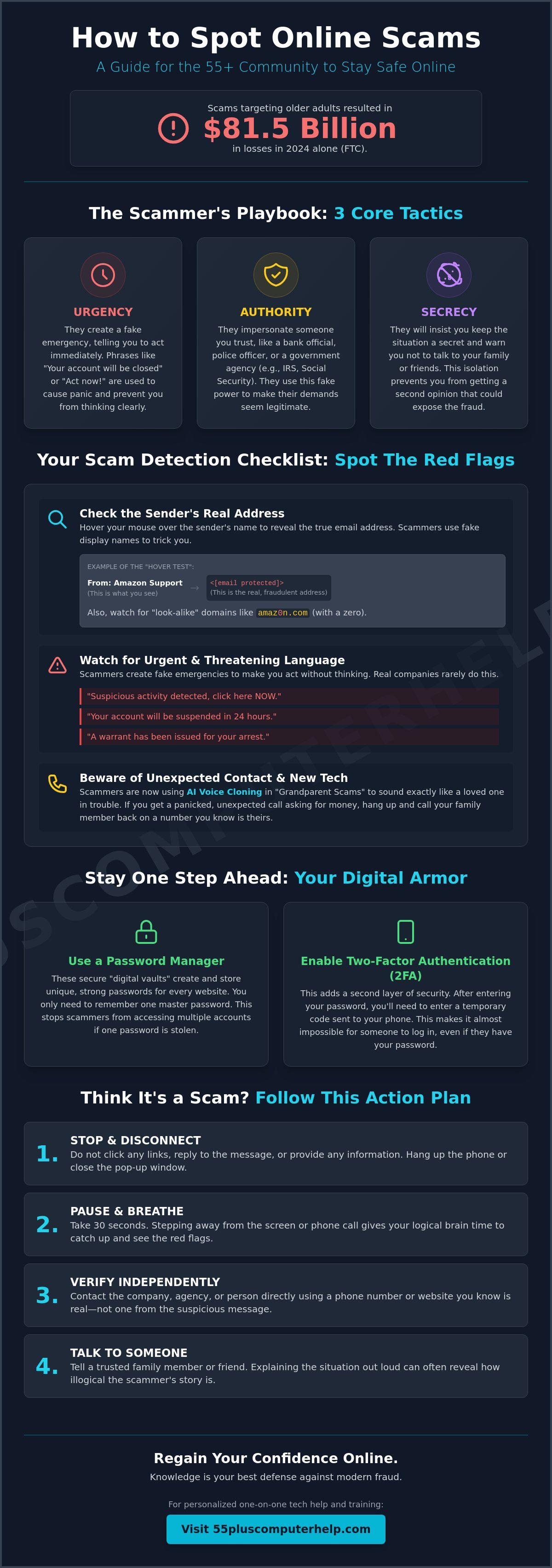
An online scam is a dishonest scheme that criminals use to steal your money or your identity. These digital traps have become more sophisticated over the years. In 2024, the Federal Trade Commission reported that scams targeting older adults resulted in a staggering $81.5 billion in losses. Learning how to spot online scams for seniors is the first step toward protecting your hard earned savings. Most of these crimes rely on three specific pillars: urgency, authority, and secrecy. A scammer will tell you that you must act immediately. They will pretend to be a person in power, like a police officer or a bank official. Finally, they will tell you not to talk to your family about the situation. If you see these three signs together, it is almost certainly a fraud.
Technology has changed the way these criminals operate. A few years ago, you might receive a poorly written email from a "Nigerian Prince" asking for help. Today, scammers use advanced artificial intelligence to create realistic messages and even clone voices. You can find more information about these common types of internet fraud to see how they have evolved. While the tools are new, the goal remains the same. They want to trick you into giving up control of your computer or your bank account. In 2026, new laws like California’s SB 278 have started requiring banks to help identify suspicious transactions, but your own awareness is still your best line of defense.
Why Scammers Target Seniors
Criminals often focus on the 55 plus community because they perceive this group as having significant retirement savings. The FBI’s Internet Crime Complaint Center noted that Americans aged 60 and over lost approximately $5 billion to scams in 2024 alone. Scammers also take advantage of the polite nature of our generation. They may use social isolation to their advantage, hoping that a friendly voice on the phone will lead to a shared secret. We often see a tactic called affinity fraud, which is a type of scam where a criminal pretends to be part of your specific community or shares your personal interests to build a false sense of trust.
The Emotional Tactics of Cybercrime
Scammers don't just hack computers; they hack human emotions. Fear is their most powerful tool because it can freeze our logical thinking. When you feel a sense of panic during a phone call or after seeing a computer pop-up, your brain struggles to spot the red flags. The "Grandparent Scam" is a perfect example of this emotional pressure. A caller might use AI to sound exactly like a grandchild in trouble. They claim they are in jail or a hospital and need money right away. We always teach our clients to use a "Pause and Breathe" approach. Taking just thirty seconds to step away from the screen or hang up the phone can give your logic time to catch up. This simple habit helps you stay in control of your digital life.
Red Flags: How to Spot a Scam Before You Click
Scammers rely on you moving quickly. They hope you won't look at the small details that give them away. If you know what to look for, you can stop a fraudster in their tracks before they do any damage. This visual checklist is a great tool for your digital safety. Knowing how to spot online scams for seniors starts with a careful look at the messages you receive every day. Most criminals leave digital footprints that are easy to see once you know where to look. They count on your politeness and your desire to fix a problem quickly, but taking a moment to inspect the screen can save you from a lot of stress.
Suspicious Sender Information
Always check the sender's email address first. Scammers often use "look-alike" domains to trick you. They might use a name like "amaz0n.com" instead of the real "amazon.com." If you see a zero instead of an "o," it's a scam. Official government agencies like the IRS or Social Security will never contact you via email to ask for personal information or money. You can use the "Hover Test" to stay safe. Simply hold your mouse pointer over the sender's name without clicking. A small box will appear showing the real email address behind the name. If the two addresses don't match, delete the email immediately. If you ever feel unsure about an email, our team offers personalized email training to help you feel more confident.
The Language of Urgency and Fear
Scammers love to create a fake emergency. They use phrases like "Your account will be closed in 24 hours" or "Suspicious activity detected, click here now." These limited time offers in security warnings are almost always fake. They want to freeze your logical thinking with fear. Real banks will never rush you into a transaction or ask for your password over the phone. In 2024, the FTC reported that Americans lost $789 million to government impersonation scams. These criminals often ask for payment in strange ways. If someone asks you to pay a fine or a bill using gift cards, wire transfers, or cryptocurrency, it's a scam. No legitimate business or government office will ever demand payment via a Target or Apple gift card.
Watch out for mismatched links as well. Sometimes the text of a link says "Click here to login," but the actual destination is a different website. You can use the hover trick for links too. Hover your mouse over any link to see the destination URL at the bottom of your browser window. If the text says "Bank of America" but the link goes to a random string of numbers or a strange website, don't click it. Taking these small steps helps you confidently navigate your digital world without the fear of being tricked.
Common Scam Tactics Targeting the 55+ Community
Understanding the specific methods criminals use helps you stay calm when a strange message appears. Fraudsters often reuse the same scripts because they know which buttons to push. Learning how to spot online scams for seniors involves recognizing these common patterns before you react. Whether it's a loud alarm on your screen or a friendly message on social media, knowing the tactic is half the battle. These criminals want to catch you off guard, but their tricks are predictable once you see them for what they are. Here are the four most common schemes active in 2026:
- Tech Support Scams: Fake warnings about computer viruses designed to sell unnecessary services.
- Government Imposters: Calls or emails pretending to be from the IRS, Medicare, or Social Security.
- Romance Scams: Fake relationships built on social media to eventually ask for money.
- Sweepstakes Scams: Claims that you won a prize for a contest you never actually entered.
Tech Support and Virus Alarms
One of the most frightening experiences is a "browser lock." This happens when a website takes over your full screen and plays a loud siren or a flashing warning. A message might claim your computer is infected with a dangerous virus and provide a phone number for "Microsoft Support." Your computer is not actually broken. This is just a webpage designed to look like a system error. It's a digital illusion meant to cause panic so you'll call the number. You should never call the phone number displayed on these pop-ups. If you have already clicked one of these links or called the number, we can help with professional Virus and Malware Removal to ensure your device is clean and secure.
Government imposters are another major threat to your peace of mind. These criminals pose as agents from the Social Security Administration. They might claim your benefits are at risk or your number has been suspended. In 2024, the FTC reported that Americans lost $1.14 billion to romance scams. In these cases, criminals build fake relationships on social media over many months. They often wait until they have your full trust before asking for money for a medical emergency. Similarly, sweepstakes scams tell you that you won a large prize. If you didn't buy a ticket or enter a drawing, you didn't win the prize. Real lotteries will never ask you to pay a fee to collect your winnings.
The Rise of AI and Deepfake Scams
Technology in 2026 has made scams even more convincing through the use of "Deepfakes." This is a type of artificial intelligence that can mimic a family member's voice or face with incredible accuracy. A scammer might call you sounding exactly like your son or granddaughter. They often claim to be in a crisis and need money immediately. Using these family strategies is a powerful way to learn how to spot online scams for seniors who want to stay safe from high-tech threats. We recommend creating a "Safe Word" with your family. This is a secret password that only your real family members know. If someone calls claiming to be a relative in trouble but doesn't know the safe word, you know it's a scam. Always hang up and call the official agency back on a known, trusted number.
A Step-by-Step Guide to Staying Safe Online
You have learned about the tricks criminals use to target the 55 plus community. Now, it's time to build your digital armor. Staying safe doesn't require you to be a computer expert. It just requires a few smart habits and a calm approach. Learning how to spot online scams for seniors is much easier when you have a solid defense in place. These steps will help you use your devices with a sense of accomplishment and security. With the new federal task force created in March 2026 to coordinate fraud prevention, there are more resources than ever to help you stay protected. You can take control of your technology today.
Securing Your Accounts and Passwords
Your first line of defense is a strong password. We recommend the "Longer is Better" rule. Instead of using a single word, use a long phrase that is easy for you to remember but hard for a computer to guess. A phrase like "TheBlueBirdsSingInMay!" is much safer than a simple name or date. You should never use the same password for two different accounts. To help with this, you can use a reliable password manager. This tool acts like a digital vault that remembers all your long passwords for you. You only have to remember one master code to get inside. We also suggest turning on Two-Factor Authentication (2FA) for your bank and email. This acts like a second lock on your door. Even if a thief steals your password, they still can't get in without the special code sent directly to your phone. If you need help setting this up, our team provides personalized smartphone and tablet training to guide you through the process.
Safe Browsing and Email Habits
Good habits are just as important as good software. Always follow the "Think Before You Click" rule. If an email has an attachment or an image you didn't expect, don't open it. It could contain hidden software that tracks your typing. You should also use "Bookmarks" for your important websites. Instead of searching for your bank on Google every time, save the real website as a favorite in your browser. This ensures you always go to the official site and not a fake version created by a scammer. Never use public Wi-Fi at a coffee shop or airport for banking or shopping. These open networks are not secure. It's much safer to wait until you are on your private home Wi-Fi to handle your money. These simple choices are a big part of how to spot online scams for seniors and keep your information private.
Finally, keep your computer "clean" and updated. Set your laptop and tablet to "Auto-Update" so they can patch security holes automatically. Companies release these updates to fix weaknesses that hackers might try to use. You should also remove any apps or browser extensions that you haven't used in the last six months. Every extra piece of software is a potential doorway for a criminal. If you ever receive an "emergency" request for money or info, stop and breathe. Hang up the phone or close the email. Look up the official number for the person or business in your own records. Call them back on that trusted number to verify the story. Taking thirty seconds to check the facts can save you from a lifetime of frustration.
What to Do if You Think You’ve Been Scammed
Discovering that you might have been targeted by a criminal is a stressful experience. It's important to remember that you are not alone. Even with the best knowledge of how to spot online scams for seniors, these sophisticated 2026 tactics can sometimes slip through. If you realize a mistake has happened, take a deep breath. Your next steps are very important for protecting your savings and your identity. Acting quickly and calmly will help you regain control. We are here to support you through this process and ensure your digital life is secure once again.
Your first physical action should be to disconnect your computer or tablet from the internet. If you suspect a scammer has remote access to your device, turn off your Wi-Fi or unplug your internet cable immediately. This simple step cuts the digital cord and stops the criminal from seeing your screen or moving your mouse. Next, call your bank and credit card companies. Tell them you suspect fraud and ask them to freeze your accounts. Under new 2026 protections like Georgia's April 2026 law, banks can now place a 15 business day hold on suspicious transactions for adults over 65. This gives you time to conduct an internal review without losing your money.
Immediate Steps to Secure Your Identity
Once your bank accounts are safe, you must protect your broader identity. Contact the three major credit bureaus to place a "Credit Freeze" on your file. This prevents anyone from opening a new credit card or loan in your name. You should also check the "Sent" folder in your email account. Scammers often use a hacked account to send more fraudulent messages to your contacts. If you see emails you didn't write, notify your friends and family immediately. This stops the criminal from using your trusted name to run a "Grandparent Scam" on your loved ones. Finally, change your primary passwords. You must do this from a different, known safe device like a friend's phone or a computer at a local library. If you use your compromised machine to change passwords, the scammer might see your new codes.
When to Call for Professional Technical Assistance
Sometimes a simple scan isn't enough to feel safe again. If a criminal has accessed your system, a "factory reset" might be the only way to ensure every piece of malicious software is gone. This process wipes the computer clean and reinstalls the original system. It's a big step, but it provides the ultimate peace of mind. Our experts can help you with professional Virus and Malware Removal to make sure no hidden trackers remain on your hard drive. We will check your settings and ensure your security software is active and updated. Don't face tech fears alone. You can schedule a Personalized Technology Training session today to learn how to keep your devices clean and secure for the future. We will help you move forward with the confidence you deserve.
Take Control of Your Digital Life Today
You now have the tools to navigate the web with confidence. By using the practical habits we discussed, like the "Hover Test" and two-factor authentication, you create a strong defense against fraudsters. Understanding how to spot online scams for seniors ensures that your retirement savings stay exactly where they belong. You deserve to use your computer or tablet without the constant weight of worry. Technology should be a window to the world, not a source of stress.
Since 2014, 55 Plus Computer Help LLC has provided specialized support to the senior community. Our team offers over 10 years of trusted local expertise to help you master your devices. We believe in patient, jargon-free instruction that makes technology simple and fun again. You don't have to figure this out on your own. Empower yourself with a patient, in-home technology lesson from 55 Plus Computer Help LLC. We are here to help you turn frustration into a sense of accomplishment. Stay safe, stay curious, and enjoy everything the digital world has to offer.
Common Questions About Online Safety
Is it safe to click on a link in an email from my bank?
It's best to avoid clicking links in bank emails entirely. Scammers use very convincing fakes to steal your login details. Instead, open a new browser window and type your bank's address yourself. This ensures you are on the real site. You can also use your bank's official smartphone app. Taking these extra seconds is a key part of how to spot online scams for seniors and protects your financial information.
What should I do if my computer screen suddenly freezes with a 'Virus' warning?
You should stay calm and avoid calling any phone number shown on the screen. This is a common trick called a "browser lock" that makes your screen look frozen. Simply turn your computer off and back on again. If the message appears again when you open your internet browser, we can help you clear it. Don't let the loud alarms or flashing lights pressure you into making a mistake.
Can scammers steal my money just by me answering a phone call?
Answering a call won't instantly empty your bank account, but it's often the start of a trick. Scammers use these calls to record your voice or to verify that your phone number is active. If you don't recognize the number, it's best to let it go to voicemail. A real person or business will always leave a message. You can then call them back on a trusted number from your own records.
How do I know if a website is 'secure' for online shopping?
You can check for a small padlock icon next to the website address in your browser. This symbol means the site uses encryption to protect your data. The web address should also start with "https" instead of just "http." The "s" stands for secure. If a site is missing these signs, don't enter your credit card number or any personal details. This habit helps you shop with confidence.
Why do scammers want me to pay with gift cards?
Scammers demand gift cards because they are exactly like cash. Once you give them the numbers on the back of the card, the money is gone forever. There is no way for your bank to get those funds back. Legitimate government offices or utility companies will never ask you to pay a bill with a gift card. If someone makes this request, hang up immediately. It's a major red flag of a fraud attempt.
What is the 'Grandparent Scam' and how can I avoid it?
This scam happens when a caller pretends to be a grandchild who needs money for an emergency like bail or a medical bill. They often use high tech tools to sound like your loved one. To avoid this, hang up and call your relative directly on their known phone number. You can also use a secret family safe word to verify who is really on the line. Never send money until you verify the story.
Should I use a free antivirus program or a paid one?
A paid antivirus program is usually the better choice for your peace of mind. While free programs offer basic scanning, paid versions provide active protection that blocks threats before they reach your computer. They also include technical support if you run into trouble. We can assist you with software installation and updates to ensure your devices stay protected year round. This investment helps you navigate the internet without fear.
How can I tell if a Facebook message from a friend is actually a scammer?
You can tell a message is fake if your friend suddenly asks for money or a strange favor. Scammers often hack accounts and send messages that sound urgent or out of character. Look for strange spelling or links to "videos" of you. Learning how to spot online scams for seniors includes knowing when to trust your gut. Call your friend on the phone to see if they actually sent the message before you click any links.


