
Last Tuesday, Martha sat down to video call her grandson, but her screen stayed frozen on a spinning circle. It's a common frustration that leaves many people asking, why is my computer so slow all of a sudden? You might worry that you broke something or that your machine is simply too old. You aren't alone in feeling this way. Technology changes fast, especially with new systems like Windows 11 or macOS 26 Tahoe. It's natural to feel overwhelmed when your reliable tool starts acting like a stranger.
You don't need to be a technical expert to get your speed back. This guide shows you how to find the cause of the lag without using confusing jargon. We will explore simple steps to clear digital clutter and stay safe from "slow PC" scams. You'll learn how to check for software updates and understand if a simple virus scan might save you the $109 to $158 that professional shops often charge for performance issues. We want to give you the confidence to keep your computer running smoothly and securely.
Key Takeaways
- Learn the common digital reasons why is my computer so slow all of a sudden and discover why it's usually a simple fix rather than a broken machine.
- Master three safe and non-technical steps you can take immediately to help your computer respond more quickly.
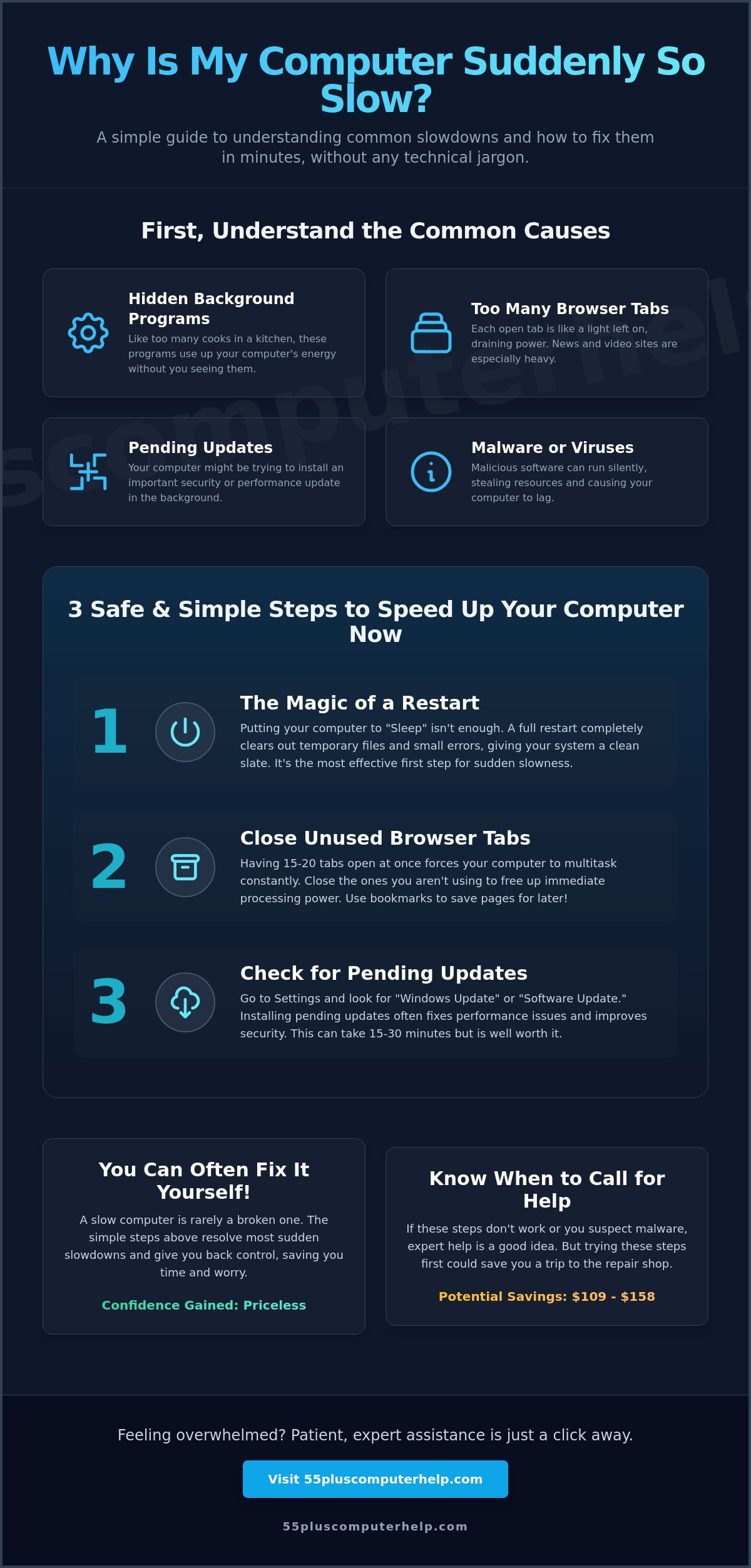
- Identify hidden background programs that act like too many cooks in the kitchen and use up your computer's energy.
- Recognize the red flags of malware and learn how to protect your peace of mind from security threats.
- Gain the confidence to decide when a problem is a simple DIY task and when it's time to reach out for patient, expert assistance.
Understanding Why Your Computer Slows Down Suddenly
It's a common feeling to sit down at your desk and wonder, why is my computer so slow all of a sudden? You might feel like you clicked the wrong button or caused a permanent error. Please know that this is almost never the case. Computers are complex tools that handle millions of tiny tasks every second. Just like a car that needs an oil change, a computer needs regular care to stay fast. Most of the time, slowness is simply a sign that your machine is trying to do more than it has the energy to handle.
Think of your computer like a physical desk. When you first sit down, the surface is clean and you can work quickly. Over time, you might leave out a few letters, a coffee mug, or some old newspapers. Eventually, you run out of room to move your arms. This is exactly what happens with digital clutter. Files, updates, and temporary data pile up until the system feels sluggish. By understanding computer performance, you can see that slowness is often just a mismatch between the tasks you want to do and the space available to do them. The good news is that these issues are usually software-based and completely reversible.
The Difference Between Slow and Broken
It helps to know that a slow computer is usually a healthy computer that is just having a hard day. If your screen turns on and your mouse still moves, your hardware is likely fine. Hardware failure is different because it usually means the machine won't turn on at all or the screen stays completely black. System lag is a temporary delay in processing commands that happens when the computer's brain is preoccupied with other tasks. You haven't broken the machine; it's just working through a long to-do list in the background.
Why "All of a Sudden" Happens
You might wonder why the speed changed overnight. Often, a single event acts as a tipping point. This could be a large software update that finished while you were sleeping, or a new program that decided to start itself automatically. Computers can get overwhelmed just like people do when they are asked to multitask too much. These hidden tasks are often the real culprits. They run quietly behind the scenes and borrow power that you would rather use for your email or web browsing. Recognizing that these tasks exist is the first step toward regaining control of your device.
Three Simple Steps to Speed Up Your Computer Right Now
If you are currently wondering why is my computer so slow all of a sudden, please take a deep breath. You haven't done anything wrong, and your machine is likely not broken. We use the "Rule of Three" to help seniors fix common speed issues safely. These steps are gentle and cannot harm your computer or delete your precious photos. They simply act as a way to clear the palate of the machine so it can focus on what you need it to do right now.
Before you worry about repair costs or buying a new device, try these three simple actions. They are designed to be easy to follow, even if you don't consider yourself a tech expert. Taking these steps often resolves the frustration of a lagging screen in just a few minutes.
Step 1: The Magic of the Restart
Restarting your computer is the most effective way to fix sudden slowness. Many people simply close the lid or put their computer to "Sleep," but this is not the same as a restart. Sleep mode saves your open programs in a state of "brain fog" where small errors can stay active. A proper restart shuts everything down completely and starts fresh. In Windows 11, click the Start button, select the Power icon, and choose Restart. On macOS 26 Tahoe, click the Apple menu in the top left corner and select Restart. This simple act clears out temporary files and gives the system a clean slate.
Step 2: Closing Unused Browser Tabs
Every website you have open in a tab is like a lightbulb left on in your house. If you have 15 or 20 tabs open at once, your computer has to send energy to all of them. Sites that show live news or videos are especially heavy. Closing these tabs often answers the question of why is my computer so slow all of a sudden without needing any professional help. Instead of leaving tabs open for days, try using the "Bookmark" feature to save the page for later. This is one of the best tips to speed up your computer because it frees up immediate processing power.
Step 3: Checking for Pending Updates
Software companies frequently release updates to make your computer run more efficiently. Sometimes, a computer slows down because an update is waiting to be installed in the background. You can check this by going to your Settings menu and looking for "Windows Update" or "Software Update." If you see a button that says "Restart Now" or "Install Updates," go ahead and click it. Please be patient during this process. Some updates can take 15 to 30 minutes to finish, but the result is a smoother and more secure machine. If you ever feel stuck during these updates, our team at 55 Plus Computer Help LLC is always here to provide a little extra guidance.
Identifying Hidden Resource Hogs and Background Programs
Imagine you are trying to bake a cake in your kitchen. If five other people walk in and start making their own meals at the same time, the kitchen becomes crowded. You have to wait for the oven, and there is no room on the counter. This "Too Many Cooks in the Kitchen" situation is exactly what happens inside your computer. Many programs run quietly in the background without you ever opening them. These programs use up the machine's energy, which often leads people to ask, why is my computer so slow all of a sudden? These hidden tasks are often called resource hogs because they take more than their fair share of power.
Common culprits include cloud backup services, chat apps, and "helper" tools for your printer or music player. These programs often install themselves when you download something else. The good news is that you have the power to choose which programs are allowed to run. By managing these background tasks, you can follow expert troubleshooting tips to reclaim your speed. This process is safe and does not delete your files; it just tells the programs to wait until you actually need them.
What Are Startup Programs?
Startup programs are applications that launch automatically the moment you turn on your computer. They don't ask for permission; they just start running. You can see this list in Windows 11 by right-clicking the Taskbar and selecting Task Manager, then clicking the "Startup apps" tab. On a Mac, look in System Settings under "Login Items." It is usually safe to disable programs that you don't use every single day. Here are a few examples of apps that are generally safe to stop from starting automatically:
- Spotify or iTunes: These only need to run when you want to hear music.
- Skype or Zoom: You can open these manually when you have a scheduled call.
- Printer "Helpers": Your printer will still work even if these aren't running in the background.
- Gaming platforms: Apps like Steam or Epic Games often hog resources for no reason.
The Impact of Anti-Virus Software
Security is vital, especially since the global cost of cybercrime is projected to hit $13.82 trillion by 2028. However, some anti-virus programs are "over-eager." They might spend too much time scanning every file you click, which causes a noticeable lag. In 2026, top-rated software like Bitdefender and Norton are designed to be efficient, but older security suites can still be heavy. If you use Windows 11, the built-in Windows Security is often enough for most daily tasks. It provides a great balance between keeping you safe and keeping your computer fast. You don't always need three different security programs running at once; usually, one reliable shield is plenty.
Recognizing Malware and Security Risks as a Cause for Slowness
Sometimes, a computer doesn't just feel a little tired. It feels like it's being held back by something invisible. If you find yourself asking, why is my computer so slow all of a sudden, and you also see strange windows popping up on your screen, you might be dealing with a security risk. Malware is a type of software that sneaks onto your machine and "borrows" your computer's power to perform its own secret tasks. This leaves very little energy left for the things you actually want to do, like checking your email or looking at family photos.
Scammers have become very clever in 2026, often using AI-powered tools to create more convincing tricks. You might see a bright red box claiming that your computer has 50 viruses and that you must call a number immediately. This is called "Scareware." These messages are designed to make you feel panicked so you'll click a link or share your credit card information. Please remember that a normal computer slowdown is common, but a slowdown combined with these aggressive pop-ups is a major red flag that requires professional Virus and Malware Removal.
Signs It Might Be a Virus
A virus often leaves clues that are easy to spot once you know what to look for. You might notice new toolbars at the top of your internet browser that you didn't install. Your homepage might suddenly change to a website you don't recognize. Another big warning sign is high fan noise. If your computer sounds like a jet engine while it's just sitting idle on your desk, something is working hard in the background. If you notice these symptoms, don't blame yourself. Scammers are experts at making their traps look like legitimate updates or helpful tools. It's not your fault that these programs are tricky to avoid.
How to Stay Safe While Troubleshooting
Your safety is the most important part of this process. If a number pops up on your screen claiming to be from Microsoft or Apple, do not call it. These companies will never put a phone number in a pop-up and ask you to call them for help. You should also avoid clicking on any "Speed Up Your PC" ads that you see on the side of news websites. These are often the very programs that cause the slowness in the first place. Real tech support will never demand payment in gift cards or ask for your bank password over the phone. If you feel uneasy about a message on your screen, it's always best to close the laptop and ask for a second opinion. For peace of mind and a clean machine, you can always reach out for our Virus and Malware Removal assistance.
When to Call for Professional Technical Support
You have tried the basic steps. You closed your extra browser tabs and performed a full restart. If you still find yourself asking, why is my computer so slow all of a sudden, it's perfectly normal to feel a bit stuck. Some technical issues live deep inside the system settings where they are hard to find. Reaching out for help isn't a sign of defeat. It's a smart way to ensure your machine stays healthy and your personal information remains secure. Professional support takes the guesswork out of technology and replaces frustration with a sense of relief.
Deciding between a "Do-It-Yourself" fix and calling an expert depends on your comfort level. If the simple steps didn't work, or if you saw the red flags of malware mentioned earlier, an expert eye can save you hours of worry. A professional can quickly identify if the lag is caused by a software conflict or a hidden background process. This help provides the peace of mind that your computer is performing at its very best.
The Value of a Professional Tune-Up
A professional tune-up is very similar to a 3,000-mile oil change for your car. It keeps the engine running smoothly and helps the machine last much longer. While you can tidy your own digital workspace, an expert looks deeper. We check for outdated software drivers and system errors that the average user might never see. According to industry data for 2026, the national average cost to fix slow computer performance ranges from $109 to $158. This small investment often prevents the need for much more expensive repairs later on. A tune-up also includes a check of your security settings to ensure you are part of the 75-85% of users who stay protected with active defense software.
Get Friendly, Patient Help Today
At 55 Plus Computer Help, we focus entirely on the needs of the senior community. We understand that technology can be intimidating, and we believe there are no silly questions. Our role is to be a patient mentor. We don't just fix the problem; we show you what happened and how to keep it from happening again. This educational approach helps you build the confidence to navigate your digital world independently. You deserve a computer that responds quickly so you can focus on connecting with family and friends. If you're ready to get your speed back, you can Contact 55 Plus Computer Help for a friendly tech check-up today.
Reclaim Your Digital Speed and Peace of Mind
You now have the practical tools to handle common speed issues on your own. Remember that a simple restart or closing extra browser tabs can often solve the mystery of why is my computer so slow all of a sudden. By managing your startup programs and staying alert for security red flags, you protect both your time and your personal information. These small habits ensure your machine stays responsive for your daily tasks and video calls.
If you still feel uncertain about your device, you don't have to face these tech challenges alone. Since 2014, we have provided specialized support designed specifically for the senior community. We offer patient, jargon-free explanations that focus on empowering you with confidence rather than just performing a quick repair. Our mission is to transform technology from a source of anxiety into a reliable tool for connection and productivity.
Get your computer running like new with friendly, patient help from 55 Plus Computer Help
You deserve a machine that keeps up with your life and keeps you connected to what matters most.
Common Questions About Computer Speed
Is it true that my computer gets slower as it gets older?
Yes, but it's usually because software becomes more demanding rather than the parts wearing out. New systems like macOS 26 Tahoe or Windows 11 require more power than older versions. As your programs update, they need more energy to run. This makes older machines feel sluggish even if the hardware is still healthy and working correctly.
Can too many photos and files make my computer slow all of a sudden?
Generally, no, unless your storage is almost completely full. Having 5,000 photos stored in a folder won't slow down your daily browsing or email. However, if those files leave you with less than 10% of your total storage space, the computer's brain has no room to move temporary files. This lack of space causes a sudden drop in speed.
Why does my computer fan get so loud when the computer is lagging?
The fan spins faster to cool down the processor when it is working extra hard. If you are asking why is my computer so slow all of a sudden and hear a loud whirring, it means a program is using 100% of your system power. This extra heat is a physical sign that your machine is struggling to keep up with a heavy task.
Should I buy one of those "PC Booster" programs I see advertised?
No, you should avoid these programs because they often cause more harm than good. Many of these boosters are actually scams that use up even more resources. In 2026, 75-85% of users find that built-in tools like Windows Security or macOS system maintenance are much safer and more effective at keeping a computer fast without the extra cost.
Does a full hard drive cause sudden slowness?
Yes, a full hard drive is a very common cause of performance issues. Your computer needs empty space to write temporary notes while it works. If your drive is 95% full, the system has to work twice as hard to find a place to put that data. This leads to significant lagging during simple tasks like opening a document or saving a file.
What is the quickest way to tell if my computer has a virus?
The fastest indicator is the presence of unexpected pop-up windows or a homepage that you didn't set yourself. If you wonder why is my computer so slow all of a sudden and notice your mouse moving on its own, these are strong signs of malware. You can use a trusted scanner like Bitdefender for a quick check to see if your security is compromised.
How often should I restart my computer to keep it fast?
You should aim to restart your computer at least once every two or three days. While it's tempting to just close the lid, a full restart clears out the brain fog from background tasks that didn't close properly. This simple habit can prevent many of the common glitches that seniors encounter during daily use and keeps the system feeling fresh.
Can a slow internet connection make my whole computer feel slow?
Yes, a weak Wi-Fi signal can make it seem like your entire machine is lagging. If websites take a long time to load or your email won't open, the problem might be your router rather than the computer itself. Checking your internet speed is a great first step before assuming your machine needs a professional repair or a software update.


