
Did you know that seniors filed over 200,000 cybercrime complaints in 2025 alone? It's a staggering number, but it doesn't mean you have to live in fear of your technology. Often, the biggest hurdle is simply knowing the signs of a computer virus for seniors so you can act before any real damage occurs. You might feel a bit of anxiety when a strange window pops up or your screen freezes, and that's completely normal. Your computer should be a tool for connecting with family and viewing cherished photos, not a source of constant frustration.
We understand how overwhelming it feels when your device starts acting like it has a mind of its own. You're likely worried about your personal data or those irreplaceable family pictures, but we're here to help you regain control. This guide will show you how to spot the five most common warning signs that something isn't right. We'll also walk you through simple, stress-free steps to get your computer back to health. By the end of this article, you'll have the peace of mind to browse the internet safely and confidently once again.
Key Takeaways
- Understand that a computer virus is like a "digital cold" for your device and is never your fault.
- Learn to identify the most common signs of a computer virus for seniors, such as strange pop-ups or a sudden drop in speed.
- Discover the difference between a real virus and "scareware" scams that use loud noises to create panic.
- Find out why disconnecting from the internet is the first simple step to keeping your personal data safe.
- Learn how professional help can provide a stress-free way to secure your device while teaching you how to stay safe.
Understanding Computer Viruses Without the Jargon
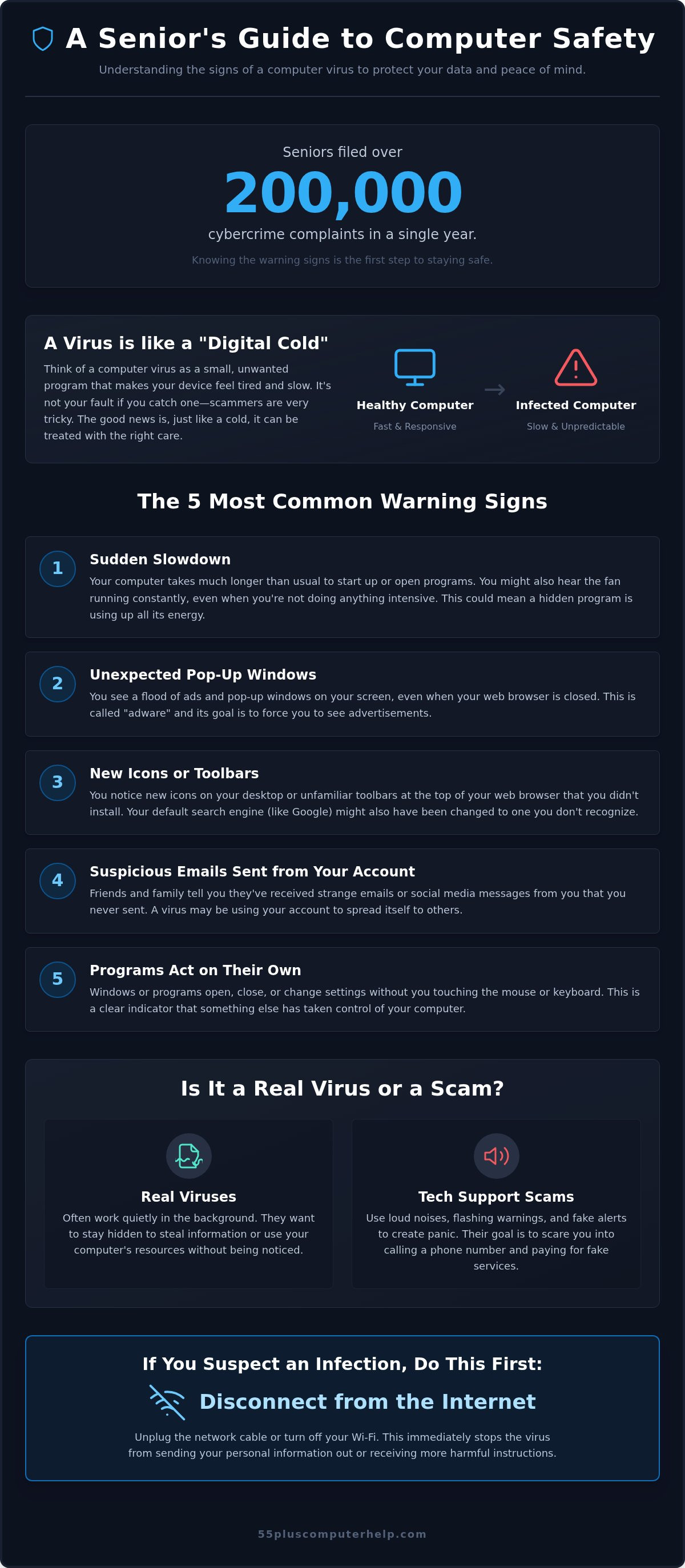
Think of a computer virus as a digital cold. It's a small, unwanted program that hitches a ride onto your device without an invitation. Just like a real cold makes you feel tired and slow, a virus drains your computer's energy. It's helpful to start with Understanding Computer Viruses so you can see they aren't mysterious or magical. They are simply pieces of software that shouldn't be there, and they can be removed with the right care.
If you think your device is sick, remember that it's never your fault. Scammers spend their whole day creating very tricky ways to get onto your screen. They use sneaky emails or fake buttons that look like real messages from friends. Even the most careful people can click the wrong thing sometimes. We focus on teaching you how to spot the signs of a computer virus for seniors so you can feel confident and secure again.
Not every problem you see is a dangerous virus. Sometimes you just have "junk" files, which are like old newspapers piling up in your hallway. They take up space and cause clutter, but they aren't trying to hurt you. Malware is a broader term for anything "bad" on your computer. Your antivirus software acts like a shield. It stays in the background to block these threats before they can cause real trouble for your personal data.
The Goal of Modern Malware
Most people who write viruses today want two things: your data or your attention. Some viruses just want to show you endless advertisements to make money. Others try to hide quietly in the background to watch what you do. They want to stay unnoticed for as long as possible so they can keep working. Catching these symptoms early is the best way to protect your privacy and your cherished family photos.
Digital Hygiene vs. Infection
Sometimes a slow computer isn't sick; it just needs a good "spring cleaning." Over time, old programs and temporary files can clog up the system and make things sluggish. It can be hard to tell if you have a software glitch or if you are seeing the signs of a computer virus for seniors. Be careful with "free" cleaner programs you see in online ads. These often cause more trouble than they solve and might even be viruses themselves. A patient mentor can help you tell the difference during a stress-free lesson.
The 5 Most Common Warning Signs to Watch For
Watching for the first signs of trouble can save you a lot of stress. You don't need to be a technical expert to notice when something feels off. Most infections show themselves through a few specific behaviors. By learning these signs of a computer virus for seniors, you can catch problems before they affect your private information or family photos.
Sign 1 & 2: Performance and Pop-ups
Is your computer suddenly very slow? If it takes several minutes just to open your email, a virus might be using up your system's energy. You might also hear your computer's fan whirring loudly even when you aren't doing much. This usually means the processor is working hard on a hidden task. Another major red flag is the appearance of unexpected pop-up windows. These ads might appear on your desktop even when you aren't browsing the internet. We call this adware, which is a program that forces unwanted ads on your screen. These ads are often aggressive and might multiply if you try to click them away.
Sign 3, 4, & 5: Strange Behavior and Messages
Sometimes the clues are more subtle. You might notice new icons on your desktop or toolbars in your web browser that you didn't install. If your search engine, like Google, suddenly looks different or sends you to strange websites, a virus likely changed your settings. It's also wise to check your "Sent" folder in your email occasionally. If friends or family tell you they received a strange message from you, a virus might be using your account to spread itself. Finally, if windows open or close on their own, your computer is acting on its own. This is a clear sign that a hidden program is in control. If you feel uneasy about what you see, our team can provide patient virus and malware removal to give you back your peace of mind.
Other small changes can signal an infection too. You might find that a specific folder or a few photos have suddenly disappeared. This can be very upsetting, but often the files are just hidden or moved. Catching these signs of a computer virus for seniors early makes it much easier to fix the problem without losing any data. Your device should be a helpful companion, not a source of mystery and worry.
Is it a Real Virus or a Tech Support Scam?
Sometimes, the scariest thing you see on your screen isn't actually a virus at all. It's a tech support scam. These scams are designed to look like official warnings to trick you into calling a fake number. While we discussed the physical signs of a computer virus for seniors earlier, it's just as important to recognize these digital lies. Scammers use a tactic called scareware to make you panic. They might play loud sirens through your speakers or show bright, flashing lights on your screen.
A real antivirus program is very quiet and professional. It will tell you it found a problem and that it's handling it. It will never use high-pressure tactics or tell you that your computer will explode. Most importantly, a real virus warning will never ask you to call a phone number. If you see a number on your screen, it's a scam. Companies like Microsoft or Apple will never call you out of the blue to tell you your computer is broken. They don't monitor individual home computers in that way.
Identifying Fake Warning Messages
Scammers are often careless with their writing. Look closely at any pop-up window that appears. You might see spelling errors or strange grammar that a big company wouldn't make. These messages also use very urgent language. They might say your data will be deleted in five minutes if you don't act now. This is just a trick to stop you from thinking clearly. A real computer warning will never ask for a credit card or gift cards to fix a software problem.
What to Do When a Scary Pop-up Appears
If a scary window takes over your screen, don't panic. You should never click "Cancel" or the small "X" inside the suspicious window. Sometimes, those buttons are fake and will just install more software. Instead, try to close your whole web browser program. If the screen is frozen and won't let you do anything, use the power button trick. Simply hold down the physical power button on your computer until the machine turns off completely.
When you turn it back on, the scam message should be gone. Never give remote access to your computer to someone who called you or appeared in a pop-up. Only let people you know and trust see your screen. Taking a moment to breathe helps you stay in control of the situation. You can always ask a patient mentor to check things over for you if you feel unsure about any signs of a computer virus for seniors you may have noticed.
What to Do Immediately if You Suspect an Infection
Finding a problem on your computer can feel scary. You might worry about losing your photos or having your identity stolen. Take a deep breath. You can take a few simple steps right now to protect yourself. These actions help stop the problem from getting worse while you decide on your next move. It's about taking back control of your device.
First, disconnect your computer from the internet. You can do this by unplugging the internet cable or turning off your Wi-Fi. This stops a virus from "talking" to the person who created it. It's like putting a sick pet in a quiet room so it can't spread germs to others. Second, stop using the computer for anything private. Do not log into your bank account, social media, or email until your device is checked. If you have trusted antivirus software, you can try running a scan. Finally, write down exactly what happened. Noting the signs of a computer virus for seniors as they occur helps a professional help you much faster.
Protecting Your Accounts
If you need to check your bank balance or send an urgent email, use a different device. Your smartphone or a tablet is a great choice. These devices usually aren't affected by the same viruses that hit computers. Never enter a password on a computer that is acting strangely. If you think a scammer might have seen your screen, call your bank or credit card company. They can put a temporary hold on your accounts to keep your money safe. Taking these steps helps you avoid becoming part of the $7.7 billion in losses reported by seniors in 2025 according to FBI data.
Gathering Information for Help
You don't need to remember every technical detail. Use your smartphone to take a photo of any strange windows or error messages on your screen. This is much easier than trying to write down long strings of numbers. Try to remember when the problem started. Did it happen after you opened an email from a friend or clicked a link on a website? Keeping a calm log of these symptoms saves time during the repair process. If you feel overwhelmed, you can reach out for patient virus and malware removal to walk through these steps together.
Some guides might tell you to "wipe" your computer or "format" the whole system. We don't recommend this as a first step. It often leads to losing your precious family photos and files. Most infections can be cleaned without such drastic measures. By staying calm and following these steps, you are already well on your way to a secure device. You have the power to handle this, and help is always available if you need it. Identifying the signs of a computer virus for seniors is the first step toward a stress-free solution.
How Professional Help Restores Your Peace of Mind
Dealing with technology issues can be draining. It's not just about the technical fix; it's about feeling confident again. When you work with a patient mentor, the process becomes a conversation rather than a chore. A professional doesn't just click buttons in silence. They explain what happened in plain English so you can understand your device better. This specialized support turns a frustrating afternoon into a sense of accomplishment.
Trying to fix a virus yourself can sometimes lead to more stress. Many online guides suggest "wiping" your system, but this is a drastic step that often deletes your cherished memories. Professional virus and malware removal is a much gentler and safer approach. It focuses on cleaning the infection while keeping your photos and files right where they belong. In many cases, this can even be done through remote support. You don't have to leave your favorite chair or invite a stranger into your home. A technician can help you over the internet while you watch the progress on your screen.
Beyond Just Fixing the Problem
A bad situation can actually become a great learning opportunity. Once your computer is clean, a patient expert can show you how to avoid similar issues in the future. These personalized lessons help you spot tricky scams before they ever land on your screen. You might also decide to set up automated backups. This ensures your family photos are always safe, even if something goes wrong later. Think of this service as having a "Tech Friend" who is always ready to help when you feel unsure. We've been providing this neighborly support since 2014, focusing specifically on the needs of those over 55.
Your Next Steps to a Clean Computer
You don't have to be a technical expert to enjoy a safe and fast computer. Technology is a tool for connection, and you deserve to use it without fear. You've already taken the most important step by learning the signs of a computer virus for seniors. This knowledge puts you in control of your digital life. If your device is acting strangely, remember that you don't have to face it alone. Reaching out for help is a sign of wisdom, not a lack of skill. We are here to provide the clarity and self-assurance you need to browse safely again.
Get patient, expert help with your computer today.
Enjoying a Safe and Stress-Free Digital Life
You now have the essential tools to spot the signs of a computer virus for seniors before they cause real trouble. Remember that a slow computer or a strange pop-up doesn't have to be a digital disaster. By staying calm and disconnecting from the internet, you protect your precious family photos and sensitive personal data. You deserve to use your device with total confidence and peace of mind every single day.
Our team has over 10 years of experience serving the senior community with a gentle, neighborly approach. We guarantee patient, jargon-free explanations that actually make sense. Every visit or remote session includes personalized training so you feel more empowered for the future. You don't have to handle technology worries on your own when a trusted expert is just a call away. We're ready to transform your frustration into a sense of security and accomplishment.
Schedule your patient in-home or remote tech support session and get back to browsing safely. Your computer is a wonderful way to stay connected with the people you love, and we are here to help keep it that way.
Frequently Asked Questions
Can my computer get a virus just by opening an email?
Opening an email is generally safe if you only read the text. However, you can get a virus if you click a link or open a file attached to that email. Scammers often make these links look like buttons for "tracking a package" or "viewing a photo." It's best to be cautious with any message from a sender you don't recognize.
Is it true that Macs do not get viruses?
No, Macs can definitely get viruses. While they used to be less common, modern scammers now target Apple computers just as much as Windows PCs. No matter what kind of computer you own, it's important to use a reliable antivirus program. Keeping your software updated is another great way to stay safe while you browse.
What is the best free antivirus software for seniors in 2026?
Microsoft Defender is a great free option that comes built-in with Windows. If you want extra protection, many seniors choose paid software for peace of mind. As of April 2026, Norton AntiVirus Plus starts at $29.99 per year for one device. McAfee Total Protection Basic is another popular choice that also starts at $29.99 for the first year.
How much does it typically cost to have a virus removed professionally?
Every service provider has a different way of charging for their time. Some businesses charge by the hour, while others offer a transparent and fixed-rate pricing structure. When you choose professional help, you aren't just paying for a repair. You are also getting a patient teacher who can explain what happened and how to prevent it from happening again.
Will a virus delete all of my family photos?
Most viruses are designed to show ads or steal information rather than delete your files. It's very rare for a virus to specifically target and delete your family photos. However, some infections can make your computer run so poorly that it's hard to find your files. Having a regular data backup plan is the best way to keep your memories safe.
What happens if I accidentally clicked on a suspicious link?
If you click a suspicious link, the first step is to stay calm. Disconnect from your Wi-Fi or unplug your internet cable right away. This stops the link from downloading more "junk" onto your device. Afterward, watch for the common signs of a computer virus for seniors, like new toolbars or a sudden slow-down. It's a good idea to have a professional check things over.
Can a virus spread from my computer to my tablet or smartphone?
It's very rare for a computer virus to spread directly to a tablet or smartphone. These devices use different systems that viruses usually can't understand. However, if a scammer gets your email password from your computer, they can log into your accounts on any device. This is why we always recommend changing your passwords on a different, clean device if you suspect an infection.
How often should I have my computer checked for malware?
We recommend having a professional check your computer for malware at least once or twice a year. Think of it like a regular tune-up for your car. These check-ups ensure your security software is working correctly and that no hidden programs are slowing you down. Regular maintenance helps you stay independent and confident while you enjoy your time online.


