
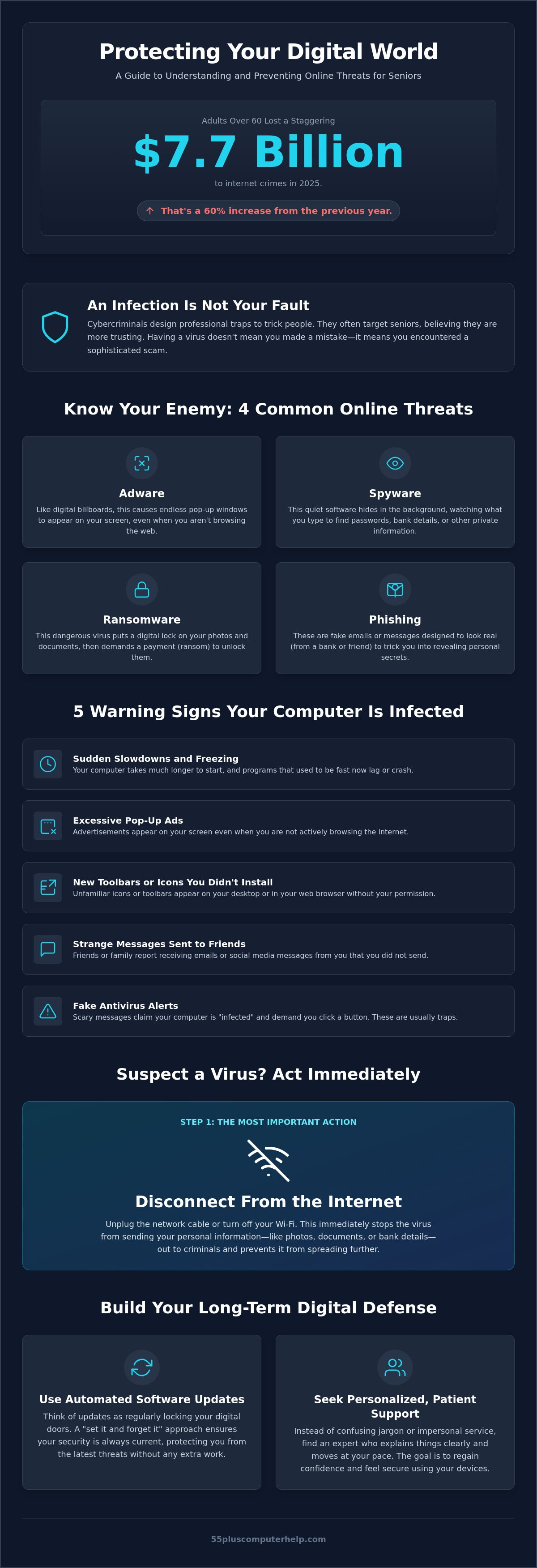
Did you know that adults over 60 lost a staggering $7.7 billion to internet crimes in 2025? This represents a 60 percent increase from the previous year, and it explains why many people feel anxious every time a strange window pops up on their screen. You shouldn't have to feel like a burden to your busy family or navigate confusing jargon just to keep your files safe. Finding reliable computer virus help for seniors is about more than just fixing a machine. It's about protecting your personal photos and your hard-earned security.
We understand that the digital world moves fast, especially with new AI scams and changing laws like the 2026 reauthorization of the Older Americans Act. You deserve a patient mentor who explains things clearly and moves at your pace. This guide will teach you how to identify red flags, remove malware, and use the internet without fear. We will walk through the exact steps to get your computer running fast again and ensure you have a trusted plan for whenever things go wrong.
Key Takeaways
- Understand why your computer might be acting like it has an "uninvited guest" and how to spot common warning signs like sudden slowdowns.
- Learn the essential first steps to take when you suspect a problem, such as disconnecting from the internet to protect your personal information.
- Discover why personalized computer virus help for seniors is more effective than "big-box" stores or waiting for inconsistent volunteer support.
- Find out how to build a lasting digital defense using automated software updates and a "set it and forget it" approach to security.
- Gain the confidence to use your devices safely by learning how to avoid scams and prevent future issues before they start.
What Are Computer Viruses and Why Are Seniors Targeted?
Think of a computer virus as a digital uninvited guest. Just like a person who walks into your home without being asked, a virus enters your system to cause trouble. It might slow things down, mess with your files, or try to take things that don't belong to it. These programs are often part of a broader category known as malware. Learning What is Malware and how it functions is the first step toward protecting your digital life. Most of these threats have a simple goal. They want to show you unwanted advertisements or steal your sensitive information for profit.
Many people feel embarrassed when they realize their device is infected. They often think they clicked the wrong button or made a silly mistake. It's important to understand that having a virus isn't your fault. These are professional traps created by criminals who spend their entire day designing ways to trick people. They often target seniors because they believe older adults are more trusting or less likely to recognize a technical scam. This is why finding patient computer virus help for seniors is so important. You deserve support that focuses on your peace of mind rather than making you feel like you did something wrong.
Common Types of Malware Explained in Plain English
Technical support can be full of confusing jargon. To help you stay informed, here are the four most common threats explained simply:
- Adware: These are like digital billboards. They cause endless windows to pop up on your screen, even when you aren't trying to shop or browse the web.
- Spyware: This software is very quiet. It hides in the background and watches what you type. Its main goal is to find your passwords or bank details.
- Ransomware: This is a scary type of virus. It puts a digital lock on your photos and documents. The criminals then demand a payment to give you the key.
- Phishing: These are fake emails. They look like they come from your bank or a friend, but they are actually bait designed to trick you into giving away your secrets.
The Emotional Impact of Cyber Threats on Independence
When your computer is compromised, it feels like a violation of your privacy. It's normal to feel anxious or frustrated. Some people get so worried that they stop using their computers altogether. This "digital withdrawal" can lead to isolation from friends and family. Tech problems are a normal part of life in 2026, and they don't have to take away your independence. Reliable computer virus help for seniors can help you regain your digital confidence. We want to transform that feeling of frustration into a sense of accomplishment and security.
5 Warning Signs Your Computer Has a Virus or Malware
Identifying a problem is the first step toward fixing it. Many people ignore small glitches until they become big headaches. If your device feels "off," it might be trying to tell you that something is wrong. Understanding these signs helps you decide when to seek professional computer virus help for seniors. It's better to address a small issue now than a major security breach later.
The most common sign of an infection is a significant slowdown. You might notice your computer takes several minutes to start instead of seconds. Programs that used to open quickly now lag or spin. This happens because malware uses your system's energy to perform its own tasks in the background. You might also see excessive pop-up windows. If ads appear on your screen even when you aren't browsing the internet, you likely have a virus. These issues can also cause your computer to freeze or crash for no clear reason.
Watch for these other red flags on your desktop:
- New toolbars or icons: These may appear in your web browser or on your screen even though you didn't install them.
- Strange messages: Friends might report receiving emails or chat messages from your account that you didn't send.
- Changed settings: Your "Home Page" might suddenly change to a website you don't recognize.
- Self-starting programs: Applications might open or close on their own without your input.
Performance Red Flags to Watch For
Sometimes your computer gives physical clues. Does your computer fan sound like a jet engine? A loud fan often means your processor is working too hard. This happens when a virus runs hidden programs that eat up your memory and generate heat. You should also watch for fake antivirus alerts. These are messages that claim your computer is "infected" and urge you to click a button to fix it. These are usually traps designed to scare you into downloading more malware. If you see these signs, our team can help you regain your confidence with our virus and malware removal services.
Unusual Pop-ups and Security Warnings
Scammers are very good at making their messages look official. They might copy the colors and logos of companies like Microsoft or Apple. A real Windows update will usually happen quietly in your settings menu. It will never ask you to call a phone number. If a window pops up and tells you to call "Technical Support" immediately, it is a scam. These browser-based errors aren't actually part of your computer system. They are just malicious websites trying to trick you. For more information on staying safe, you can review CISA cybersecurity resources for seniors. This government guide offers excellent tips on recognizing modern threats. If your computer is acting strangely, don't wait for it to get worse. Acting quickly can prevent your personal information from being stolen.
Professional Virus Removal vs. Free Volunteer Tech Support
When your computer starts acting up, you have several options for help. Some people head to big-box stores. Others look for free volunteer groups. Finding the right computer virus help for seniors depends on what you value most. Corporate stores often treat you like a number in a long line. They focus on speed and volume rather than your specific needs. Professional support from a specialist offers a different experience. It provides a "clean sweep" of your system that removes hidden threats a volunteer might miss.
Free services are wonderful for basic questions. However, they often come with long wait times. You might wait days for a call back. Inconsistent results are also a concern. A volunteer might know how to use an app but lack deep security training. Professional technicians understand the complex ways malware hides in 2026. They ensure your machine is truly safe before handing it back. You get the peace of mind that comes from knowing a specialist handled your data with care.
Why Generic Tech Support Often Falls Short for Seniors
Technical experts often use confusing jargon. They might talk about "rebooting the kernel" or "partitioning a drive." This language isn't helpful when you just want to see your family photos. Rushed service models are another problem. Corporate technicians are often timed on their calls. This pressure makes them move too fast. It leaves you feeling more confused than before. We believe in-home or personalized remote sessions are better. You should feel comfortable and in control of the process at every step.
The Value of a Patient, Senior-Focused Tech Mentor
We don't just fix the problem. We turn virus and malware removal into a teaching moment. This approach helps you regain your digital confidence. Building a relationship with one technician is valuable. They learn your computer's history and your specific goals. You will always understand the "why" behind every security step we take. This specialized focus ensures you aren't just getting a repair. You are getting an educational experience that empowers you to use the internet safely. Our goal is to make you feel like a capable user, not a burden.
What to Do Immediately When You Suspect a Virus
Suspecting a virus can feel like a digital emergency. You might feel a rush of panic or worry about your personal files. Take a deep breath. Your first goal is to stop the virus from doing more damage. Getting immediate computer virus help for seniors starts with a few simple, manual steps you can do right now. These actions protect your data while you prepare to speak with a professional.
Follow these steps to secure your device:
- Disconnect from the internet: Turn off your Wi-Fi or unplug the internet cable. This stops the virus from communicating with the person who sent it.
- Stop typing immediately: Don't enter any passwords, bank details, or credit card numbers while the system is acting strangely.
- Close your programs: If a pop-up appears, don't click the 'X' inside the window. That 'X' is often a trick to install more malware. Use the main browser 'X' at the very top of your screen instead.
- Grab a pen and paper: Write down exactly what happened right before the trouble started.
- Contact a specialist: Reach out to a trusted computer help for seniors professional for a safe evaluation.
Securing Your Information Before Seeking Help
If your screen is frozen and you can't click anything, don't worry. You can safely turn off your computer by holding down the physical power button for ten seconds. This "hard shut down" stops all malicious activity immediately. Avoid searching Google for "free virus cleaners" on another device. Many of those programs are actually professional traps designed to look like help. Instead, gather the names of the accounts you use most, such as your email or bank. You don't need to write down your passwords for the technician. A good professional will never ask for your passwords.
How to Describe Your Computer Issues to a Technician
Talking to a tech expert can feel intimidating if you don't know the right words. Use the "What, When, and Where" framework to keep things simple. Tell the technician what happened, when it started, and where you were on the internet at the time. Please don't feel silly about your technical problems. Every technician has seen these issues hundreds of times before. You can ask your technician if they specialize in helping people over 55. This ensures they have the patience and clear language you deserve. Finding reliable computer virus help for seniors ensures you have a partner who understands your specific concerns. If you need a friendly expert to take a look, you can schedule a personalized virus removal session today.
Building Your Digital Defense with Professional Support
Once your computer is clean, your next step is making sure it stays that way. Building a strong defense doesn't have to be a chore. It's about setting up a few simple habits that protect you automatically. This is where professional computer virus help for seniors makes a real difference. We help you set up automated updates so your computer fixes its own security holes while you sleep. These updates are like fixing a broken lock on your front door before a burglar finds it.
A "set it and forget it" approach is best for your security software. You shouldn't have to worry about clicking buttons or running manual scans every day. A good program stays in the background and keeps a quiet watch for you. We also emphasize the importance of regular data backup and recovery. This is your digital insurance policy. If a virus ever does manage to get through, your precious photos and documents are still safe in a second location. Having a backup takes the fear out of using your computer.
Essential Security Software and Safe Habits
Most modern Windows and Mac computers come with great built-in security tools. You just need to know how to turn them on. We also teach the concept of Two-Factor Authentication, or 2FA. Think of this as a second key for a very important door. Even if a criminal steals your password, they can't get in without that second key on your phone. To further strengthen your home office setup, you can explore Cyber security options that provide professional-grade protection. To make things even safer, we help you create pass-phrases. These are long sentences like "IlovemyGreYcat2026!" They are much easier for you to remember than random strings of numbers, but they are nearly impossible for a computer to guess.
How 55 Plus Computer Help LLC Restores Your Peace of Mind
Our team is committed to providing patient, one-on-one technical support that respects your time. We know that technology can feel overwhelming when it changes so fast. That's why we combine every repair with personalized technology training. We don't just click buttons for you. We explain what we are doing in plain English so you feel empowered to handle it next time. This educational approach helps you spot a scam email or a fake pop-up before you ever click on it.
Taking the first step toward a secure digital life is easy. You can schedule a remote session or an onsite visit to have your system checked by a friendly expert. We will look at your settings, verify your backups, and answer any questions you have. Our goal is to transform your technical frustration into a sense of accomplishment. You deserve to use the internet with confidence and the knowledge that your information is well-protected.
Take Control of Your Digital Safety Today
You now have the knowledge to spot warning signs like sudden slowdowns and strange pop-ups. You also have a clear plan for what to do if you suspect an uninvited guest is on your system. By setting up automated updates and reliable backups, you can protect your personal photos and your identity. Finding the right computer virus help for seniors means choosing a partner who understands your unique needs and values your independence.
Since 2014, we've focused on providing patient, jargon-free support that prioritizes your peace of mind. We don't just fix the problem; we teach you how to stay secure. We offer both in-home and remote assistance to fit your lifestyle. You don't have to navigate these complex systems alone or feel like a burden to your family. Get Patient, Professional Virus Help Today and start using your devices with confidence again. Your security is our top priority, and we are ready to help you every step of the way.
Frequently Asked Questions
Is it worth fixing an old computer that has a virus, or should I buy a new one?
It depends on the age and speed of your device. If your computer is less than five or six years old, a professional cleaning can often make it run like new again. Most viruses are software problems that don't damage your actual hardware. Repairing your current machine saves you the high cost of a new one and the frustration of learning a different system.
Can a computer virus steal my bank account information just by being on my screen?
A virus cannot usually see your bank balance just by sitting on your desktop. However, certain types of malware can record the keys you press when you log in to your accounts. This is why you should stop entering any sensitive information the moment you suspect a problem. Getting expert computer virus help for seniors ensures these hidden recorders are removed before you log in again.
Do I need to pay for antivirus software, or is the free version good enough?
Free tools like Microsoft Defender offer solid, basic protection for many users. Paid versions often provide extra features like identity theft alerts and more automated scanning options. If you prefer a "set it and forget it" approach with more comprehensive coverage, a paid subscription from a provider like AntivirusTotalProtection.com can provide extra peace of mind and easier support.
What is the difference between a 'virus' and a 'scam'?
A virus is a malicious program that lives on your computer and disrupts your system. A scam is a deceptive trick used by a person to get you to give up money or secrets. Often, a scammer will use a fake phone call or email to trick you into downloading a virus. Both threats require different types of caution to stay safe.
How can I tell if a 'Technical Support' phone call is legitimate or a scam?
Legitimate tech companies like Microsoft or Apple will never call you out of the blue to report a problem. If you receive an unsolicited call from someone claiming your computer is infected, it is a scam. Hang up the phone immediately. Real technical support only happens when you are the one who reaches out for help first.
Will I lose all my photos and emails if my computer needs a virus removal?
In almost every case, you will keep all your precious memories and messages. Professional computer virus help for seniors focuses on deleting the malicious files while protecting your personal data. We understand how important your photos are, so we take every precaution to ensure they stay safe during the cleaning process.
Can my iPad or smartphone get a virus just like my computer?
Yes, your mobile devices can also face security threats. While they don't get traditional viruses as often as PCs, they can still be affected by malicious apps or "phishing" links in text messages. Keeping your tablet or smartphone software updated is the most effective way to prevent these mobile security issues from happening.
How often should I have a professional check my computer for security updates?
Having a professional check your system once or twice a year is an excellent habit. These regular check-ups ensure your security software is working correctly and your important updates are installed. It is a simple, proactive way to maintain your digital confidence and stop small glitches from turning into major security concerns.


