
Last week, a local grandmother sat down to organize her digital photo albums, only to find that her computer would not turn on. It's a heart-sinking moment that many people fear, especially as technology seems to get more complicated every year. You've spent a lifetime building a legacy of memories. The thought of losing those digital files is truly overwhelming. Finding reliable data backup for seniors denver shouldn't feel like a stressful search through confusing manuals or technical jargon.
It's completely normal to feel anxious when you're told to sync your drive or upload to the cloud. You want to keep your memories safe, but you don't want to push the wrong button and delete everything. This guide will show you how to easily and securely back up your photos and documents so you never have to worry about losing what matters most. We'll explore simple ways to automate your digital filing and discuss the best tools available in 2026. You'll learn how to stay secure after the end of Windows 10 support and gain the confidence to manage your technology independently. By the end, you'll have the peace of mind that comes from knowing your history is safe.
Key Takeaways
- Understand how to preserve your digital legacy, including irreplaceable family photos and personal letters, so they stay safe for future generations.
- Discover the differences between physical drives and cloud storage to find the best fit for your data backup for seniors denver needs.
- Learn the "3-2-1 rule," a simple gold standard for ensuring you always have multiple copies of your most important files.
- Follow a clear, step-by-step process to identify your essential folders and set up your first automated backup with confidence.
- See how personalized, patient mentoring can transform technical confusion into peace of mind and digital independence.
What is Data Backup and Why is it Essential for Seniors?
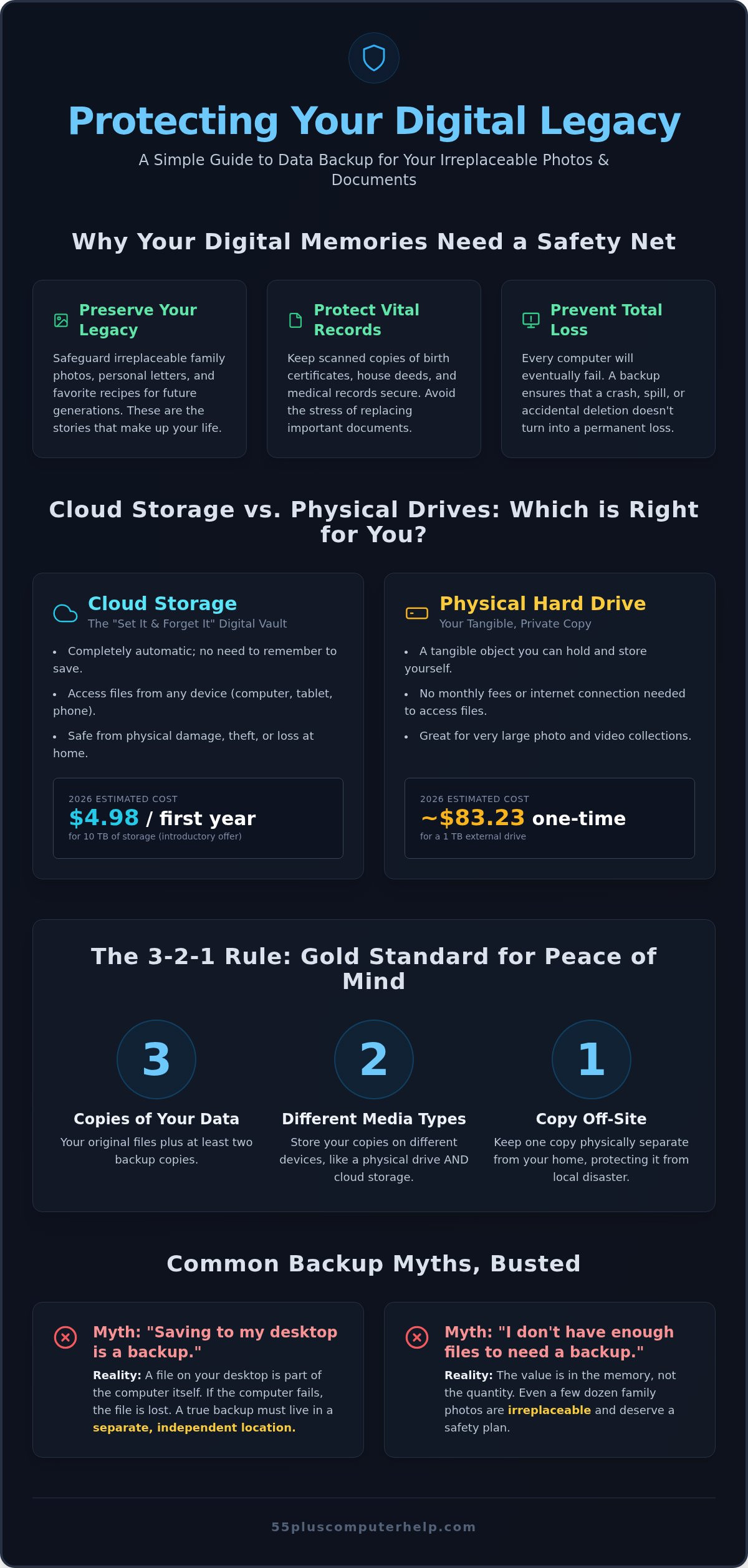
Understanding What is Data Backup starts with a very simple idea. It's a safety copy of your most important digital items. Think of it as a digital safety net for your memories. If your main device stops working, your files stay safe in a second location. For those looking into data backup for seniors denver, it's about more than just technology. It's about protecting the stories and documents that make up your life. Computers are helpful, but they're also fragile. They can fail because of a sudden internal crash, an accidental deletion, or even a simple coffee spill on the keyboard. A backup ensures these small accidents don't turn into permanent losses.
The Emotional Value of Your Digital Files
Your computer holds what we call a digital legacy. This includes the photos of your grandkids' first steps, your favorite family recipes, and personal letters saved over many years. Photos are the most common items lost by senior computer users. Unlike a physical photo album that sits on a shelf, a digital file can disappear in a second if the hard drive fails. You likely also have scanned copies of vital records. These might be birth certificates, house deeds, or medical records. Keeping these safe helps you maintain your independence. If technology fails, you won't have to spend weeks trying to replace government documents. You'll have the confidence of knowing exactly where your copies are kept.
Common Myths About Saving Files
Many people believe that saving a file to their computer desktop is the same as a backup. This is a common misunderstanding. If that specific computer breaks, the file on the desktop is gone too. A real backup must live in a separate place, like an external drive or a secure internet locker. Another myth is thinking you don't have enough files to need a professional system. Even if you only have a few dozen family photos, those items are irreplaceable. You don't need thousands of files to justify a safety plan. The reality is that every computer will eventually stop working. Hardware has a limited lifespan. By setting up data backup for seniors denver, you take control of your digital life before a problem occurs.
Cloud Storage vs. Physical Drives: Which is Right for You?
Choosing the right way to save your files is a personal decision. It often comes down to how you prefer to interact with your technology. When looking for data backup for seniors denver, you'll generally choose between a physical drive you can hold or a digital service called the cloud. Both options provide excellent security for your photos and documents. Understanding the differences helps you pick the one that feels most comfortable for your daily routine. You don't need to be a tech expert to make this choice; you just need to know what fits your lifestyle.
The Benefits of Physical External Hard Drives
A physical external hard drive is a small, lightweight box that plugs into your computer's USB port. Many people find comfort in having a tangible object they can see and touch. It feels like keeping a real photo album on a sturdy shelf. One major benefit is the cost structure. You make a one-time purchase, and the drive is yours for years without any monthly bills. However, prices have shifted recently. As of 2026, a 1TB external hard drive costs approximately $83.23. This is a noticeable increase from previous years due to high demand from large data centers. These drives are excellent for large photo collections because they don't rely on your internet speed to save or open files.
Understanding the Convenience of Cloud Storage
Think of cloud storage as a secure bank vault located on the internet. Instead of saving files to a box on your desk, your computer sends copies to a high-security server through your Wi-Fi. The best part of this method is that it's often completely automatic. You don't have to remember to plug in a cable or click a "save" button every day. If you take a photo on your smartphone, it can appear on your tablet or computer instantly. In 2026, some services offer very affordable entry points, such as 10TB of storage for just $4.98 for the first year. This "set it and forget it" approach is ideal if you want peace of mind without adding extra chores to your schedule.
If you prefer a one-time payment and like holding your backup, a physical drive is a great choice. If you want your files to save themselves in the background, the cloud is likely better for you. If you feel stuck between the two, our team offers Data Backup and Recovery services to help you set up the system that fits your life. Many seniors choose to use both for maximum safety. This ensures that even if a physical drive is lost or damaged, your memories remain safe in the digital vault.
The Simple 3-2-1 Rule for Total Peace of Mind
Many people feel a great sense of relief once they save their first file to an external drive. It's a wonderful first step toward protecting your digital legacy. However, technology experts often recommend a specific strategy called the 3-2-1 rule. This is considered the "Gold Standard" of file safety. When you follow this rule, you don't have to worry about a single device failure wiping out years of memories. It provides a structured way to look at data backup for seniors denver without getting lost in complicated technical details. This method is all about building layers of protection around your most precious files.
- 3: Keep three copies of your data. This includes the original file on your computer and two separate backup copies.
- 2: Use two different types of storage. Don't keep both backups on the same type of device. You might use one physical external drive and one cloud storage account.
- 1: Keep one copy in a different location. This protects you from local disasters. Since the cloud lives on the internet, it naturally counts as an "off-site" location.
Why One Backup is Often Not Enough
Relying on just one backup can be risky. Imagine a situation where a house fire or a flood occurs. If your computer and your backup drive are sitting on the same desk, both could be lost at once. Some people rely solely on a single USB thumb drive. These small sticks are very easy to lose or damage. They can also stop working without any warning. The 3-2-1 rule removes the fear of "what if" by ensuring your files exist in multiple places. If one system fails, you have two others ready to go. It's a simple way to guarantee your family photos stay safe no matter what happens.
Making the 3-2-1 Rule Manageable
You don't have to set everything up in a single day. It's perfectly fine to start small with just one backup and build your system over time. The best way to stay consistent is through automation. Modern software can handle the 3-2-1 steps in the background. You won't have to remember to copy files or plug in drives every afternoon. This is where a patient mentor can make a big difference. We can help you choose the right tools and set them up so they run themselves. Having a professional guide ensures you feel confident in your system. You'll gain the independence to enjoy your computer, knowing your most precious documents are always protected.
Step-by-Step: Setting Up Your First Data Backup
Taking the first step toward securing your files is a big achievement. It moves you away from the fear of loss and toward total control. Setting up data backup for seniors denver doesn't have to be a marathon. It's a series of small, manageable tasks. By following a clear path, you can ensure your most precious memories stay safe without feeling overwhelmed. Let's walk through the process together, one step at a time.
- Step 1: Identify your most important folders. Most of your life's work and memories live in the "Pictures" and "Documents" folders. Focus on these first.
- Step 2: Choose your primary backup method. Decide if you want the physical comfort of an external drive or the automatic ease of the cloud.
- Step 3: Connect your device or sign up. Plug in your drive or create an account with a trusted cloud service.
- Step 4: Run the initial backup. Click the "Start" or "Backup Now" button. It might take some time the first time, so wait for the "Success" message.
- Step 5: Schedule a check-in. Set a reminder on your calendar to check your backup once a month. This ensures everything is still running smoothly.
Organizing Your Files Before You Start
A little bit of preparation makes the whole process faster. Start by naming your folders clearly. Instead of "New Folder," try "Grandkids 2024" or "House Deeds." This helps you find what you need later. You should also take a moment to delete "digital clutter." These are blurry photos or duplicate documents you no longer need. Deleting these makes your backup faster and can even make cloud storage cheaper. If you can't find a file, check the "Downloads" folder. Often, important items get stuck there after you save them from an email.
Verifying Your Backup is Working
Once your backup finishes, you want to be sure it actually worked. You can perform a "Spot Check" by opening your backup drive or cloud folder. Try to open one photo and one document. If they look right, your backup is successful. Many systems use simple icons to tell you the status. A green checkmark usually means everything is safe. A red X might mean the computer was turned off during the process. If you see an "Error" message, don't panic. It often just means a cable was loose or the internet flickered. Simply restart the process and it should fix itself.
If you find these steps confusing or just want someone to handle the technical parts, we can help. Our team provides Data Backup and Recovery services right in your home. We'll set everything up and show you exactly how to check it, so you never have to worry about your digital legacy again.
How 55 Plus Computer Help Protects Your Digital Life
Protecting your digital legacy is a journey you don't have to take alone. Since 2014, 55 Plus Computer Help has focused on helping people just like you. We understand that technology can sometimes feel intimidating or even frustrating. That's why we focus on a patient, mentor-based teaching style. Whether you use a PC, a Mac, an iPad, or a smartphone, we create a plan that fits your specific needs. Our goal is to provide the best data backup for seniors denver by focusing on your comfort and long-term security.
We offer two ways to get the help you need. Our mentors can come directly to your home for onsite assistance. If you prefer, we can also help you over the phone through remote support. Providing reliable data backup for seniors denver means more than just plugging in a drive. We don't just set up your backup system and leave. We take the time to teach you how it works. You'll learn how to verify your files are safe and what to do if you have a question. This approach builds your confidence so you can use your technology independently.
In-Home Support Tailored to Your Pace
There's a special comfort in having a mentor sit right at your desk. You get to use your own equipment, your own mouse, and your own chair. This makes learning much easier. We never rush our sessions. We stay until you feel completely comfortable and all your questions are answered. Our mentors handle the technical heavy lifting, like configuring settings or organizing folders. This lets you focus on the results: knowing your family photos and recipes are safe. You get the benefit of professional setup without the stress of doing it yourself.
Ongoing Support and Technology Training
Our help doesn't stop at data backup. We provide a wide range of services to keep your digital life running smoothly. This includes virus and malware removal to keep your computer healthy. We also offer personalized lessons to help you master your email or learn new software. Staying connected with family through video calls or sharing photos becomes much simpler with a little guidance. We translate specialized concepts into plain language so you always stay in control.
When you choose 55 Plus Computer Help, you're choosing a local expert who cares about your community. We believe that technology should be a tool for joy, not a source of stress. Let us help you secure your memories and maintain your independence. Schedule your patient data backup session today and enjoy the peace of mind you deserve.
Secure Your Memories for the Future
Your digital life is a collection of your most precious stories. Protecting those memories with reliable data backup for seniors denver ensures your legacy stays safe for your family. Whether you choose the physical comfort of an external drive or the automated ease of the cloud, following the 3-2-1 rule provides the ultimate peace of mind. You've worked hard to build these memories; they deserve a solid safety net that works every single day without fail.
Since 2014, we've focused on providing specialized technical expertise for those 55 and older. Our patient mentors speak your language and avoid confusing jargon. We have over 10 years of experience helping neighbors master their technology with confidence. You don't have to tackle technical setup alone or feel frustrated by complex systems. We're here to be your trusted local experts and guides. Get Patient, In-Home Tech Support for Your Data Backups and let us handle the heavy lifting for you. Taking this small step today means you can enjoy your computer without worry tomorrow. Your digital history is worth protecting.
Frequently Asked Questions
Is "The Cloud" really safe for my private documents?
Yes, major cloud services use advanced encryption to keep your files private. This means your data is turned into a secret code that only your password can unlock. In 2026, companies are even more focused on privacy because of laws like the Colorado Privacy Act. Using a secure cloud provider is often safer than keeping files on an old computer. It's a reliable way to protect your sensitive personal information from digital threats.
How much storage space do I actually need for my photos?
Most people find that 1TB of storage is more than enough for thousands of high-quality photos. For context, a 1TB drive can hold roughly 250,000 pictures taken on a standard smartphone. If you have many years of family videos, you might need a bit more space. When setting up data backup for seniors denver, we check your current file sizes. This helps us pick a plan that fits your collection perfectly without any waste.
Do I need to leave my computer on all night for a backup to work?
You don't usually need to leave your computer on all night after the first backup is finished. The very first time you save your files, it can take several hours depending on your internet speed. After that, the system only saves new or changed items. These daily updates usually take just a few minutes of your time. You can schedule these small backups to happen while you're eating dinner or reading a book.
Can I back up my smartphone and my computer to the same place?
Yes, you can use the same cloud account to save files from your phone, tablet, and computer. This is one of the biggest benefits of modern technology. When you take a photo on your phone, it can automatically upload to your secure digital vault. You can then view that same photo on your computer screen later. It's a simple way to keep your entire digital life organized and safe in one location.
What is the difference between a backup and "syncing" files?
A backup is a separate copy of your files kept for safety, while syncing ensures the same files appear on all your devices. If you delete a synced file on your phone, it usually disappears from your computer too. A true backup keeps a permanent copy that stays safe even if you delete the original by mistake. We help you understand these differences so you don't accidentally lose your irreplaceable digital memories.
What happens if I forget my password to my cloud backup service?
You can reset your password using your email address or a backup phone number. Most services have a "Forgot Password" link on their login page. They will send you a secure code to verify your identity. It's a good idea to write your password down in a safe, physical book at home. We can show you how to set up these recovery options so you never lose access to your important files.
How often should I replace my external hard drive?
You should consider replacing your physical external drive every five to seven years. Like any piece of machinery, the internal parts can wear out over time. Even if the drive seems to be working perfectly, it's safer to move your data to a new device before the old one fails. This is a key part of maintaining data backup for seniors denver. Regular hardware updates keep your memories safe from aging.
Will a backup protect me from computer viruses?
A backup won't stop a virus from entering your computer, but it will help you recover your files if one causes damage. Some viruses can lock your files and demand payment to get them back. If you have a clean backup, you can simply restore your photos and documents after the virus is removed. It's the best insurance policy against digital threats. We also offer virus removal services for your extra protection.


