Did you know that online scams cost Americans nearly $119 billion in 2026? With AI technology making fake messages look more realistic than ever, it's completely normal to feel a bit of anxiety when you check your inbox. You might worry about accidentally clicking a link that puts your personal data at risk. It can be very confusing when a scam message uses the exact same logos and colors as your real bank. Learning how to tell if an email is legitimate is the best way to protect your peace of mind and your finances.
We know you value your independence and want to stay safe while staying connected with family and friends. You deserve to feel certain every time you open a message. This easy to follow guide will teach you how to confidently spot the difference between a real message and a scam. We'll walk through a simple checklist to verify any sender, show you how to safely inspect links before you click, and explain exactly when it's time to hit the delete button. You'll also learn where to find a helping hand if you ever feel unsure about a message.
Key Takeaways
- Learn a simple three-step process to inspect any message before you click or reply. You'll discover exactly how to tell if an email is legitimate by checking the sender's real address instead of just their display name.
- Master the "hover technique" to see where a link really leads without putting your computer at risk. This simple trick helps you spot a fake website in seconds.
- Understand why a professional logo or your own name doesn't always mean a message is safe. We show you how to look past the graphics to find the real clues of a scam.
- Find out how to use the "Second Channel" rule to verify a suspicious request through a trusted source. This method ensures you never have to guess if a message from your bank is real.
- Discover how personalized training can help you build the confidence to manage your inbox with ease and security.
Why Modern Email Scams Look So Convincing
It used to be easy to spot a fake email. You might remember seeing messages with strange symbols or obvious spelling mistakes. Today, scammers use advanced tools to create messages that look identical to the real thing. This makes it much harder to know when to trust your inbox. Learning how to tell if an email is legitimate starts with understanding how these tricks work. It can feel overwhelming at first, but once you know what to look for, you'll feel much more confident.
Scammers often use emotional triggers to get what they want. They might send a message saying your bank account is locked or that you've won a large prize. These messages are designed to make you feel fear or excitement. When you feel a rush of emotion, you might act quickly without checking the details. They want you to panic and click before you have time to think things through.
While some junk mail is just annoying, other messages are part of more dangerous different types of email scams designed to steal your identity. A harmless spam message usually just wants to sell you a product you don't need. A phishing attempt, however, is a direct attack. Its goal is to trick you into giving away your credit card number, social security details, or login passwords.
The Problem with "Looking Official"
Scammers are experts at copying layouts. They can easily steal the exact logos, colors, and fonts from a real company website. They spend hours making sure the email looks professional because they know a clean design builds trust. Spoofing is a digital mask used by scammers. It allows them to hide their true identity behind a name or brand you recognize. Even if the email includes your full name, it doesn't mean it's safe. Many scammers find personal details through public records or previous data leaks from large companies.
Why Seniors are Often Targeted
Many scammers specifically target the 55+ community because they rely on the politeness and trust that many seniors have. They use familiar brands like Medicare, Amazon, or major banks as bait to grab your attention. Their tactics are often focused on three main goals:
- They want you to feel a sense of urgency so you don't ask for advice.
- They hope you'll click a link that installs hidden software on your device.
- They want to gain access to your private files or financial accounts.
Understanding these motivations is a big part of knowing how to tell if an email is legitimate. It's about looking past the pretty graphics and checking the real facts behind the message. You don't have to be a tech expert to stay safe; you just need to know which details deserve a second look.
The 3-Step Inspection for Every Email
You don't need to be a computer programmer to protect your personal information. Most of the time, you can spot a fake message just by looking closer at three specific things. This section will show you how to tell if an email is legitimate by using your own eyes and a little bit of patience. These steps work whether you are using a traditional desktop computer or a modern tablet.
The goal is to move from a feeling of uncertainty to a position of control. When you receive a message that asks you to do something, don't rush. Take a moment to perform these three checks. It only takes a minute, and it can save you a world of trouble. If you ever feel like you need more practice, our email troubleshooting and training can help you master these skills in a relaxed, one-on-one setting.
Checking the "From" Address Properly
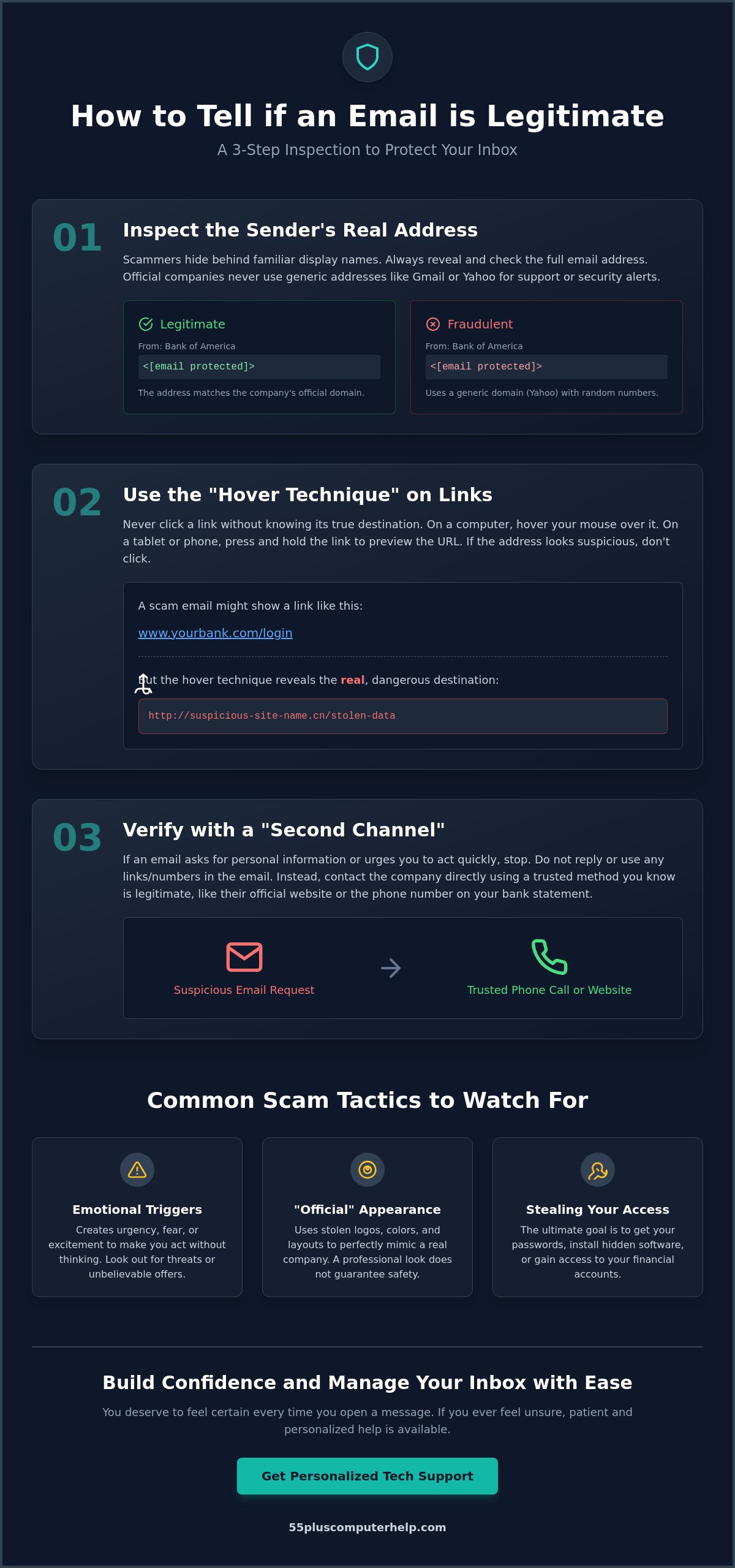
The first step is to look at the sender. Scammers often use a display name like "Netflix Support" or "Bank of America" to hide their true identity. On a computer, you can usually see the full email address next to the name. If you're on a smartphone or tablet, you may need to tap the sender's name once to reveal the hidden address. A real company will always send messages from their official domain. If you see misspellings like "amozon.com" or a long string of random numbers and letters, it's a scam. Trusted companies don't use generic Gmail or Yahoo addresses for their official business communications.
The "Hover" Technique for Links
The second step involves checking links before you click them. You should never click a link until you know exactly where it's going. On a computer, simply hover your mouse pointer over the link without clicking it. The real website address will appear in the bottom corner of your screen. If you're using a tablet, you can "long-press" the link by holding your finger down on it for a few seconds. A small box will pop up showing the destination URL. If the address looks strange or doesn't match the company name, don't touch it. You should also avoid clicking "Unsubscribe" in an email you don't recognize. This actually tells the scammer that your email account is active, which often leads to even more junk mail.
Identifying the Urgency Trap
The final step is to evaluate what the email is asking you to do. Scammers want you to feel rushed so you don't notice the red flags. They use common tricks of phishing attacks to create a false sense of panic. You might see phrases like "Account Suspended" or "Action Required Immediately." They often give you a 24-hour deadline to reply. Legitimate companies rarely give you such short deadlines via email. If a message feels threatening or scary, take a deep breath. Scammers rely on you acting before you think. Being able to pause and evaluate the "Ask" is a key part of how to tell if an email is legitimate.
Legitimate vs. Fraudulent: Spotting the Difference
Once you have checked the sender's address and the hidden links, it is time to look at the message itself. The words and tone a company uses can provide huge clues. Large businesses spend a lot of money to make sure their communications are professional and accurate. Scammers, on the other hand, often make small mistakes that reveal their true intentions. Learning how to tell if an email is legitimate often comes down to noticing these subtle differences in the body of the message.
Imagine you receive two emails from your bank. The first one addresses you by your full name and tells you that your monthly statement is ready to view. It does not ask you to click anything specific but suggests you log in to your account as usual. The second email starts with "Dear Customer" and claims there is a problem with your account. It demands that you click a large red button to "Verify Your Identity" immediately. This second message is a classic example of a scam. Real companies want to keep you informed, while scammers want to make you panic.
Personalization and Grammar
Real companies usually have your information on file. If you have an account with a bank or a store, they will almost always use your full name in the greeting. When you see a message that starts with "Dear Valued Member" or "Dear Customer," you should be cautious. This is often a sign of a bulk scam sent to thousands of people at once. You should also look closely at the spelling and grammar. While a single typo can happen to anyone, scammers often use translation tools that create awkward phrasing. If a sentence feels "clunky" or uses strange word choices, it's likely not from a professional organization.
The Nature of the Request
The most important thing to remember is that legitimate companies will never ask for your most sensitive data through an email. This includes your password, your Social Security number, or your credit card PIN. If an email asks for this information, it is a fraud. It's that simple. Legitimate businesses also handle links differently. A real bank email will often suggest you go to their homepage or use their official app. They rarely link you directly to a "login" page where you have to type your credentials.
You can stay safe by following one simple rule. If an email asks you to log in to an account, don't click the link in the message. Instead, open your web browser and type the company's address in yourself. This ensures you are going to the real website and not a fake version created by a criminal. Taking this small extra step gives you total control over your digital safety and helps you master how to tell if an email is legitimate.
What to Do if You Are Not 100% Sure
Even after you have performed your three-step inspection, you might still feel a lingering sense of doubt. This is completely normal. Scammers are constantly finding new ways to make their messages look real. If you have even a small "gut feeling" that something isn't right, the safest choice is to stop what you are doing. You don't have to make a decision right away. Knowing how to tell if an email is legitimate sometimes means knowing when to step away from your screen and verify the facts through a different path.
Your peace of mind is more important than any "urgent" request in your inbox. When you aren't sure, don't feel pressured to click or reply. Instead, follow a few simple steps to get the answers you need without putting your data at risk. If you ever feel overwhelmed by these decisions, our experts are here to help with email setup and troubleshooting to make your digital life much simpler.
The "Second Channel" Verification
The "Second Channel" rule is one of the most powerful tools you have. If an email from your bank, Medicare, or a utility company seems suspicious, do not use any contact information provided inside that message. Instead, use a channel you already know and trust. This could be the phone number printed on the back of your credit card or a monthly paper statement you have in your files. You can also open a new window in your browser and go directly to the official website by typing the address yourself. Never call a phone number or click a link found inside the suspicious message. By reaching out through a trusted source, you bypass the scammer entirely and get the truth from the real company.
Reporting and Deleting
If you decide a message is a scam, you should disarm it immediately. The simplest and most effective way to do this is to delete the email. Once it is moved to your trash folder, it can no longer hurt you. Most popular email services like Gmail, Outlook, or AOL also have a "Report Phishing" button. Clicking this does two things. First, it removes the message from your sight. Second, it helps your email provider learn what modern scams look like so they can protect other people in your community.
If you realize you clicked a link by mistake, don't panic. Close your web browser immediately. It is also a good idea to run a quick security scan on your device. If you are worried that a scammer might have gained access to your files, we provide professional virus and malware removal to ensure your computer is clean and secure. Taking action quickly can prevent a small mistake from becoming a big problem. This proactive approach is a key part of how to tell if an email is legitimate and staying safe online.
Staying Safe with Patient, Personalized Tech Support
Technology changes quickly. It can feel like you are always trying to catch up with the latest updates or new types of messages in your inbox. Reading a guide is a wonderful first step toward protecting yourself. However, having a patient expert by your side can make a huge difference in how you feel about your digital life. We believe that true confidence comes from practice and supportive guidance. When you work with a mentor, you can ask questions in real time. You don't have to worry about making a mistake or feeling rushed to understand a complex topic.
Our goal is to help you enjoy the benefits of the internet without the constant worry of scams. Learning how to tell if an email is legitimate is a skill that gets easier with every lesson. We focus on making sure you feel in control of your devices. You deserve to use your computer or tablet with a sense of accomplishment and security. Whether you want to learn how to organize your photos or how to spot a phishing attempt, we are here to support your journey.
Empowering Seniors Through Education
Our approach is very different from a standard technical support call. We provide personalized computer lessons for seniors that move at your specific pace. Instead of just showing you what to do, we teach you the logic behind digital safety. We can look at your actual inbox together and practice how to tell if an email is legitimate. This hands-on experience is much more effective than trying to learn from a thick instruction manual or a confusing video. You will learn to recognize the common patterns scammers use and gain the independence to manage your own accounts safely.
Comprehensive Security Checkups
Sometimes, even the most careful person might accidentally click a link that doesn't look right. If your computer is acting strange or running slowly, a professional checkup can provide immediate peace of mind. We offer thorough virus and malware removal to ensure your personal data stays private and your device stays healthy. Beyond cleaning your system, we can help you set up secure email settings. These settings can block a large amount of junk mail before it ever reaches your screen. We can also help you set up "Multi-Factor Authentication." This adds a powerful second layer of protection to your most important accounts, making it nearly impossible for scammers to get inside.
Take Control of Your Inbox with Confidence
Technology should be a tool for connection, not a source of worry. By remembering to check the sender's real address and using the "hover" trick for links, you are already ahead of the scammers. If you ever feel a sense of pressure or fear from a message, simply step away and verify the facts through a trusted phone number. Learning how to tell if an email is legitimate is a skill that grows stronger every time you use it. You have the power to protect your information, and you don't have to do it alone.
We have over 10 years of experience helping seniors navigate these digital challenges. Our patient, mentor-based teaching style is designed to make you feel comfortable and secure at your own pace. We specialize in virus removal and email security to ensure your devices stay clean and your data stays private. If you want to build your skills in a supportive environment, we are ready to help. Get Patient, In-Home Tech Help Today and enjoy the peace of mind you deserve.
Frequently Asked Questions
Is it safe to open an email if I don’t click any links?
Yes, in most cases, simply opening an email to read it is safe. The danger usually starts when you click a link or download an attachment. Modern email programs are designed to block hidden codes that could run automatically. However, it is still a good practice to delete anything that looks suspicious without opening it if you can. This helps you avoid any emotional traps or scary graphics inside.
Can I get a virus just by reading an email on my iPad?
No, you cannot get a virus just by reading text on your iPad. Apple devices have strong security that prevents malicious software from installing itself through a simple preview. You would typically have to download a file or visit a dangerous website for a virus to become a problem. If you are ever worried about your device's health, we can perform a security check to ensure everything is running perfectly.
Why do I keep getting emails from companies I never signed up for?
You receive these messages because scammers often buy lists of email addresses from data brokers. They also use automated programs to guess common email combinations. This is why learning how to tell if an email is legitimate is so useful. These messages are often "fishing" for a response to see if your account is active. The best thing to do is delete them without replying or clicking any links.
What should I do if I accidentally entered my password on a suspicious site?
You should change your password immediately on the real website. If you use that same password for other accounts, like your bank or social media, you must change those too. This is a critical time to act fast to protect your data. Once you have updated your credentials, keep a close eye on your accounts for any unusual activity over the next few days. We can help you with this process if you feel stuck.
Does a "padlock" icon in the email mean it is safe?
No, a padlock icon or a "security" badge inside the body of an email does not guarantee safety. Scammers often include these graphics to make their messages look official and trustworthy. A real padlock icon usually appears in your web browser's address bar when you are visiting a secure website. Do not rely on images inside the email message to judge its legitimacy. Always trust the sender's address over the pictures you see.
How can I tell the difference between a real Microsoft alert and a scam?
Real Microsoft alerts will never ask you to call a phone number or provide your password in an email. They usually provide information about a recent login and suggest you visit your account settings directly. Scams often use bright colors, large warning signs, and urgent language to scare you. A key part of how to tell if an email is legitimate is checking the sender's actual address to see if it truly ends in "@microsoft.com."
Is there a way to block all scam emails from reaching my inbox?
It is impossible to block every single scam, but you can certainly reduce the number you see. Most email providers have filters that catch the majority of junk mail. You can also adjust your privacy settings to be more strict. We can help you with your email setup and troubleshooting to ensure your filters are working as hard as possible. This creates a much cleaner and safer experience every time you check your messages.


