
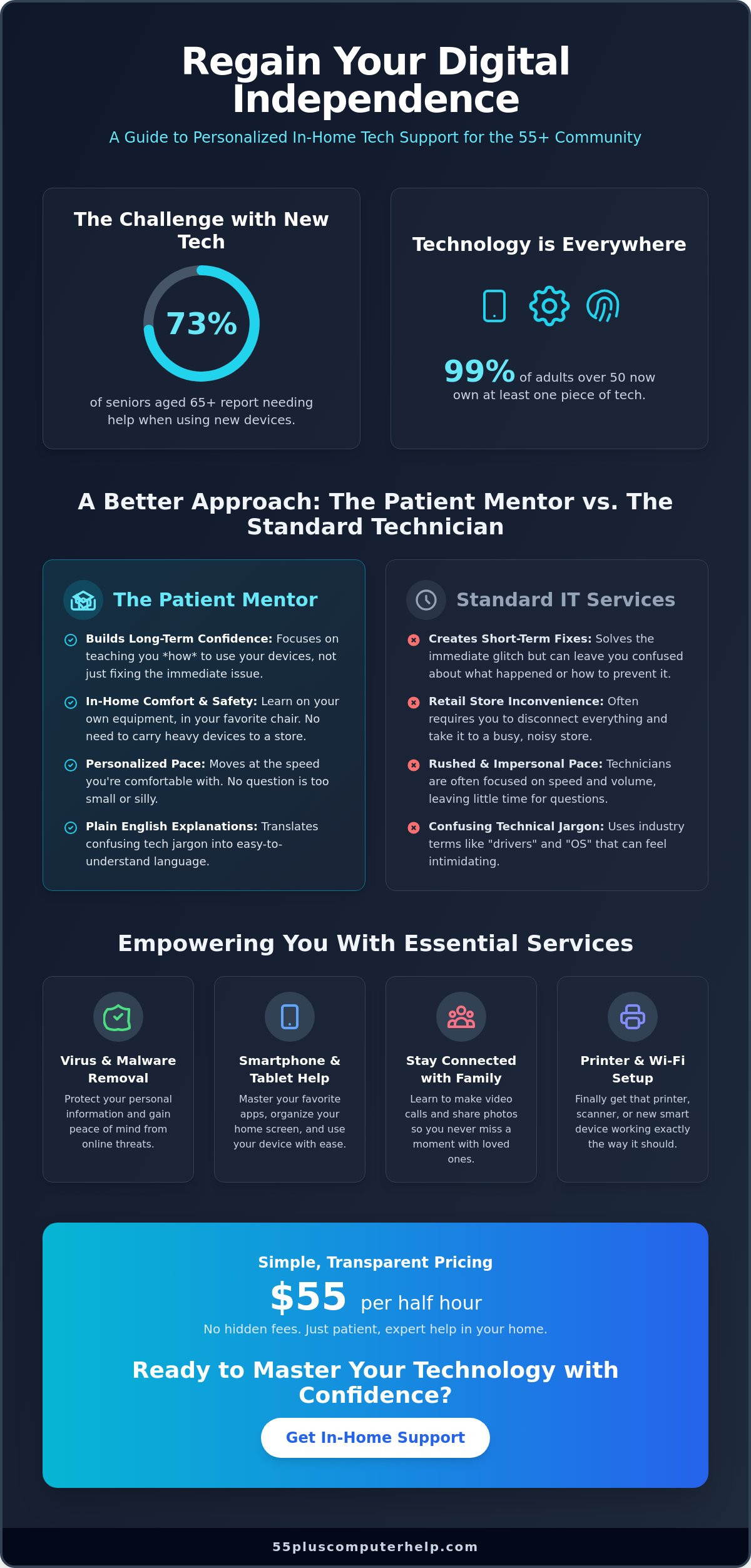
Did you know that 73% of seniors aged 65 and older report needing help when they try to use new devices? Even though 99% of adults over 50 now own at least one piece of technology, the digital world can still feel overwhelming. If you've ever felt rushed by a technician or worried about a strange pop-up on your screen, you aren't alone. Finding reliable in-home tech support for seniors shouldn't be a source of anxiety. It should be a way to regain your independence.
At 55 Plus Computer Help LLC, we understand that your tablet, phone, and computer are vital links to your family and friends. You deserve a patient mentor who visits your home and explains things in plain English. This article shows how personalized, one-on-one help empowers you to use your devices with total confidence and security. We'll look at how professional support, provided at a transparent rate of $55 per half hour, helps you master your favorite apps, secure your data from viruses, and finally get that printer working exactly the way it should.
Key Takeaways
- Learn why a patient mentor is more effective than a standard repair technician for building your long-term digital confidence.
- Discover why in home tech support for elderly denver is the safest way to fix problems without carrying heavy equipment to a store.
- Understand how professional virus and malware removal protects your personal information and provides true peace of mind.
- Explore how personalized training on your own smartphone or tablet helps you stay connected with family without the frustration.
What is Specialized In-Home Tech Support for Seniors?
Specialized in-home help is about more than just clicking buttons or fixing a broken link. It is a personalized service that brings expert guidance directly to your living room. Since 73% of seniors aged 65 and older report needing help with new devices, this support is a necessity rather than a luxury. Professional in home tech support for elderly denver removes barriers by focusing on your specific goals. A standard "fix-it" technician might solve a technical glitch in five minutes but leave you feeling confused. A patient mentor takes a different path. They focus on the person, not just the machine.
This approach addresses the emotional weight of modern technology. Many seniors feel a sense of anxiety or "tech-shame" when they can't figure out a new update. A specialized mentor acts as a friendly translator for the digital world. Instead of rushing through a checklist, they move at your pace. This supportive environment helps reduce frustration and builds the confidence needed to explore new apps without fear. It's the difference between having someone fix your computer and having someone teach you how to master it.
The Benefits of Learning in Your Own Environment
Learning in your own home offers practical advantages you simply won't find in a crowded community center or a busy retail store. When you practice on your own equipment, you're dealing with the exact setup you use every day. There's no need to worry about whether your printer will still connect to your Wi-Fi once you leave a classroom. Your mentor can help you check your internet signal in every room and ensure your smart home devices are integrated correctly. This hands-on practice in a familiar space helps bridge the digital divide that often separates seniors from the latest tools.
Comfort is also a major factor in successful learning. A mentor can help you look at your ergonomic setup to ensure your desk and chair are supportive. They can adjust font sizes and screen brightness to make your devices easier on the eyes. These small changes make a big difference in how often you use your technology. By working in your own environment, you ensure that every lesson is relevant to your actual life.
Why Specialized Support Outperforms General IT Services
General IT services often prioritize speed and volume. They want to see as many customers as possible in a single afternoon. This rushed pace often leads to "Genius Bar" style support that moves too fast for effective learning. Specialized in home tech support for elderly denver flips this model. At a transparent rate of $55 per half hour, the focus is on functional language rather than industry jargon. You won't hear confusing talk about "drivers" or "operating systems" without a clear, plain-English explanation of what those terms mean for you.
By choosing a dedicated local expert, you build a relationship based on trust and reliability. You won't have to explain your history to a new person every time you have a question. Your mentor learns your specific preferences and your unique hardware setup. This consistency provides a sense of security that faceless corporate support cannot match. You get the expert help you need from someone who truly understands the challenges of the 55-plus community.
Personalized Technology Training: Beyond Simple Troubleshooting
Many people think tech support is just about fixing a broken printer. While that's helpful, the real value lies in building your own skills. True in home tech support for elderly denver acts as a bridge to digital independence. You don't just want your device to work; you want to know how to use it yourself. A patient mentor understands that every learner starts at a different place. Whether you're using a desktop computer from 2018 or a brand-new tablet, your lessons are customized for your needs. Providing in home tech support for elderly denver means meeting you where you are, both physically and mentally.
There is no such thing as a silly question during these sessions. If you need to ask how to right-click or how to turn up the volume five times, that is perfectly fine. This judgment-free zone is essential for learning. According to Senior Technology Adoption Trends, 67% of seniors now use the internet. This increase shows that older adults are eager to learn, but they often lack the personalized guidance they deserve. We focus on your specific goals so you can feel a sense of accomplishment every time you turn on your machine.
Mastering Smartphones and Tablets
Smartphones and tablets are incredible tools for staying close to family. We can show you how to start a video call so you can see your grandkids' faces in real-time. You'll learn how to share photos from your last vacation or organize your home screen so your favorite apps are easy to find. Many seniors enjoy using tablets for reading digital books or playing brain-training games. We make sure you feel comfortable with the touch screen and the gestures needed to navigate. If you feel stuck, our friendly smartphone training can help you get back on track.
Navigating Social Media and the Internet Safely
The internet is a vast resource, but it can feel risky. We teach you how to use platforms like Facebook or Instagram to see family updates without compromising your privacy. You will learn how to adjust your settings so only friends can see your posts. We also cover how to search for information effectively. This includes identifying which websites are reliable and which ones might be trying to trick you. Understanding the basic rules of "Netiquette" helps you interact with others online with confidence. You can enjoy the benefits of being connected while staying safe and secure.
In-Home Support vs. Remote and Retail Help: A Comparison
Choosing the right kind of help depends on your specific problem. Most people look at three options: visiting a retail store, using remote support, or booking an in-person visit. Each method has different pros and cons. For many seniors, the physical and emotional cost of retail help is too high. Carrying a heavy printer or a computer tower is difficult and risky. You shouldn't have to struggle with heavy lifting just to get your email working. This is why in home tech support for elderly denver is a preferred choice for those who value comfort and safety.
Having a professional physically check your hardware provides a unique level of security. A mentor can look at your actual cables and connections. They can ensure your surge protector is working and that your devices are plugged in correctly. This physical inspection often catches small problems that remote technicians might miss. It also creates a safer environment. You aren't letting a stranger from a random call center access your files. Instead, you are working with a local expert you can see and talk to in person. Reliable in home tech support for elderly denver ensures that your hardware is set up for long-term success.
The Challenges of Retail Tech Support for Seniors
Retail tech bars are often loud and impersonal. These stores prioritize quick turnovers rather than deep understanding. You might wait for an hour just to speak with someone for ten minutes. The process of unhooking your equipment is also a major hurdle. It's easy to forget which cable goes where. When you bring a device back from a store, it might not work with your home setup. Retail technicians can't see your Wi-Fi dead zones or how your walls affect your internet signal. These home-specific issues require an on-site look to solve properly.
When to Choose Remote Assistance
Remote assistance is an excellent choice for minor software questions. If you are stuck on a specific step in a program, a quick screen-sharing session can save time. It is often more cost-effective because there is no travel fee. You can get help almost immediately for small tasks like resetting a password or updating an app. This service is very safe when it comes from a trusted partner you have already met in person. It allows for a fast solution without the need for a full house call. It's a convenient way to handle the quick questions that pop up during the week.
Essential Services: From Virus Removal to Printer Setup
In 2026, technology has become a central part of daily life, but it has also grown more complex. Older adults now own an average of seven devices, nearly double the amount from ten years ago. With this growth comes a new set of technical hurdles. Many seniors find that simple tasks now require multiple steps or various cloud accounts. Choosing in home tech support for elderly denver helps you manage these challenges without the stress. We focus on the essential services that keep your digital life running smoothly, from making sure your printer actually prints to keeping your private information safe from prying eyes.
One of the biggest concerns today is digital security. Malware is malicious software designed to disrupt, damage, or gain unauthorized access to a computer system. For many seniors, a single wrong click on a sneaky pop-up can lead to a computer infection. This isn't just a technical problem; it's a financial one. Hackers often target the 55-plus community to steal banking details or personal identity information. Professional virus and malware removal ensures your device is clean and your accounts are locked down. It gives you the peace of mind to browse the internet without worrying about every link you see.
Keeping Your Data Safe and Secure
Your computer often holds a lifetime of memories in the form of digital photos. If your hard drive fails, those pictures could be lost forever. We help you set up regular data backups so your files are always safe. We also spend time teaching you how to spot common internet and email scams. Scammers are becoming more clever, but there are always red flags to look for. For more help with your inbox, see our guide on email setup and troubleshooting for seniors. Learning these skills is the best way to protect your digital legacy.
Troubleshooting Home Connectivity Issues
Printers are notoriously difficult to manage. They often go "offline" for no clear reason, right when you need to print a boarding pass or a recipe. We use a step-by-step approach to fix these connectivity issues and ensure your Wi-Fi signal reaches every corner of your home. Slow internet can be frustrating, but it's often just a matter of adjusting your router settings. We also help you set up smart home devices like video doorbells or thermostats. These tools provide extra safety and comfort, but only if they are installed correctly. Keeping your software updated is another key part of our visit, as these updates often fix bugs and improve speed. If you're ready to secure your home network, you can schedule a friendly tech visit today.
Reclaiming Your Digital Independence with 55 Plus Computer Help LLC
Technology should be a tool that connects you to the world, not a wall that keeps you out. At 55 Plus Computer Help LLC, we believe that everyone deserves to feel capable when using their devices. We aren't a faceless global corporation or a high-pressure sales team. We are a local service dedicated to helping you master your computer, tablet, and phone on your own terms. Choosing in home tech support for elderly denver means choosing a path toward true digital independence. Our mission is to empower you with the skills and confidence needed to navigate the internet safely and stay in touch with those you love.
We've built our reputation on a foundation of absolute patience and clear communication. You won't hear us use confusing industry jargon or talk down to you. Instead, we use simple, everyday language to explain how your devices work. Our goal is to make every session a positive and rewarding experience. We understand that technology can be intimidating, but it doesn't have to be. With the right guidance, you can transform your frustration into a genuine sense of accomplishment and security. It's about more than just fixing a problem; it's about giving you the keys to the digital world.
A Patient Mentor for Every Technical Level
Since 2014, we've specialized in serving the 55-plus community. This decade of experience has taught us that every individual has a unique learning style. Our experts are trained to adapt their teaching methods to match your specific needs and pace. Whether you are a total beginner or just need help with a specific new app, we meet you exactly where you are. Our clients often tell us that working with our team feels like getting help from a knowledgeable neighbor. This neighborly approach builds a level of trust that you simply won't find at a retail tech counter. We prioritize your comfort and ensure you feel in control of every lesson.
Taking the First Step Toward Technical Confidence
Getting started is a simple and stress-free process. You can schedule a session that fits your calendar, whether you prefer an onsite visit or a remote check-in. To get the most value from our time together, we suggest keeping a notepad nearby. When you run into a problem during the week, jot it down in a list of "Common Queries." This list ensures we cover every small frustration that might otherwise be forgotten. During your first visit, we'll go through these items one by one. We'll show you the steps, let you practice them yourself, and ensure you feel ready to do it again tomorrow. It's never too late to learn a new skill or master a new device. With in home tech support for elderly denver, you have a partner who is committed to your success every step of the way.
Step Into the Digital World with Confidence
Technology should bring you closer to your family and hobbies, not create a wall of frustration. You've learned how specialized training turns a confusing device into a helpful tool. From securing your private data to finally getting your printer to cooperate, the right guidance makes all the difference. Choosing reliable in home tech support for elderly denver ensures you get help in the comfort of your own living room without the stress of a crowded retail store.
Since 2014, we've focused exclusively on the unique needs of the 55-plus demographic. We provide a patient, jargon-free teaching style that respects your pace and your questions. You deserve to use your smartphone, tablet, and computer with total peace of mind. Our experts are ready to help you reclaim your digital independence today. Get Patient, Expert Tech Support Today and discover how easy technology can be when you have a trusted mentor by your side. It's never too late to feel confident and connected.
Frequently Asked Questions
Is it safe to have a tech support person come to my home?
Yes, it is very safe when you work with a trusted local expert who specializes in the senior community. We prioritize building a relationship with you. This isn't a faceless technician from a global corporation; it's a neighborly service that values your privacy and security. You can see who is helping you and ask questions in real-time while staying in your own comfortable environment.
Can you help me learn how to see photos of my grandkids on my iPad?
Yes, we can certainly show you how to use your iPad to see family photos. Staying connected is a top priority, as 90% of adults over 50 now own a smartphone. We will walk you through the steps to open shared albums or find photos in your email. You'll learn how to save these pictures so you can look at them whenever you like.
How much does in-home tech support usually cost?
Professional rates in the area vary, but we provide a transparent rate of $55 per half hour. Other services in the Denver region might charge $80 per hour or $120 for a first-time service call. Our pricing model ensures you only pay for the help you actually need. This transparency helps you plan your budget without worrying about hidden fees or surprise costs.
What happens if my computer has a virus that I cannot see?
If your computer has a hidden virus, we use specialized tools to perform virus and malware removal. Many infections run in the background without showing any obvious signs on your screen. We scan your system to find these threats and remove them to keep your financial information secure. This process helps your computer run faster and protects your identity from online scammers.
Do I need to buy a new computer, or can you fix my old one?
You often don't need a new computer if your current one is just running slowly. We can perform software updates and clear out digital clutter to make your old machine feel much faster. While we do not perform physical hardware repairs like fixing broken screens, we can solve most software-related problems. We will always give you an honest opinion on whether your current device is worth keeping.
Can you help me set up a new printer that I just bought?
Yes, setting up a new printer is one of our most common requests. We will connect the printer to your Wi-Fi and ensure all your devices can send documents to it correctly. We also show you how to check ink levels and clear paper jams. This hands-on training ensures you feel confident using the printer long after our visit is over.
What is the difference between onsite and remote tech support?
Onsite support involves a mentor visiting your home, while remote support uses screen-sharing software to help you over the internet. Onsite help is the best choice for in home tech support for elderly denver when you have Wi-Fi or printer issues. Remote support is a great, cost-effective choice for quick software questions or resetting a password when you don't need an in-person visit.
Is my personal information safe during a technical support session?
Your personal information is completely safe during our sessions. We teach you how to manage your own passwords and security settings rather than doing it for you. This approach ensures you remain in control of your digital life and understand how to protect your privacy. We focus on empowering you with the skills to keep your own data secure from outside threats.


