
Imagine opening your computer to look at photos of your grandkids, but instead of their smiling faces, you see a cold message saying your files are locked. It's a frightening thought, and with global ransomware damages projected to reach $74 billion in 2026, it's a concern many people share. You may be asking what is ransomware and how to prevent it without feeling like you need a computer science degree.
It's completely normal to feel overwhelmed by technical words or the fear that one wrong click will ruin your computer. You want to protect your irreplaceable memories, not learn a complicated new language. We agree that technology should be a source of joy, not a source of stress. In this guide, we will explain ransomware using simple analogies and show you exactly how to stay safe. You will get a clear checklist of easy habits to follow. By the end, you'll have the confidence to browse the internet with true peace of mind and security.
Key Takeaways
- Understand the "digital padlock" analogy to see how ransomware works and why paying the ransom is never the right solution.
- Learn exactly what is ransomware and how to prevent it by using a simple "pause before you click" rule for every email you receive.
- Identify common red flags used to target seniors, such as urgent messages that try to create panic about your family or bank accounts.
- Follow a stress-free checklist of five daily habits that keep your computer and your precious family photos safe from scammers.
- Master the two essential steps to take if you suspect an infection so you can stay in control of your digital home.
Understanding Ransomware: The 'Digital Padlock' Analogy
Ransomware is a digital extortion tool used to lock personal files. If you are looking for a clear definition of What is Ransomware?, it's a type of harmful software that sneaks onto your device without an invitation. You can think of it as a digital padlock that someone else puts on your computer files. Imagine coming home to find a stranger has changed the locks on your front door. They tell you that you can only have the new key if you pay them a large sum of money. This is exactly how digital scammers operate. Understanding what is ransomware and how to prevent it is the first step toward keeping your digital home safe.
Scammers use this software to take control of your most private information. They don't want to destroy your computer. They want to hold your memories hostage. This is a very personal type of crime because it targets the things you care about most. It can feel very lonely and frightening when it happens, but you aren't alone. We have helped many people in our community understand these threats since 2014. Knowing how these scammers think helps you stay one step ahead of them. By learning what is ransomware and how to prevent it, you gain the power to protect your digital life.
What Ransomware Does to Your Computer
When this software gets inside, it scrambles your files so you can't open or read them. Your computer might look normal at first, but your documents will have strange names. If you try to click on a photo of your grandkids, nothing happens. Instead, your screen might display a scary, full-page warning message. These messages often use timers to make you feel like you must act fast. Scammers target high-value items like your family photos and tax documents because they know these are hard to replace. They use your own files as a way to pressure you into paying.
How It Differs from a Standard Computer Virus
It's easy to confuse ransomware with a standard computer virus. A typical virus usually tries to break things or make your computer run slowly. Ransomware is different because it tries to sell your files back to you. A virus often hides deep in your system to avoid being deleted. Ransomware wants to be noticed immediately so you will see their payment instructions. This isn't just a technical glitch or a mistake you made. It's a calculated financial crime. By treating it as a security issue rather than a computer error, you can better protect your independence online.
How Ransomware Sneaks Into Your Digital Home
Most people think hackers use high-tech tools to break into their computers like burglars through a window. In reality, most ransomware requires you to invite it in. This usually happens by accident when you are just trying to go about your day. Scammers are very good at creating disguises that look like your bank, a friend, or a delivery service. Understanding what is ransomware and how to prevent it begins with recognizing these digital tricks. When you know what to look for, the mystery disappears and you can browse with confidence.
The most common way these programs enter your home is through malicious links. These links can be hidden in "urgent" notifications or fake invoices that look very professional. Scammers also use pop-up ads that claim your computer is already infected. These ads are often the source of the problem they claim to fix. If you see a window that suddenly appears and tells you to take action, it's best to stay calm and close it immediately.
The 'Urgent Email' Trap
Scammers love to use "Phishing" emails. These are tricky messages designed to look like they come from someone you trust. They often focus on urgent themes to make you panic. You might see a subject line about an "Unpaid Bill," a "Package Delivery Failure," or an "Account Locked." These are all designed to make you click a link before you have time to think.
Scammers want you to act fast because they know that if you slow down, you'll spot the errors. Before you click any link, look at the sender's real email address. A real bank won't email you from a string of random numbers and letters. You can find more detailed safety tips in the official #StopRansomware Guide provided by the government. This guide is a wonderful resource for anyone wanting to see how the experts handle these threats.
Fake Software Updates and Pop-ups
You might be browsing a website when a window suddenly appears on your screen. It may claim your computer is already infected or that you need a "Critical Security Update." Never click the "Update" or "Fix Now" buttons on these windows. These are almost always traps. Official updates for your computer or tablet come from your device's own settings menu, not from a website you are visiting.
Legitimate companies never demand payment via pop-up to fix a virus. If a window tells you to call a number or pay a fee to unlock your files, it is a scam. It's okay to feel a bit nervous when these things happen. Scammers design them to be scary on purpose. If you ever feel unsure about a message you've received, our personalized technology training can help you learn how to spot these red flags with confidence. We can sit with you and show you exactly what to look for so you never have to guess. Staying safe is about building good habits, and we are here to help you do just that.
Why Seniors Are Targeted and How to Spot the Red Flags
Scammers are often like schoolyard bullies who look for people they think are vulnerable. They specifically target seniors because they assume you have more savings and less experience with complex computer systems. This isn't a reflection of your ability. It's simply how these professional criminals operate. By understanding what is ransomware and how to prevent it, you take the target off your back and regain your digital independence.
One common tactic is the "Grandparent Scam" variant. A scammer might use a family name they found online to create a sense of panic. They want you to believe a loved one is in trouble or that your computer has a problem that will ruin your family photos. This high-pressure language is a major red flag. If a message makes you feel like you've done something wrong or must act in minutes, it's likely a trap. Legitimate companies will never demand payment via gift cards or cryptocurrency to fix a technical issue.
Common Myths About Your Online Safety
Many people believe they aren't important enough to be hacked. This is a dangerous myth. Hackers use automated tools that scan thousands of computers at once looking for any open door. They don't care who you are; they only care that your files are valuable to you. Another myth is that a single antivirus program stops everything. While software helps, new threats in 2026 can sometimes bypass old security programs.
You might also think that paying the ransom is the easiest way out. Research from 2026 shows that 48% of victims with encrypted data chose to pay. However, scammers often take the money and never unlock your files. Paying also marks you as a "payer," which can lead to more attacks in the future. Knowing what is ransomware and how to prevent it means recognizing that prevention is always safer than negotiation.
The Emotional Side of Cybersecurity
Scammers want to trigger a panic response. They know that when you're scared, you're more likely to click a button or give away information. If your screen suddenly turns red or starts making a loud noise, take a deep breath. Close your laptop or turn off the monitor. This simple act breaks the scammer's spell and gives you time to think.
There is absolutely no shame in being targeted by these people. They spend all day every day perfecting their tricks. If you feel uneasy, call a trusted friend or a family member. We've spent years helping seniors navigate these moments with a calm demeanor. You don't have to face these digital bullies alone. Taking a moment to pause is your best defense against any scam.
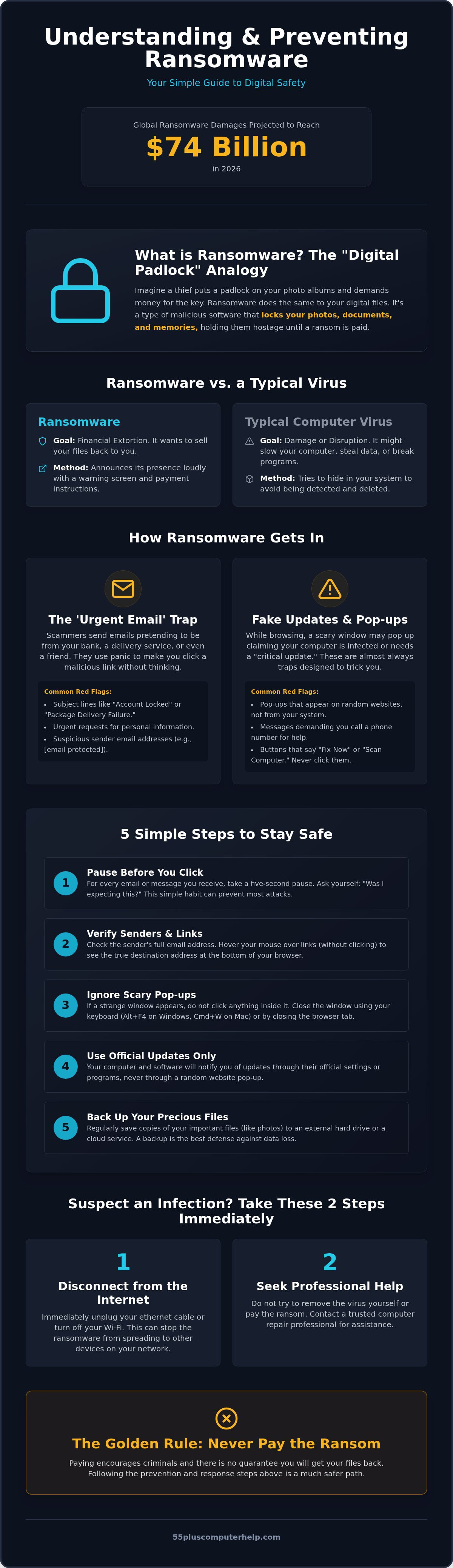
Five Simple Steps to Prevent Ransomware Today
Prevention is much easier and cheaper than trying to fix an infection. Think of it like maintaining your car. A little bit of care today prevents a massive headache tomorrow. When you understand what is ransomware and how to prevent it, you realize that safety isn't about being a genius. It is about following a few simple rules that become second nature over time. These habits will help you feel much more relaxed when you are checking your email or browsing the news.
First, you should establish a "Pause Before You Click" rule for every email attachment. Scammers rely on you being in a hurry. If you get an attachment you didn't expect, don't open it. Even if it seems to be from a friend, take a moment to call them and ask if they sent it. Second, keep your computer's "brain" updated. This is your operating system. Set it to update automatically so you always have the latest protection. Third, use a modern security program that specializes in ransomware. These programs act like a digital security guard for your folders. They watch for suspicious activity and block it before it can cause any harm.
The Power of a Reliable Data Backup
A backup is like a spare set of house keys kept at a neighbor's house. It is your ultimate safety net. If a scammer locks your computer, you don't have to panic. You can simply wipe the machine clean and use your backup to restore your photos. We suggest following the "3-2-1" rule for your precious memories. This means keeping 3 copies of your files on 2 different types of storage, with 1 copy kept offsite. For example, you might have your photos on your computer, a small external drive, and a secure online service. This ensures your memories are safe even if your physical computer is damaged.
Personalized Training: Your Best Defense
Learning to navigate the internet safely is a skill, just like learning to drive. You don't have to figure it all out on your own. One-on-one lessons help you identify scams that might target your specific interests. We provide personalized computer lessons for seniors to help you feel secure. These lessons focus on your comfort and your specific needs. It's a great way to build your confidence and independence. If you want to ensure your computer stays healthy, our Software Installation and Updates service can help you set up these protections correctly the first time.
What to Do If You Suspect an Infection
If you see a scary message on your screen, your first instinct might be to panic. It is a very stressful situation, but taking the right steps immediately can save your precious files. You've already learned what is ransomware and how to prevent it, but knowing how to react during an active threat is just as critical. The most important thing is to stay calm and remember that you are still in control of your computer.
Your first step is to immediately disconnect from the internet. You can do this by turning off your Wi-Fi or unplugging the internet cable from the back of your computer. This stops the ransomware from talking to the scammer and prevents it from spreading to other devices in your home. Second, do not pay the ransom. Scammers are not honest people; paying them rarely results in getting your files back and only funds more criminal activity. Third, take a photo of the ransom note on your screen with your smartphone. This provides important evidence for a professional to see exactly what happened. Finally, contact a professional who understands senior-focused tech support to help you navigate the next steps.
How 55 Plus Computer Help LLC Can Assist You
We understand that dealing with a digital threat feels overwhelming. 55 Plus Computer Help LLC provides patient, in-home assistance to identify and remove these threats for you. We don't just fix the problem; we sit with you and explain what happened in plain English. If a lockout has occurred, we can help you look for ways to recover your files from your backups. Our Virus and malware removal service is designed to be a supportive experience that removes the stress from the situation. We've been helping seniors since 2014, and we know how to handle these situations with a calm and methodical approach.
Restoring Your Peace of Mind
After a threat is removed, our job isn't finished until you feel safe again. We spend time teaching you how to prevent it from happening a second time. This includes setting up automated, "set-it-and-forget-it" backup systems so your photos and documents are always protected. Our goal is to make you feel confident and secure at your desk. You deserve to enjoy your computer without worrying about every click. By building these safety nets together, we transform a frustrating experience into a sense of accomplishment and long-term security for your digital life.
Take Control of Your Digital Security Today
You now have the tools to navigate the internet with true confidence. We have explored how ransomware acts like a digital padlock and why scammers use high-pressure tactics to trigger a panic response. By following the simple "3-2-1" backup rule and establishing a "pause before you click" habit, you have already built a powerful defense for your computer. Understanding what is ransomware and how to prevent it is the first step toward reclaiming your digital independence and protecting your most precious memories.
Technology should be a source of joy and connection, not a source of worry. You don't have to manage these technical updates or security settings alone. Since 2014, we've provided specialized support for seniors with a patient, jargon-free teaching style. We offer convenient in-home service and national remote help to ensure you always have a friend in the tech business. Empower yourself with a patient tech mentor; schedule your home visit today. You deserve to feel safe, secure, and completely in control every time you sit down at your desk.
Frequently Asked Questions
Can my iPad or smartphone get ransomware too?
Yes, your iPad and smartphone can get ransomware, though it is less common than on a desktop computer. On mobile devices, the threat often appears as a fake warning that "locks" your internet browser. You don't need to worry about your actual hardware being broken. Usually, clearing your browser history or deleting a suspicious app solves the problem. Keeping your device software updated is a great way to stay safe.
Is it safe to use my computer for banking if I'm worried about ransomware?
It is safe to use your computer for banking as long as you follow basic safety habits. Banks use very strong security to protect your information from outside threats. You should always type your bank's address directly into the browser rather than clicking a link in an email. If you are worried about what is ransomware and how to prevent it while banking, we can help you set up secure habits.
How much does it typically cost to have ransomware removed professionally?
The cost for professional removal varies depending on the complexity of the infection and whether you have a backup. Many technicians charge a diagnostic fee to look at the system first. Because every situation is unique, it's best to ask for a clear price before the work begins. We focus on transparent and fixed-rate pricing to ensure you always know what to expect without any hidden surprises or confusing fees.
If I pay the ransom, will I definitely get my files back?
No, paying the ransom does not guarantee that you will get your files back. You are dealing with professional criminals who may take your money and simply disappear. In 2026, many victims who paid still found their files were permanently damaged or never unlocked. This is why we always recommend focusing on backups. Having a separate copy of your photos is the only way to be certain you won't lose them.
What is the most common way seniors accidentally get ransomware?
The most common way seniors accidentally encounter this threat is through "phishing" emails. These are messages that look like they are from a trusted source, such as the post office or a utility company. They usually ask you to click a link to "view an invoice" or "track a package." Once you click, the software begins to install. Learning what is ransomware and how to prevent it starts with being cautious of unexpected attachments.
Does a 'Mac' computer get ransomware, or is it just for Windows?
Both Mac and Windows computers can get ransomware. While Windows was the primary target for many years, scammers now create harmful software specifically for Apple products. No computer is completely immune to these tricks. The best protection isn't the brand of your computer; it is the safety habits you use every day. Keeping your Mac updated is just as important as it is for any other device you own.
Can a ransomware infection spread to my friends through my email?
Yes, some types of ransomware can access your contact list and send messages to your friends. These emails often look like they are coming from you, which makes your friends more likely to click. This is another reason why acting quickly is so important. If you suspect an infection, disconnecting from the internet immediately stops the software from using your email to target the people you care about most.
What should I do if I already clicked a suspicious link but nothing has happened yet?
If you clicked a link but don't see a ransom note yet, you should still take action. Some software waits in the background before locking your files. Disconnect from the internet and run a full scan with your security program. It's also a good idea to change your important passwords from a different, safe device. Taking these calm steps now can prevent a small mistake from becoming a much larger problem later.


