
What if that sudden slow-down on your computer isn't just because the machine is getting older? It's common to assume that a spinning wheel or a frozen screen is just a part of technology aging. However, sometimes these glitches are the subtle signs of a computer virus for seniors to keep in mind. You might feel a sudden wave of anxiety when your device behaves unexpectedly. It's completely natural to worry about losing precious family photos or your personal information to a digital mistake.
We understand how overwhelming it feels when technical terms like "malware" or "trojans" start flying around. You deserve to feel confident and safe every time you log on. This guide will help you understand what's happening with your device without using any confusing technical jargon. You'll learn how to tell the difference between a normal computer hiccup and a real security threat. We'll walk through common red flags, explain how to spot a fake scam pop-up, and show you exactly how to get help from a patient, trusted expert who speaks your language.
Key Takeaways
- Understand why a computer virus is like a common cold and why you should never feel guilty for encountering one.
- Identify the common signs of a computer virus for seniors, such as unusual pop-ups or a computer that suddenly runs very slowly.
- Learn the easiest way to spot a tech support scam so you can avoid being tricked by fake warnings and loud noises.
- Follow a simple step-by-step plan to safely stop a potential threat without needing to touch a single complex setting.
- Discover how working with a friendly expert can turn a stressful technical problem into a helpful learning experience.
Understanding Computer Viruses: Why It Is Not Your Fault
Think of your computer like your own body. Sometimes, despite your best efforts to stay healthy, you catch a common cold. A computer virus works in a very similar way. It's a tiny bit of "digital germs" that hitches a ride onto your machine. Even the most careful people can encounter these threats while simply browsing the news or checking an email. It's important to remember that seeing the signs of a computer virus for seniors doesn't mean you've done anything wrong.
When your computer starts acting strange, it isn't trying to frustrate you. Think of these glitches as the computer's way of asking for help. It might run slowly or show you odd messages because it's struggling with something that shouldn't be there. A virus is just a piece of software that doesn't belong on your machine. It isn't a permanent stain; it certainly isn't your fault.
What Exactly is a Computer Virus?
To understand what is a computer virus
Six Common Signs Your Computer Might Have a Virus
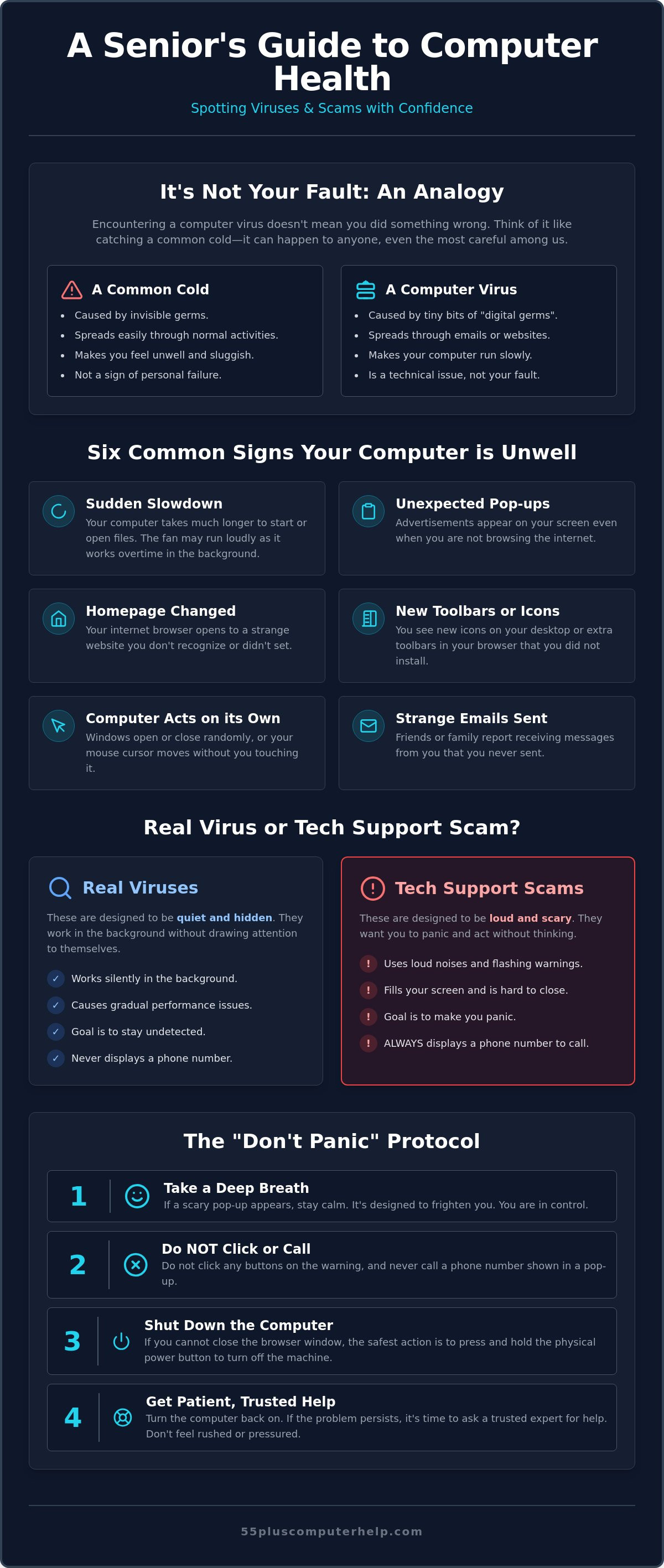
Identifying the signs of a computer virus for seniors is often easier than you might think. Your computer usually communicates through its behavior. If things feel "off," they probably are. Trust your intuition when your technology starts acting differently than it did yesterday. These changes are rarely your fault and often indicate that the system needs a bit of professional cleaning.
Performance and Speed Problems
Have you seen that little spinning wheel or hourglass more often lately? A computer that takes several minutes to open a simple folder or a single photo is a major red flag. You might also notice your computer feels unusually warm to the touch. Sometimes, the internal fan starts running very loudly, making a whirring sound like a small vacuum. This happens because a virus is forcing the machine to work overtime in the background without your permission. While all computers slow down slightly as they age, a virus causes a sudden and dramatic drop in performance. It's the difference between a car getting old and a car having a flat tire.
Unexpected Pop-ups and Visual Glitches
You might see advertisements popping up on your screen even when you aren't actively browsing the internet. This is a common sign of unwanted software that has found its way onto your desktop. You might also click on your internet browser and find that your "home page" has changed to a website you don't recognize. If you see new toolbars or extra buttons at the top of your screen that you didn't install, these are significant red flags. Learning about staying safe online can help you understand how to avoid these pesky additions in the future.
Another clear sign is the appearance of new icons or programs on your desktop. If you see a colorful icon that you don't remember downloading, it's best not to click on it. You may also notice your computer "acting on its own," where windows open or close randomly. In some cases, friends or family might mention they received strange emails or messages from your account that you never sent. This can feel very personal and upsetting, but it's simply a technical glitch that can be resolved. If you're worried about these changes, we provide gentle virus and malware removal to help you feel secure again.
Is It a Real Virus or a Tech Support Scam?
Imagine a bright red window suddenly fills your screen. A loud siren starts blaring from your speakers. This experience is terrifying. You might think these are the clear signs of a computer virus for seniors to watch for, but it's actually something else. This is usually a tech support scam. It's a trick designed to make you feel like your computer is broken when it's actually perfectly fine.
There's a big difference in how these two things behave. Real computer viruses are quiet. They want to stay hidden so they can work in the background without you noticing. A scam is different. A scam wants to be as loud and scary as possible. The goal is to make you panic so you don't think clearly. If your computer starts making noise or won't let you close a window, take a deep breath. You aren't in trouble. You're just looking at a very rude advertisement.
These scammers often put a phone number on the screen. They might claim to be from Microsoft or Apple. They want you to call them so they can ask for money. Please remember that real tech companies will never put a phone number in a pop-up window. They will never ask you to call them out of the blue. If you see a number on a scary pop-up, it is a sign that someone is trying to trick you.
How to Spot a Fake Warning Screen
Look closely at the words on the screen. Scammers often make mistakes. You might see poor spelling or strange grammar. They use very urgent language like "Urgent!" or "Your data is being deleted!" These are just scary websites designed to look like your computer system. They use flashing colors to grab your attention. If any screen asks you to pay for help with gift cards or wire transfers, it is 100% a scam. Real businesses never accept payment in gift cards.
The Difference Between Malware and a Scam
It helps to think of malware as a piece of unwanted software on your computer. A scam is a person on the other end of a screen or phone trying to trick you. Both often start the same way. You might click a link in a suspicious email without realizing it. Practicing safe habits with your inbox is a great first step. You can read more about this in our guide on email setup and troubleshooting for seniors. Learning these habits helps you stay in control of your digital life.
The "Don’t Panic" Protocol: What to Do Immediately
If you notice the signs of a computer virus for seniors, your heart might start to race. That is a completely normal reaction. You might feel a sudden urge to click every button to make the problem go away. However, the most important thing to do right now is pause. Taking a breath is your first step toward safety. This "Don't Panic" protocol is a simple set of actions to keep your personal files and information secure while you decide what to do next.
First, take your hands off the keyboard and mouse. Scammers and viruses often wait for you to click a button that gives them permission to enter your system. By doing nothing, you are already taking control. Second, if a scary or loud window is open, simply close your laptop lid or turn off your monitor. You do not need to look at those frightening messages. Third, disconnect your computer from the internet. You can do this by turning off the Wi-Fi setting or by physically unplugging the power cord from the back of your internet router. This stops the virus from sending any data out of your house. Finally, never call any phone numbers that appear on your screen. Real companies will never use a pop-up to ask for a phone call.
Why "Doing Nothing" is Often the Best First Step
Scammers rely on you acting quickly out of fear. They want you to feel like you are in a race against time. This pressure is a trick to make you overlook simple red flags. Taking a five-minute break helps clear your head. It prevents you from making a hurried mistake, such as clicking an "Allow" button or giving out a password. The most powerful tool against a computer virus is a calm mind. When you step away for a moment, the scammer loses their power over you.
When to Turn the Computer Off
Sometimes, a computer might freeze completely. If your mouse will not move, a "hard shut down" is a safe and effective choice in an emergency. You do this by holding the power button down with your finger for about ten seconds. Keep holding it until the screen goes black and the lights on the machine go out. This is like pulling the emergency brake on a train. It stops the virus or the scammer from doing anything further. We recommend that you leave the computer off until you have professional guidance. If you want a friendly expert to look things over, 55 Plus Computer Help provides the patient support you need to get back online safely.
Getting Your Computer Back to Normal with Patient Help
Discovering the signs of a computer virus for seniors can feel like a major setback. It might even make you want to stay away from your computer altogether. However, getting your machine back to normal is a straightforward process when you have the right support. While some people suggest downloading complex DIY software, this can often lead to more confusion. A professional cleaning provides a level of peace of mind that a simple scan cannot match. You deserve to know that every corner of your digital life is secure. For business owners who need this same standard of professional protection for their office systems, you can visit Trinity Networx, LLC.
A patient mentor does more than just delete a bad file. They explain what happened in plain English. This turns a scary situation into a helpful learning moment. You can ask questions without feeling rushed or judged. This personalized approach is at the heart of our virus and malware removal services. We focus on restoring your confidence along with your computer's speed. Once your machine has a clean bill of health, you can go back to enjoying your hobbies and connecting with family without that lingering worry in the back of your mind.
The Benefits of Personalized Tech Support
Many people find the "big box store" experience quite intimidating. You often have to unplug your heavy computer, drive it across town, and wait days for a stranger to look at it. A patient, one-on-one session is much more comfortable. Whether the help happens in your home or through a secure remote connection, you stay in your comfort zone. 55 Plus Computer Help specializes in making these fixes simple and stress-free. We speak your language and move at your pace, ensuring you feel empowered rather than overwhelmed.
Staying Safe Moving Forward
Once your computer is healthy again, you can take simple steps to keep it that way. Prevention is much easier than a cure. We recommend a few basic habits to maintain your digital independence:
- Accept regular software updates when they appear, as these act like digital shields.
- Set up a "Data Backup" system to serve as a safety net for your cherished photos and files.
- Avoid clicking on links in emails unless you were specifically expecting them.
- Trust your intuition if a website or pop-up feels "off."
Regaining your digital independence is a wonderful feeling. You don't have to be a technical expert to enjoy the internet safely. With a little guidance and the right partner, you can browse, shop, and share with total peace of mind. Your computer is a tool for joy and connection; we are here to help you keep it that way.
Reclaim Your Digital Confidence
You now have the tools to recognize the signs of a computer virus for seniors without feeling overwhelmed. Remember that technology glitches are never your fault. You can now distinguish between a quiet background threat and a loud, fake scam. Most importantly, you know the "Don't Panic" protocol. Taking your hands off the keyboard and disconnecting from the internet keeps your personal files safe while you decide on your next steps.
Since 2014, we've provided specialized support designed specifically for your needs. We offer patient, jargon-free explanations that help you feel empowered rather than confused. Whether you prefer in-home or remote assistance, our goal is to restore your peace of mind. You deserve to enjoy the internet with total security and independence. We're ready to help you get your computer back to its best health today.
Get Patient, Expert Help with Virus Removal Today
You've worked hard to stay connected with your loved ones and your hobbies. Don't let a technical hiccup stand in your way. We're here to support you every step of the way and transform your frustration into a sense of security.
Frequently Asked Questions
Can a computer virus steal my bank information?
Yes, some viruses can capture your keystrokes or passwords. However, this is why identifying the signs of a computer virus for seniors early is so important. If you feel worried, stop typing passwords into bank websites immediately. Once a professional removes the threat, your machine will be safe to use again. We can help you check your settings to make sure your personal data stays private.
Will a virus delete all of my family photos?
It is very rare for a virus to delete your family photos. Most digital threats want to stay hidden so they can show you ads or track your browsing. While your files are usually safe, we recommend a regular data backup to give you total peace of mind. We can help you set up a simple system that protects your cherished memories automatically and keeps them safe from future glitches.
Do I need to buy a new computer if I get a virus?
No, you do not need to buy a new machine if you encounter a virus. A virus is just a piece of unwanted software that lives on your hard drive. It does not break the physical parts of your computer. A professional cleaning can remove the problem and make your current device run smoothly again. This is much more affordable than buying a new computer and moving all your files.
Is it safe to use my computer after the virus is removed?
Yes, your computer is perfectly safe to use once the removal process is finished. A professional service makes sure that every part of the infection is gone. After the cleaning, your computer will behave normally again. We also provide gentle guidance on how to spot future threats. You can return to your digital hobbies with a sense of security and a feeling of accomplishment.
How did I get a virus if I have antivirus software installed?
Antivirus software is helpful, but it cannot stop every single threat. New viruses are created constantly, and some can sneak past even the best programs. You might also accidentally click "Allow" on a pop-up that looks like a real update. That is why recognizing the signs of a computer virus for seniors is such an important skill for staying independent and safe while you are online.
What happens if I accidentally clicked on a scam link?
Clicking a link does not always result in an immediate infection. Sometimes a link just leads to a "scary" website designed to make you panic. If you accidentally clicked something, close your browser window right away. If your computer starts running slowly or showing odd messages, it is a good idea to have a trusted expert perform a quick checkup to ensure your system is still secure.
Is it better to get help in-person or over the phone for a virus?
In-person or remote support is usually better than a standard phone call. These options allow a technician to see your screen and find the problem quickly. It also allows for a better teaching experience. You can watch the process and ask questions in a relaxed environment. We specialize in providing this kind of patient, one-on-one help to make technology feel easy and stress-free.
How can I tell if an email is from a real company or a scammer?
Check the sender's email address for small spelling errors or extra numbers. Scammers often use names that look almost like a real company. A real business will never ask you to send money or passwords through an email. If an email sounds very urgent or frightening, it is probably a trick. It is always safer to delete the message and call the company directly using a trusted number.


