
Imagine opening your inbox only to find messages you never wrote or, even worse, realizing your password no longer works. It's a sinking feeling that can make anyone feel vulnerable and frustrated. If this has happened to you, please remember that you aren't alone and there's no reason to feel embarrassed. Scammers send out roughly 3.4 billion phishing emails every single day to trick even the most careful people. Knowing exactly what to do if your email is hacked is the first step toward taking back your digital life and your peace of mind.
We understand how overwhelming it feels to worry about your personal information or your bank accounts. It's completely normal to feel a bit stuck when you're faced with complex security screens and technical jargon. This guide will show you the exact steps to regain control of your account and protect your identity with confidence. We'll walk through how to secure your login, check for any financial changes, and set up simple defenses so this doesn't happen again. You've got this, and we're here to help you through the process one step at a time.
Key Takeaways
- Identify common signs of a breach and learn why taking a methodical approach helps you stay in control.
- Understand exactly what to do if your email is hacked by following a patient, step-by-step recovery process.
- Audit your account settings for hidden "auto-forwarding" rules that could allow scammers to continue reading your private emails.
- Build long-term peace of mind by learning how to spot phishing threats and keeping your devices properly updated.
- Know when to seek help from a trusted professional for tasks like virus removal or troubleshooting complex login issues.
Immediate Steps to Take When You Suspect Your Email Is Hacked
The moment you realize something is wrong with your email, your heart might skip a beat. You might feel a rush of worry or even a bit of frustration with yourself. Please take a slow, deep breath. Hacking is a very common issue, and it doesn't mean you've done anything wrong. It's simply a technical hurdle that we can resolve together using a systematic approach. When you're wondering what to do if your email is hacked, the most important first step is to stay calm so you can think clearly.
Before you dive into the settings, grab a pen and a piece of paper. Write down exactly when you first noticed the problem. Did you see a strange message in your "Sent" folder? Did a friend call to ask why you sent them a link to a "great deal"? Keeping a small log of these details will be incredibly helpful if you decide to call a professional for help later. If you suspect that a virus is actively moving things around on your screen, go ahead and turn off your Wi-Fi or unplug your internet cable. This stops the hacker from communicating with your device while you plan your next move.
How to Tell if Your Email Was Actually Hacked
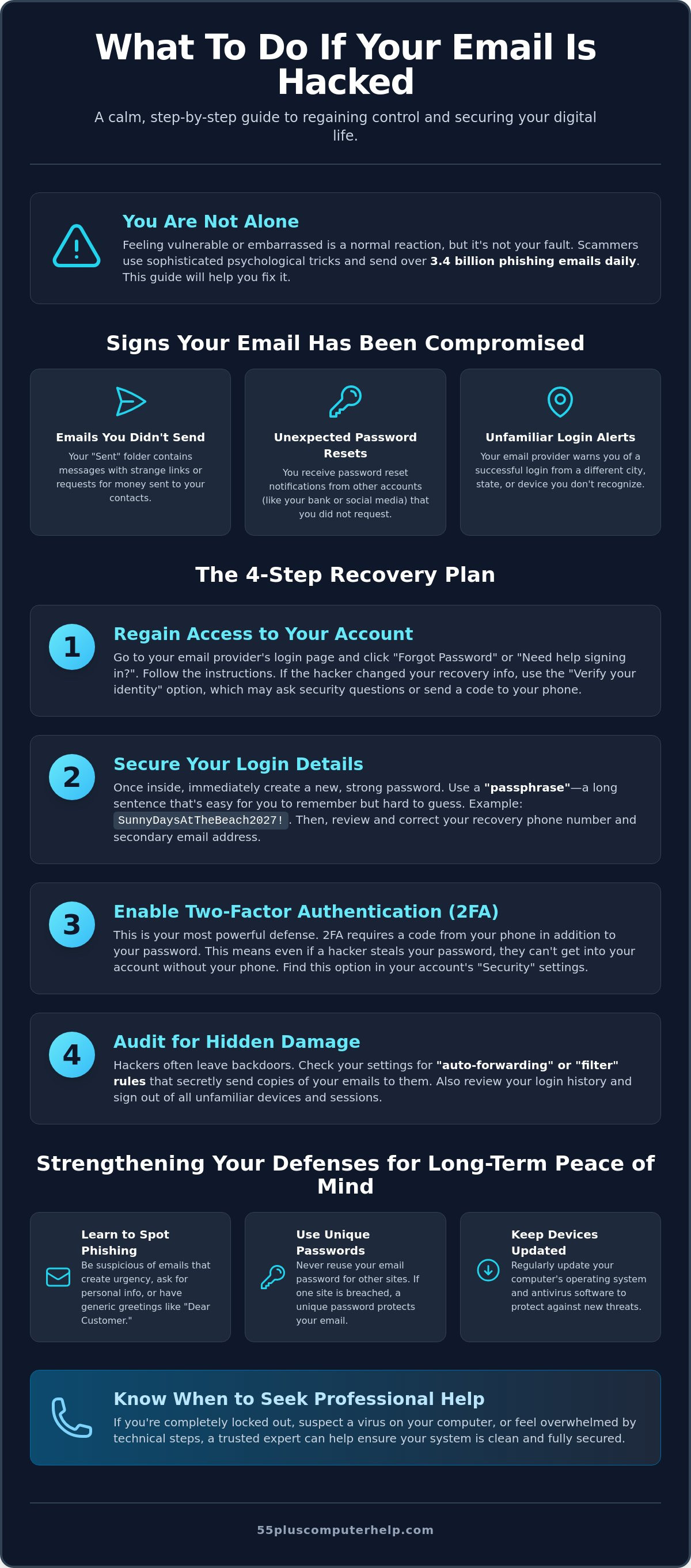
Sometimes, technical glitches can look like a security breach. To be sure, you need to look for specific evidence. Start by checking your "Sent" folder. If you see messages there that you didn't write, especially those containing strange links or requests for money, that's a clear sign. You should also look through your inbox for "Password Reset" notifications from websites like Amazon, Facebook, or your bank. Hackers often try to use your email to gain access to your other accounts. Finally, check for any security alerts from your email provider about successful logins from unfamiliar cities or devices you don't own.
The "Deep Breath" Rule: Why You Are Not to Blame
It's easy to feel embarrassed or "tricked" when a scammer gets into your account. However, you should know that modern scams are highly sophisticated. They are designed by teams of people who spend all day finding ways to bypass security. A better understanding email hacking shows that these criminals use everything from automated software to clever psychological tricks. You aren't "bad with technology" just because a professional criminal targeted you. Removing the shame of being hacked makes the recovery process much faster. Right now, don't worry about how they got in. We will focus entirely on the solution and getting your digital life back in order. You have the tools to fix this, and you're already doing a great job by taking these first steps.
Knowing what to do if your email is hacked starts with this foundation of calm observation. Once you've identified the signs and cleared your mind, you're ready to move on to the actual recovery of your account.
How to Regain Control and Secure Your Account
Once you've identified the signs of a breach, the next phase is taking direct action. This is the most critical part of knowing what to do if your email is hacked. You'll start by reclaiming your digital space and making it much harder for anyone else to get in. It's a bit like changing the locks on your front door after losing your keys. You want to move quickly but stay methodical.
Start by visiting your email login page and looking for a link that says "Forgot Password" or "Need help signing in?" Follow the prompts carefully. If the hacker already changed your recovery email address, don't worry. Most providers have a "Verify your identity" option. They might ask you questions about your account history or send a code to your phone. If you can't get back in this way, it's a good time to look into protecting your identity after a hack through other channels while you work on account recovery.
Once you gain access, your first priority is changing your password. You also need to check your recovery phone number and secondary email address. Hackers often change these to their own details so they can get back in later. If these steps feel a bit technical, a patient expert can help with email setup and troubleshooting to ensure your settings are completely secure.
Creating a Password You Can Actually Remember
A strong password doesn't have to be a confusing jumble of symbols. In fact, using a "passphrase" is often much safer. For example, a phrase like "BlueBirdsFlyHighIn2026!" is very strong because it's long. It's also much easier to remember than something like "Bbfh!26". Avoid using your name, birthdate, or the same password you use for your bank. Keeping these accounts separate protects your finances if your email is ever compromised again.
Setting Up Two-Factor Authentication (2FA)
Two-factor authentication is a digital identity check that acts like a second key for your account. Even if a hacker has your password, they can't get in without this second piece of information. Most people choose to have a short code sent to their phone via text message. You simply type in the code after you enter your password. It only takes a few extra seconds, but it provides incredible peace of mind. It's one of the best ways to ensure you never have to wonder what to do if your email is hacked in the future.
Auditing the Damage: What the Hacker May Have Left Behind
Once you've regained access to your account, you might feel like the hard work is over. However, hackers often leave behind "back doors" to stay connected to your life. They want to keep spying on your messages even after you've changed your password. Taking the time to audit your settings is a vital part of knowing what to do if your email is hacked. Think of this as a thorough spring cleaning for your digital home. You're making sure every window is locked and every unwanted guest is gone.
The most common place hackers hide is in your email forwarding settings. They set up rules that automatically send a copy of every message you receive to their own secret address. This allows them to see your bank alerts, private family notes, and password reset links for other websites. You should also check your "Signature" and "Auto-Reply" settings. Scammers sometimes add malicious links to your signature so that every email you send carries a hidden threat to your friends and family. If you see any text or links you didn't create, delete them immediately. You can find more detail on these hidden traps in McAfee's guide to recovering a hacked email.
Next, look at your "Trash" or "Deleted Items" folder. Hackers often delete notifications from your bank or credit card company to hide their tracks. If you find financial emails in the trash that you didn't put there, it's a sign that someone was looking at your money. Call your bank using the number on the back of your card to let them know. They can help you monitor your accounts for any unusual activity.
Finding Hidden Spyware in Your Email Settings
Go to your email settings and look for labels like "Filters," "Rules," or "Forwarding." These tools are meant to help you stay organized, but hackers use them to stay invisible. Look for any rule that says "Forward to" followed by an email address you don't recognize. If you find one, remove it right away. You should also check the list of "Connected Apps" or "Third-Party Access." If you see a game or a website you haven't used in years, revoke its permission to access your email. This keeps your account private and secure.
Alerting Your Inner Circle
It's a good idea to let your friends and family know what happened. You don't need to feel embarrassed; they will appreciate your honesty. Send a short email to your contacts using the "BCC" (Blind Carbon Copy) field. This prevents everyone from seeing each other's addresses. Simply explain that your account was briefly compromised and tell them not to click any links you might have sent in the last few days. This simple step stops the cycle of scams from spreading to the people you care about most.
Strengthening Your Defenses for Long-Term Peace of Mind
Now that your account is secure, you can focus on keeping it that way. Prevention is the best medicine for digital stress. You've already learned the hard way what to do if your email is hacked, so let's make sure you never have to use those steps again. Building a strong defense doesn't require you to be a computer genius. It just takes a few simple habits and a bit of regular attention to your settings.
The Role of Software Updates in Security
Think of software updates as regular maintenance for your digital home. When Apple or Microsoft releases an update, it often includes "security patches." These are digital repairs that fix tiny holes hackers use to sneak into your system. You don't have to remember to do this yourself. You can set your computer, smartphone, and tablet to "Auto-Update" in the settings menu. This ensures your devices are always wearing their best armor. If you're worried that a previous breach left something behind on your hard drive, our guide on virus and malware removal can help you verify that your system is completely clean.
Recognizing Future Scams Before You Click
Most hackers get in because of a "phishing" email. These messages are designed to look like they come from your bank, the IRS, or a friend. They often use urgent language to make you panic. They might say your account will be closed in 24 hours if you don't click a link. Before you click anything, hover your mouse over the link without pressing down. A small box will appear showing the real web address. If the email says it's from Amazon but the link goes to a strange set of numbers, it's a scam. If an email feels "off" or makes you feel pressured, stop. Call the person or company directly using a phone number you already know.
You might also consider using a reputable password manager. These tools act like a secure digital vault for all your login details. They can create very strong passwords for you and remember them so you don't have to. Finally, try to schedule a "security checkup" once every three months. Just take ten minutes to review your recent logins and update your passwords. If you'd like a patient mentor to walk you through these settings in person, we offer personalized technology training to help you feel completely confident online. Knowing what to do if your email is hacked is great, but knowing how to stop it before it starts is even better.
When to Call a Professional for Computer Help
Following a step-by-step guide is a wonderful way to build your skills and independence. However, there are times when technology presents a challenge that requires a more specialized touch. You've already taken great steps to learn what to do if your email is hacked, but you don't have to finish this journey alone. If the recovery process starts to feel overwhelming or if your computer continues to act strangely, calling for professional help is the safest and most efficient choice you can make.
You should reach out for expert assistance if you encounter any of these specific situations:
- Account Lockout: You've tried the "Forgot Password" link several times, but the provider still won't let you back into your inbox.
- Strange Computer Behavior: Your device is running much slower than usual, or you're seeing unexpected pop-up windows that won't go away.
- Financial Exposure: You found evidence that the hacker accessed your bank statements, tax returns, or other sensitive financial documents.
- Persistent Threats: Even after changing your password, your friends report that they're still receiving odd messages from your account.
Professional support is especially vital if you suspect that a virus has moved beyond your email and onto your computer's hard drive. A trusted expert can perform a deep scan to ensure every trace of malware is removed. This gives you a truly fresh start and the confidence that your personal files are once again private.
Why In-Home or Remote Support Beats the "Big Box" Store
When you take your computer to a large retail store, you're often met with a rushed environment and a technician who uses a lot of confusing jargon. We believe that technical support should be a calm and supportive experience. A patient mentor can provide one-on-one help either in your home or through a secure remote connection. This approach allows us to focus entirely on your specific needs. Instead of just "fixing" the problem and handing the device back, a mentor takes the time to explain the "why" behind each step. This educational approach transforms a frustrating event into a sense of accomplishment.
Getting Your Digital Life Back on Track
Digital security is a journey, not a one-time event. Having a trusted expert by your side makes that journey much less scary. Once the immediate crisis is over, you might consider a personalized technology training session. These lessons are designed to build your confidence and help you enjoy your computer without the constant fear of hackers. We can perform a full security audit of your devices to ensure your peace of mind is permanent. Remember, the goal is to get back to what matters most, like staying connected with family and friends, while knowing exactly what to do if your email is hacked in the future.
Taking Back Your Digital Peace of Mind
You now have a clear roadmap for handling a security breach. By staying calm and following a methodical plan, you can turn a stressful situation into a valuable learning experience. You've learned how to reset your access, clear out hidden forwarding rules, and set up two-factor authentication to keep hackers out for good. Knowing exactly what to do if your email is hacked gives you the power to protect your personal information without the need for panic.
Sometimes, you just want the extra reassurance that comes from a trusted expert. 55 Plus Computer Help LLC has over 10 years of experience helping seniors navigate technology safely. Our patient mentors speak your language instead of technical jargon. We offer specialized virus and malware removal services to ensure your computer is completely clean and secure. Get patient, professional help securing your email today to reclaim your peace of mind. You deserve to enjoy your digital life with total confidence and security.
Frequently Asked Questions
How can I tell if my email password was leaked?
You can check if your login information was part of a data breach by using a trusted website like Have I Been Pwned. Many web browsers also send you a notification if they find your saved passwords in a known leak. If you see a warning, it's a clear sign you need to know what to do if your email is hacked. Changing your password immediately is the best way to stop a leak from becoming a full account takeover.
Is it safe to keep using the same email address after it was hacked?
Yes, you can safely keep your email address as long as you follow a thorough security cleanup. Once you change your password and remove any hidden forwarding rules, the account is yours again. You don't need the hassle of telling all your friends that you have a new address. Just make sure you use a strong passphrase and enable two-factor authentication to keep the door locked tight against future intruders.
What happens if a hacker has my secondary recovery email address?
If a hacker has access to your recovery email, they can use it to reset the password on your primary account at any time. This creates a dangerous loop where you keep losing access even after you fix it. You must secure both accounts immediately by changing their passwords and recovery settings. If you feel stuck, a mentor can help you coordinate this process so you don't get locked out of both addresses.
Can a hacker access my bank account through my email?
A hacker can potentially access your bank account if they have control of your email. They do this by visiting your bank's website and clicking "Forgot Password," which sends a reset link directly to your inbox. This is why it is so important to act quickly when your email is compromised. You should check your "Trash" folder for any deleted bank notifications and call your financial institution to alert them of the situation.
Should I pay a "ransom" to a hacker who says they have my photos?
You should never pay a ransom to someone claiming they have your private photos or videos. These emails are almost always a scam where the criminal is bluffing to scare you into sending money. They often include an old password to make the threat seem real. Instead of paying, simply delete the email and update your password. Paying only encourages the scammer to ask for more money without ever stopping the threats.
How often should I change my email password to stay safe?
You don't need to change your password every month if you're using a strong, unique passphrase and two-factor authentication. In fact, changing it too often can lead to using simpler passwords that are easier to guess. Focus on making one very strong password that you don't use anywhere else. You only need to change it if you suspect a leak or if you receive a security alert from your email provider about a login attempt.
Will a virus scan find a hacker in my email account?
A virus scan will not find a hacker who is logged into your email account from another location. Scans only look for malicious software on your actual computer or tablet. While a scan is important for finding spyware that might have stolen your password, it won't see the person using your account on the provider's server. You must check your account's "Recent Activity" list to see if unfamiliar devices are currently logged in.
What is the best way to remember all my different passwords?
The safest way to manage your logins is by using a reputable password manager. These tools act like a digital vault that stores and fills in your passwords for you. If a digital vault feels too complex, a physical notebook kept in a secure place at home is also a reliable option. Knowing what to do if your email is hacked is easier when you have your unique passwords written down and ready to be updated.


