
Imagine sitting down to see a new photo of your grandkids, only to be met with a confusing pop-up or a password request you don't recognize. You might hesitate to click anything because you're afraid of breaking the device or accidentally opening the door to a scam. It's frustrating when technology feels like it's moving faster than you can keep up with, especially when instructions are filled with confusing jargon. If you've been searching for computer training for seniors denver, you likely want someone who speaks your language and understands your concerns. You deserve to feel comfortable and capable every time you turn on your computer.
We believe that technology should be a tool for your independence, not a source of anxiety. In this guide, you'll discover how personalized, one-on-one training can help you gain confidence and stay connected with the people you love. We'll show you how to master video calls, manage your emails safely, and identify the red flags of internet scams. By the end of this article, you'll see a clear path toward becoming self-sufficient, allowing you to enjoy your devices without the fear of making a mistake.
Key Takeaways
- Learn why personalized computer training for seniors denver is more effective than group classes. It focuses on your specific needs and your own home equipment.
- Discover how to protect your personal information and gain the skills to spot online scams before they cause trouble.
- Find out how mastering video calls and email helps you stay connected with grandchildren and loved ones without feeling frustrated.
- Identify the essential traits of a patient technology mentor who understands the unique challenges of users over 55.
- Understand how a properly set up computer or tablet can lead to greater daily independence and a sense of accomplishment.
The Growing Importance of Technology Instruction for Older Adults
For many people, technology used to feel like an optional hobby. You could choose to use a computer or stick to paper and phone calls. Today, that has changed. Most banks, clinics, and government offices now require you to use an online portal for basic tasks. This shift has turned digital skills from a luxury into a requirement for daily life. High-quality computer training for seniors denver provides a vital bridge. It helps you maintain your independence and stay in control of your personal affairs. When you know how to use these tools, you don't have to rely on others for every small task.
There is a common myth that older adults cannot learn new digital skills. This simply isn't true. Learning might happen at a different pace, but the ability to master a tablet or smartphone is always there. Instruction helps close the gap described as the digital divide in the U.S., ensuring that age isn't a barrier to essential services. When you learn these skills, your quality of life improves. Staying mentally active by learning something new is also excellent for your brain health. It keeps your mind sharp and builds your self-confidence.
Overcoming the Fear of Modern Devices
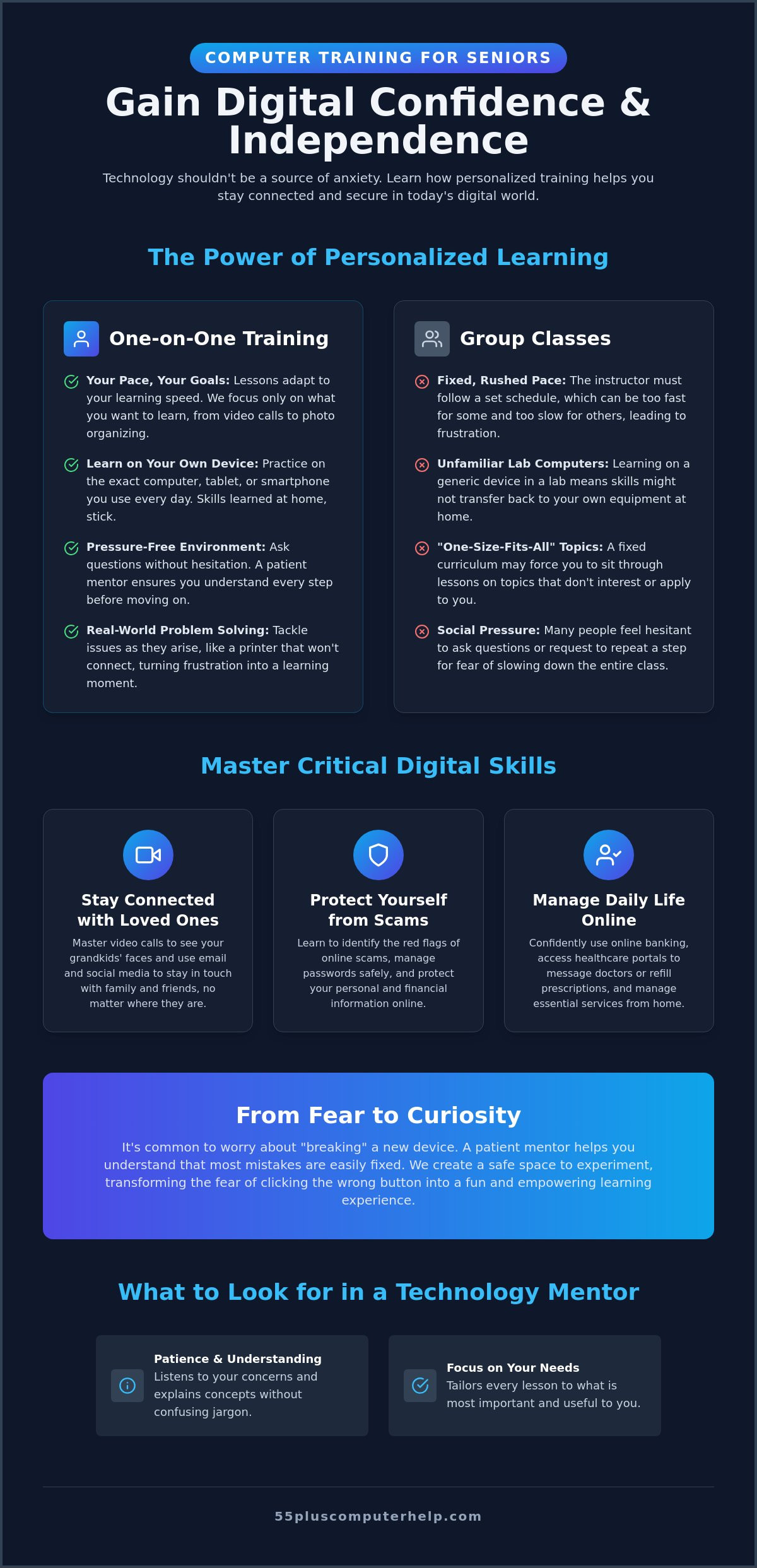
It's very common to feel anxious when you hold a new smartphone or sit at a laptop. Many people worry they will click the wrong button and break the expensive hardware. This fear can stop you from even trying. A patient mentor creates a safe space where you can experiment without worry. You'll learn that most mistakes are easily fixed with a few clicks. We want to help you move from a feeling of frustration to a mindset of curiosity. Once you realize the device won't break, you can start to have fun with it. Computer training for seniors denver is about making technology feel like a friendly tool rather than a mystery.
The Benefits of Staying Digitally Connected
Connection is often the biggest reason to embrace technology. Video calling is a wonderful motivator for many of our students. Seeing a grandchild's face on a screen can brighten your entire week. Beyond social ties, tech allows you to access healthcare portals. You can message your doctor, refill prescriptions, or check test results from your own living room. Digital literacy also keeps you involved in your local community. Whether it's a hobby group or a neighborhood forum, the internet helps you stay active and engaged with the world around you. Technology keeps you connected to what matters most.
One-on-One Personalized Lessons vs. Group Learning
When you start looking for computer training for seniors denver, you will often see flyers for group classes at local libraries or community centers. These classes are a good way to meet people, but they aren't always the best way to learn. In a group, the teacher must follow a fixed schedule. They have to move at a pace that works for the average student. This often means the class moves too fast for some and too slow for others. You might feel like you are falling behind before the first hour is even over.
Personalized lessons offer a much better experience. You get to learn on your own device in the comfort of your own home. This is a very important detail. Computer labs use machines that might look and feel different from yours. When you go back home, you might forget where certain buttons are located. By learning on your own laptop, tablet, or smartphone, you build "muscle memory" that sticks. You are practicing on the exact screen you will use every day. This makes the transition from a lesson to real-world use much smoother.
Why Private Tutoring Accelerates Learning
Private sessions focus entirely on your goals. If you only want to learn how to video call your family and organize your digital photos, that is exactly what we do. You don't have to waste time on topics that don't interest you. This creates many "teachable moments." For example, if your printer decides to stop working during a session, we can fix it together. You learn how to troubleshoot a real problem in your own environment. A patient mentor adjusts to your specific learning speed. We can repeat a step as many times as you need until you feel confident. There is no pressure to move on until you are ready.
The Limitations of Traditional Computer Courses
Traditional courses often use a generic curriculum that doesn't account for individual needs. This "one size fits all" approach can be very frustrating. You might also feel a certain amount of social pressure in a room full of strangers. Some people hesitate to ask questions because they don't want to slow down the class. In a private session, there are no silly questions. You are the only priority. Logistical issues are another factor. Traveling to a specific location requires dealing with traffic, parking, or bad weather. Much like how Snow Removal Denver helps locals manage the challenges of a Colorado winter, in-home computer training for seniors denver removes these barriers, allowing you to focus entirely on your new skills.Critical Digital Skills for Maintaining Connection and Security
In 2026, the digital world feels more connected than ever. Most people now use a mix of smartphones, tablets, and desktop computers to manage their daily lives. You might start an email on your computer and finish it on your phone while sitting on the porch. Learning how these devices sync together is a top priority for many. When you look for computer training for seniors denver, you shouldn't just learn how to click buttons. You need to learn how to stay safe while you do it. Security is a part of every lesson we teach. It isn't a separate topic; it is the foundation of everything you do online.
Mastering Communication and Social Media
Staying in touch with family is the most common reason people want to learn technology. This often starts with email setup and troubleshooting for seniors. Email is still the primary way to receive important documents and long letters. We also help you learn how to share and organize digital photos. Instead of photos being "trapped" on your phone, you can learn to put them into digital albums or send them to a digital frame. We also teach you how to use social media safely. This means setting your privacy levels so only friends and family can see your updates. You can enjoy seeing photos of your grandchildren without worrying about your personal details being public.
Internet Safety and Scam Prevention
Anxiety about online scams is a major barrier for many older adults. You might worry about clicking a link that looks like it's from your bank or a package delivery service. We teach you how to spot "phishing" attempts. These are messages that try to trick you into giving away personal information or passwords. A key part of staying safe is understanding virus and malware removal and prevention. Often, the best defense is simply keeping your software updated. These updates might seem like a nuisance, but they fix security holes that scammers use to get into your system. We also cover the basic rules for creating and managing secure passwords. We can show you how to use a password manager so you don't have to write everything down on a piece of paper. This focus on security makes computer training for seniors denver an empowering experience.
How to Choose a Patient and Reliable Technology Mentor
Finding the right teacher is just as important as the material you want to learn. Many people call a standard tech support line when they have a problem. While those technicians might know how to fix a computer, they often lack the interpersonal skills to teach you how to use it. When you look for computer training for seniors denver, you should look for a patient mentor rather than just a repair person. Technical knowledge is only half of what you need. The other half is the ability to communicate clearly and build your confidence.
Specialized experience with the 55+ demographic makes a significant difference. A mentor who works exclusively with older adults understands the specific hurdles you might face. They won't get frustrated if you need to see a step performed several times. They also know that your goal is often independence and connection rather than becoming a computer programmer. Choosing someone who values your comfort as much as the technical solution ensures a positive experience.
Before you hire a tutor, it is helpful to ask a few questions:
- How long have you been teaching seniors specifically?
- Do you provide written notes or summaries of our lessons to help me remember?
- Can we work on my specific devices in my own home?
- Are there any extra fees for travel or setup?
Key Qualities: Patience, Empathy, and Clarity
A successful instructor avoids technical jargon. They use plain English to explain what is happening on your screen. Instead of using complex industry terms, they use everyday language that makes sense to you. It is also important that they explain the "why" behind each step. Knowing why you are clicking a button helps you remember the action later. A good teacher is comfortable repeating steps as many times as needed. If you are ready to start learning in a supportive environment, you can book a personalized tech lesson today.
Practical Considerations for In-Home Support
Inviting someone into your home requires trust. You should always check for professional references and verify that the business has a solid reputation. This applies to any home-based service provider, whether you're hiring a technology tutor or someone to refresh your home's interior; for those interested in a kitchen update, click here to learn about local cabinet refinishing experts in Denver. Ask if the service provides background checks for their trainers. You should also verify their pricing structure upfront. A transparent price helps you avoid unexpected fees. Finally, check if they offer both onsite and remote support. Remote help can be very useful for quick questions after you have already had a few in-person sessions. This flexibility ensures you always have help when you need it.
Achieving Digital Independence with 55 Plus Computer Help
At 55 Plus Computer Help, we see technology as a path to a bigger, more connected world. Our mission is to act as your patient mentor during every step of your digital journey. We understand that tech support often feels cold or rushed. We choose a different path. We focus on a warm, welcoming approach that respects your pace and your concerns. Whether you need help with initial computer setup or complex internet and wi-fi troubleshooting, we are here to guide you. Our goal is to move you from a place of frustration to a place of quiet confidence. We don't just fix the problem and leave. We sit with you and show you how to handle it yourself next time.
This focus on empowerment is what makes our computer training for seniors denver unique. We believe that technology is a tool for your independence. When you understand how your devices work, you regain a sense of control. You can manage your own affairs, reach out to your family, and explore your interests without needing to ask for help every time. This transition from feeling "left behind" to feeling self-sufficient is the most rewarding part of our work. We help you turn your computer or tablet into a friendly, useful tool that serves your life.
Personalized Training Tailored to Your Goals
We customize every session to your specific devices and your personal goals. If you want to master your smartphone or tablet, we focus on the apps and features that matter to you. If you need help with printer setup or software installation and updates, we walk you through the process step-by-step. We offer onsite help in your home, which allows you to learn in the environment where you are most comfortable. We also provide remote assistance for those who prefer it or need a quick answer. This flexibility ensures you get the support you need exactly when you need it.
A Trusted Partner in Your Digital Journey
We have been a dedicated partner for the 55 and older community since 2014. We don't just provide a one-time service; we build long-term relationships with our clients. Many people work with us regularly to stay updated on new changes or to learn new skills as their interests grow. We are committed to making sure you never feel overwhelmed by rapid tech changes. Our computer training for seniors denver is designed to be a safe, supportive space for learning. If you are ready to gain your digital independence, reach out to us today. It is the first step toward feeling safe, connected, and empowered in the modern world.
Take the Next Step Toward Digital Confidence
Mastering modern technology is a journey that leads to greater independence and closer connections with your loved ones. You now understand that one-on-one lessons on your own devices provide the most effective path to success. By focusing on essential skills like secure communication and scam prevention, you can navigate the internet without fear. computer training for seniors denver should always be a patient and empowering experience that respects your unique learning pace.
Since 2014, 55 Plus Computer Help has specialized exclusively in supporting the tech needs of the 55 and older community. We offer both onsite and remote options to ensure you get the help you need in the most convenient way possible. We are ready to help you transform your frustration into a sense of true accomplishment. You don't have to face technical hurdles alone when a trusted local mentor is just a call away. Schedule your personalized tech session today and start enjoying everything the digital world has to offer. You have the ability to master these tools, and we are honored to help you do it.
Frequently Asked Questions
Is there in-home computer help for seniors available?
Yes, personalized in-home technology assistance is a primary service for residents in the Denver area. A patient mentor visits your home to provide support directly on your own equipment. This onsite approach is often the most comfortable way to learn because you don't have to worry about transport or using unfamiliar devices in a lab.
What do seniors typically learn in personalized computer classes?
Lessons are customized to your specific goals and interests. Many students focus on mastering video calls to see their grandchildren, organizing digital photo libraries, and managing email accounts. You can also learn how to use internet browsers safely, access healthcare portals, and navigate social media to stay connected with your community.
How much does a private computer tutor for seniors cost?
The cost for a private tutor depends on several factors, including the length of the session and whether you choose onsite or remote support. While group classes at community centers sometimes have fixed low rates, private tutoring offers a higher level of personalized attention. You should contact a service provider directly to get a clear understanding of their current pricing and any travel fees.
Can I learn how to use my smartphone or tablet at home?
Yes, you can receive comprehensive training for your smartphone or tablet in your own living room. We help you understand how to download apps, send text messages with photos, and adjust your settings for better visibility. Mastering these portable devices is one of the best ways to stay connected with family while you are away from your desk.
What is the best way for a senior to learn new technology skills?
Most people find that one-on-one computer training for seniors denver is the most effective way to build lasting skills. This method allows you to ask questions in a safe environment without the pressure of a classroom schedule. Learning on your own device ensures that the steps you practice will be exactly the same when you use them later on your own.
Do I need a new computer to start taking technology lessons?
You don't need to buy a new computer to start your learning journey. We can work with your current laptop, desktop, or tablet to see if it still functions well for your needs. If your device is too old to run modern software safely, we can provide guidance on choosing a reliable replacement that fits your budget and goals.
How long does it take to become comfortable with a new device?
Every student learns at a different pace, but many people feel a significant boost in confidence after just two or three personalized sessions. The key is to focus on the tasks you use most often rather than trying to learn every single feature at once. Regular practice between your lessons will help you build the muscle memory needed to feel truly self-sufficient.
Can a tech tutor help me set up a new printer or Wi-Fi?
Yes, we provide hands-on help with printer setup and internet or Wi-Fi troubleshooting. We ensure your devices are connected properly and that your signal is strong enough for your daily activities. This technical support is usually paired with a patient lesson so you feel comfortable using your new equipment long after the session ends.


