
Imagine you want to video call your grandkids, but a bright red "Download Now" button on your screen looks more like a trap than a helpful tool. It is completely normal to feel a bit of anxiety when your computer asks for passwords or permissions you don't recognize. You aren't alone in worrying that one wrong click might break your device or invite a virus. With elder fraud resulting in over $3.4 billion in annual losses as of 2026, your caution is actually a very important survival skill. That is why finding reliable software installation help for seniors is about more than just clicking buttons; it is about safety and peace of mind.
This guide will show you how to safely add the programs you need while avoiding deceptive advertisements and confusing prompts. You will learn why patient, professional help is the key to building your digital confidence and protecting your privacy. We will walk through how to ensure your device stays clean and functional, explain exactly what is being installed on your system, and help you gain the skills to use new tools independently. By the end of this article, you will feel ready to explore new software without the fear of making a mistake.
Key Takeaways
- Learn to identify deceptive "Download" buttons and stay safe from modern digital scams.
- Explore the benefits of software installation help for seniors, including the choice between quick remote fixes and hands-on, in-home lessons.
- Master the basics of managing accounts and permissions so you don't feel overwhelmed by technical jargon.
- Follow a practical checklist to ensure your computer has the right requirements for any new program you want to use.
- Move beyond "one-off" fixes and gain the skills to use your technology independently with patient, expert mentoring.
Why Software Installation Help for Seniors is Essential in 2026
Software installation is simply the process of moving a computer program into your device's permanent memory. Once it is there, the program stays ready for you to use whenever you need it. However, in 2026, this process is much more complicated than it used to be. Most new tools now use "Software as a Service" models. This means you often have to manage monthly subscriptions and constant cloud updates just to keep your programs running. It is natural to feel frustrated because many modern systems are built for speed rather than clarity. Professional software installation help for seniors provides the patience you need to understand these changes without feeling rushed or overwhelmed.
The High Stakes of a "Wrong Click"
When you search for a program online, the first thing you often see is a bright "Download" button. Unfortunately, these are frequently deceptive advertisements in disguise. Clicking the wrong button can lead to accidental malware downloads that hide inside what looks like a legitimate installer. You might also end up with "bloatware" on your device. These are extra, unneeded programs that slow down your computer and clutter your screen with unwanted pop-ups. Professional guidance is vital because it helps prevent identity theft and data breaches before they happen. Research into the challenges older adults face with technology shows that security concerns are a major barrier to digital confidence. Having a trusted expert by your side ensures that only the safe, correct files reach your hard drive.
Software vs. Apps: Understanding the Difference
Technology terms change quickly, and that adds to the confusion. You might hear people talk about "programs," "apps," or "browser extensions" as if they are the same thing. Essentially, a program is a heavy-duty tool for your computer. An app is a smaller, focused version often found on tablets or smartphones. A browser extension is a tiny tool that lives specifically inside your internet browser to help with tasks like blocking ads. Software installation help for seniors clarifies these differences so you don't download something you don't actually need. The way you install these tools differs depending on whether you use a Windows PC, a Mac, or a tablet. An expert helps you identify which specific tools will actually help you reach your goals, such as staying in touch with family or organizing your digital photos.
Common Challenges When Installing New Programs Alone
Installing software often feels like a test of patience. One major hurdle is "Account Fatigue." Almost every new tool asks you to create a username and password before you can even start. Keeping track of these credentials is exhausting. If you feel overwhelmed by these digital gatekeepers, you aren't alone. According to Pew Research Center data on senior tech adoption, many older adults feel they need someone to walk them through the setup of new devices and services. Professional software installation help for seniors can take the stress out of these early steps.
You might also see a pop-up asking, "Do you want to allow this app to make changes to your device?" This sounds scary. Usually, it just means the program needs permission to save files to your hard drive. However, scammers use similar-looking windows to trick you. Knowing the difference between a legitimate security update and a fake alert is a critical skill. Legitimate updates usually come through your computer's built-in settings menu or the program itself. They don't appear as random flashing windows on a website.
The Maze of Installation Wizards
An Installation Wizard is a guided map for your computer that leads you through the setup process step by step. While it sounds helpful, these wizards often contain hidden traps. Most people choose "Express Installation" because it seems faster. However, "Custom Installation" is usually safer. This option lets you see exactly what the program is doing. It reveals pre-checked boxes that might otherwise sign you up for newsletters or tracking programs you don't want. Taking the time to uncheck these boxes keeps your computer clean and fast.
Verifying Software Sources
Where you get your software matters as much as what you are installing. Using the Microsoft Store or the Apple App Store is generally much safer than downloading from random websites. These stores vet every program for safety. If you must download from a website, always verify it is the official developer's page and not a copycat. Before you click "Run," look for a digital signature. This is a verified stamp of approval from the creator. If the computer says the publisher is "Unknown," it is best to stop. If you're ever in doubt, our team at 55 Plus Computer Help can help you verify your sources before you commit to a download. This ensures you only get the tools you want without the hidden "bundled software" that often hitches a ride on free downloads.
Comparing Support Options: Remote vs. In-Home Assistance
Deciding how to get help is a big part of feeling comfortable with your technology. You generally have two paths: remote assistance or a friendly in-home visit. Both options provide professional software installation help for seniors, but they work best for different situations. Remote support is perfect for quick fixes, minor updates, or troubleshooting a specific program error. In-home support is usually better for complex setups or when you want a personalized lesson. Many seniors prefer having a face-to-face mentor in their own environment. It reduces the feeling of being rushed. Professional services also take your privacy seriously. They use encrypted tools to protect your data and only access what is necessary to solve the problem.
When to Choose Remote Help
Remote help works through screen-sharing. This tool allows an expert to see your screen while you stay in control of your mouse and keyboard. You can watch every move they make. The main advantage here is speed. You can often get help within minutes rather than waiting for a scheduled appointment. It's a convenient way to handle small glitches or learn a single new feature. Just remember one golden rule for safety. Never accept remote help from an unsolicited caller. Only work with trusted services that you have reached out to yourself.
The Value of In-Person Guidance
For many, hands-on learning is the most effective way to gain confidence. Watching the installation process in your own home helps you remember the steps later. An expert can also verify your physical setup. They check that your computer, power cables, and peripherals like printers are correctly positioned and plugged in. This personal touch builds a relationship with a local expert who understands your specific tech history. Since our founding in 2014, we've seen how this neighborly approach transforms frustration into independence. You get more than just a fix; you get a patient teacher who values your comfort. Having someone sit beside you makes it easier to ask questions without feeling like you're a burden.
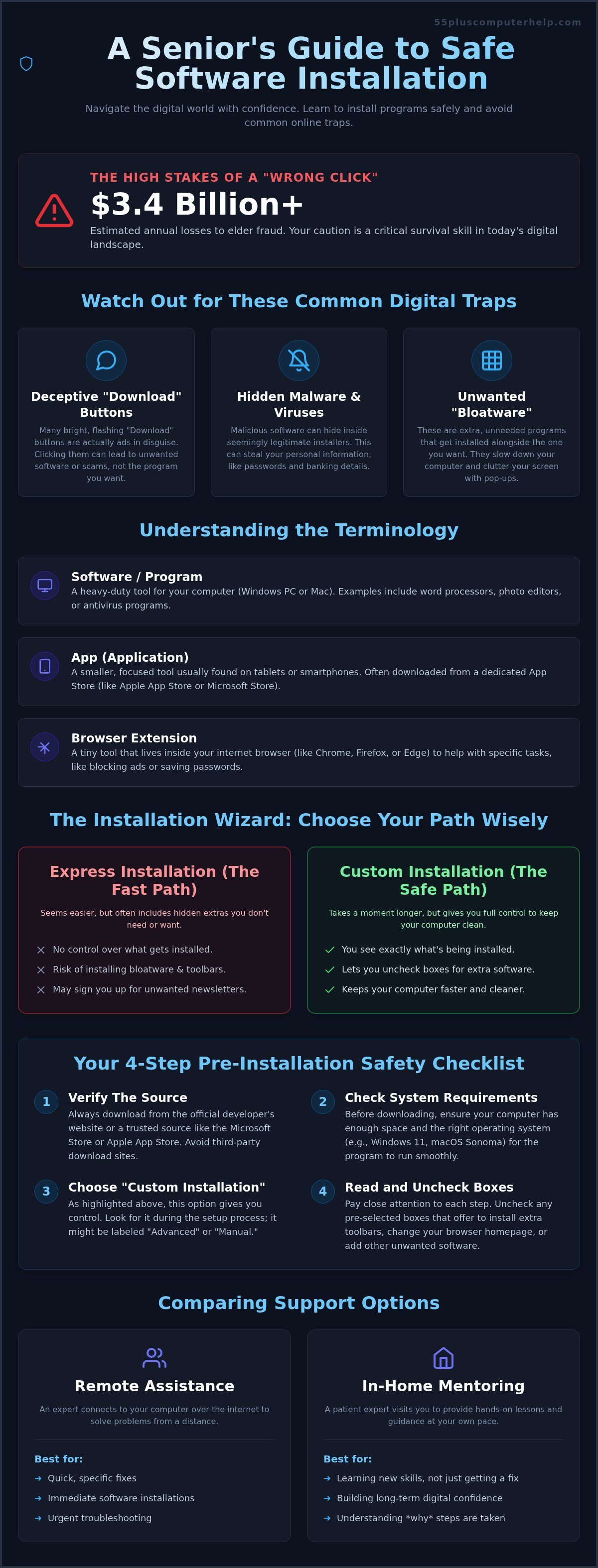
A Seniors Checklist for a Successful Software Installation
Following a simple checklist can turn a stressful task into a successful one. Before you begin, verify the need for the new program. Ask yourself if it solves a specific problem or adds value to your daily life. Maybe it helps you organize photos or join a local club's video chat. Once you decide it's useful, check your system requirements. Every computer has limits on its speed and memory. If a new program is too heavy for an older device, it will cause freezing and frustration. Getting software installation help for seniors ensures that your computer is actually capable of running the tools you want.
Pre-Installation Preparation
Success starts before you ever click "Download." First, check your available disk space. Most programs need a certain amount of room to breathe and store data. If your hard drive is nearly full, the installation might fail halfway through. Our team provides software installation help for seniors by checking these small details that make a big difference in how your computer performs. It is also a good idea to close any unnecessary programs that are currently running. This gives your computer more power to focus on the setup process. Remember that a professional Data Backup and Recovery plan is the best safety net for your digital life. It ensures your photos and documents are safe even if something goes wrong during a new setup.
Next, have your account information ready. You will likely need to create a new password or sign in with an existing one. Write this down in a secure place or have your password manager open. When the installation begins, follow the wizard carefully. As we discussed earlier, always look for those "extra" checkboxes. Uncheck anything that mentions toolbars, newsletters, or "special offers." These are rarely helpful and often slow your device down.
Post-Installation Hygiene
The job isn't finished just because the program is on your computer. You need to make the new tool easy to find. Create a shortcut on your desktop so you don't have to hunt through menus every time you want to use it. Once the shortcut is there, open the program and test it. Try to log in and click a few buttons to make sure it does exactly what you expected. If you find yourself stuck, you can always reach out to 55 Plus Computer Help for patient, professional guidance.
Finally, perform a bit of digital housekeeping. When you download a program, your computer saves an "installer" file. These often have names ending in ".exe" or ".dmg." Once the software is successfully installed, you no longer need these files. Deleting them from your "Downloads" folder is a simple way to save space and keep your computer organized. This hygiene step prevents your hard drive from getting cluttered with unneeded junk over time.
Empowerment Through Patient Mentoring with 55 Plus Computer Help
At 55 Plus Computer Help, we believe technology should be a bridge to your family and interests, not a source of stress. Our philosophy is simple: we don't just fix the problem; we teach you how the solution works. This approach transforms a technical chore into a moment of empowerment. When you receive software installation help for seniors from our team, you gain more than a new program. You gain the confidence to use it on your own. We specialize in the unique challenges faced by those aged 55 and older. We provide a patient, non-judgmental environment where no question is too small or too basic.
We take a security-first approach to every session. Before we add any new tool to your device, we perform a thorough check for Virus and Malware Removal. This ensures your computer is a safe foundation for your new software. We offer flexible options to fit your specific needs and comfort level. You can choose an onsite visit for a deep dive into complex setups or a quick remote session for immediate answers to software questions. Our goal is to make sure your device is clean, functional, and equipped with exactly what you need.
Personalized Lessons Tailored to You
We move at your pace during every session. There is no technical jargon and no rushing to finish. We focus on the apps and tools that matter most to you, such as programs that help you connect with your grandchildren or manage your hobbies. During our time together, we can help you create customized cheat sheets. These simple guides serve as a permanent reference for the steps we covered. You won't have to worry about forgetting how to log in or where to click next week because you will have your own personalized map to follow.
Reliable Support You Can Trust
You deserve a service that is both reliable and transparent. As a trusted small business founded in 2014, we value local accountability and relationship-based service. We offer clear, fixed-rate pricing so you know exactly what your session will cost before we even start. There are no hidden fees or high-pressure sales tactics. Booking your first session for software installation help for seniors is a simple, stress-free process designed with your comfort in mind. We are here to provide the steady, methodical guidance you need to navigate the digital world with total peace of mind.
Step Into a Safer Digital Future
Technology doesn't have to be a source of frustration or fear. By using a methodical checklist and staying alert to deceptive advertisements, you can keep your computer running smoothly and securely. You now know how to distinguish between a legitimate update and a scammer's trick. Choosing between remote assistance and in-home guidance allows you to find the comfort level that works best for your specific needs. Each step you take builds the independence you deserve in our increasingly digital world.
Our team has been serving seniors since 2014 with patient, one-on-one support for both Apple and Windows systems. We specialize in transforming complex setups into clear, easy-to-follow lessons. Professional software installation help for seniors is about more than just adding a program; it's about giving you the tools to stay connected with your loved ones safely. If you're ready to add new programs without the anxiety of a "wrong click," we are here to help. Get Patient Software Installation Help Today and start enjoying your technology with total peace of mind. You have the ability to master these tools, and we look forward to being your trusted mentors on that journey.
Frequently Asked Questions
Is it safe to let someone remotely access my computer for software help?
Yes, it is safe if you use a trusted service you contacted yourself. Remote support uses encrypted tools that let you watch every move the technician makes. You remain in control of your mouse and keyboard. Never accept help from an unsolicited caller claiming your computer is infected. Trusted providers use these tools to give software installation help for seniors safely. This allows us to fix minor issues quickly without you needing to leave your home.
How do I know if a software update is real or a scam?
Real updates typically appear inside the program or in your computer's official settings menu. They don't show up as flashing pop-ups or urgent warnings on websites. If a window claims your computer is "at risk" and demands an immediate click, it is likely a scam. Always check the official developer's website if you are unsure. Taking a moment to verify the source is the best way to avoid accidental malware downloads in 2026.
What is the difference between an app and a program?
A program is usually a complex tool installed on a desktop or laptop. An app is a smaller version designed for smartphones or tablets. For instance, the full version of a photo editor on your PC is a program, while the mobile version is an app. Both require careful setup to ensure they function correctly. We can help you clarify these terms so you know exactly what you are adding to your specific device and how to use it.
Why does my computer have so many "Download" buttons on one page?
Many websites host advertisements that look exactly like the "Download" button you are looking for. These are designed to trick you into clicking them. The real button is often smaller or tucked away in a specific corner of the page. Learning to spot these deceptive ads is a vital part of staying safe online. We teach you how to identify the correct links so you don't accidentally install unneeded programs that clutter your screen and slow your computer.
Do I need to buy antivirus software before installing new programs?
Modern computers have strong built-in security, so you may not need to buy extra software immediately. We include a check for virus and malware removal in our sessions to make sure your system is healthy before adding new tools. It is more important to use trusted sources than to have multiple antivirus programs. We can help you evaluate your current security settings to ensure they are active and providing the protection you need for your personal data.
Can you help me set up my email on a new computer?
We can certainly help you configure your email on a new device. This service includes setting up your inbox, helping with password recovery, and organizing your folders. We also show you how to identify and avoid common email scams. Setting up email is a frequent part of our software installation help for seniors. We make sure you can send messages and view photos from your family with ease and total confidence in your security.
What should I do if a program asks for "Administrator Permissions"?
This prompt is a security gatekeeper that stops programs from changing your system settings without your permission. If you are currently installing a trusted program, it is safe to click "Yes." If this window appears unexpectedly while you are browsing the internet, you should always click "No." This protects your computer from unauthorized changes. We can teach you how to recognize when these requests are legitimate and when they might be a sign of a hidden threat.
How long does a typical software installation help session take?
A typical session usually lasts about one to two hours. This time allows us to handle the technical setup and provide a personalized lesson at your pace. We never rush because we want to make sure you feel comfortable using the new software independently. Each session is tailored to your specific goals and skill level. We also use this time to create simple cheat sheets that you can refer to whenever you need a quick reminder.


