
Imagine sitting down to check pictures of your grandchildren, but your screen is suddenly covered in flashing boxes or your mouse simply won't move. It's a common story, and it often leads to the same worrying question: what does malware do to your computer? You might worry that you've done something wrong or that your private bank details are at risk. Please know that you aren't alone in feeling this way. With 80 percent of modern digital threats now using artificial intelligence to look more convincing, it's harder than ever for anyone to stay ahead of these tricks. It isn't a reflection of your skills; it's just a hurdle we can clear together.
We agree that it's deeply frustrating when your reliable device starts acting like a stranger. You deserve to feel safe and in control while you're online. This guide will help you understand the impact of these digital pests using plain language instead of technical jargon. You'll learn how to identify the signs of an infection, discover if you're currently at risk, and find out how a patient expert can help you regain your digital confidence. We'll show you that your computer is fixable and your peace of mind is well within reach.
Key Takeaways
- Learn how to recognize the common signs of a digital "cold" so you can identify issues before they become overwhelming.
- Understand exactly what does malware do to your computer, from causing frustrating slowdowns to showing unwanted pop-up advertisements.
- Get clear, simple explanations of common threats like "digital peeping toms" and how they affect your daily internet use.
- Discover easy, everyday habits that protect your personal information and help you browse the web with confidence.
- Know when it's time to call a patient expert for help so you can stop worrying and start enjoying your device again.
Understanding Malware: What It Is and Why It Matters for You
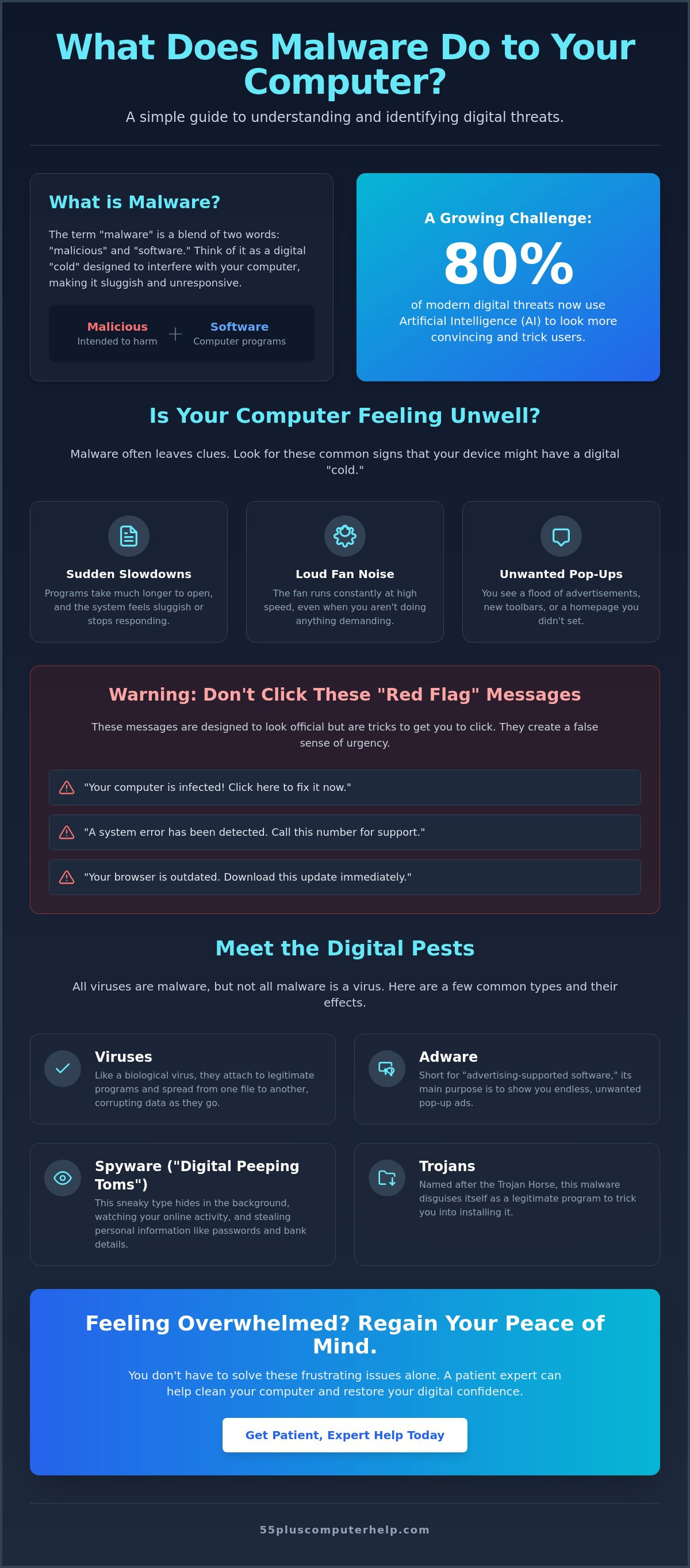
The term "malware" is actually a combination of two words: "malicious" and "software." It refers to any program or code that is created to interfere with your computer. Think of it like a digital "cold" that makes your system feel sluggish and tired. Just like a human cold can make it hard to get through your day, malware makes it hard for your device to perform its normal tasks. When you ask what does malware do to your computer, you're looking for clarity so you can move forward with confidence.
If your screen starts acting strange, please remember that it is never your fault. Malware is designed to be sneaky and deceptive. Even very experienced people can accidentally click on something that looks perfectly safe. When you understand What is malware?, you can begin to take the fear out of the situation. Knowing what you are dealing with is the first step toward fixing the problem and getting back to your routine.
Why do people create malware?
You might wonder why someone would want to cause these problems. Most of the time, the answer is simple: money. Scammers create these programs for financial gain. They might try to show you extra advertisements or trick you into clicking on links that pay them a small fee. In 2026, many of these threats are created using automated tools that target thousands of people at once. It isn't personal; it's just a business for the people behind it.
In some cases, the goal is to watch your habits or steal login information for your accounts. Malware is a tool used by scammers to disrupt your privacy and gain access to your personal data. By understanding that these are just tools used by people looking for a profit, you can view the situation more logically. It is a fixable technical issue, not a permanent failure of your skills or your computer.
The difference between a virus and malware
Many people use the word "virus" to describe any computer problem. However, a virus is actually just one specific type of malware. To help understand this, you can think of the phrase "all squares are rectangles, but not all rectangles are squares." In the digital world, all viruses are malware, but not all malware acts like a virus. Some types of malware hide quietly in the background, while others are loud and annoying.
When you ask what does malware do to your computer, the answer depends on the specific type of program that found its way onto your system. The technical name matters much less than the impact it has on your daily life. Whether it is a virus, a worm, or a trojan, the goal is always the same. We want to remove the disruption and help you feel secure while you browse the web or check your email.
How Malware Changes Your Computer’s Behavior
When you notice your device isn't acting quite right, it can be very unsettling. You might feel like the technology is working against you. To understand what does malware do to your computer, it helps to look at the physical and visual signs. A very common symptom is a sudden and significant slowdown. You might click on your internet browser or a word program and wait much longer than usual for it to open. Your computer might even stop responding entirely for a few seconds at a time.
You might also hear your computer fan running loudly. This often happens even when you aren't doing much. It sounds like a small airplane taking off on your desk. This noise occurs because the computer is working very hard on tasks you didn't authorize. It's like a car engine revving while it is parked in the driveway. The malware is using your computer's power to run its own hidden programs, which leaves less power for the things you actually want to do.
Visible signs you will notice immediately
Some signs are hard to miss. Your programs might "freeze" more often than usual. You might also find new toolbars at the top of your screen or a different homepage that you never installed. Sometimes, your friends might tell you they received a strange email from your account. This is a common way for malware to spread to other people. Here are three common "red flag" pop-up messages to watch for:
- "Your computer is infected! Click here to fix it now."
- "A system error has been detected. Call this number for support."
- "Your browser is outdated. Download this update immediately."
These messages are designed to look official, but they are often just tricks to get you to click. If you are worried about these alerts, you can always ask for virus and malware removal assistance to get things back to normal. It is always better to be safe and have a professional take a look.
Hidden actions happening behind the scenes
Not all symptoms are loud or obvious. Some malware tries to stay very quiet to avoid being caught. It works in the background like a silent, uninvited guest. This software might use your internet connection to send your private data to scammers. This is why your internet might feel slower than usual. The malware is "clogging" your connection with its own traffic.
Another hidden behavior is recording your keystrokes. This allows the program to "see" exactly what you type into login boxes for your bank or email. In McAfee's overview of malware types, they explain how these different methods help scammers gain access to information. By staying quiet, the malware can stay on your device longer without being noticed. Understanding what does malware do to your computer behind the scenes helps you realize why a slow computer is sometimes a sign of a deeper issue that needs a patient expert's touch.
Common Types of Malware and Their Specific Impacts
Names like "spyware" or "trojan" often sound more intimidating than they actually are. These are simply different labels for how a computer program behaves. When you ask what does malware do to your computer, the answer depends on which specific "pest" has found its way onto your device. We can look at these like common household problems. Some are just noisy and annoying, while others are more intrusive and require a steady hand to remove.
The goal of this section is to pull back the curtain on these terms. By understanding the different types of threats, you can replace fear with knowledge. Most malware falls into a few specific categories that each affect your computer in unique ways. Whether it's showing you unwanted ads or hiding in the background, every type of malware is a technical issue that can be solved with the right help.
Spyware and Adware: Privacy vs. Annoyance
Spyware acts like a "digital peeping tom." It hides in the shadows of your system and watches what you do online. Its main job is to record the passwords you type or read your personal messages. This can feel like a violation of your home, and it's natural to feel anxious. However, it's just a program, and it can be stopped. Adware is more like an "annoying salesperson." It floods your screen with unwanted advertisements for products you never searched for. While adware is a nuisance, it can also lead to bigger problems by tricking you into clicking links that invite more threats into your computer.
Ransomware: Protecting your precious memories
Ransomware is perhaps the most upsetting type of malware. Think of it as a "digital kidnapper." It locks your most important files, such as photos of your grandchildren or your personal tax documents. It then shows a high-pressure message demanding money to give them back. You should never pay the "ransom" demanded by these pop-ups. There's no guarantee the scammers will actually unlock your files, and it only encourages their behavior.
The best way to handle this threat is to be prepared before it ever happens. Having a solid plan for data backup and recovery ensures your memories are safe no matter what. If your files are backed up safely in another location, the "kidnapper" has no power over you. It's also important to understand what does malware do to your computer when it comes to Trojans. These are "hidden gifts" that look like helpful programs but contain a threat inside. By staying informed and keeping your files backed up, you can maintain your digital independence and browse with peace of mind.
Simple Habits to Keep Your Computer Safe
Protecting your device doesn't require you to be a computer genius. It's more about building a few simple, daily habits that act like a digital fence around your home. When you understand what does malware do to your computer, you can see why these small steps are so effective. For example, keeping your computer "health" up to date with regular software updates is one of the best ways to stay safe. These updates often fix "holes" that scammers use to get inside. While a reputable security program is a great tool, your own awareness is your strongest defense.
Be very cautious of "free" software or movie downloads on the web. These are often used as bait to hide malicious programs. It's also wise to only open emails and attachments from people you know and trust. If a message from a friend looks strange or asks for money, give them a call to verify it before you click anything. If you ever feel overwhelmed by these tasks, we can help with software installation and updates to ensure your system is always ready and secure.
Identifying suspicious links and emails
Scammers are becoming more clever every day. According to data from 2026, approximately 80 percent of phishing attacks now utilize AI-generated content to look more professional. This makes it harder to spot a fake just by looking at it. They often use urgent language to make you act quickly. You might see messages about an "unpaid invoice" or a "problem with your account." Look closely for bad spelling or "too good to be true" offers. A great trick is to "hover" your mouse over a link without clicking it. This lets you see the real web address in the corner of your screen. To learn more about these tricks, read our guide on How to Identify and Avoid Common Internet Scams.
The power of the "X" button
If a strange window pops up, your first instinct might be to click a button that says "Cancel" or "No." However, scammers sometimes hide a "Yes" command behind those buttons. It's much safer to use the "X" button in the very top corner of the window to close it entirely. Most "system alert" pop-ups are fakes designed to scare you. They want you to think your computer is broken so you'll call a fake support number. If your screen "locks" with a scary warning message, don't panic. Simply turn your computer off and back on again. This often clears the message and gives you back control of your device. Staying calm is your best tool for keeping your digital life secure.
Taking Control: Professional Help for Your Peace of Mind
Even with the best habits, digital pests can sometimes find a way into your system. When you ask what does malware do to your computer, you are often looking for a way to stop the worry. Trying to fix a technical issue on your own can be very stressful. It often feels like you are walking through a dark room without a flashlight. There is no reason to feel "stupid" or overwhelmed by these problems. Asking for help is a sign of wisdom, not a lack of skill. We believe that your comfort is just as important as the technical solution.
A patient expert acts as a guide to help you navigate these challenges. Instead of a cold, clinical repair, we offer a supportive environment where you are the priority. We focus on moving you from a state of worry to a state of security. You deserve to use your device without the fear of identity theft or losing access to your bank accounts. Regaining your digital confidence is possible, and it starts with having a trusted local expert by your side.
Why professional malware removal is a smart choice
Many people try to use free tools they find online to clean their devices. While these can be a good start, they often leave small pieces of code behind. A professional ensures the threat is completely gone, not just "hidden" from view. We look for "leftover" damage that automated tools might miss. This thorough approach prevents the problem from returning a few days later. Our Virus and Malware Removal service is designed to be thorough and transparent. We explain exactly what does malware do to your computer as we remove it, so you are never left in the dark.
Empowerment through education
We believe that technical support should be an educational experience. A help session is a wonderful opportunity to learn more about your device. We explain each step in plain, everyday language. This helps you build your "digital muscles" so you can stay safe in the future. You will feel more independent and self-assured every time you log on. Our goal is to transform your frustration into a sense of accomplishment. You can Schedule a patient, in-home or remote help session today to reclaim your peace of mind and enjoy your technology again.
Reclaim Your Peace of Mind Online
Dealing with a slow or unresponsive computer can feel overwhelming, but you now have the tools to understand the situation. We have explored how malware acts like a digital cold and why it's never your fault when things go wrong. By recognizing signs like unusual pop-ups and practicing simple habits, you can protect your personal information with confidence. Understanding what does malware do to your computer is the first step toward taking back control of your digital life.
You don't have to manage these technical challenges alone. Since 2014, we've provided specialized tech support for seniors with a patient, mentor-like approach to troubleshooting. Whether you prefer in-person help or a remote session, we're here to ensure your device is safe and your questions are answered. You can Get Patient, Expert Help with Virus and Malware Removal Today and move forward with security. Your independence online is important, and we're honored to help you maintain it. Stay curious and keep exploring the digital world with a smile.
Frequently Asked Questions
Can malware steal my bank account information?
Yes, certain types of malware are designed to capture the information you type into your browser. These programs, often called "keyloggers," can record your usernames and passwords when you log into your bank's website. It is very important to have these threats removed promptly to keep your financial details secure. Once the infection is cleared, changing your passwords provides a fresh start for your digital safety and peace of mind.
How did malware get on my computer if I have an antivirus program?
Antivirus software is a helpful shield, but it cannot catch every single threat that exists in the digital world. Scammers constantly create new versions of malicious code to bypass these security programs. Sometimes, a program might look like a harmless update or a "free" game, and the antivirus might not recognize it as a threat yet. This is why staying cautious about what you click is just as important as having your security software running.
Is it safe to use my computer if I think it has a virus?
It is best to avoid using your computer for sensitive tasks like banking or shopping until you are sure it is clean. When you wonder what does malware do to your computer while you are active, remember that some threats watch your movements in the background. If you only use your device for reading news or checking the weather, the risk is lower. However, seeking professional help quickly prevents the problem from getting worse or spreading.
Will a malware infection delete my family photos?
Most common malware will not delete your photos, but a specific type called ransomware can lock them away from you. These programs "encrypt" your files so you cannot open them without paying a fee. This is why we always emphasize the importance of regular data backups. Having a copy of your precious memories on a separate drive or in a secure cloud service keeps them safe regardless of what happens to your device.
What is the difference between malware and a scammer calling me on the phone?
Malware is a piece of software that lives on your computer, while a phone scam is a person trying to trick you directly. Often, these two work together to create confusion. A malicious pop-up might appear on your screen and tell you to call a specific number for "tech support." The person on the other end is the scammer who wants to gain access to your device. Understanding the difference helps you stay calm and avoid falling for their pressure tactics.
Can I get malware just by visiting a website, or do I have to click something?
It is possible to get an infection just by visiting a poorly secured website, but it is much more common to get one by clicking a link. These "drive-by downloads" happen when a website is compromised by scammers without the owner's knowledge. You are generally safe if you stick to well-known, reputable websites. Keeping your internet browser updated is a simple way to block these types of hidden threats from entering your system.
How much does it typically cost to have malware professionally removed?
The cost of professional removal depends on the complexity of the infection and how much time is needed to ensure your system is completely clean. Some minor issues are quick to fix, while deeper infections that have damaged system files may take more effort. We recommend looking for a service that offers transparent, fixed-rate pricing. This ensures you know exactly what to expect without any hidden surprises or confusing hourly fees for the work performed.
What should I do first if I see a scary "Your computer is infected" pop-up?
The first thing you should do is stay calm and avoid clicking any buttons inside that pop-up window. These alerts are almost always fakes designed to scare you into making a mistake. When you see these messages and ask what does malware do to your computer, remember that the pop-up itself is often the only threat. You should try to close the window using the "X" in the top corner. If the screen is frozen, simply turn your computer off and back on again.


