
What if the most powerful way to protect your digital life isn't a complex computer program, but a few simple habits you can learn in minutes? Many people feel a sense of dread when they see news stories about phone scams or data leaks. It's completely normal to worry about accidentally tapping the wrong button or losing your savings to a fraudster. This is why understanding smartphone security for seniors is more important than ever. You might even feel like your phone's privacy settings are written in a different language.
This guide is here to change that. We'll show you how to master your device without the technical jargon or the headache. Our goal is to help you protect your personal information so you can use your phone with total confidence. You don't need to be a tech expert to stay safe in 2026. Learning these steps will help you maintain your independence and keep your private life secure.
In the following sections, we'll walk through the best ways to lock your screen properly. We will explain how to identify a scam text or call before you interact with it. Finally, we'll cover the simple steps to ensure your private photos and messages stay exactly where they belong.
Key Takeaways
- Learn why your phone is a mini-computer and how simple steps can protect your most private information from scammers.
- Discover how to choose the right screen lock to ensure your photos and messages remain for your eyes only.
- Master the art of smartphone security for seniors by learning to recognize the urgent red flags used in common mobile scams.
- Find out how keeping your software updated acts as a primary defense against digital threats and malware.
- Explore how patient, one-on-one training helps you use your device with confidence and independence.
Why Smartphone Security is Essential for Seniors Today
Your smartphone is much more than just a tool for making calls. It's a small but powerful computer that you carry in your pocket every day. Because these devices are so capable, they hold a lot of your personal information. This makes smartphone security for seniors a vital topic to understand. When you know how to protect your device, you protect your peace of mind. Taking a few minutes to learn these basics is a great way to stay independent in a digital world.
Your Phone as a Portable Filing Cabinet
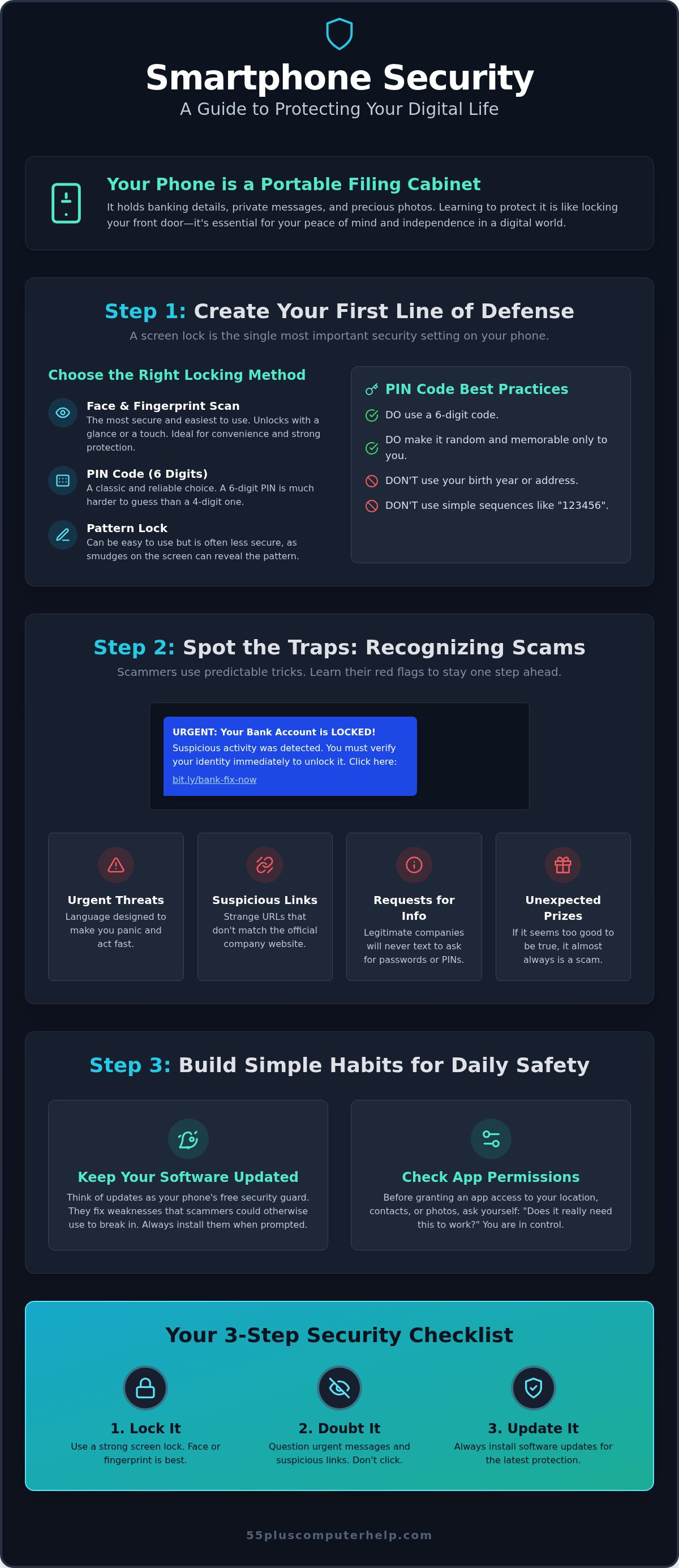
Think of your phone as a portable filing cabinet that stays with you at all times. Inside this digital cabinet, you likely have apps for your bank, portals for your healthcare provider, and years of precious family photos. You might even have saved passwords or your home address stored in your maps. It's essential to keep this cabinet locked with a strong digital latch. If someone else gets into your phone, they could see your private conversations or even access your money. Smartphone security is the practice of protecting the data that keeps you independent. By setting up proper safeguards, you ensure that your personal business stays personal. You wouldn't leave your front door wide open, and your phone deserves that same level of care.
The Evolving Landscape of Mobile Threats
Scams have changed quite a bit over the last few years. In the past, most fraudsters reached out through landline phones or physical mail. Today, they use text messages, emails, and even social media apps to try and trick people. Many scammers specifically target older adults. They often assume that seniors have less technical experience or might be easier to confuse. However, being targeted by a scammer is not a reflection of your intelligence or your capabilities. These criminals are professional deceivers who spend all day trying to find ways into people's lives.
Mobile device security is a field dedicated to stopping these threats before they reach you. Most security issues are completely preventable with just a little bit of basic knowledge. Understanding why security matters is the first step toward making better choices every time you pick up your phone. You have the power to stay safe, and it starts with a few simple habits. By focusing on smartphone security for seniors, you can spot the red flags before they become problems. Knowledge is your best defense against those who want to disrupt your digital life.
Creating Your First Line of Defense: Screen Locks and Privacy
The first step in securing your device is setting up a screen lock. This is the single most important security setting on your phone. Without it, anyone who picks up your device can see your messages, photos, and bank accounts. Think of a screen lock as a reliable deadbolt for your digital home. It keeps your private information behind a secure gate that only you can open. Many people worry that a lock will make their phone harder to use, but modern technology offers several friendly options. Understanding these choices is a big part of smartphone security for seniors.
Of course, a screen lock is only effective if your device is in good working order. If you are dealing with a cracked screen or hardware issues that make using your phone difficult, you can learn more about My Cellphone Repairs for expert repair services.
Choosing the Right Locking Method for Your Needs
You have a few different ways to lock your screen. Traditional methods include a PIN (a series of numbers) or a pattern that you draw with your finger. While these work well, they can be difficult to remember. If you have arthritis or find typing on a small screen frustrating, biometric options are a wonderful alternative. Fingerprint scanners and facial recognition allow you to unlock your phone just by touching a button or looking at the screen. These methods are often faster and much easier on the hands. If you prefer a PIN, here is a simple way to set one up:
- Open your phone's Settings app.
- Scroll down and tap on Security or Face ID & Passcode.
- Follow the prompts to create a 6-digit PIN. Avoid easy numbers like your birth year or "1-2-3-4-5-6."
Regularly reviewing these settings ensures your phone works for you, not against you. If you ever feel overwhelmed by these menus, personalized smartphone training can help you find the method that feels most comfortable for your daily life.
Managing App Permissions and Location Sharing
Privacy settings give you control over what your apps can do. When you download a new app, it often asks for "permissions." This means it wants to see your photos, your location, or use your microphone. It's helpful to ask yourself why an app needs that information. For example, a weather app needs your location to give you a local forecast. However, a simple calculator app has no reason to know where you are or who is in your contact list. You can check these settings at any time in your phone's privacy menu.
We recommend a "less is more" approach to sharing your personal data. Only give an app access to what it truly needs to function. You can find excellent Cybersecurity resources for older Americans that explain how these permissions affect your digital safety. Keeping your camera and microphone access limited to trusted apps like FaceTime or Zoom is a smart habit. This simple check-up helps ensure that your smartphone security for seniors remains strong and effective. Taking charge of these settings helps you stay independent and secure.
Recognizing and Avoiding Common Mobile Scams
Scammers are very clever at using emotions to get what they want. They use a technique called "social engineering" to trick you into making a mistake. This usually involves creating a false sense of urgency or fear. You might get a message saying your bank account is frozen or that you owe money to the government. These tactics are designed to make you act quickly without thinking. Mastering smartphone security for seniors means learning to pause when a message feels too intense. Trusting your instincts is your best defense against digital trickery. If something feels "off," it probably is.
Spotting Red Flags in Texts (Smishing) and Calls
You might receive a text message that looks official but contains a suspicious link. This is often called "smishing." Common themes include messages like "Your account is locked," "Package delivery failed," or even a scary story about a "Grandchild in trouble." Scammers want you to click a link or provide personal details. It's helpful to remember that legitimate companies will never ask for your password or social security number via a text message. Before you respond to any urgent request, use the "Stop, Look, and Think" method. Stop what you are doing. Look closely at the sender's number. Think about whether the request makes sense. Most scams fall apart when you take a moment to breathe.
What to Do if You Suspect a Security Breach
Sometimes, despite our best efforts, we might click a link we shouldn't have. If you suspect your phone has been compromised, don't panic. Mistakes happen to everyone, and there are clear steps you can take to fix the situation. Use this simple checklist to regain control:
- Disconnect: Turn off your Wi-Fi and cellular data immediately to stop the scammer from accessing your device remotely.
- Change Passwords: Use a different, secure device to change your passwords for your email and banking accounts.
- Get Expert Help: Call a professional for virus and malware removal to ensure your phone is clean and safe to use again.
You can also help protect others by reporting spam messages. Most service providers allow you to forward suspicious texts to the number 7726. This helps the company block the scammer for everyone. Remember that help is always available, and you don't have to handle these situations alone. Staying safe is about being prepared, not about being perfect. Focusing on smartphone security for seniors gives you the tools to handle these modern challenges with grace.
Safe Habits for Daily Smartphone Use
Developing daily habits is the best way to maintain long-term safety. You don't need to be a tech wizard to keep your device in top shape. Small, consistent actions act like a shield against common threats. By focusing on smartphone security for seniors, you can enjoy all the benefits of your phone without the constant worry of digital intruders. These simple steps ensure that your personal information stays in your hands and nowhere else.
The Importance of Regular Software Updates
Think of a software update as a repair crew for your phone. When companies find a "hole" in their security, they release an update to fix it. These are often called security patches. It's vital to install these as soon as they are available to prevent hackers from finding a way in. You can make this easy by turning on automatic updates in your settings menu. While an update might change the look of your phone slightly, it is a necessary step for your overall safety. If you find these changes confusing or worry about "breaking" something, we offer personalized software installation and updates to ensure your device stays current and secure.
Secure Browsing and Public Wi-Fi Safety
Public Wi-Fi networks in coffee shops or airports are very convenient for staying connected. However, these networks are often "unsecured," which means they can act as a listening post for hackers. If you connect to one, a stranger might be able to see what you are doing online. It's much safer to use your phone's cellular data when you need to check your bank account or send a private email while you're out. When you are browsing the web, always look for the small "lock" icon next to the website address in your browser. This symbol means the site is using a secure connection to protect your information. This is a key part of maintaining smartphone security for seniors while on the move.
Another key habit is to only download apps from the official Apple App Store or Google Play Store. These companies check every app for malware before they allow people to download them. If you see a pop-up on a website asking you to download a "security tool" or a "cleaner," just ignore it. These are often tricks to get harmful software onto your device. Sticking to official stores greatly reduces your risk of running into trouble. Simple maintenance like this keeps your phone running fast and securely for years to come.
Empowering Your Digital Journey with Personalized Training
Learning the theory of digital safety is a wonderful first step. However, applying these rules to your own device can sometimes feel intimidating. You might worry about tapping the wrong icon or changing a setting you can't fix. This is why hands-on practice is so valuable. Mastering smartphone security for seniors is much easier when you have a patient expert by your side. We help you turn these security steps into simple, everyday habits that you can perform with total confidence.
Why One-on-One Lessons Beat Generic Videos
Many people turn to the internet for help, but generic online videos often cause more confusion. These tutorials usually move too fast for most users. They often use technical jargon that feels like a foreign language. A patient mentor provides a completely different experience. We can answer your specific questions in real time. We explain the "why" behind every setting so you truly understand how your phone works. At 55 Plus Computer Help LLC, we tailor every lesson to your unique skill level and pace. Having someone guide you through your own menus, either in person or remotely, builds a level of comfort that a video simply cannot provide.
How 55 Plus Computer Help LLC Simplifies Security
Our goal is to transform your relationship with technology. We don't just "fix" your phone and leave. We teach you how to use it safely so you can maintain your independence. This focus on empowerment helps reduce the anxiety that often comes with modern devices. We have specialized exclusively in the 55 plus demographic since 2014, so we understand the unique challenges you face. Whether you need help with a new screen lock or want to learn how to spot a scam, we are here to help. You can also explore our guide on email setup and troubleshooting for seniors to keep your digital communications just as secure as your device. We believe that everyone deserves to feel safe and capable in the digital world. Reach out today for a personalized training session and take the first step toward a worry-free smartphone experience.
Take Control of Your Digital Safety Today
Staying safe in the digital world is a journey rather than a destination. You've learned that simple steps like setting a screen lock and managing app permissions can make a massive difference. By recognizing the red flags of common scams and keeping your software updated, you've already built a strong defense. Understanding smartphone security for seniors is about more than just settings; it's about preserving your independence and using your phone with a sense of calm.
You don't have to navigate these changes alone. Since 2014, we've provided patient, senior-focused tech support to help people just like you. We offer one-on-one lessons tailored to your pace, whether you prefer in-home or remote assistance. Our experts focus on teaching you the skills you need to feel empowered and secure. Book your personalized smartphone training session today to lock down your device and gain the confidence you deserve. Technology is a wonderful way to stay connected, and with the right habits, you can enjoy it securely every single day.
Frequently Asked Questions
Is it safe to use my fingerprint to unlock my smartphone?
Using your fingerprint to unlock your phone is a very safe and convenient option. Your phone stores a digital map of your print locally on the device rather than on a central server. This makes it much harder for someone else to guess your code or watch you type it in. It's a great feature for improving smartphone security for seniors who might find typing on small screens difficult.
How can I tell if a text message is a scam?
You can tell a text message is a scam if it creates a sense of panic or asks for personal details. Look for spelling errors or messages from numbers you don't recognize. Legitimate companies don't send links asking you to log in to fix an "emergency" through a text message. If the message feels suspicious, it is always best to delete it without clicking anything. Trust your gut.
Do I really need to install every software update?
Installing every software update is essential for keeping your device safe from new threats. These updates often fix hidden security holes that hackers might try to use. Think of them as necessary repairs for your digital home. While the changes might make your phone look different at first, they are the most effective way to stay protected. Staying current is your best defense against modern mobile risks.
What should I do if I think I accidentally clicked a scam link?
If you accidentally click a scam link, you should immediately turn off your phone's Wi-Fi and cellular data. This prevents the link from sending more information to the scammer. Next, use a separate computer to change your most important passwords, like your email and bank accounts. Finally, contact a professional to check your device for any hidden software. Taking these steps quickly helps protect your identity and your money.
Is public Wi-Fi at the library or coffee shop safe for checking my email?
Public Wi-Fi at a library or coffee shop is generally not safe for checking your email or banking. These networks are open to everyone, which means other people might be able to see your activity. It's much better to use your phone's cellular data for anything private. If you must use public Wi-Fi, wait until you are back on your secure home network to log in to sensitive accounts.
Why does my phone keep asking for "permissions" when I open an app?
Your phone asks for permissions because apps need access to certain features to do their job. For example, a map app needs your location to give you directions. You should be careful if a simple app like a calculator asks for your contacts or camera. Only say "yes" to features that make sense for the app. You can always change these settings later in your privacy menu.
Can someone hack my phone just by calling me?
Someone cannot hack your phone just by you answering a call. Scammers use calls to trick you into giving away your passwords or downloading harmful apps. They might pretend to be from your bank or a computer company. As long as you don't share personal information or follow their instructions to install something, your phone remains secure. Just hang up if the caller makes you feel uneasy.
How do I create a password that is secure but easy for me to remember?
You can create a secure password by using a short sentence that is easy for you to remember. For example, a phrase like "IHaveFourGrandkids!" is much stronger than a simple word. Using a mix of capital letters, numbers, and a symbol like an exclamation point makes it very tough for a computer to guess. This simple habit is a key part of maintaining smartphone security for seniors.


