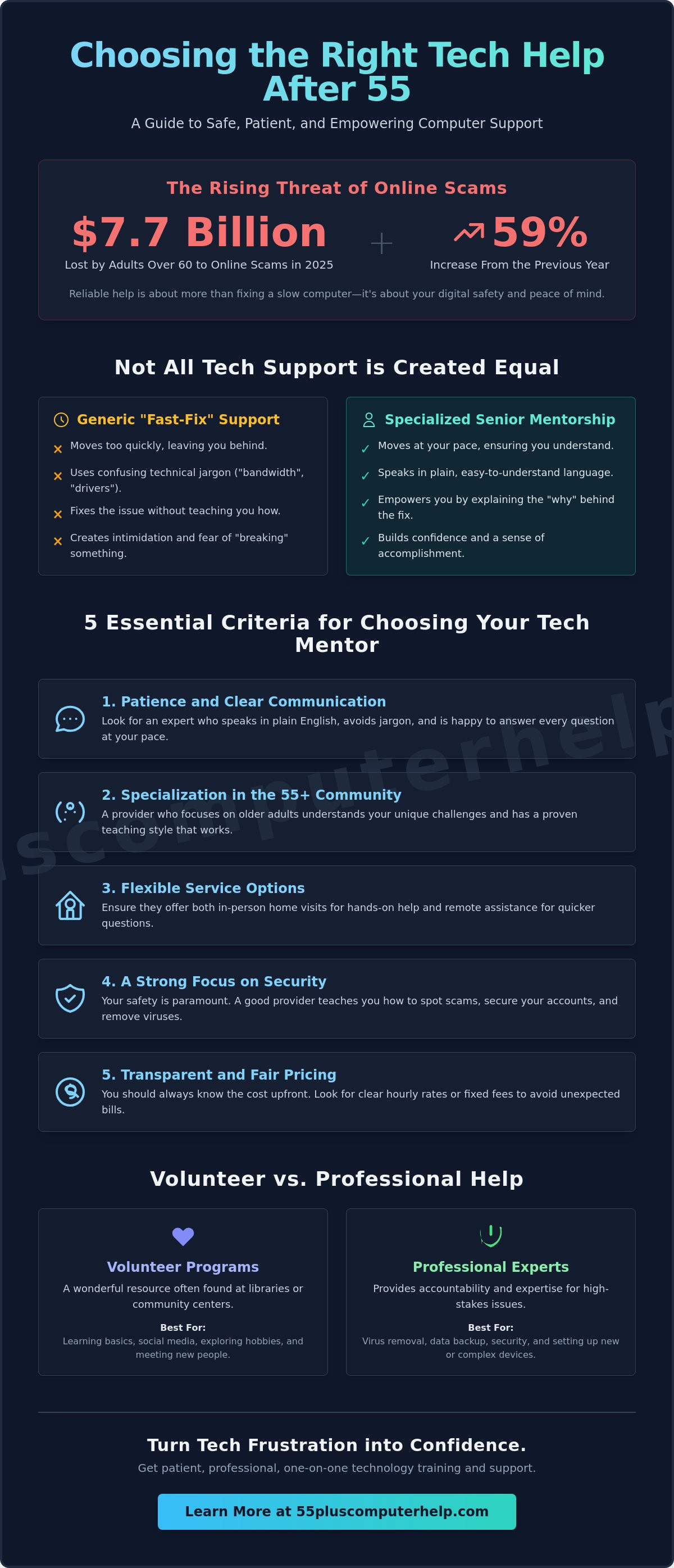
In 2025, adults over 60 lost over $7.7 billion to online scams, which was a 59% increase from the previous year. This statistic is frightening, but it highlights why finding reliable computer help for seniors near me is about more than just fixing a slow laptop. It's about your safety, your privacy, and your peace of mind. You deserve to use your devices without the constant fear of making a mistake or falling victim to a clever fraudster.
We understand that technology changes at a dizzying pace. It's frustrating when you just want to see new photos of your grandkids or print a boarding pass, but the screen looks different than it did yesterday. You shouldn't have to deal with tech support that uses confusing jargon or makes you feel silly for asking questions. We believe that technology should be a tool for independence, not a source of stress.
This article will help you find patient and professional support that focuses on your specific needs. You'll discover how to identify a tech mentor who empowers you to master your smartphone, secure your home Wi-Fi, and spot the latest AI-driven scams before they cause harm. We'll show you how to turn your technical frustrations into a sense of accomplishment and security.
Key Takeaways
- Learn how to identify tech support that prioritizes patience and uses plain language instead of confusing jargon.
- Discover the best ways to find reliable computer help for seniors near me that focuses specifically on the needs of the 55+ community.
- Understand how professional setup for your computer, tablet, or Wi-Fi can eliminate daily frustrations and connection issues.
- Gain essential skills for spotting internet scams and phishing emails to keep your private data secure and protected.
- Explore why personalized, one-on-one training is more effective than generic classes for mastering the apps you actually care about.
What is Computer Help for Seniors and Why is it Different?
Technology should be a bridge to the world, not a barrier that causes stress. When you search for computer help for seniors near me, you aren't just looking for a quick repair. You're looking for a mentor who understands that the person is just as important as the device. Senior-specific tech support is a specialized service that prioritizes patience, clear language, and empathy. It acknowledges that the goal isn't just a working screen. The true goal is a confident user who feels safe from scams and empowered to stay connected with family.
This approach is fundamentally different from the technical support you find at big-box stores or corporate call centers. Those services are often designed for speed and volume, not for teaching. By focusing on the unique needs of older adults, professional tech mentors can transform a source of daily frustration into a sense of security and accomplishment.
The Problem with Generic Tech Support
Traditional corporate tech support often fails older adults because it moves too quickly. Technicians often use a "fast-fix" mentality. They take control of the mouse, click through several screens in seconds, and announce the problem is solved. You're left with a working computer but no idea how to fix the issue if it happens again. This experience often leads to a fear of clicking the wrong button and losing data.
These services also rely heavily on technical jargon. Words like "bandwidth," "drivers," or "cloud storage" can feel like a foreign language. This clinical atmosphere creates a sense of intimidation rather than support. Patient tech support is a service that moves at the user's pace. It focuses on clarity and ensures you feel in control of your own devices.
Volunteer vs. Professional Assistance
Many local libraries and community centers offer free volunteer programs. These are wonderful resources for learning basic social media or exploring a new hobby. They provide a great way to meet others and get comfortable with the basics of a tablet or smartphone. However, there are times when the stakes are higher and professional expertise is necessary.
Research on technology adoption among older adults shows that security and reliability are primary concerns for this demographic. When you need help with Virus and Malware Removal or Data Backup and Recovery, you need the accountability that comes with a professional expert. A dedicated provider ensures your Printer Setup or Smart Home Device Setup is done correctly and securely. Hiring a professional means you have a reliable partner who is committed to your long-term success and digital safety.
Choosing the Right Tech Support: 5 Essential Criteria
Finding the right person to help with your devices is a big decision. You need someone who is reliable and respects your time. When searching for computer help for seniors near me, you should look for specific qualities that set a professional apart from a casual hobbyist. Choosing a specialist ensures that you won't just get a quick fix, but a better understanding of your own technology.
Here are five essential criteria to keep in mind during your search:
- Patience and Communication: Your expert must speak in plain English. If they use too much technical jargon, you'll likely feel more confused than when you started.
- Specialization: It's best to work with providers who focus exclusively on the 55+ demographic. They understand the unique challenges you face and have a teaching style that works for your pace.
- Service Options: Ensure they offer both onsite visits and remote assistance. This flexibility means you get the right kind of support for every situation.
- Security Focus: Safety is paramount. A good provider prioritizes Virus and Malware Removal and teaches you how to stay safe from internet scams.
- Transparent Pricing: You should always know what you're paying. Look for clear hourly rates or fixed fees to avoid hidden costs or unexpected bills.
The Importance of a Patient Mentor
A "mentor" mindset is much more helpful than a "repairman" mindset. A repairman just fixes the machine and leaves. A mentor sits with you and explains the process. This teaching approach is vital because it prevents the same problem from happening again. Before you hire someone, ask them if they have experience teaching people your age. If you want a guide who values your comfort, you can find patient tech support tailored specifically to your needs.
Onsite vs. Remote Support Options
Onsite support is usually the best choice for physical tasks. This includes things like Printer Setup or Internet and Wi-Fi Troubleshooting. Having someone in your home allows them to see exactly how your equipment is connected. It's also the best way to handle a full Computer Setup.
Remote support is a great tool for software issues or Email Setup and Troubleshooting. By using a secure screen-sharing program, a technician can see your screen from their office to provide Smartphone and Tablet Training. This is often the fastest way to get a quick answer. A hybrid provider who offers both gives you the best of both worlds. When you need computer help for seniors near me, having that remote option can save you a lot of time.
Security education should be a part of every session. This is critical because the average loss per victim of senior scams was $38,500 in 2025, according to the FBI Internet Crime Complaint Center. Your technician should teach you how to avoid gift card scams and other common threats. This knowledge is your best defense against modern fraudsters.
Common Tech Challenges We Solve for Seniors
Many people find that the most stressful part of new technology is simply getting started. When you search for computer help for seniors near me, you often need someone to help with the initial Computer Setup. Taking a new device out of the box should be exciting, not overwhelming. A professional can help you navigate the first steps. This includes everything from connecting to power to creating your initial user account. This ensures your system is configured correctly from day one.
Once your device is running, you need a stable connection to the world. Internet and Wi-Fi Troubleshooting is a common request. We help fix dead zones in your home so you can enjoy video calls without the screen freezing. Reliability is key for staying in touch with loved ones and managing your daily tasks online. You shouldn't have to struggle with a weak signal when you're trying to reach your family.
Safety is another major priority. We provide professional virus and malware removal and install protection to keep your data safe. Staying connected also requires a working inbox. Our Email setup and troubleshooting for seniors ensures you can send and receive messages without technical glitches. Having a secure and functional computer gives you the confidence to explore the digital world safely.
Smartphone and Tablet Training
Mobile devices are powerful tools, but they can feel cluttered. We show you how to organize your apps so the ones you use most are easy to find. Managing notifications is also important so your phone doesn't beep constantly. Whether you need help with iPad navigation or Android settings, we move at your pace. The best part of this training is the result. You'll be able to see photos of your grandchildren and share memories with ease. While we offer personalized help, you can also explore group resources like Senior Planet technology training for additional learning opportunities.
Hardware and Peripheral Support
Printers are notorious for being difficult to use. Printer Setup is one of the most frequent frustrations we solve. We make sure your computer and printer talk to each other perfectly. We also assist with Smart Home Device Setup. This includes installing video doorbells or smart thermostats to improve your home safety and comfort. It's important to remember that physical hardware repair is rarely needed. Most of the time, your devices just need proper software configuration to work exactly how you want them to. If you need computer help for seniors near me, focusing on these settings is often the key to a better experience.
Identifying Scams and Staying Safe Online
Safety is a habit, not just a piece of software. When you look for computer help for seniors near me, you aren't just paying for a one-time fix; you're investing in your long-term digital protection. Modern scammers are increasingly using sophisticated tools to trick even the most careful users. Developing a "safety first" mindset means taking a breath before you click on any link or answer an unexpected request. This cautious approach is your best defense when browsing the internet or checking social media.
One of the most effective ways to stay safe is keeping your devices current. Software Installation and Updates are not just about new features. They include critical security patches that close doors for hackers. For example, if you use Windows 11, you should ensure you're on version 26H1 with the latest June 2026 security updates. If you use a Mac, your system should be running macOS 26 "Tahoe" to stay protected. A professional can help you manage these updates so your personal information remains secure.
Protecting your memories is just as vital as protecting your bank account. Data Backup and Recovery ensures that your precious family photos and important documents are safe if your computer ever fails. We help you set up automatic systems that save your files to a secure location. This means you never have to worry about losing years of history due to a technical glitch or a hardware problem.
How to Spot a Fake Tech Support Call
Scammers often pretend to be from well-known companies to gain your trust. Legitimate companies like Microsoft or Apple will never call you out of the blue to tell you your computer has a problem. If you receive a call like this, it's a major red flag. Other warning signs include high-pressure language, threats that your account will be closed, or requests for payment via gift cards. If you think you've been targeted, follow these steps:
- Hang up the phone immediately.
- Do not click any links in follow-up text messages.
- Never give an unknown caller remote access to your screen.
- Contact a trusted local professional to run a safety check on your device.
The Power of Professional Malware Removal
If you suspect your computer has a virus, a DIY cleaning often misses deep-seated threats. Many modern viruses hide in hidden folders where standard free scanners can't find them. A professional technician uses specialized tools to ensure every trace of malware is gone. This thoroughness prevents the virus from returning or stealing your data in the background. Our Virus and Malware Removal service includes a full security check to give you total peace of mind. If you want to ensure your home network is truly secure, you can schedule a personalized security audit today.
Empowerment Through Personalized Technology Training
Mastering a new device is about more than just clicking the right buttons; it's about reclaiming your digital freedom. While many search for computer help for seniors near me to solve a specific problem, the real benefit comes from personalized education. Unlike crowded group workshops where you might feel left behind, one-on-one training allows the focus to remain entirely on your needs. This individualized attention ensures you aren't just watching a technician work, but performing the tasks yourself under the guidance of a patient mentor.
We tailor every lesson to the activities that bring you joy. If you want to organize a lifetime of photos or explore your family history through genealogy websites, your curriculum will reflect those interests. This relevance makes the learning process engaging instead of a chore. By focusing on what you actually want to do, you build the confidence to explore new apps and features without the fear of making a mistake.
The ultimate goal is digital independence. We want to equip you with the skills to handle minor updates or basic troubleshooting on your own. This self-reliance reduces the stress of using your devices and helps you stay active in your community. Whether it's joining a local club's newsletter or managing your own online calendar, technology becomes a tool that keeps you connected and engaged with the world around you.
Customized Lessons for Your Skill Level
There is no single starting point for learning technology because everyone has different experiences. A patient tutor begins by assessing what you already know and identifying the gaps you want to fill. It's never too late to learn a new digital skill or improve your current abilities. By moving at your pace, we ensure that the foundation of your knowledge is strong before moving on to more complex tasks like Smartphone and Tablet Training.
Ready to Get Started with Patient Help?
Choosing a professional who understands the 55+ demographic ensures you receive the respect and clarity you deserve. You won't have to wait for a busy relative or struggle with confusing technical manuals anymore. Reliable computer help for seniors near me provides a clear path to mastering your devices in a supportive, jargon-free environment. We are committed to making your technology work for you.
Contact us today to begin your journey toward technical confidence. We look forward to helping you stay safe, secure, and connected. Book your personalized tech help session with 55 Plus Computer Help LLC and discover how easy technology can be with the right guide.
Take Control of Your Digital World Today
Finding the right computer help for seniors near me marks the end of technical confusion and the beginning of digital confidence. You deserve a tech experience that is defined by patience rather than pressure. By prioritizing clear language and personalized training, you can finally use your computer or tablet without the fear of making a mistake. Technology should be a bridge to your family and community, not a source of stress.
Founded in 2014, 55 Plus Computer Help LLC brings over a decade of specialized experience to every session. We focus on jargon-free support that is tailored to your specific pace and interests. From securing your home network to mastering a new smartphone, our mission is to provide the reassuring guidance you need to thrive online. You can trust that your safety and comfort are our highest priorities.
It is time to use your devices with total peace of mind. Get Patient, Professional Tech Help Today. We look forward to helping you stay connected and secure in your digital life.
Frequently Asked Questions
Is it safe to let someone access my computer remotely for help?
Remote support is safe when you are the one who initiates the contact with a verified professional. We use secure, encrypted software that allows you to see every move the technician makes on your screen. You always remain in control and can end the session at any time. It's a convenient way to get quick computer help for seniors near me without waiting for an in-home visit.
How much does professional computer help for seniors typically cost?
Professional tech support costs vary depending on the complexity of the task and the provider's experience level. You should look for companies that offer transparent pricing, such as fixed-rate fees or clear hourly rates. This helps you avoid unexpected charges or hidden fees. Many providers offer different rates for onsite versus remote assistance to fit your specific budget and technical needs.
Can you help me set up a new printer if I bought it online?
Yes, we can certainly help you set up a new printer regardless of where you purchased it. We ensure the printer connects correctly to your home network and works with your computer, tablet, and smartphone. Our goal is to make printing photos or documents a simple, one-click process that works every time you need it. We handle the Printer Setup from start to finish.
Do I need to buy a new computer, or can my old one be fixed?
We can help you decide if your current device is worth saving. Often, Software Installation and Updates or professional virus removal can make an old computer feel fast again. However, if your hardware is too old to run modern security programs, we can guide you through a new Computer Setup. We'll help you transfer your files so you don't lose any important information.
How can I tell if an email from my "bank" is actually a scam?
A real bank will never ask you to provide your password or personal details through an email link. Scams often use urgent or threatening language to scare you into acting quickly. Check the sender's email address for misspellings or strange characters that don't match the bank's official website. If you're ever unsure, it's safest to delete the email and call your bank directly.
What is the difference between a tablet and a laptop for a senior?
Tablets are portable and use a touch screen, which makes them perfect for browsing photos or reading digital books. Laptops have a physical keyboard and a larger screen, which is often better for typing long messages or managing many files. We can help you choose the device that best fits your lifestyle and provide the Smartphone and Tablet Training you need to master it.
Can you teach me how to use Zoom or FaceTime to see my grandkids?
Yes, teaching you to stay connected with your family is one of our most popular services. We show you exactly how to join a Zoom meeting or start a FaceTime call on your specific device. We'll practice the steps with you until you feel comfortable seeing your grandkids' faces on your screen. This is a standard part of our personalized computer help for seniors near me.
What happens if I forget what I learned during my tech lesson?
Forgetting steps is a natural part of the learning process, and we never want you to feel bad about it. We encourage you to ask for a review whenever you need one. Our patient mentors can provide simple, written instructions that you can keep next to your computer for quick reference. We are happy to repeat any lesson because our goal is your long-term confidence.


