
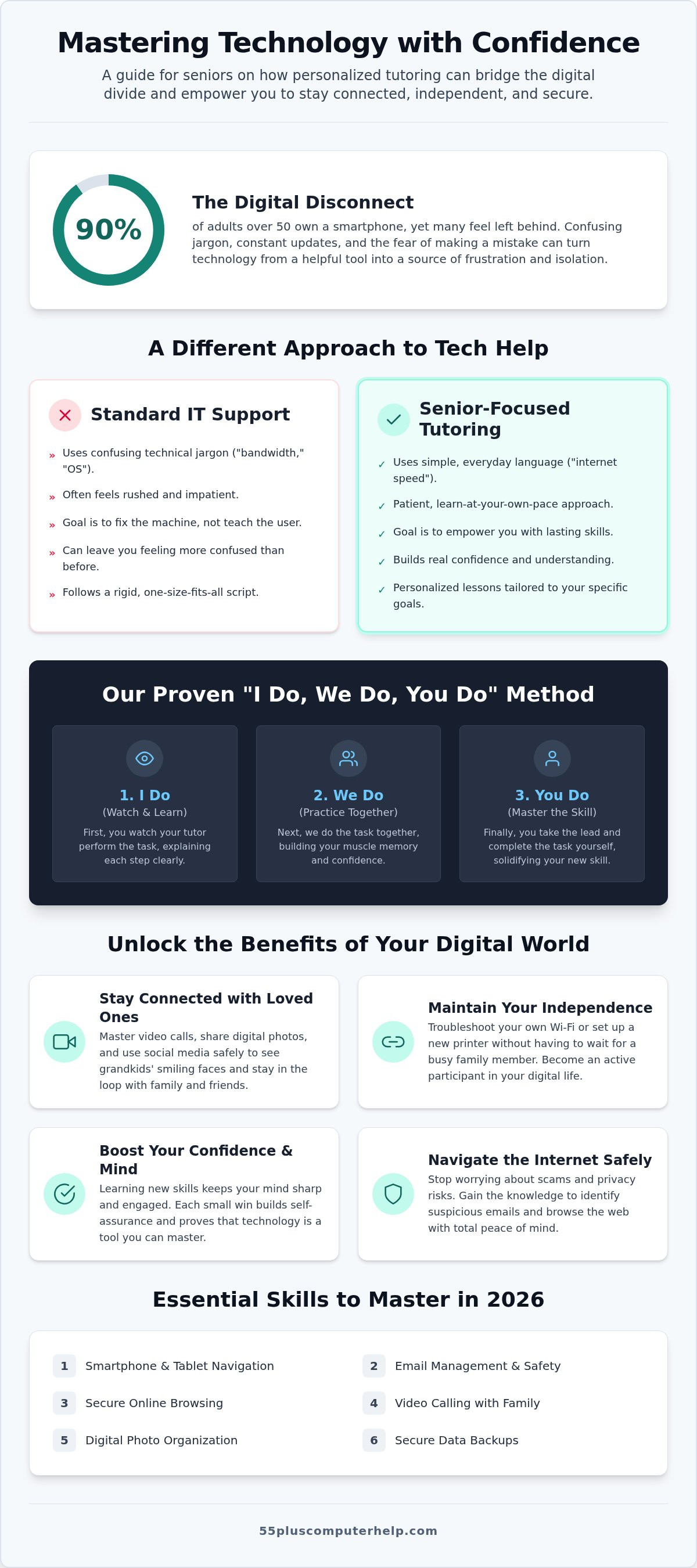
Imagine sitting down to see the latest photos of your grandkids, but instead of their smiling faces, you are met with a confusing password prompt that feels like a brick wall. It is frustrating to feel like your own devices are speaking a language you weren't taught. You might even worry that one wrong click could break the device or leave you vulnerable to a scam. If you are searching for a patient computer tutor for seniors denver, you likely want someone who understands these specific hurdles. You are not alone in this feeling; while AARP reports that 90% of adults over 50 now own smartphones, many still feel overwhelmed by technical jargon and constant updates.
We believe technology should be a tool for connection, not a source of anxiety. This guide shows how personalized tutoring can help you master your devices and navigate the internet with total confidence. We will explore how one-on-one support helps you see family photos easily, manage video calls with ease, and maintain your independence by staying secure online. It is time to stop feeling left behind and start enjoying the benefits of your digital world with a trusted mentor by your side.
Key Takeaways
- Technology doesn't have to be intimidating when you have a patient mentor to help you stay connected and independent.
- Finding a dedicated computer tutor for seniors denver allows you to learn at your own pace using simple, everyday language instead of technical jargon.
- Personalized training helps you master essential 2026 skills like smartphone navigation, email management, and secure data backups.
- Learn how both onsite visits and remote screen-sharing support can provide the specific tech help you need to feel secure online.
Why Every Senior Benefits from a Personalized Technology Tutor
Many seniors feel like they are standing on the wrong side of a growing gap. This gap, often called the digital divide for seniors, can lead to deep feelings of social isolation. When the world moves online, those who don't feel confident with a mouse or a touchscreen can get left behind. Working with a dedicated computer tutor for seniors denver changes this dynamic. Instead of feeling like a bystander, you become an active participant in your own digital life. You gain the tools to stay informed and connected without needing to ask for help every five minutes.
Technology mastery is about more than just checking email; it is about maintaining your independence. When you can troubleshoot your own Wi-Fi or set up a new printer, you don't have to wait for a busy family member to stop by. True digital literacy means you understand the "why" behind the "how." A patient mentor doesn't just fix a problem and leave. They teach you the steps so you can do it yourself next time. This approach reduces the deep anxiety that often comes with using modern devices. You stop fearing that you will break the computer and start seeing it as a helpful tool. A computer tutor for seniors denver provides a safe space to ask questions without feeling silly or rushed.
Staying Connected with the People Who Matter
Keeping in touch with family is the most common reason seniors want to learn tech. Mastering video calls means you can attend a birthday party or a holiday dinner right from your living room. Sharing and organizing digital photos allows you to keep the latest pictures of your grandkids right at your fingertips instead of buried in an inbox. We also focus on using social media safely. This lets you stay in the loop with neighborhood news or old friends without worrying about privacy risks or scams. These connections are vital for emotional well being.
The Cognitive Benefits of Learning New Tech Skills
Learning something new is a great way to keep your mind sharp and engaged. Every time you figure out a new app or organize a digital folder, your brain builds new connections. These small, repeatable wins build a sense of self-assurance that carries over into other parts of your life. Learning to use a computer is much like learning a new language. At first, the vocabulary feels strange and the rules seem complex. With a patient guide, you slowly begin to understand the patterns until you are speaking the language of technology with total fluency.
What Makes Senior-Focused Tutoring Different from Standard IT Support?
Standard IT support often feels like a race. A technician might fix your error, but they often leave you more confused than when they arrived. Senior-focused tutoring is different. It's a patient, jargon-free approach designed specifically for learners over 55. Instead of talking about "bandwidth" or "OS updates," we talk about "internet speed" and "keeping your computer safe." This change in language removes the wall between you and your device. It turns a frustrating technical problem into a clear, understandable lesson.
Patience is the most important tool we use. Many standard services follow a rigid curriculum that ignores what you actually want to do. We focus on your specific goals. If you want to learn how to print photos of your garden, we start there. We don't spend time on things you'll never use. This need for specialized training is recognized at high levels, as seen in government programs for senior digital literacy that focus on building actual skills rather than quick fixes. We believe your time is valuable, so we prioritize the tasks that matter most to your daily life.
Empowerment vs. Repair: A Different Philosophy
A repair service only cares about the machine. If your printer isn't working, they fix it and leave. A tutor focuses on empowering you. We use the "I do, we do, you do" method. First, you watch the tutor perform the task. Next, we do it together. Finally, you take the lead. This builds real muscle memory. We also encourage you to take notes and we provide step-by-step guides. These tools ensure you can repeat the task tomorrow without feeling stuck. When you choose a computer tutor for seniors denver, you aren't just getting technical help; you are gaining a new skill.
Adapting to Individual Learning Paces
Everyone learns at a different speed. Some people grasp video calls in ten minutes, while others need a few sessions to feel comfortable. We use repetition and positive reinforcement to make sure the lesson sticks. We also address physical needs that standard IT support often misses. This might mean increasing the font size so you can read clearly or slowing down the mouse sensitivity to make clicking easier. If you want to move at your own pace, working with a patient mentor can make all the difference. A computer tutor for seniors denver ensures your technology works for you, not against you.
Comparing In-Home and Remote Computer Help for Older Adults
Choosing how to receive help is a big decision. Some people prefer a friendly face in their living room, while others want a quick fix over the internet. Both options have unique benefits. A computer tutor for seniors denver can help you decide which path is right for your specific situation. We offer both onsite visits and remote screen-sharing sessions to ensure you feel supported at all times. The goal is to provide a safe environment where you can learn without pressure.
Evaluating which format fits your technical problem is the first step toward digital independence. To decide which format fits your needs, consider these points:
- Choose in-home help for physical computer setup, printer problems, or Wi-Fi troubleshooting.
- Choose remote help for email setup, software updates, or quick training questions.
- Opt for in-home if you value face-to-face connection and hands-on guidance in your own space.
- Opt for remote if you need immediate assistance and have a working internet connection.
The Convenience of In-Home Technology Setup
There is great value in face-to-face interaction. If you just bought a new device, a tutor can help with the physical unboxing and ergonomic workstation setup. This ensures your desk is comfortable and your wires are organized. In-home visits are also best for hardware issues. This includes troubleshooting Wi-Fi routers or setting up a new printer. Being in your own environment helps you build a personal rapport with your mentor. You can show them exactly how you use your space, which makes the training more relevant to your daily life.
The Speed and Flexibility of Remote Tutoring
Remote assistance is often the fastest way to solve a software glitch. You don't have to wait days for an appointment or tidy up the house for a visitor. Using secure screen-sharing technology, a tutor can see exactly what you see on your monitor. It feels like they are sitting right next to you. This format is perfect for real-time, side-by-side learning. It is also a cost-effective choice for quick questions. If you just need help with software installation or a data backup, a remote session with a computer tutor for seniors denver can get you back on track in minutes.
Safety is a top priority for any professional service. When using remote help, we follow strict security protocols. Tutors use one-time access codes that you provide. This means no one can enter your computer without your permission. You stay in total control of the session. You can see every move the tutor makes on your screen. This transparency builds trust and reduces the fear of online scams. Professional remote support is a safe, secure way to gain digital independence without leaving your favorite chair.
Essential Skills Every Senior Should Master in 2026
As we move through 2026, the digital world continues to evolve quickly. Mastering a few core skills can make the difference between feeling stuck and feeling free. A computer tutor for seniors denver can help you build these skills one step at a time. We focus on the tasks that actually matter to your daily life, like staying safe and keeping in touch with friends. Technology should serve you, not the other way around.
Mastering your smartphone or tablet is about more than just making calls. It's about having a map in your pocket or checking your bank balance securely. We teach you how to navigate apps and manage your battery health. Organizing your digital files is another essential skill. We show you how to create folders for photos and documents so you can find them in seconds. Setting up a reliable data backup is your safety net. It ensures your precious memories and important records are safe even if your device fails.
Smart home devices also offer new ways to improve your safety and convenience. Video doorbells let you see who is at the door without getting up. Voice-activated lights can prevent falls in the dark. We help you set these up so they work simply and reliably. These tools are designed to make your home a more supportive place to live as you age.
Identifying and Avoiding Modern Internet Scams
Scammers are getting smarter, but you can be smarter too. We teach you how to spot "phishing" emails that look like they are from your bank but are actually fraudulent. Fraudulent text messages are another common trick used to steal information. Our golden rule is simple: never give your passwords or remote access to a stranger who contacts you out of the blue. For more help, see our patient guide to securing your computer.
Setting Up and Troubleshooting Your Digital Communication
Email remains the backbone of staying connected. We help you resolve login issues and teach you password management best practices. This includes using long, unique phrases that are easy to remember. If you need help with the initial setup, check out our complete guide to staying connected via email. We also show you how to manage contacts and sync them across all your devices. This way, your phone and computer always have the same information. If you want to start learning today, contact a computer tutor for seniors denver for personalized help.
How 55 Plus Computer Help LLC Empowers Seniors Nationwide
Since our founding in 2014, 55 Plus Computer Help LLC has focused on one thing: helping adults over 55 master their technology. We aren't a faceless corporation. We are a team of trusted local experts who act as your patient mentors. If you are looking for a computer tutor for seniors denver, you want someone who understands your specific needs. We've spent over a decade refining a teaching style that turns technical frustration into a sense of accomplishment. We know that the goal isn't just to fix a device, but to help you feel secure and independent in a digital world.
Our support is comprehensive and covers the tasks that matter most to your daily life. We don't just teach you how to use a tablet; we also help with the technical heavy lifting. This includes virus and malware removal to keep your computer running smoothly and safely. We assist with printer setup, software updates, and data recovery so your home office stays functional. Our pricing is simple and transparent. 55 Plus Computer Help LLC uses an hourly based training model with no hidden contracts or long term commitments. You only pay for the time you need to reach your specific goals.
Personalized Lessons Tailored to Your Goals
We believe every learner is unique. We create a custom learning plan based exactly on what you want to achieve. Whether you use a Windows PC, a Mac, an iPhone, or an Android tablet, we provide expert guidance across all major platforms. The 55 Plus Computer Help LLC commitment to your digital safety is at the heart of every lesson. We show you how to browse the web securely and manage your privacy settings with total confidence. By focusing on your individual needs, we ensure you don't waste time on features you'll never use. This specialized focus is our badge of expertise.
Getting Started with Your First Session
Taking the first step toward digital independence is easy. During your initial visit or remote consultation, we'll talk about your current challenges. We recommend writing down a list of your most pressing questions before we begin. This helps us make the most of our time together. Whether you need help with email setup or want to learn how to organize your photos, we move at your pace. We never rush a lesson. We stay until you feel comfortable with the task at hand. Booking a session is a simple way to regain your confidence and stay connected with the people you love. If you're ready to start, finding a reliable computer tutor for seniors denver is the best way to move forward and reclaim your digital freedom.
Take Control of Your Digital World
Technology should open doors for you, not create walls. By choosing a patient mentor, you can move from feeling frustrated to feeling completely secure. You've seen how personalized lessons help you stay connected with family and why learning at your own pace is the key to success. Finding a computer tutor for seniors denver means you get specialized help tailored to your unique goals in a safe, supportive environment.
Since 2014, we've helped countless individuals master their PC and Apple devices with jargon-free instruction. We believe that true digital independence comes from empowerment, not just a quick repair. Whether you need help with a smartphone or want to secure your home Wi-Fi, we're here to guide you every step of the way. You don't have to navigate these changes alone.
Book your patient technology tutoring session today and start using your devices with total confidence. We look forward to helping you stay connected and independent.
Frequently Asked Questions
What exactly does a computer tutor for seniors do?
A computer tutor for seniors denver acts as a patient mentor to help you master your digital devices. They don't just fix problems; they teach you the skills needed to stay independent. This includes everything from organizing photos to setting up video calls with your family. Each lesson is tailored to your specific goals and moves at your preferred pace.
Can you help me set up a new computer I just bought?
Yes, we can help you with every step of setting up a new computer. We assist with unboxing the hardware, connecting to your home Wi-Fi, and performing initial software installation. We also make sure your printer is working and that your important documents are transferred from your old device. It's a great way to start your digital journey on the right foot.
Is remote tech support safe for seniors to use?
Remote tech support is safe and secure when handled by a trusted professional. We use encrypted screen-sharing software that requires you to provide a unique access code for every session. You stay in total control and can see exactly what the tutor is doing on your screen. You can end the connection at any time if you feel uncomfortable.
How many sessions will I need to feel confident on my own?
Most people find that their confidence grows significantly after just two or three personalized sessions. Because we focus on your specific needs rather than a rigid curriculum, you learn the most important tasks first. You can book as many or as few sessions as you like. We are here to support you until you feel fully independent.
Do you help with smartphones and tablets, or just computers?
We provide expert training for smartphones and tablets in addition to traditional computers. This includes specialized help for both Apple and Android devices. A computer tutor for seniors denver can show you how to use apps, manage your contacts, and sync your information across all your devices. We help you stay connected no matter which device you prefer.
What happens if I forget what I learned during the lesson?
It is very common to need a refresher, so we provide simple, written guides to help you remember the steps. We also encourage you to take your own notes during our time together. If you ever feel stuck, you can always schedule a short follow-up session. We believe that repetition is the best way to make new skills stick.
Can a tutor help me protect my computer from viruses and scams?
Protecting your privacy is a core part of our tutoring service. We help with virus and malware removal and teach you how to spot common internet scams. You'll learn the red flags of phishing emails and how to create strong, memorable passwords. Our goal is to help you navigate the web with total peace of mind.
Do you offer help for people who have never used a computer before?
Yes, we specialize in helping people who are starting from the very beginning. We don't expect you to know any technical terms or have any prior experience. We start with the basics, like using a touchscreen or a mouse, and build from there. You will never be rushed or made to feel silly for asking a basic question.


