
Last Sunday, you might have felt a familiar pang of frustration when a simple video call with your grandkids felt like a complex puzzle. It's completely normal to feel like technology is moving faster than you'd like. You may worry about clicking the wrong button or accidentally inviting a scammer into your private life. That's why understanding digital literacy for seniors is about much more than just learning how to use a new app. It's about feeling safe and capable in a world that's increasingly online.
We agree that you shouldn't have to feel like a stranger in your own home just because a device updated its software. This guide will show you how to master your smartphone, tablet, or computer at your own speed. You'll learn how to reclaim your independence and stay secure against modern threats. We'll explore practical ways to manage your health portals, spot online red flags, and use your devices to stay close to the people you love. By the end of this article, you'll have a clear path toward technical confidence in 2026.
Key Takeaways
- Understand how digital literacy for seniors creates a vital link to family, friends, and essential health services.
- Learn the best ways to use video calls and messaging to stay connected without feeling overwhelmed by complex settings.
- Discover simple strategies to identify online scams and keep your personal information safe using modern security tools.
- Find out how to choose the right device for your lifestyle and set a comfortable pace for learning new skills.
- See why working with a patient mentor can quickly turn technical frustration into a lasting sense of confidence.
What is Digital Literacy for Seniors and Why Does It Matter?
You might feel like the world changed overnight. Suddenly, everything from bank statements to doctor appointments moved online. This shift is why digital literacy for seniors has become so essential. At its heart, it's the ability to find, judge, and share information using digital tools. It's not just about the device itself. It's about the freedom that comes with knowing how to use it.
Understanding What is Digital Literacy? helps us see technology as a bridge rather than a barrier. For many, this knowledge means the difference between feeling isolated and staying active in society. It involves three main areas that work together. First, you learn the technical skills to handle a device. Second, you develop the critical thinking to tell real news from fake stories. Finally, you master the safety habits that keep your identity secure.
In 2026, bridging the gap between being offline and online is about personal independence. Most businesses and government offices now expect you to use an app or a website. When you have these skills, you don't have to wait for a family member to help you. You can handle your own business on your own schedule. That sense of self-reliance is a powerful boost for your confidence. You shouldn't have to rely on others for basic daily tasks.
Moving Beyond 'Just Using a Computer'
Technology should be a tool that serves your needs. It shouldn't feel like a heavy burden or a chore. When you gain digital skills, you move from being a passive observer to an active participant. You aren't just watching the world go by; you're joining the conversation. This shift often improves physical and mental well-being. Using your mind to learn new systems keeps you sharp. Accomplishing a digital task provides a genuine sense of pride.
The Social Connection Factor
Isolation can creep in as we get older. Digital literacy for seniors provides a way to stay in the loop with the people you love. You can see photos of your grandkids the moment they are posted. Video calls allow you to see a smile while you talk, which feels much more personal than a standard phone call. You can also join online communities focused on your favorite hobbies. Whether you enjoy birdwatching or classic cars, there's a group of people waiting to welcome you. This connection keeps your social life full and meaningful.
The 4 Essential Pillars of Digital Proficiency
Mastering technology doesn't mean you need to learn every single setting on your device. Instead, it's about focusing on the four areas that truly impact your daily life. These pillars form the foundation of digital literacy for seniors, turning a confusing gadget into a helpful companion. When you understand these basics, you gain the freedom to explore the digital world with confidence.
- Communication: This is the heart of staying connected. It includes sending emails with photos, texting friends, and using video apps to see family members.
- Information Management: This involves using search engines to find answers and learning how to tell if a news story is reliable.
- Daily Living: Technology makes life easier when you use it for online banking, ordering groceries, or checking medical results.
- Digital Citizenship: This means understanding your rights to privacy and your responsibility to treat others with respect online.
If you're feeling overwhelmed by any of these pillars, personalized technology training can help you move at your own pace. You don't have to figure it all out alone.
Mastering Modern Communication Tools
Communication has changed, but the goal remains the same: staying close to those you love. Learning the basics of email lets you send and receive attachments, such as digital photos of your family. Text messaging is perfect for quick check-ins during the day. For a deeper connection, apps like FaceTime or Zoom bring people right into your living room. Video Calling is a primary tool for reducing senior isolation by allowing face-to-face interaction regardless of distance. It's a wonderful way to watch your grandkids grow up, even if they live far away.
Managing Your Health and Finances Online
Handling your business from home is a major benefit of modern technology. Patient portals allow you to view test results and message your doctor without waiting on a long phone call. Online banking and bill pay are both convenient and safe when you know the right steps to take. You can check your balance or pay the electric bill in just a few clicks. Shopping online is another great tool for independence. You can have heavy groceries or essential household items delivered directly to your door. This saves you a trip to the store and ensures you always have what you need on hand.
Safety First: Navigating the Web Without Fear
The biggest hurdle for many when learning technology is the fear of being tricked. It's a valid concern. Scammers are clever, but you can be cleverer. A core part of digital literacy for seniors is building a "safety first" mindset. This doesn't mean you should be afraid of every click. It means you should have the tools to recognize when something isn't right. When you know what to look for, the internet becomes a much friendlier place.
Your first line of defense is a strong, memorable password. Avoid using easy-to-guess dates or names. To make your accounts even safer, you can use two-factor authentication (2FA). This usually means the website sends a quick code to your phone to prove it's really you. It adds an extra layer of protection that most scammers simply can't get past. It takes an extra few seconds, but the peace of mind is worth it.
Sometimes, despite our best efforts, a device might act strangely. You might see strange icons or notice your computer is running very slowly. If you think you've accidentally clicked something suspicious, professional virus and malware removal acts as a critical safety net. It clears out the digital clutter and gives you a fresh, secure start. You don't have to feel embarrassed if you make a mistake; even experts sometimes click the wrong thing.
Spotting the Red Flags of Digital Scams
Scammers love to create a false sense of urgency. They might tell you that your bank account is locked or that your computer has a "fatal error." These messages often appear as pop-ups or unexpected text messages. Never click on a link in a pop-up that claims to offer tech support. Real companies like Microsoft or Apple will never reach out to you this way. If you're ever unsure, find the company's official phone number yourself and call them directly to verify the story. Taking a breath and slowing down is your best defense.
Protecting Your Personal Data
Securing your home Wi-Fi network is a simple but effective step. Make sure your network has a unique password that isn't easy for a neighbor to guess. It's also vital to keep your software and apps updated. These updates often include "security patches" that fix newly discovered vulnerabilities. For more help with keeping your accounts private, you can review our guide on Email Setup and Troubleshooting. It offers practical advice on secure logins and staying connected without the worry. Staying safe is a habit you can build one step at a time.
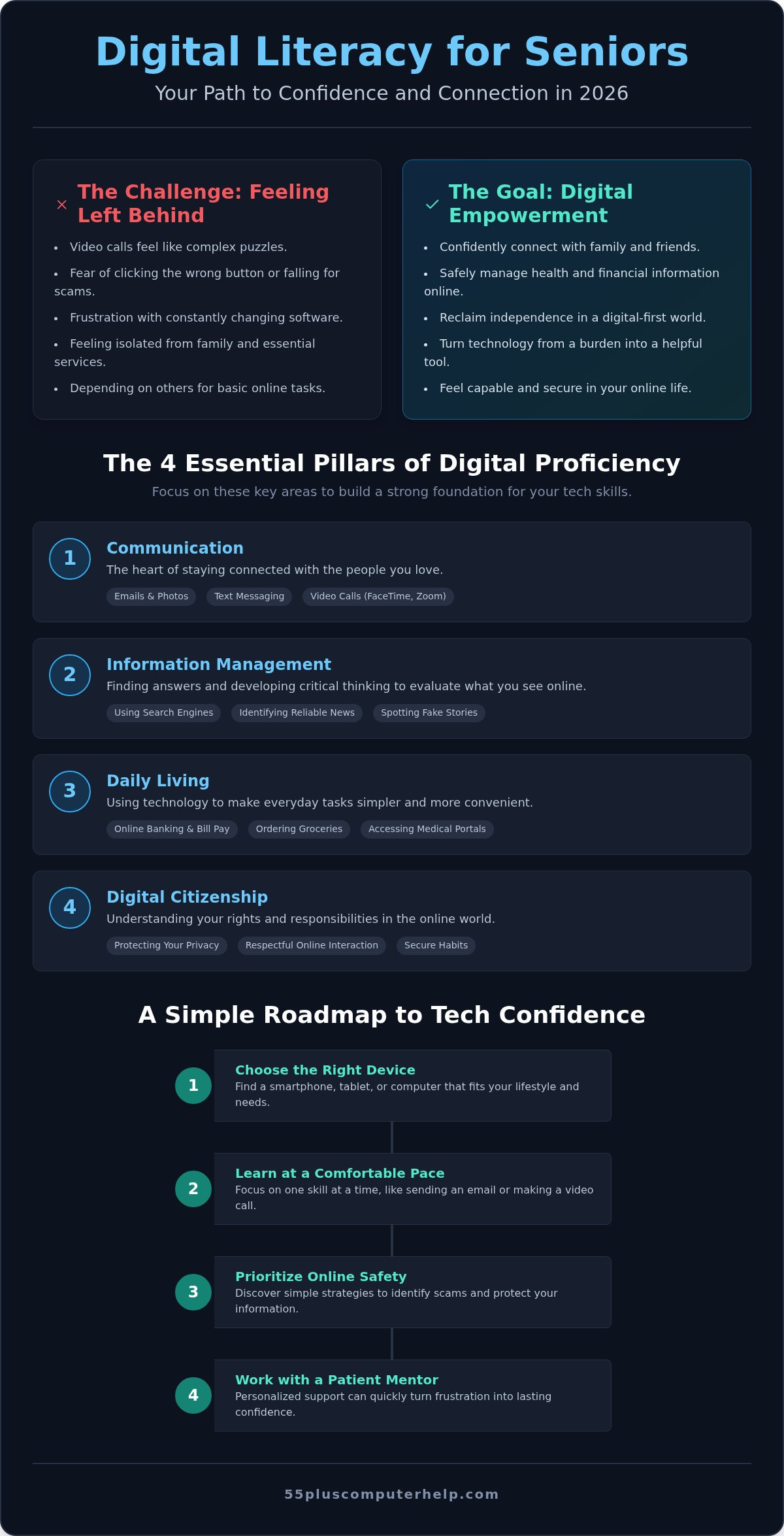
A Step-by-Step Roadmap to Tech Confidence
Gaining technical skills is much easier when you have a clear path to follow. You don't need to learn every feature of your device at once. Instead, start with the "Why." Identify one specific task you want to master today, such as sending a photo or checking the weather. This focus prevents you from feeling overwhelmed and gives you an immediate sense of success. Success is the best fuel for digital literacy for seniors.
Choosing the right device is your next big decision. A smartphone is great for staying connected on the go, while a tablet offers a larger screen that is easier on the eyes. Laptops are often best for more detailed tasks like writing emails or managing spreadsheets. Once you have your device, spend time learning the "Universal Language" of technology. Icons like the magnifying glass for searching or the gear for settings work the same way on almost every platform. Learning these symbols helps you navigate new apps without needing a manual.
If you find yourself stuck, don't let frustration take over. You can schedule a personalized lesson to clear up any confusion quickly. Getting professional help early can prevent bad habits from forming and keep your learning journey enjoyable. It's much better to ask for a hand than to struggle alone with a complex screen.
Finding Your Ideal Learning Style
Everyone learns differently. Some enjoy online tutorials, while others prefer community classes. However, many find that one-on-one tutoring is the most effective choice. A personal mentor moves at your exact speed and focuses only on your specific goals. You can use your own device in the comfort of your home. If a small problem pops up, use the "Help" menu or a search engine for a quick answer.
Building Muscle Memory and Habits
Consistency is more important than total time. Practice in a low-stakes environment for 15 minutes a day rather than a weekly 4-hour marathon. This builds muscle memory, making it easier for your fingers to find the right buttons. Keep a "cheat sheet" for common steps and passwords. Remember, you cannot "break" the internet by clicking the wrong button. Building these habits is the best way to improve digital literacy for seniors.
Personalized Support: Why a Patient Mentor Changes Everything
Learning a new skill is always easier when you have a steady hand to guide you. While many people turn to tech-savvy relatives for help, this can often lead to more tension than clarity. Family members may move too quickly or simply fix the issue without explaining the steps. A professional mentor is different. They offer the specialized patience and structured approach needed to help you truly master your device. This dedicated support is a vital part of building digital literacy for seniors in a way that sticks.
A professional tutor adapts every lesson to your specific device and current skill level. You don't have to sit through a generic class that covers things you already know. Instead, you focus on the exact tasks that will make your life better today. This supportive environment helps you move past the "shame" of asking questions. There are no silly questions when you are learning something new. 55 Plus Computer Help LLC focuses on empowering you to take full control of your digital life. We turn technical confusion into a genuine sense of pride and accomplishment.
The Benefits of In-Home and Remote Assistance
One of the most effective ways to learn is on your own equipment in the comfort of your own home. You don't have to worry about carrying a heavy laptop to a store or using a computer that feels different from yours. For small problems or quick questions, remote assistance is a wonderful tool. Through secure screen-sharing, a mentor can see exactly what you see and walk you through a solution in real time. Hourly Remote Technical Support provides immediate relief for software hurdles. This flexibility ensures that help is always available, whether you prefer someone sitting next to you or a quick fix over the internet.
Investing in Your Independence
Choosing to work with a mentor is a direct investment in your own freedom. Technical training pays for itself by making you more efficient and helping you avoid the high costs of online scams. You gain the peace of mind that comes with having a trusted tech neighbor on call. You no longer have to wait for a busy relative to find time to help you with a basic task. You can manage your own schedule, stay connected to your community, and navigate the web with total confidence. Taking this step ensures that you remain an active and secure participant in our digital world.
Get patient, personalized tech help from 55 Plus Computer Help LLC today
Take Control of Your Digital World Today
Technology should never be a source of fear or frustration. It's a bridge to your loved ones and a tool for your personal independence. By focusing on the essential pillars of communication and safety, you can transform your devices into helpful companions. Building digital literacy for seniors is a journey that you don't have to take alone. You have the power to stay connected, secure, and confident in this digital age.
Since 2014, our team has helped the senior community master their devices through patient, jargon-free instruction. Whether you prefer in-home visits or the convenience of remote support, we adapt to your unique needs. We believe that everyone deserves to feel capable when they pick up a smartphone or open a laptop. You can empower yourself with patient tech training from 55 Plus Computer Help LLC and start enjoying the benefits of modern technology today. Your new-found confidence is just one lesson away.
Frequently Asked Questions
Is it too late for me to learn how to use a computer or smartphone?
It’s never too late to start learning. Technology is designed to be user-friendly; you just need the right guidance to unlock its potential. Many people begin their journey into digital literacy for seniors well into their 70s or 80s. Learning at your own pace ensures that you feel comfortable and successful with every new step you take.
What is the most important digital skill for a senior to learn first?
Online safety is the most essential skill to master first. Knowing how to protect your personal information gives you the confidence to explore other areas without fear. Once you feel secure, you can then focus on communication tools like email or video calling. Building a strong foundation in security makes every other technical task feel much safer and more enjoyable.
How can I tell if an email is a scam or a legitimate message?
Look for signs of forced urgency or requests for sensitive information. Scammers often use email addresses that look slightly off or contain spelling errors. If an email asks you to click a link to verify your account immediately, it’s likely a scam. Always call the company directly using a trusted phone number to check if the message is real before you take any action.
Do I need a laptop, or is a tablet better for a beginner?
A tablet is often the better choice for beginners because of its simple touch-screen interface. Tablets are lightweight and easy to hold, making them perfect for reading or watching videos. However, if you plan to do a lot of typing or detailed work, a laptop might be more suitable. Choosing the right tool depends entirely on what you want to accomplish in your daily life.
What should I do if I feel overwhelmed by all the new technology?
Take a deep breath and focus on just one small task at a time. It’s helpful to step away from the screen for a few minutes if you feel frustrated. You don't need to learn everything at once to be successful. Breaking complex processes into tiny, manageable steps makes the learning process much easier. Remember that building digital literacy for seniors is a marathon, not a sprint.
Can someone help me set up my new device in my own home?
Yes, professional support is available to help you set up your computer, tablet, or smartphone right in your living room. Having an expert handle the initial configuration ensures that your Wi-Fi is connected and your security settings are correct from day one. This personalized service removes the stress of unboxing and allows you to focus on learning how to enjoy your new technology.
How do I keep my grandkids' photos organized on my tablet?
You can use digital albums to group your photos by person or event. Most tablets have a built-in photo app that allows you to create these folders with just a few taps. This makes it easy to find a specific picture without scrolling through hundreds of images. Organizing your photos helps you share your favorite memories with friends and family much more quickly.
What happens if I click something wrong and my screen freezes?
Most screen freezes can be fixed by simply restarting your device. You can hold down the power button until the screen goes dark and then turn it back on. This reset clears out minor software glitches and lets you start fresh. You haven't broken anything permanently; technology sometimes just needs a quick nap to get back to working correctly.


