
Imagine sitting down at your kitchen table with a brand new laptop, feeling that familiar knot of worry in your stomach because you don't want to click the wrong button. You want to see your grandkids on a video call or organize those digital vacation photos, but you're tired of asking your busy family for help. It is common to feel a bit overwhelmed when you first learn how to set up a new computer for a senior. You deserve to feel capable and secure rather than like a burden or an outsider in the digital world.
This guide will show you how personalized, one-on-one tech support empowers you to use your devices with confidence and independence. You can master your technology without the frustration of technical jargon or the fear of making a mistake. We will explore how a patient mentor helps you stay safe from online scams and manage your digital life with ease. By the end of this article, you will understand how to transform technology from a source of anxiety into a tool for connection.
Key Takeaways
- Discover how to set up a new computer for a senior so the screen is easy to read and the settings feel comfortable for your daily needs.
- Learn why technology often feels confusing and how a patient mentor can translate technical jargon into simple, everyday language.
- Find out how personalized sessions let you learn at your own pace while focusing only on the apps and programs you actually want to use.
- Explore the differences between professional support and volunteer programs to choose the safest and most reliable help for your learning journey.
- Get practical tips on how to prepare for your first lesson so you can start using your device with confidence and independence.
Why Technology Feels Overwhelming (And Why It Is Not Your Fault)
If you feel a bit nervous when looking at a new device, you are not alone. It's helpful to start by understanding the digital divide. This term describes how modern technology is often built for people who grew up with it. Companies design gadgets for speed and efficiency. This often leaves seniors feeling excluded. This isn't a lack of ability on your part. It is a design choice by the tech industry. It's a gap between the way things are made and the way we actually use them.
Learning how to set up a new computer for a senior can feel like learning a foreign language. Tech-speak is a real barrier. Terms like "cloud," "syncing," and "operating systems" are often used without explanation. Manuals often skip the small, essential steps that beginners need. They assume you already know where the power button is or how a mouse works. One-on-one computer help acts as a bridge. It turns technical curiosity into everyday skills you can actually use. You don't need a manual that ignores your questions. You need a patient guide who speaks your language.
The Problem with Fast-Paced Group Classes
Many people try to take classes at a local library or community center. While these are well-intended, they often move too fast. Group settings can be intimidating. You might feel embarrassed to ask a "stupid" question if the rest of the class seems to understand. These classes use a generic curriculum. They don't address your unique home device setup. Your home setup is specific to you. A classroom can't show you how to connect your specific printer or fix your own Wi-Fi connection. This often leads to more confusion rather than clarity.
The Grandkid Gap: Why Family Help Isn’t Always Best
It's natural to turn to children or grandchildren for help. However, this often creates an emotional weight. You might feel like a bother to your busy family members. According to AARP, 90% of adults over 50 own a smartphone as of 2025. With the average number of devices in the home nearly doubling since 2016, the need for help has grown. Family members often move too quickly because they find the tech "easy." They might take the mouse out of your hand and do the task for you. There is a big difference between being shown a task and actually learning it. Professional patience is different. A mentor focuses on your comfort. They ensure you are the one doing the clicking. This builds the muscle memory and confidence you need to stay independent and secure.
The Benefits of Personalized One-on-One Computer Help
Most tech support services focus only on fixing a broken machine. They want to get in, solve the problem, and leave as quickly as possible. One-on-one help is different because it focuses on the person, not just the hardware. When you learn how to set up a new computer for a senior, the primary goal isn't just a working device. It's a confident user. Recent data shows that seniors are increasingly embracing technology to stay connected with their communities. A private session ensures you aren't rushed by a classroom schedule or a technician's clock. There is no such thing as being "too slow." You are always in charge of the pace.
You also get to choose your own curriculum. If you want to master online banking but have no interest in social media, that's exactly what we cover. This isn't a lecture where you just listen. It's hands-on repetition. By performing the steps yourself with a mentor nearby, you build muscle memory. This repetition makes the movements feel natural over time. If you ever feel stuck, personalized technology training can help you move forward at your own speed in a supportive environment.
Learning in a private setting also protects your privacy and security. You can ask sensitive questions about passwords or account settings without feeling exposed. You get to learn in a safe space where your data remains protected. This personalized approach turns a confusing device into a reliable tool for your daily life.
Tailoring Lessons to Your Interests
Technology should be a source of joy, not a chore. We focus on the things that matter most to you. This might mean setting up video calls so you can see your grandkids' faces clearly. We can help you manage digital photo albums so you can share memories with loved ones safely. Many seniors use their sessions to explore hobbies, from genealogy research to travel planning. We make the technology work for your specific interests.
Boosting Digital Self-Assurance
Many people start their journey with a fear of "breaking" the device. A patient mentor helps you move from that anxiety to the freedom to explore. You'll learn that mistakes are a normal part of the process and are almost always easy to fix. Maintaining digital independence is vital as you age. It keeps you in control of your own information and connections. When you know how to set up a new computer for a senior with the right guidance, you stop feeling like an outsider in the digital world.
Comparing Support Methods: What Is Right for You?
When you decide to get help with your technology, you will find many different paths to choose from. Some people start with free digital literacy resources offered by government programs or local libraries. These are excellent starting points for general knowledge. However, they often lack the personalized touch needed for your specific home environment. Retail store "bars" are another option, but they are often noisy and rushed. The technicians there focus on quick fixes rather than teaching you the skills you need for long-term independence. Specialized senior-focused help is different because it prioritizes your comfort and understanding over speed.
You also have to choose between remote support and in-person onsite visits. Remote support is convenient for software issues, but in-person help is often better when you are learning how to set up a new computer for a senior. A mentor who comes to your home can help with physical tasks like plugging in a printer or organizing your workspace. This onsite presence reduces the anxiety of trying to explain a physical problem over the phone. Professional help is an investment in your safety. It ensures that your system is set up correctly from the very first day, preventing future headaches and security risks.
One-on-One Tutoring vs. Technical Hotlines
Technical hotlines are often frustrating because they rely on voice-only instructions. It's difficult to follow a series of verbal steps when you can't see what the other person is talking about. One-on-one tutoring allows you and your mentor to look at the same screen together. This visual connection makes a huge difference during a technical crisis. A consistent mentor also gets to know your specific device history. They won't ask you to repeat the same basic information every time you have a question. This relationship helps you move past the "one-and-done" fix mentality and into a state of lasting knowledge.
Professional Mentorship vs. DIY Learning
Learning on your own can be risky. Unverified YouTube videos or pop-up ads often lead to more confusion or even security threats. A professional mentor acts as a shield against these dangers. During a lesson, an expert can perform virus and malware removal while explaining how to avoid those threats in the future. This real-time interaction is much more efficient than searching for answers online. You get immediate answers to your specific questions, which keeps your learning momentum going. Instead of guessing, you gain the confidence that comes from expert guidance.
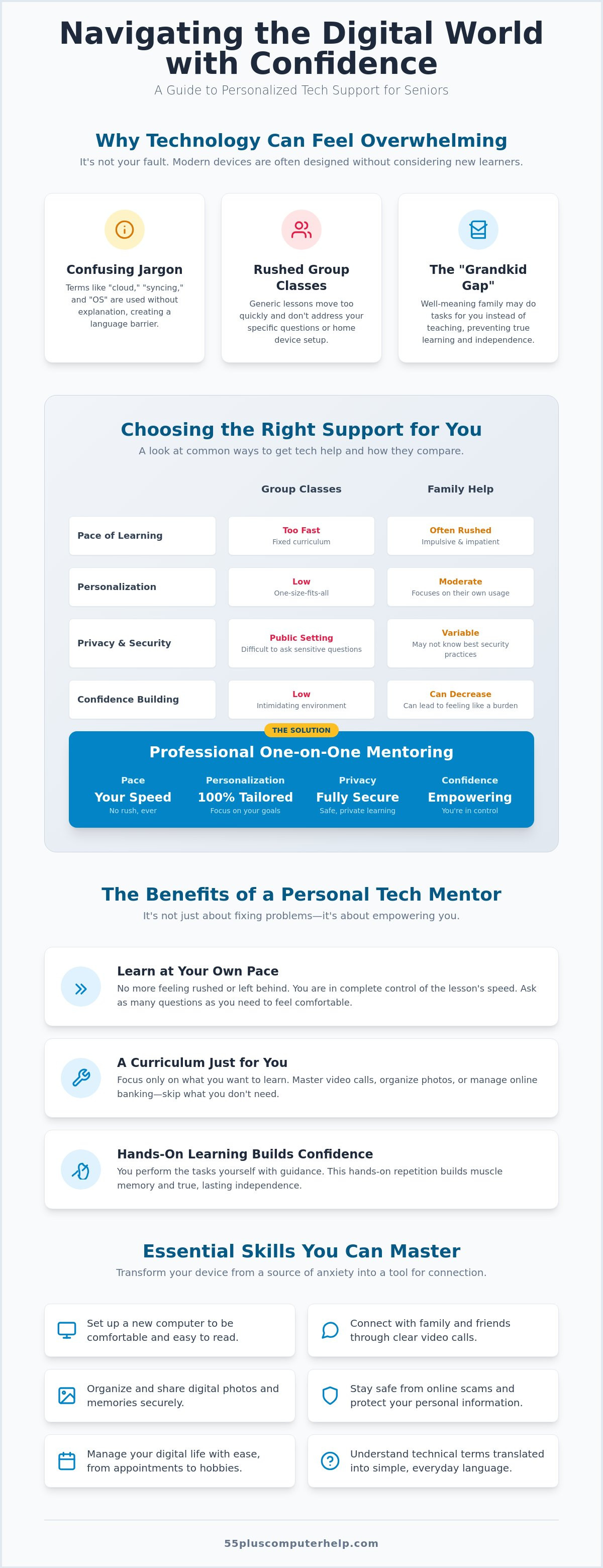
Essential Skills Covered in a Personalized Session
A personalized session starts with your physical comfort. We focus on your workspace to make the technology fit your life. We make the screen work for your eyes and the mouse work for your hands. This is a key part of how to set up a new computer for a senior. We can increase the size of icons and text so you do not have to squint. We also adjust the speed of the mouse pointer. This makes it easier to click on the right spot without feeling rushed. These small adjustments make a big difference in your daily experience. You should feel comfortable every time you use your computer.
Communication is a top priority for most students. We provide Email setup and troubleshooting for seniors. This helps you stay in touch with your family and friends. You will learn how to send photos and documents as attachments. We show you how to organize your inbox to keep your files tidy. We also cover smartphone and tablet training. This goes far beyond making phone calls. You can learn how to use maps for travel or how to download books for your digital reader. We ensure all your different devices work together seamlessly.
Staying Safe in a Digital World
Security is a major concern for everyone. Research shows that elder fraud exceeds $3.4 billion annually. We teach you how to stay safe in a digital world. You will learn to spot fake alerts that claim to be from the government or a bank. We explain two-factor authentication in plain language. It's like a second lock on your digital door. Regular software updates are also vital. They act like a shield for your personal information. When you know how to set up a new computer for a senior correctly, security is built in from the very first day.
Managing Your Digital Memories
Your computer is a library for your life's memories. We help you organize years of digital photos into folders that make sense to you. You will find specific pictures quickly without searching through thousands of files. You will also learn to set up automated data backups. This ensures you never lose a memory if your device has a problem. Sharing photos safely with family is another focus. You can send an entire album to your children with just a few clicks. We also show you how to print your favorite pictures for your home albums.
A typical lesson covers several practical skills:
- Adjusting screen brightness and text size for better visibility
- Setting up secure and memorable passwords for your accounts
- Connecting your printer and other home devices
- Updating your software automatically to stay safe
If you want to master these skills at your own pace, you can book a patient technology mentor to guide you through the process.
Finding the Right Tech Mentor for Your Journey
Choosing a guide for your digital education is a personal decision. You need someone who views technology through your eyes rather than through a lens of complex code. Look for a professional who demonstrates a specialized track record with older adults. This person should be a translator who can take a technical hurdle and turn it into a simple, logical step. To prepare for your first session, keep a small notepad by your device. Whenever you feel stuck or confused about how to set up a new computer for a senior, jot it down. This list becomes the roadmap for your first lesson, ensuring your specific needs are met immediately.
Why Patience is the Most Important Tech Skill
A mentor's most valuable asset isn't their technical knowledge; it is their ability to listen. A true teacher waits for you to find the right button rather than doing it for you. This patient approach lowers the stress that often blocks the learning process. When you aren't worried about being "too slow," your confidence grows naturally. The goal is to move from a state of hesitation to one of curiosity. This supportive environment turns every mistake into a valuable learning opportunity that sticks with you long after the session ends.
Getting Started with 55 Plus Computer Help LLC
Since 2014, 55 Plus Computer Help LLC has focused on empowering users through specialized, relationship-based training. We understand the specific hurdles that come with modern operating systems and hardware updates. If you are wondering how to set up a new computer for a senior, we provide a calm and methodical path to success. We offer both onsite visits and remote assistance to ensure you feel comfortable in your own learning environment.
Our service relies on a transparent, fixed-rate pricing model. You will never have to worry about hidden corporate fees or long-term contracts. We believe that technology should bring you closer to your community and family, not create a wall of frustration. It is never too late to gain the skills you need to navigate the digital world. With a dedicated mentor from 55 Plus Computer Help LLC, you can embrace your technology with total self-assurance and independence.
Take the Next Step Toward Digital Confidence
You have seen that technology can be a source of joy and connection when you have the right support. By focusing on your unique interests and learning at your own pace, you can move past the frustration of technical jargon. Mastering how to set up a new computer for a senior is just the beginning of your journey toward digital independence. You now have the roadmap to find a patient mentor who respects your time and values your comfort. You deserve to use your devices with total confidence and a sense of security.
Since 2014, our team has provided specialized technology training for the 55 plus community. We offer transparent, fixed-rate pricing and have a deep understanding of smartphones, tablets, and computers. Empower your digital journey with patient, one-on-one help from 55 Plus Computer Help LLC. Your devices should serve your life, not complicate it. It is never too late to embrace the digital world and stay connected to the people and hobbies you love most.
Frequently Asked Questions
What exactly is one-on-one computer help for seniors?
One-on-one computer help is a personalized teaching service where a patient mentor works directly with you to master your devices. Unlike a busy classroom, this approach focuses entirely on your specific questions and goals. You get to set the pace and practice skills until they feel natural. It's an educational experience designed to build your confidence and independence in a safe, supportive environment. This specialized attention makes technology feel much less intimidating.
Is it better to have someone come to my home or help me remotely?
The best choice depends on your specific needs and comfort level. Onsite visits are excellent when learning how to set up a new computer for a senior because a mentor can help with physical tasks like connecting a printer. Remote support is a convenient option for software questions or quick troubleshooting once your system is already running. Both methods provide the same patient, individualized attention you deserve to feel successful.
Can a tutor help me with my specific smartphone or tablet model?
A dedicated tech mentor can help you with any major smartphone or tablet model you own. Whether you use an iPhone, an Android device, or an iPad, the training is tailored to your specific hardware. You will learn how to navigate your unique settings, download apps you enjoy, and stay connected with family. This specialized training ensures your mobile devices work exactly the way you need them to for your daily life.
How long does it usually take to learn a new skill like email or Zoom?
Most students can learn the basics of a new communication tool in just one or two sessions. Because the teaching is one-on-one, you don't have to wait for other students to catch up. You spend the entire time practicing the specific steps you need for your own device. Everyone learns at a different speed, and your mentor will stay with you until you feel completely comfortable using the program on your own.
Do I need to be good with numbers to understand computer basics?
You do not need any special math or number skills to become proficient with a computer. Modern technology is about following simple visual patterns and using logical steps, not solving complex equations. Using a computer is more like learning to use a new kitchen appliance or navigating a television remote. A patient mentor will show you that most digital tasks are just a series of simple clicks that anyone can master with a little practice.
What happens if I forget what I learned after the session ends?
It is completely normal to forget a few steps after your lesson concludes. Your mentor can provide simple, written notes or personal guides that outline the most important tasks you covered together. These guides act as a helpful reminder whenever you feel stuck later on. You can also schedule follow-up sessions to review specific skills until they become part of your permanent muscle memory and you feel fully independent.
Is professional tech help safer than asking a stranger or a volunteer?
Professional tech help is often the safest choice because it provides a higher level of accountability and specialized expertise. A trusted mentor understands the unique security risks seniors face and builds protection into every lesson. While volunteers are well-meaning, a professional focused on your age group has the interpersonal skills to teach effectively. This relationship ensures your personal data stays private and your computer system remains secure against common online scams and threats.
How do I know if my computer is too old to be worth learning on?
A computer is generally considered too old if it can no longer receive the latest security updates from the manufacturer. If your device is more than seven or eight years old, it might be time to consider a newer model for your safety. A mentor can help you evaluate your current machine during a lesson. If you decide to upgrade, they can show you how to set up a new computer for a senior properly.


