
Last Tuesday, Mary sat down to check her bank balance, but after three tries, she still couldn't remember the right combination of capital letters and symbols. It's a common frustration that leads to many people feeling locked out of their own digital lives. With AI-powered scams becoming more sophisticated in 2026, the pressure to have perfect security feels heavier than ever. These password security tips for seniors are designed to take that weight off your shoulders. You don't need to be a computer expert to keep your identity safe.
We know that confusing security prompts and industry jargon can be exhausting. You deserve to use your smartphone or computer with total confidence. This guide will teach you how to protect your digital life with simple, stress-free strategies built for the way you actually use technology. We'll look at how to use modern tools like password managers and passkeys to do the hard work for you. By the end, you'll have a manageable system that gives you peace of mind whenever you're banking or emailing friends.
Key Takeaways
- Learn essential password security tips for seniors to defend against modern AI scams and protect your private information.
- Discover why long sentences made of random words are much safer and easier to remember than short, complicated passwords.
- Explore how digital safes and passkeys can do the heavy lifting so you don't have to worry about getting locked out again.
- Understand how a simple "second key" like a code sent to your phone adds a powerful layer of protection to your bank and email accounts.
- See how working with a patient mentor can turn confusing security setups into a simple, confidence-building experience.
Why Password Security is Your Best Defense in 2026
Digital safety has changed quickly over the last few years. By 2026, hackers are using artificial intelligence to guess passwords faster than we ever imagined. This shift makes following modern password security tips for seniors more important than it was even a year ago. It's no longer just about a single account. It's about protecting your entire digital life from automated tools that never get tired.
Many people still use short passwords that were considered safe a decade ago. Today, a standard computer can crack an eight-character password in a matter of seconds if it only uses lowercase letters. Hackers don't sit at keyboards and guess your dog's name anymore. They use powerful software that tries millions of combinations every heartbeat. Using a longer, more thoughtful approach is your best defense against these high-speed attacks.
Understanding the Value of Your Digital Identity
Think of your email address as the master key to your home. If a thief gets that key, they can reach your bank accounts, your health records, and your favorite shopping sites. Your identity is a valuable prize. Scammers also target social media accounts to impersonate you. They send fake messages to your friends and grandchildren, hoping to trick them into sending money. If a hacker does manage to get inside your system, you might need professional virus and malware removal to clean up the digital mess and regain your privacy.
Common Myths About Senior Online Safety
We often hear neighbors say they don't have anything worth stealing. This is a common misunderstanding that scammers count on. They aren't always looking for a million dollars. They look for any active account they can use to launch more attacks or hide their tracks. Automated bots scan the internet constantly for any weak spot. These bots don't care about your name or your hobbies. They only care about finding a gap in a weak password policy. Even a "boring" password is a prize for a bot that wants to send spam from your email address. Keeping up with current password security tips for seniors is a proactive way to stay ahead of these automated threats.
The emotional cost of a compromised account is high, but the steps for prevention are actually quite simple. You don't have to be a tech expert to stay safe. A few small changes to how you create and store your logins can save you hours of frustration and worry. It's about building a wall that is too tall for hackers to climb, giving you the freedom to enjoy your time online without fear.
Moving Beyond 'SecretWords123': Creating Modern Passphrases
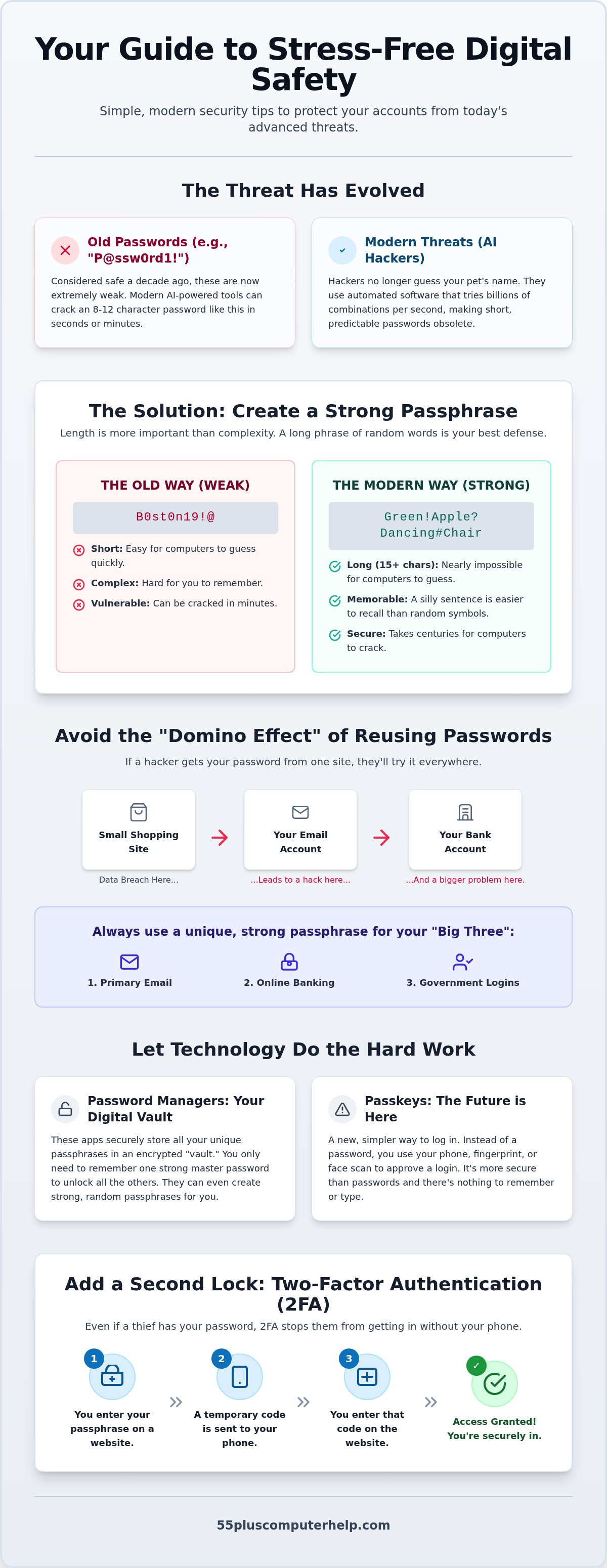
For years, we were told to create short, complicated words with numbers and symbols. In 2026, this is no longer the best advice. Modern computers can guess these short strings in the blink of an eye. Instead, the most effective password security tips for seniors involve switching to passphrases. A passphrase is a string of words that tells a short, nonsense story. Because these are much longer than traditional passwords, they are significantly harder for machines to crack, yet they are much easier for you to remember.
It's tempting to use information that is close to your heart. You might want to use your wedding anniversary, your street address, or the name of a beloved pet. However, scammers can find these details easily by looking at your social media or public records. It's safer to choose random, unrelated words. If you find this process confusing, our team offers smartphone and tablet training to help you practice these new habits in a comfortable, supportive setting.
The Formula for an Unbreakable Passphrase
Length is your greatest ally. You should aim for a passphrase that is at least 15 characters long. This length makes it nearly impossible for modern tools to guess your secret. You can still add a few symbols or capital letters to make it even stronger. For example, "Green!Apple?Dancing#Chair" is much safer than "B0st0n19!@". By following CISA's password security tips, you can create a login that keeps your information private without causing a headache every time you type it in.
Why You Should Never Reuse the Same Password
Using the same password for every site creates a "domino effect." If one small shopping website has a security leak, the hacker now has the key to your bank account and your email. You should prioritize having unique passphrases for your "Big Three" accounts: your email, your online banking, and your Social Security login. You can check if your information has been part of a leak by using trusted online security tools. If you discover a leak, changing your passphrase immediately stops the damage before it starts. Taking these small steps is one of the most important password security tips for seniors today. It builds a strong foundation for your digital independence.
Finding Your Best Memory Aid: Managers, Logs, and Passkeys
Remembering twenty different passphrases is nearly impossible for anyone. You need a reliable system that works for your specific lifestyle. Whether you prefer a digital tool or a physical notebook, the goal is to make your daily life easier and more secure. These password security tips for seniors focus on finding a memory aid that feels comfortable and reduces the fear of getting locked out. You shouldn't have to struggle with a "forgot password" link every time you want to check your email.
There are three main ways to keep track of your logins today. Digital managers, physical logs, and modern passkeys each offer different benefits. The right choice depends on how you use your devices and what makes you feel most in control. No matter which method you pick, the most important step is simply having a plan in place. This prevents the temptation to use the same weak password for every website you visit.
Is a Digital Password Manager Right for You?
A digital password manager acts like a secure vault for your computer or tablet. It stores all your different passphrases and fills them in automatically when you visit a website. This means you only have to remember one "Master Password" to unlock the rest of your accounts. When you set this up, it's helpful to learn how to create a strong password for that master key. If you feel nervous about setting this up alone, our computer setup service can help you choose a senior-friendly manager with a simple, clear interface.
The Right Way to Keep a Physical Password Book
Many technical guides tell you to never write passwords down on paper. We believe that a physical book can be a great tool if you use it correctly. If you prefer paper, never label the book "Passwords" on the front cover. Use a plain notebook that looks like a diary or a phone book. You should store this book in a locked drawer or a home safe, and never leave it sitting right next to your computer. To stay even safer, try writing down "hints" instead of the full passphrase. This ensures that even if a guest sees the page, they won't know your actual login secret.
Passkeys: The Future of 'No-Password' Logins
Passkeys are a newer technology that removes the need for typing altogether. Your smartphone acts as your key by using your face or your thumbprint to confirm your identity. This is much safer than a typed password because there is nothing for a hacker to guess or steal. Major services like Google and Apple have already embraced this technology in 2026. Using passkeys is one of the most effective password security tips for seniors because it combines top-tier safety with incredible simplicity. You can log in to your favorite sites with just a touch, giving you total peace of mind.
Adding an Extra Layer: Two-Factor Authentication (2FA) and Biometrics
Even a strong passphrase can sometimes be discovered by a very clever scammer. This is why we use a second layer of protection called Two-Factor Authentication, or 2FA. It acts as a vital "second key" for your digital life. 2FA is like a second lock on your front door that requires a different key. Even if a thief steals your first key, they still can't get inside without the second one. This is one of the most effective password security tips for seniors because it stops hackers even if they know your password. It gives you an extra moment to breathe, knowing your accounts have a backup guard on duty.
In 2026, many banks and government websites are making this second step mandatory. While it might feel like an extra chore at first, it quickly becomes a habit. Think of it like putting on a seatbelt before you drive. It only takes a few seconds, but it provides a massive amount of safety. Following these password security tips for seniors helps you stay independent and secure. You won't have to worry about someone in another country accessing your personal details just because they guessed a word.
Text Message Codes vs. Authenticator Apps
You've likely seen this when a website asks to send a six-digit code to your phone messages. You type that code in, and the site knows it's really you. Text codes are very common and simple to use for most people. However, authenticator apps offer even more safety for your most important accounts. These apps live on your smartphone and create a new code every thirty seconds. They are a great choice for securing your email setup and troubleshooting needs. If you're worried about losing your phone, you can print "recovery codes" to keep in your home safe. This ensures you never get locked out of your own digital world if your phone goes missing.
Using Your Face and Fingerprint (Biometrics)
Your own physical traits can also serve as your second key. This is called biometrics. Setting up FaceID or TouchID on your tablet makes logging in both faster and safer. It's much harder for a hacker to steal your thumbprint than it is to steal a written password. Some people feel a bit uneasy about sharing this data with a large company. You can rest easy knowing that your device stores this information locally in a special, secure part of the hardware. It doesn't live on the internet where others can find it. If you'd like a hand setting up these security layers, our smartphone and tablet training provides patient, one-on-one guidance. We can help you feel confident that your information is locked away safely.
How Personalized Training Builds Your Digital Confidence
Learning about digital safety is a great first step, but setting up new systems can feel like a tall mountain to climb. You don't have to do it alone. A patient mentor can sit with you and walk through every step at a pace that feels right for you. This personalized approach turns a confusing task into a simple, successful experience. You can ask questions as they come up and get immediate answers without any confusing industry jargon. Applying these password security tips for seniors becomes much simpler when you have a trusted expert sitting right beside you.
When you work with a specialist, you move from feeling anxious to feeling truly empowered. We can help you install a password manager and show you exactly how it works on your specific computer or tablet. Mastering 2FA or biometrics becomes a breeze when someone is there to guide your hand and explain the process clearly. These password security tips for seniors are meant to simplify your life, and one-on-one lessons ensure they actually do. You deserve to feel in control of your own devices and your private information.
Tailored Lessons for Your Specific Devices
Whether you use an iPad, a Windows laptop, or an Android smartphone, your training is built around the tools you already own. We don't use a one-size-fits-all approach because everyone uses technology differently. We focus on the accounts that matter most to you, such as seeing photos of your grandkids or managing your banking securely. Together, we can create a custom Security Checklist. This list gives you a clear path to follow every month so your digital home stays locked and safe. It's a practical way to maintain your independence while staying protected from modern scams.
Support When You Need It: In-Person or Remote
Sometimes, you need a technician to visit your home for a full setup or a deep-clean of your system to remove old clutter. Other times, you might just have a quick question about a new security prompt or a software update. We offer both in-home visits and remote support to fit your schedule and your comfort level. Having a trusted local expert available gives you the confidence to explore the internet without worry. If you're ready to take control of your digital safety, you can schedule your personalized technology training today. We are here to help you every step of the way, ensuring your technology works for you, not against you.
Build Your Digital Confidence Today
Protecting your personal information in 2026 doesn't have to be a source of constant stress. By switching to long passphrases and using a "second key" like biometrics, you can keep your accounts locked tight against modern threats. These password security tips for seniors are designed to give you independence and peace of mind. You already have the tools to stay safe. Now it's just about putting them into practice with a system that works for your life.
If you feel overwhelmed by these security steps, remember that you don't have to face them alone. Our team has provided trusted technical guidance since 2014. We specialize in patient, one-on-one training specifically for those aged 55 and older. You can learn in the comfort of your own home and at your own speed. Empower yourself with a patient, in-home tech mentor; book your session now. You deserve to use your favorite devices with total confidence and security.
Frequently Asked Questions
Is it really safe to use a digital password manager?
Yes, using a digital password manager is one of the safest ways to manage your logins in 2026. These tools use high-level encryption to scramble your data so only you can see it. Even if the company experiences a security incident, your specific vault remains locked behind your master password. It is a much more reliable system than using the same simple word for every website you visit.
What should I do if I think my password has been stolen?
You should change the password immediately and enable two-factor authentication if you haven't already. If the stolen login was for your bank or email, contact those companies to let them know about the security risk. Checking your recent activity for any strange charges or messages is also a smart move. Taking quick action stops a small problem from becoming a much larger headache for your digital life.
Is it okay to save my passwords in my web browser like Chrome or Safari?
Saving passwords in a browser is better than writing them on a sticky note, but it isn't the most secure choice. Anyone who uses your computer could potentially see those saved logins. A dedicated password manager provides a separate, stronger lock that stays with you even if you switch to a different device. This is a key part of following modern password security tips for seniors.
Why do websites keep asking me to change my password?
Websites usually ask for a change if they suspect a security leak or if their internal policy requires regular updates. This is meant to protect you from hackers who might have found an old list of logins on the dark web. While it can feel frustrating, it's a helpful reminder to keep your digital locks fresh and strong. Using a manager makes these required changes much easier to handle.
What happens if I forget my 'Master Password' for my manager?
Forgetting your master password can be difficult because most secure managers don't have a reset button for your safety. When you first set up your manager, you will receive a Recovery Key or Emergency Kit to print out. You should keep this paper in a very safe place, like a home safe or a locked drawer. If you lose both the password and the key, you may lose access to the vault entirely.
Can I use the same password for all my social media accounts if I use a strong one?
You should never use the same password for multiple accounts, even if that password is very long. If one social media site has a data breach, scammers will immediately try that same password on every other site you use. This domino effect can lead to your entire identity being compromised in minutes. Creating a unique passphrase for every account is one of the best password security tips for seniors to stay safe.
How often should I actually update my passwords in 2026?
As of July 2024, the AARP suggests changing your passwords every three months. However, if you use a very long passphrase and have two-factor authentication turned on, you don't need to change it as often unless there is a known security breach. The most important thing is to update your "Big Three" accounts—banking, email, and Social Security—whenever you feel a risk might be present. Regular updates keep your security layers strong against new AI-driven cracking tools.
What is a 'security question' and should I give real answers?
A security question is an extra way for a website to verify your identity, like asking for your mother's maiden name. It's often safer to use a fake answer that only you know, as real details are often easy for scammers to find online. For example, if the question asks for your first car, you could type "Purple Space Ship" instead. Just make sure to store that fake answer in your password manager so you don't forget it later.


