
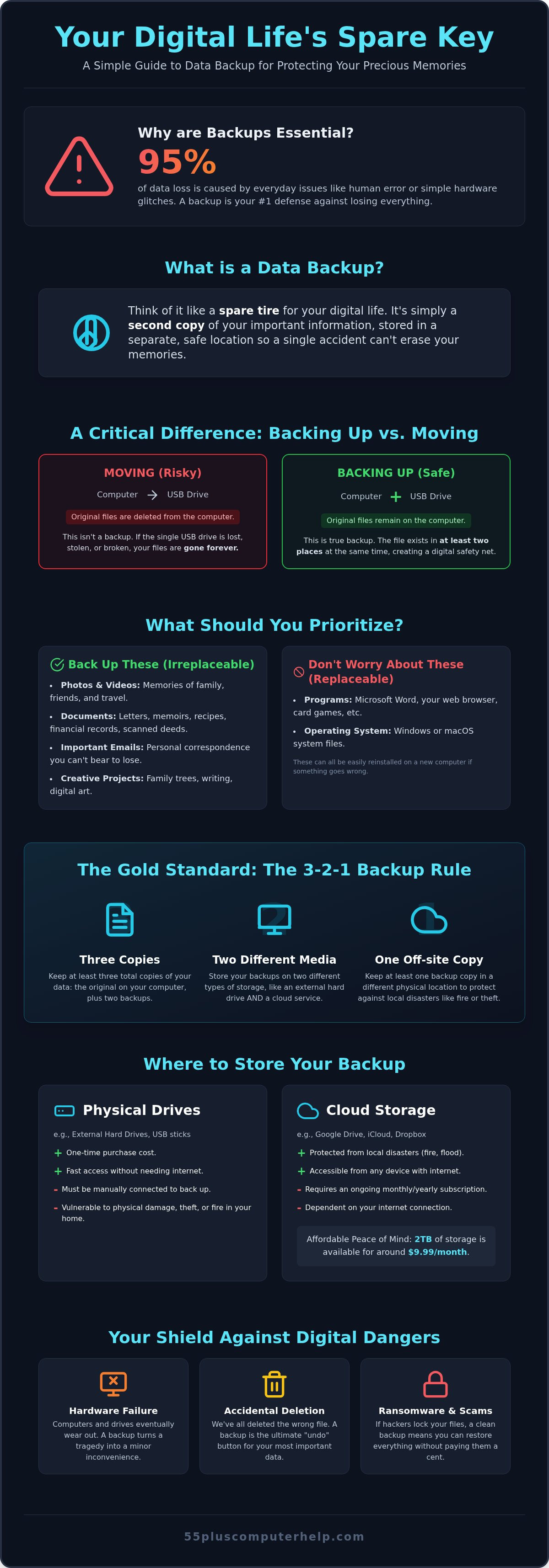
Imagine opening your tablet to show a friend photos from your last family reunion, only to find the screen won't turn on. This heart-sinking moment is more common than you might think. Many people feel overwhelmed by technology and wonder, what is data backup and why is it important? Simply put, it's like having a spare key for your digital life. Since human error or a simple hardware glitch causes up to 95 percent of data loss incidents, having a backup plan is essential for your peace of mind.
We know that "the cloud" can sound mysterious and expensive, but it's actually very accessible. In 2026, you can get 2TB of storage for about $9.99 a month from major providers. You don't need to be a computer expert to keep your memories safe. This guide will teach you exactly how to protect your precious photos and documents without any technical headaches. We'll compare easy options like physical drives and cloud services so you can choose the best fit for your home and your budget.
Key Takeaways
- Understand exactly what is data backup and why is it important for protecting your family photos from unexpected hardware failure.
- Discover the difference between physical drives and the cloud so you can pick the simplest option for your needs.
- Learn the 3-2-1 rule to ensure your most important documents stay safe in more than one location.
- Identify your digital must-haves and start a simple backup routine today with easy to follow steps.
- Find out how patient, one-on-one help can take the technical headache out of securing your digital life.
What is Data Backup? A Clear Definition for Beginners
Think of your computer or tablet like a car. You have four tires on the road that get you where you need to go. However, most cars also carry a spare tire in the trunk. That spare is there just in case one of the others goes flat. A data backup works exactly the same way for your digital files. Many people ask us, What is a data backup? simply because the term sounds more technical than it really is. It's just a second copy of your information kept in a separate location.
Imagine you have a precious handwritten letter from a parent or spouse. If you take that letter to a shop and make a photocopy, you now have two versions. If the original gets spilled on or lost, the copy is still there to save the day. This simple idea helps explain what is data backup and why is it important. When we talk about "data," we're just talking about the digital things you care about. This includes:
- Digital photos of your children and grandchildren.
- Important emails from friends or family members.
- Tax documents, scanned deeds, and financial records.
- Letters, recipes, or memoirs you have typed up.
The Difference Between Moving and Backing Up
A very common mistake is "moving" files instead of copying them. If you drag your photos onto a small thumb drive and then delete them from your computer to save space, you haven't made a backup. You've simply moved the original to a new home. If that tiny thumb drive gets lost or stops working, those photos are gone forever. We always teach our students the "Rule of Two." A file is only safe when it exists in at least two different places at the same time. Redundancy means having a digital safety net so that one single accident cannot destroy your most cherished memories.
What Exactly Should You Be Backing Up?
You don't need to save every single thing on your computer. Most people don't need to worry about backing up programs like Microsoft Word, Google Chrome, or your favorite card games. If your computer crashes, we can help you reinstall those programs quite easily. Instead, you should focus your energy on things that are irreplaceable. This is the real answer to what is data backup and why is it important. Your primary goal should be your Photos folder and your Documents folder. These hold the items that no one can replace, such as scanned family trees or years of personal correspondence. Focus on your personal history first, and the rest will fall into place.
Why Data Backup is Important: Protecting Your Digital Life
Understanding what is data backup and why is it important becomes very clear when you think about the memories stored on your device. For a business, data might be spreadsheets or sales figures. For you, data is your history. It is the video of your grandson's first steps or the scanned copy of a recipe from your mother's kitchen. These items are irreplaceable. While we often think our computers are permanent, they are actually quite fragile. Having a backup ensures that a broken device doesn't mean a lost legacy.
A backup also protects you from the most common cause of data loss: yourself. We have all accidentally clicked "Delete" on a photo we meant to keep. Mistakes happen to everyone. In fact, research from 2026 shows that human error is a factor in up to 95 percent of data loss incidents. When you have a second copy of your files, an accidental click is just a tiny mistake rather than a permanent loss. It gives you the freedom to explore your computer without the constant fear of breaking something.
Hardware Fails: It's Not If, But When
Computers are a lot like toasters or refrigerators. They are useful appliances, but they eventually wear out. Every hard drive has a limited lifespan. Sometimes a drive will give you a warning, like a strange clicking sound often called the "click of death." Other times, a computer simply won't turn on one morning. Without a backup, this is a tragedy. With a backup, it is merely a hassle. You can simply buy a new computer and let us help you with data backup and recovery to put your files back exactly where they belong.
Protection Against Scams and Viruses
The digital world has its share of bad actors. You may have heard of ransomware, which is a type of scam where hackers "lock" your files and demand money to release them. In 2026, 39 percent of organizations that suffered a data breach reported it was a ransomware attack. Seniors are often targeted by these scams through deceptive messages. If you have a clean backup, these threats lose their power. You can simply "rewind" your computer to a time before the virus arrived.
Staying safe starts with a good email setup to filter out junk. If a virus does get through, our team provides patient virus and malware removal to clean your system. Knowing your files are safely tucked away in a second location provides a level of peace of mind that makes using technology much more enjoyable.
Comparing Backup Methods: Physical Drives vs. The Cloud
Once you understand what is data backup and why is it important, the next step is choosing the right tools for the job. There are two main ways to protect your information. One method involves a physical object you can hold in your hand. The other uses the internet to store your files in a secure location. Both options have their strengths, and many of our neighbors find that using a combination of both provides the best safety net.
Choosing between these methods doesn't have to be a technical headache. We often suggest the "3-2-1 rule" to keep things simple. This means you should have three copies of your data. You keep the original on your computer, one copy on a physical drive at home, and one copy in the cloud. This way, your memories are safe from almost any situation, whether it is a spilled cup of coffee or a hardware failure. Knowing what is data backup and why is it important helps you see that these tools are just like insurance for your digital life.
External Hard Drives: The Physical Option
An external hard drive is a small, rectangular box about the size of a deck of cards. You connect it to your computer using a simple cord. Many people prefer this method because it feels familiar. You can physically see where your photos are being stored. It is a very fast way to save large amounts of information, like years of family videos.
There are several benefits to this approach. First, there are no monthly bills. You buy the drive once and you own it. However, there are some downsides to consider. You must remember to plug the drive in and start the backup process yourself. Also, because the drive sits on your desk, it is vulnerable to the same local disasters as your computer, such as a house fire or a power surge. If you choose this path, we can help you with your computer setup to make sure your drive is working correctly from day one.
Cloud Storage: The Internet Option
The "Cloud" might sound mysterious, but it is actually quite simple. It is just a very secure computer located in a high-tech building in another city. When you use cloud storage, your computer sends copies of your files over the internet to that secure building. This is often the easiest method for seniors because it is "set it and forget it." Once we help you set it up, the computer handles the work for you in the background.
As of August 2026, most major providers like Apple or Google charge about $9.99 per month for 2TB of storage. If you don't like monthly subscriptions, some companies offer "lifetime" plans for a one-time payment of around $179. The biggest advantage of the cloud is that your files are safe even if something happens to your home. You can also access your photos from any device, which is wonderful for showing off pictures of the grandkids while you are traveling. The only requirement is a steady internet connection to keep everything synced.
Deciding which method is best depends on your comfort level. If you want the most protection with the least amount of daily effort, the cloud is a fantastic choice. If you prefer to avoid monthly fees and like having a physical copy nearby, an external drive is a solid reliable option. We are always here to act as a patient mentor and help you decide which path fits your lifestyle best.
Practical Steps to Start Backing Up Your Files Today
Getting started with your own protection plan doesn't have to be a chore. You don't need to be a computer whiz to follow these simple steps. If you have ever felt confused about what is data backup and why is it important, the best way to learn is by doing. We recommend focusing on your "Must-Haves" first. These are the folders on your computer that hold your digital life, such as your Photos and Documents. Most other things on your computer can be replaced, but these folders contain your personal history.
Once you know what you want to save, follow these four basic steps:
- Step 1: Identify your files. Open your computer and look for the folders labeled "Photos" and "Documents." These are your primary targets.
- Step 2: Choose your method. For most seniors, we recommend starting with a cloud service. It is often the easiest way to begin because it doesn't require any physical hardware or extra cords.
- Step 3: Make it automatic. This is the most important step. When your backup runs by itself, you don't have to worry about forgetting to do it.
- Step 4: Check your work. Once a month, take a quick peek at your backup service to make sure you see a green checkmark or a "Success" message.
If these steps still feel a bit intimidating, don't worry. We can act as your patient mentor and guide you through our data backup and recovery services to ensure your files are safe and sound.
The 3-2-1 Rule Made Simple
Experts often talk about the "3-2-1 rule," which is a fancy way of saying you should have three copies of your data. For a senior at home, this translates to a very simple setup: your original computer, one copy on an external drive, and one copy in the cloud. Using two different types of storage media makes your digital life much more resilient. Having a copy stored "off-site" in the cloud is vital because it protects your memories even if your home experiences a local disaster like a fire or a flood.
Setting Up Automatic Backups
Modern computers come with helpful tools that do the heavy lifting for you. If you use a Windows computer, there is a tool called "File History." If you use a Mac, you have "Time Machine." These programs are designed to watch for changes in your files and save them immediately. Cloud services like iCloud or OneDrive also work quietly in the background. They upload your photos as soon as you save them. This "set it and forget it" approach removes the technical headache and gives you back your independence. You can enjoy your computer knowing that your hard work is being saved every single minute.
How 55 Plus Computer Help Simplifies Your Data Protection
Protecting your memories is a personal journey that shouldn't feel like a burden. At 55 Plus Computer Help, we believe that understanding what is data backup and why is it important is the first step toward digital independence. However, reading about it is different from actually doing it. Our team provides the patient, one-on-one support you need to turn these concepts into a working reality. We don't just give you a list of instructions. We act as a mentor to ensure you feel comfortable and confident with your new safety routine.
We offer flexible support options to fit your lifestyle. If you want to use a modern cloud service, we can provide remote assistance. We safely connect to your computer to help with software installation and updates while you watch from your own desk. For those who prefer a physical external drive, we offer in-home visits to set up your hardware correctly. We specialize in data backup and recovery for seniors, ensuring that your most cherished photos and documents are never more than a few clicks away. We take the technical headache out of the process so you can focus on enjoying your computer.
Personalized Training for Your Peace of Mind
We believe that true peace of mind comes from knowing how your systems work. Our personalized training sessions go beyond simple setup. We teach you how to verify that your files are safe so you don't have to guess if the computer is doing its job. We can also help you organize your digital life. This includes sorting your photos and documents into clear folders that are easier to manage. Because we value your trust, we use a transparent, fixed-rate hourly fee structure. There are no hidden costs or complicated contracts; just reliable help from a local expert who cares about your success.
Getting Started with a Patient Expert
It is never too late to secure your digital legacy. Since 2014, we have focused exclusively on helping seniors who may feel overwhelmed by rapid industry changes. We understand the unique challenges you face, and we are here to help you catch up without any judgment. You don't have to do this alone. We provide a calm, supportive environment where your questions are always welcome. Let us help you answer what is data backup and why is it important by building a custom plan that fits your needs. Your memories are a treasure, and we are honored to help you protect them.
Secure Your Digital Legacy Today
You now have the knowledge to protect your most cherished memories. We have explored how a digital backup acts as a safety net for your photos and documents. Whether you prefer a physical drive or a modern cloud service, the goal is to ensure your history remains safe from accidents or hardware failure. Understanding what is data backup and why is it important gives you the confidence to use your computer without fear.
Since 2014, 55 Plus Computer Help has provided specialized support for seniors just like you. We offer patient, jargon-free instruction that focuses on your specific needs. Our experts are available for in-home or remote assistance to help you set up an automatic system that works in the background. You deserve to feel independent and secure while exploring the digital world.
Let us help you secure your precious memories; schedule your patient tech support session today!
Taking this small step today protects your family stories for years to come. We are here to act as your patient mentor every step of the way. You don't have to face technology alone; we look forward to helping you gain peace of mind.
Frequently Asked Questions
Is 'The Cloud' safe for my private family photos?
Yes, the cloud is a very safe place for your family photos. Major providers use high-level security to keep your information private and secure. As of 2026, 20 U.S. states have passed comprehensive laws to ensure companies handle your data responsibly. While no system is perfect, storing photos in a professional data center is often more secure than keeping them on a single home computer that could be lost or damaged.
How often should I back up my computer?
You should ideally back up your computer every single day. Most modern services handle this automatically in the background. They watch for new files and save them immediately. If you choose to use a manual method, such as a physical drive, try to plug it in at least once a week. Frequent backups ensure that you only lose a few hours of work instead of several years of memories if a glitch occurs.
Can I just use a USB thumb drive for my backups?
A USB thumb drive is better than having no backup at all, but it isn't a reliable long-term solution. These small devices are very easy to lose or misplace. They also have a shorter lifespan than larger external hard drives. For a truly safe setup, we recommend using a dedicated external drive or a cloud service. These options are more durable and provide much more space for your growing photo collection.
What happens if my computer crashes and I don't have a backup?
If your computer crashes without a backup, your files may be lost forever. While professional recovery services exist, they are often very expensive and cannot guarantee success. This is exactly why understanding what is data backup and why is it important is vital for every senior. It's much easier and cheaper to prevent data loss today than it is to try and fix a broken drive tomorrow.
Do I need to pay for backup software, or are free versions okay?
Many free tools are excellent for basic needs. Your computer already has built-in programs like File History or Time Machine that don't cost extra. Many cloud services also offer a small amount of storage for free. However, if you have thousands of photos, you'll likely need a paid plan. As of 2026, 2TB of space usually costs around $9.99 per month, which is a small price for total peace of mind.
Will backing up my computer make it run slower?
No, modern backup systems are designed to run quietly in the background without slowing you down. They are very smart. They usually wait until you aren't using the computer to do the heavy lifting. You might notice a slight change if your internet connection is very slow, but for most people, the process is invisible. You can keep writing emails or browsing the web while your files are being secured.
How do I know if my backup actually worked?
You can check the status of your backup by looking for a success message or a green icon in your program list. We recommend checking this once a month. Simply open your backup software and look for the "Last Backup" date. If the date is recent, you're in good shape. This simple habit helps you confirm what is data backup and why is it important by ensuring your safety net is always ready.
Can 55 Plus Computer Help set up my backup for me remotely?
Yes, we can set up your cloud-based backup system remotely using secure screen-sharing software. This allows us to help you from the comfort of your own home. We'll guide you through every click and explain what we're doing in plain English. If you prefer to use a physical drive, we also offer in-home visits to ensure everything is plugged in and configured correctly.


