
Imagine sitting in your favorite chair, hearing your phone chime, and knowing exactly how to open a new photo of your granddaughter's first soccer goal. You don't have to wait for a family member to visit or worry about clicking the wrong button. While 90% of adults over 50 now own a smartphone, many still feel they need better digital literacy skills for seniors to truly feel comfortable. It's common to feel like these devices weren't designed for you. It's frustrating when technical jargon makes a simple task feel like a chore, or when you feel isolated because the family chat moved to a new app.
We understand that technology can feel intimidating, but you don't have to be a tech expert to stay connected. Our goal is to help you master essential tools at your own pace so you can use your devices with confidence. This guide provides a clear path to managing your own email, viewing family photos easily, and handling your appointments with total security and independence. You'll see that staying in touch with the people you love is simpler than you think.
Key Takeaways
- Understand that technology is a tool for connection, not a test you need to pass.
- Learn the four core areas of digital literacy skills for seniors that help you stay in touch with family through video calls and messaging.
- Discover why modern devices are harder to break than you think and how to handle common technical issues with confidence.
- Gain peace of mind by learning how to recognize online scams and navigate the internet securely.
- Find out how to choose a learning style that fits your pace, whether you prefer group classes or personalized training.
What Are Digital Literacy Skills and Why Do They Matter Now?
Many people think that Digital literacy means knowing how to program a computer or fix complex hardware. In reality, it is simply having the confidence to use technology to solve your everyday problems. It is not a one-time test you need to pass or fail. Instead, it is a journey made of small, manageable steps. You might start by learning how to send a text message, then move on to checking your bank balance. Each new skill builds on the last. You are in control of the pace.
Today, having strong digital literacy skills for seniors is more important than ever. The primary reason most people want to learn is to stay close to their families. When your grandkids live in another state, a video call can make it feel like they are right in the room with you. Beyond social ties, these skills help you maintain your independence. You can manage your own appointments, use telehealth services to talk to your doctor, and handle online banking without needing to ask for help. It gives you the freedom to handle your business from the comfort of your home.
The Connection Between Technology and Well-being
Mastering a tablet or a smartphone can change how you feel about your daily life. It significantly reduces feelings of social isolation. When you can see photos of your family or join a digital book club, you stay engaged with the world. A May 2026 study by CVS Health found that 58% of older Americans feel that low digital health literacy negatively impacts their ability to manage their health. Improving your digital literacy skills for seniors can lead to better health outcomes and a more positive outlook. Technology is a tool for empowerment. It is not just another modern chore. It gives you the power to choose how you spend your time and who you talk to.
Moving Beyond the "Tech-Savvy" Myth
You might hear people talk about being "tech-savvy" as if it is a special talent you are born with. This is a myth. You do not need to understand the complex inner workings of the internet to use it effectively. Think of it like learning to drive a car. You don't need to be a mechanic to get to the grocery store safely. It simply takes practice and a bit of patience. Your previous life experience actually makes you a better learner. You have already mastered many complex skills throughout your life. Learning a new app is just another problem to solve using the same wisdom you have always used.
The 4 Essential Digital Skills Every Senior Should Master
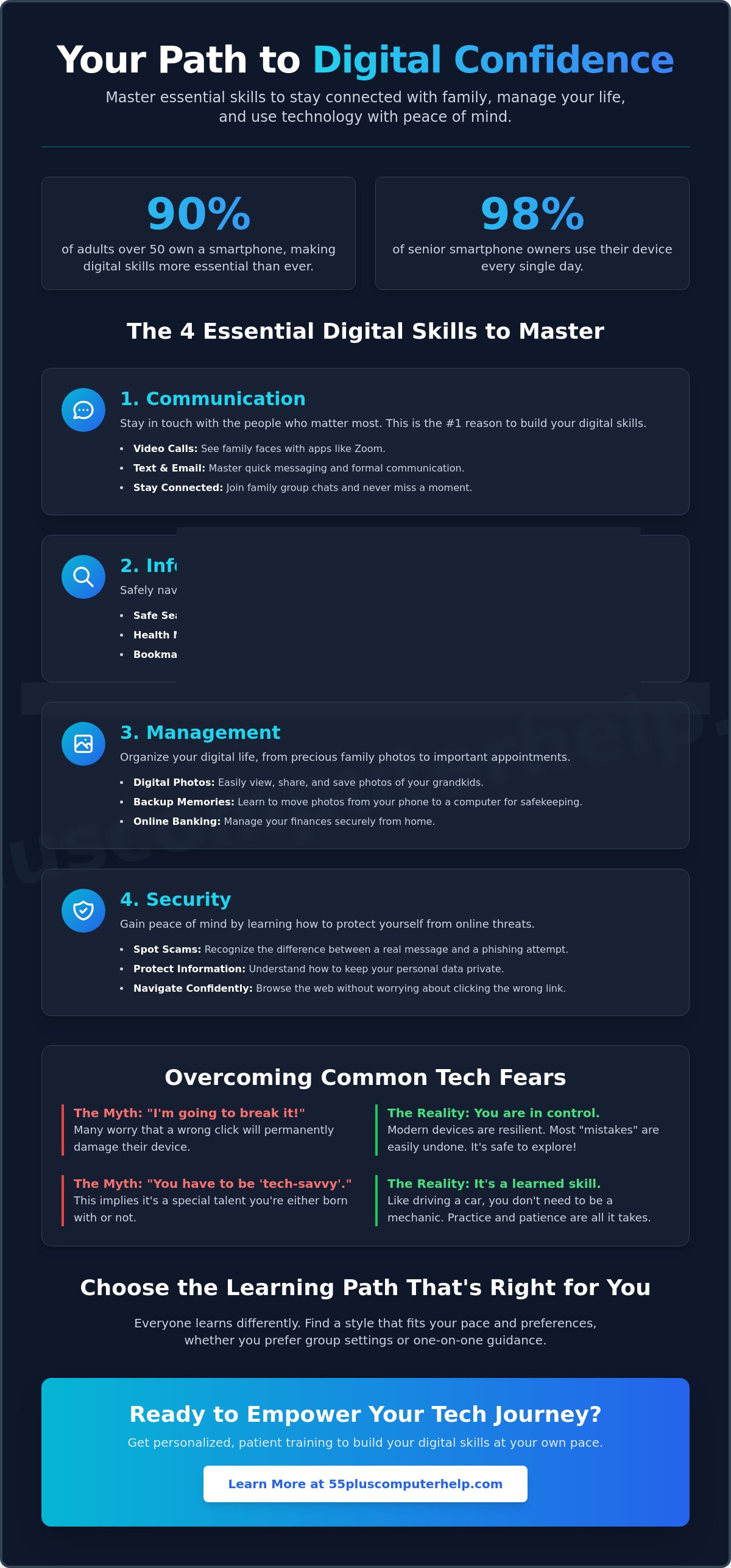
You do not need to be a computer scientist to enjoy the benefits of technology. Instead, focusing on a few key areas can make your daily life much easier. Research shows that 98% of smartphone owners aged 50 and over use their devices every single day. This shows that technology is already a big part of our lives. By focusing on these four areas, you can improve your digital literacy skills for seniors and feel more in control of your digital world.
- Communication: Using email, texting, and video calls.
- Information: Finding news, health facts, and weather safely.
- Management: Organizing and sharing your family photos.
- Security: Spotting the difference between a real message and a scam.
Mastering Communication Tools
Staying in touch is the most common reason people want to learn technology. Texting has become the preferred way to communicate for most adults over 50. Setting up an email account is also vital for receiving bills or newsletters. Email sync is a simple process that ensures your messages appear the same on your phone, tablet, and computer. Video calling tools like Zoom allow you to see the faces of loved ones who live far away. If you feel stuck, our smartphone and tablet training can help you get comfortable with these apps at your own pace.
Safely Navigating the World of Information
The internet is a vast library. You can use search engines like Google to find anything from a new recipe to details about a local event. The Digital Literacy for Older Adults Playbook emphasizes that having a clear plan for what you want to find makes learning much easier. When you search for something, look for the word "Sponsored" next to a result. This tells you it is an advertisement rather than a standard search result. You can also use bookmarks to save your favorite websites so you can find them again with one click.
Managing Your Digital Memories
Taking photos with a phone is easy, but finding them later can be hard. Learning how to move photos from your phone to your computer helps keep them safe. It is also a great way to clear space on your device. You can create digital albums to share with family in just a few clicks. Protecting these memories is important, so we recommend learning about data backup and recovery. This ensures your family history is never lost if a device stops working. Improving these digital literacy skills for seniors turns your phone into a portable family scrapbook.
Overcoming the Fear of "Breaking It" and Online Scams
One of the biggest hurdles to learning technology is the fear of doing something wrong. You might worry that one wrong click will delete your files or break the screen. This was a common problem with early computers, but modern devices are much harder to break. Tablets and smartphones are designed for you to explore them safely. Most software includes an "Undo" button to fix simple mistakes. If a screen ever feels frozen, a simple restart usually solves the issue. You can't break the internet by clicking a button.
Security is another area where many people feel anxious. Developing strong digital literacy skills for seniors includes learning how to spot a scam before it causes trouble. We recommend the "Stop, Look, and Think" method. Stop before you click any link. Look for mistakes in the sender's email address or name. Think about whether the message makes sense. Scammers often use "urgent" language to make you panic. When you stay calm and follow these steps, you stay in control of your device.
Building a Safety Mindset
Urgent pop-up messages are a common red flag. These warnings often look like they come from a bank or a government agency. Real companies will never ask for your password or social security number through a pop-up. Keeping your software updated is another simple way to stay safe. These updates fix security holes that scammers might try to use. If your computer already feels slow or shows strange ads, our Virus and malware removal guide can help you get a fresh, clean start.
The "Safety Net" of Data Backups
Backups are your ultimate safety net. When you have a backup, you never have to fear losing your precious family photos or important documents. Cloud storage is a popular option because it saves your files on the internet automatically. Physical backups use a small drive that you plug into your computer. Both methods are effective ways to protect your information. A patient mentor can help you set up an automated system. This means your files stay safe in the background without you having to remember to do anything. Improving your digital literacy skills for seniors helps you move from feeling worried to feeling secure and independent.
How to Choose the Right Learning Path for Your Style
Everyone has a different way of picking up new things. When it comes to improving your digital literacy skills for seniors, finding a method that feels comfortable is the first step toward success. You might enjoy the energy of a group or prefer the quiet of your own living room. The key is to choose a path that reduces frustration and builds your confidence one step at a time.
Group classes are a popular choice. Many local libraries and community centers offer these sessions for free. They are great for social interaction and meeting neighbors who are also learning. However, these classes can sometimes move too fast. If one student has a complex question, the rest of the group might have to wait. Conversely, the instructor might skip over a step that you find confusing. This can leave you feeling left behind.
Free online tutorials are another cost-effective option. Sites like YouTube have thousands of videos on every topic imaginable. These are helpful because you can pause and rewind them as much as you want. The main challenge is that many creators use technical jargon that can be hard to follow. If the video doesn't match your specific device, it can cause more confusion than it solves. It is hard to learn when the buttons on your screen don't look like the ones in the video.
Why Personalized Lessons Often Work Best
One-on-one tutoring is often the fastest way to master new technology. You get to learn on your own device in your own home. This is important because every tablet and computer is set up a little differently. A patient tutor can skip the things you already know and focus entirely on your personal goals. We use a "Learn by Doing" approach. You hold the mouse or the tablet while the tutor guides you through the process. This hands-on experience helps your brain remember the steps much better than just watching someone else do it. If you are ready for a patient, jargon-free experience, our Smartphone and Tablet Training can help you reach your goals quickly.
Creating a Habit of Digital Literacy
Learning a new skill is just the beginning. Turning that skill into a habit is what leads to true independence. We recommend setting aside just 15 minutes a day to practice one specific task. You might practice sending a photo to a friend or checking your local news. Keeping a "Tech Notebook" is also a very helpful strategy. Write down the steps for each task in your own words. This makes it much easier to review later without feeling overwhelmed. Never be afraid to ask "Why?" when learning. Understanding the logic behind a step makes it much easier to remember and apply to other apps in the future. Improving your digital literacy skills for seniors is a rewarding process that gets easier every day.
Empowering Your Tech Journey with 55 Plus Computer Help LLC
Learning how to use a new device doesn't have to be a source of stress. At 55 Plus Computer Help LLC, we specialize in patient, jargon-free technology training for our neighbors. We know that building digital literacy skills for seniors takes time and practice. Our goal is not just to fix a one-time problem. We want to give you the tools and confidence to use your technology independently. You deserve to feel secure and capable every time you turn on your device.
We meet you exactly where you are. Our services cover everything from your initial computer setup to advanced smartphone tips. Whether you need internet and Wi-Fi troubleshooting or software installation and updates, we provide a calm and supportive environment. We offer both onsite visits and remote support to fit your needs. This flexibility ensures you get help in the way that feels most comfortable for you.
A Patient Mentor for Every Technical Challenge
Every person learns at a different speed. Our personalized technology training adapts to your unique pace. We don't use confusing technical terms that make you feel overwhelmed. Instead, we use everyday language to explain how things work. We support all your home devices, including smartphones, tablets, printers, and computers. If you are currently struggling with your inbox, you can read our Email setup and troubleshooting for seniors guide for helpful tips. We believe that technical support should be an educational experience that leaves you feeling empowered rather than frustrated.
Getting Started is Simple and Stress-Free
Booking your first session is a straightforward process. You can reach out to us for either immediate troubleshooting or long-term training. During a typical in-home session, we sit down with you and work on your specific device. We focus on the tasks that matter most to you, like seeing photos of your family or managing your own appointments. If you prefer remote help, we can connect with you safely over the internet to solve problems quickly. You stay in control of the learning process at every step. Improving your digital literacy skills for seniors is a rewarding journey. We are proud to be your trusted local experts. Empower yourself with a patient tech mentor today.
Taking Your First Step Toward Digital Confidence
Technology is more than just a collection of screens and buttons. It is a powerful tool that helps you stay close to the people you love and manage your life with total independence. You have seen that building digital literacy skills for seniors is a journey made of small, manageable steps. You don't need to be a tech expert to enjoy the benefits of a video call or a shared photo album. Modern devices are resilient; you can explore them without the fear of breaking anything. With a few simple habits, you can also navigate the internet with security and peace of mind.
Since 2014, our team has specialized in the unique technology needs of older adults. We offer patient, jargon-free instruction designed to make you feel comfortable and capable. Whether you prefer onsite help in your home or a convenient remote session, we provide the support you need to succeed. You possess a lifetime of wisdom, and learning a new app is simply your next great achievement. Book a patient, one-on-one tech lesson today and start connecting with confidence. We look forward to helping you master your digital world.
Frequently Asked Questions
What are the basic digital literacy skills for seniors?
The most important foundational skills include knowing how to use a mouse or a touchscreen, connecting your device to a Wi-Fi network, and using a search engine to find information. Once you master these basics, you can move on to more specific tasks like sending emails or using video chat apps. These digital literacy skills for seniors serve as the building blocks for your independence and confidence online.
Is it possible for someone over 70 to learn how to use a smartphone?
Yes, it is absolutely possible and very common. As of early 2026, 90% of adults aged 50 and over own a smartphone, and nearly all older adults own at least one piece of technology. Learning to use these devices isn't about your age; it's about having the right guidance and a little bit of daily practice. Most people find that once they learn the basic gestures, the phone becomes a vital tool for staying in touch.
How can I protect myself from internet scams and viruses?
The best way to stay safe is to keep your software updated and never share your passwords with anyone who contacts you unexpectedly. Most devices have built-in security that works best when you install the latest updates as soon as they are available. If a message or pop-up feels urgent or asks for personal information, it's best to close it and call the company directly using a number you know is real.
What is the best way to learn computer skills if I am a total beginner?
Personalized, one-on-one training is usually the most effective method for beginners because you learn on your own equipment at your own pace. While group classes are great for meeting people, they can move too fast for some. Working with a patient mentor allows you to focus only on the tasks you care about, such as seeing family photos or managing your appointments, without the pressure of keeping up with a class.
Why is my printer not connecting to my computer?
Printer issues are often caused by a simple break in the Wi-Fi connection or an outdated piece of software called a driver. Start by turning both your printer and computer off and back on again to see if they reconnect automatically. If that doesn't work, you might need to check your Wi-Fi settings or reinstall the printer software. We often help with printer setup and troubleshooting to ensure your documents print reliably every time.
How do I see photos of my grandchildren on my iPad or tablet?
You can usually see shared photos through your email, a messaging app, or a dedicated photo app that comes with your tablet. Many families use shared digital albums, which allow new pictures to appear on your device automatically once they are uploaded. Learning these digital literacy skills for seniors makes it easy to feel like you are part of every family milestone, no matter how far away you live.
What should I do if I think I accidentally clicked on a scam link?
If you think you clicked a suspicious link, disconnect your device from the internet immediately to stop any potential data sharing. You should then run a virus scan or ask a professional to check for malware. It's also a good idea to change your important passwords, such as those for your bank or email, from a different, safe device. Taking these quick steps helps protect your personal information from further risk.
Do I need to buy a new computer to learn digital literacy skills?
You usually don't need to buy a brand-new computer to start your learning journey. Most computers and tablets made within the last five to seven years are perfectly capable of handling everyday tasks like browsing the web and sending emails. If your current device feels very slow, a professional cleaning or a software update can often make it feel like new again. We can help you evaluate your current equipment to see if it meets your needs.


