
Imagine you're looking at photos of your grandkids when a bright red warning suddenly fills your screen. Your heart sinks as you wonder if your bank details or those precious memories are now at risk. You might feel tempted to search for a quick fix online, but the conflicting advice often leads to more confusion. Deciding between DIY virus removal vs professional service is a big choice that affects your digital safety. It's completely natural to feel anxious when your computer acts up, especially when your personal information is on the line.
We understand that you want your computer to be safe without the technical headaches. This guide will help you understand the critical differences between fixing a virus yourself and hiring a professional mentor to handle it for you. You'll learn how to protect your personal information with confidence and gain the peace of mind you deserve. We'll explore when a DIY approach is enough and when a professional touch is necessary to ensure your system is truly clean and secure for the future.
Key Takeaways
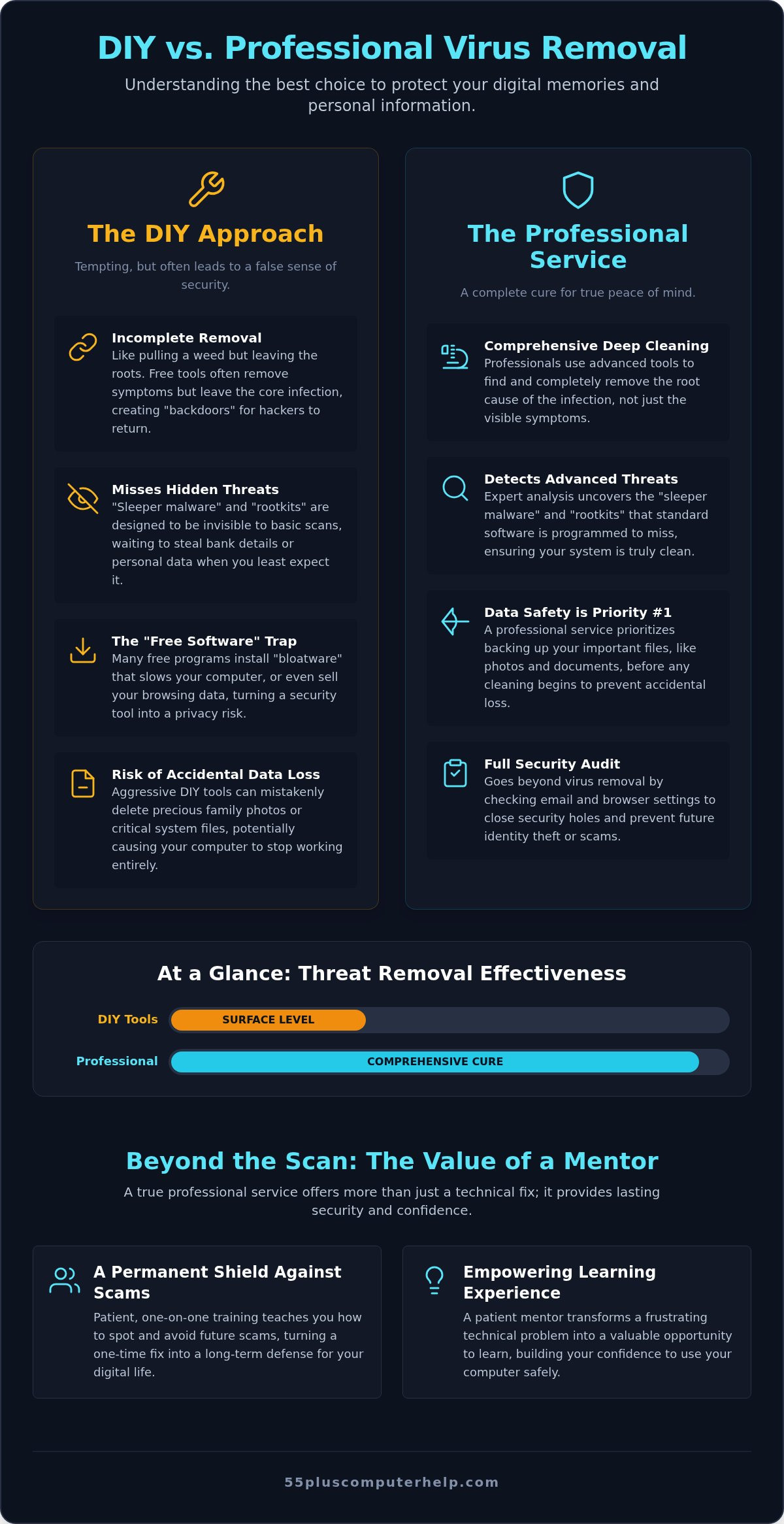
- Understand why the choice between DIY virus removal vs professional service often comes down to the difference between a temporary fix and a complete system cure.
- Learn about hidden threats like "sleeper malware" that standard free software can miss, ensuring your bank accounts and family photos stay protected.
- Discover how a professional security audit checks your email and browser settings to prevent identity theft before it happens.
- Explore how patient, one-on-one technology training can act as a permanent shield against future scams and technical headaches.
- Gain the confidence to use your computer safely by learning how a patient mentor can transform a frustrating problem into a valuable learning experience.
The Appeal of DIY Virus Removal: Is It Really Faster and Cheaper?
Many of us take pride in handling our own home maintenance. We fix leaky faucets or weed the garden to stay independent. It's natural to want that same control over your computer. When a warning light flashes on your screen, your first thought might be to save money and fix it yourself. You see "one-click" solutions online that promise a quick recovery. The convenience is very tempting. However, the choice between DIY virus removal vs professional service isn't just about cost. It's about ensuring your private information stays safe.
Scammers know you want a fast fix. They create "Scareware" pop-ups that look like official warnings. These messages often use bright colors and loud sounds to create a sense of panic. They might claim your files are being deleted right now. This emotional pressure makes it hard to think clearly. You might click a "Clean Now" button that actually installs more trouble. Staying calm is your best first step. Taking a moment to breathe helps you avoid these digital traps.
The "Free Software" Trap
Many people turn to free Antivirus software when they suspect a problem. While these tools can be helpful, they often come with hidden costs. Some free programs include "bloatware." These are extra, unneeded programs that slow down your computer even more. There is also a big difference between a basic scan and a deep system cleaning. A free tool might find the obvious symptoms but leave the actual infection behind. Some "free" programs even track your browsing habits to sell your data to advertisers. This turns a security tool into a privacy risk.
When DIY is Appropriate (and When It Is Not)
Sometimes, a small issue is okay to handle on your own. If your internet browser keeps opening to a strange homepage, you might just need to reset your settings. This is a common "browser redirect" that is relatively simple to fix. But other symptoms are major red flags. If your files won't open, or if you get alerts about your bank account, you need more than a DIY fix. Simply rebooting your computer and hoping the problem goes away is not a safe security strategy. This often just gives the virus more time to hide. Understanding the limits of DIY virus removal vs professional service helps you know when to call for a helping hand.
The Technical Risks of "Doing It Yourself" on a Senior’s Computer
Trying to fix a computer yourself can feel like a good way to save time and stay independent. However, modern viruses are much more clever than they used to be. They don't always make your computer crash or show loud warnings. Instead, many infections are designed to stay hidden for as long as possible. When comparing DIY virus removal vs professional service, it's vital to look at what's happening under the surface of your screen. A quick scan might make the computer feel better, but it doesn't always mean the danger is gone.
Some viruses are called "rootkits." Think of these like a hidden basement in your house. You might lock the front door and windows, but the intruder is still living inside, completely out of sight. Other threats are known as "sleeper malware." These programs stay quiet for weeks or even months. They wait patiently until you log into your bank account or type in a credit card number. Standard "one-click" scans often miss these dangerous tools because they are built to look like normal computer files. If you don't remove every single piece, you leave a "backdoor" open. This allows hackers to return to your system whenever they want.
The Danger of Incomplete Malware Removal
Cleaning a computer is a lot like pulling weeds in your garden. If you only snap off the leaves, the roots stay buried in the soil. The weed will eventually grow back, often stronger than before. Malware works the same way. It can even hide in your "system restore points." These are the files your computer uses to go back in time to a safer state. If the virus is hiding there, it will simply reinfect your computer the moment you try to fix it. This creates a false sense of security. Your computer might seem fast again, but your private information is still at risk.
Accidental Data Loss During DIY Attempts
The biggest worry for most people is losing precious family photos or important emails from loved ones. Many DIY cleanup tools are very aggressive. They are designed to delete anything suspicious, which can sometimes include your personal files or important parts of your operating system. If these files get corrupted, your computer might not turn on at all. A patient mentor prioritizes a safety-first approach that focuses on protecting your memories. We ensure your data is backed up safely before any cleaning begins, giving you total peace of mind throughout the process.
Comparing DIY Tools vs. Professional Virus Removal Services
Deciding between DIY virus removal vs professional service is about more than just clicking a button. Most home antivirus programs are designed for the average user. They act like a basic alarm system. They might beep when someone enters the house, but they don't always tell you how the intruder got in or what they touched. A professional virus and malware removal service goes much deeper. It includes a full security audit that looks at your entire digital life to ensure nothing was left behind.
There is a big difference between a software alert and a human explanation. A program might show a scary red box with technical codes that don't make sense. This often causes more worry than it solves. A patient mentor doesn't just click "delete" and walk away. Instead, they explain exactly what the problem was in plain English. You deserve to know why a certain pop-up appeared and how to avoid it next time. This transformation from confusion to clarity is something a software download simply cannot provide.
Deep Diagnostics vs. Surface Scans
Professionals use specialized tools to look at your "system logs." These are like a diary that your computer keeps of everything that happens. By reading these logs, a pro can find exactly where a virus started. They also check for "remote access" tools. Hackers often leave these behind so they can peek at your screen later. A thorough service also checks the physical health of your machine. For example, a computer that runs hot might be working too hard because of hidden malware taxing the processor.
The Cost of Time: DIY Hours vs. Professional Efficiency
When weighing DIY virus removal vs professional service, remember that your time has value too. Many people don't consider the "hidden cost" of the DIY path. You could spend a whole weekend feeling frustrated and overwhelmed by conflicting advice found online. Tech support shouldn't feel like a chore that ruins your Saturday. Professional help is an investment in your sanity and your schedule. Remote support can often resolve complex issues in under an hour. This lets you spend your time on things you actually enjoy, like video calling family or organizing your photos.
- Get a clear, human explanation of what went wrong.
- Ensure hidden "remote access" tools are completely removed.
- Save hours of frustration and avoid the stress of "fixing it yourself."
- Receive a full security audit that goes beyond a simple software scan.
Beyond the Scan: Why Human Expertise Matters for Your Privacy
A computer virus is more than just a technical glitch. It is an invasion of your private space. When you weigh the choice of DIY virus removal vs professional service, you're deciding how much of that space you want to protect. Software can find a file, but it cannot understand your life. A patient mentor looks at the big picture. They ensure your personal information remains your own. This human touch provides a level of security that a simple download can never match.
During a professional visit, we perform a complete security audit. This goes far beyond just clicking a "scan" button. We look at your browser settings to see if your "saved passwords" have been exposed. We also check your email setup and troubleshooting to ensure hackers haven't set up "forwarding rules." These rules can secretly send copies of your private messages to a stranger's inbox. An expert makes sure your digital front door is locked tight. This gives you the peace of mind that comes from a trusted expert saying, "You are safe."
Identifying the Source of the Infection
A professional technician acts like a digital detective. We don't just clean the mess; we solve the mystery of how the virus got in. Was it a fake "Update" button on a website? Or perhaps a tricky attachment in a suspicious email? We help you identify these traps so you don't fall for them again. Understanding the "how" is the best way to prevent the same problem from returning next week. We explain these details in plain English, turning a scary situation into a helpful lesson.
Verifying Your Identity is Still Secure
Software alone cannot tell you if your identity was stolen. Some viruses use "keyloggers" to record every single letter you type. This is how hackers steal bank passwords and credit card numbers. A professional check-up looks for these specific tools that standard scans often miss. Once your computer is clean, we help you change your important passwords safely. Doing this on a compromised machine is dangerous, but we guide you through the process once the environment is 100% secure. If you're worried about your privacy, you can schedule your personalized security check-up today to get the answers you need.
- Review browser settings to protect saved passwords.
- Check email rules for secret message forwarding.
- Detect hidden keyloggers that steal your banking details.
- Receive a clear explanation of how the infection started.
Securing Your Digital Future with Professional Help and Training
Professional help is more than just a quick fix for a slow computer. It is the start of a partnership that keeps you safe online for years to come. When you look at the choice between DIY virus removal vs professional service, think about your future peace of mind. A software download might remove a file today, but it won't teach you how to avoid the same trap tomorrow. We believe that technology support should be an educational experience that leaves you feeling more capable and secure.
Having a trusted "go-to" person for your tech questions makes a huge difference. You don't have to feel alone when a strange message appears on your screen. Instead of feeling anxious, you can simply reach out to your patient mentor. This relationship transforms your computer from a source of stress into a tool for connection. You deserve to feel in control of your digital life without any technical headaches. Viewing tech support as a partnership means you always have a neighborly expert in your corner.
Learning to Spot Red Flags Before You Click
Many security professionals report that nearly nine out of ten computer infections involve a simple human error that could have been avoided. This might be clicking a link in a fake email or downloading a "free" game that contains a hidden threat. Our personalized lessons focus on internet safety. We sit with you and show you exactly what these red flags look like in plain English. This training acts as a permanent shield for your computer. You will gain the confidence to explore the internet safely because you'll know how to spot a scam from a mile away. Empowerment is the best defense against digital threats.
Ongoing Support: Remote vs. In-Home Options
We offer different ways to keep your system healthy and secure. Remote assistance is perfect for a quick security check or a simple question. It's fast, convenient, and keeps you moving. However, an in-home visit is often best for a complete system overhaul or deep virus cleaning. This personal touch allows us to check your physical setup and ensure your printer and Wi-Fi are also working perfectly. You can schedule a security tune-up at any time to stay ahead of the scammers. It's always better to be proactive than to wait for something to go wrong. When comparing DIY virus removal vs professional service, remember that professional help includes this ongoing layer of protection and education.
- Build your confidence with one-on-one safety lessons.
- Learn to identify phishing emails and fake update buttons.
- Enjoy the convenience of remote support for quick questions.
- Experience the thoroughness of an in-home security overhaul.
Enjoy a Safer, More Confident Digital Life
Protecting your computer is about more than just deleting a single file. It's about securing your family photos, your bank accounts, and your peace of mind. When you consider the choice of DIY virus removal vs professional service, remember that true safety includes understanding how to prevent the next problem. A professional audit looks at the hidden corners of your system that standard software often misses, ensuring your private information stays private.
Our patient mentors have over 10 years of experience specializing in technology support for seniors. We offer both onsite and remote support tailored to your unique pace and needs. We don't just fix the issue; we teach you the skills to use your computer with total confidence. You don't have to face technical headaches alone. We're here to be your trusted local experts and digital guides. We take the time to explain everything in plain English so you always feel in control.
Get Patient, Expert Help to Secure Your Computer Today
You deserve a computer that is 100% clean and safe. Let's work together to make your digital world a supportive and secure environment where you can browse with ease.
Common Questions About Computer Security
Can I really fix a computer virus myself for free?
You can often fix simple issues like browser redirects using free tools, but these programs frequently miss hidden threats. When comparing DIY virus removal vs professional service, remember that free software doesn't include a human security audit. A professional ensures that every hidden corner of your system is clean, whereas free tools often just treat the symptoms you can see.
How do I know if a virus is too "advanced" for me to handle?
A virus is likely too advanced if your computer blocks you from opening files or if you see alerts about unauthorized bank access. If your computer won't turn on or if the same problem returns after you try to fix it, you need expert help. These symptoms suggest the infection has reached deeper system levels that standard consumer tools cannot reach safely.
Will a professional service delete my photos or documents?
No, a professional service focuses on protecting your precious family photos and important documents before any cleaning begins. We prioritize a safety-first approach by creating a secure backup of your data. This ensures that your memories are safe even if the operating system needs a major overhaul to remove the infection completely.
Why did my antivirus software fail to stop the virus in the first place?
Antivirus software can fail because hackers constantly create new threats that the software doesn't recognize yet. Many infections also start when a user accidentally clicks a deceptive link or a fake "Update" button, which bypasses the software's defenses. This is why human expertise and technology training are just as important as having a good program installed.
How much does professional virus removal usually cost for seniors?
While industry prices vary, many specialized services offer transparent, fixed-rate pricing structures for seniors. This helps you avoid the stress of hidden fees or hourly rates that keep climbing. Choosing a professional service often saves money in the long run by preventing identity theft and avoiding the need for repeated repairs caused by incomplete DIY attempts.
Is it safe to let a technician access my computer remotely?
It is safe to use remote support if you are working with a trusted local expert who uses secure, encrypted connections. You can watch everything the technician does on your screen, and you remain in total control of the session. This is a convenient way to get a quick security check-up without the need for an in-home visit for smaller issues.
What is the most common mistake people make when trying DIY virus removal?
The most common mistake is clicking on "Scareware" pop-ups that promise a quick DIY fix but actually install more malware. Many people also accidentally delete important system files while trying to manually remove a virus they found online. This can cause the computer to stop working entirely, turning a simple infection into a much larger technical headache.
How can I tell the difference between a real virus and a scam pop-up?
Real antivirus warnings are usually calm and provide a specific file name or location. Scam pop-ups are designed to be loud, urgent, and often demand that you call a number or pay money immediately. If a message uses high-pressure language or threatens to delete your files unless you act right now, it is almost certainly a scam.


