
Imagine you're sitting down with a cup of coffee to check on your grandkids' latest photos, but a strange message from your bank stops you cold. You want to click it to make sure your account is safe, yet a small voice in your head warns you that it might be a trap. This feeling of hesitation is something many people face, and it's why learning a few email security tips for seniors is so important. You deserve to use your computer without the constant fear of making a mistake that costs you money or access to your precious memories.
It's frustrating when technical experts use jargon that makes simple tasks feel impossible. We agree that your inbox should be a place for connection, not a source of stress. This guide will show you how to secure your personal information and communicate with total confidence. You'll learn how to verify suspicious messages and set up protective habits that act like a digital lock on your front door. We'll walk through these steps at a steady pace so you can stop worrying about clicking the wrong thing and start enjoying your time online again.
Key Takeaways
- Understand why your email account is the master key to your digital life and how protecting it keeps your banking and family photos safe.
- Learn to spot the red flags of a scam, such as messages that create a sense of panic or use sender addresses that look slightly off.
- Discover the power of passphrases, which are longer and more secure than traditional passwords but much easier for you to remember.
- Master a simple daily checklist of email security tips for seniors to help you verify every message with confidence before you click.
- See how patient, one-on-one training can turn technical confusion into a sense of accomplishment and long-term digital safety.
Understanding Email Security: Your Gateway to the Digital World
Email security means using simple tools and habits to keep your private messages safe from prying eyes. Many people find the idea of Understanding Email Security a bit intimidating, but it's really about creating a safe space for your digital life. You don't need to be a computer expert to protect yourself. By learning a few basic email security tips for seniors, you can transform your inbox from a source of worry into a reliable tool for staying in touch with your family.
Think of your email as the "Master Key" to your entire online world. Most websites use your email address to verify who you are. If you forget a password for your bank or a shopping site, they send a reset link directly to your inbox. This makes your email account a high-priority target for dishonest people. If they gain access to your messages, they could potentially unlock many other parts of your life, including your banking details and family photos.
It also helps to know the difference between spam and scams. Spam is like the junk mail that clutters your physical mailbox with unwanted ads. It's annoying, but it's usually harmless. Scams are much more serious. These are deliberate attempts to steal your money or your identity by pretending to be someone you trust. Learning to tell them apart is the first step toward staying safe.
Why Your Email Account is a Target
Hackers often want more than just your personal data. They value your contact list because they can send fake messages to your friends and family using your name. Since your loved ones trust you, they are more likely to click on a dangerous link if it looks like it came from you. Social engineering is the art of tricking people into sharing secrets. These criminals use your emotions, like fear or curiosity, to get what they want without ever having to "break in" using complex code.
The Goal of Digital Confidence
Our goal is to help you shift from a feeling of fear to a state of calm awareness. Knowledge is your best shield against these online threats. At 55 Plus Computer Help, we focus on empowerment through patient training that moves at your speed. We believe that technology should serve you, not scare you. Once your inbox is properly configured and you know what to look for, you'll find a new sense of peace of mind. Learning these email security tips for seniors ensures that you remain independent and secure in your digital home.
How to Spot the 'Red Flags' of a Scam Email
Scammers use a variety of tricks to get past your defenses. One of the most common is the "Urgency Trap." They want you to feel panicked so you act before you think. They might say your account is about to be closed or that someone has made a fraudulent purchase in your name. By creating a sense of crisis, they hope you will forget your usual caution. This is one of the most vital email security tips for seniors to remember: if a message demands immediate action, it's often a sign of trouble.
Another red flag is the "Imposter" sender address. At first glance, the name might look like it's from your bank or a big store like Amazon. However, if you look closely at the actual email address, you'll see it's slightly wrong. It might be "[email protected]" instead of "amazon.com." These tiny changes are designed to fool a quick glance. Always take a moment to look at the letters in the address before you trust the sender.
The biggest danger is "The Click." When you click a link or download an attachment in a scam email, you might accidentally install harmful software on your device. This software can track what you type or steal your files. Common themes to watch for include a "grandkid" who needs bail money, an "unpaid invoice" for something you never bought, or a "tech support" alert claiming your computer is infected. If you're ever worried that you've already interacted with a suspicious message, our team at 55 Plus Computer Help can provide personalized technical assistance to ensure your system is clean and safe.
Visual Clues in the Inbox
You can often spot a scam by looking for small visual mistakes. A great trick is to "hover" your mouse over a link without clicking it. A small box will appear showing the real web address where that link leads. If the address looks like a jumble of random letters and numbers, don't click it. You should also watch for generic greetings. Legitimate companies usually know your name. If an email starts with "Dear Customer" or "Valued Member," be extra careful. Blurry logos and poor grammar are other signs that a message isn't professional.
Emotional Red Flags
Scammers rely on your emotions to bypass your logic. They use the "Fear Factor" to make you worry about your money or your family. Remember that legitimate companies like the IRS or your local bank will never ask you to send a password or social security number through an email. They already have that information. Additionally, if an offer seems too good to be true, it always is. No one wins a lottery they didn't enter. Staying calm and trusting your intuition is a key part of mastering email security tips for seniors.
Building Your Digital Fortress: Passwords and Beyond
Managing passwords often feels like the most stressful part of staying connected. It's easy to feel overwhelmed by the need to remember so many different codes for every website you visit. However, your login information is the first line of defense for your digital fortress. One of the most effective email security tips for seniors is to stop using short, simple passwords that are easy for hackers to guess. Instead, we want to focus on building habits that keep your information safe without causing a headache.
The "Golden Rule" of staying safe online is to never use the same password for two different websites. If a hacker manages to guess your password for one site, they'll immediately try to use it on your bank account or your email. Using unique codes ensures that a problem in one area doesn't spread to the rest of your life. You should also avoid writing your passwords on a sticky note and leaving it near your computer. While it feels convenient, it's not a secure way to protect your most sensitive information.
Creating a Strong Passphrase
A passphrase is a long string of words that forms a sentence only you know. For example, you might use something like "ILoveMy3Grandkids!" as your code. This is much stronger than a short word with random symbols because length is actually more important than complexity. Computers can guess short passwords quickly, but they struggle with long sentences. You can safely store these in a dedicated notebook kept in a drawer or use a trusted password manager tool. We can help you find a storage method that feels comfortable and secure for your specific needs.
Setting Up Your Second Lock (MFA)
Multi-Factor Authentication, or MFA, acts like a second lock on your front door. Even if someone finds your key, they still can't get inside without the second code. Usually, this means the website sends a quick text message to your phone with a six-digit number. You simply type that number into the computer to prove it's really you. This provides a great deal of reassurance. If you ever receive a code on your phone that you didn't request, it serves as a helpful warning that someone else tried to log in. Following Email Setup and Troubleshooting for Seniors: A Complete Guide to Staying Connected can help you get these features running smoothly. These email security tips for seniors are simple to set up and provide lasting peace of mind.
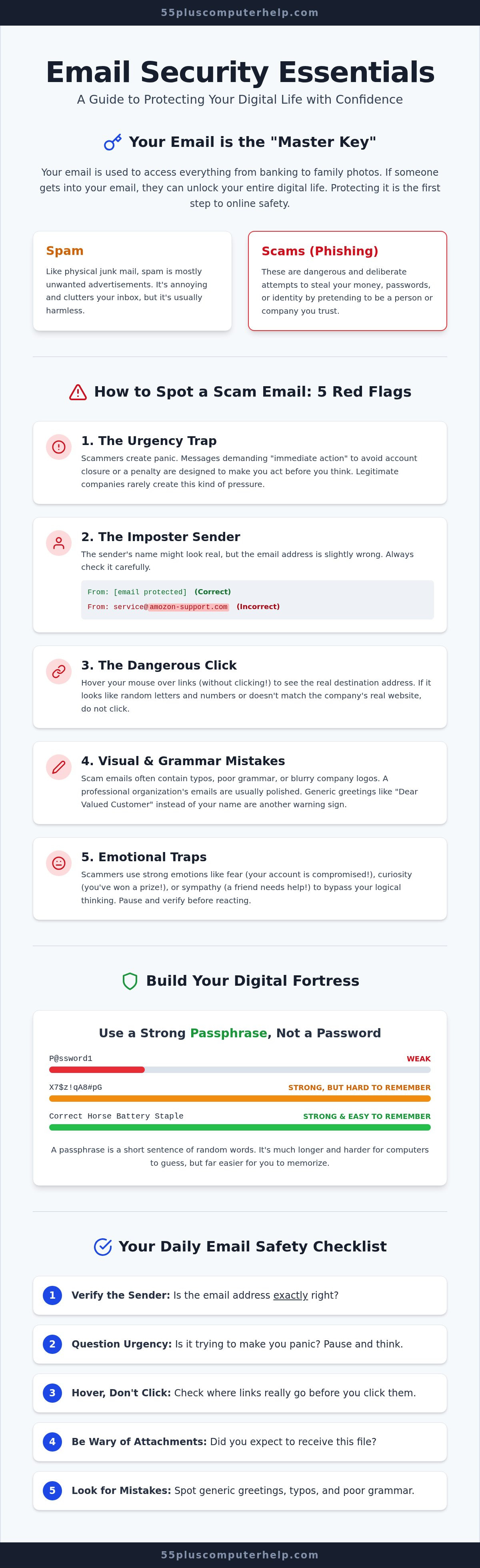
Your Daily Email Safety Checklist
A daily routine can turn your inbox from a place of uncertainty into a space you control. Just like you might lock your front door every night, these email security tips for seniors help you build a protective habit. Following a simple checklist each time you open a message ensures that you stay one step ahead of scammers. You don't need to be a technical genius to stay safe. You just need to be methodical and patient with your process.
- Step 1: Check the sender's full email address. A scammer might use a name like "Social Security Office," but the actual address is often a string of random letters.
- Step 2: Read the message carefully for "Panic Words." Scammers use words like "immediate," "overdue," or "unauthorized" to make you act without thinking.
- Step 3: Use the "Hover Test." Rest your mouse cursor over any button or link to see the true destination address. If the web address looks strange or doesn't match the company, don't click it.
- Step 4: Follow the "Phone Call Rule." Stop and verify the request with a trusted number you already have if a message asks for personal information.
- Step 5: Delete when in doubt. Legitimate senders will always find another way to reach you if the matter is truly important.
The 3-Second Pause
Take a short three-second pause before you click. This simple act can save your account from unwanted access. Scammers rely on your reflex to react quickly to their messages. Breathe and look closer to spot odd formatting or blurry images. A "bank alert" arriving at two in the morning is a major red flag. Remember the power of saying "No." You are never obligated to reply to a suspicious email. Ignoring a threat is often the safest and most effective choice you can make.
Verifying Offline
Beat a digital scam by taking the conversation offline. This "Human Element" is your strongest tool against hackers. Call a family member directly on their known phone number if you get an "emergency" request for money. Find the official phone number for a company on their website or a paper statement. Real banks don't mind if you call to check on a message. This proactive routine keeps you in the driver's seat and builds your confidence. 55 Plus Computer Help provides personalized technical support to help you master your inbox and use these email security tips for seniors at your own pace.
How 55 Plus Computer Help Keeps You Secure
Staying safe online is a skill that anyone can learn with the right support. We understand that technology changes fast. It can feel like you're always trying to catch up with the latest updates. At 55 Plus Computer Help, we act as your trusted neighbor and patient mentor. We offer personalized, one-on-one lessons to help you set up your security measures together. We don't just fix a problem and leave. We take the time to show you how everything works so you feel in control of your own inbox. Our team provides both in-home and remote assistance. This means we can help you right where you are most comfortable. We tailor our teaching to your specific devices and your current skill level. We move at a steady pace that works for you. You'll never feel rushed or overwhelmed by technical jargon during our time together.
Virus and Malware Removal Services
If you think you've already clicked a suspicious link, don't worry. It happens to the best of us. We provide professional virus and malware removal to give your computer a fresh and safe start. We scan your system thoroughly. Our team cleans out any harmful software that might be hiding in the background. You can learn more about our process in our guide, Virus and Malware Removal: A Patient Guide to Securing Your Computer. Beyond cleaning your device, we help you set up automated backups. This ensures that your precious family photos and important documents are always safe even if something goes wrong. Having a reliable backup plan is one of the best ways to reduce the stress of using a computer today.
Customized Training for Your Peace of Mind
We believe that empowerment is the best way to stay safe long-term. You can book a private session with us to review your specific email settings and privacy options. We'll walk through the email security tips for seniors we've discussed today to make sure they are active on your account. We also help you use your smartphone and tablet safely. These devices are wonderful for staying connected with grandkids and friends. We want you to use them with total confidence. Our goal is to transform your frustration into a sense of accomplishment and security. You deserve to enjoy the digital world without the constant fear of making a mistake. Schedule your personalized tech support session today!
Taking Control of Your Digital World
You now have the tools to turn your inbox back into a place for connection rather than concern. By remembering to spot urgency traps and using strong passphrases, you've already built a much stronger defense. These email security tips for seniors are simple, repeatable habits that will grow more natural every single day. You don't have to manage this journey alone or feel overwhelmed by the latest technical changes. We're here to walk beside you at a pace that feels comfortable and respectful.
Whether you need expert virus and malware removal or patient, one-on-one senior training, our team is ready to help. We offer both in-home and remote support to ensure you feel capable using your specific devices. You deserve to check your messages and share photos with your family without a second thought. It's time to replace anxiety with a sense of total accomplishment. Empower yourself with a patient tech mentor—Schedule a session with 55 Plus Computer Help today! We look forward to helping you stay safe, secure, and confidently connected to the people you love.
Frequently Asked Questions
Is it safe to open an email from someone I don't know?
It is generally safe to open an email just to read it, but you must be very careful with what is inside. Simply opening a message rarely causes harm. The real danger comes from clicking on links or downloading files attached to the message. If you don't recognize the sender, it's best to delete the email immediately. This habit is one of the most effective email security tips for seniors to stay safe.
Can I get a virus just by reading an email, or do I have to click something?
You usually have to take an action, like clicking a link or opening an attachment, to get a virus. Modern email programs have strong built-in protections that block most hidden threats. However, some sophisticated scams can trigger a download if you have certain settings turned off. To stay protected, never download images or files from people you don't know. Always wait until you can verify that the sender is a real person.
What should I do if I accidentally clicked a link in a scam email?
First, disconnect your device from the internet to stop any data from being sent to the scammer. You should then run a full scan using your security software to check for malware. If you entered any login information on a website, change your passwords immediately from a different, safe device. We provide professional virus and malware removal if you feel unsure about your computer's safety. Taking quick action helps prevent further problems.
Why does my email keep asking me to 'verify my account'?
These requests are often a trick used by scammers to steal your login details. Legitimate companies almost never ask you to verify your account through a link in an email. They might send a notice, but they will ask you to log in directly through their official website. If you see these messages frequently, your email address might be on a list used by scammers. Always ignore these links and go to the official site instead.
Is it okay to use my browser's 'save password' feature?
Using your browser to save passwords is much safer than writing them on a sticky note. It is a convenient way to keep track of your unique passphrases. However, if someone else uses your computer, they might be able to access your accounts easily. For the best protection, we recommend using a dedicated password manager or a locked notebook. We can show you how to set these up during a personalized training session.
How often should I change my email password for better security?
You don't need to change your password on a set schedule if you use a strong, unique passphrase. Experts now suggest that changing passwords too often can lead to using weaker codes that are easier to guess. You should only change it if you suspect someone else has accessed your account. Focus your energy on making your current password long and difficult to crack. This is a key part of following email security tips for seniors.
What is a 'phishing' scam, and why is it called that?
A phishing scam is a dishonest attempt to "fish" for your private information by using bait. The bait is usually a fake email that looks like it comes from a trusted source, such as your bank or a friend. The scammer hopes you will "bite" by clicking a link or giving up your password. They use this spelling because it started with early hackers who often used "ph" instead of "f" in their technical terms.
Can 55 Plus Computer Help help me recover a hacked email account?
Yes, we specialize in email troubleshooting and can guide you through the recovery process. We will help you contact the email provider and follow their specific security steps to regain access. Once your account is back in your hands, we can work together to strengthen your settings. Our goal is to make sure your master key stays safe. We offer both onsite and remote assistance to help you resolve these stressful situations quickly.


