
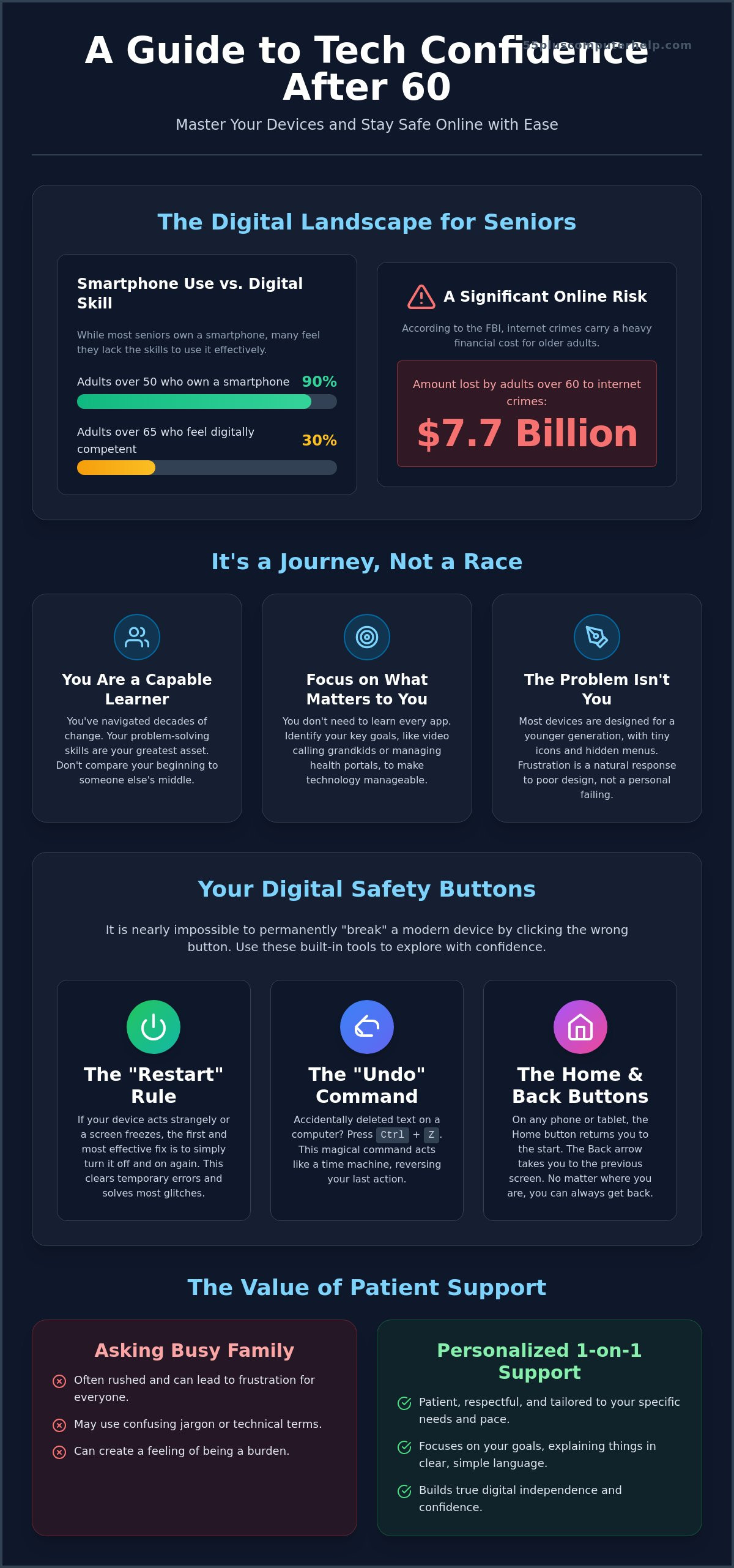
Did you know that while 90% of adults over 50 own a smartphone, only 30% of those aged 65 and over feel they possess functional digital competency? It's completely natural to feel a bit of hesitation when you pick up a new tablet or sit down at your computer. You might worry about clicking the wrong button or accidentally deleting a precious family photo. These fears are valid, especially since the FBI reported that adults over 60 lost over $7.7 billion to internet crimes in 2025. Many of our neighbors feel the same way, often getting frustrated when family members try to explain things using confusing jargon. Start feeling confident with technology after 60 by realizing that you don't need to be a computer expert to stay safe and connected.
You deserve to enjoy the benefits of the digital world without the stress. This guide will show you how to overcome tech anxiety and gain the skills to use your devices with ease. We'll walk through the steps to secure your personal information so you can browse the internet safely. You'll learn how to video call your grandkids without any technical hitches and manage your health portals independently. By the end of this article, you'll have a clear path to mastering your smartphone and feeling secure in every click you make.
Key Takeaways
- Learn why viewing technology as a journey helps reduce stress and how one simple habit can fix most common computer glitches.
- Gain practical tips for feeling confident with technology after 60 by focusing on high-value tasks like video calling family members.
- Understand how to create a digital safety net that protects your personal files and identity from common online threats.
- Find out why personalized, 1-on-1 support provides a more patient and effective learning experience than asking busy family members.
Why Feeling Confident with Technology After 60 is a Journey, Not a Race
It is easy to feel a bit overwhelmed when you look at a new smartphone or computer. Most of these devices were designed by people in their twenties for other people in their twenties. They often use tiny icons, hidden menus, and gestures that feel unnatural. If you find yourself squinting at a screen or wondering where a button went, please know that the problem isn't you. The digital world simply wasn't built with your needs in mind from the start. Validating this frustration is the first step toward feeling confident with technology after 60.
Learning these new tools is a skill, much like learning a new hobby or a foreign language. It takes time and a bit of patience. You are working toward a concept called digital literacy. If you are wondering, what is digital literacy? it is essentially the ability to use technology to find information and communicate with others. It doesn't mean you have to become an expert who knows every single setting. The real goal is digital independence. You want to be able to use your devices to make your life better without needing to call for help every five minutes.
The Myth of the "Tech-Savvy" Generation
We often hear that younger people are "naturals" with computers. The truth is less magical. They simply grew up using these tools every day at school and home. It looks easy for them because they have had thousands of hours of practice. You have something just as valuable: life experience. You have navigated decades of changes, managed careers, and raised families. Those problem-solving skills are your secret weapon. Don't compare your beginning to someone else's middle. Focus on a growth mindset. Try to celebrate one small win each day, like successfully sending a text message or finding a recipe online. Feeling confident with technology after 60 starts with recognizing that you are already a capable learner.
Setting Realistic Goals for Your Digital Life
You don't need to use every app on your phone. In fact, most of them are probably distractions you can safely ignore. Start by identifying what truly matters to you. Is it seeing photos of your family on social media? Is it managing your health portal or reading the morning news? Digital confidence is the ability to solve basic problems independently so you can enjoy these activities. If you focus only on the tools you actually need, the digital world becomes much smaller and easier to manage. You are in charge of your devices; they shouldn't be in charge of you.
Overcoming the Fear of Breaking Your Devices
Many people worry they will click the wrong button and "break" their computer forever. This is a very common fear. However, modern software is built to be incredibly resilient. It is designed to handle mistakes. You can think of a software error as a temporary glitch, not a permanent disaster. It is not like dropping a ceramic plate. You can't usually break the machine just by clicking the wrong icon. Feeling confident with technology after 60 begins with the realization that your device is much tougher than it looks.
You have several built-in safety nets. The most powerful one is the "Undo" command. If you are on a computer and delete a sentence by mistake, press the Ctrl and Z keys at the same time. This acts like a digital time machine. It undoes your last action immediately. Another vital tool is the "Restart" rule. If your device starts acting strangely, simply turn it off and back on. This simple step clears out temporary errors and fixes the vast majority of technical hiccups. It is often the first thing a professional will try because it works so well.
The Magic of the Home Button and Back Arrow
Every smartphone and tablet has a way to get you back to the start. This is usually a physical button at the bottom or a thin line you swipe up. It is your "panic button." No matter how lost you feel in an app, one tap brings you back to your familiar home screen. You should also look for a small arrow pointing to the left. This is the "Back" button. It takes you to the previous screen you were viewing. These tools allow for safe exploration. You can click around and try new things because you always know the way back. There are excellent digital literacy resources for seniors that provide practice for these specific navigation skills.
What to Do When a Screen Freezes
Occasionally, a screen might stop responding entirely. We call this a "freeze." It can feel scary, but it doesn't mean your data is gone. Most freezes are just the computer getting stuck on a single task. You can usually fix this with a forced restart. For most tablets, you hold the power button down for about ten seconds until the screen goes dark. On a laptop, holding the power button down for several seconds does the same thing. This forces the computer to clear its memory and start fresh. If your device freezes often, it might be time to look into personalized computer setup to ensure everything is updated correctly. Knowing when to try a quick fix and when to ask for help is a big part of feeling confident with technology after 60.
Building a Safety Net: Protecting Yourself from Scams
The biggest hurdle to feeling confident with technology after 60 is often the fear of being scammed. It's a very valid concern. In 2025, the FBI reported that adults over 60 lost over $7.7 billion to online fraud. This is a 37% increase from the previous year. However, scammers don't win because they have more technical knowledge than you do. They win because they use psychological tricks like fear and urgency to make you act quickly. If you want to learn more about the technical side of protection, you can read our guide on virus and malware removal. Understanding that these attacks are based on emotions rather than your skills is your best defense.
You can protect yourself by using a simple "Stop, Look, and Think" framework. If you receive a message that makes your heart race, stop immediately. Do not click any links. Look for clues that the message is fake. Think about whether the request makes sense. You can find more online safety and financial literacy guides to help you recognize these patterns. By slowing down, you take away the scammer's greatest weapon.
Identifying Common Red Flags in Emails
Scammers often pretend to be companies you trust. They might send an email saying your Amazon account is locked or a bank transfer failed. Look closely at the sender's email address. If it looks like a jumble of random letters or doesn't match the company name exactly, it's a scam. Legitimate companies will never ask you for your password or Social Security number through an email. Poor grammar and spelling mistakes are also big warning signs. For more tips on managing your inbox safely, see our guide on email setup and troubleshooting.
The Role of Professional Security Software
Think of antivirus software as your digital bodyguard. It works quietly in the background to stop threats before they ever reach you. This software provides an extra layer of protection that builds peace of mind. When your computer asks to install a "Software Update," don't ignore it. These updates are actually security shields. They fix holes that scammers might try to use to get into your system. Having this safety net in place makes feeling confident with technology after 60 a much more reachable goal. If you ever feel like you clicked something by mistake, don't panic. Reach out for help immediately. It's always better to check with a professional than to worry in silence.
Practical Strategies to Master Your Computer and Smartphone
Technology is most rewarding when it helps you do the things you love. Instead of trying to learn every complex feature, start by focusing on high-value tasks. This might mean learning how to order groceries online or finding a digital group for your favorite hobby. When you see a direct benefit in your daily life, feeling confident with technology after 60 becomes much easier. You don't need to be a programmer; you just need to be a user who knows how to get things done.
Many people try to take generic computer classes at local community centers. While these are well-intentioned, they often move too fast or cover topics you don't actually need. This is why personalized technology training is so effective. It allows you to focus on your specific device and your unique goals. You can ask questions at your own pace without feeling like you are holding up a class. It turns a frustrating experience into a supportive one.
One of the best ways to learn is by using a physical notebook. When you learn a new skill, write down the steps in your own words. Don't just copy what a teacher says. Use descriptions that make sense to you, like "click the blue circle" instead of "open the browser." This creates a personal manual you can refer to whenever you feel stuck. It also reinforces your memory through the act of writing.
Connecting with Grandkids and Family
Bridging the physical distance with family is often the main reason people want to learn new tech. Tools like FaceTime, Zoom, or WhatsApp allow you to see your grandkids' faces in real-time. You can also learn how to save the photos they send you so you can look at them whenever you want. These connections are the real heart of digital literacy. If you want to master these apps, our Smartphone and Tablet Training can help you get started with ease.
Daily Habits for Tech Confidence
Building a habit is better than trying to learn everything at once. Try to spend just 15 minutes a day "playing" with your device. You can look at maps, check the weather, or practice typing a message. You should try to explore one new feature every week to keep your skills fresh.
Voice commands are another great way to simplify your life. You can ask Siri or Google to "set a timer for 10 minutes" or "call my daughter." This removes the need to navigate through multiple menus and makes the device feel much more approachable. As you practice these small habits, you will find yourself feeling confident with technology after 60 before you know it.
The Value of Personalized Support for Digital Independence
Many people turn to their children or grandchildren when they have a tech problem. While family members mean well, they are often the worst teachers. They tend to move too fast, clicking through screens before you can see what happened. They might even grab the device and do it for you. This doesn't help you learn. It often leads to a sense of defeat rather than feeling confident with technology after 60. A professional tutor provides the patience and steady pace you need to actually absorb new information.
Investing in 1-on-1 tutoring is an investment in your long-term independence. When you work with a professional, there are no "stupid questions." You can ask to see the same step five times until it clicks. Onsite support also removes a major source of stress. You don't have to unhook cables or transport a heavy computer to a store. A mentor comes to your home, where you are most comfortable, and works with you on the exact equipment you use every day. This personalized approach turns a confusing task into a manageable one.
Tailored Lessons vs. Generic Classes
Generic computer classes often follow a rigid curriculum that might not apply to your life. You might spend an hour learning about spreadsheets when all you really want to do is print a boarding pass. Personalized training focuses only on your specific goals. At 55 Plus Computer Help LLC, we use a "patient mentor" approach to ensure you feel heard and respected. We can help with everything from Printer Setup to mastering your new tablet. Learning on your own equipment means you won't be surprised by different buttons or settings when the lesson is over. It builds a foundation of trust between you and your devices.
Your Next Steps to Digital Empowerment
You can start your journey today by making a simple list. Write down your top three tech frustrations. Maybe your email won't sync, or you can't figure out how to share photos. Having a clear list helps a professional provide the exact help you need. A proper Computer Setup or software update can also prevent many future headaches. It's much easier to learn when your machine is running smoothly and safely. Feeling confident with technology after 60 is a goal you can definitely reach. You have mastered many complex things throughout your life. Learning to use a smartphone or a computer is just one more skill you can add to your list. With the right support, you will be navigating the digital world with ease in no time.
Your Path to Digital Independence Starts Here
You have already taken the first step toward feeling confident with technology after 60 by learning how these tools actually work. Remember that your devices are built to be resilient. You can't break them just by exploring. By using simple safety nets like the "Restart" rule and professional security software, you can browse the internet with peace of mind. You don't have to settle for confusing jargon or hurried help from family members.
Since 2014, we have focused exclusively on empowering seniors to navigate the digital world safely. We provide patient, in-home support that is tailored to your unique pace and goals. Whether you want to master video calls or secure your personal data, we are here to act as your trusted mentor. You have mastered many skills throughout your life; you can certainly master this one too. Book a patient, one-on-one technology lesson to build your confidence today. We look forward to helping you stay connected and secure.
Frequently Asked Questions
Is it possible to actually "break" a computer by clicking the wrong thing?
No, it is nearly impossible to cause physical damage to your computer just by clicking a button. Most errors you encounter are software-based, which means they are temporary and fixable. You can usually resolve these glitches by simply restarting the device or using the "Undo" command. You don't need to worry about permanent destruction while you are exploring new features or trying out a new app.
How can I tell if an email is a scam or a real message from my bank?
You can identify a scam by checking the sender's full email address and looking for signs of forced urgency. Real banks and companies like Amazon will never ask for your password or Social Security number through an email. If a message threatens to close your account unless you click a link immediately, it is likely a fraud attempt. Use the "Stop, Look, and Think" method before you click anything.
Why do I keep forgetting the steps my kids showed me on my iPad?
You likely forget the steps because family members often move too quickly and don't explain the "why" behind each action. They might do the task for you instead of letting you practice. To help your memory, try writing down the steps in your own notebook using your own words. This creates a personal guide that makes feeling confident with technology after 60 much more attainable than relying on a fast-paced demonstration.
What is the best way for a senior to learn how to use a new smartphone?
The most effective way to learn is through 1-on-1 personalized training on your own device in your own home. This allows you to focus on the specific apps you want to use, such as FaceTime or photos, without the pressure of a classroom. Learning in a supportive environment helps you build muscle memory. It also reduces the anxiety often associated with navigating a new smartphone or tablet for the first time.
Do I really need to update my software every time it asks me to?
Yes, you should install updates because they act as essential security shields for your device. These updates fix hidden vulnerabilities that scammers might use to access your personal files or bank details. When you see a notification for a "Security Update," it means the manufacturer has found a way to make your device even safer. Keeping your software current is one of the simplest ways to ensure your digital safety.
Can I get someone to come to my house and show me how to use my computer?
Yes, you can have a patient mentor come directly to your home to provide personalized support and training. This onsite service removes the stress of unhooking your equipment and transporting heavy computers to a repair shop. Working in your own comfortable environment makes it much easier to learn. You can practice the exact skills you need for digital independence on the same Wi-Fi network you use every day.
Is it safe to do my banking and shopping on a tablet or laptop?
It is safe to bank and shop online as long as you are using a secure private Wi-Fi connection and have updated security software. Avoid using public Wi-Fi at coffee shops or airports for these tasks, as those networks are less secure. Following these basic safety rules is a major part of feeling confident with technology after 60. It allows you to enjoy the convenience of managing your finances from your own living room.
How do I stop my computer from running so slowly?
A slow computer is often caused by too many programs running at once or old files cluttering the system. You can often improve the speed by closing unused browser tabs and deleting temporary files you no longer need. If the problem persists, it might be time for professional software installation and updates to clear out the junk. Professional troubleshooting can also help identify if the issue is with your hardware or your connection.


