
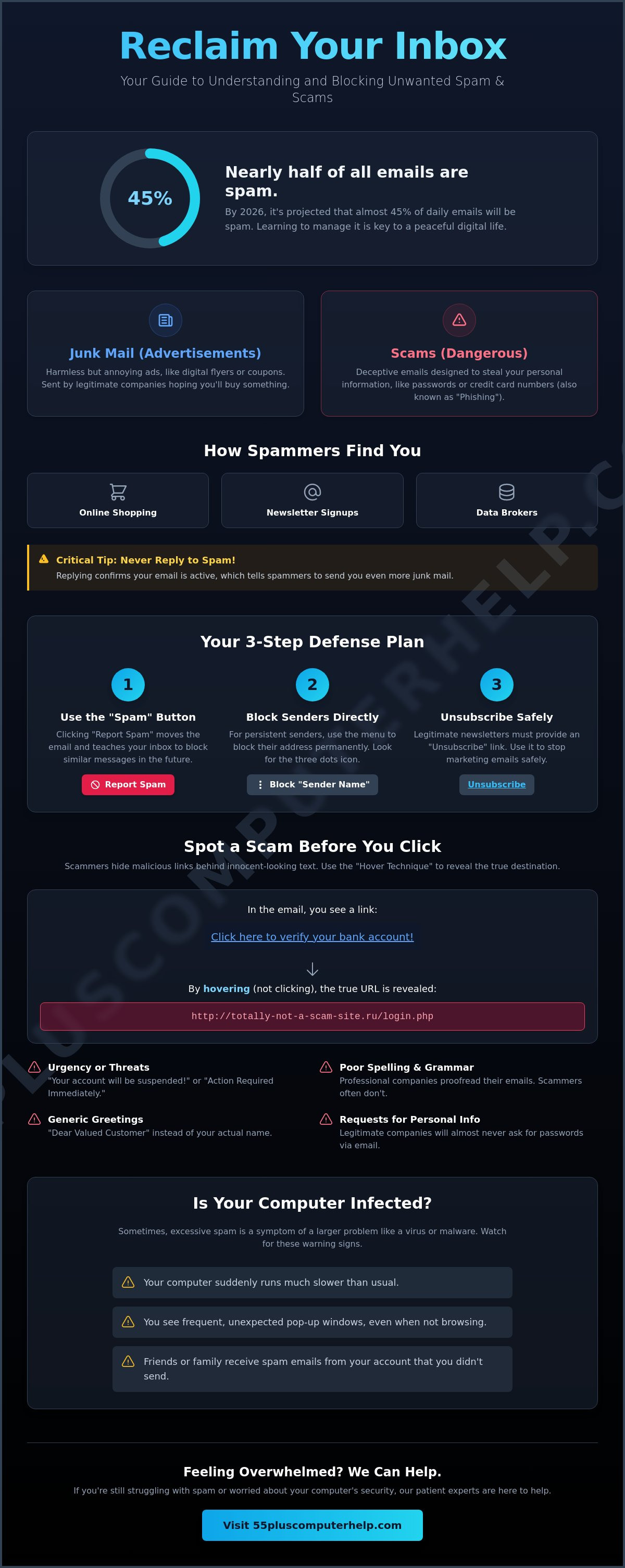
Did you know that nearly 45% of all emails sent every single day in 2026 are actually spam? If your inbox feels like a crowded room where everyone is shouting at once, you aren't alone. It's natural to feel frustrated by confusing menus or worried that you might delete a precious family photo by mistake. Learning how to block junk mail and spam doesn't have to be a stressful chore. It's a simple, manageable task that you can master with a little bit of guidance and patience.
We want to help you clear away the digital clutter so you can focus on the messages that truly matter. This guide provides gentle, step-by-step instructions to help you reclaim your peace of mind. We'll walk you through setting up email filters, using the DMAchoice service to reduce physical junk mail, and identifying common scams before they cause any trouble. By the end of this article, you'll feel confident managing your settings and enjoy a much cleaner, safer inbox.
Key Takeaways
- Learn the clear difference between harmless advertisements and dangerous spam to keep your personal information secure.
- Discover how to block junk mail and spam by using simple buttons that teach your inbox which messages to hide.
- Find out how to reduce the pile of physical mail in your home by opting out of pre-screened credit and insurance offers.
- Master the "Hover Technique" to safely check links and spot common scam red flags before you ever click.
- Identify the specific signs that your computer might need a professional check-up for virus or malware removal.
Why Is My Inbox Full of Junk Mail and Spam?
Opening your email can sometimes feel like opening your physical mailbox after a long vacation. You might find a few important letters from family hidden beneath a mountain of grocery store flyers and credit card offers. This digital clutter happens to everyone. It is not a sign that you've done something wrong or made a mistake online. Understanding how to block junk mail and spam starts with knowing why these messages arrive in the first place.
Think of junk mail as the digital version of those "blue coupons" or local restaurant menus left on your doorstep. These are advertisements from companies that hope you'll buy something. Spam, however, is often sent by people you don't know and can sometimes be more than just annoying. To learn about the technical side of this, you can look into what is email spam? and how it has changed over the years. Most of it is just a numbers game where senders blast out millions of messages at once.
How Your Email Address Gets Out There
You might wonder how these strangers got your address. Often, it happens when you shop at a store online or sign up for a digital newsletter. Your name ends up on a list. There are companies known as "data brokers" who act like digital librarians. They collect lists of email addresses and sell them to other businesses. It's a very common practice, though it feels like an invasion of your privacy. Even your activity on social media or participating in old "chain" emails can leave your address visible to these collectors.
One important tip: never reply to a suspicious email to ask them to stop. When you reply, you confirm that your email account is active and being watched by a real person. This tells the sender that their message reached a human. This often results in even more mail rather than less.
The Difference Between Spam and Scams
It's helpful to distinguish between a simple unwanted ad and a dangerous scam. An ad is just a store trying to sell you a pair of shoes. A scam is different. Scammers often use "phishing" tactics. This is like a digital fishing trip where the sender throws out a "hook," like a fake bank alert, hoping you'll "bite" by providing your password or credit card number.
Common red flags include messages that create a sense of urgency. They might claim your account is locked or that you owe money immediately. They want you to feel worried so you click a link without thinking. Real companies will almost never ask for your private information through a surprise email. By staying calm and looking for these signs, you can keep your information safe while you learn how to block junk mail and spam effectively.
Easy Steps to Block Spam in Gmail, Outlook, and Yahoo
Learning how to block junk mail and spam is much easier than it looks. Every major email provider, like Gmail or Yahoo, includes a special button just for this purpose. Think of it as a gatekeeper for your inbox. When you see a message you didn't ask for, look for the "Mark as Spam" or "Report Spam" button. Clicking this does two things. It moves the email out of your sight immediately. It also teaches your computer to watch out for similar messages in the future.
The Junk folder is where these unwanted messages go to live. It's like a digital recycling bin that sorts itself. Over time, your email service learns your preferences. If you find a real letter from a friend in there, don't worry. You can simply click "Not Spam" to move it back to your main inbox. However, you should stay cautious. Never click links or open attachments while an email is still in the Junk folder. These can be harmful. For more advice on staying safe, you can follow these tips from the FTC.
Blocking Senders in Gmail and Yahoo
In Gmail and Yahoo, you can stop specific people from emailing you entirely. Look for the "three dots" icon near the top of the message. This icon is your gateway to more options. To block someone permanently, follow these three steps:
- Open the unwanted email.
- Click the three vertical dots in the top corner.
- Select "Block [Sender Name]" or "Report Spam."
You can also use the "Unsubscribe" link that often appears right at the top of the email. This is a safe way to tell legitimate stores to stop sending you advertisements without having to hunt through confusing menus at the bottom of the page.
Managing Your Junk Folder in Outlook
Outlook users can find their "Junk Email" folder in the sidebar on the left side of the screen. It's a good habit to "Empty" this folder every week or two. This helps keep your computer running smoothly and prevents old messages from piling up. If you're worried about missing important notes from your grandkids, you can use the "Safe Senders" list. This ensures that their addresses are always welcome in your main inbox. If these settings still feel a bit confusing, we offer patient email setup and troubleshooting to help you get everything just right. Mastering how to block junk mail and spam is a great way to feel more confident every time you go online.
Stopping Physical Junk Mail from Filling Your Mailbox
Clutter does not just stay in your digital inbox. It often piles up on your kitchen counter too. Learning how to block junk mail and spam also involves managing the physical letters that arrive at your front door. You might feel like your name is everywhere, but there is a reason for this. Companies often find your address through public records or credit bureaus. Even buying a new home can trigger a wave of mail. Thankfully, the Homebuyers Privacy Protection Act, which went into effect on March 4, 2026, now helps by restricting how certain companies sell your information to third parties.
One of the best ways to clean up your mailbox is by using a service called DMAchoice. This is a central clearinghouse that helps you manage what kind of mail you receive from different businesses. You can use it to stop mail from entire categories, such as catalogs or magazine offers. As of June 2026, the online registration fee is $8, while registering by mail costs $9. This small step protects your mailbox for 10 years. It is a patient process, however. It usually takes between 30 and 90 days to see the full results in your daily mail delivery. For more details, you can read official advice on how to stop physical junk mail safely.
How to Opt-Out of Credit and Insurance Offers
You can stop those "pre-approved" credit card and insurance offers that seem to arrive every week. This is a safe, government-sanctioned process. Visit the website OptOutPrescreen.com or call their official number to get started. You have two main choices. You can opt out for five years entirely online. If you want a permanent solution, you can choose the permanent opt-out. This requires you to sign and return a simple paper form. This service is free and helps prevent your personal data from being used for marketing lists you never joined.
Reducing Catalogs and Charity Solicitations
If your mailbox is heavy with magazines and flyers, a website called Catalog Choice can help. It allows you to search for specific companies and ask them to stop sending you their booklets. For charities, a direct approach works best. You can call the organization and use a simple script. Just say: "Please remove my name from your mailing list and do not share my information with other groups."
Some mail is addressed to "Current Resident." These are harder to block because they aren't sent to you specifically. They are sent to every house on the block. While you cannot always stop these, mastering how to block junk mail and spam through the other methods will significantly lighten your load. Taking these steps gives you back control over your home and your time.
How to Spot a Scam Before You Click
It is natural to feel a bit nervous when a strange email appears in your inbox. You might worry that one wrong click will cause a big problem. Approximately 3.4 billion phishing emails are sent daily in 2026. This means everyone sees them eventually. Learning how to block junk mail and spam is about more than just moving files. It is about building your confidence to spot a trick before it happens. One of the best tools you have is called the "Hover Technique." Simply move your mouse pointer over a link without clicking it. A small box will appear at the bottom of your screen showing you where that link really goes. If the email says it is from your bank but the link points to a strange website with random numbers, you know it is a fake.
Scammers often leave clues that they aren't who they say they are. Look for misspelled words or greetings that feel slightly off, like "Dear Customer" instead of your actual name. They also love to use the "Urgency Trap." This is when a message claims you must act "right now" to save your account or avoid a fine. They want you to feel rushed so you don't stop to think. In 2026, many phishing attacks are now created by AI. This makes them harder to spot because they have fewer spelling mistakes than they used to. If you feel that sudden pressure, take a deep breath. Use this "Checklist of Doubt" before you touch anything:
- Expectation: Was I expecting an email from this person or company today?
- Request: Is the sender asking for money, passwords, or gift cards?
- Tone: Does the message sound overly pushy or frightening?
- Links: Does the "Hover Technique" reveal a website address that looks suspicious?
The 'From' Address Secret
Digital masks are very common in the world of spam. On your computer or tablet, you can often click or tap on the sender's name to see the real email address underneath. A real message from a company like Amazon will always come from an address ending in "@amazon.com." If you see "[email protected]" or a long string of random letters, it is a trick. A spoofed address is a digital mask used by scammers to hide their identity while pretending to be a trusted friend or business. Checking this address is a fast way to confirm if the message is legitimate.
Common Scams Targeting Seniors Today
Many scammers focus on specific stories to get your attention. The "Grandkid in Trouble" scam involves a message pretending to be a relative who needs money for an emergency. Another common trick is the "Amazon Account Locked" message. These are designed to make you panic. You can learn more about identifying and avoiding common email scams to keep your computer safe. Remember that no legitimate company will ever ask you to pay them with gift cards or wire transfers. If you ever feel like your computer is acting strangely after an email, we are here to help with professional virus and malware removal. We can help you clean your system and feel secure again as you learn how to block junk mail and spam.
When to Call for Professional Tech Support
You have already taken some wonderful steps toward a cleaner inbox. Knowing how to block junk mail and spam is a powerful skill that will save you time every day. However, even with the best habits, technology can sometimes be unpredictable. If you ever feel that a situation is too complex or if you're worried about your privacy, it's a sign that calling for help is the right choice. Professional support isn't just about fixing a problem. It's about giving you the confidence to use your computer without fear.
Sometimes, a single accidental click can lead to more than just a few extra ads. In the first quarter of 2026, Microsoft detected approximately 8.3 billion email-based phishing threats. These attacks are designed to be tricky. If you suspect your personal information is at risk, a professional security audit can provide immense peace of mind. A technician can look "under the hood" of your device to ensure every setting is safe and secure. This prevents scammers from accessing your private world.
Signs Your Computer Needs a Professional Cleaning
It's important to recognize when an unwanted email has left something behind on your system. If your computer starts acting differently, it might be more than just old age. Watch for these common symptoms:
- Unexpected pop-up windows that appear even when you aren't browsing the web.
- Your computer or tablet running much slower than it did last week.
- New toolbars or search boxes appearing in your browser that you didn't install.
- Friends or family telling you they're receiving strange messages from your account.
When these things happen, professional virus and malware removal is essential for protecting your identity. A patient technician can clear out these digital pests and "lock the digital doors" of your computer. This ensures that your private files and bank details stay private.
Building Your Skills with Personalized Lessons
You don't have to figure everything out on your own. Many people find that a little one-on-one time with a mentor makes a huge difference. We believe that technical support should be an educational experience that leaves you feeling empowered. Learning more about email setup and troubleshooting for seniors can simplify your digital life and make it much more enjoyable.
Whether you want to master how to block junk mail and spam or just want to feel safer while browsing, we are here to help. We offer patient, one-on-one assistance tailored to your specific pace and needs. You can reach out for support whenever you're ready to transform frustration into a sense of accomplishment and security.
Enjoy a Cleaner and Safer Digital Life
Reclaiming your digital space is a wonderful way to reduce daily stress. You now have the skills to identify red flags and use built-in tools to manage your inbox effectively. By following these steps, you can also keep your physical mailbox clear of unwanted clutter. These simple habits will help you feel more in control every time you check your messages.
Mastering how to block junk mail and spam is a journey; you don't have to walk it alone. Since 2014, we have provided specialized support for seniors through patient, one-on-one mentoring. Our team has the virus and malware removal expertise to keep your devices running safely. We can help you lock your digital doors and build your confidence at your own pace.
Get Patient, In-Home Tech Support for Your Email and Security Questions
You have the tools to stay safe and connected. We look forward to helping you enjoy your technology with peace of mind.
Frequently Asked Questions
Is it safe to click the 'Unsubscribe' link in an email?
It is safe to click the unsubscribe link only if the email comes from a legitimate store or organization you recognize. If the message looks like a scam or comes from a stranger, clicking that link can actually be a mistake. It tells the sender that your email account is active and being watched. This often leads to even more unwanted mail. For suspicious senders, it is always better to use the "Block" button instead.
Can I permanently block all junk mail so I never see it again?
No one can stop every single piece of unwanted mail because new senders appear every day. However, you can significantly reduce the volume by consistently marking messages as spam. Your email provider uses these choices to build better filters for your specific account. Over time, your inbox will become much quieter and more manageable as the "magic" of the Junk folder does its work.
What happens if I accidentally click a link in a spam email?
If you click a link by mistake, the most important step is to close the browser window immediately. Do not type in any passwords, social security numbers, or credit card details on the page that opens. Most of the time, simply closing the page prevents any harm. If your computer starts running slowly or showing strange pop-ups afterward, you may want to seek professional help to ensure your system is clean.
Do I need to pay for a special program to block spam?
You do not need to buy expensive software to learn how to block junk mail and spam effectively. Major services like Gmail, Outlook, and Yahoo provide excellent filtering tools for free. These built-in features are very powerful and are designed to catch the majority of threats before they ever reach your eyes. Using the tools you already have is usually the safest and simplest path.
Why does junk mail keep coming back even after I block the sender?
Junk mail often reappears because spammers constantly change their email addresses to bypass filters. Even if you block one specific address, they might send the next message from a slightly different one. This is why it is important to keep using the "Mark as Spam" button. This helps your email service learn the new patterns and words these senders use, even when they change their digital masks.
Is my computer at risk just by opening a spam email to read it?
Simply opening an email to read the text is generally safe on modern devices. The real danger comes when you click a link or download an attachment hidden inside the message. These actions are what allow viruses to enter your system. If an email looks suspicious or creates a sense of fear, it is always safest to delete it without opening it at all to stay completely protected.
How can I tell if an email from 'Social Security' or 'Medicare' is real?
Real government agencies like Social Security or Medicare will almost never contact you by email to ask for personal information or payments. They typically use the U.S. Postal Service for official business. If you receive an urgent email claiming to be from them, do not click any links. Instead, go directly to their official website or call them using a trusted phone number from your own records to verify the message.
Will blocking spam also block the emails I actually want to receive?
Blocking a specific spammer will not affect your regular emails from family and friends. However, email filters sometimes make mistakes and send a "good" email to the Junk folder by accident. Checking your Junk folder once a week ensures you don't miss important notes from your grandkids. This habit is a key part of learning how to block junk mail and spam while keeping your important connections strong.


