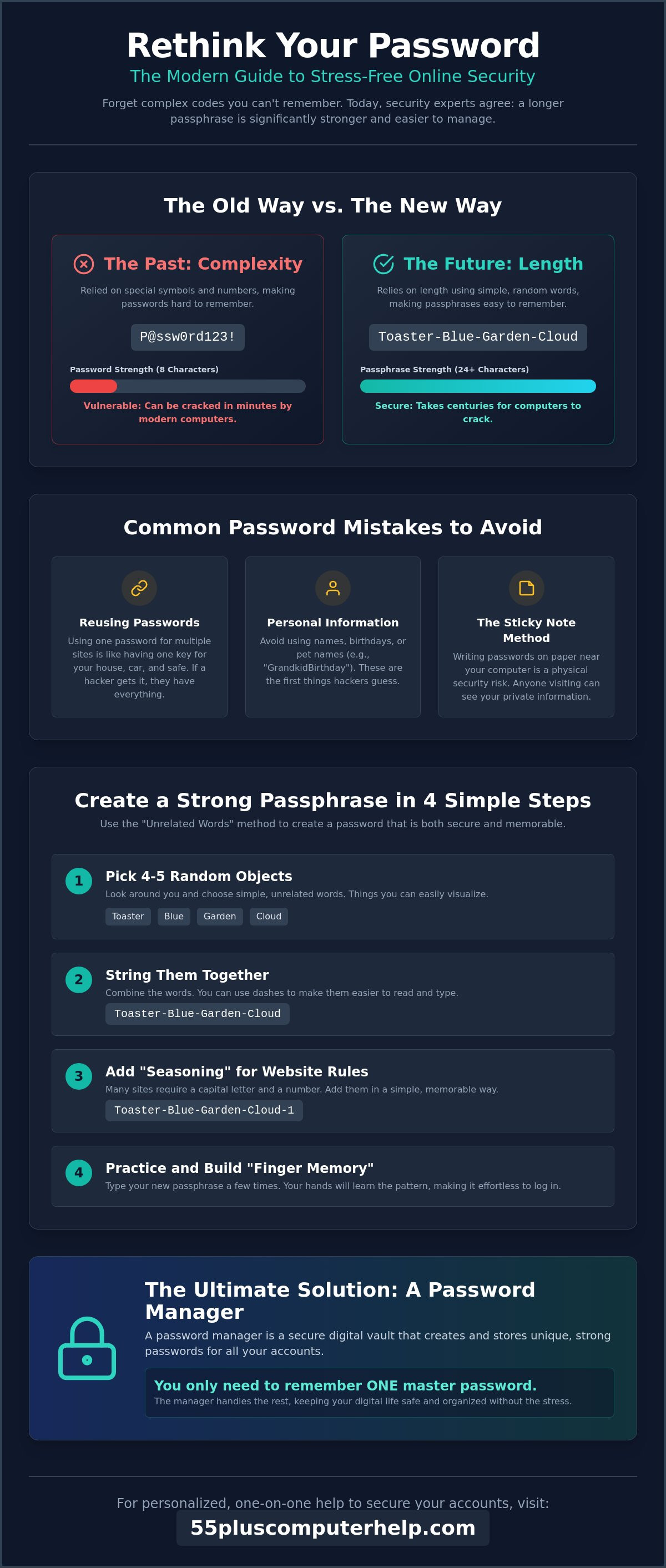
You might think that a password like "P@ssw0rd123!" is secure because it uses symbols and numbers, but a simple string of random words is actually much harder for a hacker to crack. It sounds backwards, but modern security experts now recommend length over complexity when teaching people how to create a strong and memorable password. If you've ever felt frustrated by technical jargon or worried about identity theft, you aren't alone. Many people feel anxious when they see a "wrong password" message or get asked for a special character they can't find on the keyboard.
We believe that staying safe online shouldn't be a source of stress. In this guide, you'll learn simple, stress-free methods to protect your accounts without the headache of constant resets. We want to help you feel confident and secure every time you log in. We'll walk through the "unrelated words" method, explain why you can stop changing your passwords so often, and look at how a password manager can take the weight off your shoulders. It's time to make your digital life feel easy and safe again.
Key Takeaways
- Understand why modern security relies on long passwords rather than complicated codes that are hard to remember.
- Discover how to create a strong and memorable password by simply stringing together a few random, everyday words.
- Learn the "Sentence Method" to turn your personal memories into secure secrets that a computer could never guess.
- Explore how a password manager acts as a secure digital notebook so you only ever have to remember one master key.
- Find out how one-on-one training can help you feel calm and capable while securing your online accounts.
Why Your Old Password Habits Might Be Putting You at Risk in 2026
Many of us grew up in a world where a simple lock and key were enough to keep our most private things safe. You might feel that using a familiar name or a significant date for your computer is a good way to stay organized. However, a strong password today is a unique sequence of at least 16 characters. This might sound like a lot to manage, but this specific length is what makes your accounts impossible for a computer to guess. We understand that this change can feel overwhelming. It's completely normal to feel a bit of anxiety when the rules of the digital world shift so quickly.
Using common choices like "PetName123" or "GrandkidBirthday" is a habit many of us share. Unfortunately, these are the very first things hackers try. It's helpful to think of your password as a physical key. If you use the same password for your email, your bank, and your grocery store account, it's like having one key that opens your house, your car, and your safe. If a thief finds that one key, they have access to your entire life. Modern hacking software isn't a person sitting at a desk guessing your favorite hobby. It's a powerful computer program that tries millions of character combinations every second. This is why learning how to create a strong and memorable password is the best way to protect your independence online.
The Problem with the 'Sticky Note' Method
We often see people keeping a list of passwords on a sticky note or in a small notebook by their desk. It feels safe because you can see it and touch it. Physical security is very different from digital security, though. A visitor, a houseguest, or even a repair person could easily see that list. If you lose that piece of paper, you might find yourself locked out of your own accounts, which is a stressful experience. Moving from paper to a safer digital habit is a journey, and it's okay to take it one step at a time. We want to help you replace that paper list with a system that keeps your information private and your mind at ease.
What Makes a Password 'Strong' Today?
In the past, you were likely told to use symbols like hash marks or percentages to make things complicated. Today, security experts have found that length is much more important than complexity. The "16-character rule" is the new standard for 2026. A long password made of simple, random words is much harder for a computer to crack than a short password with many symbols. This concept is known as password strength, and it relies on being unpredictable. When you learn how to create a strong and memorable password, you are using randomness to defeat digital scammers. It's a simple change that makes a huge difference in how secure you feel every day.
Creating Strong Passphrases with the 'Unrelated Words' Method
The best way to stay safe online is to stop thinking about passwords as secret codes. Instead, think of them as short, silly stories. This method is called creating a passphrase. It's much easier on your memory and much harder for a hacker to crack. When you learn how to create a strong and memorable password using this method, you'll find that you don't need to write things down as often. You can follow these four simple steps to build a passphrase that works for you.
- Step 1: Look around your room and pick four or five random objects. You might see a toaster, a blue chair, a garden hose, and a cloud outside. These are things you can easily see in your mind.
- Step 2: String these words together. You can write them as "ToasterBlueGardenCloud" or use simple dashes like "Toaster-Blue-Garden-Cloud" to make it easier to read.
- Step 3: Add a little "seasoning" to satisfy website rules. Most sites want a capital letter and a number. You can simply capitalize the first word and add a "1" at the end, like "Toaster-Blue-Garden-Cloud-1."
- Step 4: Practice typing your new passphrase three times in a row. This builds "finger memory," so your hands will eventually remember the pattern even if your mind is busy.
If you want to practice these steps with a friendly guide, our smartphone and tablet training can help you master these new digital habits. We'll sit with you and ensure you feel comfortable every step of the way.
Why Passphrases Beat Complex Passwords
Passphrases like "Toaster-Blue-Garden-Cloud" are much easier to type than confusing codes like "Tr0ubl3!99." You don't have to hunt for special symbols as often. A 20-character passphrase is 100 times stronger than an 8-character complex password because computers struggle with sheer length while humans thrive with visualization. Government experts at the Cybersecurity and Infrastructure Security Agency suggest you Use Strong Passwords that prioritize length over complexity to keep your data safe. Computers can guess short codes in seconds, but they can't easily guess a long string of random words.
Picking Your Words Wisely
When you choose your words, stay away from personal details. Don't use your street name, your high school mascot, or your child's middle name. Scammers can often find that information on the internet. Instead, use "mental snapshots" of things that have no connection to you. You might pick a favorite color, a type of tree, and a kitchen appliance. Avoid using famous quotes or song lyrics. Hackers have lists of every famous line from movies and music. They use those lists to try and break into accounts. By picking random objects, you stay one step ahead of the software they use.
Simple Mnemonics: How to Remember Your Passwords Without Stress
Forgetting a password can make you feel like you are locked out of your own life. It is a common source of frustration, but there are ways to make this easier. You can use memory aids called mnemonics to help your brain hold onto complex information. These tools allow you to use stories and places you already love to protect your accounts. When you understand how to create a strong and memorable password this way, you won't have to rely on a messy stack of papers or worry about getting stuck at a login screen.
The First-Letter Sentence Trick
One of the best ways to build a secret code is to use a sentence about your life. For example, you might think of a special memory: "I married my wife Sarah in 1974 in Vermont." To make your password, you just take the first letter of each word and keep the numbers as they are. This turns into "ImmwSi1974iV." This string of letters looks like nonsense to a stranger or a computer. However, it is very meaningful to you. This method is excellent because it naturally includes capital letters and numbers. It satisfies almost every website's security requirements without you having to think too hard about special characters.
Creating Variations for Different Accounts
You should never use the exact same password for every site. If one site has a security problem, all your other accounts are at risk. Instead, you can use the "Base plus Tag" system. You start with one strong base passphrase that you find easy to remember, like "Red-Barn-Door." Then, you add a unique identifier for each specific site. For your email, it might be "Red-Barn-Door-Mail." For your grocery account, it could be "Red-Barn-Door-Shop." This system keeps you organized without requiring you to memorize dozens of completely different codes. It also helps you stay safe with our guide on identifying email scams. By having unique passwords, you limit the damage a scammer can do if they happen to find one of your keys.
Another helpful trick is to use "Mental Maps." You can associate different types of accounts with specific rooms in your house. Perhaps your banking passwords always involve things in your kitchen, like "Toaster" or "Fridge." Your social media passwords might involve things in your garden, like "Tulip" or "Fence." This gives your brain a physical place to "look" for the answer when you are trying to remember. Finally, if you must write a reminder, only write a hint. Instead of writing the actual password, write "Vermont wedding year." Only you will know what that means. This keeps your information private even if someone else sees your notes.
Demystifying Password Managers: Your Digital Safety Deposit Box
A password manager is like a digital notebook that is locked with a single, sturdy key. Instead of trying to remember dozens of different codes, you only have to keep track of one. This is called your "Master Password." Once you unlock your manager, it handles the rest. It remembers which site you are visiting and fills in your details for you. This means you don't have to worry about typing long strings of characters every time you want to check your email or look at photos of your grandkids. This tool makes the process of how to create a strong and memorable password for every single site much simpler.
You might wonder if it's safe to put all your eggs in one basket. This is a very common and valid fear. However, modern managers use "zero-knowledge" technology. This means the company providing the software cannot see your information. Only you hold the key. It's actually much safer than using the same simple password for everything or keeping a list on your desk. When you use a manager, you can easily learn how to create a strong and memorable password for that one master key, and the software will create 16-character codes for everything else. This follows the 2026 NIST guidelines that prioritize length to keep your data secure.
The Benefits of Digital Organization
Using this tool means you can say goodbye to "Incorrect Password" messages forever. The manager types for you, so typing mistakes disappear. It also watches out for you. If a website you use has a security problem, the manager will give you an automatic alert. You can even set up emergency access. This allows a trusted child or spouse to help you if you ever get stuck. It provides a wonderful sense of relief to know you have a backup plan and a secure way to manage your digital life.
How to Choose a Simple, Senior-Friendly Manager
Look for a manager with large text and a simple interface. Some managers live right in your internet browser, while others are separate apps on your phone. A password manager is a secure vault that generates, stores, and types your passwords for you. If you feel nervous about setting this up alone, our team offers computer setup and software installation to get you started safely. We can help you pick the right tool, like Bitwarden or RoboForm, and show you exactly how it works on your own devices. We'll move at your pace until you feel completely confident.
Getting Personalized Help to Secure Your Digital Life
Learning how to create a strong and memorable password marks a significant turning point in your digital journey. While the methods we've discussed are simple, we understand that changing your security habits can still feel like a big task. It is perfectly natural to feel a bit of hesitation before updating your bank or email settings. You don't want to make a mistake that leaves you locked out of an important account. Our one-on-one technology training is designed to remove that fear by building your confidence in a safe, supportive environment.
A patient tutor can sit with you to help you implement everything you've learned today. We can help you set up your first password manager and choose a Master Password that feels right for you. We'll ensure the software is working correctly on your computer and phone so that it fills in your details automatically. This personalized approach means we move at your pace. There is no pressure to keep up with a group, and every question you have is treated with the respect it deserves. We'll also take the time to review your current settings to ensure your most important accounts are fully protected.
In-Home Support for Your Peace of Mind
There is a unique advantage to learning in the comfort of your own home. You're using the exact devices you rely on every day, which makes the training much more effective. One area where professional guidance makes a huge difference is setting up multi-factor authentication. This extra layer of security can be confusing at first, but we'll show you exactly how to receive and enter those verification codes. You can also learn how we help with email troubleshooting and security to keep your digital conversations private and organized.
Take the Next Step Toward Independence
You deserve to enjoy the internet without worrying about scammers or identity theft. When you master how to create a strong and memorable password with a little help, you regain a sense of freedom and control. You won't have to wait for busy family members to help you with technical issues. Instead, you'll have the skills and the tools to manage your digital life yourself. We invite you to contact 55 Plus Computer Help LLC for patient, in-home technology lessons. You can visit 55 Plus Computer Help LLC to schedule a session that focuses on your specific needs. Let's work together to make your online world secure and stress-free.
Secure Your Digital Future with Confidence
Mastering how to create a strong and memorable password is a powerful step toward protecting your privacy and your peace of mind. You've discovered that modern security relies on simple, long phrases rather than the confusing codes of the past. These methods help you stay in control of your digital life without the stress of constant resets or technical jargon. By using the tools and techniques we've discussed, you can explore the internet with a new sense of accomplishment and security.
Since 2014, 55 Plus Computer Help LLC has focused exclusively on providing patient, senior-oriented technology support. We understand the unique challenges of staying safe in a rapidly changing digital landscape, and we're here to help you every step of the way. Our specialized, in-home training ensures that you learn on your own equipment at a pace that feels comfortable. Book a patient, one-on-one technology lesson to secure your accounts today with 55 Plus Computer Help LLC. We look forward to helping you build a secure digital future with confidence and ease.
Frequently Asked Questions
Is it really okay to write my passwords down in a physical book?
Yes, it's okay to keep a physical book if it helps you feel organized and reduces your anxiety. You must keep this book in a safe place, like a locked drawer, where visitors or workers cannot see it. We recommend using hints instead of the actual password. For example, write "Grandson's favorite fruit" instead of the word itself. This adds a layer of protection while keeping things easy for you.
How often should I change my passwords to stay safe?
You only need to change your password if you suspect someone has stolen it or if a website reports a security breach. Modern 2026 guidelines from NIST suggest that forced, frequent changes actually lead to weaker passwords. It's better to focus on learning how to create a strong and memorable password once and keeping it secure. This approach reduces the stress of constant resets and helps you stay in control of your digital life.
What should I do if I think my password has been stolen?
If you think your password has been stolen, you should change it immediately on that specific website. After that, check any other accounts where you might have used a similar password. It's also a good idea to look at your bank statements for any unusual activity. If you feel overwhelmed, a patient expert can help you review your security settings to ensure your information is private and safe once again.
Are password managers safe from hackers?
Password managers are very safe because they use "zero-knowledge" technology to hide your data. This means even the company that makes the software cannot see your passwords. These tools are much more secure than using simple words or the same password for every site. Using a manager is one of the best ways to manage how to create a strong and memorable password for your master key while the app handles the rest.
What is 'Two-Factor Authentication' and do I really need it?
Two-Factor Authentication is like having a second lock on your front door. When you log in, the website sends a unique code to your phone to prove it's really you. We highly recommend using it for important accounts like your email and bank. It provides a wonderful sense of security. If a hacker guesses your password, they still can't get in without that special code from your smartphone or tablet.
Can I use the same password for my bank and my email if it is very strong?
You should never use the same password for your bank and your email. If a thief gets into your email, they can often use it to reset your bank password and gain access to your money. Each important account needs its own unique key. Using a "base plus tag" system is a simple way to keep these accounts separate without making things too complicated for your memory or causing unnecessary frustration.
How do I create a password that includes symbols and numbers without forgetting it?
The best way to include symbols and numbers is to "season" a long passphrase. You can start with a simple phrase like "Blue-Chair-Garden" and add a number at the end, like "Blue-Chair-Garden-24." You can also capitalize the first letter to satisfy website rules. This method keeps the password very long and strong. It's much easier to remember a simple pattern than a random string of confusing characters and symbols.
What is the best way to remember my 'Master Password' for a manager?
To remember your Master Password, we suggest typing it three times every morning for the first week. This builds finger memory in your hands. You can also write a hint for yourself on a card and keep it in your wallet. Over time, the phrase will become a natural habit. Picking a sentence about a favorite memory is a gentle way to ensure you never feel locked out of your password manager.


