
Did you know the average person now manages over 100 different passwords? It's no wonder that one occasionally slips your mind. You might be staring at a login screen and feeling stuck right now. You are not alone. Learning how to recover a forgotten email password doesn't have to be a stressful ordeal. You may feel overwhelmed by technical terms or fear a permanent lockout. We are here to show you a clear path back to your inbox.
It's normal to feel frustrated when automated systems don't understand you. We believe technology should be helpful and easy to use for everyone. You'll learn the simple, reassuring steps to regain access to your email account and keep your digital life organized. This guide covers the official recovery steps for major providers. We explain why your home Wi-Fi helps you succeed. Finally, we provide a clear plan to help you feel confident and secure online.
Key Takeaways
- Learn simple keyboard checks that might solve your login issues without needing a full password reset.
- Follow a clear, patient process for how to recover a forgotten email password on Gmail, Outlook, and Yahoo accounts.
- Discover how to navigate common hurdles like outdated recovery phone numbers or forgotten security questions.
- Explore reliable ways to organize your passwords, from physical books to digital managers, to prevent future stress.
- Recognize when to reach out for supportive, professional guidance to regain your digital independence and peace of mind.
Don’t Panic: Simple Fixes to Try Before Resetting Your Password
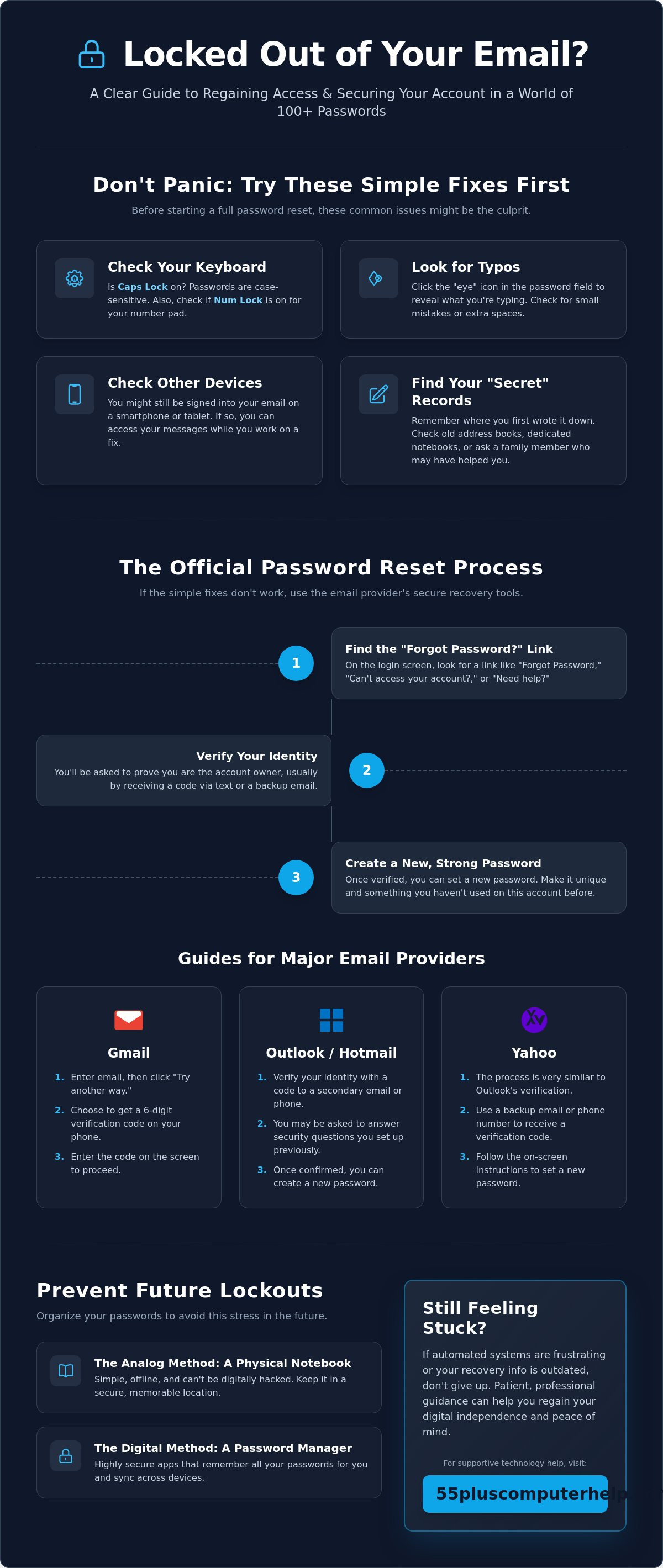
It's very easy to feel a sense of panic when your screen says "Incorrect Password." You might feel like you're locked out of your digital life forever. Take a deep breath. This is a very common experience. Most people manage over 100 passwords now, so forgetting one is just part of modern life. Before you worry about how to recover a forgotten email password, let's try a few simple checks. These steps often solve the problem in just a few seconds.
First, look at your keyboard. Is the Caps Lock key turned on? Passwords are case-sensitive. This means a capital "A" is different from a lowercase "a." If you have a desktop computer, check the Num Lock key too. If it's off, your number pad might not be typing the numbers you expect. Also, try logging in from a different device. You might still be signed in on your smartphone or a tablet. If you can get in there, you can see your messages while we work on the fix together.
Checking for Common Typing Mistakes
Small errors are the most frequent cause of login failures. A single extra space at the end of your password can stop you from getting in. This often happens if you copy and paste from a document. Most login screens now have a small "eye" icon in the password box. Click this icon to reveal the letters you're typing. It helps you see if you made a typo or hit the wrong key. If you need more help with the general logic of these systems, a password reset guide can explain the basic steps used by most websites. Seeing your password as you type it reduces frustration and helps you feel more in control.
Where to Look for Your "Secret" Records
Many of us have a "secret" place where we write things down. Think back to when you first set up the account. Did you write the password in an old address book or a dedicated notebook? Check the kitchen drawer or the shelf near your computer. Sometimes we leave sticky notes in hidden spots like the underside of a desk or inside a drawer.
You might also ask a trusted family member. Perhaps a child or grandchild helped you set up your email. They might have a record of it on their own device or in their own notes. Checking these physical records first is much faster than going through a full digital reset. It saves you from dealing with complex automated recovery systems right away. If these quick checks don't work, don't worry. We'll move on to the next step of the recovery process together.
How to Reset Your Password on Gmail, Outlook, and Yahoo
Once you have checked your physical records and still cannot log in, it is time to use the official reset tools. Every major email provider has a built-in system designed to help you. The first step is always the same. You need to find the "Forgot Password" or "Need help signing in?" link on the login screen. It is usually located right below the box where you type your password. Clicking this link starts the official process for how to recover a forgotten email password.
These systems work by proving you are the true owner of the account. They usually do this by sending a temporary code to a device or another email address you already own. This step is very secure because only you should have access to your own phone or backup inbox. It's a reliable way to regain control without needing to remember your old password at all. You just need to follow the prompts on the screen at a pace that feels comfortable for you.
Step-by-Step for Gmail Users
Google uses a specific recovery page to guide you through the process. First, enter your full email address. Google will then ask for the last password you remember. If you don't know it, don't worry. Simply click the "Try another way" button. This is a very helpful feature. It lets you skip steps that don't work for you, like answering old security questions you might have forgotten. Most people find it easiest to receive a 6-digit code on their mobile phone. You simply type that code into the box on your computer screen. This tells Google that you're definitely the person trying to get in.
Steps for Outlook, Hotmail, and Yahoo
Microsoft and Yahoo follow a very similar path to help you get back online. They'll ask you to verify your identity using a secondary email address or a text message. If you set up security questions years ago, they might ask you those instead. For many people, email setup and troubleshooting for seniors often involves updating these old security settings to make future recovery much easier. Once you verify who you are, the system will let you choose a new password immediately.
When you pick your new password, make sure it's something you've never used for this account before. It's helpful to follow guidelines on how to create a strong password to keep your information safe. A strong password usually includes a mix of letters, numbers, and symbols. After you save the new password, remember to sign in on your phone and tablet too. Your devices need the new information to stay connected. If this process feels a bit daunting, our team provides patient email troubleshooting to walk you through every click. We can help you update all your devices so you stay logged in everywhere.
What to Do if You Are Stuck and Cannot Recover Your Account
Sometimes the standard recovery path has a roadblock. You might find that the phone number listed for your account is one you haven't used in years. Or perhaps the security question asks for a detail you can no longer remember. It is completely normal to feel a bit discouraged at this stage. However, even these situations have solutions. The key is to remain calm and follow the alternative paths provided by the service.
If you are struggling with how to recover a forgotten email password because of old information, look for a link that says "I don't have access to these" or "Try another way." Providers like Google and Microsoft will then ask for an alternative email address where they can reach you. They use this to verify your identity through other means. This process requires a bit of time. A manual review can take anywhere from 48 to 72 hours. It is often best to wait at least 24 hours before trying again if you have had multiple failed attempts. This prevents the system from flagging your account for suspicious activity.
Handling Outdated Recovery Information
When your recovery phone number is outdated, the system needs a new way to prove you are you. You might be asked to provide details about when you created the account or which contacts you email most often. Using a familiar device is very helpful here. Try to perform these steps from your home Wi-Fi and the computer you usually use. Email providers track "familiar" networks and devices. They are much more likely to grant access if the request comes from your usual location. If you are using an organizational account, a new recovery feature for Microsoft Entra ID was introduced in May 2026 to help when all other methods are lost.
Identifying and Avoiding Recovery Scams
Be very careful about where you look for help. Many scammers post fake "support" numbers on search results or social media. They may claim to be from Gmail or Yahoo and ask for a fee to unlock your account. Official email providers will never ask for your password or payment over the phone. They also do not have a direct "help desk" phone number for free accounts. If you have already clicked a suspicious link or talked to a stranger about your account, you should consider virus and malware removal to ensure your device is still safe. Protecting your computer is the first step toward feeling secure again.
Organizing Your Passwords to Prevent Future Lockouts
Once you have successfully regained access to your account, you likely feel a sense of relief. You don't want to repeat the stress of searching for how to recover a forgotten email password ever again. The best time to organize your digital life is right now, while the process is fresh in your mind. A few simple changes can make your future logins much smoother and more secure.
Your first task should be updating your recovery information. Go into your account settings and check the phone number and secondary email address on file. If they are old or incorrect, change them immediately. This ensures that if you ever forget your password again, the reset code will go exactly where you need it. You might also try the "Passphrase" method for your new password. Instead of a random string of letters and numbers, choose a short sentence like "TheBlueCatLikesFish!". It's easy for you to remember but very difficult for a computer to guess.
The Pros and Cons of a Physical Password Book
Many people find comfort in writing things down. A physical password book is a great tool because no hacker can access it from across the internet. It's a tangible record that stays in your home. However, it's vulnerable to being lost or damaged by fire or water. To keep it safe, follow these tips:
- Store the book in a private location, like a locked drawer or a home safe.
- Never keep the book right next to your computer where a visitor might see it.
- Write down "hints" instead of the full password. For example, write "My first car plus the year I graduated" to remind yourself without revealing the secret.
Simple Introduction to Digital Password Managers
If you prefer a digital solution, a password manager is like a secure vault for your phone or computer. These tools store all your login information in one place. When you visit a website, the manager can automatically fill in your username and password for you. Experts highly recommend these because they can create unique, complex passwords for every site you use. As of March 2026, only 34% of people use a password manager, but that number is growing as people look for more security. It's a reliable way to ensure you never have to worry about a lockout again.
Setting up these systems can feel a bit technical at first. If you want a patient mentor to help you set up a physical book or a digital vault, we can help. We offer personalized smartphone and tablet training to show you exactly how to keep your passwords organized and safe. Having a plan in place will help you feel much more confident every time you log in.
When to Call for Patient, Professional Technology Help
Technology should serve you. It should not make you feel small or capable of being defeated by a login screen. If you have followed every step for how to recover a forgotten email password and still find yourself locked out, it is okay to ask for help. Recognizing when frustration is outweighing your progress is a sign of wisdom. You don't have to struggle with automated systems that don't understand your unique situation. Seeking assistance is a positive step toward regaining your independence.
A patient mentor can transform a stressful afternoon into a sense of accomplishment. Professional help is about more than just getting back into an account. It is about making sure your computer is secure and up to date. We can check for software updates and ensure your data is backed up during the process. This gives you a fresh start with a system that works exactly the way you need it to. Having a trusted expert by your side ensures that no small detail is overlooked.
The Value of In-Home or Remote Support
Sometimes you just need someone to sit with you and explain the steps. A technician can visit your home or connect with you remotely to resolve the issue in real-time. This is a wonderful learning opportunity. Instead of someone taking your device away to a back room, you can watch and learn. You can ask questions in plain language without feeling rushed or judged. This supportive environment helps you understand the logic behind the recovery steps. Knowing your accounts are safe and properly configured provides a level of peace of mind that is hard to achieve alone. It turns a technical repair into a personalized educational experience.
Empowering Your Digital Independence
Our goal is always to help you feel confident using your tech. We believe that everyone deserves to feel secure and capable online. Personalized lessons can help you master your email, smartphone, and other devices at your own pace. You can learn how to manage your passwords so you never feel that fear of being locked out again. It is always better to reach out before you feel completely overwhelmed. We are here to listen and guide you through the process with patience and care. Let us help you regain control of your digital life today. You deserve to enjoy your technology without the stress or the worry of being left behind by rapid industry changes.
Take Control of Your Digital Life with Confidence
You have learned that technology doesn't have to be intimidating or overwhelming. By starting with simple checks like the Caps Lock key and using official recovery links, you can solve most login issues on your own. Remember that keeping a physical password book in a safe spot or using a digital vault will prevent these worries in the future. Understanding how to recover a forgotten email password is a valuable skill that builds your digital independence and peace of mind.
If you still feel stuck or frustrated, you don't have to face these systems alone. We have been serving seniors since 2014 with trusted in-home and remote support options. Our patient mentors speak your language and understand the unique challenges you face with modern devices. We can help you regain access and set up a clear plan that works for your lifestyle. Get Patient Help with Your Email Today. You are fully capable of mastering your technology. We are honored to support you and cheer you on every step of the way.
Frequently Asked Questions
How do I reset my Gmail password if I forgot it?
You can reset your password by visiting the Google Account Recovery page and entering your email address. The system will guide you through several options to verify your identity, such as sending a code to your phone. It is the most direct way to learn how to recover a forgotten email password for any Google account. If you get stuck on a question, you can simply click "Try another way" to find a method that works better for you.
What if I do not have my recovery phone number anymore?
You should click the link that says "I don't have my phone" or "Try another way" during the recovery process. The email provider will then ask for an alternative email address where they can send a message to verify your identity. This manual review process can take between 48 and 72 hours to complete. Staying patient during this time is the best way to ensure the security of your account while the provider confirms you are the owner.
Can I recover an email password without a secondary recovery email address?
Yes, you can usually use a verified mobile phone number to receive a text message security code instead. If you do not have a phone or a backup email on file, you may be asked to answer security questions you created in the past. Providers might also ask for details about when you started the account. Using a familiar computer at home makes this process much more likely to succeed because the system recognizes your network.
Is it safe to write my passwords down in a physical notebook or book?
Writing your passwords in a physical notebook is a safe and reliable option if you keep the book in a private place. Hackers cannot reach a paper notebook through the internet, which provides excellent protection against digital theft. You should store the book in a secure drawer or a home safe rather than leaving it on your desk. For extra security, consider writing down a hint that only you understand instead of the actual password itself.
How can I see my password while I am typing it to avoid mistakes?
You can see the characters you type by clicking the small icon that looks like an eye inside the password box. This feature changes the hidden dots or stars into visible letters and numbers so you can check for typos. It is a very helpful tool for catching accidental capital letters or extra spaces that cause login errors. Using this icon helps you feel more in control and reduces the frustration of repeated failed attempts.
Why does my computer keep asking me for my email password every day?
This problem often occurs because your email settings need to be refreshed or your software requires an update. It can also happen if you recently changed your password on a different device, like a smartphone or tablet. Our email setup and troubleshooting service can help you resolve these constant prompts for good. We make sure your "Remember Me" settings are configured correctly so you can enjoy a smooth and easy login experience every day.
What should I do if I think my email account has been hacked?
You should immediately use the official recovery page to change your password and secure your account. Once you are back in, check your settings to make sure no unfamiliar recovery phone numbers or email addresses were added. It is also a good idea to check your computer for any hidden threats. We provide virus and malware removal to help you clean your device and ensure your personal information remains private and protected from future attacks.
Are there free services that can help me recover my forgotten password?
The only safe and free way to regain access is through the official recovery tools provided by Gmail, Outlook, or Yahoo. You should avoid any third-party websites that claim they can recover your account for a fee or through a "free" phone number. These services are often scams designed to steal your login credentials or personal data. Sticking to the official provider's website is the only way to keep your account safe and your information secure.


