
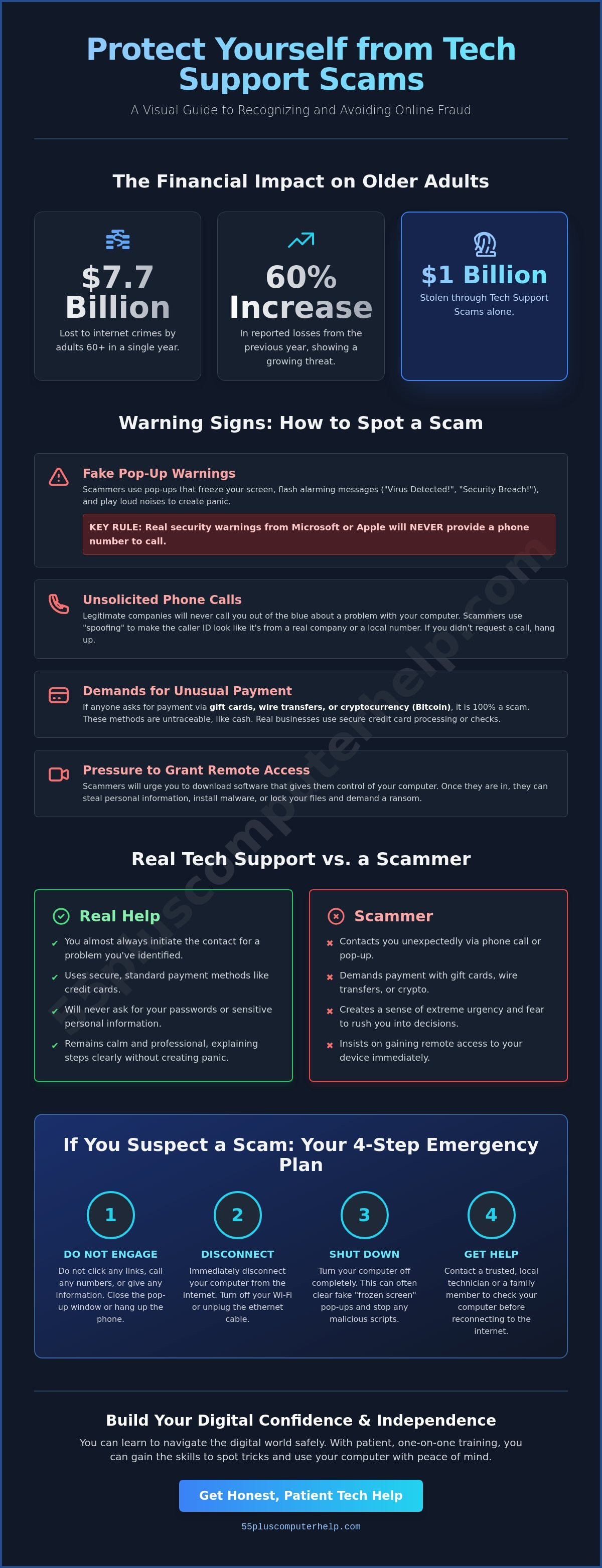
In 2025, adults aged 60 and older reported losing over $7.7 billion to internet crimes. This was a 60 percent increase from the year before, and tech support scams alone accounted for $1 billion of those losses. Learning how to avoid tech support scams is the most important step you can take to protect your hard-earned savings and your identity.
It is natural to feel a sense of panic when a flashing warning suddenly appears on your screen or a loud siren starts playing from your speakers. You might worry that you've broken something or that your private information is at risk. Many people feel like they're being targeted specifically because of their age, and that feeling can make using the internet feel like a risk rather than a tool for connection. We understand those fears and want you to know that you're not alone in feeling this way.
We are here to help you regain your peace of mind and your independence. You can learn to spot the tricks scammers use by recognizing a few simple warning signs. This guide will walk you through the most common red flags, provide a clear checklist of what to ignore, and show you exactly how to find honest help when you truly need it.
Key Takeaways
- Learn why scammers use fake alerts and loud noises to create a sense of panic.
- Discover practical tips for how to avoid tech support scams by recognizing the difference between real help and fraudulent pop-ups.
- Understand that legitimate companies like Microsoft or Apple will never call you unsolicited to report a problem.
- Find out the immediate steps to take if you suspect a scam, such as safely disconnecting your device from the internet.
- Build your digital independence through personalized training from 55 Plus Computer Help LLC.
What is a Tech Support Scam and Why Does it Happen?
A tech support scam is a fraudulent attempt to gain access to a device by impersonating a legitimate technician. These criminals use fear to trick you into paying for repairs you don't actually need. It's helpful to understand What is a tech support scam so you can protect your personal information and your savings. The main goal of a scammer is usually one of three things: getting your money, stealing your personal data, or gaining remote access to your computer. Once they have access, they can install harmful software or watch what you do online.
Scammers often target older adults because they believe seniors are more polite and more likely to trust a professional voice. They also assume that older users might have less experience with the latest technical tricks. This makes it easier for them to use the "Psychology of Urgency." By creating a sense of panic, they stop you from thinking clearly. They want you to act fast before you have a chance to call a friend or a trusted technician for advice. Knowing these tactics is the first step in learning how to avoid tech support scams.
The Anatomy of a Modern Tech Scam
Modern scams often start with a simple mistake. You might mistype a website address or click on a link in a deceptive email. This can trigger a "warning" screen that locks your browser and tells you that your computer is infected. Scammers use social engineering to make these lies sound like the truth. They might use official looking logos or technical terms that sound scary. Their goal is to make you believe that your computer is already broken. They want you to follow their instructions without question.
Why Scammers Pretend to be Big Brands
Scammers love to use names you already trust. You might see logos for Microsoft, Apple, or Amazon on these fake pop-ups. They use these brands to build false trust quickly. Sometimes, they even use "spoofing" technology. This makes your caller ID show a local phone number or the name of a real company. It's vital to remember that these big companies will never call you out of the blue to report a virus. They don't monitor your computer for problems in real time. If you receive an unsolicited call or a sudden pop-up, it's almost certainly a trick. Understanding this simple rule is a powerful way to master how to avoid tech support scams.
Recognizing the Red Flags of Tech Support Fraud
Scammers want to make you panic. They use sights and sounds to trick your brain into acting before you can think. One common trick is the "Frozen Screen." Your computer isn't actually broken; the scammer has simply used a bit of code to make your web browser get stuck. They often pair this with a loud, repetitive beeping sound. This noise is designed to increase your stress and make the situation feel like an emergency. Knowing these tricks is a major part of learning how to avoid tech support scams.
Another huge red flag is how these individuals ask for money. No legitimate company like Microsoft or Apple will ever demand payment via gift cards, wire transfers, or Bitcoin. These methods are just like cash. Once you send the money, it's gone forever. If someone asks you to go to a store and buy a gift card to "fix" your computer, they're a criminal. Real businesses use secure, standard payment methods that you're already familiar with.
The Fake 'Virus Found' Pop-Up Warning
Look out for scary phrases like "System Failure," "Security Breach," or "Serious Threat Detected." These pop-ups almost always include a phone number and tell you to call immediately. Real security software, such as Windows Defender, will never put a phone number in a warning message. If you see a phone number on a pop-up, it's a scam. You can usually close these windows by pressing the "Esc" key or closing the browser entirely. If you ever feel stuck or worried about a message, patient technical help can give you the clarity you need.
Unsolicited Phone Calls and Spoofed Numbers
You cannot trust your Caller ID in the modern digital age. Scammers use technology called "spoofing" to make their calls look local or like they're coming from a real company. They follow a script to sound professional and helpful. They might say they've noticed "errors" on your device or that your subscription has expired. Remember the "Unsolicited Rule." If you didn't ask for help, the person calling is a scammer. Hanging up is the safest thing you can do. You don't owe a stranger your time when they're trying to trick you.
Fake Invoices and Subscription Renewal Emails
Phishing emails are another common tactic. These messages might claim you owe hundreds of dollars for a subscription you don't remember buying. Always check the sender's email address for misspellings or strange domains that don't match the company name. If you're unsure about an email you received, you can learn more about Email Setup and Troubleshooting for Seniors to keep your inbox safe. Taking a moment to breathe and check the details will save you from a lot of trouble later.
Real Tech Support vs. Scammers: Knowing the Difference
The biggest difference between a real technician and a scammer is who starts the conversation. Real companies wait for you to reach out to them. They don't have the ability to see a virus on your screen from across the country. If you receive a call, text, or pop-up warning you about a problem you didn't know you had, it's a scam. Learning this distinction is a vital part of knowing how to avoid tech support scams and staying safe online.
A legitimate technician will also be calm and patient. They will explain the problem in plain language and let you decide how to proceed. Scammers do the opposite. They use fear and high-pressure tactics to make you feel like you're in a rush. They want you to act before you can think. If someone is shouting or telling you that your bank account will be deleted in five minutes, they're lying. Real support staff don't behave that way. They want you to feel comfortable and informed throughout the entire process.
How Legitimate Companies Actually Contact You
Real companies use official support portals. If you need help with a Windows computer, you would go to Microsoft's official website yourself. You might even schedule an appointment for a callback. Sometimes your computer might show a "blue screen" error. This is just a log of what went wrong. It's meant for information only. It will never include a phone number for you to call. If you need to find a real support number, look at the back of your device or the original box it came in. Never trust a phone number that appears in a pop-up window.
The Dangers of Unauthorized Remote Access
The most important rule is the "Remote Access" rule. Never let a stranger control your mouse or keyboard. Scammers often ask you to download apps like AnyDesk or TeamViewer. While these are real tools, scammers use them to get "inside" your computer. Once they have control, they can look at your files and see your bank logins. If you realize something is wrong while someone is on your computer, don't wait. You should immediately disconnect from the internet or hold down the power button until the screen goes black. This stops the scammer in their tracks and protects your data.
What to Do if You Suspect a Scam or Already Shared Info
If you have already clicked a suspicious link or shared your information, please take a deep breath. You are not alone. These scammers are professional liars who spend all day practicing how to trick people. There is no reason to feel ashamed if you were caught off guard. The best thing you can do right now is follow a clear plan to regain control. Learning these emergency steps is a vital part of how to avoid tech support scams in the long run.
Your first priority is to stop the scammer from seeing what you are doing. Disconnect your computer from the internet immediately. You can do this by turning off your Wi-Fi or unplugging the internet cable from the back of your machine. Next, power down your device completely. This stops any remote software the scammer might have installed from running in the background. Once the computer is off, you can safely use a different device or your phone to start securing your accounts.
Immediate Steps to Secure Your Device
Performing a "Hard Shutdown" is necessary if your screen is completely stuck and you cannot click anything. To do this, hold down the physical power button on your computer for at least ten seconds until the screen goes black. This forces the system to stop every process. After a scam attempt, it is important to have a professional check for "backdoors" or hidden files that the criminal might have left behind. You can follow our Virus and Malware Removal Guide to learn more about keeping your system clean and secure.
Protecting Your Financial Information and Identity
Contacting your bank is the next essential step if any financial details were shared. Ask for the fraud department. They can help you reverse suspicious charges and issue a new card to keep your money safe. You should also consider a "Credit Freeze" with the major credit bureaus. This is a simple, free way to prevent anyone from opening new accounts in your name. Reporting the scam to the FTC helps protect others in your community. Finally, change your passwords. Start with your primary email account, as that is often the "key" to your other online profiles.
We believe that everyone deserves to feel safe while using their computer. If you are worried that your device is still at risk, our patient experts offer virus and malware removal services to give you total peace of mind. We can help you understand how to avoid tech support scams so you can browse the internet with confidence.
Building Digital Confidence with 55 Plus Computer Help LLC
Confidence comes from understanding. When you know how your computer works, those scary pop-ups lose their power over you. We believe that education is the ultimate tool for how to avoid tech support scams. Instead of feeling like a target, you can become a savvy user who knows exactly what to ignore. Our goal is to help you enjoy your technology without the constant worry of making a mistake. You deserve to use your tablet or computer to talk to family and friends with total peace of mind.
Having a trusted technician makes a world of difference. You don't have to call a stranger in a distant call center when something feels wrong. You can talk to a local expert who knows you and your specific computer setup. Our team provides a warm and welcoming approach that focuses on your comfort as much as the technical solution. This personal relationship builds a safety net that protects you from fraud and technical frustration. We treat your computer with the same care we would give to our own family members. Our patient approach ensures that you never feel rushed or overwhelmed during a support session.
Personalized Lessons to Spot Scams Before They Start
We provide one-on-one training that moves at your specific speed. You can learn safe browsing habits and how to identify suspicious emails in the comfort of your own home. We also teach you how to manage your passwords securely. This removes the stress of forgetting logins and keeps your accounts safe from prying eyes. These lessons give you the inner strength to say "No" to any request that feels out of place. You will learn to trust your instincts and recognize the difference between a real update and a fake warning. Mastering these basics is a great way to learn how to avoid tech support scams forever.
Professional Support You Can Trust
Sometimes you need a professional to handle the technical details for you. We offer in-home assistance to deep-clean your computer after a security scare. This ensures that no hidden threats or "backdoors" remain on your system. Since we specialize in helping seniors, we understand the specific concerns you have regarding your privacy and safety. We also help you set up automated backups for your data. This means your precious photos and important files are always safe, even if your device has a problem. Contact 55 Plus Computer Help LLC for patient, expert tech support today. We are here to be your partner and mentor as you explore the digital world with confidence.
Embrace Your Digital Independence with Confidence
You now have the tools to identify the warning signs of fraud and protect your personal information. Remember that a legitimate company will never contact you first to report a virus or demand payment in gift cards. By trusting your instincts and knowing when to hang up, you are already ahead of the scammers. Learning how to avoid tech support scams is not just about staying safe today; it's about building the skills you need to explore the internet with joy and curiosity.
Since 2014, we have specialized in senior-focused IT support. Our patient experts provide one-on-one technology training that respects your time and your intelligence. We believe that everyone deserves a trusted partner to help them handle technical challenges without fear or frustration. You can schedule a patient, in-home tech safety checkup today to ensure your computer is secure and your backups are working perfectly. Let's work together to make your digital world a safe and welcoming place.
Frequently Asked Questions
Does Microsoft or Apple ever call you to say your computer has a virus?
No, Microsoft and Apple will never call you to report a virus on your computer. These companies do not monitor your device for security issues in real time. If you receive an unsolicited call from someone claiming to be from a big tech brand, it is a scam. Legitimate support only happens when you initiate the contact through their official websites or support channels.
What should I do if a pop-up won't let me close my internet browser?
You should try pressing the "Esc" key on your keyboard or using the "Alt + F4" shortcut to force the window to close. Scammers design these pop-ups to look like they have locked your screen, but it is usually just a "stuck" browser tab. Do not click any buttons inside the pop-up window. If the screen remains frozen, you can safely perform a hard shutdown by holding the power button.
Is it ever safe to let someone remotely access my computer?
It is only safe to allow remote access if you reached out to a trusted technician first. You should never grant access to a stranger who calls you or appears in a sudden pop-up warning. Legitimate support providers will wait for you to ask for help. They will also explain exactly what they are doing while they are connected to your device. Knowing when to say no is a key part of how to avoid tech support scams.
I gave a scammer my credit card number—what is the very first thing I should do?
You must call your bank or credit card company immediately to report the fraudulent charge. Ask their fraud department to cancel your card and issue a new one to prevent further theft. They can often reverse the recent transaction if you act quickly. It is also a good idea to check your statements for any other unfamiliar activity over the next few weeks.
How can I tell if an email about a 'subscription renewal' is real or fake?
You can check the sender's email address to see if it matches the official company domain. Fake emails often come from strange addresses with random letters or misspellings. Look for generic greetings like "Dear Customer" instead of your actual name. Real companies will not use high-pressure threats to demand immediate payment. If you are unsure, log into your account directly through the company's official website instead of clicking email links.
Can a scammer get into my computer just by me answering the phone?
No, a scammer cannot gain access to your computer simply by you answering a phone call. They need you to take a specific action, such as clicking a link or downloading remote access software. As long as you don't follow their instructions or share your screen, your information remains safe. Hanging up the phone is the simplest and most effective way to protect your privacy.
What are the most common 'scare tactics' used in tech support scams?
Scammers often use loud sirens and flashing red screens to create a sense of panic. They may also claim that your computer was used for illegal activity or that your bank account is currently being hacked. These claims are designed to stop you from thinking clearly so you act out of fear. Understanding these tricks helps you stay calm and learn how to avoid tech support scams more effectively.
How can I report a tech support scam to the authorities?
You can report these crimes to the Federal Trade Commission by visiting their official website at ReportFraud.ftc.gov. Providing details about the scam helps the authorities track down the criminals and warn others in your community. You can also report the incident to your local police department if you lost money. Sharing your experience is a powerful way to help protect other seniors from falling victim to similar tricks.


