
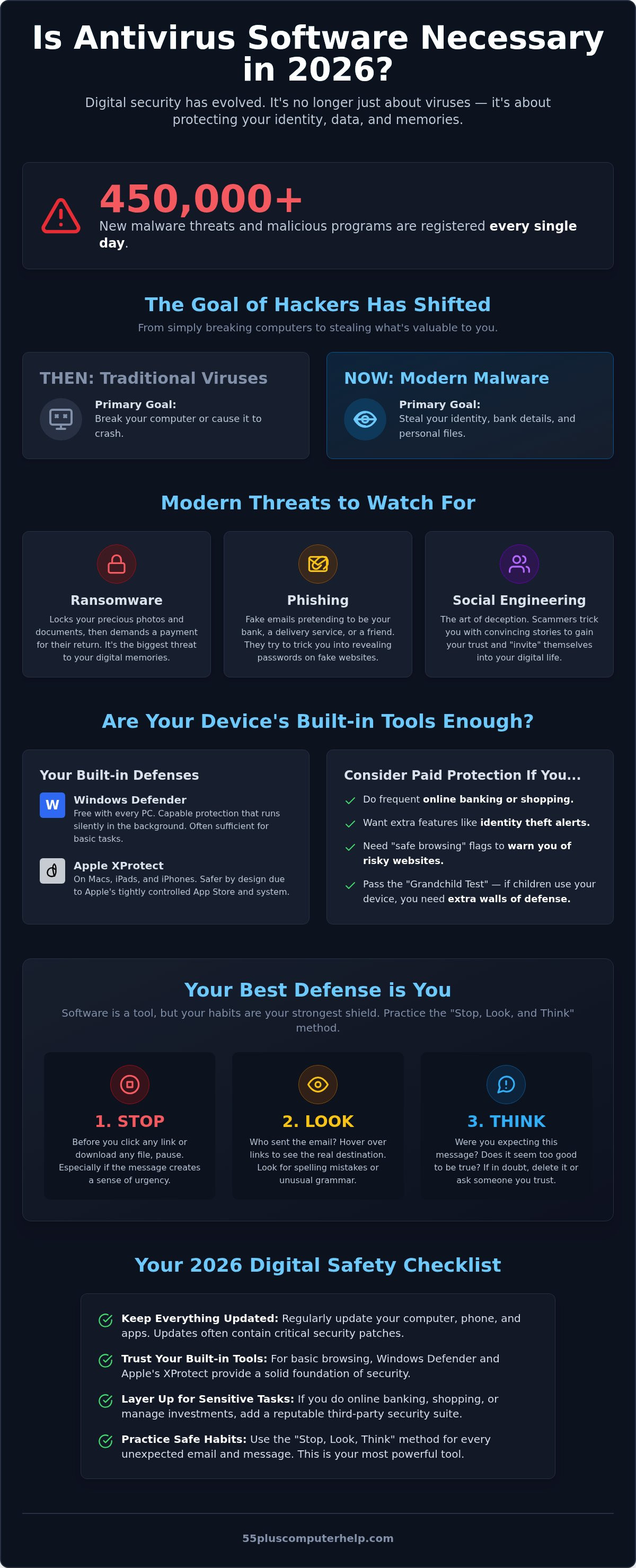
Did you know that over 450,000 new malware threats and malicious programs are registered every single day? It's a staggering number that can make anyone feel uneasy about opening their email or browsing the web. You might remember when a single piece of software was all you needed to feel safe, but digital threats feel much more complicated now.
We understand how frustrating it is to deal with slow computer performance and those constant, confusing pop-up notifications. You deserve to use your device without worrying about identity theft or tech support scams. Many people ask us, is antivirus software necessary in 2026? It's a fair question, especially since modern computers come with their own built-in security tools like Microsoft Defender. You want to know if you are truly protected or if you are just paying for software you don't actually need.
This guide will give you a clear answer and help you find peace of mind while you're online. We'll explain how digital security has changed and what layers you actually need to stay safe today. You'll learn how to protect your personal information without the technical confusion or the heavy software that slows you down.
Key Takeaways
- Understand why digital security in 2026 focuses on protecting your identity and sensitive data rather than just blocking traditional viruses.
- Find out if the free tools already on your computer provide enough protection for your daily activities or if you need extra layers of defense.
- Get a direct answer for your tablet, smartphone, or PC when asking is antivirus software necessary in 2026.
- Learn simple habits like the "Stop, Look, and Think" method to stay one step ahead of scammers and suspicious emails.
- Use our easy checklist to build a safety net that protects your information without making your computer run slowly.
Understanding the Digital Landscape: Is Antivirus Still Relevant in 2026?
The way we use our computers has changed so much since the early days of the internet. Back then, a virus was something that might break your machine or make it crash. Today, the goal of a hacker has shifted. They don't want to break your computer; they want to use it to get to your bank account or your private information. Because of this, many people ask, is antivirus software necessary in 2026? The answer starts with understanding that the old term "antivirus" is a bit outdated. Experts now call it "endpoint security" because it protects the "end" of the connection, which is your device.
Modern malware is unwanted software that sneaks onto your device to watch what you do or steal your files. In the past, you might get a virus by downloading a suspicious file. Now, it often happens through "social engineering." This is a fancy way of saying that scammers try to trick you into inviting them in. Antivirus software has evolved to handle these clever tricks, but the software itself is only part of the solution.
The Evolution of Computer Threats
Threats have become much more personal. Ransomware is a great example. This is software that locks up your precious family photos and documents. It demands a payment to give them back. It is a scary experience, and it's currently the biggest threat to your digital memories. Phishing is another common problem. You might receive a fake email that looks like it's from your bank or a delivery service. These emails try to trick you into typing your password on a fake website. This is why "antivirus" is now a bit of a misnomer. Modern programs are actually all-in-one security suites that watch for these tricks, not just old-fashioned viruses.
Why Seniors are Primary Targets
It's helpful to understand why you might see more of these threats than others. Scammers often look for a "trust gap." Many seniors grew up in a more polite era where a person's word meant something. Criminals try to take advantage of that kindness. They know your digital life is valuable. It's not just about the money in your bank. Your device holds your family photos, your emails with grandchildren, and years of memories. Losing access to those files can feel devastating.
Please remember that being a target doesn't mean you have to be a victim. You have the power to stay safe. By learning how these threats work, you can browse with confidence. You might still wonder, is antivirus software necessary in 2026, especially if you only use your computer for basic tasks? Deciding on the right level of protection is the first step toward that peace of mind. We are here to help you set up these layers of security so you can enjoy your technology without fear.
You don't have to start from scratch when you buy a new computer today. Modern systems already have security tools built into them. For many people, this raises a very important question: is antivirus software necessary in 2026? It's a valid concern because you don't want to waste money on something you already own. You are never truly "unprotected" on a modern machine. However, you might be "under-protected" depending on how you use your device.
Windows Defender is the free tool that comes with every PC. It is much more capable than the basic tools from a decade ago. It stays in the background and watches for known threats without asking you for permission every five minutes. Many of our clients ask us is antivirus software necessary in 2026 when they already have these built-in protections. The answer depends on your "good enough" threshold. If you only use your computer for basic news and weather, the built-in tools are often sufficient. If you do a lot of online shopping or banking, you might want a bit more help.
The Case for Windows Defender and Apple XProtect
These tools work silently to keep you safe. They don't slow down your computer like the heavy, clunky software of the past. Apple devices like iPads and iPhones are generally even safer out of the box. This is because Apple tightly controls what programs are allowed to run. The most important thing is to stay current with software updates for security. These updates act like new sets of instructions that help your computer recognize the latest tricks from scammers.
When Third-Party Protection is Worth the Cost
Paid software often includes features that are specifically helpful for seniors. This includes identity theft alerts and "safe browsing" flags that warn you before you click a suspicious link. We often suggest the "Grandchild Test." If you let your grandchildren use your tablet or computer, you probably need extra walls of defense. Children often click on colorful ads or download games that can accidentally lead to trouble.
Another big benefit of paying for a security service is the access to customer support. If a scary message pops up on your screen, it's nice to have a trusted company to call for advice. If you're feeling overwhelmed by these choices, we can help you with software installation and updates to ensure your safety net is set up correctly. Knowing you have a professional watching your back provides real peace of mind.
Do You Need Antivirus for Your Specific Device?
Many people use a mix of different gadgets today. You might have a laptop for writing emails, a tablet for reading the news, and a smartphone for sharing family photos. It's helpful to remember that tablets and phones are just small computers. Because they all work in different ways, the answer to is antivirus software necessary in 2026 isn't the same for every device. Security is not a "one size fits all" solution. We always encourage our clients to check their current device settings before they go out and buy new software.
Windows Laptops and Desktops
Windows remains the most popular operating system for home computers. Unfortunately, its popularity makes it the biggest target for scammers and hackers. In 2026, the vast majority of digital threats are still designed specifically to attack Windows users. While the built-in tools have become much stronger, we still recommend a secondary layer of protection for most Windows users. This extra wall of defense helps catch the clever tricks that might slip past the standard settings. If you ever feel like your computer is acting strange or you've clicked something suspicious, we provide virus and malware removal to get your machine back to a healthy state.
Apple Macs, iPads, and iPhones
Apple devices are built using a "walled garden" concept. This means Apple checks every single app before it's allowed into their official store. Because of this strict control, iPhones and iPads generally don't need traditional antivirus software. In fact, some "security" apps in the App Store are actually fake programs designed to confuse you. For Mac computers, the situation is a bit different. The old myth that "Macs don't get viruses" is simply not true anymore. As more people switch to Mac, hackers are spending more time trying to find ways in. A light, reputable security tool for your Mac is a very wise choice in 2026 to keep your memories safe.
Android Tablets and Smartphones
Android devices offer a lot of freedom, but that freedom comes with some extra responsibility. While the Google Play Store is generally a safe place, malicious apps occasionally slip through the cracks. Android users should be a bit more cautious than Apple users. You don't always need to buy expensive software to stay safe, though. You can secure an Android device by only downloading well-known apps and keeping your software updated. Taking five minutes to look through your security and privacy settings can prevent a lot of headaches. If you aren't sure where to look, we can help you find those settings so you can browse with confidence.
Beyond Software: The "Human Element" of Staying Safe
Even with the best security tools in the world, you are still the most important part of your computer's defense. Many people ask, is antivirus software necessary in 2026 if they already have good habits? The truth is that software is only 50% of the battle. The other half is you. We teach our clients the "Stop, Look, and Think" method. If something unexpected happens on your screen, don't click right away. Stop for a moment. Look at what the message is actually saying. Think about whether it makes sense for a company to contact you this way.
One of the biggest threats today is the Tech Support Scam. A Tech Support Scam is a fake warning that asks you to call a number or download "help" software. These pop-ups often look very official. They might even use the logos of companies you trust, like Microsoft or Apple. They often use flashing lights or loud sounds to make you feel panicked. Scammers want you to act quickly before you have a chance to realize it is a trick. Remember, a real technology company will never put a phone number in a pop-up and ask you to call them for help.
Spotting Phishing and Email Scams
Scammers love to use a "Sense of Urgency." They might send an email saying your bank account is locked or a package couldn't be delivered. They want you to feel like you must click the link immediately. Before you do anything, check the sender. Don't just look at the name at the top. Look at the actual email address behind the name. If it looks like a jumble of random letters or doesn't match the company name, it is likely a scam. For more tips on safe communication, you can read our guide on email setup and troubleshooting for seniors.
Password Safety Made Easy
Your passwords are the keys to your digital life. Using "123456" or your birthday is no longer an option in 2026. Hackers now use powerful computers that can guess simple passwords in a matter of seconds. We often recommend using a password manager. It's much safer than writing passwords in a notebook because it keeps your information locked behind a master key. If you prefer to remember your own, try using a "passphrase." This is a short sentence like "TheGreenGrassGrowsIn2026!" It is easy for you to remember but very difficult for a computer to guess.
Learning these safety habits is like learning to lock your front door. It becomes second nature over time. If you want to feel even more confident, we offer personalized smartphone and tablet training to help you master these skills. We can sit down with you and show you exactly what to look for so you never have to worry about being tricked.
How to Build Your 2026 Security Plan
Creating a safety net for your digital life doesn't have to be a chore. Instead of looking for one "magic" program to solve everything, it's better to think about layers. When you combine updated software with a little bit of knowledge, you become much harder to trick. You might still wonder, is antivirus software necessary in 2026 for your specific situation? The best way to find out is to look at what you already have and what you actually do online. This simple plan will help you feel more in control of your technology.
Step 1: Audit Your Current Devices
The first step is to see what is already running on your computer or tablet. Many people find they are paying for monthly subscriptions they forgot about or don't actually use. Open your settings and look for the security section. You want to verify that your built-in protections, like Windows Defender, are turned on and active. It's also vital to ensure your operating system is up to date. These updates are the most important defense you have because they fix the "holes" that scammers try to use to get into your system.
Step 2: Decide on Extra Protection
Next, think about how you use your devices. Do you use your computer for online banking or managing your retirement accounts? Do you have years of precious family photos saved on your hard drive? If you answered yes, a third-party security suite might be worth the small annual cost for the extra identity theft alerts. We usually suggest avoiding "free" antivirus programs. These companies often make money by selling your browsing data to advertisers. A paid, reputable provider is almost always safer for your privacy. If you're still asking, is antivirus software necessary in 2026, remember that the extra peace of mind is often the most valuable part of the purchase.
Step 3: Get Personalized Help
Finally, remember that you don't have to do this alone. A one-on-one lesson can provide more peace of mind than any software ever could. At 55 Plus Computer Help, we act as a patient mentor to help you navigate these choices. We can sit with you, either in-person or remotely, to look at your specific devices and make sure everything is locked down tight. We want to empower you to use your computer with confidence. If you're ready to feel secure, Schedule a patient tech session to secure your computer today!
Taking Control of Your Digital Safety
Staying safe online doesn't have to be a source of stress or confusion. We've seen that modern security is a combination of the tools built into your computer and the smart habits you practice every day. While your devices are stronger than ever, having an extra layer of defense provides the peace of mind you need when managing your private information. When you ask, is antivirus software necessary in 2026, the answer depends on your unique needs and how you use your technology.
You don't have to navigate these changes alone. Since 2014, our team of patient, senior-focused experts has helped people just like you stay protected. Whether you need virus removal and prevention or a mentor to show you the ropes, we are here to support your independence. You deserve to enjoy the internet without fear or annoying pop-ups. Get Personalized Security Training and Support from our trusted specialists today. You can master your technology with confidence and ease.
Frequently Asked Questions
Is Windows Defender good enough for seniors in 2026?
Windows Defender provides a solid foundation for your computer's safety. It is often sufficient if you only use your device for reading the news or checking the weather. However, if you frequently shop online or manage your retirement accounts, you may want additional layers of protection. When asking is antivirus software necessary in 2026, consider your own habits. We often recommend a second layer of security for those who handle sensitive financial information.
Does my iPad or iPhone really need antivirus software?
Your iPad and iPhone generally don't need traditional antivirus software. Apple uses a "walled garden" approach to keep your devices safe by checking every app before it reaches the store. Most security apps for these devices are actually unnecessary and can sometimes cause confusion. Instead of buying extra software, focus on keeping your device updated. These updates provide the latest security fixes to keep your family photos and messages private.
What is the best free antivirus for seniors who are on a budget?
The best free option for most people is the security already built into your computer, such as Microsoft Defender. We usually suggest avoiding third-party "free" programs. These companies often make their money by selling your personal browsing data to advertisers. If you're on a budget, sticking with your device's native tools is a safe and private choice. You won't have to worry about hidden costs or your information being sold.
Why does my computer keep telling me I have a virus when I just bought it?
This often happens because new computers come with trial versions of security software. These programs use scare tactics to encourage you to buy a full subscription. They might show frequent, alarming pop-ups even if your computer is perfectly healthy. It's also possible that you're seeing a fake alert from a website. We can help you remove this "bloatware" so you only see the notifications that actually matter for your safety.
Can I have more than one antivirus program installed at the same time?
You should not have more than one active antivirus program running at the same time. These programs are designed to monitor your system deeply, and they can often mistake each other for a threat. This conflict makes your computer run very slowly and can even cause it to crash. It's best to choose one reputable security suite and let it do its job. We can help you decide which program is the best fit.
How do I know if a security alert on my screen is a scam or real?
Real security alerts from your computer will never include a phone number or ask you for money. If a window pops up with loud noises, flashing lights, or a "Tech Support" number to call, it is a scam. These are designed to make you panic so you act without thinking. A genuine alert will simply tell you that a threat was blocked. If you're ever unsure, it's always safest to close the window.
What should I do if I think I already have a virus or have been scammed?
If you suspect you have a virus or were tricked by a scammer, the first step is to disconnect your device from the internet. This stops the scammer from seeing what you're doing. You should then change your important passwords from a different, safe device. We specialize in virus and malware removal and can help you clean your system thoroughly. Our team has been helping seniors resolve these stressful situations since 2014.
Does antivirus protect me from identity theft and fake emails?
Modern security software helps protect you, but it's not a complete shield. It can warn you if you click a link to a known fake website, but it cannot stop a scammer from sending you an email. This is why understanding the "human element" is so important. When you ask is antivirus software necessary in 2026, remember that software is just one part of your safety net. Personal training can help you spot tricks.


