
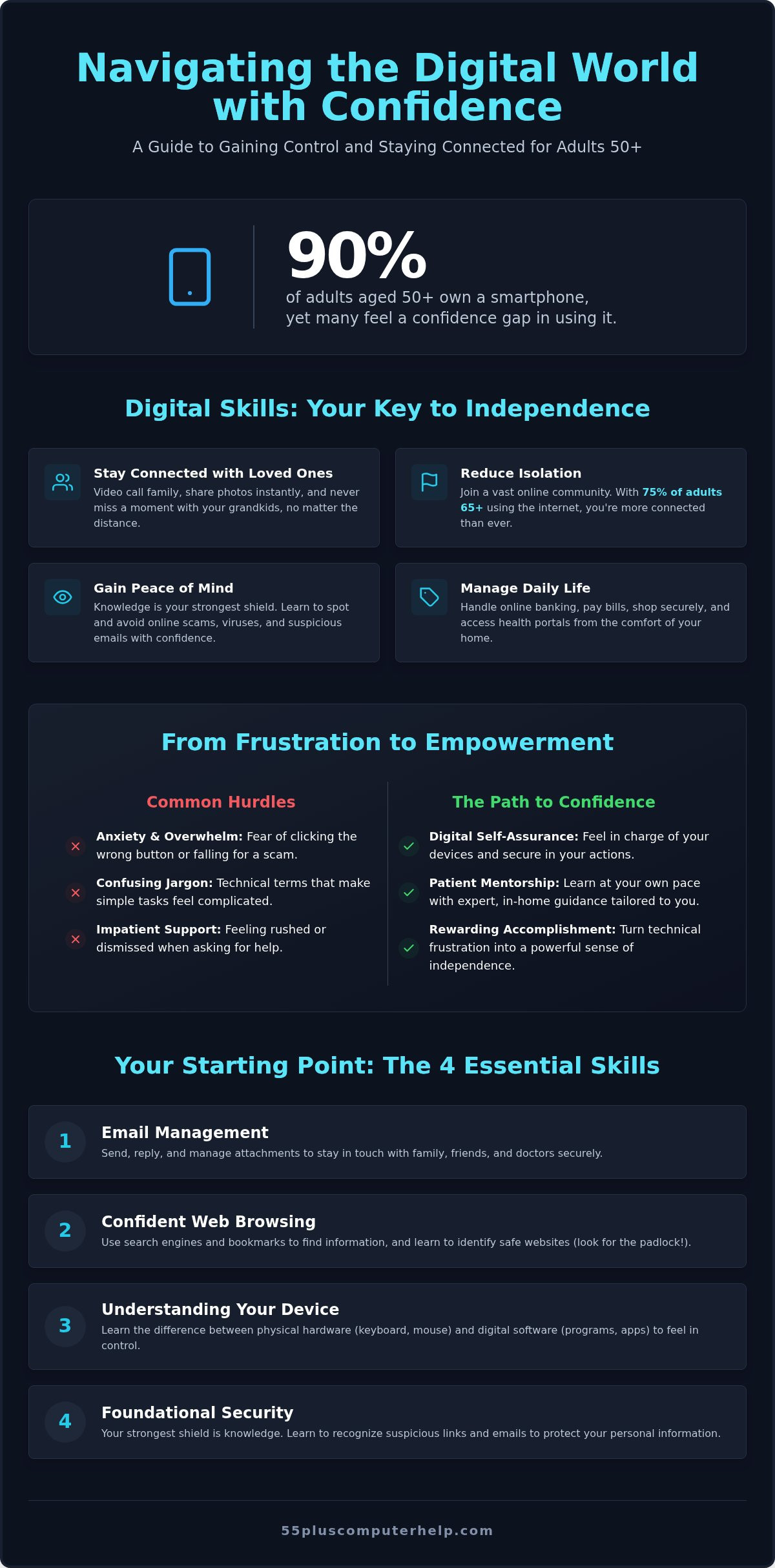
90% of adults aged 50 and older now own a smartphone, yet many still feel a confidence gap when it comes to using their devices for more than just the basics. It's common to feel a bit of anxiety about clicking the wrong button or falling for an online scam. If you're seeking patient, in-home computer support, you likely want a trusted hand to help you get started. You don't have to deal with impatient tech support or confusing jargon that makes you feel overwhelmed.
At 55 Plus Computer Help LLC, we understand that technology should be a bridge to your loved ones, not a source of stress. You can learn to manage your emails, share photos, and video call your grandkids with complete independence. This guide will help you navigate the digital world safely and with the self-assurance you deserve. We'll walk through the best ways to secure your personal information, stay connected with family, and finally feel like you're the one in charge of your devices.
Key Takeaways
- Digital literacy is a powerful tool that helps you stay connected with your family and enjoy your independence.
- You can feel secure online by learning how to recognize common scams and protect your personal information.
- Professional help for your in-home computer setup denver ensures you receive patient, expert guidance tailored to your specific needs.
- Focusing on the most important skills like email and web browsing builds a solid foundation for all your digital activities.
- Learning at your own pace with a patient mentor turns technical frustration into a rewarding sense of accomplishment.
Why Digital Literacy is the New Key to Senior Independence
Digital literacy isn't just about knowing how to turn on a device. It's about having the skills to find, evaluate, and communicate information online effectively. For many, What is Digital Literacy? is the first question on the path to freedom. When you understand how to use your computer, you aren't just using a machine. You're opening a door to the world. A professional in-home computer setup denver provides the foundation you need to handle daily tasks on your own terms.
Mastering technology is one of the best ways to reduce feelings of isolation. With 75% of adults aged 65 and older using the internet, you have a massive community waiting to connect. Video calls allow you to see your family’s smiles and watch your grandkids grow, even if they live miles away. This visual connection is much more personal than a standard phone call. Beyond social ties, technology helps you manage your physical health. You can use online pharmacy services to order refills or log into health portals to review your medical history. It's a faster, more efficient way to stay on top of your well-being.
Financial independence is another major benefit. Computers empower you to manage your banking and shop safely from your living room. You can pay bills, track spending, and find the best prices on household items without leaving home. This convenience saves time and energy, giving you more hours to enjoy the things you love.
Bridging the Generational Gap
Your family likely uses smartphones and computers to share their lives. When you know how to use these tools, you can enjoy instant photo sharing with your grandchildren. You won't have to wait for the next holiday to see what they've been up to lately. Staying current with family group chats and social media platforms keeps you in the loop of daily events. It also allows you to build a lasting record of your own life. A digital legacy is the preservation of your family stories and photos for future generations to enjoy.
Technology as a Tool for Safety
The number one fear for many seniors is getting a virus or being scammed. It's a valid worry, but knowledge is your strongest shield. Being tech-savvy is the best defense against predatory phone and email scams that target the unwary. Most online trouble starts when a user is tricked into clicking a suspicious link. When you learn how to spot these red flags, you gain incredible peace of mind. You'll know how to verify information independently rather than trusting every pop-up or email that appears. This confidence ensures you stay secure and in control of your digital life.
Essential Computer Skills for Seniors: Where to Start
Learning a new skill takes time, but it's completely possible at any age. We focus on the Big Four skills to give you a strong start. These include email, web browsing, file management, and security. Understanding the difference between hardware and software makes everything else easier. Hardware is the physical equipment you can touch, like your keyboard and monitor. Software is the set of programs that live inside the machine. These programs allow you to write letters, play games, or view family pictures.
Control is the key to confidence. Using a mouse or trackpad accurately is a fundamental skill. It allows you to select exactly what you want on the screen. Many people feel frustrated when the cursor jumps around too quickly. When you schedule an in-home computer setup denver, we can adjust your settings for you. We make sure the mouse speed matches your hand movements, which reduces stress and mistakes.
Managing Your Digital Mailbox
Think of email as your personal digital mailbox. It's a wonderful tool for staying in touch with friends and family. You'll learn how to send messages, reply to others, and keep your inbox organized. Managing attachments is another important part of this skill. This includes opening photos from grandkids or reading medical documents from your doctor. Always ensure you only open attachments from trusted sources. If you want to dive deeper into this topic, our Email Setup and Troubleshooting for Seniors guide offers step-by-step help.
Navigating the Internet with Confidence
The internet is a vast library of information. Search engines help you find exactly what you're looking for, whether it's a new recipe or a local news story. You don't have to worry about getting lost if you use bookmarks. Bookmarks save your favorite websites so you can visit them with a single click. A Pew Research Center study on tech adoption shows that internet use is growing rapidly among older adults. Safety is always a priority when you're browsing. Look for the small padlock icon next to the website address. This icon tells you that the connection is secure and your privacy is better protected. Getting an in-home computer setup denver helps you practice these skills with a mentor by your side. If you're feeling stuck, scheduling a lesson can help you master these basics in the comfort of your own home.
Staying Safe Online: Protecting Your Privacy and Peace of Mind
Online safety is often the biggest concern for new computer users. In 2025, Americans aged 60 and older reported over $7.7 billion in losses to internet fraud. This number is high, but you don't have to be a victim. Most people worry that a hacker will break into their machine like a physical burglar. In reality, most digital trouble starts with a simple trick. A scammer might send an email that looks like it's from your bank or a government agency. They want you to click a link or download a file. If you don't click, they can't get in. During an in-home computer setup denver, we show you exactly how to spot these traps in your own inbox.
Identifying these suspicious emails, also known as phishing, is a skill anyone can learn. Scammers rely on fear to make you act quickly. They want you to feel panicked so you don't think clearly. Look for these red flags to stay safe:
- Messages that sound very urgent or use threatening language.
- Requests for your password, social security number, or bank details.
- Spelling errors or strange-looking sender addresses that don't match the company name.
- Links that look unusual when you point your mouse at them.
If you ever feel that your security has been compromised, don't panic. Professional virus and malware removal can clean your system and restore your peace of mind. It's always better to ask for help than to worry in silence.
The Golden Rules of Internet Safety
Following a few simple rules can prevent most online problems. First, never give out passwords or social security numbers via email or pop-up windows. Legitimate companies will never ask for this information in that way. Second, if a pop-up says your computer is infected, it is likely a lie. These are fake warnings designed to sell you useless software. Third, when in doubt, just shut the computer down. Turning off the power stops any active connection and gives you time to call a professional mentor for advice.
Smart Password Management
Passwords are your first line of defense against intruders. Simple passwords like "password123" are dangerous because they are easy to guess. You can create secure passwords by using a short, memorable sentence instead. You might also consider using a password manager or keeping a simple, safe physical log in your home. An in-home computer setup denver can include a lesson on how to store these safely. Finally, remember that software updates are actually security patches. These updates fix holes in your programs to keep your system safe from new threats.
Training vs. Troubleshooting: Finding the Right Tech Support
Finding the right support system makes the difference between feeling capable and feeling defeated. Most people start by asking a family member for help. While your children or grandchildren love you, they often lack the patience to teach effectively. They might fix the problem in seconds without explaining how they did it. This leaves you just as confused as before the fix. Big box store employees often use technical language that sounds like a foreign tongue. Professional specialists are different because they combine technical skill with a genuine desire to teach. When you arrange an in-home computer setup denver, you're investing in a mentor who respects your learning process.
It's also vital to know if you need troubleshooting or training. Troubleshooting is a reactive service used when a device stops working correctly. If your printer won't connect or your screen goes black, you need a fix. Training is a proactive choice to expand your horizons. It's about learning how to use new programs or exploring the internet safely. A specialized partner can handle the immediate repair and then transition into a lesson. This ensures you feel confident handling the same issue if it ever happens again.
Why Specialized Senior Support Matters
Specialized support focuses on the unique needs of the 55+ community. We use a Patient Mentor approach that avoids the high-pressure environment of corporate tech support. This means we move at your speed and encourage every question you have. We also look at the physical aspects of using technology. For example, we can adjust screen brightness or mouse sensitivity to make your computer more comfortable to use. This personalized care ensures your technology fits your life perfectly rather than forcing you to adapt to the machine.
In-Home vs. Remote Support
Both in-home and remote services play a role in your digital success. In-home visits are ideal for physical tasks like your initial in-home computer setup denver or connecting a smart home device. It allows for a hands-on experience where you can see exactly how cables and hardware work together. Remote support is a faster option for software-related questions. A mentor can securely view your screen from a distance to help with email issues or program updates. 55 Plus Computer Help LLC offers both options to provide a complete safety net for all your needs. If you're ready to move past frustration, professional troubleshooting and training can help you master your devices with ease.
Empower Your Digital Journey with 55 Plus Computer Help LLC
Technology should work for you, not the other way around. 55 Plus Computer Help LLC is more than just a technical support service; we are your neighbors and your mentors. We know that every person has different goals for their digital life. Perhaps you want to organize a lifetime of family photos, or maybe you simply want to feel safe while checking your bank balance. We don't follow a rigid classroom curriculum that might cover things you already know. Instead, we listen to your specific needs and build our sessions around what you want to accomplish today.
Our work covers a wide range of essential services, from virus and malware removal to printer setup and software updates. If you need an in-home computer setup denver, we handle the heavy lifting so you can focus on the fun parts of learning. We also offer specialized smartphone and tablet training for those who prefer mobile devices. Our no-jargon guarantee means we explain every step in plain, everyday language. You'll never feel talked down to or rushed during our time together. We believe that when you understand how a tool works, you lose the fear of using it.
One-on-One Personalized Lessons
A lesson with 55 Plus Computer Help LLC is a relaxed and productive experience. We sit with you at your own desk, using the equipment you already own. There's no need to spend money on expensive new hardware when your current machine just needs a little fine-tuning and a patient teacher. We can help you master social media to see updates from old friends or show you how to use Zoom for your next club meeting. Because it's one-on-one, you get our full attention for the entire hour. This individual focus allows us to answer every question thoroughly until you feel completely confident.
Getting Started is Simple
We've made the process of getting professional help as easy as possible. You can choose an onsite visit for hands-on tasks or a remote session for quick software fixes and email questions. Whether you need a comprehensive in-home computer setup denver or a simple lesson on managing your digital files, we are ready to assist. Our mission is to give you the digital skills and the self-assurance you deserve. You should feel empowered every time you open your laptop or pick up your phone. Schedule your patient tech support session today and start enjoying your technology with total peace of mind.
Take Control of Your Digital World Today
The digital world moves fast, but you have the power to keep pace on your own terms. By focusing on the essential skills and safety habits discussed in this guide, you've already started building a stronger foundation for your independence. Whether you are managing your medical records or simply sharing a laugh with family online, these tools belong to you. An in-home computer setup denver is the first step toward a more connected and secure life where you feel truly in charge of your devices.
Since 2014, 55 Plus Computer Help LLC has specialized exclusively in the unique technology needs of the 55+ community. We pride ourselves on providing patient, jargon-free instruction that transforms technical confusion into lasting clarity. You don't need a background in engineering to master your tablet or laptop; you just need a trusted mentor who speaks your language. Empower your digital life with patient, professional help from 55 Plus Computer Help LLC. Your journey toward technical confidence starts with a single click, and we are honored to walk that path with you.
Frequently Asked Questions
Is it too late for me to learn how to use a computer or tablet?
It is never too late to learn how to use a computer or tablet. According to a 2025 report, 78% of Americans aged 65 and older now own a smartphone. Learning is about finding the right teaching style that respects your pace. Our patient mentors focus on your specific interests to make the process rewarding. You can quickly gain the skills to stay connected with your family and manage daily tasks.
How do I know if an email is a scam or a real message from my bank?
You can identify a scam by looking for a few key red flags. Real banks will never ask for your password or social security number through an email. Scammers often use urgent language to make you feel panicked. Look for these signs:
- Strange sender addresses
- Spelling errors
- Urgent threats
Can you help me with my specific tablet or smartphone, too?
Yes, we provide personalized training for all your digital devices. This includes smartphones and tablets as well as traditional computers. Many people find it helpful to learn how to see photos of grandkids on an iPad. Whether you need a full in-home computer setup denver or just a quick lesson on a new app, we tailor the session to your needs. We move at a pace that makes you feel comfortable.
What happens if I click the wrong thing and accidentally break the computer?
It is very difficult to physically break a computer just by clicking on the screen. Most mistakes lead to software issues that a professional can easily fix. If you feel lost, you can always turn the machine off and start over. We teach you how to navigate menus safely so you feel more in control. Learning how to undo a mistake is a big part of building your digital confidence.
Do I need to buy a special senior computer or can I use my current one?
You do not need to buy a special computer designed only for seniors. We believe in helping you master the devices you already own. Most standard computers have settings that make them easier to use, such as larger text. Using your current machine saves you money and prevents the stress of learning a new system. We can adjust these settings during an in-home computer setup denver to ensure your comfort and confidence.
Is remote tech support safe for seniors to use with a professional?
Remote tech support is a very safe and efficient way to get help. We use secure screen-sharing software that allows a mentor to see your screen and fix software issues. You are always in control and can end the session at any time. This method is perfect for quick questions about email or software updates. It provides immediate assistance without the need for a physical visit to your home.
How much do personalized computer lessons for seniors typically cost?
We provide transparent hourly rates for both onsite and remote assistance. These fees cover the time spent diagnosing issues or providing one-on-one training. Because every person has different goals, we don't use a one-size-fits-all pricing model. You only pay for the time you need to reach your specific goals. This approach ensures you get high-quality, personalized support that fits your budget and learning style perfectly.
Can you help me set up a new printer or Wi-Fi router at home?
Yes, we can certainly help you with these tasks. Our services include printer setup and internet troubleshooting to ensure your home office works correctly. We make sure your Wi-Fi router is secure and all your devices connect without any trouble. Having a professional handle the setup prevents future technical headaches. We also show you how to perform basic tasks like loading paper or checking your connection status so you feel independent.


