
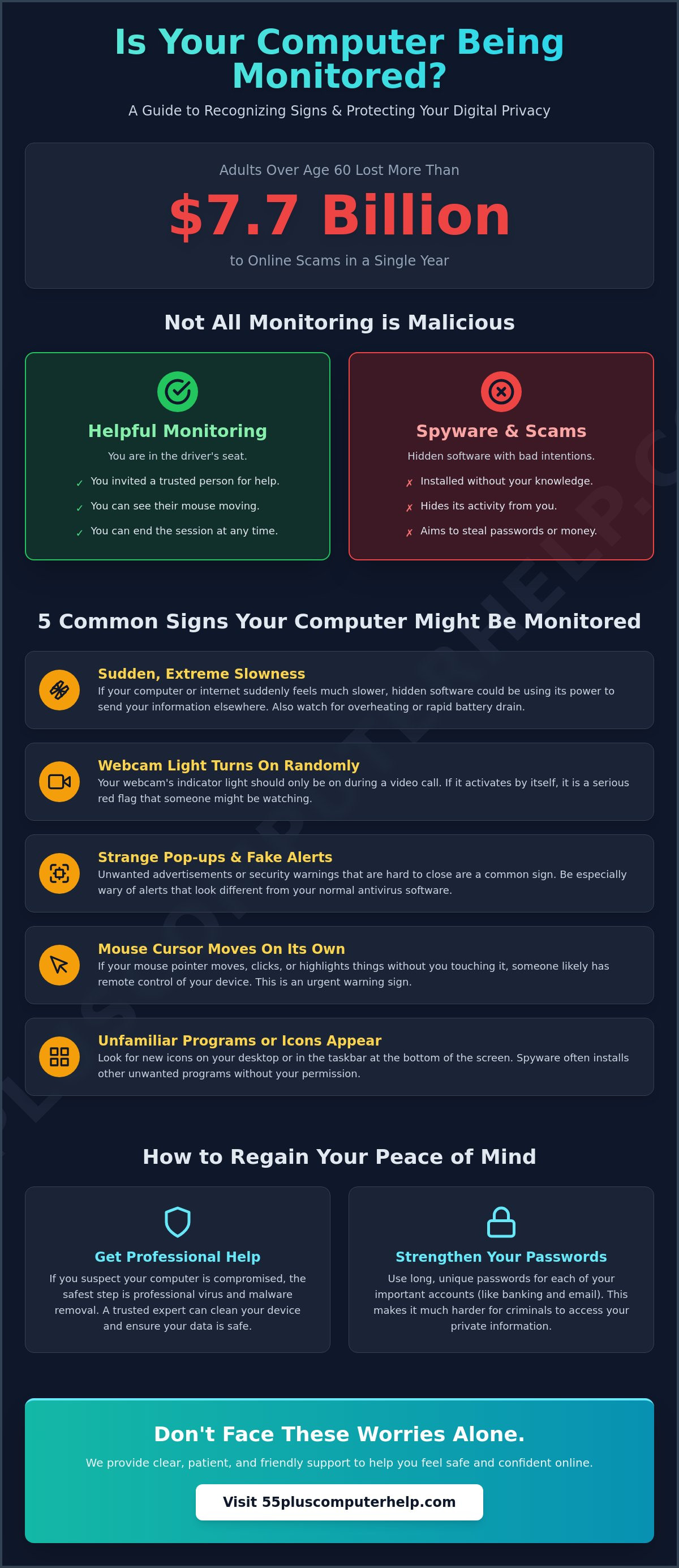
Adults over the age of 60 lost more than $7.7 billion to scams in 2025. This record high number explains why so many people are asking, "is my computer being monitored?" It is perfectly normal to feel a bit of anxiety when your device acts in ways you don't expect. You value your independence and your privacy, so the thought of a stranger looking at your screen is naturally upsetting. We know that technical talk can often feel like a foreign language, but you don't have to face these worries alone.
We are here to help you find peace of mind. You will learn how to identify the signs of computer monitoring and how to regain your privacy with simple, patient steps. This guide avoids confusing jargon and focuses on clear actions you can take today. We will explain what is normal for your computer versus what is actually suspicious. You will finish this article with a better understanding of your digital security and the confidence of knowing who to call for local, friendly support.
Key Takeaways
- Learn the difference between helpful software and actual surveillance to understand how your privacy is protected.
- Discover how to answer the question, "is my computer being monitored" by identifying signs like sudden slowness or strange pop-up windows.
- Find out how to use simple tools like the Task Manager to see exactly which programs are running on your screen right now.
- Understand why loud security alerts are usually fake scams, while real monitoring software often tries to stay quiet and hidden.
- Get clear advice on how to regain your peace of mind through professional virus and malware removal and better password habits.
Understanding Computer Monitoring in Simple Terms
It is natural to wonder if your digital life is truly private. In 2026, many people ask, "is my computer being monitored?" because they see things on their screen they do not recognize. To put it simply, computer monitoring happens when a piece of software records what you do or lets another person see your screen from a different location. This can feel like an invasion of your home, but understanding how it works is the first step toward feeling safe again.
Your computer is a personal space. It holds your family photos, private emails, and bank details. It should feel as safe as your own living room. It is important to know that not every strange glitch means a "hacker" is in your system. Often, what feels like spying is just aggressive advertising software that got installed by mistake. For a broader look at the history and technical side of this topic, you can read more about what computer monitoring is via Wikipedia. It is very common to feel concerned about your privacy these days, and your feelings are completely valid.
The Difference Between Good and Bad Monitoring
Monitoring is not always a bad thing. If you have ever called a family member or a trusted professional for help, they might have used "remote access" to fix a printer or update your software. This is helpful monitoring because you gave permission and you can see exactly what they are doing. You remain in the driver's seat. Here are a few ways to tell the difference:
- Helpful Monitoring: You invited the person to help, you can see their mouse moving, and you can end the session at any time.
- Spyware: This is software that hides on your computer without your knowledge. Its goal is to steal information like passwords or credit card numbers.
The most important rule is that you should always be the one in control of who sees your screen. If you didn't ask for help, no one should be looking in.
Why Seniors Are Often Targeted
Scammers often use "scare tactics" to trick people. They might send a pop-up message that screams about a virus to make you believe your computer is being watched. In 2025, older adults filed over 200,000 complaints about cybercrime, which was more than any other age group. These criminals hope that the fear of a compromised device will lead you to call a fake support number. Many unwanted programs also get installed by accident while you are downloading a recipe or a digital book. Spyware is a type of software that tracks your clicks without permission. Asking "is my computer being monitored" is a smart first step toward protecting your digital home and keeping your independence.
5 Common Signs Your Computer Might Be Monitored
Computers can be unpredictable. Sometimes they run slowly because of a software update or a weak internet connection. However, when multiple strange things happen at once, you might start to worry. You may ask yourself, "is my computer being monitored?" Learning these signs will help you stay in control of your device. It is often about trusting your intuition when your technology begins to act differently than it did yesterday.
One of the most common signs is a sudden change in speed. If your computer or internet feels much slower than usual, it could be because hidden software is working in the background. This software uses your computer's power to send information to another location. You might also notice your computer feels unusually hot to the touch or the battery drains in just an hour. These are physical clues that your device is working harder than it should. If you feel uneasy about these changes, our team can help with professional computer setup and checkups to ensure everything is running correctly.
Another warning sign is the behavior of your webcam. Most cameras have a small light that glows when the lens is active. If that light turns on when you are not on a video call, it is a clear signal to take action. You should also watch for strange pop-up windows. If you see advertisements or warnings that will not go away even after you click the "X," it is likely that unwanted software has found a home on your machine.
Visual Clues on Your Screen
Your screen often provides hints about what is happening behind the scenes. Take a look at your taskbar, which is the strip at the bottom of your screen. Do you see any new or unfamiliar icons there? Some monitoring programs will place a small symbol there while they run. You should also watch for programs that start up automatically the moment you turn on your computer. Finally, be very wary of "security alerts" that look different from your usual antivirus software. These are often fake messages designed to trick you into clicking a dangerous link.
Behavioral Red Flags
Sometimes the signs are more active and easier to spot. It is very alarming to see your mouse cursor move on its own without you touching it. This usually means someone has remote access to your device. You should also check your "Sent" folder in your email occasionally. If you find messages there that you did not write, your account may be compromised. Another red flag is your search engine. If you usually use Google but suddenly find yourself on a strange, cluttered website, your browser settings might have been changed. Following online safety tips from trusted sources can help you prevent these issues before they start. Knowing what to look for is the best way to answer the question, "is my computer being monitored?" and regain your peace of mind.
How to Check for Unusual Activity Yourself
Taking a look under the hood of your computer might sound scary, but it is actually quite simple. You have the power to see exactly what your device is doing at any moment. If you are still asking "is my computer being monitored," the best way to find an answer is to use the tools already built into your system. These tools are designed to show you which programs are active and how much energy they are using. You don't need to be a technical expert to perform these basic checks.
Using the Task Manager Safely
The Task Manager is a helpful list of every task your computer is currently performing. You can open it easily by right-clicking the taskbar, which is the long strip at the very bottom of your screen. A small menu will appear. Click on "Task Manager" to see the window. Once it is open, look for the "Processes" tab. This tab shows you every program that is running right now.
You should pay attention to the columns labeled "CPU" and "Network." CPU represents the brain power of your computer. Network represents your internet usage. If you see an icon you don't recognize using a high percentage of these resources, it might be worth a closer look. However, please remember to be patient with yourself. Do not click "End Task" unless you are certain what the program is. Many essential system tasks have strange names, and stopping them could cause your computer to restart or behave poorly.
Reviewing Your Applications
Next, you should check the list of programs installed on your computer. You can find this in your Settings menu under "Apps" or "Installed Apps." A very helpful trick is to sort this list by "Date Installed." This allows you to see the most recent additions to your computer. If you see a program that appeared on a day you weren't actively installing anything, it deserves your attention.
Keep a sharp eye out for specific names like "Remote Desktop," "VNC," or "TeamViewer." While these are legitimate tools used by real technicians, they should not be on your computer unless you specifically asked for them. Many monitoring tools use names that sound like helpful "System Utilities" to blend in with your normal files. Checking these lists regularly helps you answer the question, "is my computer being monitored?" with confidence. You can also look at your browser extensions in your internet settings. If you see a name you don't recognize there, it is often best to remove it to keep your browsing private and secure.
Scams vs. Actual Monitoring: What You Need to Know
It can be very frightening when a loud siren or a bright red box suddenly appears on your screen. You might see a message claiming that your device is infected or that your files are being deleted. These messages often make people ask, "is my computer being monitored?" The truth is that these loud warnings are almost always a "Tech Support Scam." Scammers use these alerts to create a sense of panic. They want you to believe you are in trouble so that you will follow their instructions without thinking.
There is a major difference between a real security threat and a scam. Real security threats usually try to stay very quiet and hidden. A person who is actually monitoring your computer does not want you to know they are there. They want to watch your activity in secret. On the other hand, scammers want to scream for your attention. They want you to believe they are a "trusted expert" who has caught a hacker for you. They do this to gain your trust and eventually your money. If you are worried that your device has been compromised by one of these scams, we offer Virus and Malware Removal to help you feel safe again.
Identifying Fake Security Alerts
You can often spot a fake alert just by looking closely at the details. Real companies like Windows or Apple will never put a phone number in a security alert. They will never ask you to call them to "unlock" your computer. If you see a phone number on a pop-up window, it is a scam. Fake alerts also tend to have spelling errors or use very urgent, scary language that doesn't sound professional. Sometimes, a scam window will fill your entire screen and won't let you click away. This is a common trick used to make you feel trapped, but it does not mean your hardware is broken.
What to Do if You See a Scary Pop-up
The best thing you can do is stay calm and take your hands off the keyboard for a moment. Close your web browser immediately. If the window will not close, you can simply restart your computer by holding down the power button. This usually clears the fake alert away. Most importantly, you should never call the phone number on the screen or give your credit card information to anyone who calls you out of the blue. You can read our guide on virus and malware removal for more safety tips on how to handle these situations. Remember, a loud computer is usually just a scammer trying to trick you, while a silent computer is much more likely to be secure.
Taking Back Your Privacy and Peace of Mind
Once you have identified the signs of trouble, the next step is to take action. You can stop asking "is my computer being monitored" by putting strong defenses in place. Your peace of mind is worth the effort, and most of these steps are quite simple to maintain once you get started. You deserve to feel confident every time you turn on your device. By following a few methodical steps, you can transform your computer back into a private and secure tool for your daily life.
One of your best defenses is keeping your software updated. When companies like Microsoft or Apple release an update, they are often fixing "holes" that scammers use to get inside. It is a good habit to let these updates install as soon as they are available. You should also focus on your passwords. Using a unique password for every account acts like a deadbolt on your digital doors. If you use the same password everywhere, a scammer only needs to guess it once to gain access to everything. Strong passwords prevent remote access and keep your personal information where it belongs.
Professional Help for a Fresh Start
Sometimes, a standard scan is not enough to catch every threat. A professional virus and malware removal service provides a deep cleaning that goes beyond the surface. Technicians look for hidden programs called "rootkits." These are specialized tools that bury themselves deep inside your computer's system files to avoid being seen. Standard antivirus software might miss these, but a trained expert knows exactly where they hide.
An in-home visit is often the most reassuring way to handle these concerns. A local expert can check your computer, your tablet, and even your Wi-Fi router to ensure your entire home network is secure. This personalized approach allows you to ask questions in a comfortable environment. A clean computer feels faster, safer, and more reliable. It removes the nagging worry that someone is watching, allowing you to enjoy your technology again without hesitation.
Simple Habits for Ongoing Safety
You can also use physical tools to boost your sense of security. A "webcam cover" is a small plastic slide that blocks your camera lens when you are not using it. This provides instant, physical peace of mind because no one can see through a covered lens. You should also learn to recognize "phishing" emails. These are fake messages that try to trick you into clicking a link that installs monitoring software. They often look like they come from your bank or a package delivery service.
If you feel overwhelmed by your inbox, you can reach out for email setup and troubleshooting to ensure your accounts are locked down. Learning these habits is a form of empowerment. Personalized technology training helps you understand what is normal and what is suspicious. You don't have to be a computer whiz to stay safe; you just need a few reliable habits and a trusted expert to call when things feel off. Taking these steps ensures that you remain the only person in control of your digital world.
Enjoying a Secure and Private Digital Life
You have learned how to spot the difference between a loud technical support scam and actual monitoring software. By checking your Task Manager and keeping your software updated, you are already taking control of your privacy. It's perfectly normal to still have questions when you ask, "is my computer being monitored?" Technology changes quickly, but you don't have to stay updated on every single detail by yourself.
We have been a trusted resource for seniors since 2014. Our team provides patient, jargon-free support that focuses on your comfort and security. We are specialized in virus and malware removal to ensure your device is completely clean and reliable. You can Get a patient, professional security check for your computer today to remove any lingering doubts. We believe that everyone deserves to feel safe while using their favorite devices.
Your computer should be a source of joy and connection, not a source of worry. With the right habits and a little bit of help, you can browse the internet with absolute confidence. You have the tools and the support you need to keep your digital home safe. You are in control, and we are always here to help you stay that way.
Frequently Asked Questions
Can someone see me through my computer camera without me knowing?
It is technically possible for malicious software to activate your camera without your knowledge. Most webcams have a small light that glows when the lens is active. However, some advanced programs can bypass this light to stay hidden. Using a simple, physical webcam cover is the most reliable way to ensure your privacy and give you peace of mind.
Is it possible for someone to monitor my computer through my Wi-Fi?
It is possible for someone to see your online activity if your Wi-Fi network is not properly secured. If your home wireless network doesn't have a strong, unique password, others might be able to join it and see which websites you visit. Always ensure your router uses modern encryption and a complex password to keep your browsing habits private from neighbors or strangers.
Does a slow computer always mean I am being monitored or hacked?
No, a slow computer does not always mean someone is watching you. Computers often slow down because of large software updates, too many open programs, or an old hard drive that is running out of space. While sudden slowness is a sign to check your settings, it is frequently just a result of normal maintenance tasks or aging hardware.
How do I know if a "Security Alert" on my screen is real or a scam?
Real security alerts from Windows or Apple will never include a phone number or ask you to pay for help. If an alert uses scary language or tells you to call a technician immediately, it is a scam. Genuine alerts usually happen quietly within your official antivirus software or through your computer's built-in notification center.
Can my family members monitor my computer without my permission?
Yes, family members can use remote access tools to see your screen if they have installed them in the past. While they usually do this to help you fix a printer or update an app, you should always know when these programs are active. You can ask your family to show you how to turn these tools off when they aren't actively helping you.
What is the first thing I should do if I think I am being watched?
The first thing you should do is disconnect your computer from the internet. You can do this by turning off your Wi-Fi or unplugging the internet cable from the back of the machine. This immediately stops any remote connection from the outside world. Once the computer is offline, you can safely look for unusual programs without a stranger watching your moves.
Will antivirus software stop all types of monitoring programs?
Reputable antivirus software stops the majority of common monitoring programs and spyware. However, some specialized tools are designed to hide deep within your system where standard scans might not look. This is why it is helpful to have a professional check your device occasionally to ensure your security software is updated and working at its best.
Can someone see my passwords if they are monitoring my computer?
If a malicious person has full access to your device, they might be able to see what you type, including your passwords. This is why many people ask, "is my computer being monitored" when they notice strange activity on their bank or email accounts. Using two-factor authentication adds an extra layer of safety because it requires a code from your phone to log in, even if someone knows your password.


