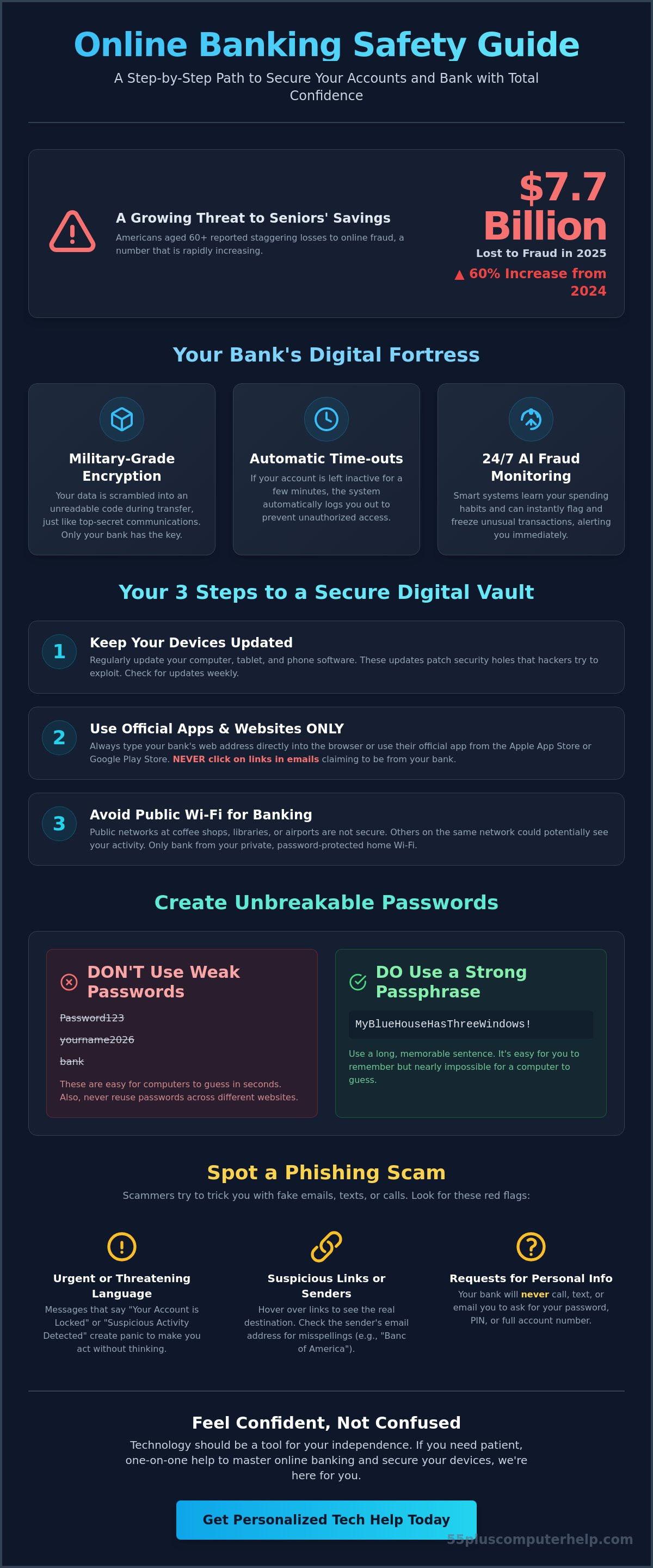
Americans aged 60 and over reported $7.7 billion in losses to online fraud in 2025, which was a 60% increase from the year before. It's a number that can feel quite scary, especially when you've worked your whole life for your savings. You might feel a bit anxious about clicking the wrong link or feel overwhelmed by terms like multi-factor authentication. This online banking safety guide for seniors is here to help you move past that fear. We believe that technology should be a tool for your independence, not a source of stress.
You can learn to manage your money online with total confidence. This guide provides a patient, step-by-step path to secure your accounts and protect yourself from modern scams. We'll show you how to set up your computer correctly and how to spot a fraudster immediately. You'll soon be able to check your balances and pay your bills from home with true peace of mind. Let's start this journey together so you can bank with certainty in 2026.
Key Takeaways
- Use this online banking safety guide for seniors to learn how bank encryption protects your transfers just like a secure vault.
- See why using official apps and clean devices is the most important step for a worry-free banking experience.
- Master the signs of a phishing scam so you can identify fake emails and suspicious phone calls with total confidence.
- Learn why regular software updates are essential for keeping your personal information private and your computer running safely.
- Discover how patient, one-on-one technology training can help you feel comfortable performing your first online transfer.
Understanding Online Banking Safety: Why It Is Secure for Seniors
Online banking safety isn't just a technical term. It's a partnership between your bank's advanced technology and your own daily habits. Many people feel nervous about digital money, but the system is built with multiple layers of protection. A helpful starting point is Understanding Online Banking and how it has evolved to become a secure fortress for your finances. This online banking safety guide for seniors explains that your money is often safer in a digital vault than in a physical wallet.
Banks now use the same high-level encryption that the military uses to protect top-secret communications. This means your data is scrambled into a code that nobody else can read. As of April 2026, new federal rules from the Consumer Financial Protection Bureau give you even more control over your data. These regulations ensure that your bank must follow strict security standards to keep your information private. If an unauthorized charge does happen, federal laws generally protect you from losing your money if you report it quickly.
How Your Bank Protects Your Information
Your bank uses several invisible tools to keep you safe. First, encryption acts like a digital shredder for your information. It turns your password and account numbers into a jumbled mess of symbols while they travel across the internet. Only the bank has the "key" to put the pieces back together. Under the updated 2026 FTC safeguards, all financial institutions must use this encryption for your data at all times.
Automatic time-outs are another vital feature. If you get distracted by a phone call and leave your computer, the bank will automatically log you out after a few minutes. This prevents anyone else from seeing your screen. Additionally, banks now use advanced AI to monitor your accounts 24/7. These systems learn your normal spending patterns. If a strange purchase appears from a different state or country, the bank can freeze the transaction and text you a fraud alert immediately.
The Benefits of Banking from Your Living Room
Using this online banking safety guide for seniors helps you reclaim your time and energy. You no longer need to drive to a branch in bad weather or stand in long lines. You can check your balance every morning from your favorite chair. This real-time access helps you spot mistakes or "junk fees" right away. It's much easier to manage a budget when you can see exactly where your money goes each day. Digital statements also make tax season much simpler. You can download and save your records in seconds, which keeps your home office organized and clutter-free.
A Step-by-Step Guide to Setting Up Your Secure Digital Vault
Setting up your digital workspace is the first step toward security. Think of your computer or tablet as a private office. You wouldn't invite a stranger into your office to watch you pay bills. Before you even visit your bank's website, make sure your device is ready. A clean device means your software is completely up to date. These updates often fix tiny holes that hackers try to use. This online banking safety guide for seniors recommends checking for updates every week to keep your digital vault strong.
Always use the official path to reach your bank. You can type the bank's address directly into your browser or use their official app from the Apple App Store or Google Play Store. Avoid clicking links in emails that claim to be from your bank. These are often tricks to steal your login info. The Washington State guide to internet safety explains how scammers use these fake notices to target older adults. By going directly to the source, you stay in control of your information.
Public Wi-Fi is another area where you should be careful. It's tempting to check your balance while at a coffee shop or the library. However, public networks are often not secure. Other people on the same network might be able to see what you are doing. It's much safer to wait until you are home on your private, password-protected Wi-Fi. If you feel unsure about your home connection, you can get help with internet and Wi-Fi troubleshooting to ensure your network is private and secure.
Creating Passwords You Can Remember (But Hackers Cannot)
A great way to stay safe is to use a passphrase. Instead of a single word like "Password123", try a long sentence. For example, "MyBlueHouseHasThreeWindows!" is very hard for a computer to guess but easy for you to remember. Never use the same password for your bank that you use for Facebook or your email. If one site has a problem, your bank stays safe. A password manager acts like a digital safe for all these long sentences. It stores them securely so you don't have to write them on a piece of paper near your computer.
The Power of Multi-Factor Authentication (MFA)
Think of Multi-Factor Authentication as the second lock on your front door. Even if someone steals your key, they still can't get in without the second code. When you log in, the bank sends a short code to your phone. You type that code in to prove it's really you. Most banks let you turn this on in your security settings. It's a small extra step that provides a huge amount of safety. This is a core part of any online banking safety guide for seniors because it stops almost all unauthorized access.
Identifying and Avoiding Common Online Banking Scams
Scammers work hard to create clever tricks, but you can learn to see right through them. The most important rule to remember is that your bank will never ask for your password or PIN over the phone or in an email. They already have the tools to verify who you are. If someone calls and asks for your login details, it's a scam. This online banking safety guide for seniors is designed to help you stay one step ahead of these bad actors.
Criminals often use the "urgency trap" to make you act without thinking. They might say your account is frozen or that a large, fraudulent purchase was just made. They want you to panic. When we feel rushed, we're more likely to make a mistake. Real banks will always give you time to verify information. Another common trick is "spoofing." This is when a criminal makes their phone number look like your bank's official number on your Caller ID. Don't trust the name on the screen. It's always safer to hang up and call back using a trusted number you find on your monthly statement.
Spotting Fake Emails and Text Messages
Fake emails, or "phishing," often have small clues that give them away. Look closely at the sender's email address. A real bank email won't come from a random string of numbers or a public service like Gmail. You should also look for generic greetings. If an email starts with "Dear Customer" instead of your actual name, be very suspicious. You can hover your mouse over any link without clicking it. This shows you the actual website address in the corner of your screen. If the address looks strange, don't click. For more tips on keeping your inbox clean, you can read our guide on identifying common internet scams.
What to Do if You Suspect a Scam
If something feels wrong, trust your gut. You have the power to end the conversation at any time. If you're on the phone, simply hang up. If you receive a suspicious text, don't reply. Go directly to your bank's official website or use their mobile app to check your balance. Reporting these attempts is also a great way to help others. Tell your bank about the call or forward the fake email to their security department. By taking these steps, you protect your own savings and help your community stay safe from fraud. In 2025, older adults lost $352 million to AI-related scams alone. Your awareness is your best defense.
Securing Your Devices for Worry-Free Banking
If your bank is a secure vault, your computer or smartphone is the key that opens the door. Keeping that key in good condition is vital for your financial health. Many people think software updates are just about new buttons or different colors. In reality, these updates are essential security patches that fix tiny holes in your system. This online banking safety guide for seniors emphasizes that a modern, updated device is your first line of defense. Using an old computer that no longer receives updates is a significant risk. Without current security support, your device cannot block the latest threats that hackers invent every day.
Antivirus software plays a quiet but heroic role in your daily life. It works in the background to block "keyloggers." These are nasty programs that record every letter you type, including your bank passwords and usernames. Good security software stops these programs before they can even start. When you are browsing the web, always look for the small padlock icon in the address bar next to the website name. This icon means the website uses encryption to protect your data while it travels. As of 2026, the FTC requires all financial institutions to use this encryption for your data both at rest and in transit. If you don't see that padlock, do not enter any personal information on that page.
Keeping Your Computer and Tablet Healthy
The easiest way to stay safe is to set your device to "Auto-Update." This means your computer will download and install security fixes automatically. It's one less thing for you to worry about. Malware is a general term for "malicious software" that is specifically designed to sneak onto your computer to steal your financial data. It can hide in attachments or fake downloads. If your computer starts acting slow or you see strange pop-ups, it might be infected. You can look into professional virus and malware removal to get your device back to a healthy and secure state.
Safeguarding Your Home Wi-Fi Network
Your home Wi-Fi should be a private sanctuary for your banking. Ensure your router has a strong, unique password that is different from your other accounts. You should avoid using "Free Wi-Fi" at coffee shops or airports for any banking tasks. These open networks are easy targets for criminals who want to peek at your digital activity. If you must bank while you are away from home, a Virtual Private Network (VPN) can help. A VPN acts like a private, encrypted tunnel for your data, keeping it hidden from everyone else on the network. If you want to make sure your home setup is as safe as possible, our team provides expert software installation and updates to keep you protected.
Gaining Confidence Through Personalized Technology Training
Reading a guide is a wonderful first step toward security. However, doing something for the first time is often where the real learning happens. It's normal to feel a bit shaky when you click that first "transfer" button on your own. A patient mentor can stand right by your side to offer encouragement and guidance. This hands-on practice turns a list of instructions into a real skill you can use every day. You'll find that your anxiety fades away when you have someone to answer your questions in real time.
The ultimate goal of this online banking safety guide for seniors is your total independence. You want to manage your finances on your own terms without having to wait for a family member to visit. Personalized training helps you move past the "fear factor" of modern technology. It transforms your computer or tablet from a source of stress into a tool for your freedom. You'll gain the pride that comes from knowing you can handle your own banking safely and securely.
One-on-One Lessons Tailored to Your Skill Level
Unlike a crowded classroom at a community center, one-on-one lessons move at your exact pace. You don't have to worry about asking too many questions or falling behind the rest of the group. We focus only on the specific tasks that matter to your life. If you only want to learn how to pay your monthly bills or deposit a check using your phone camera, that's exactly what we will practice. Together, we can build a customized "cheat sheet" of steps for your specific bank. This list stays right by your computer as a friendly reminder for whenever you need it.
Support When You Need It: Remote and In-Home Help
You can choose the type of help that makes you feel most comfortable. Some people prefer having a technician sit right at their desk for in-home training. This allows you to learn on the exact device you use every day. Others find that remote assistance is perfect for quick questions or simple troubleshooting. This specialized support ensures that you never feel alone when you use your devices. Whether you need help with your smartphone, tablet, or home computer, the focus is always on your comfort. Ready to bank with confidence? Schedule a personalized training session with 55 Plus Computer Help LLC today.
Take Control of Your Financial Future Today
You now have the tools to manage your money with total security. By keeping your devices updated and staying alert for common scams, you've already built a strong defense. This online banking safety guide for seniors has shown you that technology doesn't have to be intimidating. It's simply a new set of skills that you can master at your own pace. You can enjoy the convenience of banking from home while knowing your hard-earned savings are well-protected.
True confidence comes from practice and having the right support. 55 Plus Computer Help LLC has over 10 years of experience helping seniors navigate technology with ease. Our patient, non-judgmental mentors speak your language. We focus only on the personalized lessons you need. Whether you want to pay bills or check your balance, we're here to help you succeed. Empower your digital life with patient, senior-focused tech training from 55 Plus Computer Help LLC today. You deserve the freedom and peace of mind that comes with digital independence.
Frequently Asked Questions
Is online banking safer than visiting a bank branch in person?
Online banking is just as safe as visiting a branch, and it often provides faster security alerts. While physical branches have security guards, digital banking uses military-grade encryption and 24/7 AI monitoring to spot fraud instantly. You don't have to carry cash or paper checks in public, which reduces the risk of physical theft. This online banking safety guide for seniors helps you use these digital tools to stay secure without leaving your home.
Can someone hack my bank account if they only have my account number?
An account number alone is not enough for someone to log into your online banking. Criminals also need your unique password and your multi-factor authentication code to gain access. Your account number is often printed on paper checks, so it is not a secret key. However, you should still keep it private to prevent unauthorized paper-based transactions. Always protect your login credentials, as those are the real keys to your digital vault.
What happens if I accidentally click a link in a suspicious banking email?
Clicking a link is a concern, but you are usually safe if you didn't enter any information or download any files. Close your browser immediately and do not type anything into the page that opened. It's a good idea to run a security scan on your computer to check for hidden programs. If you feel worried about your device's health, professional virus and malware removal can provide peace of mind and ensure your system is clean.
Is it safer to use a banking app on my phone or the website on my computer?
Mobile banking apps are often considered slightly safer because they are harder for hackers to mimic than websites. Apps also allow you to use biometric features like your fingerprint for a secure login. Whether you use a phone or a computer, the most important step is keeping your device updated. This online banking safety guide for seniors recommends using whichever device you feel most comfortable with, provided it has the latest security software installed.
How often should I change my online banking password for maximum safety?
You only need to change your password if you suspect someone else has seen it or if a company you use has a data breach. Modern security experts suggest using a very long passphrase instead of changing a short password every month. A long, unique sentence is much harder for a computer to guess. If you use multi-factor authentication, your account remains very secure even if you keep the same strong passphrase for a long time.
What should I do if I lose my smartphone that has my banking app on it?
Call your bank right away so they can disconnect your lost phone from your accounts. You should also use another device to change your online banking password immediately. Most smartphones allow you to "find my phone" and wipe the data remotely. Since your banking app is protected by a password or your fingerprint, a stranger cannot easily open it. Taking these quick steps will keep your money safe while you replace your phone.
Are biometric logins like Fingerprint or Face ID safe for seniors to use?
Biometric logins are very secure because your fingerprint or face is unique to you and cannot be easily stolen like a written password. They also make banking easier since you don't have to remember a long string of letters and numbers every time you log in. This technology adds a strong layer of protection to your mobile app. It's a reliable and modern way to ensure that only you can see your financial information.
How can I tell if a banking website is legitimate or a fake copy?
A legitimate website will always have a small padlock icon next to the web address, which indicates a secure connection. You should also look closely at the website's address to ensure every letter is spelled correctly. Scammers often use names that are one letter off, such as "bankofamerca.com" instead of the real version. The safest habit is to bookmark your bank's official site so you never have to type it in or search for it manually.


