
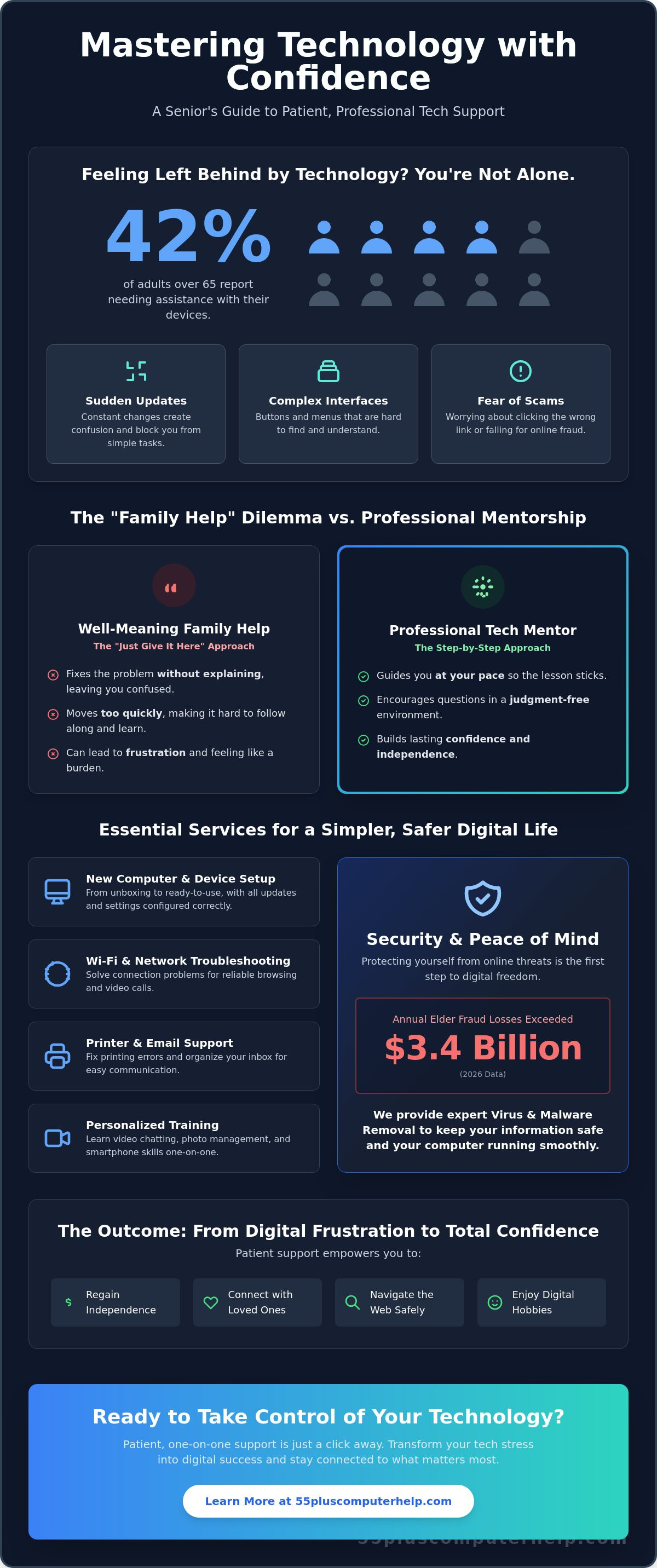
Imagine trying to join a video call to see your grandson, but a sudden software update blocks your screen. It is frustrating when technology feels like a wall instead of a bridge to the people you love. According to recent 2026 data, 42% of adults over 65 report needing assistance with their devices. Finding patient tech help for seniors is often the difference between feeling left behind and staying truly connected. You deserve to use your computer or tablet without the fear of clicking the wrong button or falling for an online scam.
We understand that family members often move too fast when they try to help. It's exhausting to feel like a burden just because you want to learn at your own pace. This guide will show you how specialized support can transform your digital frustration into total confidence. We'll walk through the best ways to secure your computer, manage your family photos, and master video chats independently. You can enjoy the benefits of the digital world with a sense of security and ease.
Key Takeaways
- Understand why specialized tech help for seniors focuses on patient mentorship to help you feel comfortable with your devices.
- Identify essential services like Wi-Fi troubleshooting and computer setup that make your daily technology more reliable.
- Learn the security advantages of working with a vetted professional who prioritizes your privacy and digital safety.
- Discover simple steps to prepare for a support session, including how to safely organize your passwords and top goals.
- See how a supportive learning environment can help you master new skills like video chatting and managing digital photos.
Understanding the Need for Specialized Tech Help for Seniors
Technology moves at a lightning pace. It seems like as soon as you learn one way to do things, a software update changes everything. If you feel overwhelmed by these constant shifts, you are not alone. It is a normal reaction to a very complex digital world. Most generic IT services focus only on the hardware. They want to fix a broken screen or a slow hard drive. However, specialized tech help for seniors is different. We prioritize patience and understanding. We know that you don't just want your device fixed; you want to understand how to use it yourself. This is a safe space to ask any question, no matter how simple it might seem. You deserve to learn without feeling judged or rushed.
The Digital Divide and Your Independence
In 2026, digital tools are no longer optional. Most banks, healthcare providers, and government agencies expect you to use online portals. This shift can create a gap for those who didn't grow up with a computer in their hands. Research on technology adoption among older adults shows that many people face barriers like complex interfaces or a lack of clear instruction. It is important to remember that digital literacy is a skill you can learn. It is not an innate talent. When you master your smartphone or tablet, you regain your independence. You can manage your own appointments and stay connected with friends. This confidence reduces the isolation that many people feel when they can't keep up with digital trends.
Why Family Members Aren’t Always the Best Teachers
We have all been there. You ask a child or grandchild for help, and they let out a sigh. They might say, "Just give it here," and fix the problem in five seconds without explaining what they did. This "just give it here" frustration doesn't help you learn. In fact, it often makes you feel more hesitant to try next time. Family members love you, but they aren't always trained to be mentors. Professional tech help for seniors provides a different experience. A professional mentor uses step-by-step instruction tailored to your pace. We wait for you to click the buttons yourself so the memory sticks. Surprisingly, hiring outside help often improves your family relationships. When tech stress is off the table, your time with family can go back to being about love and connection instead of troubleshooting.
Essential Tech Services That Simplify Your Daily Life
Technology should make your life easier, not more complicated. When your devices work correctly, they become tools for joy and connection. Getting the right tech help for seniors ensures that your computer, tablet, and phone are ready when you need them. Many people try to learn by watching generic online videos. However, these videos often move too fast. They also don't account for your specific device settings. Personalized training is a better choice because it focuses on your actual needs. It also includes vital safety steps like virus and malware removal. With elder fraud exceeding $3.4 billion annually in 2026, keeping your system secure is a top priority for your peace of mind.
Professional Device Setup and Troubleshooting
Setting up a new laptop or desktop involves many steps. A professional can help with unboxing, installing software updates, and configuring your security settings. This foundation prevents future headaches. One of the most helpful services is email setup and troubleshooting for seniors. Having your inbox organized and working correctly keeps you in the loop with family and friends. Beyond computers, professional support resolves common printer errors and Wi-Fi connection issues. A reliable home network means you can browse the web or stream shows without the screen freezing. It's about making sure every piece of tech in your house works perfectly together.
Personalized Training for Meaningful Connection
The true goal of technology is staying connected to what you love. In 2026, 90% of adults over 50 own a smartphone. However, owning the device is only the first step. You might want to learn how to video chat with your grandkids or share digital photos from your last vacation. One-on-one training sessions adapt to your specific learning pace. You don't have to worry about "keeping up" with a class. This individual focus is a key part of successful Intergenerational Tech Support Programs and professional mentorship alike. You can also receive training for tablets and smartphones. These devices allow you to stay connected while you are away from home. If you want to master your mobile device, you can look into our smartphone and tablet training to build your skills at your own speed.
Professional Support vs. Volunteers: Choosing What is Right for You
When you need tech help for seniors, you may feel tempted to look for free options first. Many community centers or student programs offer volunteer assistance. While these programs have good intentions, the results are often inconsistent. A volunteer might be available one week but gone the next. They may know how to use a specific app, but they often lack the deep technical training needed to handle complex security or hardware issues. Professional support offers a level of reliability and accountability that volunteers simply cannot provide. You are not just paying for a quick fix. You are investing in a long term relationship with a mentor who understands your specific needs.
The Value of Professional Expertise and Security
Hiring a vetted professional provides a layer of safety that is vital in 2026. Professionals carry insurance and have proven track records. This is especially important when you deal with sensitive tasks like data backup and recovery. If a volunteer accidentally deletes your precious family photos, there is often no way to get them back. A professional uses secure, industry standard methods to protect your information. Tasks like virus and malware removal also require a high level of technical skill. A mentor who specializes in tech help for seniors knows how to clean your system while ensuring your private data remains private. They provide a single, reliable point of contact for every question you have.
In-Home vs. Remote Assistance
Choosing between in-home and remote support depends on the problem you face. In-home assistance is often the superior choice for physical setup. If you have a new printer or your Wi-Fi signal is weak in the bedroom, a professional needs to see the physical space. They can check cables, move routers, and ensure everything is plugged in correctly. Remote support is a faster and more convenient option for software issues. If you have trouble with an email attachment or a software update, a professional can often guide you through it over the phone or via a secure screen share. Many volunteers only offer remote help, which leaves you stuck if your internet goes down. Having access to both formats ensures that your digital life stays running smoothly no matter what happens.
It is true that you get what you pay for when it comes to technical expertise. A professional mentor stays until the job is done. They don't rush through the steps or leave you feeling confused. This steady and methodical approach is what builds true digital independence.
How to Prepare for Your First Tech Support Session
Taking the first step toward digital independence is an exciting move. It is perfectly normal to feel a bit of anxiety before your first session. You might worry about not knowing the right terms or feel embarrassed about what you don't know yet. To get the most out of your tech help for seniors, a small amount of preparation can make a big difference. You don't need to study or practice beforehand. Instead, focus on what you want to achieve and how you can make your learning space comfortable. A little bit of organization helps the session run smoothly and keeps your stress levels low.
Identifying Your Primary Technology Goals
Before your mentor arrives or calls, think about your daily life. Ask yourself: "What is the one thing I wish I could do today but cannot?" You don't need to learn everything at once. In fact, it is much better to focus on a few specific tasks. For example, you might say, "I want to see my grandkids on Facebook," or "I want to learn how to pay my water bill online." Write down your top three goals on a piece of paper. These clear goals help your mentor tailor the lesson to what matters most to you. When the training is relevant to your real life, the steps are much easier to remember.
Creating a Safe and Productive Learning Environment
Learning is much easier when you are in a comfortable and quiet space. Choose a room with a sturdy table and a chair that supports your back. Good lighting is also very important so you can see the screen and your buttons clearly. Have a notepad and a pen ready. Many of our clients find that writing down steps in their own words is the best way to make the information stick. Your mentor expects and welcomes a slow pace. We will repeat any step as many times as necessary. If you feel overwhelmed, it is always okay to ask for a five minute break to stretch or grab a glass of water.
It is also helpful to gather any necessary passwords or login information. If you want to work on your email, try to have your email address and password written down in a safe place. If you can't find them, don't worry. A professional mentor can often help you reset them. Most importantly, remember that there are no "dumb" questions. If a term like "browser" or "cloud" sounds like a foreign language, just ask us to explain it. We are here to be your partner in this journey. If you are ready to build your skills in a supportive environment, you can book a session with a patient mentor to get started today.
Empowering Your Digital Journey with 55 Plus Computer Help LLC
At 55 Plus Computer Help LLC, we believe that learning should be a rewarding experience. Our mission is to bridge the digital gap by providing specialized support that respects your experience and your time. While other services might focus strictly on the hardware, we focus on the person behind the screen. We want you to feel that your devices are assets that enhance your life, not obstacles that create stress. Our professional tech help for seniors is designed to transform your relationship with technology from one of hesitation to one of total mastery.
Reassuring Support Tailored to Your Pace
The team at 55 Plus Computer Help LLC consists of patient mentors rather than just technicians. We understand that everyone learns differently, which is why we never use a one-size-fits-all approach. Our services are designed exclusively for those aged 55 and older, ensuring that our teaching methods align with your specific needs. We replace confusing industry terms with clear, everyday language. This creates a supportive environment where you can master your tools without feeling rushed or intimidated. We take pride in being a calm, reliable presence in your digital life.
Getting Started with Professional Tech Assistance
Beginning your path to independence is straightforward. 55 Plus Computer Help LLC offers a wide range of services to suit your home environment. Whether you need help with smart home device setup or require internet and Wi-Fi troubleshooting to keep your connection stable, we are ready to assist. You can choose the convenience of onsite help or the speed of remote assistance depending on the task at hand. From initial computer setup to ongoing smartphone and tablet training, we provide the steady guidance you need to succeed.
We are committed to your long-term success and digital safety. Our experts handle complex tasks like software installation and updates so you don't have to worry about the details. We also ensure your peace of mind through thorough data backup and recovery services. If you are ready to stop feeling frustrated and start feeling empowered, we invite you to reach out. Schedule your patient tech support session with 55 Plus Computer Help LLC today.
Start Your Journey Toward Digital Confidence Today
Digital independence is within your reach. Technology should serve you, not the other way around. By prioritizing professional mentorship, you gain a secure and reliable way to navigate the online world. You now know how to prepare your goals and your workspace for a successful learning experience. Finding the right tech help for seniors means you can finally enjoy video calls, digital photos, and online services with total peace of mind.
55 Plus Computer Help LLC has served the senior community since 2014 with a specialized focus on users aged 55 and older. Our team provides patient, in-home or remote mentorship that adapts to your specific learning style. You deserve a teacher who understands your concerns and respects your time. Take the first step toward a more connected and confident life today.
Get Patient, Professional Tech Help Today
You don't have to feel left behind by new updates or complex systems. We are here to be your trusted partners in this digital journey.
Frequently Asked Questions
Is it safe to have a tech support person come to my home?
Yes, it is safe to have a professional mentor visit your home. We have served the senior community since 2014 and prioritize your comfort and security. Our team members are vetted professionals who understand the importance of trust. You can always have a friend or family member present during the session if it makes you feel more at ease. We treat your home with the same respect we give to your technology.
What if I am a complete beginner and do not even know how to turn the computer on?
We welcome complete beginners and are happy to start with the basics. If you don't know how to turn your computer on, that is the perfect place for us to begin. Our patient mentors specialize in tech help for seniors who are just starting their digital journey. We move at your pace and ensure you feel confident with each step before moving to the next one. No prior knowledge is required.
Can you help me with my specific smartphone or tablet, or just computers?
We provide comprehensive support for smartphones and tablets in addition to traditional computers. Whether you have an iPhone, an Android device, or an iPad, we can help you master its features. Our training covers everything from basic navigation to using specific apps for video calls or photo sharing. You can receive help for all your personal devices during a single session to ensure your entire digital life is connected.
How long does a typical technology training session last?
A typical technology training session lasts between one and two hours. This timeframe allows enough time to make real progress without becoming overwhelming. We find that shorter, focused sessions help you retain more information and stay energized. If you have several goals to cover, we can schedule multiple visits to ensure we address each one thoroughly and at a comfortable pace for your learning style.
Do I need to buy any special software before our appointment?
You do not need to purchase any special software before your appointment. We work with the programs and tools you already have on your device. If we identify a specific tool that would benefit you, such as a security program, we will discuss it during the session. Our mentor can then guide you through the process of installing it safely. Our goal is to simplify your experience, not add extra costs or steps.
Can you help me identify if an email I received is a scam?
Identifying online scams is a key part of our tech help for seniors. We can look at specific emails with you and point out the red flags that indicate a message is fraudulent. Beyond just fixing a problem, we teach you the skills to spot these threats independently in the future. With elder fraud reaching record levels in 2026, learning how to stay safe is one of the most important skills we teach.
What happens if I forget what I learned during the session?
It is completely normal to forget a few steps after a lesson. We encourage you to take notes during our session in your own words. Your mentor can also provide simple, written instructions for the most important tasks we cover. If you find yourself stuck later, you can always book a follow-up session to review those specific steps. Repetition is a natural part of the learning process, and we are happy to help you as many times as you need.


