
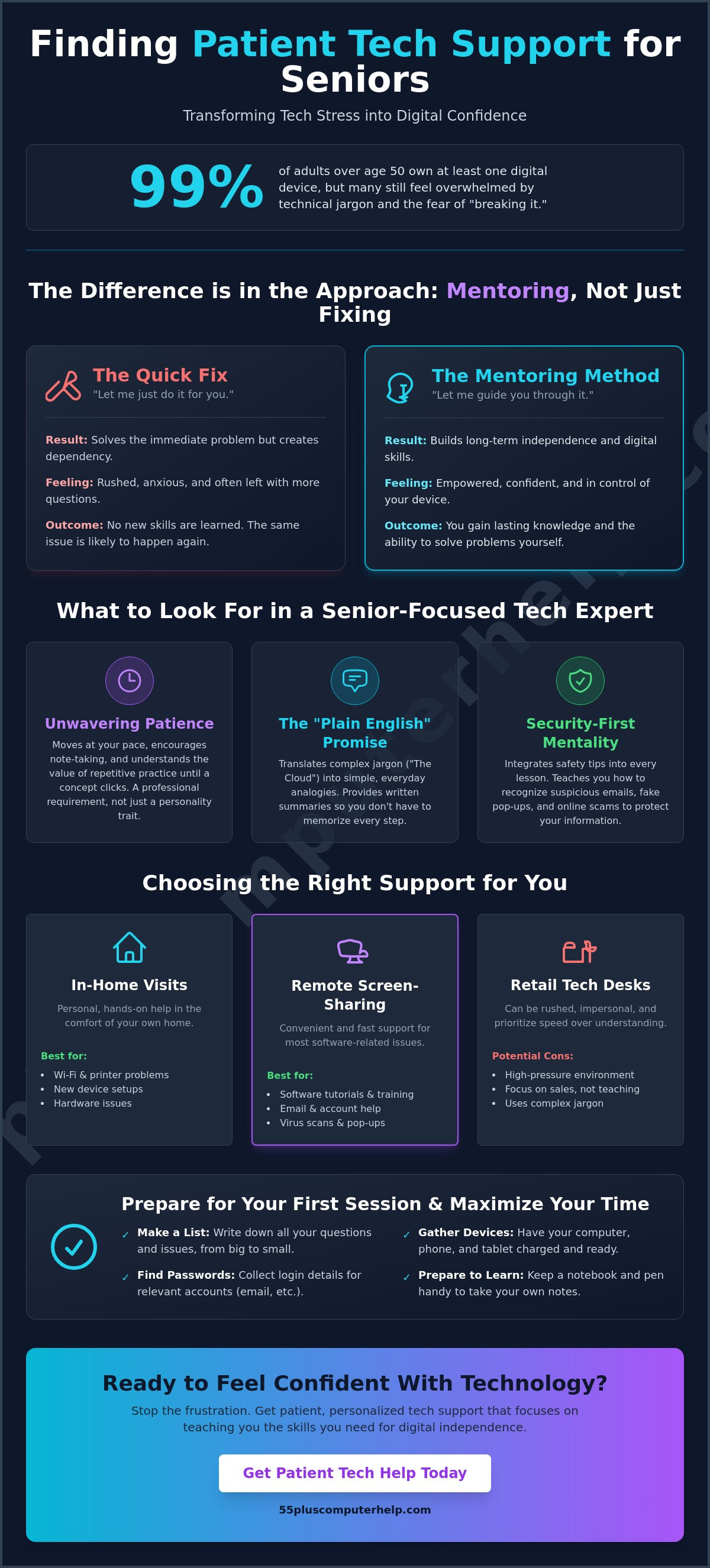
You want to see your grandkids on a clear video call, but instead, your screen freezes and shows a message that looks like a foreign language. It is natural to feel a flash of anxiety or worry that asking for help makes you a burden to your busy family. You aren't alone in this struggle. While 99% of adults over age 50 now own at least one digital device, many still feel overwhelmed by technical jargon. Finding patient tech support for seniors shouldn't be a source of stress. You deserve a mentor who listens, speaks clearly, and moves at your preferred pace.
We understand that technology is only helpful when you feel confident using it. This guide will show you how to find assistance that prioritizes your comfort, security, and digital independence. We'll cover how to find experts who can help you master your smartphone, secure your computer from viruses, and finally feel at home in the digital world.
Key Takeaways
- Understand how a teaching-first approach transforms technology from a source of stress into a tool for independence.
- Learn what to look for when choosing patient tech support for seniors, from clear communication to a mentor's calm demeanor.
- Compare the benefits of in-home visits and remote screen-sharing to find the most convenient way to solve your software or Wi-Fi issues.
- Follow a simple preparation checklist to help you organize your questions and passwords before your first session.
- Discover how personalized training on your specific devices can help you confidently connect with family and friends.
What Is Patient Tech Support for Seniors and Why Is It Essential?
Patient tech support for seniors is not just about resolving a software glitch or connecting a printer. It is a specialized service that combines technical expertise with the principles of adult education. This approach recognizes that learning a new digital skill is different from simply fixing a broken tool. This specialized field often draws from the study of Gerontechnology, which focuses on matching technology to the specific health and social needs of an aging population. By focusing on the user rather than just the device, this support model helps build a bridge to the modern world.
Traditional "fast-talk" support desks often fail older adults because they prioritize speed over understanding. A typical technician might use complex jargon that sounds like a foreign language. They want to close the support ticket as quickly as possible. This high-pressure environment creates anxiety. It makes many people feel like they are a burden. True patient tech support for seniors removes that pressure. It focuses on reducing the "fear of breaking it" by creating a safe, supportive space for exploration. When you feel safe to click a button without worry, you move from being a passive user to an active, confident digital citizen.
The Difference Between Fixing and Mentoring
Fixing a computer is a one-time transaction. Mentoring is a long-term investment in your independence. The most common mistake in senior tech help is when a helper says, "Let me just do it for you." While this solves the immediate problem, it leaves the user without any new skills. Mentoring focuses on the "how" and "why" behind each step. It uses clear analogies and everyday language. A calm expert understands the value of repetitive practice. They will guide you through the same process three or four times until it feels like second nature. This patience ensures you can handle the task yourself the next time it comes up.
Why Family Members Aren’t Always the Best Teachers
Many people turn to their children or grandchildren for help first. This often leads to what we call "Family Friction." Because there is so much emotional history involved, it's easy for both sides to feel frustrated. A family member might move too fast or forget that these concepts are new to you. Professional tutors provide a neutral, judgment-free environment. They don't have the same emotional baggage as a relative. A professional ensures that you stay in control of the mouse and keyboard at all times. This hands-on approach is the only way to build real muscle memory and long-term confidence.
Key Qualities to Look for in a Senior-Focused Tech Expert
Not all IT experts are natural teachers. When you are looking for help, you need someone who views patience as a professional requirement rather than just a nice personality trait. The right expert should be comfortable helping you across various platforms. Whether you use a Mac, a PC, an iPhone, or a tablet, your mentor should have the flexibility to meet you where you are. This versatility ensures they can help you with your specific setup without trying to force you into a system you don't like.
A good mentor doesn't rush. They wait for you to take notes and watch as you perform the steps yourself. This approach is what defines quality patient tech support for seniors. It ensures you don't just get a quick fix; you gain a lasting skill. Organizations like Cyber-Seniors have shown that when technology is taught with kindness and clarity, older adults can thrive in the digital world. This patience is a professional standard that requires active listening and the ability to pivot when a specific explanation isn't clicking.
The "Plain English" Requirement
Technical terms often feel like a barrier to learning. A great expert translates these terms into everyday, relatable analogies. If they talk about "The Cloud," they might compare it to a digital filing cabinet kept in a safe, secondary location. Effective communication is the ability to make the complex feel simple. You should also look for someone who provides a written summary after each session. These notes serve as a personal "cheat sheet" so you don't have to worry about memorizing every single click or menu option.
Security-First Mentality
Safety is a top priority for anyone using the internet. A senior-focused expert includes security tips in every lesson they provide. They help you understand virus and malware removal so you can spot red flags before they become major problems. Instead of just installing software for you, they teach you how to recognize a suspicious email or a fake pop-up alert. They might show you how to check a sender's email address or explain why a legitimate business will never ask for your password over the phone. This proactive training turns you into your own best defense against online scams.
Privacy is equally important. Your technician must respect your personal data and explain exactly what they are doing while they are on your screen. This transparency builds the trust necessary for a successful learning partnership. If you are looking for a mentor who values your security and speaks your language, 55 Plus Computer Help LLC offers the specialized care you need to feel safe and independent at home.
Comparing Support Options: In-Home, Remote, and Retail Tech Desks
Choosing where to get help can be just as confusing as the technology itself. You might see ads for big box retail stores or local repair shops. While these places are common, they often operate on a high-volume model. They want to fix the machine and move to the next customer. This approach rarely leaves time for the teaching that makes patient tech support for seniors so valuable. There are many tech support and training resources available today, but the best choice depends on your specific needs and your home environment.
A dedicated relationship with a single mentor beats a random technician every time. When you work with the same person, they learn your specific device setup. They understand your learning style and remember which topics you have already covered. You don't have to explain your problems from scratch every time you call. This continuity builds a level of trust that a busy retail counter simply cannot provide. It transforms a stressful repair visit into a comfortable meeting with a trusted local expert.
The Benefits of In-Home Assistance
Some problems are best solved exactly where they happen. If you are struggling with internet and Wi-Fi troubleshooting or printer setup, an in-home visit is often the most effective choice. A technician can see how your walls or furniture might be blocking your signal. You get the comfort of learning in your own favorite chair using your own keyboard. In-home support is also essential for physical computer setup and connecting smart home devices. It ensures everything works together perfectly in the space where you actually use it.
When to Choose Remote Support
Remote support is an excellent choice for software issues and quick questions. It is often the fastest way to get help with email setup and troubleshooting for seniors or software installation and updates. During a remote session, you stay on the phone while a technician securely views your screen. You can watch their mouse move and see exactly which buttons they click. This method is often more affordable and convenient since you don't have to wait for someone to drive to your house. It is a great way to handle minor glitches or get a quick refresher on how to use a specific app.
How to Prepare for Your First Tech Support Session
Preparing for your first appointment can feel a bit like getting ready for a guest. It's a simple way to reduce anxiety and make the most of your time. When you invest in patient tech support for seniors, the goal is to make you feel empowered. A little organization beforehand ensures the session flows smoothly. Start by creating a "Frustration List." Whenever you run into a problem during the week, write it down. You don't want your mind to go blank once the mentor arrives. This list keeps the session focused on the specific things that matter most to you.
You should also gather all your necessary passwords and login information in one secure place. Having your email or Apple ID password ready saves a lot of time. It prevents the frustration of searching through old drawers while you're trying to learn. Make sure your devices are fully charged or plugged into a power outlet. A stable internet connection is also vital for any software updates. Finally, clear a physical space on your desk or kitchen table. A comfortable, tidy area helps you stay relaxed and gives the tutor room to work alongside you.
Setting Realistic Learning Goals
It's tempting to try and "fix everything" in a single hour. However, focusing on two or three key tasks is much more effective for long-term learning. You might want to prioritize sending photos to your grandkids or learning how to use video calls independently. Digital literacy is a journey, not a single appointment. By mastering a few things well, you build the muscle memory needed for independence. Your mentor will help you set a pace that feels right. They won't move on until you feel confident with each step.
Gathering Your "Tech Toolkit"
Think about the physical items your tutor might need to access during the visit. This includes your Wi-Fi router, external backup drives, and all your power cables. It's also helpful to have a notebook and pen ready. You can use these to write down your own personal "cheat sheet" notes in your own words. Ensure your environment is quiet and free from distractions. Turn off the TV and put your ringer on silent. This quiet space makes it easier to hear instructions and stay focused on the task at hand. If you're ready to gain more confidence with your devices, schedule a personalized session with 55 Plus Computer Help LLC today.
Empowering Your Digital Life with 55 Plus Computer Help LLC
55 Plus Computer Help LLC believes that technology should be a tool for joy, not a source of frustration. Our mission is to provide education-first technical support that puts you in the driver's seat. We offer specialized patient tech support for seniors that focuses on your unique needs and comfort level. By building a lasting relationship with a technician who knows your specific setup, you can stop feeling like a burden to your family. You will have a trusted local expert who understands which buttons you find confusing and which tasks you want to master.
Our help covers everything from initial computer setup and printer setup to advanced smartphone and tablet training. If your internet is acting up, we provide internet and Wi-Fi troubleshooting right in your home. If you are worried about security, we offer virus and malware removal along with data backup and recovery. We also handle software installation and updates so your devices stay current without the headache. Whether you prefer hourly onsite visits or the convenience of remote sessions, we always move at your preferred pace.
A Personalized Approach to Learning
We don't use scripts or confusing jargon. You get direct help for your specific questions. We focus on the things that matter most to you, like staying connected with your family through social media and email. 55 Plus Computer Help LLC is committed to fostering senior independence through compassionate, one-on-one technical mentoring. We want you to feel the thrill of success every time you send a photo or join a video call on your own. This personalized approach ensures that you aren't just getting a device fixed; you are growing your own digital skills.
Getting Started with Your Tech Mentor
Starting your journey is simple. You can book your first onsite or remote appointment through our website or by giving us a call. During your first 60 minutes of support, we will review your "Frustration List" and tackle your most urgent problems. We will make sure your email setup and troubleshooting is handled first if that is your priority. You will spend the session with your hands on the keyboard, learning by doing while your mentor guides you. This hands-on practice is the best way to ensure the information sticks. Schedule your patient tech support session today and take the first step toward digital confidence.
Take Control of Your Digital Independence
Technology should work for you, not against you. You now know that the right help focuses on your education and long-term independence. By choosing a mentor who speaks your language and respects your pace, you can master your devices with confidence. Finding quality patient tech support for seniors is the first step toward staying connected without the stress of jargon or confusing instructions.
At 55 Plus Computer Help, we have dedicated over a decade to bridging the digital divide since our founding in 2014. We specialize exclusively in the unique needs of the 55+ community. Our team offers transparent hourly rates for both in-home visits and remote sessions. We are here to help you feel secure and capable in the digital world. Get Patient, Expert Tech Help Today and see how easy it can be to master your favorite devices. You have the power to stay connected, and we are honored to help you achieve it.
Frequently Asked Questions
What exactly does patient tech support for seniors include?
Patient tech support for seniors includes personalized training and troubleshooting for your everyday devices. This service covers smartphone and tablet training, email setup, and connecting your home printer. It is not just about fixing a glitch; it is about teaching you how to use your technology with confidence and independence.
Your mentor will also help with more complex tasks like internet and Wi-Fi troubleshooting or smart home device setup. The focus is always on your specific goals. Whether you want to see your grandkids on a video call or organize your digital photos, the support is tailored to your pace.
Is remote tech support safe for someone who isn’t tech-savvy?
Remote tech support is very safe when you work with a trusted professional who stays on the phone with you throughout the process. You will use a secure screen-sharing tool that allows the technician to see your computer screen. You can watch every move they make with their mouse in real time.
This method ensures you are never left alone with a confusing screen. You always stay in control of the session and can end it at any time. It is a convenient way to handle software updates or email issues without having to wait for an in-home visit.
How much does professional senior tech support typically cost?
The cost of professional support varies depending on whether you choose a one-time visit, an hourly rate, or a monthly subscription model. Some providers offer flat fees for specific tasks like virus removal, while others focus on long-term mentoring sessions. It's important to look for patient tech support for seniors that offers transparent pricing structures.
You should check the specific website of a service provider to see their current rates for in-home or remote help. Many seniors find that an hourly model works best because it allows them to focus on exactly what they need to learn without any hidden fees or long-term contracts.
Can a tech tutor help me with my specific smartphone or tablet?
Yes, a tech tutor can provide specialized training for your specific device, whether it is an iPhone, an Android, or an iPad. They will show you how to navigate your unique settings and menus. You don't have to worry about learning on a device that looks different from the one you own.
You will learn practical skills like sending text messages, downloading helpful apps, and managing your battery life. The tutor will watch as you perform the tasks yourself to make sure you feel comfortable. This hands-on approach is the best way to build lasting confidence with your mobile devices.
What if I forget everything we talked about during the session?
It is completely normal to worry about forgetting new steps, which is why professional mentors provide a written summary of your session. These notes act as your personal "cheat sheet" that you can refer to whenever you get stuck. You can keep these instructions right next to your computer or tablet.
Repetition is a key part of learning. You can always book a follow-up session to practice the same tasks again. Your mentor is happy to go over any topic as many times as you need until it feels like second nature to you.
Do I need to buy any special software before my tech support appointment?
You do not need to purchase any special software before your appointment begins. If your computer needs a specific update or a new program to run better, your mentor will guide you through the software installation and updates process. They will help you find the safest and most reliable tools for your needs.
If you are having a remote session, the mentor will provide a simple link for the screen-sharing tool. They will talk you through the few clicks needed to get it started. There is no need to worry about complicated setups before the expert arrives to help you.
How do I know if my computer has a virus or just needs a tune-up?
A computer with a virus often shows strange pop-up ads, sends emails you didn't write, or runs much slower than it used to. If you notice these red flags, you may need professional virus and malware removal to protect your personal information. A mentor can perform a thorough check to see what is causing the trouble.
Sometimes a computer is just slow because it has too many old files or outdated programs. In these cases, a simple "tune-up" or software update can make a big difference. Your technician will explain exactly what they find and show you how to keep your system running smoothly in the future.
Can you help me set up a new computer I just bought from the store?
Yes, we can assist with a complete computer setup for any new device you have purchased. This service includes connecting the machine to your Wi-Fi, setting up your email accounts, and ensuring your printer is ready to work. We make sure everything is configured correctly from the very first day.
We also help with data backup and recovery to move your important photos and documents from your old machine to the new one. We will take the time to show you where everything is located on your new screen. You will end the session feeling ready to use your new computer with ease.


