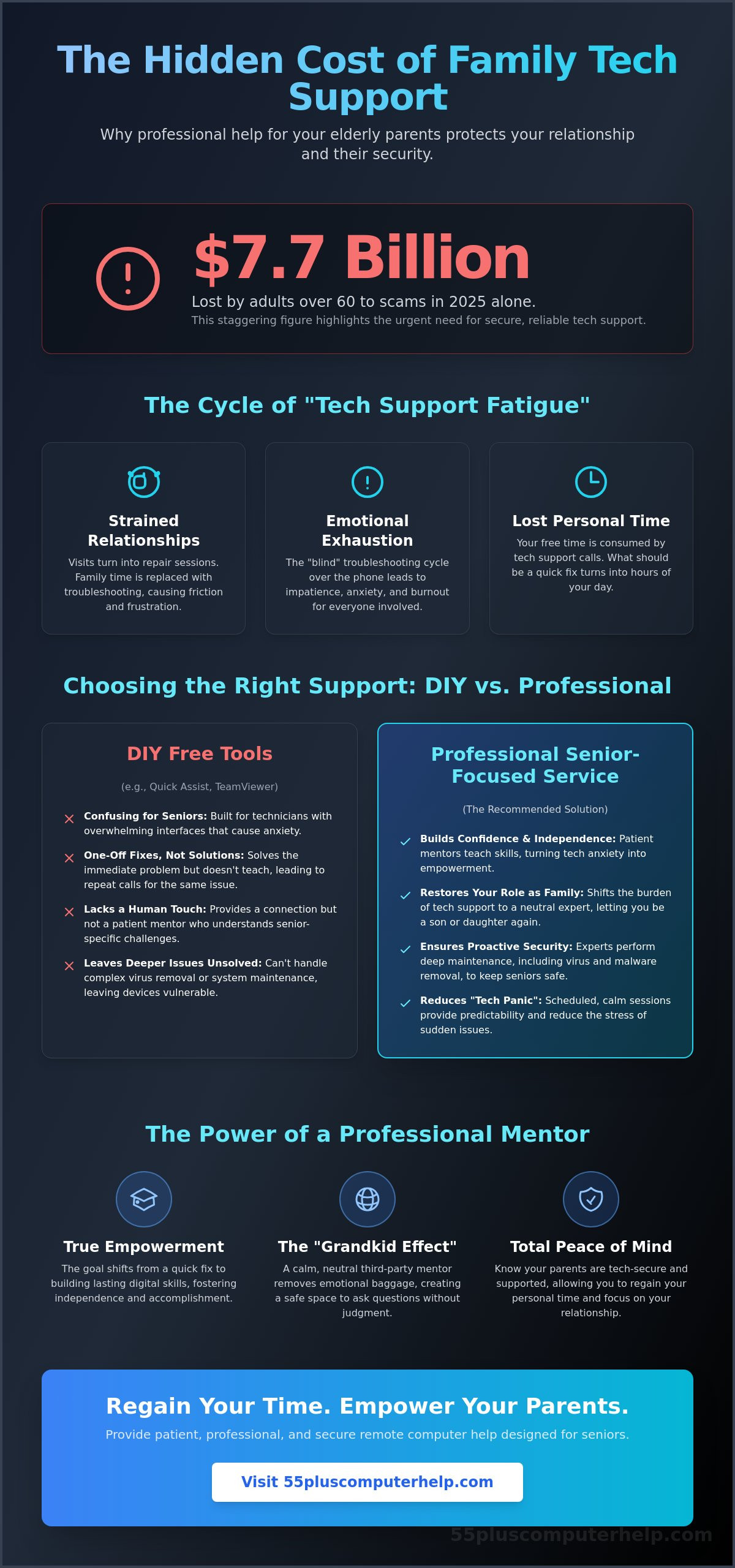
Did you know that adults over the age of 60 lost more than $7.7 billion to scams in 2025? This staggering figure explains why you feel a knot in your stomach whenever your mom mentions a strange pop-up on her screen. You want her to stay connected, but the fear of a security breach is always there. Most families spend hours on the phone trying to fix simple issues, which often leads to frustration and guilt. Finding reliable remote computer help for elderly parents shouldn't feel like a second job.
You deserve to regain your personal time while knowing your parents are tech-secure. It's possible to provide them with patient, professional support that treats technology as a way to empower them, not just a problem to be solved. In this guide, we'll show you how to choose a service that specializes in the unique needs of seniors. You'll learn what to look for in a provider so your parents can use their devices independently and safely. We will also explore how to spot the best experts who prioritize your parent's dignity and your own peace of mind.
Key Takeaways
- Learn how to identify tech support fatigue and protect your family relationship from the stress of troubleshooting.
- Compare the limitations of free screen-sharing tools against professional remote computer help for elderly parents to find a more reliable solution.
- Discover the safety protocols experts use to protect seniors from scams and ensure every remote connection is secure.
- Find out how to vet a provider's patience and communication style to ensure they can teach your parents effectively.
- Understand how a senior-first approach builds your parents' independence so they can use their devices with confidence.
The Hidden Cost of Being Your Parents' Unpaid Tech Support
You love your parents. You want them to enjoy their tablets and laptops. But when the phone rings at 7:00 PM on a Tuesday, your heart might sink just a little. You know the call is likely about a "lost" email or a printer that won't print. This is the start of tech support fatigue. It is the emotional exhaustion that comes from trying to solve digital problems over the phone. It strains your relationship and turns your visits into repair sessions instead of meaningful family time.
Many families try the "just click the button" approach. You might feel impatient when they cannot find the icon you are describing. This leads to friction and hurt feelings. You aren't just fixing a computer; you are navigating a generational gap. Professional remote computer help for elderly parents changes this dynamic. It shifts the burden from your shoulders to a patient expert. This allows you to go back to being a daughter or a son rather than a frustrated technician.
Why 'Simple' Tasks Are Never Simple Over the Phone
There is a real vocabulary gap that makes phone help difficult. When you say "open your browser," your parent might look for a physical window or a different icon entirely. This confusion creates a frustration loop. Anxiety rises, and when people are anxious, they stop learning. They just want the problem to go away. Using remote desktop software allows a helper to see exactly what is happening on the screen. Visual remote access is the only way to stop the "blind" troubleshooting cycle that leads to so many hang-ups and headaches.
The Benefits of a Third-Party Professional Mentor
Sometimes, parents listen better to someone who is not their child. We call this the Grandkid Effect. A professional mentor does not have the emotional baggage of past family arguments. They bring a calm, neutral energy to every session. This helps seniors feel safe enough to ask "silly" questions without feeling judged. The goal shifts from a quick repair to true empowerment. When your parents learn digital skills from a patient mentor, they gain the confidence to explore their devices independently. Reliable remote computer help for elderly parents ensures they feel supported without feeling like a burden. You get your weekends back, and they get a new sense of accomplishment.
Evaluating Remote Support Options: DIY Tools vs. Professional Services
Many families start by using free software. It seems like the easiest way to provide remote computer help for elderly parents without spending money. These tools are helpful for a five minute fix. However, they often solve the technical bug while leaving the human frustration untouched. Free tools are built for technicians, not for teaching seniors. They provide a connection, but they don't provide a patient mentor who understands the unique needs of older adults.
You might find yourself stuck in a cycle of one-off fixes. This happens when you repair the same issue every week because the "how" was never explained. Moving to a structured service breaks this cycle. It turns a stressful emergency into a calm learning session. This approach saves you time and protects your relationship with your parents. You can stop being the tech support person and go back to being a family member.
Popular Remote Access Software for Families
Windows Quick Assist is a common choice for PC users. It is built into the system and is relatively easy to start. The downside is that it requires both people to have a Microsoft account. Apple Screen Sharing is an excellent option for families who only use Macs. It is fast and clear. For more complex needs, some families use third party apps. As of May 2026, the latest version of TeamViewer is 15.76.6. Another option is Chrome Remote Desktop, which reached version 147.0.7727.3 in April 2026. These apps are powerful, but their many buttons and settings can be very confusing for a senior who is already feeling anxious.
The Professional Service Advantage
Professional services offer much more than just a screen connection. A scheduled appointment creates a sense of order. Your parents know exactly when help is coming. This predictability reduces the "tech panic" that often leads to mistakes. A professional mentor stays calm even when things get complicated. They have the specialized skills to explain technology in plain language.
A professional session also allows for deeper maintenance. An expert can handle virus and malware removal to keep the system safe. They can check for updates and ensure backups are running correctly. This comprehensive care prevents future problems before they start. If you want a more supportive experience for your family, you can view our personalized training options. We focus on empowering your parents to use their devices with confidence and joy.
Security First: Ensuring Safe Remote Access for Your Parents
Safety is the biggest concern for families looking for remote computer help for elderly parents. You probably worry about your mom or dad falling for a scam. It is a valid fear. In 2025, adults over 60 lost more than $7.7 billion to various scams. Many of these crimes start with a fake tech support call or a scary pop-up message. A professional service helps by creating a wall between your parents and these criminals. We teach them to recognize the red flags before they click a dangerous link.
The most important rule is to distinguish a requested helper from an unsolicited caller. Scammers often pretend to be from "Microsoft" or "Apple" to create a sense of panic. A legitimate service will never call your parents out of the blue. We use a pre-arranged schedule so your parents know exactly who is calling and when. Professional providers also use unique, one-time codes to verify their identity before a session begins. This ensures that only a trusted person can see their screen.
How Professional Remote Help Protects Against Scams
A predictable routine is a powerful defense against fraud. When your parents have a regular time for tech assistance, they are less likely to trust a random caller. We act as a trusted advisor for our clients. If your parent sees a suspicious email, they can wait and ask us about it during their session. This prevents them from making a quick, fear-based decision. We also educate them about social engineering. Social engineering is a way of lying to people to trick them into giving away passwords or access to their computer. Understanding this tactic makes seniors much harder to fool.
Privacy and Consent in Remote Sessions
Privacy is just as important as security. We believe in "attended" access. This means your parents must be at the computer to start the session. They are always in control. They can see exactly what the technician is doing on the screen at every moment. If they ever feel uncomfortable, they can end the session with one click. This transparency builds trust and reduces anxiety.
We also handle sensitive tasks with care. When performing email setup and troubleshooting for seniors, we never ask them to share their passwords out loud. We show them how to enter their own information securely. This approach protects their accounts while teaching them safe habits. By prioritizing consent and transparency, we provide remote computer help for elderly parents that feels safe and supportive rather than invasive.
What to Look for in a Senior-Focused Remote Support Provider
Finding the right remote computer help for elderly parents requires more than just technical skill. Most IT companies focus on speed. They want to finish the job as fast as possible. This "quick fix" culture often leaves seniors feeling confused and ignored. A senior-focused provider understands that the process is just as important as the solution. They prioritize the person, not just the machine. You want a helper who views your parent as a capable student rather than a technical problem.
You should also look for transparent pricing. Many services hide costs in complex subscription plans or "Total Tech" bundles that might include things your parents don't need. Look for a provider who is clear about what they charge before the session starts. This prevents hourly surprises that can cause stress for families on a budget. A reliable expert will be happy to explain their fees without using confusing corporate language.
Communication Style and Pedagogy
A great mentor uses plain language. They avoid industry jargon that can make seniors feel overwhelmed. Instead of talking about "cloud synchronization," they might talk about how photos move from a phone to a computer. This approach builds trust and reduces anxiety. Ask if the provider can give your parents simple notes to refer to later. Having a written guide helps them remember what they learned. This transforms the service from a one-time repair into a long-term relationship. Your parents become confident users rather than just a ticket number in a system.
Technical Breadth and Flexibility
Seniors use a wide range of technology today. As of 2025, 90% of adults aged 50 and over own a smartphone. This is a significant increase from 55% in 2016. Because of this, your provider should be comfortable with more than just desktop computers. They should offer smartphone and tablet training along with printer setup and smart home device support. Complex tasks like data backup and recovery are also essential for protecting family photos and documents.
Sometimes a problem cannot be fixed over the internet. A hardware issue or a physical connection might be the culprit. A good provider will be honest about these limitations. They should have the flexibility to suggest an onsite visit or local repair if a physical issue arises. This holistic approach ensures your parents are never left stranded. If you want to find a patient expert who specializes in this kind of care, you can book a professional tech session to give your family peace of mind.
How 55 Plus Computer Help Simplifies Tech for Your Family
At 55 Plus Computer Help LLC, we believe technology should be a bridge, not a barrier. Our philosophy goes beyond just fixing a glitch. We focus on teaching your parents the skills they need to feel capable and independent. Providing remote computer help for elderly parents is about more than just clicking buttons; it's about building a relationship based on trust and respect. We turn technical frustration into a sense of accomplishment by moving at a pace that works for every individual. You can stop worrying about their tech issues and start enjoying your time together again.
Our onboarding process is designed to be gentle and non-intimidating. We know that many seniors feel anxious about letting someone access their device for the first time. We walk them through the initial connection over the phone with clear, simple instructions. We don't use technical jargon that causes confusion. Instead, we use landmarks they recognize on their screen, like colors or familiar icons. This makes the first session feel like a friendly visit from a neighbor rather than a clinical repair. We also offer flexible scheduling to ensure the timing works for both the parent and the adult child.
Personalized Lessons and Troubleshooting
We tailor every lesson to what your parent actually wants to achieve. If their goal is to see photos of their grandkids or organize an email inbox, we prioritize those tasks first. While we work on the fun things, we also handle the background maintenance that keeps them safe. This includes things like software installation and updates or virus and malware removal. We also provide internet and Wi-Fi troubleshooting to ensure their connection stays reliable. Every session is a safe space where there are no "dumb" questions. This supportive environment helps seniors learn at their own speed without feeling rushed or judged.
Getting Started with a Remote Session
Booking your first session is easy and takes only a few minutes. We offer flexible scheduling that works for your busy life and your parents' routine. We often coordinate with family members to make sure everyone feels informed and comfortable with the support plan. Our team at 55 Plus Computer Help LLC is dedicated to protecting your parents' privacy while empowering them to explore the digital world. We can also assist with smartphone and tablet training or printer setup to make their home office fully functional. If you are ready to reduce the tech stress in your family, you can Schedule a patient remote support session for your parents today. We are here to help them stay connected, secure, and independent.
Reclaiming Your Time and Their Independence
Choosing the right support is about more than just fixing a screen. It is about restoring the joy of connection for your family. You can move away from the frustration of phone-based troubleshooting and embrace a professional solution that works. Specialized care protects seniors from fraud while building their digital confidence. This shift allows you to focus on your relationship instead of acting as an unpaid technician.
Since 2014, our team has provided remote computer help for elderly parents with a focus on patience and clarity. We use plain language to explain complex tasks; this ensures your parents feel respected and heard. You won't find any confusing jargon or long-term contracts here. We offer transparent hourly rates that keep things simple for every family. It is time to let a trusted expert handle the software updates and Wi-Fi troubleshooting. You can Book a Patient Remote Tech Support Session for Your Parents to start this new chapter. You deserve to be a family member again, and your parents deserve to feel tech-secure. We are ready to help them thrive in the digital world.
Frequently Asked Questions
Is remote computer help safe for seniors?
Remote support is very safe when it is provided by a trusted professional using attended access software. This means your parents must give permission for every session. They can see the mentor moving the mouse and can end the connection with one click at any time. Professional remote computer help for elderly parents also includes identity verification to ensure your parents are always talking to their designated expert.
What software do I need to install for my parents to get remote help?
We usually use simple, secure tools that are already built into the computer or are very easy to download. For Windows users, we often use Quick Assist. For Mac users, we use the built-in Screen Sharing feature. If a third party app is needed, our patient mentors will guide your parents through the setup process step by step over the phone. They don't need to be tech experts to get started.
Can you help my parents if their internet isn't working?
Remote help requires a working internet connection to see the screen and move the mouse. If the internet is completely down, we cannot connect to the device remotely. In these cases, we can often provide guidance over the phone to help them restart their router or check physical cables. Once the connection is back up, we can start the full remote session to finish the troubleshooting.
How much does professional remote tech support usually cost?
The cost for professional support depends on the type of service you choose. Some providers charge by the hour, while others offer monthly subscriptions or per-session fees. Independent providers often charge between $70 and $110 per hour for specialized care. It's best to check for transparent pricing structures that don't include hidden fees or long-term contracts that your parents might not need.
What if my parent is completely non-technical and can't even open a browser?
Our service is specifically designed for seniors who feel overwhelmed by technology. We provide remote computer help for elderly parents that starts with a simple phone call. We can coordinate with you to help them get the initial connection started. Once we are on the screen, our patient mentors take over and use very simple verbal cues to guide them through the session without any stress.
Can remote help fix a slow computer or remove viruses?
Yes, remote sessions are perfect for cleaning up a slow computer and performing virus and malware removal. We can see which programs are slowing down the system and remove them safely. We also check for important software updates and ensure that security settings are active. This helps the computer run faster and protects your parents' personal information from online threats.
Do you provide support for tablets and smartphones as well as computers?
We provide comprehensive training and troubleshooting for iPads, iPhones, and Android smartphones. We can show your parents how to use apps, manage their photos, or set up text messaging. Our mentors also help with email setup and troubleshooting to ensure they stay connected with family. We treat every device as a tool for empowerment and independence.
How long does a typical remote support session last?
Most sessions last between 30 and 60 minutes. This is usually the right amount of time to solve a problem or learn a new skill without becoming tired. If a task is more complex, such as a full computer setup, we might schedule a longer session or break it into two parts. We always move at a pace that feels comfortable and steady for your parents.


