
You sit down at your desk and a strange pop-up message suddenly appears on your screen. Your first instinct might be to close the laptop quickly, fearing that one wrong click could break the system. This is exactly why remote computer training for seniors has become such a vital resource for staying connected. It is common to worry about online scams or feel frustrated by tech support people who talk way too fast. We believe that learning should be a calm, supportive experience that respects your individual pace.
Our personalized approach provides a patient, one-on-one environment where your comfort is the top priority. You don't have to worry about "breaking" anything or feeling lost in a sea of technical jargon. Instead, you'll learn how to use your devices as tools for independence and connection. This training helps you use the digital world with total confidence and security from the safety of your own living room.
In this article, we'll show you how easy it is to master technology when you have a trusted mentor by your side. We will cover how to video call your grandkids independently, manage your emails safely, and identify malware before it causes any trouble. You will see that with a patient teacher, your computer can become a source of joy rather than a source of stress.
Key Takeaways
- Discover how remote computer training for seniors provides live, interactive lessons from a patient teacher directly on your screen.
- Learn why 1-on-1 mentorship allows you to move at your own pace without the pressure of fast-talking tech support.
- Find out how to master video calls and email so you can stay connected with family safely and independently.
- Gain practical tips for spotting "fake" websites and scam emails to protect your personal information online.
- See how a simple phone consultation can lead to a personalized lesson plan tailored to your specific technical goals.
What is Remote Computer Training for Seniors?
Remote computer training for seniors is a live, interactive experience where a teacher connects with you through your screen. It is not a generic lecture or a pre-recorded video. Instead, it is a real-time conversation tailored to your specific needs. Many people try to learn by watching videos on YouTube, but those videos cannot answer your questions when you get stuck. With remote training, you have a patient mentor who sees exactly what you are seeing. If a button does not look right, you can ask for help immediately. This personalized guidance helps you build digital literacy at a pace that feels comfortable. In 2026, this is the safest and most convenient way to gain new skills. You stay in the comfort of your home while gaining the tools to stay connected. Remote training acts as a supportive bridge between technical confusion and digital confidence.
The Technology Behind Remote Learning
The technology we use is straightforward and secure. We use screen-sharing software that lets your mentor see your desktop. You don't need to be a tech expert to set it up; we guide you through the initial connection over the phone. Privacy is a top priority for our students. You are always in control of the session. You must click "allow" before any sharing begins, and you can end the session with one click at any time. Your mentor cannot see your files or personal information unless you specifically show them. To get started, you only need your computer and a reliable internet connection. Most modern households already have everything they need to begin.
Why Seniors Prefer Remote Lessons
There are many reasons why seniors choose remote lessons over traditional classes. First, you are in your own environment. You don't have to worry about driving to a community center or finding parking. There is no need to pack up a heavy laptop or struggle with cables. You can learn on the exact same setup you use every day. This makes it easier to remember what you've learned once the session ends. Scheduling is also much easier. You can pick a time that works with your existing plans, whether that is after a morning walk or before dinner. Remote computer training for seniors fits into your life, not the other way around. It turns a potentially stressful task into a relaxing part of your day.
The Benefits of Professional 1-on-1 Mentorship
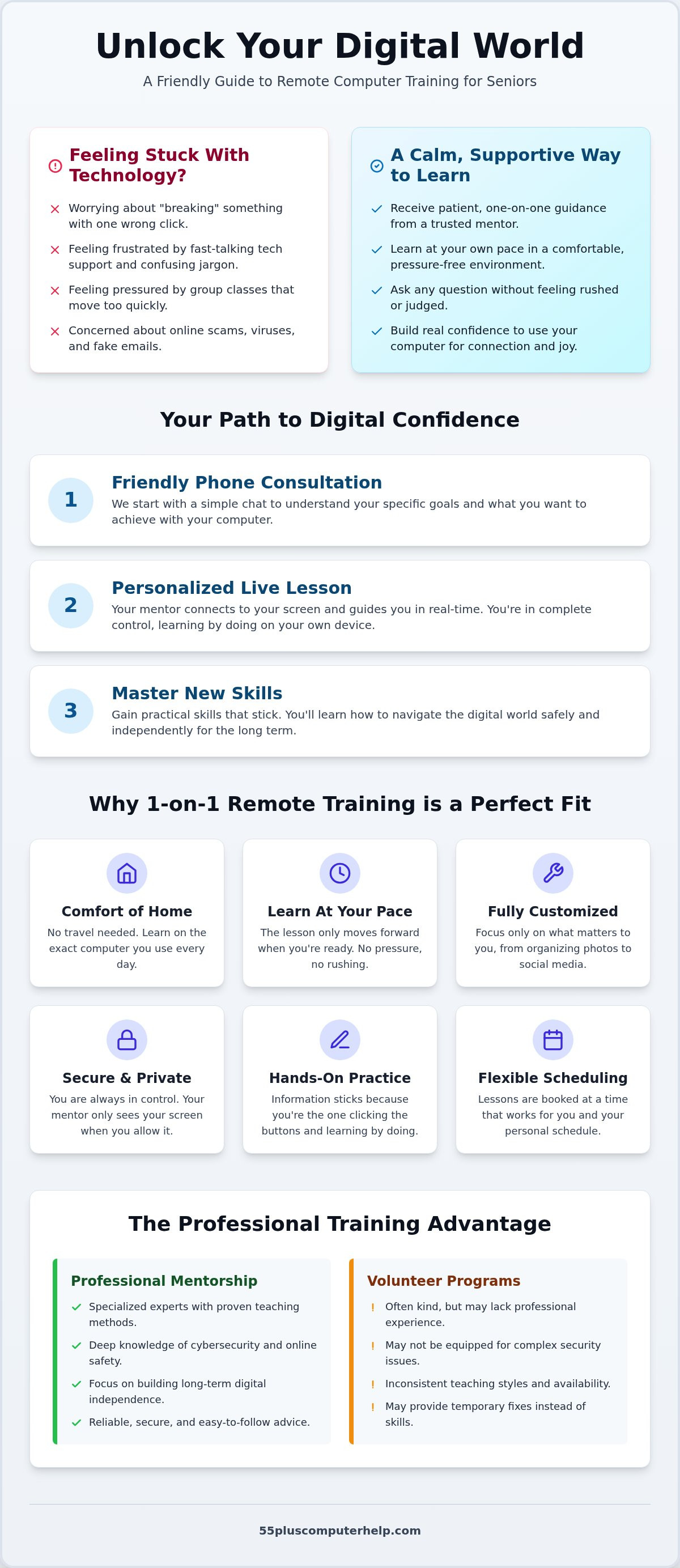
Learning technology should not feel like a race. Many online courses use pre-recorded videos that treat every student the same. Professional remote computer training for seniors changes this by putting you in the driver's seat. Your mentor moves only as fast as you are comfortable. If you need to hear an explanation three times, that is perfectly fine. This patience builds a foundation of trust. You aren't just watching someone else do it; you are doing it yourself with a guide by your side. This hands-on approach ensures that the information actually sticks.
This relationship is about more than just clicking buttons. It is about having a trusted expert who understands the specific hurdles you face. Whether you are worried about making a mistake or feeling overwhelmed by constant software updates, a dedicated mentor provides a safe space to ask any question. This approach leads to true empowerment. You gain the confidence to explore your computer without fear of "breaking" something. You are learning a new language, and having a translator makes all the difference.
Volunteer Programs vs. Professional Training
You might find free programs that use student volunteers for tech support. While these students are often kind, they may lack the professional experience needed for complex tasks like cybersecurity or virus prevention. Professional trainers focus on long-term digital independence. They use consistent teaching methods that help you remember what you've learned. Our experts at 55 Plus Computer Help specialize in the unique needs of the 55+ community, ensuring the advice you get is reliable, secure, and easy to follow.
Customizing Your Learning Path
One of the biggest benefits of a private session is the lack of "fluff." In a group class, you might spend an hour learning about things you will never use. With personalized remote computer training for seniors, you only learn what you want to know. If your goal is to organize family photos, master email, or use social media safely, that is exactly what we focus on. We don't waste your time with features that don't matter to you.
We also address the specific quirks of your own device. A Mac works differently than a PC, and a tablet has its own unique gestures. Your mentor helps you create a personalized "cheat sheet" of notes during the session. These notes serve as a handy reference for when you are working on your own later. This tailored approach ensures every minute of your lesson is valuable and relevant to your daily life.
How Remote Training Sessions Work Step-by-Step
Starting something new can feel daunting. We understand that. That is why our process for remote computer training for seniors begins with a simple, friendly phone call. We don't start by sending you complicated links or codes. Instead, we talk about what you want to achieve. Maybe you want to learn how to back up your photos. Perhaps you need help with email troubleshooting. This initial conversation ensures that we are prepared to help you with your specific goals from the very first minute. We want you to feel heard and respected before the technical work even begins.
Overcoming the Connection Hurdle
Many services assume you already know how to join a digital meeting. They might send an email with a link and expect you to figure it out on your own. We do things differently. If you are unsure how to get the remote software running, we stay on the phone with you. We provide clear, step-by-step verbal instructions until we can see your screen together. It is completely okay to be confused during this part. We've helped many people through this stage since 2014. If your internet starts acting up, don't worry. We can pause and try again when the connection is stronger. We are here to support you, not to rush you.
A Typical Lesson Experience
Once we are connected, every session follows a logical and calm path. We start by setting a clear goal for the hour. For example, you might say, "I want to organize my holiday photos into folders." We then provide a demonstration right on your own screen. You see exactly where the mouse moves and which buttons are clicked. However, we follow a "Hand-on-the-Mouse" philosophy. This means you are the one doing the clicking. We provide the guidance, but you perform the actions. This hands-on practice is the best way to build muscle memory and long-term confidence.
We always leave plenty of time for questions. There are no "silly" questions in our lessons. You can play around with the software safely, knowing your mentor is there to help if you take a wrong turn. At the end of the hour, we provide a recap of everything we covered. This summary helps reinforce your new skills. We want you to finish the session feeling a sense of accomplishment. Professional remote computer training for seniors is more than just a tech fix. It is a steady, methodical path toward mastering your digital world with a trusted expert by your side.
Essential Digital Skills for the Modern Senior
Technology changes at a rapid pace. Many basic guides focus on simple tasks like "how to use a mouse," but modern life requires more than just the basics. Our remote computer training for seniors focuses on practical skills that actually improve your daily life. We help you move past the initial confusion so you can feel secure, organized, and connected. Learning these skills allows you to use your devices as tools for joy rather than sources of stress. We believe that everyone can master technology with the right guidance.
Staying Safe from Scams and Malware
Online safety is often the biggest concern for our students. We teach you how to identify "phishing" attempts in your inbox. This is when a scammer sends an email that looks like it's from your bank or a government agency. You'll learn to look for specific warning signs, such as strange sender addresses or urgent, threatening language. Understanding these tricks is the first step toward true digital confidence. For more detailed help on this topic, you can read our article on Virus and Malware Removal: A Patient Guide to Securing Your Computer. We also cover best practices for password management. Keeping your accounts secure doesn't have to be a headache. We show you how to create and manage strong passwords so your personal information stays private.
Connecting with Family and Friends
Staying in touch with loved ones is a top priority for most of our clients. We help you with email setup and troubleshooting for seniors so you never miss an important message. Beyond just text, we teach you how to master video conferencing tools like Zoom, FaceTime, or Skype. This means you can see your grandkids' faces clearly without needing someone else to set up the call for you. We also show you how to share large photo albums securely. You'll be able to send and receive family photos with ease and keep them organized on your device.
Organizing your digital life is just as important as keeping it safe. We show you how to save photos of your grandkids into neat, labeled folders. This makes them easy to find when you want to show a friend or print a copy. We also explain how to maintain your device. You'll learn what those "software update" notifications actually mean and why they are important for your security. Basic troubleshooting skills help you fix small issues before they become big problems. If you want to start mastering these essential skills today, visit 55 Plus Computer Help to schedule your first personalized session.
Choosing 55 Plus Computer Help for Your Training
Since 2014, we've focused on one thing: helping the 55+ community feel at home with technology. We know that many seniors feel left behind by big tech companies. Our remote computer training for seniors is designed to fix that. We don't just fix a problem and leave. We teach you how to handle it yourself next time. Patience is our most important tool. We believe that a calm atmosphere is the only way to learn effectively. You deserve a teacher who speaks your language and respects your pace.
Our expertise is specialized. We don't try to be everything to everyone. By focusing exclusively on seniors, we've developed a deep understanding of the unique challenges you face. Whether it's frustration with tiny icons or anxiety about online security, we've seen it all. We offer comprehensive care that covers both training and technical support. You can count on us for everything from setting up a new printer to removing a stubborn virus. We provide a reliable, local feel even though we are working with you remotely.
The "Mentor" Difference
We call ourselves mentors because our work is about more than just software. A technician wants to finish a job quickly and move on to the next person. A mentor wants you to succeed long-term. We want you to feel a sense of accomplishment every time you turn on your computer. Our goal is your digital independence. Many of our students started with high anxiety. Now, they manage their own emails and video calls with ease. These success stories are the reason we do what we do. We are committed to building your confidence one click at a time.
We also believe in total transparency. Our pricing for remote sessions is simple and fixed. You don't have to worry about surprise bills or complicated contracts. This honesty is part of how we build trust with our community. We treat every student like a neighbor. You can expect a steady, methodical pace in every lesson. We never use high-pressure tactics or confusing jargon. We are here to help, not to sell you things you don't need.
Ready to Get Started?
Booking your first session for remote computer training for seniors is a straightforward process. You can start by visiting our website to see our available times. Before your mentor calls, just make sure your computer is plugged in and turned on. It's helpful to have a short list of your top three goals or questions. This helps us make the most of your time together. We'll handle the connection process over the phone, so you don't have to worry about the technical details.
Mastering technology from home is a journey, and you don't have to take it alone. We are ready to provide the patient, professional guidance you need. Whether you want to learn a new skill or just feel safer online, we are here for you. Book Your Personalized Remote Lesson Today and take the first step toward digital confidence.
Take Control of Your Digital World Today
Technology should be a tool that brings joy and connection to your life. Through remote computer training for seniors, you can learn to navigate the digital landscape with total confidence. You don't have to struggle with confusing manuals or fast-talking tech support anymore. Instead, you get a patient mentor who understands your specific needs and moves at your preferred pace. Whether you want to master video calls or secure your personal data, the right help makes all the difference.
At 55 Plus Computer Help, we've specialized in the 55+ community since 2014. We provide 1-on-1 personalized instruction and offer transparent hourly rates for all our remote support services. We believe that everyone deserves to feel safe and independent online. You have the potential to become a tech expert in your own home, and we are here to support you every step of the way.
Empower yourself with a patient tech mentor; schedule your remote session here. Your journey toward digital independence starts with a single, friendly conversation. We look forward to helping you master your computer with ease and security.
Frequently Asked Questions
Is remote computer training safe for my privacy?
Remote computer training for seniors is very safe because you are always in control of your screen. You must give us permission before we can see anything. You can also end the session at any moment with one simple click. We use secure software that protects your personal data. We never access your files without your knowledge. Your privacy and comfort are our top priorities during every lesson.
Do I need to be a tech expert to set up the remote connection?
You don't need any special skills to get started. We call you on the phone first and walk you through the process step-by-step. We use very simple instructions that anyone can follow. If you can turn on your computer and open a web browser, we can help you with the rest. We stay on the line until we are successfully connected and you feel ready to begin.
What if I am a very slow learner or get frustrated easily?
We specialize in working with students who prefer a slower pace. Frustration is a natural part of learning something new, and we are trained to help you through it. We never rush you or use complicated language. If we need to repeat a step ten times, we will do it with a smile. Our goal is to turn that frustration into a sense of real achievement and confidence.
Can remote training help me with my tablet or smartphone too?
Yes, we provide comprehensive training for your other mobile devices. Our remote computer training for seniors includes help with both smartphones and tablets. We can show you how to download apps, organize your messages, or adjust your settings for better visibility. Whether you use an iPad or an Android phone, we can guide you through the features that matter most to your daily life.
What happens if my computer freezes during the training session?
If your computer freezes, we simply continue our conversation over the phone. We will walk you through a safe restart of your device. Once your computer is back up and running, we can reconnect and pick up exactly where we left off. You don't have to worry about being left alone with a stuck screen. We stay with you until the problem is completely resolved.
How long is a typical remote training session?
A typical session usually lasts for one hour. We find that this is the perfect amount of time to learn a new skill without feeling overwhelmed. It gives us enough time to demonstrate a task, let you practice it, and answer any questions you have. If you feel you need more time, we can always schedule follow-up lessons that fit into your regular weekly routine.
Can you help me get rid of a virus during a remote training session?
Yes, we can certainly help with virus and malware removal during a remote session. We use specialized tools to scan your system and clean out any harmful files that might be slowing you down. This is a common part of remote computer training for seniors because keeping your system healthy is vital for your security. We also teach you how to avoid clicking on dangerous links in the future.
Do I have to pay for expensive software to do remote training?
You do not have to purchase any expensive software to work with us. The remote connection tool we use is completely free for you to download and use. You only need your existing computer and a standard internet connection. We believe that learning technology should be accessible and affordable. We keep our process simple so you can focus on gaining new skills rather than managing software costs.


