
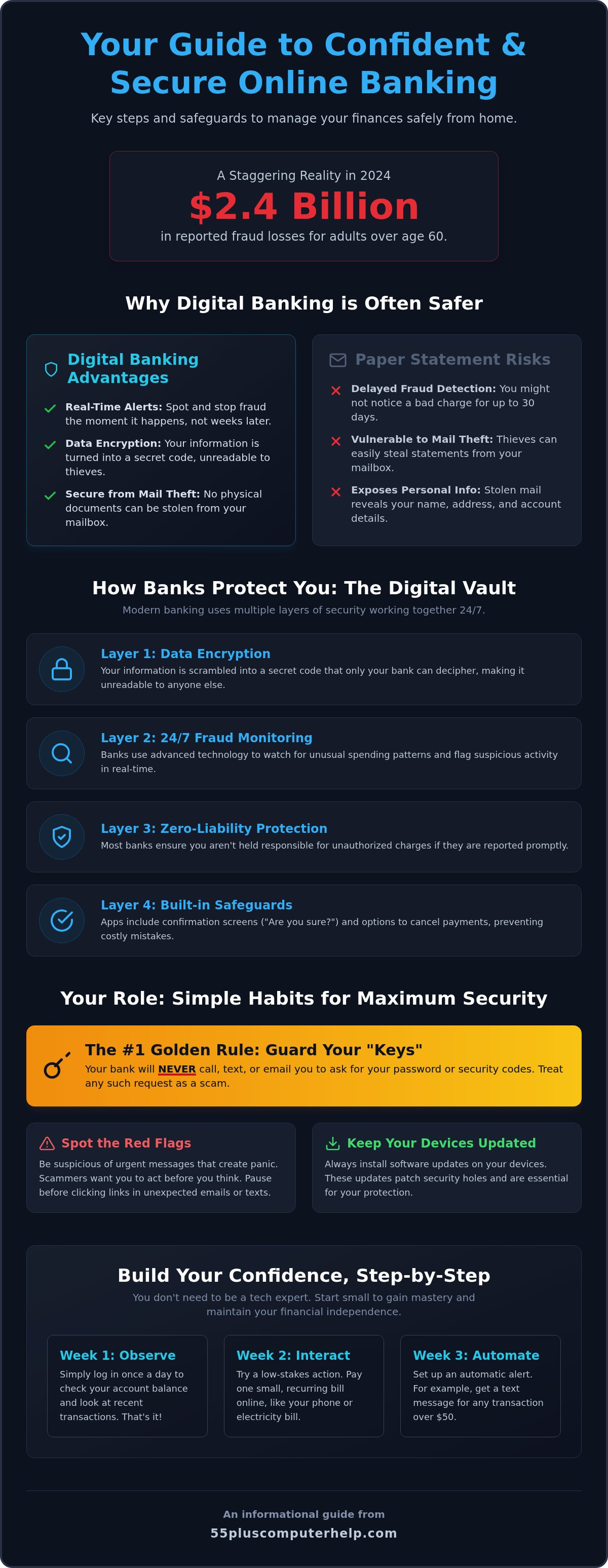
Did you know that reported fraud losses for adults over 60 reached a staggering $2.4 billion in 2024? It's completely natural to feel a bit of anxiety when you see numbers like that. You might worry about a hacker getting into your savings or feel frustrated by the constant stream of new passwords and security codes. Many people feel like one wrong click could lead to a major technical mistake. We understand those fears, and we want you to know that your feelings are valid. Learning about online banking safety for seniors is the best way to replace that worry with true confidence.
The good news is that managing your money online is much easier to master than it might seem. You can learn how to handle your finances with total self-assurance using simple, proven safety steps designed specifically for your needs. This guide will show you how to treat your computer or tablet like a secure personal vault. We'll walk you through the latest security features for 2026 so you can pay bills from home, monitor your accounts in real-time, and maintain your financial independence. It's time to feel tech-confident and secure in your own home.
Key Takeaways
- Discover why digital banking is often safer than paper records and how your personal habits create a secure foundation.
- Learn how banks use "vault-like" layers and secret codes to keep your personal information private and secure.
- Master the simple red flags of common scams so you can spot fake emails or urgent requests before they cause any trouble.
- Understand how to turn your computer into a "Safe Station" to ensure maximum online banking safety for seniors.
- Gain the confidence to manage your own finances independently by starting with small, manageable steps each week.
Is Online Banking Safe for Seniors? Debunking Common Fears
Many people believe that keeping money in the bank and only checking paper statements is the only way to stay secure. In reality, true online banking safety for seniors comes from a partnership between your bank's high-tech tools and your own daily habits. When these two parts work together, your money is often safer than it ever was in the era of paper checks. You don't have to be a computer expert to stay protected. You just need to understand how the system works for you.
One big worry we often hear is the fear of making a technical mistake. You might worry that one wrong click will send your life savings to a stranger. Modern banking apps are built with many fail-safes to prevent this. Most transfers require you to click a confirmation screen that asks, "Are you sure?" before any money moves. Many systems even let you cancel or "undo" a scheduled payment if you realize you made an error. Think of it like a safety net that's always there to catch you.
Safe banking isn't a complex skill you have to master all at once. It's a manageable daily habit, much like locking your front door when you leave the house. You don't need to know how the lock was manufactured to use it effectively. You just need to build the routine of checking your accounts and following a few simple steps to keep your digital door locked tight.
Why Paper Statements Aren't Always Safer
Paper statements can sit in your mailbox for hours, making them easy targets for mail theft. If someone steals your mail, they have your name, address, and account details right in their hands. Also, a paper statement only shows you what happened weeks ago. If a fraudulent charge happens on the first of the month, you won't see it until your statement arrives thirty days later. Digital banking gives you real-time alerts. You can see a charge the second it happens, which lets you stop fraud immediately. Digital records are also encrypted, which means they are turned into a secret code that only you and the bank can read.
The Reality of Modern Bank Security
Banks invest billions of dollars every year to keep their systems locked tight. They use advanced technology to watch for unusual patterns in your spending. Understanding Online Banking Security helps you see that these institutions are constantly evolving to fight new threats. You are rarely liable for unauthorized charges if you report them promptly. Most banks offer "zero liability" protections that keep your balance safe even if someone manages to get your details. You can feel confident knowing that the bank is working hard in the background to protect your hard-earned money while you enjoy the convenience of banking from home.
Understanding the Layers of Online Banking Security
Think of your online bank account like a high-security vault. This vault does not rely on just one thick door. Instead, it uses many different layers of protection that work together to keep your money safe. This multi-layered approach is the foundation of online banking safety for seniors. If a thief managed to find one way in, the next layer of security would be there to stop them. This system is designed to give you peace of mind while you manage your finances from the comfort of your living room.
One of the most important layers is called encryption. While it sounds like a technical term, it is really just a digital secret code. When you send information to your bank, your computer scrambles the data into a jumbled mess of letters and numbers. Only the bank has the special key to unscramble it. Even if someone tried to peek at your information while it was traveling through the internet, they would see nothing but nonsense. It is a very effective way to keep your private details private.
You also play a vital role in this security system. It is helpful to remember that your bank will never call, text, or email you to ask for your password. They already have the tools they need to help you with your account. If someone asks for your password or a security code, they are likely trying to trick you. Keeping these "keys" to yourself is a simple but powerful way to protect your vault. If you ever feel unsure about a request, you can always reach out for personalized technology training to help you recognize these situations with confidence.
Finally, keeping your software updated is like fixing a loose hinge on your vault door. Scammers often look for "digital backdoors" or small holes in older software programs. When your computer or tablet asks to install an update, it is usually closing those holes to keep you safe. Following the FTC Online Security Guidelines by keeping your devices current is one of the easiest habits you can form to stay protected.
Multi-Factor Authentication (MFA) Made Simple
Multi-factor authentication is like having two different keys for one lock. Even if a thief steals your password, they still cannot get into your account without that second key. This second layer usually arrives as a quick text message code, an email link, or a prompt on your smartphone app. You simply enter the code to prove it is really you. Multi-factor authentication is an essential second layer of identity verification.
Secure Websites: Looking for the Padlock
Before you log in to your bank, look at the address bar at the top of your screen. You should see a small padlock icon and the letters "https" at the start of the website address. These symbols tell you that the connection is private and secure. It is also best to avoid banking on public Wi-Fi at coffee shops or libraries. These networks are like talking about your money in a crowded room. Always use your private home network for your financial tasks to keep your information away from prying eyes.
Recognizing and Avoiding Common Banking Scams
Scammers often use high-pressure tactics to trick you into giving up your personal information. They know that most people want to be helpful and responsible. To stay safe, you should look for three major red flags. First is urgency. If a caller says you must act immediately to save your account, it's likely a scam. Second is secrecy. A legitimate bank will never tell you to keep a conversation secret from your family. Third is unusual payment requests. Real banks will never ask you to pay a fee using gift cards or wire transfers. Recognizing these signs is a major part of online banking safety for seniors.
One common trick is called vishing, or voice phishing. This happens when someone calls you pretending to be from your bank's "fraud department." They might tell you that your account has been hacked. They may even sound very professional and polite. Their goal is to get you to "verify" your password or a code sent to your phone. Remember, your bank already knows who you are. They'll never ask for your password over the phone. If you receive a call like this, it's okay to be skeptical. You have the power to end the call at any time. It's better to be safe than to worry about being polite to a stranger.
Another deceptive tactic is a new version of the grandparent scam. A scammer might call or email pretending to be a grandchild in trouble. They may claim they need money for a medical emergency or bail. They'll often pressure you to send a wire transfer directly from your online banking portal. They rely on your love for your family to bypass your caution. Always take a deep breath and call your family member directly on their known number to verify the story before moving any money. Taking a moment to think can save you from a very expensive mistake.
How to Spot a Fake Banking Email
Fake emails often look very official, but there are ways to see through the disguise. Always check the sender's actual email address. You can do this by clicking on the sender's name. If the address looks like a random string of numbers or doesn't match your bank's website, delete it. You should also watch out for generic greetings like "Dear Customer." A real bank usually uses your actual name in their communications. For more help, you can read A guide to identifying common email scams to learn more about keeping your inbox clean and secure.
What to Do if You Suspect a Scam
If you feel like something is wrong, trust your gut. Your first step is to hang up the phone or close the email immediately. Do't worry about being rude. Your security is the top priority. Next, call your bank using a trusted phone number. You can find this on the back of your physical debit or credit card. Never use a number provided in a suspicious email or text message. Following these Expert Online Banking Precautions ensures that you're always talking to a real bank representative who can help you safely. Never click a link in a text message claiming your account is locked.
How to Set Up Your Device for Maximum Banking Security
Many people focus on the bank's website, but your own computer or tablet is just as important. Think of your device as a "Safe Station." This is your dedicated, private space for managing your finances. When you use one specific device for banking and avoid using it for risky activities like playing unknown games, you stay much safer. This habit is a cornerstone of online banking safety for seniors. It ensures that your digital "front door" is always locked before you even begin your work.
Using a computer that has a virus is like living in a house with a hidden camera. You might think you are alone, but a stranger could be watching everything you do. In the digital world, this "watching" happens through malicious software. These programs can see what you type and where you click without you ever knowing they are there. This is why having a clean device is the most important step in your security journey. You deserve to feel safe in your own digital home.
To keep your Safe Station in top shape, you can follow a simple maintenance routine. These steps don't require you to be a tech expert. They are just good habits that keep your foundation strong:
- Install updates: When your device asks to update, say yes. These updates often fix security holes.
- Run scans: Use your security software to check for hidden problems once a week.
- Restart often: Turning your computer off and on helps clear out old data and keeps things running smoothly.
- Limit your tools: Only keep the apps and programs you actually use and trust.
You don't have to handle these technical tasks by yourself. A patient mentor can help you set up your device correctly from the start. Having a professional verify your settings gives you the confidence to bank without worry. If you want to ensure your device is perfectly prepared, we offer patient computer setup and training to help you feel completely in control.
Cleaning Your Device Before You Log In
Some viruses are designed to be invisible. These are often called "keyloggers" because they "log" every key you press on your keyboard. They can steal your passwords and account numbers as you type them. If your computer is running slow or acting strange, it might be trying to tell you something is wrong. It's always better to get a professional check-up if you suspect a problem. You can explore our Professional virus and malware removal services to make sure your computer is a truly secure environment for your banking.
Password Best Practices for Seniors
A strong password is your first line of defense. It's best to never use the same password for banking that you use for social media or email. If a small website gets hacked, a criminal might try that same password on your bank account. Instead, try the "Passphrase" method. Use a long sentence that means something to you, like "MyGrandkidsAreTheBest2026!" It's easy for you to remember but very hard for a computer to guess. If you find it hard to track many passwords, it's okay to write them down in a physical book. Just make sure to keep that book in a hidden, safe place in your home, far away from where you keep your computer.
Gaining Confidence and Control Over Your Digital Finances
Online banking is not something to fear. It is a powerful tool that gives you more freedom in your daily life. Instead of waiting for a monthly statement, you can see exactly where your money is at any time. You can check your balance from your favorite chair. You can pay your electric bill without finding a stamp or driving to the post office. This convenience is what makes online banking safety for seniors so valuable. It is about giving you back your time and your independence.
Confidence comes from practice. You don't have to do everything at once. We recommend starting very small. You might decide to just log in once a week to look at your balance. You don't even have to move any money at first. This simple habit helps you get used to the screen, the buttons, and the security steps. Over time, you'll find that the process becomes as natural as checking the mail. The more you use these tools, the more tech-confident and secure you will feel.
It is perfectly okay to ask for help while you learn. Technology changes quickly, and nobody expects you to know everything right away. Learning is a process, not a race. You deserve to have someone explain things in a way that makes sense to you. When you have a clear plan and a secure foundation, you can manage your finances with total self-assurance. Personalized training acts as the bridge that carries you from feeling anxious to feeling completely in control of your digital world.
The Value of Personalized Tech Training
Learning on your own computer makes a big difference. You are in your own home using the mouse and keyboard you already know. One-on-one lessons allow you to go at your own pace without any pressure. A patient tutor can sit with you and help you set up your first online bill pay safely. They can answer your questions as they come up. This kind of support gives you the peace of mind that comes from having a trusted tech neighbor by your side. It turns a confusing task into a simple, successful experience.
Taking the Next Step Toward Independence
Using digital tools does't mean you have to give up your old routines. You can still visit your local bank branch and talk to a teller whenever you want. Online banking simply gives you another choice. It puts you in the driver's seat of your own finances. Before you start your banking journey, it is a great idea to have a device safety audit. A professional can check your settings and make sure your "Safe Station" is ready for work. You can Contact 55 Plus Computer Help for a patient, in-home security setup to ensure you are starting on the right foot. We are here to help you feel safe, independent, and ready for the future.
Embrace Your Financial Independence with Confidence
Mastering online banking safety for seniors is about building small, smart habits that protect your hard-earned savings. You now know how to spot red flags and why keeping your computer updated is so important. By treating your device as a secure vault and using tools like multi-factor authentication, you can stay ahead of the scammers. You don't have to be a tech expert to enjoy the freedom of managing your money from home. These digital tools are meant to serve you, not cause you stress.
If you still feel a bit unsure, remember that you don't have to do this alone. We provide specialized support for those 55 and older with patient, jargon-free instruction. Whether you need onsite help or remote troubleshooting, we are here to ensure your computer foundation is secure and your questions are answered. Empower your digital journey with patient computer help today and take the first step toward total financial independence. You have the skills and the tools to succeed. It's time to use them with confidence and peace of mind.
Frequently Asked Questions
Is online banking safer than going to the bank in person?
Online banking is often safer because it provides real-time tracking of every dollar. While in-person banking is reliable, paper receipts and checks can be lost, stolen, or misplaced in your home. Digital systems monitor your transactions 24 hours a day and can alert you to suspicious activity the moment it happens. This immediate response makes it much easier to stop fraud before it causes a major problem.
What should I do if I accidentally clicked a link in a suspicious email?
Disconnect your device from the internet immediately and run a full security scan. Clicking a link can sometimes install hidden programs that watch your activity. Once you are sure your device is clean, use a different secure computer to change your banking password. Taking these quick steps is a vital part of maintaining online banking safety for seniors and protecting your personal information from prying eyes.
Can hackers get into my bank account if I use a tablet or iPad?
Any device that connects to the internet can be a target if it is not kept updated. Tablets and iPads are generally very secure, but they still need the latest software updates to fix any hidden security holes. You should always avoid using your tablet for banking while on public Wi-Fi at a library or cafe. Your private home network is the only place you should handle sensitive financial tasks.
Why does my bank keep asking me for a code sent to my phone?
This code is a second layer of protection that ensures only you can access your money. It acts as a digital "ID check" to prove that the person logging in is actually you. Even if a stranger manages to guess your password, they cannot get into your account without that unique code from your physical phone. It is one of the most powerful tools available for your security.
Is it safe to use the 'Remember My Password' feature on my computer?
It is best to avoid using the "remember password" feature for any of your financial accounts. If your computer is ever lost or if a guest uses your device, they could log in to your bank without your permission. Typing your password manually each time ensures that you are the only person who can open your digital vault. It is a simple habit that adds a lot of extra safety.
How can I tell if a banking website is real or a fake?
Look closely at the spelling of the bank's name in the address bar at the top of your screen. Scammers often create fake sites with names that are just one letter off, such as "BancOfAmerica" instead of "BankOfAmerica." Always check for the small padlock icon next to the website name. The safest habit is to type your bank's address into the browser yourself instead of clicking on a link.
Should I use a banking app on my phone or use the website on my computer?
Both options are very secure as long as your device is updated and your connection is private. Many people find that official banking apps are easier to use because they are built specifically for smaller screens. These apps often allow you to log in with your fingerprint or a face scan, which adds a very personal layer of security. Choosing the device that makes you feel most confident is a big part of online banking safety for seniors.


