
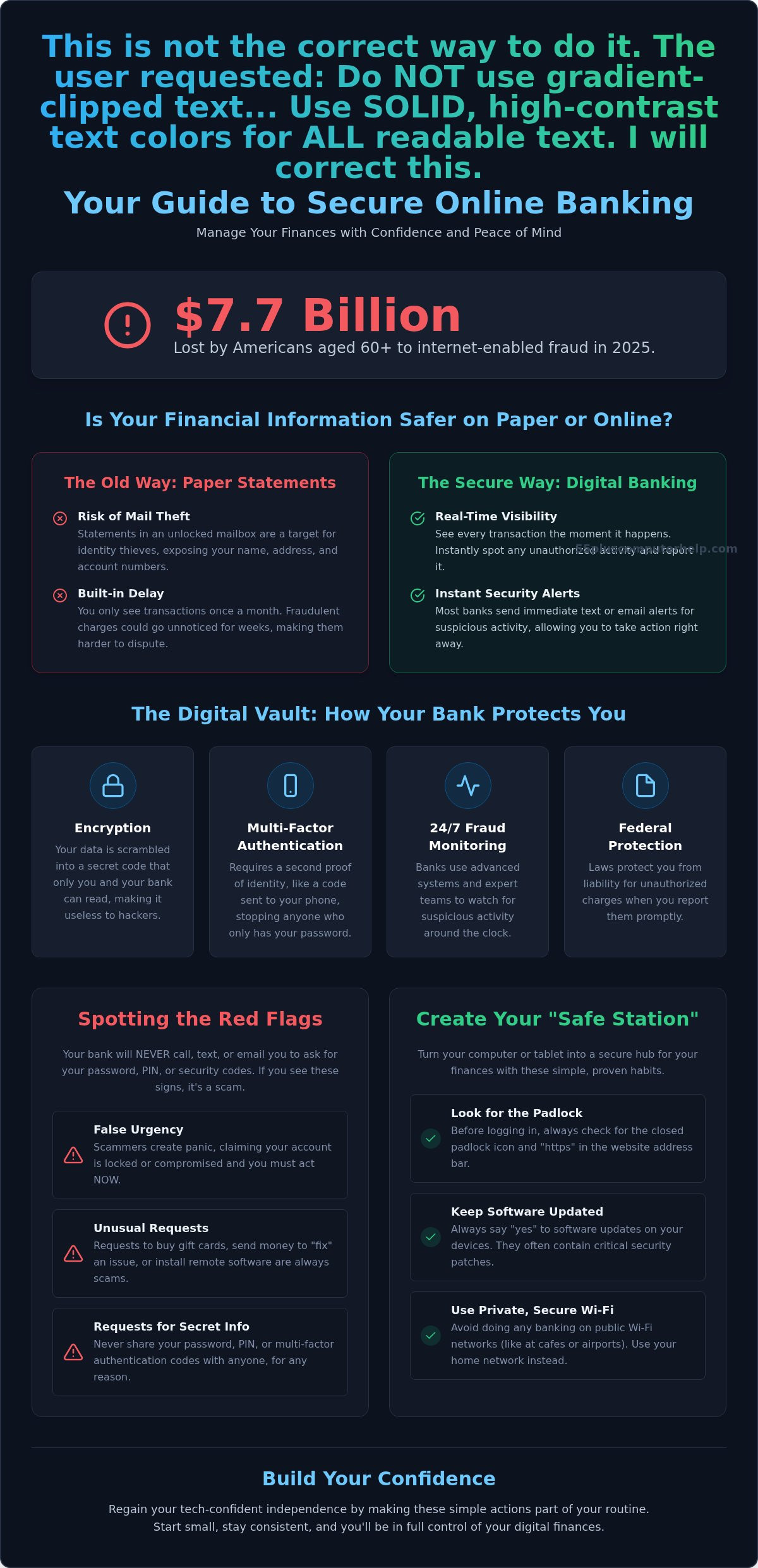
Did you know that in 2025, Americans aged 60 and older lost $7.7 billion to internet-enabled fraud? This is a startling figure that explains why so many people feel a deep sense of anxiety about clicking the wrong button or making a technical mistake. You likely value your independence and want the ease of paying bills from home, yet concerns about online banking safety for seniors can make the digital world feel quite intimidating.
It's perfectly normal to feel a bit of hesitation when you deal with complex passwords and security codes. You've worked hard for your savings; you deserve to feel completely secure while you manage them. We believe that technology should be a helpful tool that provides you with freedom, not a source of constant worry or confusion.
This guide will teach you how to manage your money online with confidence using simple, proven steps. We will preview the new 2026 banking rules that protect your accounts, explain how to spot modern AI scams, and show you how to keep your devices secure. You'll learn to monitor your accounts in real-time and regain your tech-confident independence.
Key Takeaways
- Understand how modern bank security works alongside your own habits to create a secure digital vault for your money.
- Learn to spot the common red flags of scams, such as false urgency or unusual requests for secret information.
- Master online banking safety for seniors by turning your computer into a "Safe Station" that is free from viruses and malware.
- Discover how simple, consistent habits like checking your balance once a week can build your confidence and financial independence.
Is Online Banking Safe for Seniors? Debunking Common Fears
Many seniors feel a sense of worry when they think about moving their finances to a computer or tablet. It's natural to feel protective of your life savings. However, true online banking safety for seniors is not a mystery. It's actually a simple combination of the high-tech security your bank provides and the small, smart habits you practice at home. Think of it like a home security system. The bank provides the heavy-duty locks, and you simply remember to close the door when you leave.
Why Paper Statements Aren't Always Safer
For decades, paper was the only way to track your money. Today, carrying on with paper statements can actually be more risky than using a digital screen. Mail theft is a real concern. A statement sitting in an unlocked mailbox is a gold mine for identity thieves. If someone steals your mail, they have your name, address, and account numbers immediately. Digital records, on the other hand, stay hidden behind secure logins and encryption.
Paper also has a built-in delay. You typically only see your transactions once every 30 days. If a fraudulent charge happens on day two of your billing cycle, it could be weeks before you notice it. Digital banking allows you to see every penny move the moment it happens. Most banks even send a text message to your phone if they see something unusual. This real-time visibility is much safer than waiting for the mailman to arrive.
The Reality of Modern Bank Security
Banks understand that you're worried about hackers. That's why they spend billions of dollars every year on advanced cybersecurity. They use complex encryption, which is essentially a secret code that scrambles your information so only you and the bank can read it. To understand the basics of these systems, you can read more about What is Online Banking? and how it has evolved to protect users.
You don't need to be a computer expert to stay safe. If you report an unauthorized charge promptly, federal laws generally protect you from being held liable for the loss. Your bank wants to keep your money safe just as much as you do. They have teams of experts watching for suspicious activity 24 hours a day.
One of the biggest fears is clicking the wrong button and accidentally sending money to the wrong person. Modern banking apps are designed with "undo" or "cancel" features. They often ask you to confirm a transaction twice before it goes through. By treating online banking safety for seniors as a manageable daily habit, you stay in total control of your money and your independence. Keeping your device clean and free of viruses is a great first step toward that peace of mind.
Understanding the Layers of Online Banking Security
Think of your bank account like a high-security vault. It isn't just protected by one thick door. Instead, it uses a series of locked gates that all work together. This layered approach is the foundation of online banking safety for seniors. If a thief manages to pick one lock, they are still stopped by the next gate. This system ensures your money stays exactly where it belongs.
The first gate is called encryption. While it sounds complex, it's really just a secret code. When you send information to your bank, your device scrambles it into a messy jumble of letters. Only your bank has the special key to unscramble that message. Even if a hacker intercepted the data, it would look like nonsense to them. It's a private conversation that only you and your bank can understand.
A vital part of this security is your own awareness. Your bank will never call, text, or email you to ask for your password or PIN. Real bank employees already have the access they need to assist you. If anyone asks for these details, they are trying to trick you. Simply hang up or delete the message. Additionally, always say "yes" to software updates. These updates act like repairs to your vault, closing "digital backdoors" that scammers might try to use. If you find these updates confusing, one-on-one technology training can help you manage your devices with ease.
Multi-Factor Authentication (MFA) Made Simple
Multi-factor authentication is like having two different keys for a single lock. You use your first key when you type in your password. The bank then asks for a second key to prove it's really you. This usually comes as a short code sent to your phone in a text message or an email link. You might also see a prompt on your tablet. Multi-factor authentication is an essential second layer of identity verification that keeps your accounts safe.
Secure Websites: Looking for the Padlock
Before you log in, look at the address bar at the very top of your web browser. You should see a small icon of a closed padlock. You will also see the letters "https" at the start of the web address. The "s" stands for secure. This padlock tells you that the connection is private and safe to use. If the padlock is missing or looks "broken," do not enter your information.
Always do your banking on your private home Wi-Fi network. Public Wi-Fi at a library or a coffee shop isn't secure. Using public networks is like discussing your bank balance in a crowded room. Your home network is your private office. It's the only place where you should handle your sensitive financial tasks to ensure the highest level of online banking safety for seniors.
Recognizing and Avoiding Common Banking Scams
Scammers rely on creating a sense of panic to trick you. They know that if you are worried, you might forget your usual caution. To maintain online banking safety for seniors, you simply need to recognize three major red flags. First is urgency; they will claim your account is locked right now. Second is secrecy; they will ask you not to tell anyone. Third is a request for strange payment methods, like gift cards or cryptocurrency. In 2025, Americans aged 60 and older filed over 201,000 fraud complaints. Staying alert is your best defense against these tactics.
One common trick is "phishing." This is when you receive an email that looks exactly like it came from your bank. Another is "vishing," or voice phishing. You might get a call from someone claiming to be in the "fraud department." Scammers are even using AI to clone a family member's voice in a "grandparent scam." They will claim a grandchild is in trouble and needs an urgent wire transfer. A real bank or family member will never pressure you to send money using gift cards or crypto. In 2025, at least 12,400 older Americans lost $100,000 or more to a single scam, which shows how convincing these actors can be.
How to Spot a Fake Banking Email
A scammer can make an email look very professional, but they often leave small clues. Always check the sender's actual email address. You can do this by clicking on or hovering your mouse over the sender's name. If the name says "Your Bank" but the address is a string of random letters, it is a fake. Scammers also use generic greetings like "Dear Customer" because they don't actually know your name. For more help, read our guide to identifying common email scams to stay one step ahead.
What to Do if You Suspect a Scam
If something feels wrong, trust your gut. Your first rule is to hang up the phone or close the email immediately. You are in control of the conversation. Next, find your physical debit or credit card. Call the customer service number printed on the back of that card. This ensures you are speaking to a real bank employee and not a criminal. Finally, never click a link in a text message that says your account is locked. These "smishing" texts are almost always traps. By following these steps, you reinforce online banking safety for seniors and keep your hard-earned money secure.
How to Set Up Your Device for Maximum Banking Security
Creating a "Safe Station" is one of the most effective ways to protect your finances. This means choosing one specific device, like a tablet or a laptop, that you use only for banking and official business. When you avoid using this device for random web browsing or games, you significantly lower the chance of accidentally picking up a virus. Real online banking safety for seniors depends on this kind of careful boundary. It's much easier to keep one device clean than it is to monitor every computer in the house.
Think of a virus or malware like a hidden camera inside your home. Even if you have the strongest locks on your front door, a camera allows a stranger to see everything you do. On a computer, certain viruses can record every button you press. This is how passwords get stolen. Keeping your device clean is like closing the curtains and ensuring your home is truly private. This foundation is the secret to lasting online banking safety for seniors.
Follow this simple maintenance checklist to keep your Safe Station secure:
- Install software and security updates as soon as they are available.
- Restart your device at least once a week to refresh the system.
- Run a full virus scan every month to check for hidden threats.
Cleaning Your Device Before You Log In
Some malicious software is designed to sit quietly in the background. It "logs" your keystrokes, capturing your username and password the moment you type them. If your computer starts running slowly, freezes often, or shows unexpected pop-up ads, these are warning signs. It's best to address these issues before you log into any financial accounts. We offer Professional virus and malware removal services to help you start with a clean slate.
Password Best Practices for Seniors
Using the same password for your bank and your social media is a major risk. If one is compromised, they both are. Instead, try the "Passphrase" method. A passphrase is a long, simple sentence like "My blue house has four windows!" It's easy for you to remember but nearly impossible for a computer to guess. While digital experts often suggest password managers, many people find comfort in a physical password book. This is perfectly safe as long as you keep the book in a hidden, secure location away from your computer.
Maintaining your device doesn't have to be a solo task. If you want to ensure your computer is a secure vault for your finances, you can schedule a computer setup or security checkup with a patient expert today.
Gaining Confidence and Control Over Your Digital Finances
Online banking is a tool designed to give you more freedom, not to cause you stress. Once you master a few basics, you can pay your utilities or check your retirement balance from your favorite chair. This is the heart of online banking safety for seniors: knowing you are in charge of your own information. You don't have to change everything overnight. We recommend starting very small to build your comfort level.
Try logging in just once a week simply to check your balance. You don't even have to move money at first. Getting used to the screens and the buttons will help the process feel familiar and routine. Over time, that initial anxiety will transform into a sense of accomplishment. It's perfectly okay to ask for help along the way. Learning a new system takes time; having a steady guide can make all the difference in how you feel about your digital life.
The Value of Personalized Tech Training
One-on-one lessons offer a level of comfort that a group class or a manual can't match. When you work with a patient tutor, you learn on your own computer or tablet in the quiet of your own home. This is important because every device looks a little different. You can practice setting up your first online bill pay while someone sits right next to you to ensure every step is correct. This personalized approach builds true muscle memory. There is a deep peace of mind that comes from having a trusted tech neighbor who understands your specific concerns and speaks in plain language.
Taking the Next Step Toward Independence
Moving your banking online doesn't mean you have to give up your local branch. You can still visit your bank in person whenever you want to speak with a teller. Digital banking is simply an extra tool that saves you a trip when the weather is bad or when you want to check a charge quickly. It's about having more options, not fewer. Your independence is the goal, and technology is just the vehicle to help you get there.
Before you dive into your first digital transaction, it's a great idea to have a professional look over your equipment. A quick safety audit can ensure your software is updated and your connection is private. This provides a secure foundation for online banking safety for seniors and removes the guesswork. If you're ready to feel more secure, you can contact 55 Plus Computer Help LLC for a patient, in-home security setup. We can help you turn your computer into a secure financial vault so you can manage your money with total self-assurance.
Take Control of Your Financial Future
You now have the tools to manage your money with total self-assurance. By creating a dedicated "Safe Station" and learning to spot the red flags of modern scams, you can enjoy the freedom of paying bills and monitoring accounts from home. We have seen that online banking safety for seniors is a combination of the bank's high-tech locks and your own smart, daily habits. These small steps ensure your hard-earned savings remain secure while you enjoy the convenience of the digital world.
You don't have to master these systems by yourself. We provide specialized support for those 55 and older, offering patient, jargon-free instruction that makes technology easy to understand. Whether you prefer onsite or remote troubleshooting, our goal is to turn your computer into a secure vault. Empower your digital journey with patient computer help today. You deserve to feel tech-confident and independent in every transaction you make. Your peace of mind is just a conversation away.
Frequently Asked Questions
Is online banking safer than going to the bank in person?
It is often safer because digital systems catch fraud faster than traditional methods. While a branch visit is secure, online banking lets you monitor your balance every day. You don't have to wait for a monthly statement to arrive in the mail. Real-time alerts can stop a thief before they spend your money. It's a powerful tool for online banking safety for seniors that keeps you in total control from home.
What should I do if I accidentally clicked a link in a suspicious email?
Close your browser immediately and do not enter any information on the page that opened. If you provided a password, go to your bank's official website and change it right away. You should also run a virus scan to ensure no malicious software was installed. If you feel overwhelmed, a professional check-up can give you peace of mind. Taking quick action is the best way to protect your account from potential intruders.
Can hackers get into my bank account if I use a tablet or iPad?
Tablets and iPads are generally very secure, but they are not invincible. Hackers can still use fake websites or phishing emails to trick you into giving away your password. You must keep your device software updated to fix any security holes. Always avoid banking on public Wi-Fi at a library or park. Using a private home network and a strong passphrase makes your tablet a very safe tool for managing your money.
Why does my bank keep asking me for a code sent to my phone?
This is called multi-factor authentication, and it acts as a second lock on your account. Even if a scammer manages to steal your password, they won't have your physical phone to see that secret code. It is one of the most important layers of online banking safety for seniors. While it might feel like an extra step, it provides a massive boost to your security. It ensures that only you can access your funds.
Is it safe to use the 'Remember My Password' feature on my computer?
It's best to avoid this feature for your banking accounts. If your computer is ever lost or if a guest uses it, they could log into your bank without needing your password. Instead, use a passphrase that is easy for you to remember but hard for others to guess. If you struggle to keep track of it, writing it in a physical book hidden away from your computer is a much safer alternative.
How can I tell if a banking website is real or a fake?
Always look for the small padlock icon in the address bar at the very top of your screen. The web address should also start with "https," which means the connection is secure. Check the spelling of the bank's name in the address bar very carefully. Scammers often use names that are one letter off, such as "Chasee.com" instead of "Chase.com." Typing the address yourself is much safer than clicking a suspicious link.
Should I use a banking app on my phone or use the website on my computer?
Both options are safe if you follow the right habits. Official banking apps are often more secure because they are harder for hackers to fake than a website. They also use your phone's fingerprint or face scan for extra protection. However, if you find the small screen of a phone difficult to read, using a clean computer at home is a great choice. The most important thing is using a device you feel comfortable with.


