
Margaret sat at her kitchen table, looking at a blurry photo of her new great-granddaughter sent via text. She knew there were clearer updates on Facebook, but the fear of clicking a wrong button or seeing a scam kept her from logging in. Many people feel this same hesitation when exploring social media for seniors. It's natural to feel a bit anxious about making a public mistake or getting lost in technical jargon.
You shouldn't have to miss out on family updates or the chance to find old friends because of a confusing app. We believe that technology should bring you closer to the people you love, not make you feel frustrated. You can learn to navigate these platforms with confidence and stay safe while doing it. It's all about taking small, steady steps at your own pace.
In this article, we'll walk through the best ways to use social media securely in 2026. You'll learn how to see the latest family photos, discover new hobbies through video, and keep your private information protected. Let's turn that technical hurdle into a simple gateway for connection.
Key Takeaways
- Understand how social media acts like a digital living room where you can enjoy two-way conversations with friends and family.
- Discover why Facebook is the best place for family photos and how YouTube can help you learn new hobbies through video.
- Learn the essential safety rules for social media for seniors, including how to protect your private information and avoid common scams.
- Gain confidence by starting slow and using the "Grandkid Rule" to interact with younger generations in a positive way.
- See how working with a patient mentor can help you master new technology without the frustration of confusing jargon.
What is Social Media and Why Should Seniors Use It?
Imagine a cozy room where your family and friends gather every day. They share stories, show new photos, and tell jokes. You can walk in whenever you like, stay as long as you want, and talk to anyone there. This is exactly how we think about social media for seniors. It is not just a collection of apps or websites. It is a digital living room that keeps you at the center of your family circle. You don't have to worry about the technical side right away. Instead, focus on the people waiting to talk to you.
In the past, keeping up with friends meant waiting for a letter or a scheduled phone call. Information usually moved in one direction. You read the newspaper or watched the nightly news. Today, the conversation goes both ways. When your grandson posts a video of his first soccer goal, you can tell him how proud you are right away. This real-time connection helps reduce the feeling of being far apart. It turns distance into a small detail rather than a barrier. Feeling connected to your loved ones is vital for your emotional well-being and happiness.
The Evolution of Connection in 2026
By 2026, staying online has become a normal part of our daily lives. We no longer rely only on traditional letters that might get lost in the mail. Quick updates and video calls have become the standard way to say hello. Being part of this digital world is a great way to stay active in your community. You don't have to wait for the next family reunion to see what everyone is doing. Social media is simply a tool that helps you stay close to the people who matter most.
Beyond Photos: Learning and Hobbies
Social media offers much more than just family updates. It is a massive library of knowledge and fun. You can join groups dedicated to your favorite things. For example, many seniors enjoy:
- Watching live cooking demonstrations from expert chefs.
- Joining history groups that share rare photos of your hometown from decades ago.
- Participating in gentle exercise classes or yoga sessions designed for your age group.
Staying digitally active provides excellent mental stimulation. It keeps your mind sharp as you learn new skills and engage with new ideas. If you feel a bit unsure about where to start, personalized technology training can help you find your footing. Having a patient mentor by your side makes the process much easier. You can learn at your own pace and focus on the things that bring you joy. Using social media for seniors is about empowerment and keeping your world big and bright.
Comparing the Best Social Media Platforms for Seniors
Choosing the right digital space is the first step toward staying connected. Every platform has a different purpose. One might be great for seeing photos, while another is better for learning a new skill. Understanding these differences helps you enjoy social media for seniors without feeling lost. It's about finding the tool that fits your lifestyle.
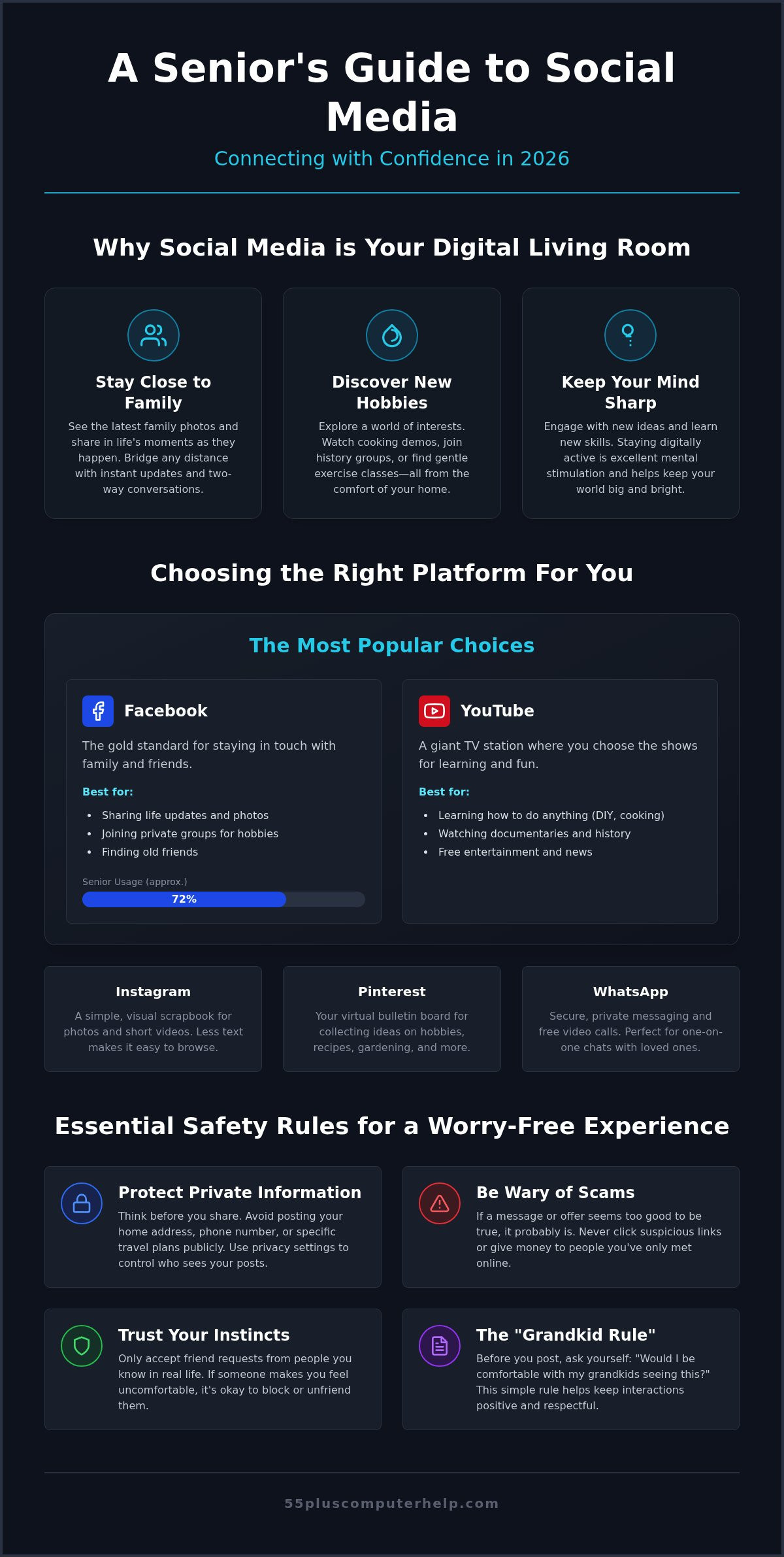
Facebook is often called the gold standard for staying in touch. Industry reports from Creating Results show that about 72% of seniors use Facebook regularly. It is where most families share their life updates and holiday photos. You can join private groups for your local neighborhood or a specific interest, like birdwatching or classic cars. It feels like a community center that stays open all day and night.
YouTube is another popular choice. It works like a giant TV station where you choose the shows. You can find videos on how to fix a leaky faucet or watch a documentary about history. It is a wonderful way to find free entertainment and learn at your own pace. For those with family abroad, WhatsApp is a great choice. It allows you to send private messages and make video calls for free over the internet. It is very secure and keeps your conversations private between you and your loved ones.
Facebook and YouTube: The Big Two
These two sites remain the most popular choices for people over 55. Facebook keeps you connected to your social circle through posts and comments. YouTube acts as a helpful search engine for your hobbies and daily news. To use these sites safely, you will need a secure email account. If you need help getting started, our guide on email setup and troubleshooting for seniors covers everything you need to know to get set up correctly.
Rising Platforms: Instagram and Pinterest
Instagram is like a digital scrapbook. It focuses mostly on photos and short videos. Many people find it easier to navigate than Facebook because there is less text on the screen. It is a simple, visual way to follow your favorite artists or see what your grandkids are doing. Pinterest works like a virtual bulletin board. You can "pin" ideas for recipes, gardening, or home DIY projects. It is a calm space that focuses more on your interests than on talking to others.
We recommend starting with just one platform first. This helps you build your confidence without feeling overwhelmed by too many notifications. If you're not sure which one to pick, personalized technology training can help you find the perfect match for your specific interests. Taking it one step at a time ensures you feel in control of your digital journey.
Staying Safe: A Seniors Guide to Privacy and Scams
Safety is the most important part of enjoying your time online. Many people worry about scams, and that is a healthy way to feel. It means you are being careful and thoughtful about your digital life. When using social media for seniors, your first line of defense is a simple, firm rule. Never share your passwords, bank details, or social security number in a post or a private message. Even if a message looks like it comes from a friend, treat it with caution if it asks for money or personal information. Real friends and family will almost always call you on the phone if they have a true emergency.
Digital "stranger danger" is another concept to keep in mind. It is just like the rule we taught our children years ago. If you do not know a person in real life, you do not have to accept their friend request or reply to their messages. Scammers often use fake profiles with friendly-looking photos to gain your trust. By keeping your digital circle limited to people you actually know, you remove most of the risk. You are in charge of who enters your digital living room, and you have every right to keep the door closed to strangers.
Understanding your privacy settings is like putting a sturdy lock on that door. These settings allow you to choose exactly who sees your posts. You can set your account so that only your approved friends and family can view your photos or read your updates. This keeps your personal life private and away from the public eye. If you ever feel that your computer is acting strange or slow after you clicked a link, professional virus and malware removal can act as a critical safety net. It clears away hidden threats and gives you back your sense of security.
Common Red Flags to Watch For
Scammers often try to create a sense of urgency to make you act without thinking. One common trick is the "Grandparent Scam," where someone pretends to be a relative in trouble. They might ask for money for bail or a hospital bill. Always hang up and call that relative directly to check the story first. You should also watch out for prizes that seem too good to be true. If a post says you won a free cruise or a large cash prize, it is likely a trap. Our best advice is simple. When in doubt, don't click.
Managing Your Digital Footprint
You have total control over your digital footprint. You can lock down your profile so it is not searchable by the public or random people on the internet. It is also vital to use a strong, unique password for every social account you own. This prevents a problem with one account from affecting others. If someone makes you feel uncomfortable or sends too many messages, you can block or "unfriend" them immediately. Social media for seniors should always be a safe, supportive, and happy experience for you.
Practical Tips for Navigating Social Media with Confidence
You don't have to become an expert overnight. Most people find that social media for seniors is much more enjoyable when they take a steady, patient approach. Start by simply observing. You can scroll through your feed and see what others are sharing without feeling the pressure to post anything yourself. This listening phase helps you understand how the platform works and what kind of content you enjoy most. It is a great way to build your comfort level at your own pace.
When you interact with younger relatives, try following the Grandkid Rule. It's wonderful to be supportive, but you don't need to comment on every single photo they post. A simple Like or a short, encouraging word is often the perfect way to show you care. This keeps the connection strong without making them feel overwhelmed by too much attention. Remember that social media should be a positive part of your day. We recommend setting a timer for 20 or 30 minutes. This ensures your online time stays focused on joy and connection. When the timer goes off, you can step away and return to your physical surroundings feeling refreshed.
Interacting with Family Online
Understanding the basic buttons makes a big difference in how you feel. A Like is a quick way to say you enjoyed a post. A Comment lets you add your own thoughts for others to read. A Share sends the post to your own profile so your friends can see it too. If you want to talk about private family matters or health issues, use Direct Messages. These are private conversations that only you and the recipient can see. When you share your own photos, only post things you would be happy for your whole friend group to see. If you want to practice these skills in a safe environment, our personalized technology training can give you the hands-on experience you need to feel truly confident.
Finding Your Community
The search bar at the top of the screen is a very powerful tool. You can type in words like gardening, local history, or book club to find groups of people with similar interests. Before you join the conversation, try lurking for a few days. This just means watching the posts to see how people talk to each other. It helps you learn the culture of the group before you jump in. Many people find that using social media for seniors is much easier on a tablet. The larger screen and touch controls make the experience much easier to read and navigate than a small smartphone screen.
How Personalized Training Makes Social Media Easy
Many people try to learn new technology by watching generic video tutorials. These videos often move far too quickly for a true beginner to follow. The presenter might use technical words that feel like a foreign language. This can leave you feeling more frustrated than when you started. A patient mentor makes a world of difference in your learning journey. We focus on your specific goals and your unique device. Whether you use an iPad, an Android tablet, or a desktop PC, we show you exactly where your buttons are located. This personal touch turns a confusing technical hurdle into a simple path toward connection.
We enjoy helping our clients reach that special moment of discovery. Our goal is to transform your daily experience with technology. We want to help you move from saying "I can't do this" to proudly saying "Look at this photo I sent to my family!" Mastering social media for seniors is about much more than just learning apps. It is about giving you the tools to stay active in the lives of your children and grandchildren. When you have a dedicated teacher to answer every question, the digital world feels much smaller and more welcoming. You can take your time and ask the same question as many times as you need.
One-on-One Lessons vs. Group Classes
Group classes can often feel rushed or intimidating. You might worry about holding the rest of the class back or asking a question that seems too simple. In a one-on-one session, the pace is entirely up to you. We never move on to a new topic until you feel completely comfortable with the current one. You can choose the convenience of in-home visits or remote help for immediate troubleshooting. Learning in the comfort of your own home helps reduce anxiety and makes the lessons more effective. No question is ever too basic for a professional who specializes in helping seniors.
Empowerment Through Digital Literacy
Building your skills in social media for seniors creates a foundation for all your technology use. This newfound digital literacy builds your general computer confidence. Once you feel at ease with Facebook or YouTube, you will find that other tasks become much easier to handle. You might notice that checking your email or using a smart home device feels less like a chore and more like a helpful tool. We are dedicated to empowering you to explore the modern world with safety and self-assurance. You deserve to feel capable and connected in 2026. If you are ready to begin, you can book a personalized session with us today. We look forward to helping you stay connected.
Start Connecting with Confidence Today
Staying connected in 2026 is simpler than it seems when you have the right tools and support. You now know how to choose the platform that fits your life and how to keep your private information secure. By following basic safety rules and taking small steps, you can enjoy all the benefits of social media for seniors without the stress. Technology should be a bridge to your loved ones, not a source of frustration. You have the power to stay active and engaged in the digital world.
Since 2014, we have served as a trusted partner for people who want to master their digital world. We provide patient, one-on-one training that is tailored specifically for those aged 55 and older. Our team offers both in-home and remote assistance to help you with immediate troubleshooting or long-term learning. You don't have to figure these systems out on your own. We are here to act as your personal guide every step of the way.
Book Your Personalized Social Media Lesson Today. Let's work together to turn your technical questions into a sense of true accomplishment. We look forward to helping you stay close to your family and friends. Your digital journey is just beginning, and we're excited to help you succeed.
Frequently Asked Questions
Is social media free for seniors to use?
Yes, the most popular social media platforms are completely free to join and use. Companies like Facebook, YouTube, and Instagram don't charge a subscription fee because they make money through advertisements. You only need a basic internet connection and a valid email address to create your profile and start connecting with others.
How can I see my grandkids' photos without everyone else seeing mine?
You can control exactly who sees your content by adjusting your privacy settings. Most platforms allow you to set your account to "Private" or "Friends Only." This means you can enjoy all the updates your grandchildren share while ensuring your own photos and posts stay hidden from the general public and strangers.
What is the safest social media platform for older adults?
WhatsApp is often considered one of the safest options because it uses high-level encryption for private messages. However, any platform can be safe if you use it correctly. When exploring social media for seniors, the best approach is to only accept friend requests from people you know and to never share sensitive personal information in a post.
Can I use social media on my tablet or do I need a computer?
You can use social media on any modern device, including tablets, smartphones, and computers. Many of our clients prefer using a tablet because the touch controls are intuitive and the screen is larger than a phone. You can simply download the specific app for the service you want to use from your device's app store.
What should I do if I think my account has been hacked?
You should change your password immediately if you still have access to your account. If you are locked out, use the "Forgot Password" or "Report a Compromised Account" link on the login page. Most platforms have a dedicated security center to help you verify your identity and regain control of your profile safely.
How do I find my old friends from high school or college on Facebook?
Use the search bar at the top of the Facebook screen to type in the full name of the person you're looking for. You can also search for the name of your high school or college to find alumni groups. Facebook often suggests people you might know based on the schools and locations you have listed in your own profile.
Do I need a separate account for every social media site?
Yes, you typically need to create a new account for each different social media site you decide to join. While some apps allow you to log in using your Facebook details, it's often better to create a unique login for each one. This keeps your accounts separate and helps protect your overall digital security if one site has a problem.
How can I stop seeing political posts or ads I don’t like?
You can train the platform to show you better content by using the "Hide" or "See Less" options. Most social media for seniors features three small dots at the top corner of every post. Clicking these dots allows you to tell the app you aren't interested in that topic. Over time, your feed will become more focused on the hobbies and family updates you enjoy.


