
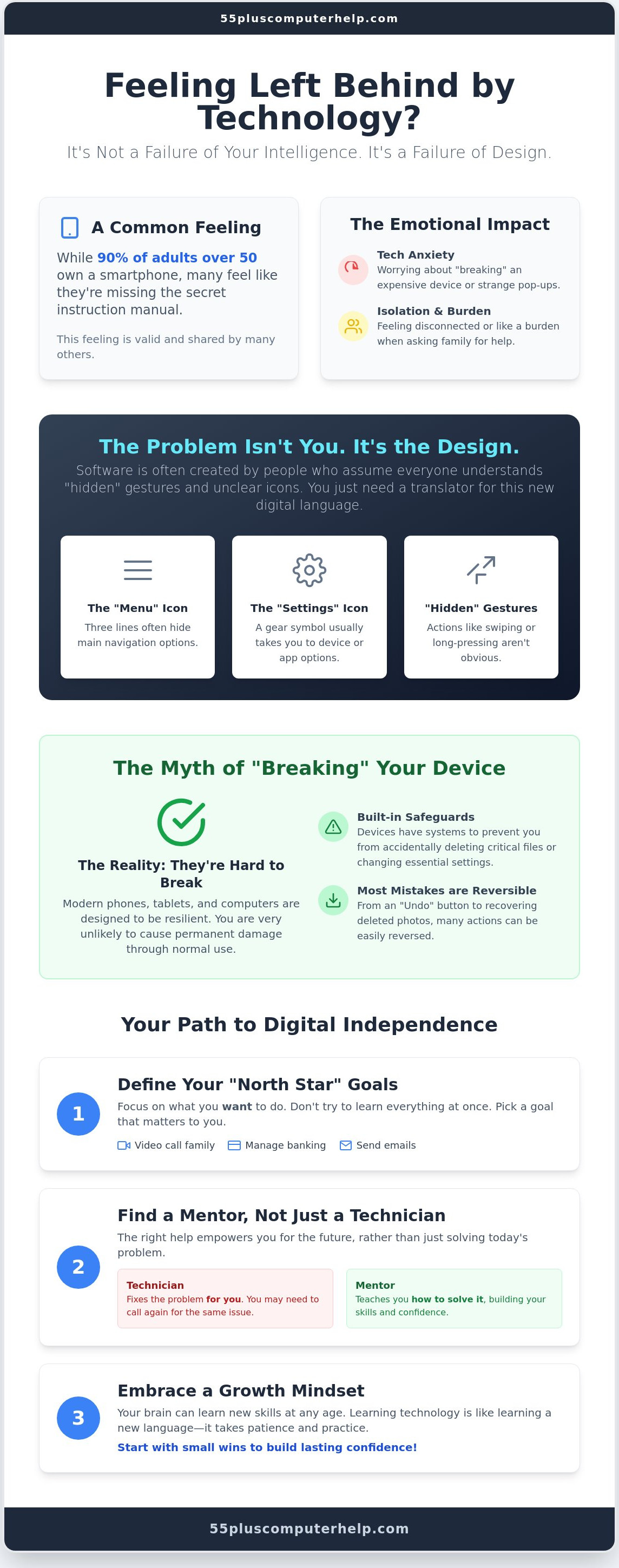
Technology was designed to be intuitive, so feeling "left behind" is a failure of design rather than a failure of your intelligence. Even though 90 percent of adults over 50 now own a smartphone, many still feel like they are missing the secret instruction manual. It's common to feel a bit of anxiety when an update changes your screen or a strange popup appears. You might worry about accidentally "breaking" an expensive device or feel like a burden when asking family for help. If you're searching for tech help for seniors who feel left behind, please know that your feelings are valid and shared by many others.
You deserve to feel confident and secure every time you pick up your tablet or turn on your computer. This guide will show you how to overcome tech anxiety and regain your digital independence with patient, step-by-step guidance. You'll discover how to manage your emails safely, video call your grandkids whenever you like, and navigate your favorite apps without fear. We will explore simple strategies to master your devices and stay connected to the people who matter most.
Key Takeaways
- Understand why your tech struggles are usually a result of poor software design rather than a lack of intelligence.
- Learn why modern devices are much harder to "break" than you think and how to use simple tools to reverse mistakes.
- Discover how to find patient tech help for seniors who feel left behind by focusing on your specific "North Star" goals.
- Identify the difference between a technician who just fixes a problem and a mentor who empowers you to solve it yourself.
- Gain the confidence to manage essential digital tasks like banking and video calls independently and safely.
What It Means to Feel Left Behind by Technology in 2026
In 2026, nearly every essential service requires a screen. You need an app to check your bank balance. You need a portal to see your doctor. Even booking a flight or ordering at a restaurant often happens through a digital interface. This shift happened quickly. It left many people feeling like the world moved on without them. Finding reliable tech help for seniors who feel left behind is more important than ever because these tools are no longer optional. They are the keys to your daily life.
The gap you feel is often called the digital divide. Broadening your understanding the digital divide helps you see that this isn't about your intelligence. It is a combination of having the right equipment and the confidence to press the buttons. Software designers often create "intuitive" layouts for people who grew up with tablets in their hands. If a design doesn't feel natural to you, that's a failure of the design, not you. Tech literacy is a learned skill. It is just like learning to drive a car or following a new recipe. It takes practice and a clear set of instructions.
The Emotional Impact of the Digital Gap
Feeling disconnected from your family is one of the hardest parts of this gap. You might see your children or grandkids laughing over a video call or a group chat that you can't access. This can lead to a sense of isolation. Many seniors also feel a sense of shame. They don't want to ask for help with the same task three times. Many people seek out tech help for seniors who feel left behind because they want to reclaim their independence. Technology should serve you and make your life easier. It shouldn't make you feel small. You deserve to use these tools with pride.
Why 2026 Feels Faster Than Previous Years
The pace of change is accelerating. In 2025, AI usage among adults over 50 nearly doubled to 30 percent. Automated systems and artificial intelligence are now part of customer service and health monitoring. This speed can be overwhelming. Even younger people struggle to keep up with every new update. The goal isn't to learn everything at once. It's about taking a patient, step-by-step approach to the things that matter to you. You can catch up at your own pace with the right support.
Understanding the Digital Gap: It Is Not You, It Is the Design
If you find yourself struggling with a new app, remember that the problem is usually the design. Most software is created by people who grew up with touchscreens in their hands. They assume everyone understands certain "hidden" gestures. For example, swiping from the edge or long-pressing an icon are not obvious actions. There are no physical buttons to tell you what to do. You are not "bad with tech" because you don't automatically know these things. You simply need a translator to help you learn the language of icons and symbols.
Learning this new language takes time. Icons like the three horizontal lines for a menu or a gear for settings are the alphabet of the digital world. Once you recognize these symbols, the screen becomes much less intimidating. Seeking patient smartphone and tablet training can help you decode these symbols quickly. You will soon see that technology is just a tool. It is meant to work for you, not against you.
The Myth of the Tech-Savvy Brain
Many people believe they are "too old" to learn how to use a computer. This is a myth. Science shows that our brains can create new neural pathways at any age. Learning digital literacy is very similar to learning a foreign language. It requires a bit of patience and regular practice. Start with small wins, like sending a photo to a friend. These small successes build the confidence you need for bigger tasks. A growth mindset makes a big difference in how you approach your devices.
How Modern Tech Can Actually Simplify Senior Living
Modern technology offers many features that make daily life easier. Voice commands allow you to set reminders or search the internet without typing. You can adjust your settings to show large text, which makes reading much more comfortable. Tablets are excellent tools because they can replace heavy books and cluttered filing cabinets. They keep everything in one light device.
Safety is also a top priority for many users. Using a professional service for virus and malware removal provides a strong safety net. It ensures your information stays private while you explore. Resources like the Digital Literacy for Older Adults Playbook highlight how these tools improve social connection. If you want tech help for seniors who feel left behind, focus on the benefits that matter most to you. Technology can truly simplify your life once you have the right guidance.
Overcoming the Fear of Breaking Your Devices
Many people hesitate to use a new tablet or computer because they are afraid of "breaking" it. This fear is very understandable. In the past, many machines were mechanical. If you pulled the wrong lever or pressed the wrong physical button, something might actually snap or jam. Today, digital devices are much more resilient. Most of what happens on your screen is temporary and digital. If you click a button you didn't mean to, you can almost always go back. The "Undo" button is your best friend. It is usually a curved arrow pointing to the left. Clicking it simply reverses your last action. Modern operating systems also have built-in protections. They are designed to prevent you from changing anything critical by accident. If you are looking for tech help for seniors who feel left behind, start by realizing that your device is much tougher than you think.
Here is a simple "safe to explore" checklist for when you feel nervous:
- Look for the Home button. On many tablets, this is a physical button or a small house icon. It always takes you back to the start.
- Use the Back arrow. Most apps have an arrow in the top corner to take you one step back.
- Read the popup. If the device asks "Are you sure?", stop and read the text. It usually explains what will happen next.
- Ask for a demonstration. Seeing someone else do it first can remove the mystery.
Software vs. Hardware: What Can Actually Break?
You should know that clicking a screen cannot cause physical damage to your device. Hardware is the physical part, like the glass and the battery. Software is the program running on the screen. You can't break the glass by clicking an icon. If your screen freezes or acts strange, don't panic. Turning the device off and on again fixes the vast majority of common problems. This simple step clears the "brain" of the device and lets it start fresh. If a problem feels too tricky, professional help is always available to set things right.
Developing a "Safe to Click" Intuition
Learning to trust your clicks is a big part of the process. You will eventually learn to tell the difference between a helpful system notification and a scam popup. A real system update will never ask for your credit card or tell you that your computer is "infected" in a flashing box. Playful exploration is the best way to learn. Try opening a new app or changing your wallpaper just to see what happens. You can find many Tech support and training resources for seniors to help you practice these skills safely. Building a secure foundation starts with the basics, such as email setup and troubleshooting for seniors. When your email is set up correctly, you can communicate with confidence and less worry. Getting tech help for seniors who feel left behind means learning that you are in control of the machine, not the other way around.
Practical Steps to Reclaim Your Digital Independence
You can regain your digital independence by following a clear, steady plan. Many people try to learn every feature of a new device at once. This often leads to feeling overwhelmed and frustrated. This is why specialized tech help for seniors who feel left behind focuses on small, manageable goals rather than trying to master everything in one day. By focusing on what matters most to you, the process becomes much more enjoyable.
- Step 1: Identify your "North Star." This is the one task you want to do most. It might be seeing photos of your family or checking your local news. Focus only on this one task until you feel comfortable.
- Step 2: Choose one primary device. Do not try to learn a smartphone, a tablet, and a computer in the same week. Master your tablet before moving to your laptop. Mastery in one area builds the confidence you need for the next.
- Step 3: Write down your instructions. Use your own words and descriptions. If a button looks like a "little house" to you, call it that in your notes.
- Step 4: Schedule practice time. Try using your device for 15 minutes every morning. Just like a hobby, regular practice helps the information stick.
- Step 5: Know when to call for help. If you feel stuck or frustrated for more than ten minutes, it is time to ask a patient expert. There is no reason to struggle alone.
Creating Your Own Tech Cheat Sheet
Handwritten notes are much better for learning than reading digital manuals. When you physically write something down, your brain remembers the steps more clearly. You should draw the icons you see on the screen in your notebook. For example, draw a small gear and write "Settings" next to it. Draw a magnifying glass and write "Search." These drawings act as a visual map for your fingers. Repetitive practice is the best way to build muscle memory. Soon, your hand will move to the right icon without you even having to think about it.
Staying Safe from Scams and Viruses
Safety is a major concern when you are first joining the digital world. You can stay safe by following a few simple rules. First, keep your passwords in a secure place and never share them with anyone who calls you on the phone. Second, remember that if an offer online looks too good to be true, it is almost certainly a scam. Real companies will not send you a message saying you won a prize for a contest you never entered. You have the power to say "no" or close a window if something feels suspicious. Trusting your gut is your best security tool. If you want to learn these safety steps in a supportive environment, you can book personalized smartphone and tablet training to build your confidence and protect your privacy.
Personalized Tech Support: Finding a Patient Mentor
Finding the right person to help you is the final piece of the puzzle. Many people start by visiting a big-box store or a generic repair shop. These environments are often loud and busy. The technicians usually work very fast because they have a long line of other customers waiting. They might fix your device, but they rarely explain what they did. This can leave you feeling even more confused than before. When you seek tech help for seniors who feel left behind, you need more than just a quick fix. You need a patient mentor who understands your pace and respects your time.
There is a big difference between someone fixing a problem for you and someone teaching you how to fix it yourself. If a technician simply takes your device and hands it back, you haven't gained any new skills. You are likely to run into the same issue again later. A true mentor stays by your side. They explain each step in plain language so you can repeat the process on your own. This approach transforms a moment of frustration into a sense of accomplishment and security. You deserve to feel in control of your own technology.
What to Look for in a Tech Tutor
Look for a teacher who avoids technical jargon. They should use everyday words that make sense to you. A good tutor will also make sure you are the one "driving" the mouse or touching the screen. You learn much faster by doing the actions yourself rather than just watching someone else do them. Most importantly, the environment must be non-judgmental. You should feel safe asking the same question ten times if that is what it takes to feel confident. A supportive environment is the key to successful learning.
How We Help You Join the Digital Conversation
At 55 Plus Computer Help LLC, we prioritize your comfort and confidence over speed. Our mission is to empower you with the skills you need to stay connected to your world. We offer personalized lessons for your smartphone, tablet, and computer. Whether you need help with email or want to learn how to video call your family, we move at your speed. We believe that technology should be a bridge to your loved ones, not a barrier. You can get patient, professional tech help from 55 Plus Computer Help LLC today and start your journey with a trusted expert who truly cares about your success.
Your Path to Digital Confidence Starts Here
You've explored the design flaws that often create the digital gap and learned that your devices are built to be resilient. By focusing on your personal "North Star" and keeping a handwritten cheat sheet, you've already started the journey toward independence. Finding reliable tech help for seniors who feel left behind isn't about finding a repairman. It is about finding a partner who values your comfort as much as the solution itself.
55 Plus Computer Help LLC was founded in 2014 with a specific focus on senior-specific needs. We specialize in one-on-one, patient mentoring that respects your time and your questions. Whether you prefer onsite or remote support, our transparent hourly rates mean you stay in control of the process. Empower your digital journey with patient, in-home tech support today. You have the ability to master these tools, and we're here to ensure you never feel alone in the digital world again.
Frequently Asked Questions
Is it really possible for me to learn how to use a smartphone at my age?
It is absolutely possible to learn how to use a smartphone at any age. As of 2025, 90 percent of adults aged 50 and older own a smartphone. This shows that your peers are successfully using these devices every day. Learning is a gradual process that involves building new neural pathways. With the right tech help for seniors who feel left behind, you can master your phone at your own comfortable pace.
What is the best device for a senior who is just starting out?
A tablet is often the best device for someone just starting their digital journey. Tablets offer a large, clear screen that is easier to read than a smartphone. They are also lighter and more portable than a traditional laptop. The touch interface is very intuitive because you interact directly with the icons on the screen. Many seniors find that a tablet feels more like a physical book than a complex machine.
How can I tell if a tech support person is being patient enough with me?
A patient tech support person will always use plain English instead of technical jargon. They should encourage you to perform the tasks yourself while they provide gentle guidance. You should never feel rushed or like you are being a burden. If you are seeking tech help for seniors who feel left behind, look for a tutor who lets you "drive" the mouse. Trust your feelings during the lesson to ensure the environment is supportive.
Can I break my computer by clicking the wrong thing?
You cannot break your computer's hardware simply by clicking a button on the screen. Physical damage only happens from drops or spills. Most digital mistakes are easily reversible by using the "Undo" button or restarting the device. Modern systems are designed with layers of protection to keep you safe while you explore. If the screen freezes, turning it off and on again usually solves the problem without any lasting damage to the machine.
How do I know if an email I received is a scam or a virus?
Scam emails often use urgent language to make you act quickly without thinking. They might claim your account is locked or ask for your password and credit card details. A real company will never ask for sensitive information through an email. If you receive a message from an unknown sender or an offer that seems too good to be true, it is best to delete it immediately. Staying safe is about trusting your intuition.
Do I need to go to a classroom to learn how to use my computer?
You do not need to attend a formal classroom to learn how to use your computer. While organizations like Senior Planet offer helpful classes, many people prefer the comfort of their own home. Personalized one-on-one training allows you to focus on the specific tasks that matter to you. You can learn on your own equipment in a quiet environment. This targeted approach often leads to faster progress and much higher confidence levels.
What should I do if I forget what I learned in my last lesson?
Forgetting a step is a normal part of the learning process. You should refer to the handwritten notes or "cheat sheet" you created during your previous session. Practicing for 15 minutes a day helps build the muscle memory needed to remember common tasks. If you are still stuck, a patient mentor can review the steps with you as many times as you need. Repetition is the most effective tool for long-term memory.
How much does personalized tech training for seniors typically cost?
The cost of personalized tech training can vary based on several factors. Some providers offer onsite visits in your home, while others provide help remotely over the internet. Prices often depend on the length of the session and the complexity of the training you require. You should look for services that offer transparent pricing structures. This ensures you know the total cost upfront without any hidden fees or unexpected surprises during your lesson.


