
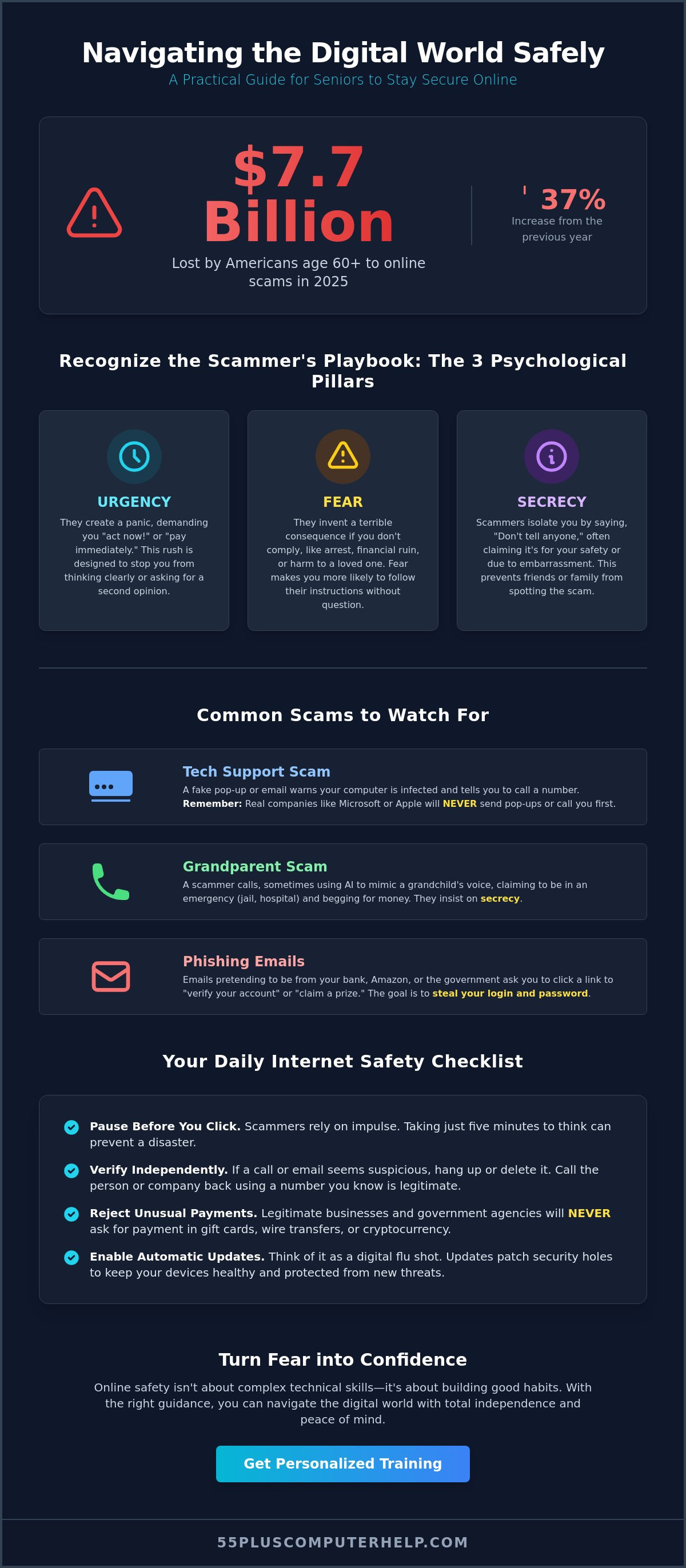
In 2025, Americans aged 60 and older reported losing over $7.7 billion to digital scams, which is a 37% increase from the year before. Since scammers now use advanced tools like AI voice cloning to mimic loved ones, it is vital to have the right internet safety tips for older adults at your fingertips. You might feel overwhelmed by technical jargon or worry that one wrong click could lead to a major financial mistake. It is completely normal to feel this way, and you should never feel embarrassed about wanting to stay safe.
We want to help you feel secure and independent every time you go online. You will learn how to identify red flags, secure your personal devices, and browse the web with total confidence using our simple, senior-focused safety guide. We will walk through a clear checklist that covers how to spot common scams and exactly what to do if you think you have been targeted. Let's build your digital confidence together, one step at a time.
Key Takeaways
- Learn why online safety is a simple habit you can practice daily rather than a complex technical setting.
- Discover how to spot the three pillars of a scam so you can recognize emotional manipulation before it works.
- Master essential internet safety tips for older adults by using a simple checklist every time you check your email or browse the web.
- Understand how automatic software updates act like a digital flu shot to keep your computer healthy and secure.
- Find out how personalized training can turn technical frustration into a sense of total confidence and independence.
Understanding the Landscape of Online Safety for Seniors
Many people believe that staying safe online requires complex software or a degree in computer science. In reality, internet safety is mostly about building good habits. It is very similar to how you protect your home. You lock your front door and don't let strangers inside. Online safety follows these same familiar rules. It's about recognizing who to trust and when to keep your digital door closed. By learning a few internet safety tips for older adults, you can use your devices without constant worry.
It is perfectly normal to feel a bit of anxiety when you use a computer or smartphone. Many of our clients tell us they are afraid of making a single "wrong click" that could ruin their finances. We want you to know that this fear is valid, but it shouldn't stop you from enjoying the digital world. Education is the best way to move from fear to independence. When you understand how your device works, you regain control over your digital life.
Why Seniors are Primary Targets for Scammers
Scammers often focus on retirees because they are looking for what experts call a "wealth transfer." In 2025 alone, Americans aged 60 and older lost over $7.7 billion to fraud. Criminals assume that older adults have more savings and better credit. They also try to exploit the polite, helpful nature of your generation. A scammer might use a friendly tone or a sense of urgency to make you feel like you are being rude if you don't help them.
There is also a common myth that you only get scammed if you are "bad with computers." This is not true. Scammers use highly sophisticated psychological tricks to fool people of all ages. Even if you are comfortable with technology, these criminals work hard to create believable lies. Understanding this helps remove the embarrassment that often comes with digital mistakes.
The Role of Digital Literacy in Personal Security
Digital literacy is simply a fancy way of saying you know how your tools work. When you are familiar with your tablet or computer, you can spot a "tech support scam" immediately. For example, a real computer company will never send a pop-up telling you to call a random number. For a comprehensive overview of internet safety, you can see that most threats rely on tricking the user rather than breaking the machine.
The best defensive tool you have is the ability to slow down. Scammers want you to rush. They want you to feel panicked so you don't think clearly. Taking a breath and pausing for five minutes can stop almost any scam in its tracks. As you learn more through internet safety tips for older adults, your confidence will grow. This confidence makes it much easier to catch red flags early. You deserve to feel secure while you shop, bank, and connect with your family online.
Recognizing the Psychological Red Flags of a Scam
Scammers don't always use viruses to get what they want. They often use your own feelings against you. This is why understanding the psychological side of fraud is one of the most important internet safety tips for older adults. Most scams rely on three specific pillars: urgency, fear, and secrecy. They want you to act fast so you don't have time to think. They use fear to make you feel like something terrible will happen if you don't comply. Finally, they demand secrecy so no one can talk you out of it. If someone tells you that you must pay "right now," it is a major red flag.
The "Grandparent Scam" is a common example of this emotional pressure. Scammers might use AI to mimic a grandchild's voice. They claim to be in jail or at a hospital. They beg you not to tell their parents because they are "embarrassed." This creates a wall of secrecy that helps the scammer. Similarly, "Sweetheart Scams" involve someone pretending to be a romantic partner online. They build trust over weeks before asking for money for a "medical emergency" or a "plane ticket." If an online friend or a "government official" asks for payment in gift cards, stop immediately. Legitimate companies will never ask for gift cards or wire transfers. In 2025, Americans aged 60 and older lost over $7.7 billion to these types of emotional traps.
The Anatomy of a Tech Support Scam
You might see a bright red pop-up on your screen while browsing. It may say your computer is infected and give a phone number to call. This is a fake. Real companies like Microsoft or Apple do not monitor your computer for viruses in real time; they will never call you first. If you are already on the phone with a stranger, just hang up. It is not rude to protect your privacy. Getting personalized smartphone and tablet training can help you learn how to handle these situations with confidence.
Identifying Phishing: When Emails Pretend to be Friends
Phishing is a fraudulent attempt to steal your personal data by pretending to be a trusted person or company. You can spot these emails by looking at the "From" address. A real email from your bank will not come from a random string of numbers or a misspelled name. Look for generic greetings like "Dear Customer" instead of your actual name. Scammers often use these broad terms because they send thousands of emails at once. Checking these small details is a powerful way to use internet safety tips for older adults in your daily life.
Your Daily Internet Safety Checklist: 10 Essential Habits
Staying safe online is easier when you have a routine. Think of it like checking your mirrors before you pull out of the driveway. You don't need to be a tech expert to follow these internet safety tips for older adults. By using a simple checklist, you can protect your personal information every time you open your browser or check your messages. These habits act as your digital shield.
- Step 1: Pause before you click. If an email or text feels urgent, stop. Don't click any links or open attachments right away. Scammers want you to rush.
- Step 2: Verify the sender. If a friend or family member asks for money or information, reach out to them through a different channel. Give them a call on the phone number you have saved.
- Step 3: Secure your login information. Keep your passwords in a secure, physical location like a locked drawer or use a digital password manager. Avoid leaving them on sticky notes near your computer.
- Step 4: Check for the padlock. Only shop on websites that show a small padlock icon in the address bar. This icon means the website uses encryption to keep your credit card details safe.
Password Management Made Simple
Many people use simple passwords because they're easy to remember. However, hackers can guess common patterns in seconds. We recommend the "Passphrase" method. Instead of a single word, use a short sentence. A phrase like "I-Love-My-Grandkids-2026!" is much stronger than a simple word with a few symbols. It's long, unique, and easy for you to picture in your mind. You should also use a different password for every account. If someone manages to find your Facebook password, you don't want them to have the key to your bank account too. A password manager can help you keep track of these different phrases so you don't have to memorize them all.
The Power of Multi-Factor Authentication (MFA)
Think of MFA as a "second lock" on your digital front door. It is one of the most effective internet safety tips for older adults. Even if a hacker steals your password, they still can't get into your account. When you try to log in, the website will send a secret code to your smartphone. Since only you have your phone, only you can enter the code to finish the login. It adds a powerful layer of protection to your most sensitive data. You can turn this on for your primary accounts today. If you're unsure where to start, our guide on email setup and troubleshooting for seniors provides clear instructions on keeping your inbox secure.
Hardening Your Devices: Technical Settings for Peace of Mind
Your computer and smartphone need regular maintenance to stay safe. Think of software updates as digital flu shots. These updates fix small holes in your system that scammers use to get inside. When you keep your device current, you make it much harder for criminals to succeed. This is one of the most practical internet safety tips for older adults because it works in the background while you browse. It's a simple way to stay one step ahead of hackers.
To make things easy, you should set your computer to update automatically. On a Windows computer, click the Start button and go to Settings. Look for "Windows Update" and make sure it is turned on. If you use a Mac, go to the Apple Menu, click System Settings, and find the Software Update section. Once these are set, your computer will handle the hard work for you. It's also vital to keep your web browser updated. Whether you use Chrome, Safari, or Edge, these programs need the latest security features to block new threats.
A clean computer does more than just stay safe; it also runs much faster. When your system is free of old files and unnecessary programs, it resists the need for virus and malware removal. If you feel your machine is acting strangely or running slowly, we can help with software installation and updates to get everything back in order. This ensures your technology works for you instead of causing frustration.
Securing Your Home Wi-Fi Network
Your home Wi-Fi is the gateway to your digital life. Many people use the default password that came with their router, but this is a security risk. You should change it to something unique that only your family knows. Also, be careful with "Public Wi-Fi" at coffee shops or airports. These networks are open to everyone, including hackers. Never check your bank account or enter credit card info while on public Wi-Fi. If you must use the internet away from home, a VPN (Virtual Private Network) acts like a private tunnel for your data, keeping it hidden from prying eyes.
Browser Settings to Block Intrusions
Your web browser has built-in tools to protect your privacy. You can turn on "Pop-up Blockers" in the settings menu to stop annoying and dangerous ads from appearing. It's also a good habit to clear your "Cookies" and history every few months. This removes digital tracks that companies use to follow your movements online. If you are searching for sensitive topics or don't want your history saved, use "Incognito" or private mode. This ensures your browser doesn't keep a record of that specific session. These simple settings are essential internet safety tips for older adults who want more control over their privacy.
Building Digital Confidence with Professional Support
Learning new technology is much easier when you have a patient mentor by your side. Digital security moves fast, and it can feel like a moving target. New apps and updates appear every day. Having someone to walk you through these changes makes all the difference. Our team provides one on one training that moves at your pace. We don't use confusing jargon or rush you through the steps. Instead, we focus on building your confidence. Our goal is to share internet safety tips for older adults that actually stick.
Professional help is especially important when you feel stuck. If your computer starts acting strangely, trying to fix it yourself can be stressful. Choosing professional virus and malware removal ensures the job is done right the first time. At 55 Plus Computer Help LLC, we want you to enjoy your devices. You should be able to video chat with family or shop online with total peace of mind. We transform technical frustration into a sense of accomplishment. We also help with data backup and recovery so your precious photos and files stay safe no matter what happens.
What to Do if You Think You Have been Scammed
If you think a scammer has reached you, don't panic. Your first step should be to disconnect your device from the internet. This stops any remote access the criminal might have. Next, call your bank or credit card company immediately to protect your accounts. You should never feel ashamed if this happens to you. These scammers are professional criminals who spend all day practicing their lies. They are the ones who should be ashamed, not you. A professional security audit can help you understand what happened and restore your peace of mind. We can check your system to ensure it is clean and secure again.
Partnering with a Patient Tech Expert
Personalized support is the best way to stay safe long term. We offer in home assistance to help you set up a secure computer environment. This includes everything from smartphone and tablet training to internet and Wi-Fi troubleshooting. We provide customized lessons tailored to the specific devices you use every day. You don't have to navigate these changes alone. We can even help with email setup and troubleshooting to make sure your primary way of communicating is locked down. Taking the first step toward a safer digital life is as simple as asking for a little guidance. 55 Plus Computer Help LLC is here to help you stay connected, independent, and secure.
Take Control of Your Digital Life Today
Staying safe online is a skill you can master with steady practice. It involves trusting your instincts and recognizing the emotional tricks that scammers use to cause panic. By following a simple daily routine and keeping your technical settings current, you build a strong defense against digital threats. These internet safety tips for older adults provide the independence and peace of mind you need every time you log on. You don't have to be a tech expert to enjoy the modern digital world.
If you would like extra support, we are ready to assist you. Since 2014, we've provided patient, in-home assistance tailored specifically for users aged 55 and older. We specialize in virus removal and personalized safety training to keep your computer running smoothly. You can Get a Professional Security Checkup from 55 Plus Computer Help LLC to ensure your devices are fully protected. Our goal is to make technology easy and safe for you. You deserve to browse the web with total confidence.
Frequently Asked Questions
How can I tell if a website is safe to enter my credit card information?
Look for the small padlock icon in your browser's address bar before you enter any payment details. This icon means the website uses encryption to protect your data. You should also check that the web address starts with "https" instead of just "http." The "s" stands for secure. If you don't see these signs, it is better to leave the site and shop somewhere you recognize.
What should I do if a pop-up says my computer has 50 viruses?
You should immediately close your web browser if a pop-up claims your computer is infected. These messages are always fake and are designed to scare you into calling a scammer. Real security software will never use a browser pop-up to alert you of a problem. If the window will not close, you can restart your computer to clear the screen safely and stop the alert.
Is it safe to use my iPad for online banking at the library?
It is not safe to use public library Wi-Fi for sensitive tasks like online banking. Public networks are open, which means other people could potentially see your private data. If you must bank while you are out, use your iPad's cellular data or wait until you are on your secure home network. Practicing these internet safety tips for older adults keeps your financial information private and secure.
Why do I keep getting emails from "Amazon" saying my account is locked?
These emails are a common trick called phishing, where scammers pretend to be a big company to steal your login details. They want you to feel panicked so you click their link without thinking. Always go directly to the real Amazon website by typing the address into your browser yourself. This ensures you are dealing with the real company and not a fraudulent copy.
Can I get a virus just by opening an email, or do I have to click a link?
You usually need to click a link or open an attachment to get a virus, but simply opening a message can sometimes confirm your email address is active. Scammers use this information to send you even more junk mail or targeted attacks. It is best to delete any suspicious emails without opening them at all. This simple habit is one of the most effective ways to protect your inbox.
How often should I change my passwords to stay safe?
You don't need to change your passwords constantly if you use strong, unique passphrases for every account. Modern internet safety tips for older adults suggest changing them only if you think an account has been compromised. If you hear about a data leak at a company you use, that is the right time to update your login. Focus on making your passwords long and memorable instead.
What is the best way to store all my different passwords safely?
The best way to store your passwords is in a dedicated digital password manager or a physical notebook kept in a locked drawer. A digital manager can remember every complex code for you and enter them automatically. If you prefer using paper, just make sure the book is hidden and not left near your computer. Both methods are much safer than using the same simple password for every site.
If I accidentally gave a stranger remote access to my computer, what do I do now?
You must disconnect your computer from the internet immediately if you gave remote access to a stranger. Turn the machine off to stop them from seeing your files or typing on your screen. After that, call your bank to alert them of the potential risk to your accounts. It is vital to have a professional check your system to ensure no hidden tracking programs were left behind.


